

警告を使用して常に注意を払う
NavigatorとVisualNavigatorでは広範な警告システムが提供されるため、トラッキング中またはターンバイターンナビ中に特定のイベントの通知を受け取ることができます。警告を実装する方法の例については、「NavigationWarners」サンプルアプリを参照してください。サンプルアプリはGitHubにあります。警告は、安全な運転や、事前に知っておくと役立つ情報の受信に役立ちます。
すべての警告が危険な状況を通知するわけではありません。多くの警告は、現在の道路の属性を知るなどの情報提供を目的としています。
最も一般的な警告イベントは次のとおりです。
TruckRestrictionWarning:設定されたトラックの仕様 (高さ、重量など) に照らして事故につながるおそれのあるトラック障害物が近づいている場合や、トラックの通行が許可されていない場合に通知します。SafetyCameraWarning:安全スポット (レーダー式速度違反取締カメラ) に近づいている場合に通知します。SpeedLimit:現在の道路の制限速度が変わったときに通知を受け取ります。SpeedWarningStatus:制限速度を超えたときに通知します。SchoolZoneWarning:制限速度が走行中の道路のデフォルトの制限速度よりも低いスクール ゾーンが前方にあることを通知する警告です。BorderCrossingWarning:国境または国内の州境に近づいたときに通知します。国または州で適用される一般的な制限速度についても通知します。RailwayCrossingWarning:先にある鉄道踏切を通知します。EnvironmentalZoneWarning:排気ガス規制ゾーンに近づいたときに通知します。DangerZoneWarning:ドライバーの注意が必要な危険ゾーンに近づいたときに通知します。LowSpeedZoneWarning:ドライバーの注意が必要な低速ゾーンに近づいたときに通知します。TollStop:近づいている料金所、料金所ブースに到達するための車線を通知します。RealisticViewWarning:近づいている合流地点を標識で示す SVG コンテンツを提供します。RoadSignWarning:停止標識など、近づいている交通標識を通知します。RoadAttributes:現在の道路の属性が変更された場合 (トンネル、橋、有料道路に到達した場合など) に通知します。ManeuverViewLaneAssistance:合流地点が複雑であるかどうかに関係なく、次のルート運転操作が合流地点で行われる場合に推奨するLaneのリストを提供します。JunctionViewLaneAssistance:運転操作が合流地点で行われるかどうかに関係なく、合流地点が複雑な場合にのみ推奨するLaneのリストを提供します。このイベントは、複雑でない合流地点に関しては配信されません。CurrentSituationLaneView:ユーザーが現在走行している道路の車線のアクセス、タイプ、方向に関するレーンベースの情報を受信します。TrafficMergeWarning:現在の道路に合流してくる交通に対する、差し迫った警告を通知します。
通知距離を設定する
デフォルトでは、各WarningTypeに対して警告を送信する通知距離は次のように設定されます。
warningNotificationDistances.slowSpeedDistanceInMeters:低速走行が想定される都市部の道路では、イベントはデフォルトで、500メートル手前で送信されます。warningNotificationDistances.regularSpeedDistanceInMeters:通常の走行速度が想定される地方の道路では、イベントはデフォルトで、750メートル手前で送信されます。warningNotificationDistances.fastSpeedDistanceInMeters:高速道路などの高速走行が想定される道路では、イベントはデフォルトで、1000メートル手前で送信されます。
注
TimingProfileは高速、通常、低速に分類される速度範囲を定義します。
警告を送信する距離はWarnerEngineを使用して設定できます。これを行うには、warnerEngine.setWarningNotificationDistances(..)を呼び出し、指定されたWarningTypeと、WarningNotificationDistancesのインスタンスを受け入れます。次の例は、RoadSignWarningに対する通知距離の設定方法を示しています。
// Get notification distances for road sign alerts from the warner engine.
WarningNotificationDistances warningNotificationDistances = warnerEngine.getWarningNotificationDistances(WarningType.ROAD_SIGN);
// The distance in meters for emitting warnings when the speed limit or current speed is fast. Defaults to 1500.
warningNotificationDistances.fastSpeedDistanceInMeters = 1600;
// The distance in meters for emitting warnings when the speed limit or current speed is regular. Defaults to 750.
warningNotificationDistances.regularSpeedDistanceInMeters = 800;
// The distance in meters for emitting warnings when the speed limit or current speed is slow. Defaults to 500.
warningNotificationDistances.slowSpeedDistanceInMeters = 600;

// Set the warning distance for road signs.
warnerEngine.setWarningNotificationDistances(WarningType.ROAD_SIGN, warningNotificationDistances);
// Get notification distances for road sign alerts from the warner engine.
val warningNotificationDistances = warnerEngine.getWarningNotificationDistances(WarningType.ROAD_SIGN)
// The distance in meters for emitting warnings when the speed limit or current speed is fast. Defaults to 1500.
warningNotificationDistances.fastSpeedDistanceInMeters = 1600
// The distance in meters for emitting warnings when the speed limit or current speed is regular. Defaults to 750.
warningNotificationDistances.regularSpeedDistanceInMeters = 800
// The distance in meters for emitting warnings when the speed limit or current speed is slow. Defaults to 500.
warningNotificationDistances.slowSpeedDistanceInMeters = 600
// Set the warning distances for road signs.
warnerEngine.setWarningNotificationDistances(
WarningType.ROAD_SIGN,
warningNotificationDistances
)
注
WarningNotificationDistancesはルートに沿った特定の位置情報またはエリアに関する警告にのみ適用されます。これは、位置情報に依存せず、制限速度を超過したときや制限範囲内に戻ったときに動作するSpeedWarningListenerには影響しません。
ほとんどの警告では、通知のしきい値を設定できます。詳細については、「通知頻度」を参照してください。
注
- すべての警告は、アクティブなルートの有無にかかわらずサポートされています。つまり、ルート走行中だけでなく、トラッキングモードでのフリー走行中にも、各警告タイプのイベントを受信できます。
- ルートを外れた後や目的地に到着した後も、警告は引き続きイベントを配信します。
また明示的に言及されない限り、(トラックの制限速度など) すべての警告はルートまたはRouteOptionsセットに固有ではありません。たとえば、歩行者ルートを追随している間、希望する場合は TruckRestrictionWarning イベントを受信できます。通常、警告イベントは、ナビゲーターにフィードされたマップマッチングした場所に基づいて生成されます。たとえば歩行者ルートはほとんどの場合、GPS 信号の精度により、横方向を無視する他の移動モードのように、道路の同じ側にマップマッチングされます。
注アプリケーションは、場合により特定の危険スポットについて警告する可能性があります。たとえば、車の前方にある障害物までの距離を表示する場合です。このような場合は、便利なメソッドである
navigator.calculateRemainingDistanceInMeters(GeoCoordinates coordinates)を使用することを検討してください。ルートの先に障害物がある場合に、ルート上のユーザーの現在地と指定されたcoordinatesの間の距離が提供されます。coordinatesがすでに後方にある場合、またはルート上にない場合は、nullが返されます。この方法では、問題となる前方のスポットのcoordinatesをアプリが認識している必要があります。
各警告の詳細については、以下のセクションを参照してください。
制限速度の警告を取得する
SpeedLimitListener を実装すると、道路上の制限速度に関するイベントを受け取ることができます。これらは、現地の標識に示されている制限速度や、特定の気象条件にのみ適用される制限速度など、特別な速度状況に関する警告の場合があります。
条件付きとしてマークされている制限速度は、時間による可能性があります。たとえば、スクール ゾーンの制限速度は、1 日の特定の時間にのみ適用されます。このような場合、HERE SDK はデバイスの時刻と制限速度の時間範囲を比較します。制限速度がその時点で適用されている場合はイベントとして伝播され、適用されていない場合はイベントとして伝播されません。
実装例はGitHubにある「NavigationWarners」のサンプルアプリで確認できます。
// Notifies on the current speed limit valid on the current road.
visualNavigator.setSpeedLimitListener(new SpeedLimitListener() {
    @Override
    public void onSpeedLimitUpdated(@NonNull SpeedLimit speedLimit) {
        Double currentSpeedLimit = getCurrentSpeedLimit(speedLimit);

        if (currentSpeedLimit == null) {
            Log.d(TAG, "Warning: Speed limits unknown, data could not be retrieved.");
        } else if (currentSpeedLimit == 0) {
            Log.d(TAG, "No speed limits on this road! Drive as fast as you feel safe ...");
        } else {
            Log.d(TAG, "Current speed limit (m/s):" + currentSpeedLimit);
        }
    }
});

private Double getCurrentSpeedLimit(SpeedLimit speedLimit) {

    // Note that all values can be null if no data is available.

    // The regular speed limit if available. In case of unbounded speed limit, the value is zero.
    Log.d(TAG,"speedLimitInMetersPerSecond: " + speedLimit.speedLimitInMetersPerSecond);

    // A conditional school zone speed limit as indicated on the local road signs.
    Log.d(TAG,"schoolZoneSpeedLimitInMetersPerSecond: " + speedLimit.schoolZoneSpeedLimitInMetersPerSecond);

    // A conditional time-dependent speed limit as indicated on the local road signs.
    // It is in effect considering the current local time provided by the device's clock.
    Log.d(TAG,"timeDependentSpeedLimitInMetersPerSecond: " + speedLimit.timeDependentSpeedLimitInMetersPerSecond);

    // A conditional non-legal speed limit that recommends a lower speed,
    // for example, due to bad road conditions.
    Log.d(TAG,"advisorySpeedLimitInMetersPerSecond: " + speedLimit.advisorySpeedLimitInMetersPerSecond);

    // A weather-dependent speed limit as indicated on the local road signs.
    // The HERE SDK cannot detect the current weather condition, so a driver must decide
    // based on the situation if this speed limit applies.
    Log.d(TAG,"fogSpeedLimitInMetersPerSecond: " + speedLimit.fogSpeedLimitInMetersPerSecond);
    Log.d(TAG,"rainSpeedLimitInMetersPerSecond: " + speedLimit.rainSpeedLimitInMetersPerSecond);
    Log.d(TAG,"snowSpeedLimitInMetersPerSecond: " + speedLimit.snowSpeedLimitInMetersPerSecond);

    // For convenience, this returns the effective (lowest) speed limit between
    // - speedLimitInMetersPerSecond
    // - schoolZoneSpeedLimitInMetersPerSecond
    // - timeDependentSpeedLimitInMetersPerSecond
    return speedLimit.effectiveSpeedLimitInMetersPerSecond();
}
// Notifies on the current speed limit valid on the current road.
// Notifies on the current speed limit valid on the current road.
visualNavigator.speedLimitListener = SpeedLimitListener { speedLimit: SpeedLimit ->
val currentSpeedLimit = getCurrentSpeedLimit(speedLimit)
if (currentSpeedLimit == null) {
Log.d(TAG, "Warning: Speed limits unknown, data could not be retrieved.")
} else if (currentSpeedLimit == 0.0) {
Log.d(TAG, "No speed limits on this road! Drive as fast as you feel safe ...")
} else {
Log.d(TAG, "Current speed limit (m/s): $currentSpeedLimit")
}
}
private fun getCurrentSpeedLimit(speedLimit: SpeedLimit): Double? {
// Note that all values can be null if no data is available.
// The regular speed limit if available. In case of unbounded speed limit, the value is zero.
Log.d(TAG, "speedLimitInMetersPerSecond: " + speedLimit.speedLimitInMetersPerSecond)
// A conditional school zone speed limit as indicated on the local road signs.
Log.d(
TAG,
"schoolZoneSpeedLimitInMetersPerSecond: " + speedLimit.schoolZoneSpeedLimitInMetersPerSecond
)
// A conditional time-dependent speed limit as indicated on the local road signs.
// It is in effect considering the current local time provided by the device's clock.
Log.d(
TAG,
"timeDependentSpeedLimitInMetersPerSecond: " + speedLimit.timeDependentSpeedLimitInMetersPerSecond
)
// A conditional non-legal speed limit that recommends a lower speed,
// for example, due to bad road conditions.
Log.d(
TAG,
"advisorySpeedLimitInMetersPerSecond: " + speedLimit.advisorySpeedLimitInMetersPerSecond
)
// A weather-dependent speed limit as indicated on the local road signs.
// The HERE SDK cannot detect the current weather condition, so a driver must decide
// based on the situation if this speed limit applies.
Log.d(TAG, "fogSpeedLimitInMetersPerSecond: " + speedLimit.fogSpeedLimitInMetersPerSecond)
Log.d(TAG, "rainSpeedLimitInMetersPerSecond: " + speedLimit.rainSpeedLimitInMetersPerSecond)
Log.d(TAG, "snowSpeedLimitInMetersPerSecond: " + speedLimit.snowSpeedLimitInMetersPerSecond)
// For convenience, this returns the effective (lowest) speed limit between
// - speedLimitInMetersPerSecond
// - schoolZoneSpeedLimitInMetersPerSecond
// - timeDependentSpeedLimitInMetersPerSecond
return speedLimit.effectiveSpeedLimitInMetersPerSecond()
}制限速度は、指定した移動モードによって異なります。現在、HERE SDK は、各国の事業用自動車法的規制 (CVR) に基づいて普通車とトラックを区別しています。つまり、上の例のSpeedLimitイベントでは、トラックを対象としたより低速の制限速度を示すことができます。たとえば、ドイツの高速道路での制限速度は最高80km/時ですが、普通車では制限速度が130km/時以上で示される可能性があります。CVR の制限速度を取得するには、マップ バージョン 32 以上を使用してください。それ以下のマップ バージョンでは、トラックも普通車と同じ制限速度通知を受け取ります。マップ バージョンは MapUpdater で更新できます。ダウンロードされた地域がない場合も、ナビゲーションはマップ キャッシュに現在保存されているのと同じバージョンのマップ データのみをリクエストします。そのため、これはオンラインとオフラインの両方の使用に適用されます。
注トラックの場合は、
RouteOptions内でTruckSpecificationsを指定することもお勧めします。プロパティgrossWeightInKilogramsはトラックの制限速度に影響する可能性があります。ほとんどの国では、これは法的に許可される制限速度に影響します。重量が設定されていない場合、HERE SDK はトラックの重量が軽量であると想定し、法的に許可されているトラックの最高制限速度のみが転送されます。トラックの制限速度は、現地の事業用自動車規制 (CVR) に従って決定されます。日本など一部の国では、これが異なることに注意してください。ただし、トラック用に計算されたルートでは、普通車に適した制限速度が提供されません。たとえば、トラックの重量が 3.5 トン未満の場合は、代わりに普通車のルートを計算することを検討してください。
トラッキング モードの場合は、navigator.setTrackingTransportProfile(vehicleProfile) を呼び出し、VehicleProfile を設定します。たとえば、トラック ドライバーであれば TRUCK 移動モードで、重量など車の他の属性も対象の車に応じて指定してください。このプロフィールを設定すると speedLimit.effectiveSpeedLimitInMetersPerSecond() が決定されますが、通常の制限速度 (speedLimit.speedLimitInMetersPerSecond) には影響しません。
注日本のルートでは、
TruckSpecificationsで特別なフラグisLightTruckを設定できます。このフラグは、トラックが普通車として分類される軽さであるかどうかを示します。このフラグは日本以外の国では使用しないようにしてください。なお、これはこの機能のベータ版です。
スピードオーバーの警告を取得する
新しい制限速度イベント (上のセクションを参照) を受信すると、いつ制限速度を超えたかを検知できますが、アプリに速度警告機能を実装するのに役立つ、さらに便利なソリューションがあります。
注天候による制限速度などの一時的な制限速度を超えても警告は送信されません。
onSpeedWarningStatusChanged() メソッドはドライバーが現在許容されている制限速度を超えるとすぐに通知します。また、ドライバーが制限速度を超えてから減速した場合にもすぐに通知します。
// Notifies when the current speed limit is exceeded.
visualNavigator.setSpeedWarningListener(new SpeedWarningListener() {
    @Override
    public void onSpeedWarningStatusChanged(SpeedWarningStatus speedWarningStatus) {
        if (speedWarningStatus == SpeedWarningStatus.SPEED_LIMIT_EXCEEDED) {
            // Driver is faster than current speed limit (plus an optional offset).
            // Play a notification sound to alert the driver.
            // Note that this may not include temporary special speed limits, see SpeedLimitListener.
            Uri ringtoneUri = RingtoneManager.getDefaultUri(RingtoneManager.TYPE_NOTIFICATION);
            Ringtone ringtone = RingtoneManager.getRingtone(context, ringtoneUri);
            ringtone.play();
        }

        if (speedWarningStatus == SpeedWarningStatus.SPEED_LIMIT_RESTORED) {
            Log.d(TAG, "Driver is again slower than current speed limit (plus an optional offset).");
        }
    }
});
// Notifies when the current speed limit is exceeded.
visualNavigator.speedWarningListener =
SpeedWarningListener { speedWarningStatus: SpeedWarningStatus ->
if (speedWarningStatus == SpeedWarningStatus.SPEED_LIMIT_EXCEEDED) {
// Driver is faster than current speed limit (plus an optional offset).
// Play a notification sound to alert the driver.
// Note that this may not include temporary special speed limits, see SpeedLimitListener.
val ringtoneUri =
RingtoneManager.getDefaultUri(RingtoneManager.TYPE_NOTIFICATION)
val ringtone = RingtoneManager.getRingtone(context, ringtoneUri)
ringtone.play()
}
if (speedWarningStatus == SpeedWarningStatus.SPEED_LIMIT_RESTORED) {
Log.d(
TAG,
"Driver is again slower than current speed limit (plus an optional offset)."
)
}
}
注使用可能な制限速度データがない場合、
onSpeedWarningStatusChanged()は通知しません。この情報は、NavigableLocationインスタンスの一部としてのみ提供されます。
SpeedWarningStatusは、現在の速度を超えた場合、または速度が元に戻った場合にのみ配信されます。たとえば、ドライバーが常にスピードを出しすぎている場合は1つのイベントのみが発生します。
onSpeedWarningStatusChanged() 通知は、現在の道路の制限速度とドライバーの運転速度に応じて送信されます。つまり、ルートに関係なく、トラッキング モードでも速度警告イベントを取得できます。そのため、ドライバーが再びスピードを落とした後にルートが変更された場合も、SPEED_LIMIT_RESTORED イベントを受け取ります。
必要に応じて、制限速度値に付加するオフセットを定義できます。オフセットを含めて制限速度を超えた場合にのみ通知されます。以下では、2 つのオフセットを定義します。1 つは境界より低速の場合、もう 1 つは境界より高速の場合です。境界は highSpeedBoundaryInMetersPerSecond によって定義されます。
private void setupSpeedWarnings() {
    SpeedLimitOffset speedLimitOffset = new SpeedLimitOffset();
    speedLimitOffset.lowSpeedOffsetInMetersPerSecond = 2;
    speedLimitOffset.highSpeedOffsetInMetersPerSecond = 4;
    speedLimitOffset.highSpeedBoundaryInMetersPerSecond = 25;

    visualNavigator.setSpeedWarningOptions(new SpeedWarningOptions(speedLimitOffset));
}
private fun setupSpeedWarnings(visualNavigator: VisualNavigator) {
val speedLimitOffset = SpeedLimitOffset()
speedLimitOffset.lowSpeedOffsetInMetersPerSecond = 2.0
speedLimitOffset.highSpeedOffsetInMetersPerSecond = 4.0
speedLimitOffset.highSpeedBoundaryInMetersPerSecond = 25.0
visualNavigator.speedWarningOptions = SpeedWarningOptions(speedLimitOffset)
}この例では highSpeedBoundaryInMetersPerSecond を 25 m/秒に設定しています。制限速度標識で 25 m/秒を超える値が表示されている場合に使用されるオフセットは highSpeedOffsetInMetersPerSecond です。25 m/秒未満の場合に使用されるオフセットは lowSpeedOffsetInMetersPerSecond です。
上のオフセットで使用されている値の例として
-
道路の制限速度が 27 m/秒の場合、使用される (高) 速度のオフセットは 4 m/秒です。つまり、運転速度が 31 m/秒 = 27 m/秒 + 4 m/秒を超えている場合にのみ警告通知を受け取ります。現在の制限速度の数値が
highSpeedBoundaryInMetersPerSecondより大きいため、highSpeedOffsetInMetersPerSecondが使用されます。 -
道路の制限速度が 20 m/秒の場合、使用される (低) 速度のオフセットは 2 m/秒です。つまり、運転速度が 22 m/秒 = 20 m/秒 + 2 m/秒を超えている場合にのみ警告通知を受け取ります。現在の制限速度の数値が
highSpeedBoundaryInMetersPerSecondより小さいため、lowSpeedOffsetInMetersPerSecondが使用されます。
マイナスのオフセット値を設定することもできます。これは、制限速度に達する前にバッファを用意して、制限速度を超えないようにする場合に有効です。以前の速度警告が復元されていない限り、定義したオフセットよりもスピードが遅いなど、運転速度が遅すぎる場合は通知を受け取ることはありません。
注車両仕様については、上で説明した制限速度と同じルールが適用されます。
道路標識の警告を取得する
道路上にはさまざまな標識があります。WarnerEngineの統一されたWarningListenerを介して、運転中にこれらの標識に関する詳細な通知を受け取ることができます。
その結果のRoadSignWarningイベントには、RoadSignTypeやRoadSignCategoryのような標識に関する情報が含まれます。
HERE SDKにはさまざまなRoadSignType値があり、RoadSignWarningイベントから取得できます。一般に、道路標識の外観は国によって異なりますが、STOP_SIGNなど、一部の標識は標準化されているため、ほとんどすべての国で同じような外観となります。使用可能なRoadSignType値のリストは、こちらを参照してください。
実際の道路標識アイコンは HERE SDK によって提供されません。このイベントでは、標識のイメージそのものではなく、標識のタイプに関する情報のみが提供されます。また、交通標識の正確な位置は提供されませんが、前方の距離情報が提供されるため、標識に到達したときにアプリケーションによって通知できます。たとえば、RouteProgress イベントは、車の走行距離に関する情報を常に提供します。
RoadSignWarningOptionsでは、通知を受け取る標識のフィルターを設定できます。

すべての道路標識が含まれているわけではありません。RoadSignTypeにサポートされているすべての型が一覧表示されます。たとえば、制限速度を示す道路標識は専用のSpeedLimitListenerで検出されるため、除外されます。
以下のコードスニペットは、WarnerEngine.addWarningListener()を使用した使用状況の例を示しています。
// Configure road sign warning options through WarnerEngine.
WarningOptions warningOptions = warnerEngine.getWarningOptions();
RoadSignWarningOptions roadSignWarningOptions = new RoadSignWarningOptions();
// Set a filter to get only road signs relevant for TRUCKS and HEAVY_TRUCKS.
roadSignWarningOptions.vehicleTypesFilter = Arrays.asList(RoadSignVehicleType.TRUCKS, RoadSignVehicleType.HEAVY_TRUCKS);
warningOptions.roadSignWarningOptions = roadSignWarningOptions;
warnerEngine.setWarningOptions(warningOptions);

// Receive road sign warnings through the unified WarningListener
// Ensure WarningType.ROAD_SIGN is included in warnerEngine.setEnabledWarnings()
// When a road sign warning is triggered:
warnerEngine.addWarningListener(new WarningListener() {
    @Override
    public void onWarnings(@NonNull List<WarningUpdate> warnings, @NonNull WarningsRegistry warningsRegistry) {
        for (WarningUpdate warningUpdate : warnings) {
            if (warningUpdate.warning.warningType == WarningType.ROAD_SIGN) {
                RoadSignWarning roadSignWarning = warningsRegistry.getRoadSignWarning(warningUpdate.warning);
                if (roadSignWarning != null) {
                    RoadSignType roadSignType = roadSignWarning.type;
                    if (warningUpdate.warningStatus == WarningStatus.AHEAD) {
                        // The start indicates the RoadSign spot.
                        Log.d(TAG, "A RoadSignWarning of road sign type: " + roadSignType.name()
                        + " ahead in (m): " + warningUpdate.distanceTillStartInMeters);
                    } else if (warningUpdate.warningStatus == WarningStatus.PASSED) {
                        Log.d(TAG, "A RoadSignWarning of road sign type: " + roadSignType.name() + " just passed.");
                    }

                    if (roadSignWarning.signValue != null) {
                        // Optional text as it is printed on the local road sign.
                        Log.d(TAG, "Road sign text: " + roadSignWarning.signValue.text);
                    }
                    // For more road sign attributes, please check the API Reference.
                }
            }
        }
    }
});
// Configure road sign warning options through WarnerEngine.
val warningOptions = warnerEngine.warningOptions
val roadSignWarningOptions = RoadSignWarningOptions()
// Set a filter to get only road signs relevant for TRUCKS and HEAVY_TRUCKS.
roadSignWarningOptions.vehicleTypesFilter = listOf(RoadSignVehicleType.TRUCKS, RoadSignVehicleType.HEAVY_TRUCKS)
warningOptions.roadSignWarningOptions = roadSignWarningOptions
warnerEngine.warningOptions = warningOptions
// Receive road sign warnings through the unified WarningListener
// Ensure WarningType.ROAD_SIGN is included in warnerEngine.setEnabledWarnings()
// When a road sign warning is triggered:
warnerEngine.addWarningListener { warnings: List<WarningUpdate>, warningsRegistry: WarningsRegistry ->
for (warningUpdate in warnings) {
if (warningUpdate.warning.warningType == WarningType.ROAD_SIGN) {
val roadSignWarning = warningsRegistry.getRoadSignWarning(warningUpdate.warning)
if (roadSignWarning != null) {
val roadSignType: RoadSignType = roadSignWarning.type
if (warningUpdate.warningStatus == WarningStatus.AHEAD) {
// The start indicates the RoadSign spot.
Log.d(TAG, "A RoadSignWarning of road sign type: ${roadSignType.name}" +
" ahead in (m): ${warningUpdate.distanceTillStartInMeters}"
)
} else if (warningUpdate.warningStatus == WarningStatus.PASSED) {
Log.d(TAG, "A RoadSignWarning of road sign type: ${roadSignType.name} just passed.")
}
if (roadSignWarning.signValue != null) {
// Optional text as it is printed on the local road sign.
Log.d(TAG, "Road sign text: " + roadSignWarning.signValue!!.text)
}
// For more road sign attributes, please check the API Reference.
}
}
}
}RoadSignWarningイベントが発行されるのは完全に2回です。
WarningStatusがAHEADの場合は、distanceTillStartInMetersは 0 より大きくなります。WarningStatusがPASSEDの場合は、distanceTillStartInMetersは 0 です。
注安全監視カメラ、道路標識、リアリスティック ビューなど、道路上の 1 つの地物について通知する位置警告の場合、一度に発生するアクティブな警告は常に 1 つのみです。つまり、1 つの地物に対して 2 つの
AHEAD警告が同時にアクティブになるのを回避するために、それぞれのAHEADイベントの後には常にPASSEDイベントが続きます。
通行料金収受ポイントの警告を取得する
警告のもう1つのタイプは、統一されたWarningListenerを介して近づいている料金所ブースに関するイベントを提供するTollStopです。
これには、窓に張るステッカーや道路税などのビネットの支払いの詳細に関する情報も含まれます。
すべての警告と同様に、このイベントはトラッキング モードで、ターン・バイ・ターンナビ中に発行されます。
TollBoothLaneクラス内では、車両タイプに適した料金所の車線のほか、利用可能な支払い方法などの情報を見つけることができます。
// Receive toll stop warnings through the unified WarningListener
// Ensure WarningType.TOLL_STOP is included in warnerEngine.setEnabledWarnings()
// When a toll stop warning is triggered:
warnerEngine.addWarningListener(new WarningListener() {
    @Override
    public void onWarnings(@NonNull List<WarningUpdate> warnings, @NonNull WarningsRegistry warningsRegistry) {
        for (WarningUpdate warningUpdate : warnings) {
            if (warningUpdate.warning.warningType == WarningType.TOLL_STOP) {
                TollStop tollStop = warningsRegistry.getTollStopWarning(warningUpdate.warning);
                if (tollStop != null) {
                    List<TollBoothLane> lanes = tollStop.lanes;
                    // The lane at index 0 is the leftmost lane adjacent to the middle of the road.
                    // The lane at the last index is the rightmost lane.
                    int laneNumber = 0;
                    for (TollBoothLane tollBoothLane : lanes) {
                        // Log which vehicles types are allowed on this lane that leads to the toll booth.
                        logLaneAccess(laneNumber, tollBoothLane.access);
                        TollBooth tollBooth = tollBoothLane.booth;
                        List<TollCollectionMethod> tollCollectionMethods = tollBooth.tollCollectionMethods;
                        List<PaymentMethod> paymentMethods = tollBooth.paymentMethods;
                        // The supported collection methods like ticket or automatic / electronic.
                        for (TollCollectionMethod collectionMethod : tollCollectionMethods) {
                            Log.d(TAG,"This toll stop supports collection via: " + collectionMethod.name());
                        }
                        // The supported payment methods like cash or credit card.
                        for (PaymentMethod paymentMethod : paymentMethods) {
                            Log.d(TAG,"This toll stop supports payment via: " + paymentMethod.name());
                        }
                        laneNumber++;
                    }
                }
            }
        }
    }
});

private void logLaneAccess(int laneNumber, LaneAccess laneAccess) {
    Log.d(TAG,"Lane access for lane " + laneNumber);
    Log.d(TAG,"Automobiles are allowed on this lane: " + laneAccess.automobiles);
    Log.d(TAG,"Buses are allowed on this lane: " + laneAccess.buses);
    Log.d(TAG,"Taxis are allowed on this lane: " + laneAccess.taxis);
    Log.d(TAG,"Carpools are allowed on this lane: " + laneAccess.carpools);
    Log.d(TAG,"Pedestrians are allowed on this lane: " + laneAccess.pedestrians);
    Log.d(TAG,"Trucks are allowed on this lane: " + laneAccess.trucks);
    Log.d(TAG,"ThroughTraffic is allowed on this lane: " + laneAccess.throughTraffic);
    Log.d(TAG,"DeliveryVehicles are allowed on this lane: " + laneAccess.deliveryVehicles);
    Log.d(TAG,"EmergencyVehicles are allowed on this lane: " + laneAccess.emergencyVehicles);
    Log.d(TAG,"Motorcycles are allowed on this lane: " + laneAccess.motorcycles);
}
// Receive toll stop warnings through the unified WarningListener
// Ensure WarningType.TOLL_STOP is included in warnerEngine.setEnabledWarnings()
// When a toll stop warning is triggered:
warnerEngine.addWarningListener { warnings: List<WarningUpdate>, warningsRegistry: WarningsRegistry ->
for (warningUpdate in warnings) {
if (warningUpdate.warning.warningType == WarningType.TOLL_STOP) {
val tollStop = warningsRegistry.getTollStopWarning(warningUpdate.warning)
if (tollStop != null) {
val lanes = tollStop.lanes
// The lane at index 0 is the leftmost lane adjacent to the middle of the road.
// The lane at the last index is the rightmost lane.
var laneNumber = 0
for (tollBoothLane in lanes) {
// Log which vehicles types are allowed on this lane that leads to the toll booth.
logLaneAccess(laneNumber, tollBoothLane.access)
val tollBooth = tollBoothLane.booth
val tollCollectionMethods = tollBooth.tollCollectionMethods
val paymentMethods = tollBooth.paymentMethods
// The supported collection methods like ticket or automatic / electronic.
for (collectionMethod in tollCollectionMethods) {
Log.d(
TAG,
"This toll stop supports collection via: " + collectionMethod.name
)
}
// The supported payment methods like cash or credit card.
for (paymentMethod in paymentMethods) {
Log.d(TAG, "This toll stop supports payment via: " + paymentMethod.name)
}
laneNumber++
}
}
}
}
}
private fun logLaneAccess(laneNumber: Int, laneAccess: LaneAccess) {
Log.d(TAG, "Lane access for lane $laneNumber")
Log.d(TAG, "Automobiles are allowed on this lane: " + laneAccess.automobiles)
Log.d(TAG, "Buses are allowed on this lane: " + laneAccess.buses)
Log.d(TAG, "Taxis are allowed on this lane: " + laneAccess.taxis)
Log.d(TAG, "Carpools are allowed on this lane: " + laneAccess.carpools)
Log.d(TAG, "Pedestrians are allowed on this lane: " + laneAccess.pedestrians)
Log.d(TAG, "Trucks are allowed on this lane: " + laneAccess.trucks)
Log.d(TAG, "ThroughTraffic is allowed on this lane: " + laneAccess.throughTraffic)
Log.d(TAG, "DeliveryVehicles are allowed on this lane: " + laneAccess.deliveryVehicles)
Log.d(TAG, "EmergencyVehicles are allowed on this lane: " + laneAccess.emergencyVehicles)
Log.d(TAG, "Motorcycles are allowed on this lane: " + laneAccess.motorcycles)
}正確な支払い価格および料金所ブースの位置など、その他の情報はRouteオブジェクトの一部として提供されます。このような情報は、移動を開始する前にルートから抽出する際に役立ちます。たとえば、タップ可能なMapMarkerアイテムは、ルート上の料金所を示すために使用できます。ガイダンス中は、このような詳細な情報によってドライバーの注意がそらされる可能性があります。そのため、このような情報は事前に提供することをお勧めします。
安全監視カメラの警告を取得する
安全監視カメラは、一般的にスピード違反取締カメラや交通監視カメラと呼ばれ、監視し道路交通法を施行して、道路の安全を向上させるために使用するツールです。これらは通常、交差点、混雑した一般道路沿い、交通違反や事故が頻繁に起こる地域に設置されます。
安全監視カメラの警告のテキスト通知を設定するには、WarnerEngine.getWarningOptions()を使用してSafetyCameraWarningOptionsにアクセスします。これらの通知は今後の安全監視カメラに関する有用な情報を提供します(「A safety camera is ahead in 500 meters.」(安全監視カメラは500メートル先にあります、など)。このテキストは音声合成(TTS)エンジンで処理でき、ManeuverNotificationOptionsでローカライズできます。SafetyCameraWarningOptionsを有効化するだけでなく、テキスト通知を受信して処理するためにEventTextListenerも設定する必要があります。EventTextListenerの詳細については、こちらを参照してください。
WarningOptions warningOptions = warnerEngine.getWarningOptions();
SafetyCameraWarningOptions safetyCameraWarningOptions = new SafetyCameraWarningOptions();
// Enable text notifications for safety camera warnings, that can be used with TTS engines.
safetyCameraWarningOptions.enableTextNotification = true;
warningOptions.safetyCameraWarningOptions = safetyCameraWarningOptions;
warnerEngine.setWarningOptions(warningOptions);
val warningOptions = warnerEngine.warningOptions
val safetyCameraWarningOptions: SafetyCameraWarningOptions = SafetyCameraWarningOptions()
// Enable text notifications for safety camera warnings, that can be used with TTS engines.
safetyCameraWarningOptions.enableTextNotification = true
warningOptions.safetyCameraWarningOptions = safetyCameraWarningOptions
warnerEngine.warningOptions = warningOptions-
WarningListenerをWarnerEngineに登録すると、ドライバーの速度を検出するカメラの情報を通知するSafetyCameraWarningイベントの通知を受け取ることができます。 -
ほとんどの国では、この対象となるのは恒久的に設置されたカメラのみです。HERE SDK は、カメラが現在アクティブかどうかについては通知しません。
注地域の法律や規制により、安全カメラ (「速度違反取締カメラ」とも呼ばれる) に関する通知はすべての国で提供できるわけではありません。フランスやドイツなど一部の国では、速度違反取締カメラの正確な位置に関する情報は法律で禁止されています。これらの国は除外され、イベントを受信しません。フランスのユーザーは、代わりに
DaneZoneWarningイベントの利用を検討してください。ただしほとんどの国では、正確な位置情報が利用可能であり、許可されています。
以下のように統一されたWarningListenerを使用して、運転中に安全監視カメラに関する通知を受信できます。
// Receive safety camera warnings through the unified WarningListener
// Ensure WarningType.SAFETY_CAMERA is included in warnerEngine.setEnabledWarnings()
// When a safety camera warning is triggered:
warnerEngine.addWarningListener(new WarningListener() {
    @Override
    public void onWarnings(@NonNull List<WarningUpdate> warnings, @NonNull WarningsRegistry warningsRegistry) {
        for (WarningUpdate warningUpdate : warnings) {
            if (warningUpdate.warning.warningType == WarningType.SAFETY_CAMERA) {
                SafetyCameraWarning safetyCameraWarning = warningsRegistry.getSafetyCameraWarning(warningUpdate.warning);
                if (safetyCameraWarning != null) {
                  // Safety camera warning geocoordinates can only be fetched in non-tracking mode.
                  Route currentRoute = Objects.requireNonNull(visualNavigator.getRoute());
                  GeoCoordinates safetyCameraGeoCoordinates = getGeocordinatesForRemainingDistance(currentRouteProgress,
                      warningUpdate.distanceTillStartInMeters,
                          currentRoute
                  );

                  if (warningUpdate.warningStatus == WarningStatus.AHEAD) {
                      Log.d(TAG, "Safety camera warning " + safetyCameraWarning.type.name() + " ahead in: "
                              + warningUpdate.distanceTillStartInMeters + " with speed limit ="
                              + safetyCameraWarning.speedLimitInMetersPerSecond + " m/s"
                              + " at geo-coordinates: " + toString(safetyCameraGeoCoordinates));
                  } else if (warningUpdate.warningStatus == WarningStatus.PASSED) {
                      Log.d(TAG, "Safety camera warning " + safetyCameraWarning.type.name() + " passed: "
                              + warningUpdate.distanceTillStartInMeters + " with speed limit ="
                              + safetyCameraWarning.speedLimitInMetersPerSecond + " m/s");
                  } else if (warningUpdate.warningStatus == WarningStatus.REACHED) {
                      Log.d(TAG, "Safety camera warning " + safetyCameraWarning.type.name() + " reached at: "
                              + warningUpdate.distanceTillStartInMeters + " with speed limit ="
                              + safetyCameraWarning.speedLimitInMetersPerSecond + " m/s");
                  }
                }
            }
        }
    }
});
// Receive safety camera warnings through the unified WarningListener
// Ensure WarningType.SAFETY_CAMERA is included in warnerEngine.setEnabledWarnings()
// When a safety camera warning is triggered:
warnerEngine.addWarningListener { warnings: List<WarningUpdate>, warningsRegistry: WarningsRegistry ->
for (warningUpdate in warnings) {
if (warningUpdate.warning.warningType == WarningType.SAFETY_CAMERA) {
val safetyCameraWarning = warningsRegistry.getSafetyCameraWarning(warningUpdate.warning)
if (safetyCameraWarning != null) {
// Safety camera warning geocoordinates can only be fetched in non-tracking mode.
val currentRoute = Objects.requireNonNull<Route>(visualNavigator.route)
val safetyCameraGeoCoordinates: GeoCoordinates =
getGeocoordinatesForRemainingDistance(
currentRouteProgress,
warningUpdate.distanceTillStartInMeters,
currentRoute
)
if (warningUpdate.warningStatus == WarningStatus.AHEAD) {
Log.d(
TAG,
"Safety camera warning ${safetyCameraWarning.type.name} ahead in: " +
"${warningUpdate.distanceTillStartInMeters} m " +
"with speed limit = ${safetyCameraWarning.speedLimitInMetersPerSecond} m/s " +
"at geo-coordinates: ${toString(safetyCameraGeoCoordinates)}"
)
} else if (warningUpdate.warningStatus == WarningStatus.PASSED) {
Log.d(
TAG,
"Safety camera warning ${safetyCameraWarning.type.name} passed: " +
"${warningUpdate.distanceTillStartInMeters} with speed limit = " +
"${safetyCameraWarning.speedLimitInMetersPerSecond} m/s"
)
} else if (warningUpdate.warningStatus == WarningStatus.REACHED) {
Log.d(
TAG,
"Safety camera warning ${safetyCameraWarning.type.name} reached at: " +
"${warningUpdate.distanceTillStartInMeters} with speed limit = " +
"${safetyCameraWarning.speedLimitInMetersPerSecond} m/s"
)
}
}
}
}
}HERE SDKはgeopolyline.coordinatesAtOffsetInMeters()を提供しており、これは安全監視カメラなどのポリライン上のオブジェクトの正確な座標を返します。このメソッドはメートル単位のオフセット距離とGeoPolylineDirectionを受け取り、ポリラインのジオメトリを走査してそのオフセットでの緯度と経度を計算します。これにより、ルートに沿った前方の距離に基づいて今後のオブジェクトの位置を以下のように特定できます。
// Returns the GeoCoordinates for an object that is located at the end of the remaining distance.
private GeoCoordinates getGeocordinatesForRemainingDistance(RouteProgress routeProgress,
                                                            double remainingObjectDistnaceInMetres,
                                                            Route currentRoute) {
    double currentCCPOffsetInMetrs = getOffsetOfCCPOnRouteInMeters(routeProgress, currentRoute);

    // Calculate the offset along the route for the given object.
    double remainingDistanceOffsetInMetres = currentCCPOffsetInMetrs + remainingObjectDistnaceInMetres;
    return getGeoCoordinatesFromOffsetInMeters(currentRoute.getGeometry(), remainingDistanceOffsetInMetres);
}

private Double getOffsetOfCCPOnRouteInMeters(RouteProgress routeProgress, Route currentRoute) {
    double totalLength = currentRoute.getLengthInMeters();
    // [SectionProgress] is guaranteed to be non-empty.
    double remainingDistance = routeProgress.sectionProgress.get(routeProgress.sectionProgress.size() - 1).remainingDistanceInMeters;
    return totalLength - remainingDistance;
}

// Convert an offset in meters along a GeoPolyline to GeoCoordinates using the HERE SDK's coordinatesAtOffsetInMeters.
public GeoCoordinates getGeoCoordinatesFromOffsetInMeters(GeoPolyline geoPolyline, double offsetInMeters) {
    return geoPolyline.coordinatesAtOffsetInMeters(offsetInMeters, GeoPolylineDirection.FROM_BEGINNING);
}
// Returns the GeoCoordinates for an object that is located at the end of the remaining distance.
private fun getGeocoordinatesForRemainingDistance(
routeProgress: RouteProgress,
remainingObjectDistnaceInMetres: Double,
currentRoute: Route
): GeoCoordinates {
val currentCCPOffsetInMetrs = getOffsetOfCCPOnRouteInMeters(routeProgress, currentRoute)
// Calculate the offset along the route for the given object.
val remainingDistanceOffsetInMetres =
currentCCPOffsetInMetrs + remainingObjectDistnaceInMetres
return getGeoCoordinatesFromOffsetInMeters(
currentRoute.geometry,
remainingDistanceOffsetInMetres
)
}
private fun getOffsetOfCCPOnRouteInMeters(
routeProgress: RouteProgress,
currentRoute: Route
): Double {
val totalLength = currentRoute.lengthInMeters.toDouble()
// [SectionProgress] is guaranteed to be non-empty.
val remainingDistance =
routeProgress.sectionProgress[routeProgress.sectionProgress.size - 1].remainingDistanceInMeters.toDouble()
return totalLength - remainingDistance
}
// Convert an offset in meters along a GeoPolyline to GeoCoordinates using the HERE SDK's coordinatesAtOffsetInMeters.
fun getGeoCoordinatesFromOffsetInMeters(
geoPolyline: GeoPolyline,
offsetInMeters: Double
): GeoCoordinates {
return geoPolyline.coordinatesAtOffsetInMeters(
offsetInMeters,
GeoPolylineDirection.FROM_BEGINNING
)
}現在、以下に記載した国でサポートされています。
安全カメラの対象国
- ベトナム
- アメリカ合衆国
- 英国 (グレートブリテンおよび北アイルランド)
- アラブ首長国連邦
- ウクライナ
- トルコ
- タイ
- 台湾
- スウェーデン
- スペイン
- 南アフリカ
- スロベニア
- スロバキア
- シンガポール
- セルビア
- サウジアラビア
- ロシア連邦
- ルーマニア
- カタール
- ポルトガル
- ポーランド
- オマーン
- ノルウェー
- ニュージーランド
- オランダ
- メキシコ
- マルタ
- マレーシア
- マカオ
- ルクセンブルク
- リトアニア
- ラトビア
- クウェート
- 大韓民国
- カザフスタン
- インドネシア
- イタリア
- イスラエル
- マン島
- アイスランド
- ハンガリー
- 香港
- ギリシャ
- フィンランド
- エストニア
- デンマーク
- チェコ共和国
- キプロス
- クロアチア
- チリ
- カナダ
- カンボジア
- ブルガリア
- ブラジル
- ボスニア・ヘルツェゴビナ
- ベルギー
- ベラルーシ
- バーレーン
- アゼルバイジャン
- オーストリア
- オーストラリア
- アルゼンチン
- アンドラ
TTSエンジンを使用した車線推奨を有効にする
車線推奨はEventText通知の一部として提供され、距離ベースの運転操作通知を強化します。たとえば、「250メートル先で右折」という通知を受け取るのではなく、「250メートル先で、右側2車線に入り右折」といった、より具体的な指示を受け取ることができます。
- まだ設定していない場合は、こちらで示すように
EventTextListenerを設定します。 - 必要に応じて、
ManeuverNotificationOptionsを指定してテキストをローカライズします。同じ設定がイベントテキストにも適用されます。 - 受信したイベントテキストは任意のTTSエンジンにフィードして、音声ガイダンスによりドライバーをサポートできます。
車線推奨を有効にするには、以下のようにManeuverNotificationOptionsを使用します。
private void setupManeuverNotificationOptions(VisualNavigator visualNavigator) {
    ManeuverNotificationOptions maneuverNotificationOptions = new ManeuverNotificationOptions();

    maneuverNotificationOptions.enableLaneRecommendation = true;
    visualNavigator.setManeuverNotificationOptions(maneuverNotificationOptions);
}車線推奨通知のタイミングはManeuverNotificationTimingOptionsで制御されます。車線推奨はManeuverNotificationType.DISTANCE通知タイプに対してのみ提供されるため、関連するタイミングパラメーターは以下になります。
distanceNotificationDistanceInMeters:車線推奨をトリガーする距離しきい値を制御します。デフォルト値は移動モードとタイミングプロファイルによって異なります。distanceNotificationTimeInSeconds:車線推奨をトリガーする時間しきい値を制御します。デフォルト値は18秒です。
ManeuverNotificationTimingOptionsの詳細については、こちらを参照してください。
スクールゾーンの警告を取得する
他の警告と同様、スクールゾーンイベントは統一されたWarningListenerを介して受信できます。
// Receive school zone warnings through the unified WarningListener
// Ensure WarningType.SCHOOL_ZONE is included in warnerEngine.setEnabledWarnings()
// When a school zone warning is triggered:
warnerEngine.addWarningListener(new WarningListener() {
    @Override
    public void onWarnings(@NonNull List<WarningUpdate> warnings, @NonNull WarningsRegistry warningsRegistry) {
        for (WarningUpdate warningUpdate : warnings) {
            if (warningUpdate.warning.warningType == WarningType.SCHOOL_ZONE) {
                List<SchoolZoneWarning> schoolZoneWarnings = warningsRegistry.getSchoolZoneWarnings(warningUpdate.warning);
                if (schoolZoneWarnings != null && !schoolZoneWarnings.isEmpty()) {
                    for (SchoolZoneWarning schoolZoneWarning : schoolZoneWarnings) {
                        if (warningUpdate.warningStatus == WarningStatus.AHEAD) {
                            Log.d(TAG, "A school zone ahead in: " + warningUpdate.distanceTillStartInMeters + " meters.");
                            // Note that this will be the same speed limit as indicated by SpeedLimitListener, unless
                            // already a lower speed limit applies, for example, because of a heavy truck load.
                            Log.d(TAG, "Speed limit restriction for this school zone: " + schoolZoneWarning.speedLimitInMetersPerSecond + " m/s.");
                            if (schoolZoneWarning.timeRule != null && !schoolZoneWarning.timeRule.appliesTo(new Date())) {
                                // For example, during night sometimes a school zone warning does not apply.
                                // If schoolZoneWarning.timeRule is null, the warning applies at anytime.
                                Log.d(TAG, "Note that this school zone warning currently does not apply.");
                            }
                        } else if (warningUpdate.warningStatus == WarningStatus.REACHED) {
                            Log.d(TAG, "A school zone has been reached.");
                        } else if (warningUpdate.warningStatus == WarningStatus.PASSED) {
                            Log.d(TAG, "A school zone has been passed.");
                        }
                    }
                }
            }
        }
    }
});
// Receive school zone warnings through the unified WarningListener
// Ensure WarningType.SCHOOL_ZONE is included in warnerEngine.setEnabledWarnings()
// When a school zone warning is triggered:
warnerEngine.addWarningListener { warnings: List<WarningUpdate>, warningsRegistry: WarningsRegistry ->
for (warningUpdate in warnings) {
if (warningUpdate.warning.warningType == WarningType.SCHOOL_ZONE) {
val schoolZoneWarnings = warningsRegistry.getSchoolZoneWarnings(warningUpdate.warning)
if (schoolZoneWarnings != null && !schoolZoneWarnings.isEmpty()) {
for (schoolZoneWarning in schoolZoneWarnings) {
if (warningUpdate.warningStatus == WarningStatus.AHEAD) {
Log.d(TAG, "A school zone ahead in: " + warningUpdate.distanceTillStartInMeters + " meters.")
// Note that this will be the same speed limit as indicated by SpeedLimitListener, unless
// already a lower speed limit applies, for example, because of a heavy truck load.
Log.d(TAG, "Speed limit restriction for this school zone: " + schoolZoneWarning.speedLimitInMetersPerSecond + " m/s.")
if (schoolZoneWarning.timeRule != null && !schoolZoneWarning.timeRule!!.appliesTo(Date())) {
// For example, during night sometimes a school zone warning does not apply.
// If schoolZoneWarning.timeRule is null, the warning applies at anytime.
Log.d(TAG, "Note that this school zone warning currently does not apply.")
}
} else if (warningUpdate.warningStatus == WarningStatus.REACHED) {
Log.d(TAG, "A school zone has been reached.")
} else if (warningUpdate.warningStatus == WarningStatus.PASSED) {
Log.d(TAG, "A school zone has been passed.")
}
}
}
}
}
}この警告は、前方の道路にスクールゾーンがあり、制限速度がデフォルトの制限速度よりも低い場合にのみ通知します。それ以外は、前方に学校があってもアラートは発生しません。
通知のしきい値はすべての地域に適用され、次のようにWarnerEngine.getWarningOptions()とSchoolZoneWarningOptionsにより設定できます。
WarningOptions warningOptions = warnerEngine.getWarningOptions();
SchoolZoneWarningOptions schoolZoneWarningOptions = new SchoolZoneWarningOptions();
schoolZoneWarningOptions.filterOutInactiveTimeDependentWarnings = true;
schoolZoneWarningOptions.warningDistanceInMeters = 150;
warningOptions.schoolZoneWarningOptions = schoolZoneWarningOptions;
warnerEngine.setWarningOptions(warningOptions);
val warningOptions = warnerEngine.warningOptions
val schoolZoneWarningOptions = SchoolZoneWarningOptions()
schoolZoneWarningOptions.filterOutInactiveTimeDependentWarnings = true
schoolZoneWarningOptions.warningDistanceInMeters = 150
warningOptions.schoolZoneWarningOptions = schoolZoneWarningOptions
warnerEngine.warningOptions = warningOptionsデフォルトの距離しきい値は、「API リファレンス」で確認できます。
国境検問所の警告を取得する
他の警告のように、国境を越えたときに通知する、専用の BorderCrossingWarning 通知を受け取ることができます。必要に応じて、国の州境を越えたときにもイベントが通知されます。
// Receive border crossing warnings through the unified WarningListener
// Ensure WarningType.BORDER_CROSSING is included in warnerEngine.setEnabledWarnings()
// When a border crossing warning is triggered:
warnerEngine.addWarningListener(new WarningListener() {
    @Override
    public void onWarnings(@NonNull List<WarningUpdate> warnings, @NonNull WarningsRegistry warningsRegistry) {
        for (WarningUpdate warningUpdate : warnings) {
            if (warningUpdate.warning.warningType == WarningType.BORDER_CROSSING) {
                BorderCrossingWarning borderCrossingWarning = warningsRegistry.getBorderCrossingWarning(warningUpdate.warning);
                if (borderCrossingWarning != null) {
                    // Since the border crossing warning is given relative to a single location,
                    // the WarningStatus.REACHED will never be given for this warning.
                    if (warningUpdate.warningStatus == WarningStatus.AHEAD) {
                        Log.d(TAG, "BorderCrossing: A border is ahead in: " + warningUpdate.distanceTillStartInMeters + " meters.");
                        Log.d(TAG, "BorderCrossing: Type (such as country or state): " + borderCrossingWarning.type.name());
                        Log.d(TAG, "BorderCrossing: Country code: " + borderCrossingWarning.countryCode.name());

                        // The state code after the border crossing. It represents the state / province code.
                        // It is a 1 to 3 upper-case characters string that follows the ISO 3166-2 standard,
                        // but without the preceding country code (e.g. for Texas, the state code will be TX).
                        // It will be null for countries without states or countries in which the states have very
                        // similar regulations (e.g. for Germany there will be no state borders).
                        if (borderCrossingWarning.stateCode != null) {
                            Log.d(TAG, "BorderCrossing: State code: " + borderCrossingWarning.stateCode);
                        }

                        // The general speed limits that apply in the country / state after border crossing.
                        GeneralVehicleSpeedLimits generalVehicleSpeedLimits = borderCrossingWarning.speedLimits;
                        Log.d(TAG, "BorderCrossing: Speed limit in cities (m/s): " + generalVehicleSpeedLimits.maxSpeedUrbanInMetersPerSecond);
                        Log.d(TAG, "BorderCrossing: Speed limit outside cities (m/s): " + generalVehicleSpeedLimits.maxSpeedRuralInMetersPerSecond);
                        Log.d(TAG, "BorderCrossing: Speed limit on highways (m/s): " + generalVehicleSpeedLimits.maxSpeedHighwaysInMetersPerSecond);
                    } else if (warningUpdate.warningStatus == WarningStatus.PASSED) {
                        Log.d(TAG, "BorderCrossing: A border has been passed.");
                    }
                }
            }
        }
    }
});
// Receive border crossing warnings through the unified WarningListener
// Ensure WarningType.BORDER_CROSSING is included in warnerEngine.setEnabledWarnings()
// When a border crossing warning is triggered:
warnerEngine.addWarningListener { warnings: List<WarningUpdate>, warningsRegistry: WarningsRegistry ->
for (warningUpdate in warnings) {
if (warningUpdate.warning.warningType == WarningType.BORDER_CROSSING) {
val borderCrossingWarning = warningsRegistry.getBorderCrossingWarning(warningUpdate.warning)
if (borderCrossingWarning != null) {
// Since the border crossing warning is given relative to a single location,
// the WarningStatus.REACHED will never be given for this warning.
if (warningUpdate.warningStatus == WarningStatus.AHEAD) {
Log.d(
TAG,
"BorderCrossing: A border is ahead in: " + warningUpdate.distanceTillStartInMeters + " meters."
)
Log.d(TAG, "BorderCrossing: Type (such as country or state): " + borderCrossingWarning.type.name)
Log.d(TAG, "BorderCrossing: Country code: " + borderCrossingWarning.countryCode.name)
// The state code after the border crossing. It represents the state / province code.
// It is a 1 to 3 upper-case characters string that follows the ISO 3166-2 standard,
// but without the preceding country code (e.g. for Texas, the state code will be TX).
// It will be null for countries without states or countries in which the states have very
// similar regulations (e.g. for Germany there will be no state borders).
if (borderCrossingWarning.stateCode != null) {
Log.d(TAG, "BorderCrossing: State code: " + borderCrossingWarning.stateCode)
}
// The general speed limits that apply in the country / state after border crossing.
val generalVehicleSpeedLimits = borderCrossingWarning.speedLimits
Log.d(
TAG,
"BorderCrossing: Speed limit in cities (m/s): " + generalVehicleSpeedLimits.maxSpeedUrbanInMetersPerSecond
)
Log.d(
TAG,
"BorderCrossing: Speed limit outside cities (m/s): " + generalVehicleSpeedLimits.maxSpeedRuralInMetersPerSecond
)
Log.d(
TAG,
"BorderCrossing: Speed limit on highways (m/s): " + generalVehicleSpeedLimits.maxSpeedHighwaysInMetersPerSecond
)
} else if (warningUpdate.warningStatus == WarningStatus.PASSED) {
Log.d(TAG, "BorderCrossing: A border has been passed.")
}
}
}
}
}BorderCrossingWarningOptionsでは、WarnerEngine.getWarningOptions()を使用して境界に対する通知のフィルターを指定できます。
WarningOptions warningOptions = warnerEngine.getWarningOptions();
BorderCrossingWarningOptions borderCrossingWarningOptions = new BorderCrossingWarningOptions();
// If set to true, all the state border crossing notifications will not be given.
// If the value is false, all border crossing notifications will be given for both
// country borders and state borders. Defaults to false.
borderCrossingWarningOptions.filterOutStateBorderWarnings = true;
warningOptions.borderCrossingWarningOptions = borderCrossingWarningOptions;
warnerEngine.setWarningOptions(warningOptions);
val warningOptions = warnerEngine.warningOptions
val borderCrossingWarningOptions = BorderCrossingWarningOptions()
// If set to true, all the state border crossing notifications will not be given.
// If the value is false, all border crossing notifications will be given for both
// country borders and state borders. Defaults to false.
borderCrossingWarningOptions.filterOutStateBorderWarnings = true
warningOptions.borderCrossingWarningOptions = borderCrossingWarningOptions
warnerEngine.warningOptions = warningOptions危険地帯の警告を取得する
他の警告のように、危険ゾーンに近づいたときに通知する、専用の DangerZoneWarning 通知を受け取ることができます。
危険ゾーンとは、交通事案のリスクが高い地域のことです。これらのゾーンは、ドライバーに対して潜在的な危険を警告し、より安全な運転行動を促すように指定されています。
特定のデバイスでは、危険ゾーンにいることを合法的に警告でき、典型例としては速度違反取締カメラの存在を示すことができます。適用される法律および業界標準に従い、これらの警告は、通常、高速道路では4 km、市街地外では2 km、市街地外内では300 mの範囲内の道路で提供されます。
HERE SDKは、危険ゾーンに近づくときのほか、危険ゾーンを離れるときにも警告します。危険ゾーンには、速度違反取締カメラが 1 台以上ある場合とそうでない場合があります。そのような速度違反取締カメラの正確な位置は提供されません。
危険ゾーンは、フランスなどの一部の国にのみ該当します。
// Receive danger zone warnings through the unified WarningListener
// Ensure WarningType.DANGER_ZONE is included in warnerEngine.setEnabledWarnings()
// When a danger zone warning is triggered:
warnerEngine.addWarningListener(new WarningListener() {
    @Override
    public void onWarnings(@NonNull List<WarningUpdate> warnings, @NonNull WarningsRegistry warningsRegistry) {
        for (WarningUpdate warningUpdate : warnings) {
            if (warningUpdate.warning.warningType == WarningType.DANGER_ZONE) {
                DangerZoneWarning dangerZoneWarning = warningsRegistry.getDangerZoneWarning(warningUpdate.warning);
                if (dangerZoneWarning != null) {
                    if (warningUpdate.warningStatus == WarningStatus.AHEAD) {
                        Log.d(TAG, "A danger zone ahead in: " + dangerZoneWarning.distanceInMeters + " meters.");
                        // isZoneStart indicates if we enter the danger zone from the start.
                        // It is false, when the danger zone is entered from a side street.
                        // Based on the route path, the HERE SDK anticipates from where the danger zone will be entered.
                        // In tracking mode, the most probable path will be used to anticipate from where
                        // the danger zone is entered.
                        Log.d(TAG, "isZoneStart: " + dangerZoneWarning.isZoneStart);
                    } else if (warningUpdate.warningStatus == WarningStatus.REACHED) {
                        Log.d(TAG, "A danger zone has been reached. isZoneStart: " + dangerZoneWarning.isZoneStart);
                    } else if (warningUpdate.warningStatus == WarningStatus.PASSED) {
                        Log.d(TAG, "A danger zone has been passed.");
                    }
                }
            }
        }
    }
});
// Receive danger zone warnings through the unified WarningListener
// Ensure WarningType.DANGER_ZONE is included in warnerEngine.setEnabledWarnings()
// When a danger zone warning is triggered:
warnerEngine.addWarningListener { warnings: List<WarningUpdate>, warningsRegistry: WarningsRegistry ->
for (warningUpdate in warnings) {
if (warningUpdate.warning.warningType == WarningType.DANGER_ZONE) {
val dangerZoneWarning = warningsRegistry.getDangerZoneWarning(warningUpdate.warning)
if (dangerZoneWarning != null) {
if (warningUpdate.warningStatus == WarningStatus.AHEAD) {
Log.d(TAG, "A danger zone ahead in: ${dangerZoneWarning.distanceInMeters} meters.")
// isZoneStart indicates if we enter the danger zone from the start.
// It is false, when the danger zone is entered from a side street.
// Based on the route path, the HERE SDK anticipates from where the danger zone will be entered.
// In tracking mode, the most probable path will be used to anticipate from where
// the danger zone is entered.
Log.d(TAG, "isZoneStart: ${dangerZoneWarning.isZoneStart}")
} else if (warningUpdate.warningStatus == WarningStatus.REACHED) {
Log.d(
TAG,
"A danger zone has been reached. isZoneStart: ${dangerZoneWarning.isZoneStart}"
)
} else if (warningUpdate.warningStatus == WarningStatus.PASSED) {
Log.d(TAG, "A danger zone has been passed.")
}
}
}
}
}低速ゾーンの警告を取得する
他の警告のように、低速ゾーンに近づいたときに通知する、専用の LowSpeedZoneWarning 通知を受け取ることができます。
「低速ゾーン」とは、安全性を高めて特定の条件に対応するために、制限速度を意図的に周囲のエリアより低く設定するエリアのことです。多くの場合、低速ゾーンは歩行者、自転車、その他の道路利用者にとって高速走行がより大きなリスクをもたらす場所に実装されます。このようなゾーンは MapFeatures.LOW_SPEED_ZONES を表示することにより、マップ ビューで視覚化することもできます。
HERE SDK は低速ゾーンに近づいているときや、低速ゾーンを出入りするときに警告します。
// Receive low speed zone warnings through the unified WarningListener
// Ensure WarningType.LOW_SPEED_ZONE is included in warnerEngine.setEnabledWarnings()
// When a low speed zone warning is triggered:
warnerEngine.addWarningListener(new WarningListener() {
    @Override
    public void onWarnings(@NonNull List<WarningUpdate> warnings, @NonNull WarningsRegistry warningsRegistry) {
        for (WarningUpdate warningUpdate : warnings) {
            if (warningUpdate.warning.warningType == WarningType.LOW_SPEED_ZONE) {
                LowSpeedZoneWarning lowSpeedZoneWarning = warningsRegistry.getLowSpeedZoneWarning(warningUpdate.warning);
                if (lowSpeedZoneWarning != null) {
                    if (warningUpdate.warningStatus == WarningStatus.AHEAD) {
                        Log.d(TAG, "Low speed zone ahead in meters: " + warningUpdate.distanceTillStartInMeters);
                        Log.d(TAG, "Speed limit in low speed zone (m/s): " + lowSpeedZoneWarning.speedLimitInMetersPerSecond);
                    } else if (warningUpdate.warningStatus == WarningStatus.REACHED) {
                        Log.d(TAG, "A low speed zone has been reached.");
                        Log.d(TAG, "Speed limit in low speed zone (m/s): " + lowSpeedZoneWarning.speedLimitInMetersPerSecond);
                    } else if (warningUpdate.warningStatus == WarningStatus.PASSED) {
                        Log.d(TAG, "A low speed zone has been passed.");
                    }
                }
            }
        }
    }
});
// Receive low speed zone warnings through the unified WarningListener
// Ensure WarningType.LOW_SPEED_ZONE is included in warnerEngine.setEnabledWarnings()
// When a low speed zone warning is triggered:
warnerEngine.addWarningListener { warnings: List<WarningUpdate>, warningsRegistry: WarningsRegistry ->
for (warningUpdate in warnings) {
if (warningUpdate.warning.warningType == WarningType.LOW_SPEED_ZONE) {
val lowSpeedZoneWarning = warningsRegistry.getLowSpeedZoneWarning(warningUpdate.warning)
if (lowSpeedZoneWarning != null) {
if (warningUpdate.warningStatus == WarningStatus.AHEAD) {
Log.d(
TAG,
"Low speed zone ahead in meters: ${warningUpdate.distanceTillStartInMeters}"
)
Log.d(
TAG,
"Speed limit in low speed zone (m/s): ${lowSpeedZoneWarning.speedLimitInMetersPerSecond}"
)
} else if (warningUpdate.warningStatus == WarningStatus.REACHED) {
Log.d(TAG, "A low speed zone has been reached.")
Log.d(
TAG,
"Speed limit in low speed zone (m/s): ${lowSpeedZoneWarning.speedLimitInMetersPerSecond}"
)
} else if (warningUpdate.warningStatus == WarningStatus.PASSED) {
Log.d(TAG, "A low speed zone has been passed.")
}
}
}
}
}一般道路属性の変更を取得する
RoadAttributesListener を実装すると、道路属性に関するイベントを受け取ることができます。このイベントは、その道路を走行している間、属性が変更されるたびに起動します。
// Notifies on the attributes of the current road including usage and physical characteristics.
visualNavigator.setRoadAttributesListener(new RoadAttributesListener() {
    @Override
    public void onRoadAttributesUpdated(@NonNull RoadAttributes roadAttributes) {
        // This is called whenever any road attribute has changed.
        // If all attributes are unchanged, no new event is fired.
        // Note that a road can have more than one attribute at the same time.

        Log.d(TAG, "Received road attributes update.");

        if (roadAttributes.isBridge) {
            // Identifies a structure that allows a road, railway, or walkway to pass over another road, railway,
            // waterway, or valley serving map display and route guidance functionalities.
            Log.d(TAG, "Road attributes: This is a bridge.");
        }
        if (roadAttributes.isControlledAccess) {
            // Controlled access roads are roads with limited entrances and exits that allow uninterrupted
            // high-speed traffic flow.
            Log.d(TAG, "Road attributes: This is a controlled access road.");
        }
        if (roadAttributes.isDirtRoad) {
            // Indicates whether the navigable segment is paved.
            Log.d(TAG, "Road attributes: This is a dirt road.");
        }
        if (roadAttributes.isDividedRoad) {
            // Indicates if there is a physical structure or painted road marking intended to legally prohibit
            // left turns in right-side driving countries, right turns in left-side driving countries,
            // and U-turns at divided intersections or in the middle of divided segments.
            Log.d(TAG, "Road attributes: This is a divided road.");
        }
        if (roadAttributes.isNoThrough) {
            // Identifies a no through road.
            Log.d(TAG, "Road attributes: This is a no through road.");
        }
        if (roadAttributes.isPrivate) {
            // Private identifies roads that are not maintained by an organization responsible for maintenance of
            // public roads.
            Log.d(TAG, "Road attributes: This is a private road.");
        }
        if (roadAttributes.isRamp) {
            // Range is a ramp: connects roads that do not intersect at grade.
            Log.d(TAG, "Road attributes: This is a ramp.");
        }
        if (roadAttributes.isRightDrivingSide) {
            // Indicates if vehicles have to drive on the right-hand side of the road or the left-hand side.
            // For example, in New York it is always true and in London always false as the United Kingdom is
            // a left-hand driving country.
            Log.d(TAG, "Road attributes: isRightDrivingSide = " + roadAttributes.isRightDrivingSide);
        }
        if (roadAttributes.isRoundabout) {
            // Indicates the presence of a roundabout.
            Log.d(TAG, "Road attributes: This is a roundabout.");
        }
        if (roadAttributes.isTollway) {
            // Identifies a road for which a fee must be paid to use the road.
            Log.d(TAG, "Road attributes change: This is a road with toll costs.");
        }
        if (roadAttributes.isTunnel) {
            // Identifies an enclosed (on all sides) passageway through or under an obstruction.
            Log.d(TAG, "Road attributes: This is a tunnel.");
        }
    }
});
}
// Notifies on the attributes of the current road including usage and physical characteristics.
visualNavigator.roadAttributesListener =
RoadAttributesListener { roadAttributes: RoadAttributes ->
// This is called whenever any road attribute has changed.
// If all attributes are unchanged, no new event is fired.
// Note that a road can have more than one attribute at the same time.
Log.d(TAG, "Received road attributes update.")
if (roadAttributes.isBridge) {
// Identifies a structure that allows a road, railway, or walkway to pass over another road, railway,
// waterway, or valley serving map display and route guidance functionalities.
Log.d(TAG, "Road attributes: This is a bridge.")
}
if (roadAttributes.isControlledAccess) {
// Controlled access roads are roads with limited entrances and exits that allow uninterrupted
// high-speed traffic flow.
Log.d(TAG, "Road attributes: This is a controlled access road.")
}
if (roadAttributes.isDirtRoad) {
// Indicates whether the navigable segment is paved.
Log.d(TAG, "Road attributes: This is a dirt road.")
}
if (roadAttributes.isDividedRoad) {
// Indicates if there is a physical structure or painted road marking intended to legally prohibit
// left turns in right-side driving countries, right turns in left-side driving countries,
// and U-turns at divided intersections or in the middle of divided segments.
Log.d(TAG, "Road attributes: This is a divided road.")
}
if (roadAttributes.isNoThrough) {
// Identifies a no through road.
Log.d(TAG, "Road attributes: This is a no through road.")
}
if (roadAttributes.isPrivate) {
// Private identifies roads that are not maintained by an organization responsible for maintenance of
// public roads.
Log.d(TAG, "Road attributes: This is a private road.")
}
if (roadAttributes.isRamp) {
// Range is a ramp: connects roads that do not intersect at grade.
Log.d(TAG, "Road attributes: This is a ramp.")
}
if (roadAttributes.isRightDrivingSide) {
// Indicates if vehicles have to drive on the right-hand side of the road or the left-hand side.
// For example, in New York it is always true and in London always false as the United Kingdom is
// a left-hand driving country.
Log.d(
TAG,
"Road attributes: isRightDrivingSide = " + roadAttributes.isRightDrivingSide
)
}
if (roadAttributes.isRoundabout) {
// Indicates the presence of a roundabout.
Log.d(TAG, "Road attributes: This is a roundabout.")
}
if (roadAttributes.isTollway) {
// Identifies a road for which a fee must be paid to use the road.
Log.d(TAG, "Road attributes change: This is a road with toll costs.")
}
if (roadAttributes.isTunnel) {
// Identifies an enclosed (on all sides) passageway through or under an obstruction.
Log.d(TAG, "Road attributes: This is a tunnel.")
}
}実装例はGitHubにある「NavigationWarners」のサンプルアプリで確認できます。
roadAttributes.isTunnelが真であれば、アプリケーションは夜間マップスキームに切り替える判断を下す可能性があります。これはHERE SDKによって自動的に行われません。通常、トンネル内では GPS 信号が非常に弱いか、失われてしまうこともあるため、HERE SDK は内部的にトンネル補間アルゴリズムを使用してトンネル内でガイダンスを提供します。
前方の道路の合流に対する交通合流の警告を取得する
他の警告と同様に、現在の道路と合流する道路が近づいたときに通知する、専用のTrafficMergeWarning通知を受け取ることができます。
TrafficMergeWarningイベントには、高速道路、進入路、アクセスが制限された道路などの現在の道路に合流するRoadTypeについて記載されています。
HERE SDKは、合流する道路に近づくときと離れるときに警告します。このイベントはRoute上の単一の位置に対して相対的に与えられるため、この警告にはREACHING距離タイプは使用されません。
// Receive traffic merge warnings through the unified WarningListener
// Ensure WarningType.TRAFFIC_MERGE is included in warnerEngine.setEnabledWarnings()
// When a traffic merge warning is triggered:
warnerEngine.addWarningListener(new WarningListener() {
    @Override
    public void onWarnings(@NonNull List<WarningUpdate> warnings, @NonNull WarningsRegistry warningsRegistry) {
        for (WarningUpdate warningUpdate : warnings) {
            if (warningUpdate.warning.warningType == WarningType.TRAFFIC_MERGE) {
                TrafficMergeWarning trafficMergeWarning = warningsRegistry.getTrafficMergeWarning(warningUpdate.warning);
                if (trafficMergeWarning != null) {
                    if (warningUpdate.warningStatus == WarningStatus.AHEAD) {
                        Log.d(TAG, "There is a merging " + trafficMergeWarning.roadType.name() + " ahead in: "
                            + warningUpdate.distanceTillStartInMeters + " meters, merging from the "
                                + trafficMergeWarning.side.name() + " side, with lanes = "
                                + trafficMergeWarning.laneCount);
                    } else if (warningUpdate.warningStatus == WarningStatus.PASSED) {
                        Log.d(TAG, "A merging " + trafficMergeWarning.roadType.name() + " passed: "
                            + warningUpdate.distanceTillStartInMeters + " meters, merging from the "
                                + trafficMergeWarning.side.name() + " side, with lanes = "
                                + trafficMergeWarning.laneCount);
                    } else if (warningUpdate.warningStatus == WarningStatus.REACHED) {
                        // Since the traffic merge warning is given relative to a single position on the route,
                        // WarningStatus.REACHED will never be given for this warning.
                    }
                }
            }
        }
    }
});
// Receive traffic merge warnings through the unified WarningListener
// Ensure WarningType.TRAFFIC_MERGE is included in warnerEngine.setEnabledWarnings()
// When a traffic merge warning is triggered:
warnerEngine.addWarningListener { warnings: List<WarningUpdate>, warningsRegistry: WarningsRegistry ->
for (warningUpdate in warnings) {
if (warningUpdate.warning.warningType == WarningType.TRAFFIC_MERGE) {
val trafficMergeWarning = warningsRegistry.getTrafficMergeWarning(warningUpdate.warning)
if (trafficMergeWarning != null) {
if (warningUpdate.warningStatus == WarningStatus.AHEAD) {
Log.d(
TAG,
"There is a merging ${trafficMergeWarning.roadType.name} ahead in: " +
"${warningUpdate.distanceTillStartInMeters} meters, merging from the " +
"${trafficMergeWarning.side.name} side, with lanes = ${trafficMergeWarning.laneCount}"
)
} else if (warningUpdate.warningStatus == WarningStatus.PASSED) {
Log.d(
TAG,
"A merging ${trafficMergeWarning.roadType.name} passed: " +
"${warningUpdate.distanceTillStartInMeters} meters, merging from the " +
"${trafficMergeWarning.side.name} side, with lanes = ${trafficMergeWarning.laneCount}"
)
} else if (warningUpdate.warningStatus == WarningStatus.REACHED) {
// Since the traffic merge warning is given relative to a single position on the route,
// WarningStatus.REACHED will never be given for this warning.
}
}
}
}
}TTS音声ガイダンスに役立つテキスト通知 ("前方の道路に合流"など) は、必要に応じてEventTextListener経由のこの警告と一緒に送信できます。これは、TrafficMergeWarningOptionsを使用して有効または無効にできます。
リアル ビューの警告を取得する
WarnerEngine を使用すると、道路標識や複雑な合流地点の 3D ビューの SVG 文字列データを受け取ることができます。RealisticViewWarning イベントには、道路標識と合流地点の両ビューの SVG データが含まれます。警告は複雑な合流地点に対してのみ配信されます (上を参照)。
// Configure realistic view warning options through WarnerEngine.
WarningOptions warningOptions = warnerEngine.getWarningOptions();
RealisticViewWarningOptions realisticViewWarningOptions = new RealisticViewWarningOptions();
realisticViewWarningOptions.aspectRatio = AspectRatio.ASPECT_RATIO_3_X_4;
realisticViewWarningOptions.darkTheme = false;
warningOptions.realisticViewWarningOptions = realisticViewWarningOptions;
warnerEngine.setWarningOptions(warningOptions);

// Receive realistic view warnings through the unified WarningListener
// Ensure WarningType.REALISTIC_VIEW is included in warnerEngine.setEnabledWarnings()
// When a realistic view warning is triggered:
warnerEngine.addWarningListener(new WarningListener() {
    @Override
    public void onWarnings(@NonNull List<WarningUpdate> warnings, @NonNull WarningsRegistry warningsRegistry) {
        for (WarningUpdate warningUpdate : warnings) {
            if (warningUpdate.warning.warningType == WarningType.REALISTIC_VIEW) {
                RealisticViewWarning realisticViewWarning = warningsRegistry.getRealisticViewWarning(warningUpdate.warning);
                if (realisticViewWarning != null) {
                    double distance = warningUpdate.distanceTillStartInMeters;

                    // Note that WarningStatus.REACHED is not used for Signposts and junction views
                    // as a junction is identified through a location instead of an area.
                    if (warningUpdate.warningStatus == WarningStatus.AHEAD) {
                        Log.d(TAG, "A RealisticView ahead in: " + distance + " meters.");
                    } else if (warningUpdate.warningStatus == WarningStatus.PASSED) {
                        Log.d(TAG, "A RealisticView just passed.");
                    }

                    RealisticViewVectorImage realisticView = realisticViewWarning.realisticViewVectorImage;
                    if (realisticView == null) {
                        Log.d(TAG, "A RealisticView just passed. No SVG data delivered.");
                        continue;
                    }

                    String signpostSvgImageContent = realisticView.signpostSvgImageContent;
                    String junctionViewSvgImageContent = realisticView.junctionViewSvgImageContent;
                    // The resolution-independent SVG data can now be used in an application to visualize the image.
                    // Use a SVG library of your choice to create an SVG image out of the SVG string.
                    // Both SVGs contain the same dimension and the signpostSvgImageContent should be shown on top of
                    // the junctionViewSvgImageContent.
                    // The images can be quite detailed, therefore it is recommended to show them on a secondary display
                    // in full size.
                    Log.d("signpostSvgImage", signpostSvgImageContent);
                    Log.d("junctionViewSvgImage", junctionViewSvgImageContent);
                }
            }
        }
    }
});
// Configure realistic view warning options through WarnerEngine.
val warningOptions = warnerEngine.warningOptions
val realisticViewWarningOptions = RealisticViewWarningOptions()
realisticViewWarningOptions.aspectRatio = AspectRatio.ASPECT_RATIO_3_X_4
realisticViewWarningOptions.darkTheme = false
warningOptions.realisticViewWarningOptions = realisticViewWarningOptions
warnerEngine.warningOptions = warningOptions
// Receive realistic view warnings through the unified WarningListener
// Ensure WarningType.REALISTIC_VIEW is included in warnerEngine.setEnabledWarnings()
// When a realistic view warning is triggered:
warnerEngine.addWarningListener { warnings: List<WarningUpdate>, warningsRegistry: WarningsRegistry ->
for (warningUpdate in warnings) {
if (warningUpdate.warning.warningType == WarningType.REALISTIC_VIEW) {
val realisticViewWarning = warningsRegistry.getRealisticViewWarning(warningUpdate.warning)
if (realisticViewWarning != null) {
val distance = warningUpdate.distanceTillStartInMeters
// Note that WarningStatus.REACHED is not used for Signposts and junction views
// as a junction is identified through a location instead of an area.
if (warningUpdate.warningStatus == WarningStatus.AHEAD) {
Log.d(
TAG,
"A RealisticView ahead in: $distance meters."
)
} else if (warningUpdate.warningStatus == WarningStatus.PASSED) {
Log.d(TAG, "A RealisticView just passed.")
}
val realisticView = realisticViewWarning.realisticViewVectorImage
if (realisticView == null) {
Log.d(TAG, "A RealisticView just passed. No SVG data delivered.")
continue
}
val signpostSvgImageContent = realisticView.signpostSvgImageContent
val junctionViewSvgImageContent = realisticView.junctionViewSvgImageContent
// The resolution-independent SVG data can now be used in an application to visualize the image.
// Use a SVG library of your choice to create an SVG image out of the SVG string.
// Both SVGs contain the same dimension and the signpostSvgImageContent should be shown on top of
// the junctionViewSvgImageContent.
// The images can be quite detailed, therefore it is recommended to show them on a secondary display
// in full size.
Log.d("signpostSvgImage", signpostSvgImageContent)
Log.d("junctionViewSvgImage", junctionViewSvgImageContent)
}realisticView.signpostSvgImageContent は realisticView.junctionViewSvgImageContent の上にオーバーレイされることになります。両方の画像を同じアスペクト比でリクエストできます。そうすると両方の画像の寸法が同じになり、左上の同じ位置にレンダリングできます。
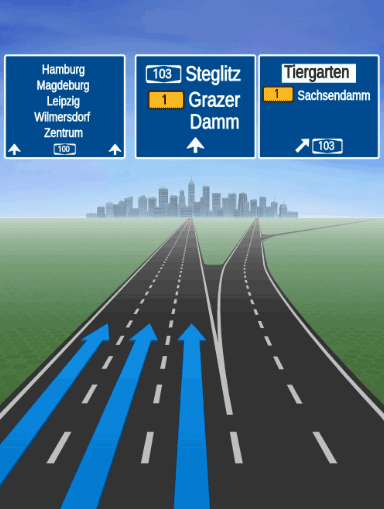
HERE SDKはSVGを文字列でのみ提供するため、AndroidSVGなどのサードパーティライブラリを使用してSVG文字列のコンテンツをレンダリングする必要があります。正しいフォントを使用できるようにするために、HERE SDK は無料で使用できるフォント パッケージを提供しています。以下を参照してください。
注合流地点ビューのデータは、占有サイズが2MB程度に留まるように最適化されており、道路標識データの占有サイズはわずか数 KB です。ただし、利用可能な機能構成を使用して事前に画像データをプリロードしておくことをお勧めします。詳細については、「最適化に関するガイド」を参照してください。
16:9 の解像度は横向きフォーマットで使用でき、縦向きモードでも全画面を覆わずに使用できます。ただし、SVG アセットは非常に詳細であるため、第 2 画面で全画面表示することをお勧めします。
注安全監視カメラ、道路標識、リアリスティックビューなど、道路上の1つの地物について通知する位置警告の場合、一度に発生するアクティブな警告は常に1つのみです。つまり、1つの地物に対して2つの
AHEAD警告が同時にアクティブになるのを回避するために、それぞれのAHEADイベントの後には常にPASSEDイベントが続きます。
使用例はGitHubの「NavigationWarners」のサンプルアプリを参照してください。
注
RealisticViewVectorImage機能はベータ リリースとしてリリースされているため、いくつかのバグや予期しない動作が発生する可能性があります。関連するAPIは、廃止のプロセスを経ずに、新しいリリースに変更される可能性があります。
SVG レンダラーと HERE フォントを統合する
道路標識の SVG (上記を参照) をレンダリングするには、AndroidSVG プラグインを使用することをお勧めします。さらに、SVG コンテンツでフォント ファミリーとして定義されている TTF 必須フォントも必要です。これらのフォントは、HERE SDK ディストリビューション パッケージに含まれています。
- プラグイン ベンダーの手順に従って
AndroidSVGを統合します。ベンダーのライセンスで問題がないことを確認してください。アプリのbuild.gradleファイルを変更します。
dependencies {
    implementation fileTree(dir: 'libs', include: ['*.aar', '*.jar'], exclude : ['*mock*.jar'])
    implementation 'androidx.appcompat:appcompat:1.3.1'
    implementation 'androidx.constraintlayout:constraintlayout:2.1.1'

    // Needed for realistic views rendering that are provided as SVG strings.
    implementation 'com.caverock:androidsvg-aar:1.4'
}-
コードに
import com.caverock.androidsvg.SVG;ステートメントを追加し、プラグインの統合が成功したかどうかを確認します。 -
HERE SDK ディストリビューション パッケージ (HERE SDK のバイナリも含まれているパッケージ) にある
SignpostFonts.zipアーカイブを抽出します。コンテンツをプロジェクトのassetフォルダー:YourApp/app/src/main/assetsにコピーします。フォルダーがまだない場合は作成します。 -
Android の
AssetManagerでフォント リゾルバー クラスを作成して、必要なフォントを読み込みます。次のステップでプラグインによって登録されます。プラグインでフォントを使用する必要がある場合は、以下のリゾルバーを使用して検索します。
import android.content.res.AssetManager;
import android.graphics.Typeface;
import android.util.Log;

import com.caverock.androidsvg.SVGExternalFileResolver;

// Needed by AndroidSVG plugin to render the provided fonts.
// Note: It has to be registered for use with the plugin.
public class FontResolver extends SVGExternalFileResolver {

    final private AssetManager assetManager;

    public FontResolver(AssetManager assetManager) {
        super();
        this.assetManager = assetManager;
    }

    @Override
    public Typeface resolveFont(String fontFamily, int fontWeight, String fontStyle) {
        try {
            return Typeface.createFromAsset(assetManager, getFontPath(fontFamily));
        } catch (RuntimeException exception) {
            Log.e("FontResolver", exception.getMessage());
        }

        return null;
    }

    private String getFontPath(String fontFamily) {
        switch (fontFamily) {
            case "FiraGO-Map":
                return "FiraGO_Map/FiraGO-Map.ttf";
            case "SignText-Bold":
                return "SignText/SignText-Bold.ttf";
            case "SignTextNarrow-Bold":
                return "SignTextNarrow/SignTextNarrow-Bold.ttf";
            case "SourceHanSansSC-Normal":
                return "SourceHanSansSC/TTF/SourceHanSansSC-Normal.ttf";

            default:
                Log.e("FontResolver", "Font not found: " + fontFamily);
                return "";
        }
    }
}- SVG コンテンツをレンダリングします。
private void showRealisticViews(String signpostSvgImageContent, String junctionViewSvgImageContent) {
    ImageView signpostSvgImage = createImageView(signpostSvgImageContent);
    ImageView junctionViewSvgImage = createImageView(junctionViewSvgImageContent);

    if (signpostSvgImage == null || junctionViewSvgImage == null) {
        throw new RuntimeException("Unexpectedly, the SVG string could not be parsed.");
    }

    // Draw the signpost image on top of the junction view image.
    FrameLayout frameLayout = new FrameLayout(MainActivity.this);
    frameLayout.addView(junctionViewSvgImage);
    frameLayout.addView(signpostSvgImage);

    // Attention: In a production-app, be careful to not distract a driver.
    // It is recommended to show this on a secondary display that resets
    // automatically after some time or when the junction was passed.

    // ... now show the view.
}

private boolean registerFontResolver = true;

// Create a rendered bitmap from a raw SVG string.
// Requires com.caverock.androidsvg.SVG plugin.
@Nullable
private ImageView createImageView(String svgString) {
    // Register our font resolver with AndroidSVG.
    if (registerFontResolver) {
        registerFontResolver = false;
        SVG.registerExternalFileResolver(new FontResolver(getAssets()));
    }

    SVG svg;
    try {
        svg = SVG.getFromString(svgString);
    } catch (SVGParseException e) {
        e.printStackTrace();
        return null;
    }
    PictureDrawable pictureDrawable = new PictureDrawable(svg.renderToPicture());
    ImageView imageView = new ImageView(MainActivity.this);
    imageView.setImageDrawable(pictureDrawable);
    return imageView;
}
注SVG コンテンツのラスター化は、アプリ側で行う必要があります。モバイル機器の GPU によって全画面画像のレンダリングに時間がかかる場合があります。UI スレッドをブロックしないように、これをワーカー スレッドに移動することを検討してください。
現在、HERE SDK では以下の TTF フォントが提供されています。これらは、独自の商用および非商用プロジェクトで無料で使用できます。各フォントの使用にあたっては、SignpostFonts.zip アーカイブに含まれているライセンス ファイルを必ず確認してください。
- **SourceHanSansSC-Normal.ttf:**このフォントは主にマカオ、台湾、香港で使用されます。
- **FiraGO-Map.ttf:**このフォントは主にイスラエルで使用されます。
- **SignText - Bold.ttf:**このフォントは主にベトナムで使用されます。
- **SignTextNarrow-Bold.ttf:**このフォントは、上記の国を除くすべての国で使用されます。
注SVG コンテンツで指定されているフォント ファミリーが見つからない場合、通常、選択した SVG プラグインでデフォルトのフォントがレンダリングされますが、想定どおりに表示されない場合があります。
環境ゾーンの警告を取得する
廃止予定
EnvironmentalZoneWarningListenerは廃止されるため、v4.29.0で削除されます。代わりに、WarningType.ENVIRONMENTAL_ZONEではWarnerEngineのWarningListenerを使用してください。
環境ゾーンとは空気の質を改善し大気汚染を減らすために特定の制約や規制が施行されている市内または地域内の指定区域のことで、低排気ガス規制ゾーン(LEZ)やクリーンエアゾーン(CAZ)とも呼ばれます。これらのゾーンは、二酸化窒素 (NO2) や粒子状物質 (PM) といった高レベルの汚染物質を排出する車の進入を阻止または制限することを目的としています。
環境ゾーンの具体的な規則や規制は、市や国によって異なる可能性があります。通常、一定の排出基準を満たさない車はゾーンへの進入を禁止されるか、料金を支払う必要があります。
環境ゾーンの指定とそれに付随する規則は、通常、運輸局や環境局と連携して、地方自治体または地域当局によって決定されます。
HERE SDKでは、統一されたWarnerEngineを通じて先にある環境ゾーンを通知します。
// Receive environmental zone warnings through the unified WarningListener
// Ensure WarningType.ENVIRONMENTAL_ZONE is included in warnerEngine.setEnabledWarnings()
// When an environmental zone warning is triggered:
warnerEngine.addWarningListener(new WarningListener() {
    @Override
    public void onWarnings(@NonNull List<WarningUpdate> warnings, @NonNull WarningsRegistry warningsRegistry) {
        for (WarningUpdate warningUpdate : warnings) {
            if (warningUpdate.warning.warningType == WarningType.ENVIRONMENTAL_ZONE) {
                EnvironmentalZoneWarning environmentalZoneWarning = warningsRegistry.getEnvironmentalZoneWarning(warningUpdate.warning);
                if (environmentalZoneWarning != null) {
                    if (warningUpdate.warningStatus == WarningStatus.AHEAD) {
                        Log.d(TAG, "An EnvironmentalZone ahead in: " + environmentalZoneWarning.distanceInMeters + " meters.");
                    } else if (warningUpdate.warningStatus == WarningStatus.REACHED) {
                        Log.d(TAG, "An EnvironmentalZone has been reached.");
                    } else if (warningUpdate.warningStatus == WarningStatus.PASSED) {
                        Log.d(TAG, "An EnvironmentalZone just passed.");
                    }

                    // The official name of the environmental zone (example: "Zone basse émission Bruxelles").
                    String name = environmentalZoneWarning.name;
                    // The description of the environmental zone for the default language.
                    String description = environmentalZoneWarning.description.getDefaultValue();
                    // The environmental zone ID - uniquely identifies the zone in the HERE map data.
                    String zoneID = environmentalZoneWarning.zoneId;
                    // The website of the environmental zone, if available - null otherwise.
                    String websiteUrl = environmentalZoneWarning.websiteUrl;
                    Log.d(TAG, "environmentalZoneWarning: description: " + description);
                    Log.d(TAG, "environmentalZoneWarning: name: " + name);
                    Log.d(TAG, "environmentalZoneWarning: zoneID: " + zoneID);
                    Log.d(TAG, "environmentalZoneWarning: websiteUrl: " + websiteUrl);
                }
            }
        }
    }
});
統一されたWarnerEngineを使用してください。
バージョン4.26.0.0から、HERE SDKはすべてのナビゲーション警告を受信および設定するための統一APIとしてWarnerEngineを導入します。各警告タイプに対して個別のリスナーをVisualNavigatorに直接登録する代わりに、すべての警告を一か所で処理するためにWarnerEngine上の単一のWarningListenerを使用できるようになりました。
WarnerEngineはvisualNavigator.getWarnerEngine()を介してアクセス可能で、以下の主要な利点を提供します。
- 中央集約型設定:すべての警告オプション (安全カメラ、道路標識、学校区域、国境検問所、リアルなビュー、トラック制限など) は、単一の
WarningOptionsオブジェクトを通じて設定されます。 - 単一のリスナー:統一された
WarningListenerがすべての警告イベントを受信し、警告の管理と配信を容易にします。 - 警告レジストリ:
WarningsRegistryを使用すると、一般的なWarningオブジェクトから詳細な型付き警告メタデータを検索できます。 - 柔軟な警告管理:実行時に有効な警告タイプを動的に追加、削除、または置き換えることができます。
WarnerEngineを取得する
WarnerEngineはVisualNavigatorから取得されます。それはナビゲーターに内部的に接続されており、現在のナビゲーションコンテキストに基づいて警告を処理します:
WarnerEngine warnerEngine = visualNavigator.getWarnerEngine();val warnerEngine = visualNavigator.warnerEngine警告オプションを設定します
すべての警告特有のオプションは、単一のWarningOptionsオブジェクトを通じて設定されます。これは、VisualNavigatorにおける個々のset...Options()呼び出しに代わるものです。
// Get the current warning options from the WarnerEngine.
WarningOptions warningOptions = warnerEngine.getWarningOptions();

// Configure safety camera warning options.
SafetyCameraWarningOptions safetyCameraWarningOptions = new SafetyCameraWarningOptions();
safetyCameraWarningOptions.enableTextNotification = true;
warningOptions.safetyCameraWarningOptions = safetyCameraWarningOptions;

// Configure road sign warning options.
RoadSignWarningOptions roadSignWarningOptions = new RoadSignWarningOptions();
roadSignWarningOptions.vehicleTypesFilter = Arrays.asList(RoadSignVehicleType.TRUCKS, RoadSignVehicleType.HEAVY_TRUCKS);
warningOptions.roadSignWarningOptions = roadSignWarningOptions;

// Configure school zone warning options.
SchoolZoneWarningOptions schoolZoneWarningOptions = new SchoolZoneWarningOptions();
schoolZoneWarningOptions.filterOutInactiveTimeDependentWarnings = true;
schoolZoneWarningOptions.warningDistanceInMeters = 150;
warningOptions.schoolZoneWarningOptions = schoolZoneWarningOptions;

// Configure border crossing warning options.
BorderCrossingWarningOptions borderCrossingWarningOptions = new BorderCrossingWarningOptions();
borderCrossingWarningOptions.filterOutStateBorderWarnings = true;
warningOptions.borderCrossingWarningOptions = borderCrossingWarningOptions;

// Configure realistic view warning options.
RealisticViewWarningOptions realisticViewWarningOptions = new RealisticViewWarningOptions();
realisticViewWarningOptions.aspectRatio = AspectRatio.ASPECT_RATIO_3_X_4;
realisticViewWarningOptions.darkTheme = false;
warningOptions.realisticViewWarningOptions = realisticViewWarningOptions;

// Apply all warning options at once.
warnerEngine.setWarningOptions(warningOptions);
// Get the current warning options from the WarnerEngine.
val warningOptions: WarningOptions = warnerEngine.warningOptions
// Configure safety camera warning options.
val safetyCameraWarningOptions = SafetyCameraWarningOptions()
safetyCameraWarningOptions.enableTextNotification = true
warningOptions.safetyCameraWarningOptions = safetyCameraWarningOptions
// Configure road sign warning options.
val roadSignWarningOptions = RoadSignWarningOptions()
roadSignWarningOptions.vehicleTypesFilter = listOf(RoadSignVehicleType.TRUCKS, RoadSignVehicleType.HEAVY_TRUCKS)
warningOptions.roadSignWarningOptions = roadSignWarningOptions
// Configure school zone warning options.
val schoolZoneWarningOptions = SchoolZoneWarningOptions()
schoolZoneWarningOptions.filterOutInactiveTimeDependentWarnings = true
schoolZoneWarningOptions.warningDistanceInMeters = 150
warningOptions.schoolZoneWarningOptions = schoolZoneWarningOptions
// Configure border crossing warning options.
val borderCrossingWarningOptions = BorderCrossingWarningOptions()
borderCrossingWarningOptions.filterOutStateBorderWarnings = true
warningOptions.borderCrossingWarningOptions = borderCrossingWarningOptions
// Configure realistic view warning options.
val realisticViewWarningOptions = RealisticViewWarningOptions()
realisticViewWarningOptions.aspectRatio = AspectRatio.ASPECT_RATIO_3_X_4
realisticViewWarningOptions.darkTheme = false
warningOptions.realisticViewWarningOptions = realisticViewWarningOptions
// Apply all warning options at once.
warnerEngine.warningOptions = warningOptions通知距離を設定する
VisualNavigatorと同様に、WarnerEngineを通じて通知距離を設定できます:
WarningNotificationDistances roadSignDistances = warnerEngine.getWarningNotificationDistances(WarningType.ROAD_SIGN);
roadSignDistances.fastSpeedDistanceInMeters = 1600;
roadSignDistances.regularSpeedDistanceInMeters = 800;
roadSignDistances.slowSpeedDistanceInMeters = 600;
warnerEngine.setWarningNotificationDistances(WarningType.ROAD_SIGN, roadSignDistances);
val roadSignDistances = warnerEngine.getWarningNotificationDistances(WarningType.ROAD_SIGN)
roadSignDistances.fastSpeedDistanceInMeters = 1600
roadSignDistances.regularSpeedDistanceInMeters = 800
roadSignDistances.slowSpeedDistanceInMeters = 600
warnerEngine.setWarningNotificationDistances(WarningType.ROAD_SIGN, roadSignDistances)イベントを受信するために特定の警告タイプを有効にします
setEnabledWarnings()は警告を受信するために必須です。この呼び出しがないと、登録に関係なくWarningListenerに警告は配信されません。受信するWarningType値のリストを渡してください。含まれていないタイプは静かに抑制されます:
List<WarningType> enabledWarnings = Arrays.asList(
        WarningType.SAFETY_CAMERA,
        WarningType.TRUCK_RESTRICTION,
        WarningType.ROAD_SIGN,
        WarningType.SCHOOL_ZONE,
        WarningType.REALISTIC_VIEW,
        WarningType.BORDER_CROSSING,
        WarningType.DANGER_ZONE,
        WarningType.RAILWAY_CROSSING,
        WarningType.LOW_SPEED_ZONE,
        WarningType.TRAFFIC_MERGE,
        WarningType.TOLL_STOP,
        WarningType.LANE_DECREASE
);
warnerEngine.setEnabledWarnings(enabledWarnings);
val enabledWarnings = listOf(
WarningType.SAFETY_CAMERA,
WarningType.TRUCK_RESTRICTION,
WarningType.ROAD_SIGN,
WarningType.SCHOOL_ZONE,
WarningType.REALISTIC_VIEW,
WarningType.BORDER_CROSSING,
WarningType.DANGER_ZONE,
WarningType.RAILWAY_CROSSING,
WarningType.LOW_SPEED_ZONE,
WarningType.TRAFFIC_MERGE,
WarningType.TOLL_STOP,
WarningType.LANE_DECREASE
)
warnerEngine.setEnabledWarnings(enabledWarnings)WarningListenerを登録する
すべての警告イベントを受信する単一のWarningListenerを登録します。各WarningUpdateにはwarning(warningTypeとid付き)、warningStatus、およびオプションの距離が含まれています。詳細な型付き警告メタデータを調べるためにWarningsRegistryを使用します:
WarningStatusの値:
AHEAD:警告は車両の前方にあります。APPROACHING:警告は、REACHED通知までの更新された距離とともに前方にあります。INSIDE:車両は警告エリア内にあります。PASSED:警告位置を通過しました。REACHED:警告位置に到達しました。
warnerEngine.addWarningListener(new WarningListener() {
    @Override
    public void onWarnings(@NonNull List<WarningUpdate> warnings, @NonNull WarningsRegistry warningsRegistry) {
        for (WarningUpdate warningUpdate : warnings) {
            switch (warningUpdate.warning.warningType) {
                case SAFETY_CAMERA:
                    SafetyCameraWarning safetyCameraWarning = warningsRegistry.getSafetyCameraWarning(warningUpdate.warning);
                    if (safetyCameraWarning != null) {
                        Log.d(TAG, "SafetyCameraWarning " + safetyCameraWarning.type.name()
                                + " warning status: " + warningUpdate.warningStatus.name());
                    }
                    break;
                case TRUCK_RESTRICTION:
                    TruckRestrictionWarning truckRestriction = warningsRegistry.getTruckRestrictionWarning(warningUpdate.warning);
                    if (truckRestriction != null) {
                        Log.d(TAG, "TruckRestrictionWarning warning status: " + warningUpdate.warningStatus.name());
                    }
                    break;
                case ROAD_SIGN:
                    RoadSignWarning roadSign = warningsRegistry.getRoadSignWarning(warningUpdate.warning);
                    if (roadSign != null) {
                        Log.d(TAG, "RoadSignWarning " + roadSign.type.name()
                                + " warning status: " + warningUpdate.warningStatus.name());
                    }
                    break;
                // Handle other warning types: SCHOOL_ZONE, BORDER_CROSSING, DANGER_ZONE,
                // LOW_SPEED_ZONE, REALISTIC_VIEW, TOLL_STOP, TRAFFIC_MERGE, etc.
                default:
                    Log.d(TAG, "Warning type: " + warningUpdate.warning.warningType.name()
                            + ", warning status: " + warningUpdate.warningStatus.name());
                    break;
            }
        }
    }
});
warnerEngine.addWarningListener(WarningListener { warnings, warningsRegistry ->
for (warningUpdate in warnings) {
when (warningUpdate.warning.warningType) {
WarningType.SAFETY_CAMERA -> {
val safetyCameraWarning = warningsRegistry.getSafetyCameraWarning(warningUpdate.warning)
if (safetyCameraWarning != null) {
Log.d(TAG, "SafetyCameraWarning ${safetyCameraWarning.type.name}" +
" warning status: ${warningUpdate.warningStatus.name}")
}
}
WarningType.TRUCK_RESTRICTION -> {
val truckRestriction = warningsRegistry.getTruckRestrictionWarning(warningUpdate.warning)
if (truckRestriction != null) {
Log.d(TAG, "TruckRestrictionWarning warning status: ${warningUpdate.warningStatus.name}")
}
}
WarningType.ROAD_SIGN -> {
val roadSign = warningsRegistry.getRoadSignWarning(warningUpdate.warning)
if (roadSign != null) {
Log.d(TAG, "RoadSignWarning ${roadSign.type.name}" +
" warning status: ${warningUpdate.warningStatus.name}")
}
}
// Handle other warning types: SCHOOL_ZONE, BORDER_CROSSING, DANGER_ZONE,
// LOW_SPEED_ZONE, REALISTIC_VIEW, TOLL_STOP, TRAFFIC_MERGE, etc.
else -> Log.d(TAG, "Warning type: ${warningUpdate.warning.warningType.name}" +
", warning status: ${warningUpdate.warningStatus.name}")
}
}
})警告を確定します
ガイダンスが停止されると、finalizeGivenWarnings()を呼び出してすべてのアクティブな警告をPASSEDとしてマークし、内部状態をクリアする前にすべての登録されたリスナーに通知できます。
warnerEngine.finalizeGivenWarnings();warnerEngine.finalizeGivenWarnings()
注
WarnerEngineでは現在、以前はVisualNavigator上の個別のタイプ別リスナーによって処理されていた警告タイプをカバーしています。SpeedWarningListenerはVisualNavigatorに残っており、WarnerEngineの一部ではありません。WarnerEngineの使用の完全な例は、「NavigationWarners」のサンプルアプリのWarnerEngineExampleクラスにあります。
カスタム警告を追加する
組み込みの警告システムではカバーされないカスタム警告タイプを配信するにはCustomWarningProviderを実装します。この例は、セグメントデータをスキャンすることで、スピードバンプを検出し報告するスピードバンププロバイダーを示しています。同じパターンを、スクールゾーン、天候条件(霧、雨、雪)、またはアドバイザリー速度ゾーンなどの他のカスタムタイプにも適用できます。
スピードバンプ用のカスタム警告プロバイダーを作成する
SegmentDataLoaderOptionsフラグでは、エンジンがプロバイダーを呼び出す前にロードすべきセグメントごとのデータを指定します。この例では、スパンにSPEED_BUMPS_PRESENT情報を含めるためにloadSpecialSpeedSituationsが必要です。
警告を受け取るにはsetEnabledWarnings(...)を呼び出す必要があります。この呼び出しがないと、WarnerEngineはWarningListenerに警告を配信しません。スピードバンププロバイダーのような登録済みカスタムプロバイダーを呼び出すべきだとエンジンがわかるように、リストにWarningType.CUSTOMを含めてください。
setEnabledWarnings(...)を呼び出す前にカスタムプロバイダーをaddCustomWarningProvider(...)に登録します。以下の登録スニペットに示されているように、setupWarnerEngine(visualNavigator)から呼び出される専用のregisterCustomProvider()メソッドを参照してください。
WarningListener内で汎用的なWarningオブジェクトを受け取ります。WarningType.CUSTOMエントリーについて、CustomWarning(およびそのpayload)を取得するためにwarningsRegistry.getCustomWarning(warning)を呼び出します。ヘルパーアクセサでペイロードをデコードする前に、customWarning.customWarningTypeがプロバイダーID(こちらのSpeedBumpWarningProvider.SPEED_BUMP_WARNING_ID)と一致していることを必ず確認してください。
public class SpeedBumpWarningProvider implements CustomWarningProvider {
    public static final int SPEED_BUMP_WARNING_ID = 1000;
    private static final String PAYLOAD_SEGMENT_REFERENCE = "segmentReference";

    @Override
    public int getCustomWarningType() {
        return SPEED_BUMP_WARNING_ID;
    }

    // Called by the WarnerEngine for EVERY segment the vehicle passes through.
    // The WarnerEngine uses startOffsetInMeters to compute distance and determine AHEAD/PASSED.
    @Override
    public List<CustomWarning> getWarnings(SegmentData currentSegment, SegmentData previousSegment) {
        List<CustomWarning> result = new ArrayList<>();
        List<SegmentSpanData> spans = currentSegment.getSpans();
        if (spans == null) return result;

        for (SegmentSpanData span : spans) {
            List<SegmentSpecialSpeedSituation> specialSituations = span.getSpecialSpeedSituations();
            if (specialSituations == null) continue;

            for (SegmentSpecialSpeedSituation situation : specialSituations) {
                if (situation.specialSpeedType == SpecialSpeedType.SPEED_BUMPS_PRESENT) {
                    // The position of the speed bump comes directly from SegmentData.
                    int spanStartOffsetMeters = span.getStartOffsetInMeters();

                    Metadata payload = new Metadata();
                    payload.setString(PAYLOAD_SEGMENT_REFERENCE, currentSegment.getSegmentReference().toString());

                    CustomWarning customWarning = new CustomWarning();
                    customWarning.customWarningType = SPEED_BUMP_WARNING_ID;
                    // startOffsetInMeters tells the WarnerEngine where in the segment the bump is.
                    customWarning.startOffsetInMeters = spanStartOffsetMeters;
                    customWarning.endOffsetInMeters = null;
                    customWarning.payload = payload;
                    result.add(customWarning);
                }
            }
        }
        return result;
    }

    // Helper for decoding payload in warning handler
    public String getSegmentReference(CustomWarning customWarning) {
        if (customWarning.payload != null) {
            return customWarning.payload.getString(PAYLOAD_SEGMENT_REFERENCE);
        }
        return null;
    }
}
class SpeedBumpWarningProvider : CustomWarningProvider {
companion object {
const val SPEED_BUMP_WARNING_ID: Int = 1000
private const val PAYLOAD_SEGMENT_REFERENCE = "segmentReference"
}
override fun getCustomWarningType(): Int = SPEED_BUMP_WARNING_ID
// Called by the WarnerEngine for EVERY segment the vehicle passes through.
// The WarnerEngine uses startOffsetInMeters to compute distance and determine AHEAD/PASSED.
override fun getWarnings(currentSegment: SegmentData, previousSegment: SegmentData?): List<CustomWarning> {
val result: MutableList<CustomWarning> = ArrayList()
val spans = currentSegment.spans
for (span in spans) {
val specialSituations = span.specialSpeedSituations ?: continue
for (situation in specialSituations) {
if (situation.specialSpeedType == SpecialSpeedType.SPEED_BUMPS_PRESENT) {
// The position of the speed bump comes directly from SegmentData.
val spanStartOffsetMeters = span.startOffsetInMeters
val payload = Metadata()
payload.setString(PAYLOAD_SEGMENT_REFERENCE, currentSegment.segmentReference.toString())
val customWarning = CustomWarning()
customWarning.customWarningType = SPEED_BUMP_WARNING_ID
// startOffsetInMeters tells the WarnerEngine where in the segment the bump is.
customWarning.startOffsetInMeters = spanStartOffsetMeters.toDouble()
customWarning.endOffsetInMeters = null
customWarning.payload = payload
result.add(customWarning)
}
}
}
return result
}
// Helper for decoding payload in warning handler
fun getSegmentReference(customWarning: CustomWarning): String? {
return customWarning.payload?.getString(PAYLOAD_SEGMENT_REFERENCE)
}
}カスタム警告を配信するには、プロバイダーをWarnerEngineに登録し、有効化されている警告リストでWarningType.CUSTOMを有効にし、WarningListenerでカスタム警告を処理します。
// Register the provider in a dedicated method, called from setupWarnerEngine() before configureEnabledWarnings().
private void registerCustomProvider() {
    SegmentDataLoaderOptions speedBumpOptions = new SegmentDataLoaderOptions();
    // Ensure segment loader includes special speed situations (required for speed bumps).
    speedBumpOptions.loadSpecialSpeedSituations = true;
    warnerEngine.addCustomWarningProvider(speedBumpWarningProvider, speedBumpOptions);
}

// Make sure CUSTOM warnings are enabled so the engine will poll custom providers.
List<WarningType> enabledWarnings = Arrays.asList(
    WarningType.SAFETY_CAMERA,
    // ... other built-in types ...
    WarningType.CUSTOM
);
warnerEngine.setEnabledWarnings(enabledWarnings);

// In your WarningListener, decode the custom warning using WarningsRegistry.getCustomWarning().
warnerEngine.addWarningListener(new WarningListener() {
    @Override
    public void onWarnings(@NonNull List<WarningUpdate> warnings, @NonNull WarningsRegistry warningsRegistry) {
        for (WarningUpdate warningUpdate : warnings) {
            Warning warning = warningUpdate.warning;
            if (warning.warningType == WarningType.CUSTOM) {
                CustomWarning customWarning = warningsRegistry.getCustomWarning(warning);
                if (customWarning != null && customWarning.customWarningType == SpeedBumpWarningProvider.SPEED_BUMP_WARNING_ID) {
                    String segRef = speedBumpWarningProvider.getSegmentReference(customWarning);
                    // The WarnerEngine provides warningStatus (AHEAD/PASSED) based on startOffsetInMeters.
                    Log.d(TAG, "Speed bump " + (warningUpdate.warningStatus == WarningStatus.AHEAD ? "ahead" : "passed")
                            + ". segmentRef=" + segRef);
                }
            }
        }
    }
});
// Register the provider in a dedicated method, called from setupWarnerEngine() before configureEnabledWarnings().
private fun registerCustomProvider() {
val speedBumpOptions = SegmentDataLoaderOptions()
// Ensure segment loader includes special speed situations (required for speed bumps).
speedBumpOptions.loadSpecialSpeedSituations = true
warnerEngine.addCustomWarningProvider(speedBumpWarningProvider, speedBumpOptions)
}
// Enable CUSTOM warnings so the engine will poll custom providers.
val enabledWarnings = listOf(
WarningType.SAFETY_CAMERA,
// ... other built-in types ...
WarningType.CUSTOM
)
warnerEngine.setEnabledWarnings(enabledWarnings)
// Add a WarningListener and decode custom warnings.
warnerEngine.addWarningListener(WarningListener { warnings, warningsRegistry ->
for (warningUpdate in warnings) {
val warning = warningUpdate.warning
if (warning.warningType == WarningType.CUSTOM) {
val cw = warningsRegistry.getCustomWarning(warning)
if (cw != null && cw.customWarningType == SpeedBumpWarningProvider.SPEED_BUMP_WARNING_ID) {
val segRef = speedBumpWarningProvider.getSegmentReference(cw)
// The WarnerEngine provides warningStatus (AHEAD/PASSED) based on startOffsetInMeters.
Log.d(TAG, "Speed bump " + (if (warningUpdate.warningStatus == WarningStatus.AHEAD) "ahead" else "passed")
+ ". segmentRef=" + segRef)
}
}
}
})WarningType.CUSTOMの警告がWarningListenerに届いたら、warningsRegistry.getCustomWarning(warning)を呼び出して詳細なCustomWarningオブジェクトを取得し、そのcustomWarningTypeがプロバイダーのIDと一致することを確認して、ペイロードからセグメント参照を抽出します。WarnerEngineはSegmentDataから報告されたstartOffsetInMetersに基づいてwarningStatus(AHEAD/PASSED)を自動的に決定します。
注
- カスタム警告の使用の例は、NavigationWarnersサンプルアプリの
SpeedBumpWarningProviderクラスにあります。
12 日前の更新