

Maps and layers in HERE Map Attributes API v8
HERE Map Attributes API v8 is based on and offers simple access to all HERE map data and customers' private map data.
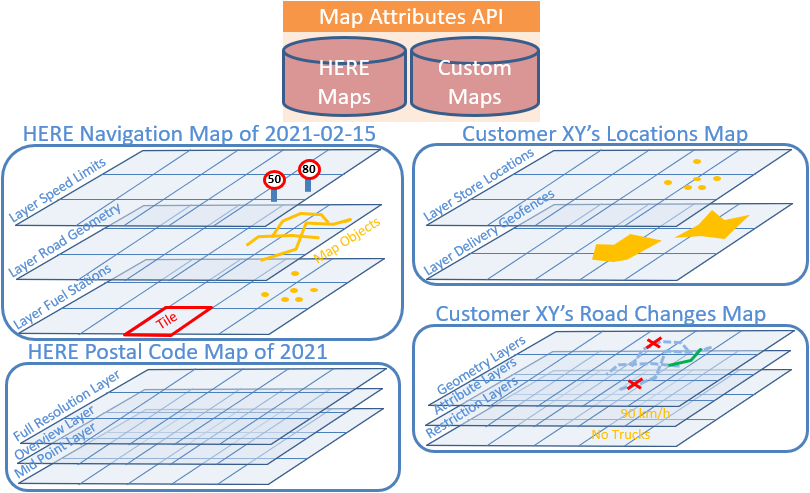
The available data is grouped into two main groups: maps and layers.
- A map is a collection of layers.
- A layer contains map objects with geometry and attribution.
- A layer is divided into tiles, with data organized into categories.
Maps
Resource /v8/maps/list.html shows the available maps. To access it, follow this URL:
https://smap.hereapi.com/v8/maps/list.html?&apiKey=API_KEYThe core map content is divided into regional maps, but can always be used as a single, global map.
Other content is delivered in dedicated - mostly worldwide - maps.
Regions
The HERE map is divided into the following regions:
- ANTARC: Antarctica
- APAC: Asia-Pacific
- AUSL Australia
- CHN: China
- EEU: Eastern Europe
- HKG: Hong Kong
- IND: India
- JPN: Japan
- MEA: Middle East Africa
- NA: North America
- SAM: South America
- TWN: Taiwan
- WEU: Western Europe
Requests to HERE Map Attributes API v8 can refer to one or more regions by using the region parameter. However, the region parameter is optional in most cases, except for when you use the doc/maps resource.
Release frequency
HERE updates map content weekly. By default, HERE Map Attributes API v8 delivers the latest available map release for each map region. But the API also offers older map releases on demand, which you can select via the release parameter. Contact us for availability and pricing of older map content.
Layers
HERE Map Attributes API v8 groups HERE map data into thematic layers. Each layer contains rows (map objects), like road segments, points of interest, river polygons - their geometry and attributes (columns).
Some layers just extend the objects of another layer by additional attributes, like the speed limits for a road segment layer.
Layers without geometry are called "attribute" layers, as opposed to "geometry" layers.
Layers are made for certain use cases:
- Show warnings to the driver
- Enable fuel efficient driving
- Enable safe driving
- Provide access to polygons that describe the hierarchy of administrative regions
Use the appropriate layer to request only the relevant data to minimize data transfer. Since the layers offered by HERE Map Attributes API v8 change often, check the currently supported layers with the resource Layers.
Resource /v8/layers/doc.html shows the attributes (columns) of a speed limit layer.
To access it, follow this URL:
https://smap.hereapi.com/v8/maps/layers/doc.html?layer=SPEED_LIMITS_FC1&apiKey=API_KEYResource /v8/maps/attributes?in=tile:tileId shows the content from one tile of layer SPEED_LIMITS_FC2.
To access it, follow this URL:
https://smap.hereapi.com/v8/maps/attributes?in=tile:1371046&mapName=WEU&layers=SPEED_LIMITS_FC2&apiKey=API_KEYExample speed limit layer tile content:
| LINK_ID | FROM_REF_SPEED_LIMIT | TO_REF_SPEED_LIMIT | SOURCE | UNIT |
|---|---|---|---|---|
| 566084098 | null | 80 | 1 | K |
| 566084207 | 100 | 100 | 1 | K |
| 566089718 | null | 100 | 1 | K |
| 578304140 | null | 100 | 1 | K |
| 578313250 | 100 | null | 1 | K |
Note
Make sure that your app can deal with suppressed JSON values in the response (if null, unknown, or default), and ensure that your app still works if the publishing order of the JSON elements changes or new fields or nodes are added.
A typical example for using layers is when you need to retrieve information along a particular route. A route usually starts on smaller roads, follows bigger roads, then stays on motorway-like roads for the main part of the journey, and finally returns onto smaller roads when approaching the destination.
Retrieving all the information about smaller roads along the whole route can result in an overwhelming amount of data transfer. Therefore, road link related layers are split into five layers each corresponding to the functional classes used in HERE maps.
To keep the data processing simple, each layer consists of a single flat table with simple records in numbers or text strings represented as attribute key/value pairs.
To reduce the volume of data transferred, some columns are denormalized or encoded. Denormalization is done by storing a list of comma-separated values in a column.
Encoding is done by using abbreviations or numbers to represent static string values, bit mask for a vehicle's type, and so on.
For example, each geometry is delivered in a single column per coordinate (x, y, z-level columns).
Each coordinate is a comma-separated list of integer values in 1E-5 WGS degrees (or 1E-7 for ADAS accuracy). The first value is absolute. Each subsequent value is relative to the previous value. A value of zero is reduced to an empty string.
The following tiled layers are available:
ADAS_ATTRIB_FC1...5: Curvature, height, slope, and links inside built-up areas.ADMIN_PLACE_0/1/2/8/9: Administrative area info.ADMIN_POLY_0/1/2/8/9: Administrative area geometry.APPLICABLE_SPEED_LIMIT: Applicable speed limit for the given vehicle specification for the given time along the given route (matching) path.BASIC_HEIGHT_FC1...5: Link height.BUILDING: Building type, height, and footprint geometry.CARTO_LINE_DO0/1/2/8/9: Cartographic line type, name, and geometry.CELL_SIGNALS_FC1...5: Measured availability, interface, and signal strength of a link for different carriers.CARTO_POLY_DO0/1/2/8/9: Cartographic polygon type, name, and geometry.CARTO_POLY_OCEAN: Cartographic ocean polygon name and geometry.CARTO_POLY_RIVER_DO0/1/2/8/9: Cartographic river polygon type, name, and geometry.CARTO_POLY_TOLL_HAZ: Cartographic toll zone and hazardous area polygon name and geometry.CENSUS_0/1/2/8/9: Basic census area info.CEN_*: Country-specific census info.CITY_POI_0/1/2/8/9: City center POI info and location.DISTANCE_MARKERS_FC1...5: Distance marker info and location.DTM_HEIGHT: Digital terrain model grid height.EVCHARGING_POI: Electric vehicle charging station info and location.FUELSTATION_POI: Gasoline, diesel, and EV charging offerings.LANE_CONN_FC1...5: Lane-level guidance link connectivity info.LANE_FC1...5: Link lane attributes.LINK_ATTRIBUTE2_FC1...5: Advanced link info for routing and map display.LINK_ATTRIBUTE_FC1...5: Basic link info for routing and map display.LINK_FC1...5: Link connectivity info for routing and guidance.LINK_TMC_FC1...5: Link TMC for live traffic processing.LOADING_ZONE_POI: Loading dock and loading zone POIs.NATURAL_GUIDANCE: Natural guidance info.POINT_ADDRESS: Address location and info with house number for map display.POI_BIG: Point of interest info and location for map display.POI_BIGGER: Point of interest type, info, and location for map display.POI_SMALL: Point of interest type, info, and location for map display.POI_SMALLER: Point of interest type, info, and location for map display.PSTLCB_GEN: Postal code boundary generalized geometry.PSTLCB_MP: Postal code boundary midpoint location.PSTLCB_UNGEN: Postal code boundary geometry.PSTLCMIDP: Postal code area midpoint location for map display.PUBLIC_TRANSPORT_POI: Public transport stop locations, like bus stops and subway stations, for map display.REAL_TIME_INCIDENTS: Layer with real-time traffic incidents.REAL_TIME_TRAFFIC: Layer with real-time traffic.ROAD_ADMIN_FC1...5: Road link's administrative hierarchy and postal code.ROAD_ADMIN_NAMES_FC1...5: Road link's official names of the admin hierarchy (built-up area, city, district, state, country).ROAD_GEOM_FC1...5: Road link info and geometry for map display.ROAD_NAME_FC1...5: Road link name.ROAD_OVERVIEW: Generalized road geometry for map display.ROAD_ROUGHNESS_FC1...5: Classification of the road surface roughness for driver warning.ROUNDABOUT_FC1...5: Roundabout info.ROUTING_FC1...5: Compact representation of link info, connectivity, and conditions for routing.SAFETY_ALERTS: Locations of accident spots and speed cameras, for driver warning.SIGNPOST: Direction sign info.SPEED_LIMITS_COND_FC1...5: Conditional speed limit info.SPEED_LIMITS_FC1...5: Car speed limit info.SPEED_LIMITS_VAR_FC1...5: Variable speed sign info.TOLLCOST_FC1...5: Road toll cost info for toll calculation and optimization.TOLL_BOOTH_FC1...5: Toll booth info for toll calculation and optimization.TOLL_LINK_FC1...5: Road link toll info for toll calculation and optimization.TOPO_SEG_ID_FC1...5: Topology segment IDs for roads.TOPO_SEG_LINK_FC1...5: Maps between topology segment IDs and their link IDs for the offset ranges.TRAFFIC_PATTERN_FC1...5: Typical link speed per time of day and weekday.TRAFFIC_SIGN_FC1...5: Traffic sign info for driver alerts.TRAFFIC_SPEED_RECORD_FC1...5: Live traffic info recorded from the last few days, at a 15-minute resolution.TRUCK_POI: Truck-specific rest area and restaurant info.TRUCK_RESTR_FC1...5: Truck restriction info for routing.TRUCK_SPEED_LIMITS_FC1...5: Truck speed limit info.TURN_RESTR_FC1...5: Turn restriction info.VIRT_CONN: Virtual connection link info and geometry for routing and map display.ARCHIVED_WEATHER: Archived weather of the world. The historical data is stored in 15-minute intervals.TRUCK_PARKING_POI: Static info about truck-specific parking locations, including designated truck parking areas and related facilities.TRUCK_PARKING_POI_STATUS: Dynamic info about truck-specific parking locations, including total parking capacity and current availability status.
The following non-tiled layers are available:
ADMIN_REGULATIONS: Administrative level regulations and time zones.ADMIN_TRUCK_RESTR: Administrative level truck restrictions.COUNTRY: Country info.ENV_ZONE_RESTR: Characteristics for environmental zones where access to traffic is limited and governed by various vehicle parameters, specific emission rules, and more.ROUTING_ZONES: Supported routing zone identifiers, names, types, and the country in which the zone exists.TC_ADMIN: Administrative level road toll info.TC_SYSTEM: Toll operator info.TC_TOLLSYS_NAMES: Toll operator names.TC_VEH_TYPES: Toll vehicle type info.TRAFFIC_PATTERN: Traffic speed curves.
For more details and licensing info, see the /v8/maps/layers/list.html service documentation.
Resource v8/maps/layers/list.html shows the available core map layers.
https://smap.hereapi.com/v8/maps/layers/list.html?mapName=WEU&mapType=1&apiKey=API_KEYSome layers contain non-spatial data (independent of locations), such as toll vehicle type definitions. HERE Map Attributes API v8 refers to these as "non-tiled" content layers.
Applications always retrieve the full layer content (not a tile, no spatial searches).
Another example:
The records in the (tiled) Traffic Pattern layers contain a PATTERN_ID. Additionally, there is a non-tiled layer containing the full specification for each PATTERN_ID.
Indexes
Some layers offer a search index on certain attributes for efficient search. For example, map data attributes are also indexed which allows you to request which tiles contain specific values in attribute key/value pairs.
Resource /v8/maps/indexes.html shows the available indexes in core map layers.
https://smap.hereapi.com/v8/maps/indexes.html?region=WEU&apiKey=API_KEYUse indexes if you don't know the spatial location of the map objects you're looking for. For example, you know the Link ID or Admin Place ID.
If you know the location, use tile.json or spatial search resources to retrieve the data.
The index.json resource shows in which tile the requested object is so that it can be retrieved via tile.json.
Resource /v8/maps/index finds in which road geometry layer's tiles the link IDs 17339738 and 17339811 reside.
https://smap.hereapi.com/v8/maps/index?layer=ROAD_GEOM_FC3&attributes=LINK_ID&values=17339738%2C17339811&apiKey=API_KEYTiles and tile sizes (levels)
Each layer's data is cut into "rectangular" WGS84 degree tiles, for efficient access.
The size of (a region covered by a) map tile depends on layer's tile size "level".
The lower the "level" number, the more area the tile covers. For example, tiles for level 2 cover a broader region than tiles for level 10.
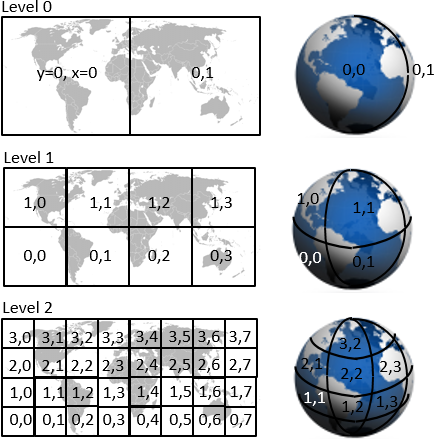
As shown in the image, tiling divides the world recursively into halves.
- Level 0 contains 2 x 1 tiles (East and West of Greenwich) and each tile comprises 180 x 180 degrees.
- Level 1 contains 4 x 2 tiles, where each of the 2 level 0 tiles are subdivided into 4 parts.
- On Level N, each tile comprises 180.0 / (2 level) degrees into each direction.
Note
The world map in the image is flattened via Mercator projection. However, layer tiling is based on unprojected WGS 84 degrees, not Mercator.
Each layer has a fixed tiling size (level).
For road link based layers, the level is always "road functional class" + 8
For example, the layer containing the functional class 2 (= roughly second level) roads has tiling level 10.
Layer tiling follows the Navigation Data Standard (NDS) tiling scheme.
A tile "owns" its lower and left borders, meaning that objects on those borders belong into this tile.
Map objects on a tile's upper or right border belong to the respective neighbor tile.
Still, for points, the tile also contains (a copy of) the points on its right/upper borders.
Polylines and polygons are cut at tile boundaries.
Hence, artificial points are created on the boundaries, and marked as such.
These artificial points exist in both tiles with identical coordinates. Polygons that cut at tile borders are closed on each side. With this tiling schema, you can choose to do one of the following:
- Ignore the tiling and use the tiled fragments as separate map objects
- Remove the additional geometry and stitch tiled geometries back together
- Suppress the drawing of artificial tiling lines as polygon border lines
Pieces of a tiled geometry can be identified as belonging to each other if they have the same permanent IDs, such as link IDs or carto/face IDs.
Some layers don't cut the geometry into tile pieces, but copy the whole geometry of an object into each of the tiles it covers.
This is described in the respective layers' documentation.
Tiled links are represented as:
- Tile A - start node, shape point(s), artificial shape point
- Tile B - artificial shape point, shape point(s), end node
Artificial shapes are also represented as relative coordinate values that are relative to the previous shape point.
This example shows how to compute the tile ID that covers a given coordinate in a layer:
  tile size = 180° / 2^level [degree]
  tileY = trunc((latitude  +  90°) / tile size)
  tileX = trunc((longitude + 180°) / tile size)
  tileID = tileY * 2 * (2^level) + tileX
Map object identifiers
Each layer has one (or multiple) key attributes, called "identifier".
For example, road segments are globally, uniquely, and permanently identified by a Link ID.
HERE map object identifiers never change for an object.
However, if a road segment is split, the parts get new (different) identifiers, and the old identifier is no longer used.
Use identifiers to combine a map object's across multiple layers.
For example, take the Link ID of the road geometry layer to identifier the according speed limit value in the speed limit layer.
The most heavily used identifier is the Link ID:
- A link is a piece of road with a fixed set of attributes. A link ends at an intersection, or when any of its attributes change, such as the speed limit.
- A link has a node at each of its ends. The lower left node (lower latitude, or if equal then lower longitude, or if equal then lower z-level) is called a
Reference Node. The other node is called a Non-Reference Node. A node can connect two links to attribute changes along the road, or multiple links when
there's an intersection. - Each link is globally identified by a Link ID.
Custom map tile size
For best search/display performance, customers can choose the tile sizes of their layers.
The default is level 12 with 3 km by 3 km tiles.
If a layer contains large amounts of locally high-density geometries, such as 10,000 points within a city center of 2km x 2km, then you should choose a smaller grid size. Otherwise, each search operation in this city involves all 10,000 points.
For reference, level 13 is a 1.5km x 1.5km grid and level 14 is a 750m x 750m grid.
If geometries in a layer are sparsely distributed over a big region, say 100 points around the globe, then you should choose a bigger grid size. Otherwise, each search operation operates on 10,000s of empty tiles.
For reference, level 11 is a 6km x 6km grid, level 10 a 12km x 12km grid, level 9 is a 24km x 24km grid, and level 8 is a 48km x 48km grid.
Searches are limited to operate on up to 150 tiles. If this is critical then it should be considered while choosing the tile size.
Updated 27 days ago