

How to delete catalog versions
Deleting catalog versions to manage storage costs gives you more granular data lifecycle management controls for your versioned layers.
You can safely delete older versions manually or automatically to manage how long your versioned data is stored and to control your versioned layer costs. Catalog version deletion safely removes data from versioned layers only and in a way that doesn't break dependencies that exist between different versioned layers in a single catalog. Deleting catalog versions maintains catalog configuration information and therefore the overall data integrity of the versioned layers within a catalog. Catalog version deletion does not impact any other layer types stored in a catalog, only versioned layers.
Warning
If you delete catalog versions, you permanently and irrevocably delete partition metadata as well as data associated with those versions. This impacts all versioned layers in the catalog. Any partition metadata and data that is still used in current, non-deleted versions will not be deleted so that the non-deleted versions remain functional.
Generally it is recommended to use a unique data handle for each partition and not to reuse data handles in multiple partitions. This ensures that when you delete catalog versions, all partitions would still reference existing blobs.
In some cases, when the same data blob is used many times to optimize for storage, you may reuse a data handle but only within the same version. During data deletion, the Data Service, will only check within the catalog minimum version, for data handles that are still being used.
Reusing same data handle across different catalog versions will result in partitions referencing non-existent data.
Note
You cannot delete the last single version of a catalog. In order to delete the last single version, you must delete the catalog.
Delete catalog versions manually
You can use the metadata service to set a minimum version for your catalog. All prior catalog versions will be deleted. Any catalog versions as recent as or more recent than your minimum version will not be deleted. Similarly, any partition metadata and data that is still used in current, non-deleted versions will not be deleted so that the non-deleted versions remain functional.
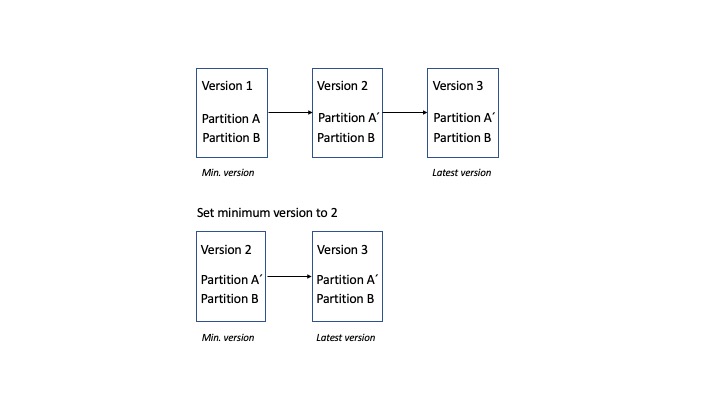
In the preceding figure, the catalog has three versions with two partitions: A and B. During publication of version 2, partition A is updated to be A´, but partition B is not committed. Once the minimum version is set to 2, partition A will be deleted, however partition A´ will not be deleted.
To delete catalog versions manually, use the metadata service and set a minimum version.
For the complete API reference on using the metadata service, see the Metadata API Reference.
-
Obtain an authorization token. For instructions, see the Identity and Access Management Guide.
-
Use the API Lookup service to get the API endpoint for the
metadatav1API of the catalog for the versions you want to delete. For instructions, see the API Lookup Developer Guide. -
Set the minimum version for the catalog's metadata using this request:
POST /catalogs/<catalogHrn>/versions/minimum HTTP/1.1 Host: <Hostname for the metadata API from the API Lookup Service> Authorization: Bearer <Authorization Token> { "version": 1 } -
The request returns
204 No Content. -
Once the minimum version has been set, you'll be able to verify it with another request:
 GET /catalogs/<catalogHrn>/versions/minimum HTTP/1.1
 Host: <Hostname for the metadata API from the API Lookup Service>
Authorization: Bearer <Authorization Token>-
The request returns
200 OKwith the response body:{ "version": 1 }
Note
The actual data deletion process will be executed asynchronously, so that the request is not blocked by the internal processing of data, such as processing results from a users points of view will be eventual consistent.
The physical metadata and data deletion may take up to 3 days and billing will continue for that period of time.
For complete information on using the metadata service, see the API Reference.
Delete Catalog Versions Automatically
You can use the config service to delete catalog versions automatically by enabling the automaticVersionDeletion and setting the numberOfVersionsToKeep at the time of your catalog creation or during an update at a later stage.
When the number of versions in a catalog exceeds the value set for numberOfVersionsToKeep, a new minimum version will be set for the catalog and all prior versions will be deleted. Any catalog versions as recent as or more recent than your minimum version will not be deleted. Similarly, any partition metadata and data that is still used in current, non-deleted versions will not be deleted so that the non-deleted versions remain functional. The maximum accepted value for numberOfVersionsToKeep is 50,000.
For example, given a versioned layer with 10 versions, you can configure the catalog by setting numberOfVersionsToKeep=10, to store a maximum of 10 versions. On the next increment to version 11, a job will asynchronously trigger the deletion of version 1. This process will repeat for every new commit.
Note
The actual data deletion process will be executed asynchronously, so that the request is not blocked by the internal processing of data. Therefore, the data deletion process is eventually consistent. The physical metadata and data deletion may take up to three days and billing will continue for that period of time.
Enable automatic version deletion
This procedure to enable automatic deletion of catalog versions is done, by setting the numberOfVersionsToKeep using the config service. For more information on using the config service, see the Config API Reference.
- Obtain an authorization token. For more information, see the Identity and Access Management Guide.
- Use the API Lookup service to get the API endpoint for the
configv1API to update the catalog. For more information, see the API Lookup Guide. - Set the
numberOfVersionsToKeepfor the catalog's configuration using the following request:
Note
The maximum accepted value for
numberOfVersionsToKeepis 50,000.
PUT /catalogs/<catalogHrn> HTTP/1.1
Host: <Hostname for the config API from the API Lookup Service>
Authorization: Bearer <Authorization Token>
Content-Type: application/json
{
  ...
  NOTE: remainder of the catalog configuration hidden for clarity
  ...

  "automaticVersionDeletion": {
    "numberOfVersionsToKeep": 10
  }
}
The request returns 202 Accepted.
Enable automatic version deletion on catalog creation
Similarly, the automaticVersionDeletion can be set on the catalog creation operation. For more information on creating a catalog, see the Config API Reference.
Disable automatic version deletion
To stop the automated deletion of catalog versions, use the config API.
- Obtain an authorization token. For instructions, see the Identity and Access Management Guide.
- Use the API Lookup service to get the API endpoint for the
configv1API to
update the catalog. For instructions, see the API Lookup Developer Guide. - Disable the automatic version deletion using this request:
DELETE /catalogs/{catalogHrn}/automaticVersionDeletion HTTP/1.1 Host: <Hostname for the config API from the API Lookup Service> Authorization: Bearer <Authorization Token> Content-Type: application/json - The request returns
202 Accepted.
Updated 6 months ago