

Archive stream data
The HERE Workspace lets you archive stream data so that you can later query and process that data for non-real-time use cases.
For example, if you want to run a daily batch process to find all pothole detection events recorded that day in the area surrounding a given city, you can use an index layer to organize the pothole detection events by event time, event type, and location, and then archive the data. You can then query the data every 24 hours for pothole events in the area of the city as part of your batch process.
The following diagram illustrates the overall process of archiving and querying stream data.
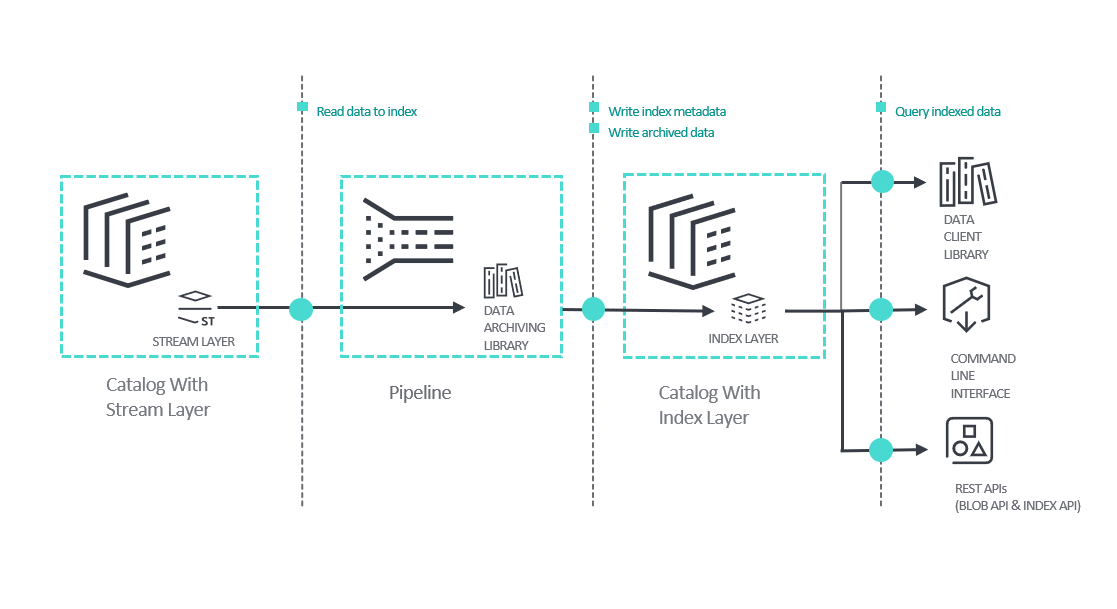
The key points in the diagram are:
- Data from the stream layer is archived by an application that you create and run as a platform pipeline. The archiving application uses the Java-based Data Archiving Library to read data from a stream layer, aggregating the data, and then indexing it to the index layer. For more information, see Data Archiving Library Developer Guide.
- The index layer contains the archived data and indexing attributes. It is a layer in a separate catalog from the stream layer.
- Once data is archived, there are multiple options for querying the data:
- The Data Client Library provides Java/Scala libraries for reading data from index layers.
- The Command Line Interface lets you read data from an index layer through a command line or script.
- The Index and Blob REST APIs can be used together to query and read the indexed data. The Index API returns the data handles for the data that matches your query. For example, if you query for events from a specific time frame and location, the response will contain the data handles for those events. Once you have the data handles that match your query criteria, you can use them to get the corresponding data using the Blob API.
Comparison of index layer interfaces
There are multiple ways to interact with the index layer.
- Data Archiving Library: Use the Data Archiving Library to develop a custom Java application which can run in a pipeline. The Data Archiving Library is the recommended way to store stream layer messages into an index layer. With the Data Archiving Library, you only need to implement the library's user-defined functions in your application to extract the indexing attributes for each message. Once your application is created, you can package and run it in a pipeline. Note that the Data Archiving Library is only for writing to an index layer, and cannot query data.
- Data Client Library: The Data Client Library provides Java and Scala APIs that you can use to interact with index layer. If the Data Archiving Library does not meet your requirements and you want to develop a custom application, the Data Client Library is the recommended way to work with an index layer.
- REST API: Use the REST API if you want to create an application with a language that the Data Client Library does not support. You can use the REST API to interact with index layer.
- Command Line Interface: Use the command line interface (CLI) to work with an index layer from a command line or script.
Creating an archiving solution
To create an archiving solution for a stream layer:
Step 1: Create a stream layer
If you do not already have a stream layer whose data you want to archive, create a stream layer. For more information, see Create a layer.
Step 2: Create an index layer
Create an index layer in a catalog that does not also contain the stream layer you want to archive. For more information, see Create a layer.
Step 3: Create an archiving application
The archiving process is performed by an application that runs in a pipeline. The easiest way to create an application is by starting with one of the example applications included with the HERE Data SDK. These examples show how to use the Data Archiving Library to store data.
To create an archive application:
- Implement the user-defined functions provided in the Data Archiving Library.
- Configure the
application.conffile. - Package the application into an executable JAR file.
See the README file included with the examples for more information.
Step 4: Set permissions
The archiving pipeline must have read access to the catalog containing the stream layer, and read and write access to the catalog containing the index layer. Grant this access to the group ID under which the archiving pipeline will be created. For more information on how to grant access, see Share a Catalog.
Step 5: Deploy the application using a pipeline
To run the application, you must create a pipeline in the HERE Workspace. For more information, see portal UI for pipelines.
Step 6: Verify the pipeline is running
In the HERE platform portal, select the Pipelines tab and find your pipeline. It should be in the Running state.
Querying indexed data
Once the archiving pipeline is running and data has been archived to the index layer, you can query and obtain data using one of the following methods:
Note
Ensure the app making the query to the index layer has
readpermission to the index layer. For more information, see
Manage Apps
For information on parsing the data retrieved from index layer, see Validation rules for indexing attributes.
Updated 6 months ago