

How to get features by tile type and tile id
The interactive API supports the following tile types:
- web for the Mercator projection (used by OpenStreetMaps, Google Maps, Bing Maps and others) format: level_x_y; for example: 10_100_100 means level 10. x-coordinate 100, y-coordinate 100
- tms for the Tile Map Service developed by the Open Source Geospatial Foundation
format: level_x_y; for example: 10_100_100 means level 10 x-coordinate 100, * y-coordinate 100 - quadkey for quadtree keys used by Bing Maps (formerly Virtual Earth) and others
format: for example 0123031233 for level 10 - here for the HERE tiling schema
GET /<Base path for the interactive API from the API Lookup Service>/layers/<Layer ID>/tile/<Tile Type>/<Tile ID>
Host: <Hostname for the interactive API from the API Lookup Service>
Authorization: Bearer <Authorization Token>
Cache-Control: no-cacheNote
You can alternatively use an API Key instead of an OAuth bearer token in an authorization header.
There are two available response types:
- GeoJSON (GeoJSON specification)
- MVT (MVT specification)
An example for GeoJSON FeatureCollection response:
Response
{
    "type": "FeatureCollection",
    "features":
    [
        {
            "type": "Feature",
            "id": "BfiimUxHjj",
            "geometry":
            {
                "type": "Point",
                "coordinates":
                [
                    -2.960847,
                    53.430828
                ]
            },
            "properties":
            {
                "name": "Anfield",
                "@ns:com:here:xyz":
                {
                    "createdAt": 1517504700726,
                    "updatedAt": 1517504700726
                },
                "amenity": "Football Stadium",
                "capacity": 54074,
                "popupContent": "Home of Liverpool Football Club"
            }
        }
    ]
}
Get clustered features in a tile
This section describes how to get data from an interactive map layer in a clustered form. Two clustering modes are available: hexbin and quadbin.
hexbin- calculates the amount of features in a hexagonal tiling. Furthermore it provides statistics (min, max, avg, median) on a user-defined property.quadbin- calculates the amount of features in tiles and subtiles. It gives a fast overview on dataset locations on lower zoom levels. The quadbins correspond to the webmercator tiling scheme.
Hexbin
While retrieving features from layers inside a tile you can use hexbin clustering to visualize your data as hexagons. Each hexagon represents the features of the area it covers. Additional statistical information about one property of your data can be evaluated and returned as properties of the returned hexagonal features.
The hexbin algorithm divides the world in hexagonal "bins" on a specified resolution.
Each hexagon has an address being described by the H3 addressing scheme.
For more information on that topic see: https://eng.uber.com/h3/
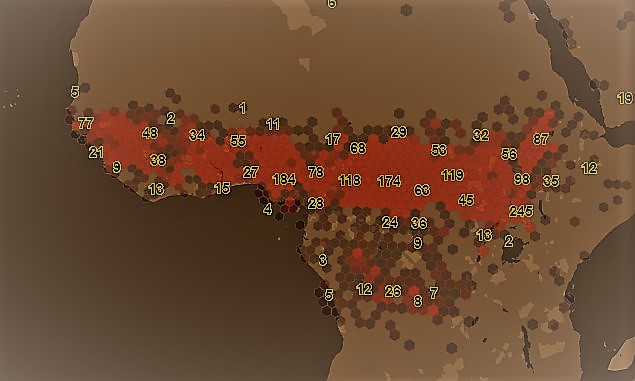
Request
GET /<Base path for the interactive API from the API Lookup Service>/layers/<Layer ID>/tile/<Tile Type>/<Tile ID>?clustering=hexbin&clustering.resolution=<#number>&clustering.property=<Property name>The following clustering related parameters can be passed and combined with others ( for example, tags, clip, feature filtering).
| Parameter | Type | Mandatory | Meaning |
|---|---|---|---|
| absoluteResolution | Number | No | Integer, the H3 hexagon resolution [0,13], default:( s.b. Default Resolution for zoomlevel ) |
| relativeResolution | Number | No | Integer value [-2,2] to be added to current used resolution |
| property | String | No | A property of the original features for which to calculate statistics |
| pointmode | Boolean | No | returns the centroid of hexagons as geojson feature |
| singlecoord | Boolean | No | evaluates the first object coordinate only (default: false) |
| sampling | String | No | sampling ratio of the underlying dataset values [off, low, lowmed, med, medhigh, high] (default: off) off ~ (1/1), low ~ (1/8), lowmed ~ (1/32), med ~ (1/128), medhigh ~ (1/1024), high ~ (1/4096) |
Response
{
    "type": "FeatureCollection",
    "features": [
        {
            "type": "Feature",
            "properties": {
                "kind" : "H3",
                "kind_detail" : "858b1303fffffff",
                "resolution": 5,
                "level": 7,
                "aggregation": {
                    "<Property name>": {  // only if a clustering.property=<Property name> is specified. If not specified field "qty" is
                                        // written on this object-level (e.g. properties.aggregation.qty )
                        "avg": 30.05000,
                        "max": 44.1,
                        "min": 16,
                        "qty": 2,
                        "sum": 60.1
                    }
                },
            "centroid": [ ... ], // only if clustering.pointmode = false|null
            "hexagon": [ ... ]  // only if clustering.pointmode = true
            },
            "geometry": {...},
        },
        ......
        ......
        {
            "type": "Feature",
            "properties": {
                "kind" : "H3",
                 "kind_detail" : "881f1d4a81fffff",
                    ....
            },
            "geometry": {...}
        }
    ]
}
Miscellaneous
Default resolution for zoomlevel
The parameter clustering.absoluteResolution specifies the size of the desired hexagons wanted.
The default resolution is balanced to suit size and performance of hexbin calculations per tile for normal amounts of data. Various parameters like amount, density, distribution and object size play a role in the time of performance. Higher resolution specific tile level -- up to ( default + 2 ) -- can be specified on experimental base, depending on the amount of data. If the value of the clustering resolution exceeds the maximum value for tile level, the maximum resolution will be used instead.
| Zoomlevel | Default H3 Resolution |
|---|---|
| 0 | 2 |
| 1 | 2 |
| 2 | 2 |
| 3 | 2 |
| 4 | 3 |
| 5 | 4 |
| 6 | 4 |
| 7 | 5 |
| 8 | 6 |
| 9 | 6 |
| 10 | 7 |
| 11 | 8 |
| 12 | 9 |
| 13 | 9 |
| 14 | 10 |
| 15 | 11 |
| 16 | 11 |
| 17 | 12 |
| 18 | 13 |
| 19 | 13 |
| 20 | 13 |
| 21 | 13 |
| 22 | 13 |
Quadbin
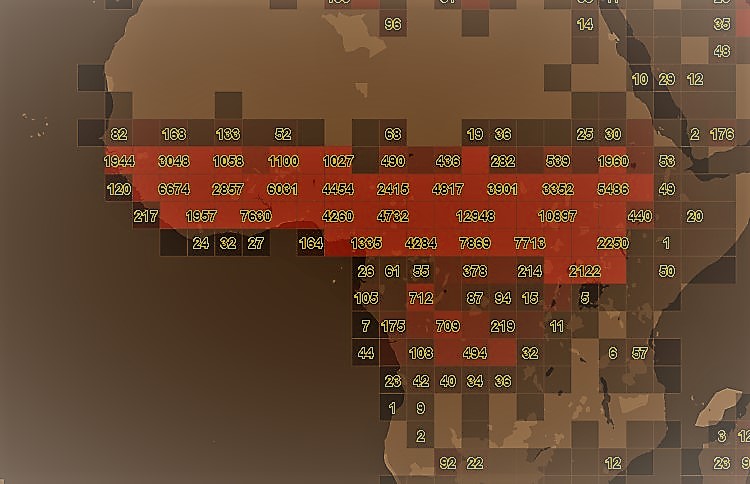
The quadbin algorithm takes the geometry input of the request (e.g. quadkey / bbox..)
and does estimated count on the features contained in the layer. This clustering mode works also for very large layers and
can be used for getting an overview where data is geolocated in a given layer. Furthermore,
a property filter on one property is applicable.
There are several parameters needed by the quadbin algorithm. You can use one property filter in combination.
Request
GET /<Base path for the interactive API from the API Lookup Service>/layers/<Layer ID>/tile/<Tile Type>/<Tile ID>?clustering=quadbin&clustering.relativeResolution=<#number>&clustering.countmode=<cmode>The following clustering related parameters can be passed
| Parameter | Type | Mandatory | Meaning |
|---|---|---|---|
| relativeResolution | Number | No | Integer, the quad resolution [0,4] |
| noBuffer | Boolean | No | Do not place a buffer around quad polygons, default: false |
| countmode | String | No | [real, estimated, mixed] real = real feature counts Best accuracy, but slow. Not recommended for big result sets estimated = estimated feature counts Low accuracy, but very fast Recommended for big result sets mixed (default) = estimated feature counts combined with real ones If the estimation is low a real count gets applied. Fits most use cases |
Response
{
    "type": "FeatureCollection",
    "features": [
        {
            "type": "Feature",
            "properties": {
                "qk": "12002323333",     // tile quadkey
                "xyz": "(639,1071,11)",  // tile row/col/level
                "count": 30393,          // count of features in tile
                "estimated": true,
                "total_count": 33521484,      // total feature count in related layer
                "equipartition_count": 511    // total_count/#Nr_Of_All_Level_Tiles
            },
            "geometry": {...}
        },
        ......
        ......
        {
            "type": "Feature",
            "type": "Feature",
            "properties": {
                "qk": "12002323331",
                "xyz": "(638,1071,11)",
                    ....
            },
            "geometry": {...}
        }
    ]
}Note
When using a version enabled interactive map layer, tiles can be requested a specific version of a layer using the "version" query parameter.
For more information, see the HERE Tiling Scheme.
Updated 6 months ago