

Manage catalogs with partitions
Most HERE map products organize data into Catalogs representing regions, such as one catalog for North America and another for Western Europe. Each catalog contains more than one data layer, and each layer is divided into multiple partitions — making partitions the smallest unit of data in the system. Partitions are key values within a catalog, and layers are a namespace for partitions. This makes the catalog (with layers and partitions) a key-key-value store.
Data layers and their partitions can store any binary data. The HERE platform does not need to understand the structure of the data in a partition since it does not need to decode it. Data is published and retrieved without modification. However, you can define the structure and encoding of the data in a layer by associating a schema with the layer. A schema defines the data structure and encoding for the partitions in a given layer so that data producers and consumers know how to encode and decode the data.
For example, each of the HERE HD Live Map catalogs contain 18 data layers in Native Protobuf format and 19 layers in the NDS format. The data in each layer is partitioned into tiles based on the HERE Tile partitioning scheme (explained in detail in this topic). Each partition in each layer corresponds exactly to Level 14 tiles (with the exception of the layer containing administrative data, which is partitioned by admin level). In most cases, one partition in a given layer is published as one raster tile image, and that image has a specific resolution in pixels — not screen pixels, but tile pixels, a bit like a digital photo of specific dimensions that can be measured in image pixels. Thus, depending on the product, and on the longitude of a given partition/tile, the pixels in a tile image can correlate to an area of a specific size on the surface of the earth.
Most types of data in HERE maps (such as road "topology-geometry" and "barriers" and "signs") are stored only in their home tiles/partitions, even if a given road extends through multiple tiles. The exact definition of "home tile" depends on the product. For HD Live Map, the home tile of a road is where the road starts, as defined by the direction the topology segments were initially digitized. HERE core map products define "home tile" differently. Hence, to access details about an HD Live Map object that extends beyond its home tile, select that object in an appropriate viewer (such as the HD Live Map Viewer) to display a reference to its home tile. If the Viewer also has the home tile loaded, the Viewer can use the reference to the home tile of an object to access details on the object even if you select the part of the object extending into a tile other than its home tile.
The data layer containing administrative data is usually partitioned differently. Depending on the country, the admin data for that country can be partitioned into as few as 3 administrative levels, and as many as 5 — from nation to state/province to county/parish to city to neighborhood. Each admin level has a corresponding partition (or partitions) containing data that's defined at that level. For example, a nation usually has a Level 1 partition containing data that applies throughout that country; a Level 2 partition for each state or province within that country, and so on.
Partitions are named according to one of two partitioning schemes:
- Generic partitioning
- HERE tile partitioning
There are a couple reasons why understanding partitioning schemes is important. First, when you are creating a catalog, you need to select the partitioning scheme to use for the catalog, and you need to choose the one best suited to the data you are going to store in the catalog. Second, when you are querying a catalog or publishing data to a catalog, you need to know the partitioning scheme used so that you can understand how to reference partitions by their name (which is typically a unique ID number), so you can reference the "home" partition containing the detailed definition of a given map object, such as a road or lane in a road.
Generic partitioning
Generic partitioning is the simplest form of partitioning. Partition names have no semantic meaning. Generic partitioning is best suited to data other than map data, such as search index data.
HERE Tile partitioning
HERE Tile partitioning is a method for storing map data. In HERE Tile partitioning, layers contain rectangular geographic tiles that represent an area of the map. These tiles are also known as partitions. If you use HERE Tile partitioning, you can take advantage of the HERE platform libraries and APIs to perform geo-related tasks.
To use HERE Tile partitioning, you need to know how map data is partitioned so that you can read and write data.
Map tiling
The process of dividing map data into partitions is called tiling. The HERE Tile tiling scheme is based on quadtrees. A quadtree is a tree data structure in which each internal node has exactly four children. Quadtrees partition a two-dimensional space by recursively subdividing it into four tiles. The child tiles are numbered 0-3 in a fixed reverse "Z" pattern:
- Tile 0 is the southwest sub-tile
- Tile 1 is the southeast sub-tile
- Tile 2 is the northwest sub-tile
- Tile 3 is the northeast sub-tile
Tile level
A tile's level refers to how many tiles were subdivided to produce the tile. For example, in the following diagram, tile 4 (100 in binary) is at level 1 and tile 24 (11000 in binary) is at level 2.
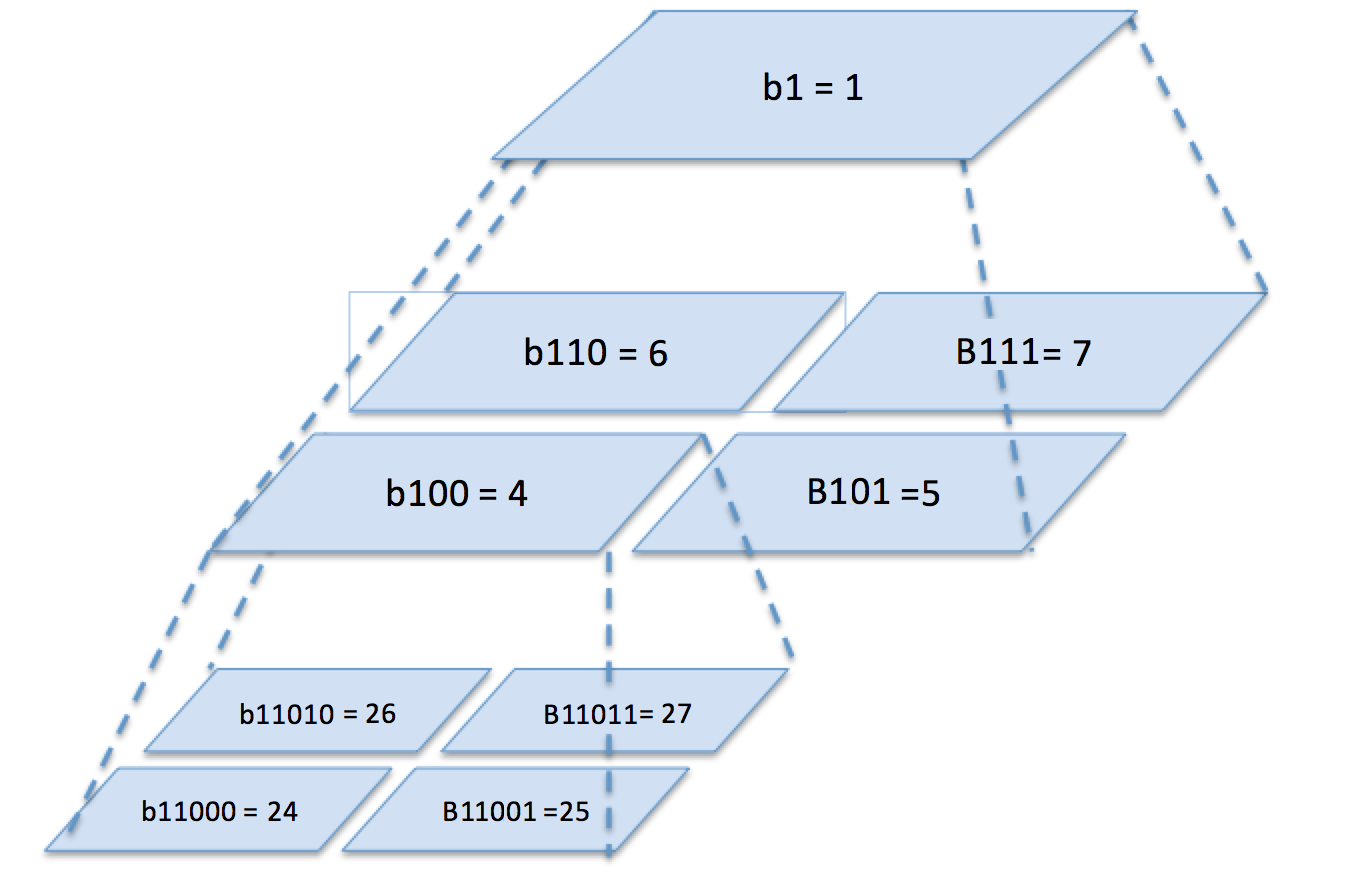
The maximum tile level supported in the HERE platform is 15. At this level, each tile has a size of about 2.45 km x 2.43 km near the equator.
HERE Tile tiling is based on raw, non-projected WGS84 latitude/longitude coordinate values, so each child tile covers exactly half its parent's latitude/longitude range per side.
Note
This scheme results in non-square tiles when viewed on a common Mercator projected 2D map, with the effect more pronounced further from the equator.
HERE Tile IDs
Each tile in the map has an identifier called a HERE Tile ID. A HERE Tile ID is a 64-bit unsigned integer computed from the tile's quadkey. A quadkey is a string of numbers (0-3) which captures the hierarchy of parent-child tiles from level 1 to the target tile level.
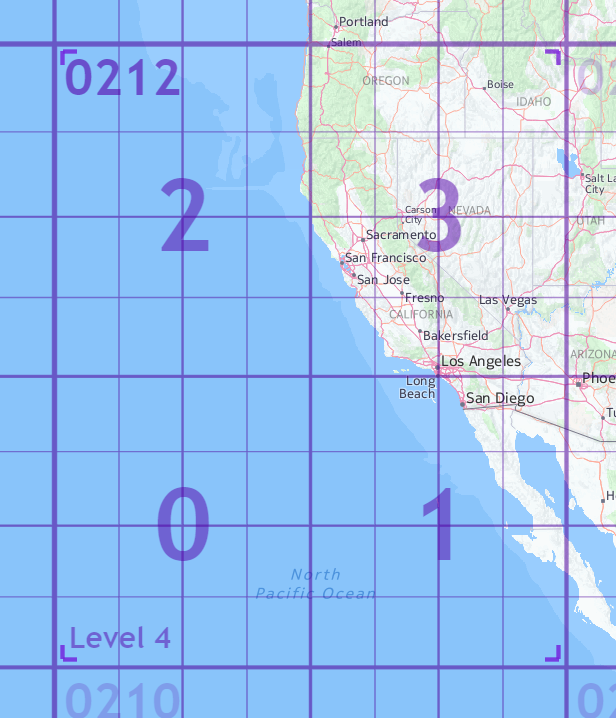
For example, for the level 5 tile containing San Francisco in the map below, the quadkey would be 02123 because the parent tile is 0212, and the child tile containing San Francisco is 3:
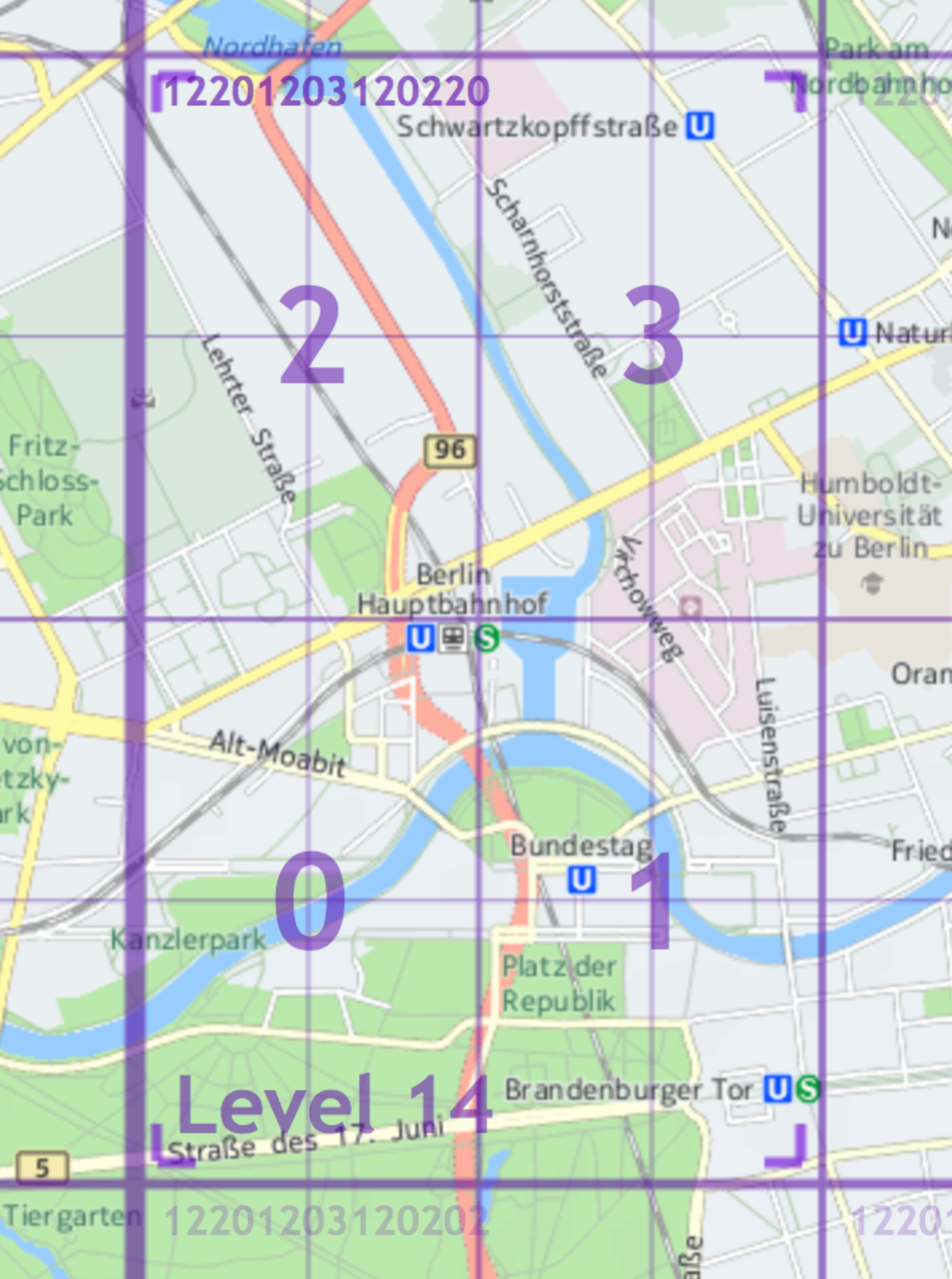
In this second example, the quadkey for the child tile containing the Berlin Hauptbahnhof (central train station) is 122012031202200 because the parent tile's quadkey is 12201203120220 and the quadkey of the child tile containing the Berlin Hauptbahnhof is 0.
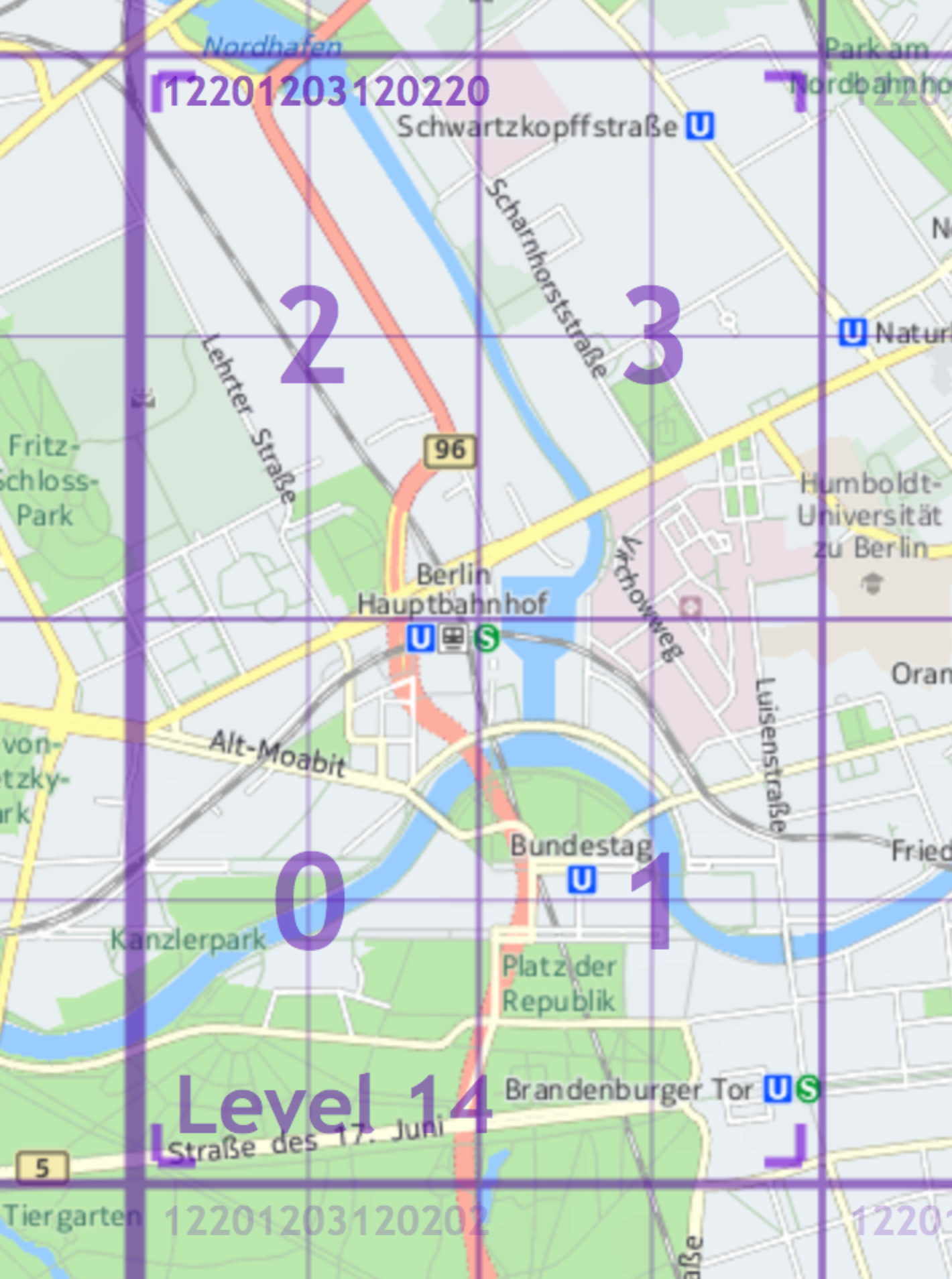
You can determine the level of a tile by the number of digits in the quadkey. For example, the quadkey for a level 14 tile will have 14 digits.
To determine a tile's HERE Tile ID from its quadkey, use the following algorithm. To illustrate the algorithm, the example values use the level 14 tile of Berlin as shown above.
- Prepend the quadkey with a 1, such as
12201203120220 = 112201203120220 - Convert the quadkey from base 4 to base 10, as in
1122012031202204 = 37789444010 - The resulting base 10 number is the HERE Tile ID - 377894440.
Note
HERE Location Libraries provide a
TileResolverthat you can use to calculate HERE Tile IDs. If you are using Scala or Java, you can use themapquadlibrary for the same purpose.
HERE Tile coordinate ranges
The normal coordinate range on a world map is -180° to +180° longitude and -90° to +90° latitude. However, in HERE Tile partitioning, the level 0 root tile representing the entire world is augmented with a virtual counterpart north of the North Pole. This is done to avoid special handling of level 1 tiles. As a result, the base coordinate range in HERE Tile partitioning is -180° to +180° longitude and -90° to +270° latitude, making the level 0 world tile a square with sides of 360°. From here, the root world tile is split in the standard quadtree way into four tiles at level 1, resulting in tiles 0 and 1 covering the world and tiles 2 and 3 generally unused.
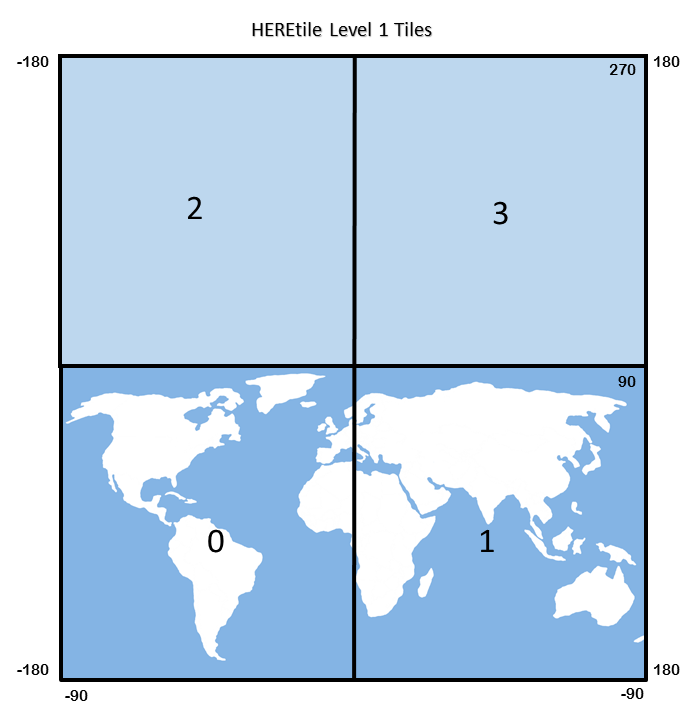
Note the following special cases:
- Longitude values of +180° are converted to -180°, so tile references "wrap" over the anti-meridian.
- Latitude values of +90° are owned by their southern tiles.
Calculating latitude/longitude degrees for a tile level
The latitude and longitude range for a tile can be calculated as 360°/2tile level
So for level 14 tiles, the latitude/longitude range would be calculated as 360°/214 = 360°/16384 = 0.02197265625° per tile
Tiling schemes always result in a question of which tile contains a latitude/longitude location that lies on a tile border. For the HERE Tile scheme, locations lying on the south-west border of a tile belong to that tile.
Identifying the HERE Tile ID for a latitude/longitude
The tile HERE Tile ID for any latitude/longitude position at a given tile level can be calculated algorithmically using a version of Morton coding. Take this example for the Berlin Hauptbahnhof (central train station) at latitude/longitude coordinates 52.52507/13.36937.
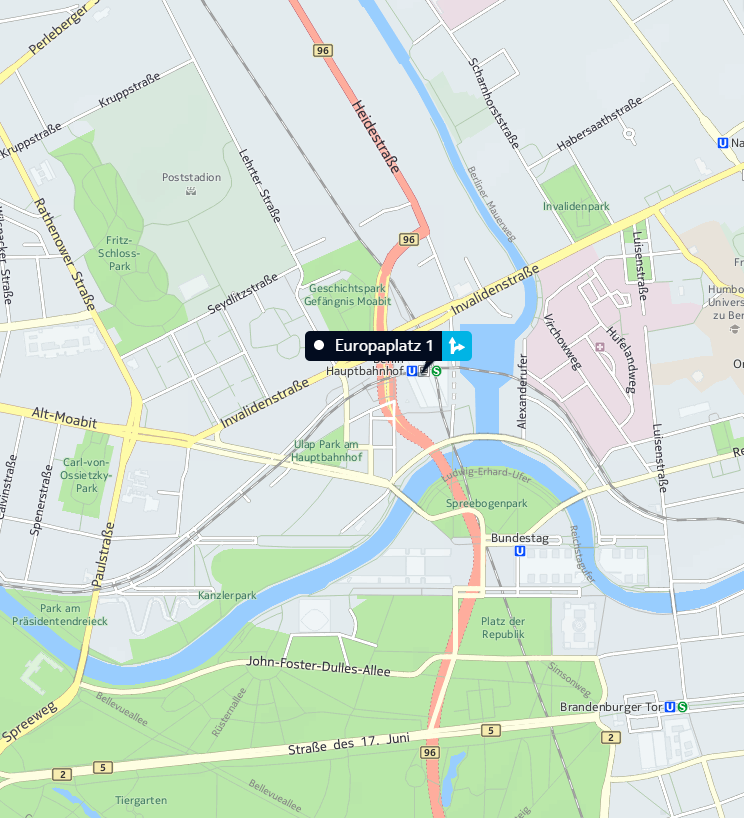
Let's calculate the level 14 HERE Tile ID for this location. First, we need to calculate the desired tile's X,Y coordinates on the world map. Tile X,Y coordinates are not latitude/longitude values, they are the tile's integral positional coordinates, indexed from (0,0) in the southwest corner of the world map.
- Find the horizontal (X) tile index from the longitude value by dividing the world map longitude range (-180° to +180°) into tile-sized ranges based on the desired tile level. As described in HERE Tile coordinate ranges, each level 14 tile covers 0.02197265625 degrees per tile:
180° + 13.36937° = 193.36937° (absolute longitude offset from south-west corner)

193.36937° / 0.02197265625° = 8,800.45 = **tile X: 8,800** (round down for 0-based indexing)- Find the vertical (Y) tile index, making sure to use the latitude range -90° to +270° as described in HERE Tile coordinate ranges.
90° + 52.52507° = 142.52507° (absolute latitude from the south-west corner)

142.52507°/0.02197265625° = 6,486.47 = **tile Y: 6,486** (round down for 0-based indexing)- Convert the tile X, Y indexes (8800, 6486) and tile level (14) into a Morton code quadkey. To do this, take the simple binary representation of the tile coordinate indexes, zero-padded to the number of bits in the tile level:
Tile X coordinate: 8800 = 100010011000002 (already 14 bits)

Tile Y coordinate: 6486 = 011001010101102 (zero-padded to 14 bits)- Interleave the bits of the binary values, starting with the first bit of the Y-coordinate:
Interleaved Y/X = 01101000011000110110001010002- Convert the resulting binary value to a base 4 integer to get the quadkey string:
01101000011000110110001010002= 122012031202204So, the quadkey for the Berlin Hauptbahnhof (central train station) at latitude/longitude coordinates 52.52507/13.36937 is 12201203120220. Here is the quadkey on the map:
The final step is to encode the tile's quadkey as a HERE Tile ID:
- Prepend the quadkey with a 1, as in
12201203120220 = 112201203120220 - Convert the quadkey from base 4 to base 10, as in
1122012031202204 = 37789444010 - The resulting base 10 number is the HERE Tile ID for the latitude/longitude coordinates 52.52507/13.36937 is then 377894440
Related Topics
Updated 6 months ago