

How to add and use billing tags
This tutorial shows how to add and use billing tags. The billing tag provides a way to track your platform usage across components tracking usage and costs. Using billing tags, you can create a string used for combining costs on your invoices. For example, you can group multiple pipelines together for a project or activity where you want to highlight those specific costs.
Add user-defined billing tags
You can add user-defined billing tags to your query.
User-defined billing tags have the following rules:
- Between four-16 characters
Ccase-sensitive - Allowed characters are alpha or numeric ASCII characters [A-Za-z0-9] and the following special characters: [ - ] [ _ ]
- The billing tag isn't allowed to begin or end with the special characters: [ - ] [ _ ]
- up to six billing tags can concatenate with + to a long string, for example, tag1+tag2+tag3+tag4+tag5+tag6
An invalid billing tag results in the following error:
{
  "title": "billingTag is invalid",
  "status": 400,
  "code": "<to be defined by the service>",
  "cause": "The billingTag passed does not meet validation rules",
  "action": "Please provide a valid billingTag according to service specification",
  "correlationId": "4199533b-6290-41db-8d79-edf4f4019a74"
}
Valid and invalid characters
The account management paradigm known as "Technical Accounting" removes invalid characters from faulty billing tags. For example, "My#In%validTag_ThatIsVeryLong" → "MyInvalidTag_Tha".
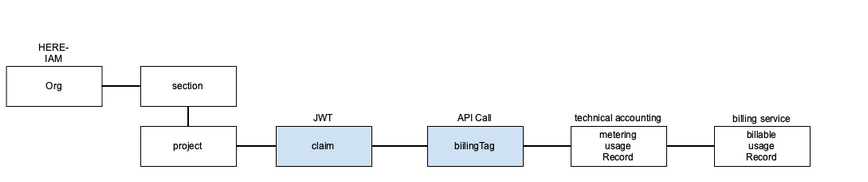
Account management paradigm
The following table shows samples of how to add valid billing tags in your query.
| Sample Text |
|---|
https://samplehost/sampleresource?billingTag=ABCD&other_tag=123D |
https://samplehost/sampleresource?billingTag=DEFG+GHI1&other_tag=123A |
https://samplehost/sampleresource?billingTag=ABC2&other_tag=123B |
https://samplehost/sampleresource?billingTag=DEF2+GHI2&other_tag=olp-test-123C |
Regex for a single billing tag

Regex for multiple, concatenated billing tags

Billing tag for projects
The part of account management known as "Projects" identifies as follows:
| Purpose | Example | |
|---|---|---|
| name | non-unique, purpose for UI | "Happy Project" |
| id | Constructed from the name for uniqueness in an organization. | "project/happy-project" |
| hrn | Globally unique identifier. | "hrn:here:authorization::org123456789:project/happy-project" |
| scope | Scope in token = hrn. | "hrn:here:authorization::org123456789:project/happy-project" |
The cost allocation for projects is internal and is independent from user-defined billing tags. The scope is extracted from the token and used as a billingTag. For example, hrn:here:authorization::org123456789:project/happy-project, as shown in the previous table, where the project, happy-project, is the billing tag.
The project related billing tag appears in your invoicing for the specific project cost.
For more information, see the Cost Management Usage API v2 API Reference.
Related Topics
Updated 2 months ago