

How to retrieve usage by featureId
This tutorial shows how to get the usage for your organization using a feature ID.
On the platform, HERE offered features identify by the feature HRNs, which are also known as the featureId parameter. This tutorial shows how to use the featureId parameter to filter the results for a specific feature.
To find your feature HRN, click the Services option in the platform Launcher. A web page containing services is then displayed. When you select your service, a web page containing the HRN for the selected service displays.
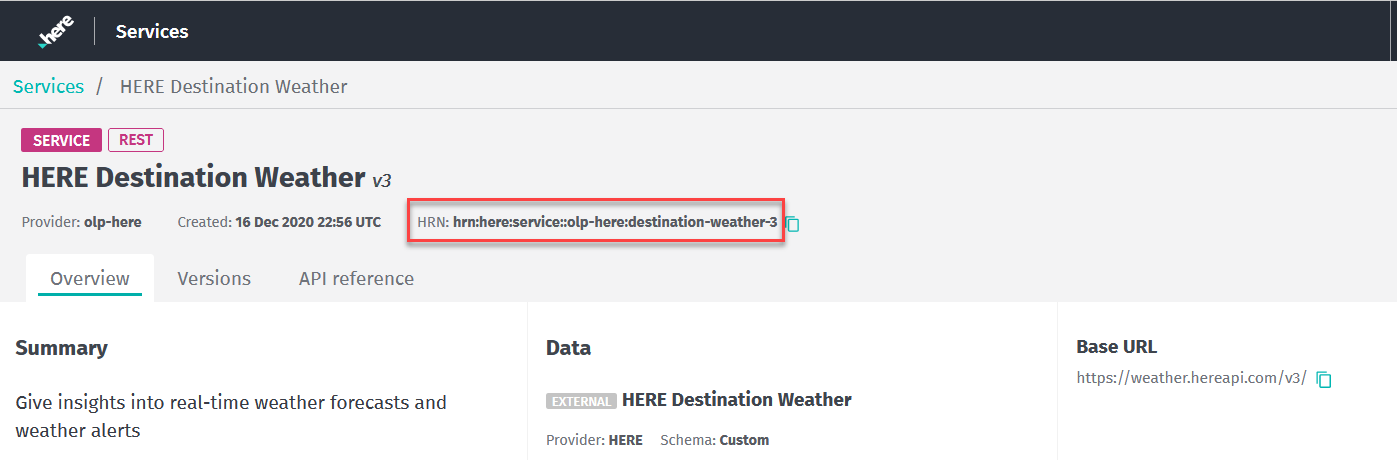
This sample request uses org123456789 as the realmId, 2021-07-01T10:39:51 as the startDate, 2021-08-30T10:39:51 as the endDate, and hrn:here:service::org123456789:search-geocoding-1 as the featureId.
GET https://usage.bam.api.here.com/v2/usage/realms/org123456789/startDate=2021-07-01T10:39:51&endDate=2021-08-30T10:39:51&featureId=hrn:here:service::org123456789:search-geocoding-1Parameters
The parameters shown here are only those required for this sample request. For a complete list of parameters, see the Cost Management Usage API v2 API Reference.
| realmId required | string [ 5 ... 30 ] characters. Example: org123456789 Your org ID. |
| startDate required | string "date-time". *Example:*startDate=yyyy-MM-dd'T'HH:mm:ss The start date for a search. |
| endDate required | string "date-time". *Example:*endDate=yyyy-MM-dd'T'HH:mm:ss >End date for search. |
| featureId | string less than or equal to 256 characters. *Example:*featureId=hrn:here:service::org123456789:search-geocoding-1 The feature HRN is the feature ID. |
Header parameters
| X-Request-ID | string User-provided token used to trace a request or a group of requests sent to the service. |
| X-Correlation-ID required | string Auto-generated ID, which uniquely identifies the request, available in the response. When contacting the support team with an inquiry regarding a specific request, provide the value of this header. This helps when troubleshooting the issue. |
Response: HTTP 200 OK
The request returns the following sample response:
{
  "total": 10,
  "limit": 100,
  "items": [
    {
      "realmId": "org123456789",
      "billingSubscriptionId": "",
      "billingChargeNumber": "",
      "featureId": "hrn:here:service::org123456789:search-geocoding-1",
      "category": "service",
      "name": "Geocoder Autosuggest",
      "valueDriver": "Transactions",
      "usageValue": "10",
      "billableValue": "10"
    },
  ],
  "nextOffset": 0,
  "lastOffset": 0
}
Updated 5 months ago