

How to retrieve usage csv by featureId
This tutorial shows how to get your usage using a feature ID, and receiving your response in CSV format.
On the platform, HERE offered features identify by the feature HRNs, which are the featureId parameter. You can also use the featureId parameter to filter the results for a specific feature.
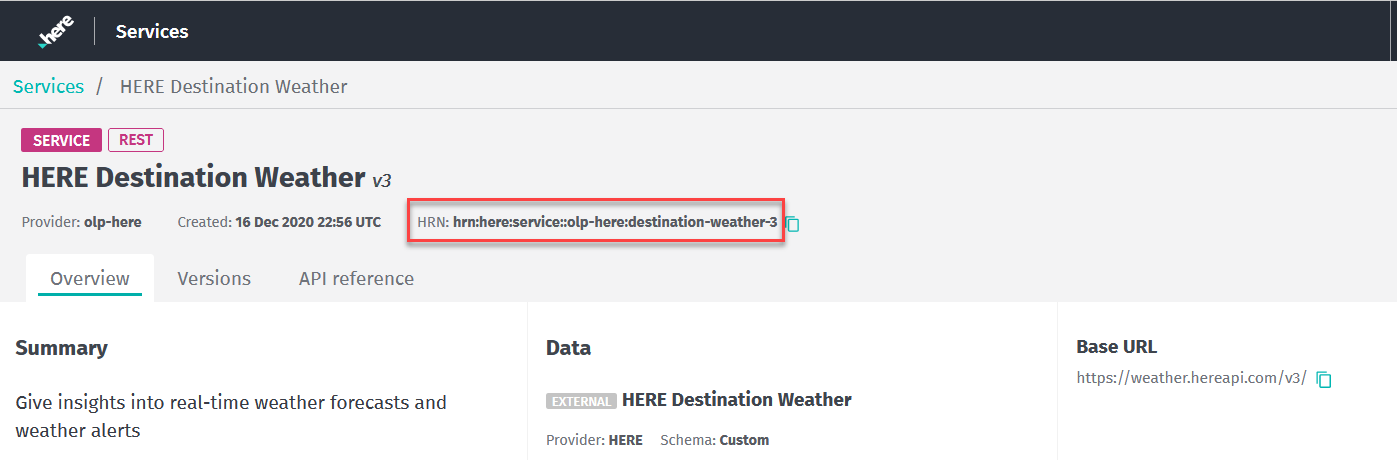
To find your feature HRN, click the launcher on the platform and select the Services option. A web page containing services is then displayed. When you select your service, a web page containing the HRN for the selected service displays.
You can retrieve the usage in CSV format by adding CSV to your request, as shown in the sample request.
This sample request uses org123456789 for the realmId, 2021-07-01T10:39:51 as the startDate, 2021-08-30T10:39:51 as the endDate, and hrn:here:service::org123456789:search-geocoding-1 as the featureId.
GET https://usage.bam.api.here.com/v2/usage/realms/org123456789/csv?startDate=2021-07-01T10:39:51&endDate=2021-08-30T10:39:51&featureId=hrn:here:service::org123456789:search-geocoding-1Parameters
The parameters shown here are only those required for this sample request. For a complete list of parameters, see the Cost Management Usage API v2 API Reference.
| realmId required | string [ 5 ... 30 ] characters. Example: org123456789 Your org ID. |
| startDate required | string "date-time". *Example:*startDate=yyyy-MM-dd'T'HH:mm:ss Start date for a search. |
| endDate required | string "date-time". *Example:*endDate=yyyy-MM-dd'T'HH:mm:ss End date for a search. |
Response: HTTP 200 OK
The response in CSV format lists the following columns:
- Category (
category): The category is the name of the billable service you have selected, such as location services, content, SDKs, data, or pipelines. - Service or Resource Name: The service, such as Navigate SDK, Network Positioning, 3D Buildings.
- Billing Tag (
billingTag): a user defined unique string used for combining costs. - Project ID (
projectHrn): (Optional) A unique identifier to manage work and resources. This is also known as the project HRN. - Start date (
startDate): The start date of the usage. - End date (
endDate): The end date of the usage. - Usage amount (
billableValue): How much billable usage has accrued. - Unit (
valueDriver): The unit which is billable, for example GB. - Rate per Unit: The billable rate per unit.
- Total Price: The calculated cost of your usage.
For partners, there is an additional column in the CSV output. The additional column is the name of the organization, orgName.
Updated 5 months ago