

Autocomplete
The /autocomplete endpoint aids users in entering an address or administrative area by providing suggestions based on a few keystrokes. When the user selects the desired suggestion, your application can subsequently use the /lookup endpoint to retrieve the coordinates of the suggestion. Alternatively, your application can use the /geocode endpoint to geocode the address returned by the /autocomplete endpoint.
The user can also select the intermediate result to use it as a base to continue entering the address with help of the /autocomplete endpoint. For example, by selecting the completion of the city name first, then the street name, and a specific address on the street.
For example, a query to retrieve a list of addresses, completing the text Pariser 2 Frank, can be formulated with the following request:
GET https://autocomplete.search.hereapi.com/v1/
    autocomplete
    ?q=Pariser+2+Frank
    &apiKey={YOUR_API_KEY}
The response to the above request contains two suggestions, completing the query text, and looks like the following:
{
  "items": [
    {
      "title": "Deutschland, 60486, Frankfurt am Main, Pariser Straße 2",
      "id": "here:af:streetsection:A2eGBPgL70TOTtA85fTiEB:CggIBCDg0K_aAhABGgEy",
      "language": "de",
      "resultType": "houseNumber",
      "houseNumberType": "PA",
      "address": {
        "label": "Pariser Straße 2, 60486 Frankfurt am Main, Deutschland",
        "countryCode": "DEU",
        "countryName": "Deutschland",
        "stateCode": "HE",
        "state": "Hessen",
        "countyCode": "F",
        "county": "Frankfurt am Main",
        "city": "Frankfurt am Main",
        "district": "Gallus",
        "street": "Pariser Straße",
        "postalCode": "60486",
        "houseNumber": "2"
      },
      "highlights": {
        "title": [
          {
            "start": 20,
            "end": 25
          },
          {
            "start": 39,
            "end": 46
          },
          {
            "start": 54,
            "end": 55
          }
        ],
        "address": {
          "label": [
            {
              "start": 0,
              "end": 7
            },
            {
              "start": 15,
              "end": 16
            },
            {
              "start": 24,
              "end": 29
            }
          ],
          "city": [
            {
              "start": 0,
              "end": 5
            }
          ],
          "street": [
            {
              "start": 0,
              "end": 7
            }
          ],
          "houseNumber": [
            {
              "start": 0,
              "end": 1
            }
          ]
        }
      }
    },
    {
      "title": "Deutschland, Frankenthal (Pfalz), Pariser Weg",
      "id": "here:af:streetsection:CUcedHTrEUhmgRAcm.mbnD",
      "language": "de",
      "resultType": "street",
      "address": {
        "label": "Pariser Weg, 67227 Frankenthal (Pfalz), Deutschland",
        "countryCode": "DEU",
        "countryName": "Deutschland",
        "stateCode": "RP",
        "state": "Rheinland-Pfalz",
        "countyCode": "FT",
        "county": "Frankenthal (Pfalz)",
        "city": "Frankenthal (Pfalz)",
        "district": "Frankenthal (Pfalz)",
        "street": "Pariser Weg",
        "postalCode": "67227"
      },
      "highlights": {
        "title": [
          {
            "start": 13,
            "end": 18
          },
          {
            "start": 34,
            "end": 41
          }
        ],
        "address": {
          "label": [
            {
              "start": 0,
              "end": 7
            },
            {
              "start": 19,
              "end": 24
            }
          ],
          "city": [
            {
              "start": 0,
              "end": 5
            }
          ],
          "street": [
            {
              "start": 0,
              "end": 7
            }
          ]
        }
      }
    }
  ]
}
The response includes the following high-level elements for each result:
resultType- HERE Geocoding and Search/autocompleteendpoint is able to return items of several types, which cover addresses and areas, such as:houseNumber,locality,street,
administrativeArea,intersection,postalCodePointhouseNumberType- type of address data (returned only for address results):PA- Point Address, location matches as individual point objectinterpolated- location was interpolated based on an address range
title– a representative string for the resultaddress- the detailed address of the resultid- the identifier of the result object. Its value can be used to retrieve the very same object through the/lookupendpoint.language- the preferred language of address elements in the result. Its value may be used to set the same language preference while retrieving the same object through the/lookupendpoint by id.highlights- the text slices matching the query. These slices can be used to highlight the related matching query terms within the result.
For more details about the /autocomplete endpoint parameters, see the API Reference.
The /autocomplete endpoint tries to complete the entered text by matching the text terms to parts of an address or an administrative area. As it is the "completion" use case, the user may expect to see all the already entered terms in the /autocomplete endpoint suggestions. To fulfill this expectation, the /autocomplete endpoint provides the following features:
- The
/autocompleteendpoint returns only the results that include all the query terms. The only exception is not matched house numbers. If/autocompleteendpoint can match the complete query to a street address, but not the house number, instead of no result, the/autocompleteendpoint returns street suggestion without a house number. In the example above, the second suggestion does not include the house number, as it is not available in the map data, but still may be valid in the reality. - The
/autocompleteendpoint selects the response language, so that the user can see and recognize all the entered terms in the same language as in the query. With thelangparameter, the customer application can specify the response language preferred by the user. It does not change the language of the matched address fields, but sets the language preference for the rest of the address. - The result
titleof the/autocompleteendpoint has a different format from all the other endpoints. It represents the result in a unified way, starting from the country name, and includes all the matched query terms. - The response includes
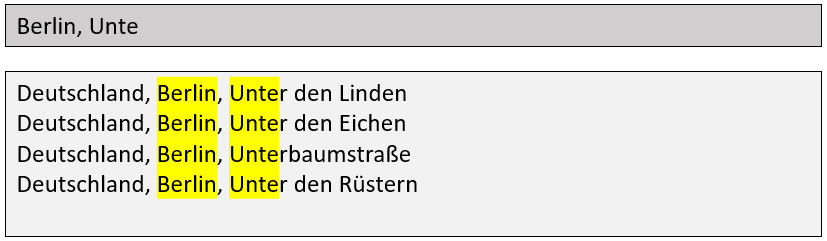
highlightsblock, which can be used to highlight the matched query terms within the resulttitleand within the detailed address components in theaddressblock:
Note:
HERE Geocoding and Search
/autocompleteendpoint does not support premium Japan data.
Updated 7 months ago