

Submit feedback with the HERE Map Feedback API
Any content that you submit via the Map Feedback API is reviewed by HERE before updating the underlying data in HERE maps.
When you submit feedback, the POST body should only contain the properties that have changed compared to the values in the map data. You can include the original values upon which you are submitting the feedback in the currentValues component. For more information, see, Feedback submission request body.
If you want to optimize the feedback review process, include the optional property referenceIds to uniquely identify the object upon which you are providing feedback. If the feedback relates to a road object, use the HERE Geocode API to find the reference ID. If the feedback relates to a place, use the HERE Places API to find the reference ID.
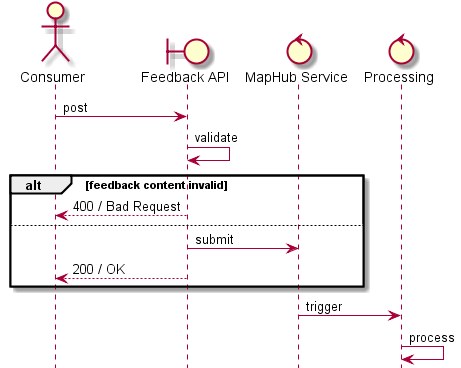
The figure below illustrates the steps in the process of submitting feedback.
Feedback status
The API supports feedback status requests that you can use to check on the status of all of your submissions. When you submit feedback, your request can have one of the following statuses:
OPEN– Feedback was received but it has not been processed.INPROGRESS– Feedback processing is underway.CLOSED– Feedback processing is complete and the outcome is recorded in thejobSolutionfield, which can have one of the possible values:NONE– The feedback request has not been closed yet.FIXED– The feedback has been accepted in part or in full.WONTFIX– The feedback was not accepted.
REOPENED– Feedback processing is complete but the outcome is not satisfying, so the feedback needs to be reopened.
If the result in the jobSolution field is WONTFIX, the corresponding jobSolutionDetails field will contain further explanations why the map feedback has been rejected. The following main categories for a reject are detailed out by addition explanations:
- No additional information was provided.
- Feedback was incomplete.
- Feedback does not meet the requirements.
- The Map Database already reflects the requested change.
- The Map Database reflects the reality.
For a complete list of feedback status options and subcategories, see Feedback response properties.
Note
The field
jobSolutionDetailsis a Preview feature, and may not be available in all responses. For more information on the kinds of features available, see Feature categories.
Updated 4 months ago