

Obtain a traffic vector tile with flow and incident events
To get a traffic vector tile with all events, use the traffic layer parameter.
Request
The following example demonstrates such traffic tile request for a traffic layer parameter:
curl -H "Authorization: Bearer TOKEN_HERE" "https://traffic.vector.hereapi.com/v2/traffictiles/traffic/mc/11/1100/673/omv"curl "https://traffic.vector.hereapi.com/v2/traffictiles/traffic/mc/11/1100/673/omv?apikey=APIKEY_HERE"Response
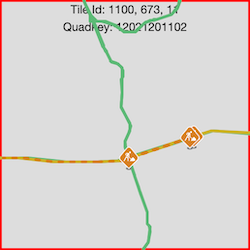
The response contains all traffic layers traffic_flow, traffic_incident and incident_icons with information about traffic for the particular tile.
The following figure illustrates an example of a rendered vector tile response with all layers.
To see how you can integrate real-time traffic flow and incident data into a map application, see the HERE Maps API for JavaScript.
Updated 4 months ago
Did this page help you?