
HERE Traffic Vector Tile API data layers
The data in the HERE Traffic Vector Tile API is organized in layers according to the definitions specified by the Tilezen open-source project started by Mapzen.
The following sections include provide information on the traffic layers' structure.
The HERE Traffic Vector Tile API uses the same structure as the original layer definition to make it easier to find the changes, and follows the same SEMANTIC VERSIONING statement as originally formulated by Tilezen.
Data sources and attribution
The HERE Traffic Vector Tile API uses data from HERE. For more information, see the Required copyright notice.
Source property usage in tiles
The property source is generally omitted in all tiles. Assume that the value is here.com unless stated otherwise.
However, for some regions of the world within the core layer parameter this property is present, and the property value indicates the data source provider. For example, the value for Japan is ipc.
Definition of terms
common- These layers, properties, and kinds are generally available across all features in a response.- Establishes basic selection of features and their arrangement into specific named layers.
- Core properties needed for display and labeling of features:
- Special bits that make traffic vector tile content interoperable, including
kind,kind_detail,landuse_kind,min_zoom, andsort_rank. - Fundamental properties like
name(including localized names) that are included in almost every feature.
- Special bits that make traffic vector tile content interoperable, including
common-optional- These are part of a common set but may not be present because they aren't relevant or because the data isn't available (primarily feature properties, but could also be layers).- Used to refine feature selection.
- Lightly transformed interoperable properties based on original data values.
- Fundamental properties like
sort_rank.
optional- These are properties of a specific, less important kind, or generally present across kinds, but only in exceptional cases.- Often used to "decorate" features already selected for display.
Feature names
Most features in a traffic vector tile include a basic name property in the common list of properties, such as:
name- Generally the name the locals call the feature, in the local language script.
Geometry types
A traffic tile geometry can be one of two types:
point- point, multipointline- linestring, multilinestring
Data updates
Due to the highly dynamic nature of traffic data, traffic tiles should update around every minute.
Changelog
The current version of the HERE Traffic Vector Tile API layer definition is v1.0.0..
Data model promises are in the SEMANTIC VERSIONING statement.
Read the full details in the changes section.
Feature ordering
The ordering of features determines which features to render "on top of" other features, and is an important issue when rendering maps. To assist map rendering, there is a sort_rank property on some features that suggests in what order the features should appear. Lower numbers indicate that features should appear "towards the back" and higher numbers indicate "towards the front." These numbers are consistent across traffic layers.
Road properties (common-optional)
common-optional)The following common properties define additional information about a road in the traffic tile features.
Road transportation kind values
kind valuesaerialwayferryhgv_restrictionhighwaymajor_roadminor_roadpathrailpiste
Road transportation kinddetail values
kinddetail valuesferry- forferrykindmotorway- forhighwaykindtrunk- forhighwaykindprimary- formajor_roadkindsecondary- formajor_roadkindtertiary- formajor_roadkindresidential- forminor_roadkindservice- forminor_roadkindunclassified- forminor_roadkindpedestrian- forpathkindfootway- forpathkindrail- forrailkindchair_lift- foraerialwaykinddownhill- forpistekind
Traffic layers
The HERE Traffic Vector Tile API includes the following layers:
traffic_flowtraffic_incidentsincident_icons
Due to the highly dynamic nature of traffic data, these layers update approximately every minute.
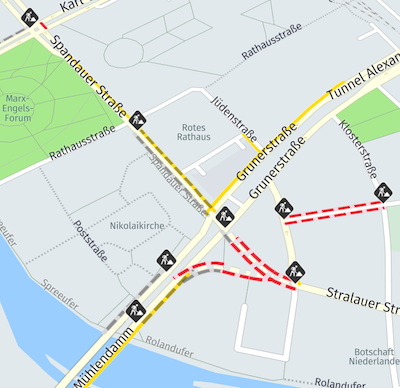
The following figure illustrates an example of rendered all traffic layers (traffic_flow, traffic_incidents, incident_icons).
 Traffic info
Traffic flow
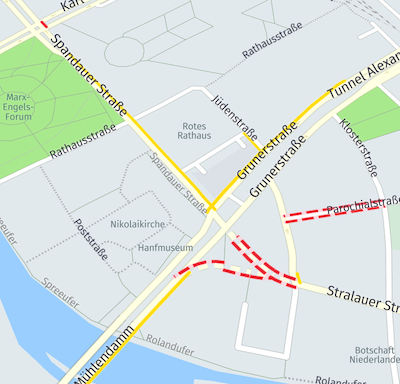
The following figure illustrates an example of traffic flow rendered from the data.
 Traffic flow
The layer content is defined as follows.
- Layer name:
traffic_flow - Geometry types:
line
Traffic flow properties (common)
common)id- A unique traffic event ID. Can check for updated traffic information for the specific event.kind- The severity of the flow information as seen by the traffic provider to indicate the traffic "color." For possible values, see below.min_zoom- A float value as a suggestion which zoom you use when drawing a feature. The value derives from a combination of theroad_kind,kind, andkind_detailvalues described below.
Traffic flow kind values
kind valuesunknown- traffic status unknownfree- free flowing, not disturbed, trafficminor- minor traffic delaysslow- slowly moving trafficqueuing- congested traffic but is still moving slowlystationary- stationary traffic, congestionnone- no traffic flow due to blockage or closure
Traffic flow properties (common-optional)
common-optional)source- The provider of traffic information.congestion- The level of traffic flow, where 0.0 represents completely free-flowing traffic, and 1.0 - completely congested traffic.speed- Speed in km/h.drives_on_left- Set totruewhen the country drives on the left (for example, in the United Kingdom).sort_rank- This property contains a suggestion in which order to render flow features. The value is an integer where smaller numbers suggest that features should be "behind" features with larger numbers.
Traffic flow properties (optional)
optional)road_kind- See the Road transportationkindvalues under Road properties (common-optional).road_kind_detail- See the Road transportationkinddetailvalues under Road properties (common-optional).is_bridge- Set totruewhen the linear is a bridge.is_tunnel- Set totruewhen the linear is a tunnel.is_link- Set totruewhen the linear is a slip-road.is_hov_lane- Set totruewhen the linear is an High-Occupancy Vehicle (HOV) express lane.
Traffic incidents
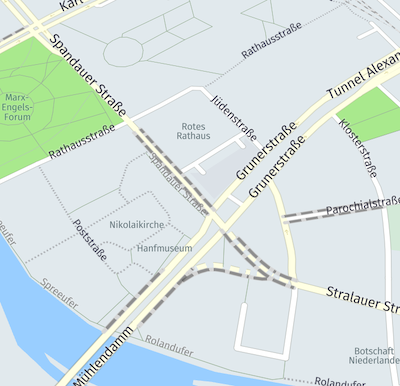
The following figure illustrates an example of traffic incidents rendered from the data.
 Traffic incidents
The layer content is defined as follows:
- Layer name:
traffic_incidents - Geometry types:
line
Traffic incident properties (common)
common)id- A unique traffic event ID. Can check for updated traffic information for the specified event.kind- A type of the incident. For possible values, see below.min_zoom- A float value as a suggestion which zoom you use when drawing a feature. The value derives from thewarning_levelvalue described below.
Traffic incident kind values
kind valuesaccident- there has been a collision.congestion- there has been a build up of vehicles.construction- building or roadworks are taking place.disabled_vehicle- a vehicle is unable to move and is obstructing the road.lane_restriction- lanes are closed.mass_transit- a large number of people are migrating from one location to another.planned_event- an organized event is taking place, causing disruption.road_closure- road closed due to traffic incident, roadworks or public event.road_hazard- there are dangerous objects on the surface of the road.weather- weather conditions are causing disruptions.other- an incident not explainable with the previous labels has occurred.
Traffic incident properties (common-optional)
common-optional)source- The provider of traffic information.sort_rank- This property contains a suggestion in which order to draw flow features (for traffic incident line geometries only). The value is an integer where smaller numbers suggest that features should be "behind" features with larger numbers.start_time- The time the incident begins/has begun as unix time. At least one of thestart_timeorstop_timemust be set.stop_time- The time the incident ends/has ended as unix time. At least one of thestart_timeorstop_timemust be set.
Traffic incident properties (optional)
optional)warning_level- The severity of the incident that has occurred, with the following possible values:low(least severe),minor,major, andcritical(most severe).road_kind- See the Road transportationkindvalues under Road properties (common-optional).road_kind_detail- See the Road transportationkinddetailvalues under Road properties (common-optional).is_bridge- Set totruewhen the linear is a bridge.is_tunnel- Set totruewhen the linear is a tunnel.is_link- Set totruewhen the linear is a slip-road.drives_on_left- Set totruewhen the country drives on the left (for example, in the United Kingdom).is_hov_lane- Set totruewhen the linear is, or the incident affects, a HOV (High-Occupancy Vehicle) express lane.
Incident icons
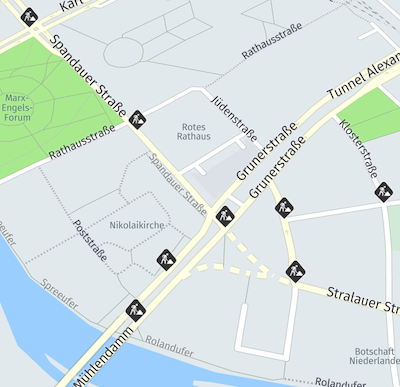
The following figure illustrates an example of rendered traffic incident icons from the data.
 Traffic incident icons
- Layer name:
incident_icons. - Geometry types:
point.
This layer defines information about icons for incidents. It uses the same structure as the traffic_incidents layer. All properties from Traffic Incidents Layer are present in incident_icons layer too.
An incident icon is provided for an incident's primary or secondary locations. Primary location is where the source of the incident (For example, an accident or congestion) occurs and is at the end of the road part affected by the incident. Secondary location is the start of the road part affected by the incident.
Incident icons properties (optional)
optional)is_primary: set totruewhen the feature represents the icon position of the incident's primary location,false(or option is absent) when the feature represents the icon position of the incident's secondary location.offset_direction: the angle in degrees between the true North and the driving side perpendicular to the direction of the incident. Expressed as an integer in range of 0-359, using a clockwise rotation from North.
Updated 3 months ago