

How to make a tile API request
HERE supports map services that work with HEREtile partitioning, not least of which is hosting private data on the HERE platform and incorporating third party maps. Other partitioning systems are available. If you choose to use HEREtile partitioning, you can access map data in a specific tile by sending a REST request that includes an address in tile grid coordinates.
Tile grid coordiates divide the globe into a grid of tiles. For more information on the tile grid system, see HEREtile tiling scheme.
To calculate the tile address in grid coordinates for a tile API request, follow these steps:
-
Choose a location and determine its geographic coordinates in latitude and longitude. For example, the Berlin Hauptbahnhof train station is at 52.525439 latitude and 13.38727 longitude.
-
To find the corresponding tile address, convert the geographic coordinates of the location into the Mercator projection system. This conversion translates latitude and longitude into row and column numbers in the tile grid system, at a specific zoom level.
- For an example using the Berlin Hauptbahnhof train station, see Calculate tile quadkeys. This example calculates the following row/column address for the zoom level 14 tile containing this train station: 8800/6486.
- For a general formula, see the following section, "Convert to Mercator projection."
-
Use the tile address in the form zoom/column/row to build your URL for the tile API GET request. This is the [Z]/[X]/[Y] addressing scheme.
For example, if your location is the Berlin Hauptbahnhof train station with a tile address of 8800/6486 for at zoom level 14, then the URL of your request looks like this:
curl "https://2.base.maps.ls.hereapi.com/maptile/2.1/maptile/newest/normal.day/14/8800/6486/256/png8?apiKey={'{YOUR_API_KEY}'}"
In this example:
- Replace {YOUR_API_KEY} with your actual API key.
- The number "256" represents 256 pixels in the tile.
This example request returns a level 14 tile containing the Berlin Hauptbahnhof train station.
For more information, see Get started in the HERE Vector Tile API — Developer Guide.
Convert to Mercator projection
The Mercator projection system uses a plane representing the globe as a square grid of map tiles. The size of the grid depends on the map zoom level. At the lowest zoom level, the world is in one map tile. At the next higher zoom level, the world is two tiles wide and two tiles high. At the next level, the grid is 4x4, then 8x8, then 16x16, up to the maximum zoom for a particular region.
For more information on map tiles, see HEREtile tiling scheme
To convert geographic coordinates to a tile address, use a specific form of the following general formula:
{λ, φ} -> x[-1, 1] y [-1, 1]
In this formula:
- λ = longitude
- φ = latitude
- x = λ / π
- y = ln(tan(π/4 + φ/2)) / π
At each zoom level the tiles that make up the complete map of the world form a grid in which the number of tiles is equal to two to the power of two multiplied by the zoom level:
22*zoom
The relationship between tiles at two consecutive zoom levels is as follows:
col1,z+1 = (2colz) + 1row1,z+1 = (2rowz) + 1
In this formula:
- col = column number in the tile grid
- row = row number in the tile grid
- z = zoom level
The diagram below demonstrates this graphically:
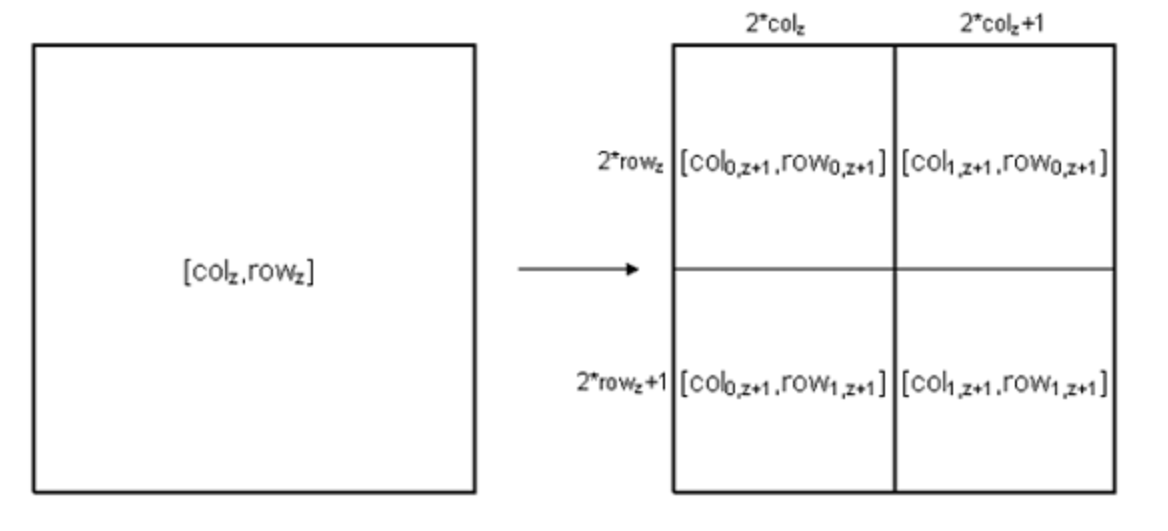
You can use this information to calculate the grid coordinates (row and column) of the map tile with a given zoom level at a particular geographic location. The following example contains the complete algorithm:
var lat = 52.525439, // Latitude
lon = 13.38727,      // Longitude
z = 14,              // Zoom level
latRad,
n,
xTile,
yTile;

latRad = lat * Math.PI / 180;
n = Math.pow(2, z);
xTile = n * ((lon + 180) / 360);
yTile = n * (1-(Math.log(Math.tan(latRad) + 1/Math.cos(latRad)) /Math.PI)) / 2;


--- output ---
lat_rad = 0.916
n = 16384
xTile = 8801.27 // Column
yTile = 6486.13 // Row
Updated 7 months ago