

Catalogs, layers, partitions, and tiles
Most HERE map products organize data into catalogs representing regions, such as one catalog for North America and another for Western Europe. Each catalog typically contains more than one data layer. For example, the HERE HD Live Map product contains 19 data layers in Navigation Data Standard (NDS) format, and 18 layers in Native format using Protocol Buffer.
Each data layer contains a logical type of map object such as road topology, lane topology, road geometry, lane geometry, road attribution, lane attribution, localization objects such as road signs, and so on. Each map object within a layer has a unique Map Object Identifier, so map objects can refer to each other, and you can refer to specific map objects and their attributes.
Data layers and their partitions can store any binary data. The HERE Platform doesn't need to understand the structure of the data in a partition since the platform doesn't need to decode that data. You can retrieve and publish that data in digital form, without modification. You can define the structure and encoding of the data in a layer by associating a schema with the layer. A schema defines the data structure and encoding for the partitions in a given layer so data producers and consumers know how to encode and decode the data.
Partitions
Each data layer within a map catalog has multiple partitions, making partitions the smallest unit of data in the system. Partitions are key values within a catalog, and layers are a namespace for partitions. This makes the catalog a key-key-value store.
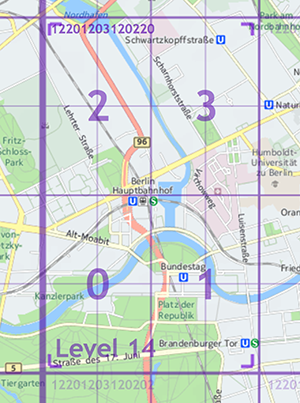
HEREtile partitioning is one of many possible methods for storing map data. With HEREtile partitioning, data layers contain rectangular geographic tiles that represent an area of the map. The tiles at a project-specific zoom level correspond to partitions. If you use HEREtile partitioning, you can take advantage of the HERE platform libraries and API to perform geo-related tasks.
The partitioning of the layer containing administrative data is different. Depending on the country, partitioning of such data requires as few as 3 administrative levels and as many as 5: from nation to state/province to county/parish to city to town to neighborhood. Each administrative level has a corresponding partition containing data at that level. For example, a nation usually has a Level 1 partition containing administrative data that applies throughout that country, a Level 2 partition for data that applies in a state or province within that country, and so on.
Tiles and tile images
In HD Live Map catalogs, each partition within a layer corresponds exactly to zoom level 14 tiles, with the exception of the layer containing administrative data. Other products might partition data at a different zoom level. For more information, see the HEREtile tiling scheme.
In most cases, publication converts the partitions in each data layer to raster tile images. These images have a specific resolution in tile pixels, not screen pixels, similar to a digital photo of specific pixel dimensions. Depending on the product, and on the location of a given tile, the pixels in a tile image correspond to an area of a specific size on the surface of the earth. For more information, see Tile zoom levels and sizes.
Home tiles
The attributes and other data for most map objects live only in their home tiles, even if a given road or other map object extends through multiple tiles. The exact definition of "home tile" depends on the product. For HD Live Map, the home tile of a road is where the road starts, based on its original digitizing direction. Hence, to access details about an HD Live Map object that extends beyond its home tile, one option is to select that object in the HD Live Map Viewer to display a reference to its home tile. In general, you can reference an object from remote tiles by using the object's ID and its home tile ID.
For more information, see Feature tile assignment and Make a Tile API request.
Updated 7 months ago