

Get traffic incidents in route spans
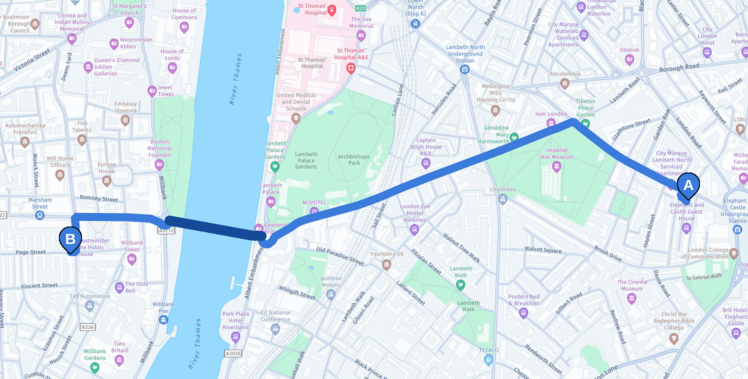
This example request shows how to add traffic incident spans along the route. You can get traffic incidents along the route by adding return=polyline,incidents and spans=incidents to the route request.
curl -gX GET 'https://router.hereapi.com/v8/routes?'\
'origin=51.495308,-0.102713&'\
'destination=51.493865,-0.129217&'\
'return=polyline,incidents,summary&'\
'spans=incidents&'\
'transportMode=car&'\
'departureTime=2024-09-16T11:17:26+01:00&'\
'apiKey=YOUR_API_KEY'
The dark blue span in the following image shows the location of the incident shown in the response below.
{
  "routes": [
    {
      "id": "1c5e42a2-3f83-4f11-9da9-1f1db0c4a8ea",
      "sections": [
        {
          "id": "32e63d71-530d-46f0-9e91-b4107befb33d",
          ...,
          "summary": {
            "duration": 426,
            "length": 2148,
            "baseDuration": 325
          },
          "polyline": "...",
          "spans": [
            {...},
            {
              "offset": 71,
              "incidents": [
                1
              ]
            },
            {...}
          ],
          ...,
          "incidents": [
            {
              "type": "construction",
              "criticality": "critical",
              "validFrom": "2024-08-29T07:00:00Z",
              "validUntil": "2024-09-23T23:00:00Z",
              "description": "Road construction",
              "id": "here:traffic:incident:2940177881427534436"
            },
            {
              "type": "construction",
              "criticality": "critical",
              "validFrom": "2024-08-29T07:00:00Z",
              "validUntil": "2024-09-23T23:00:00Z",
              "description": "Road construction",
              "id": "here:traffic:incident:2662582736385153745"
            }
          ]
        }
      ]
    }
  ]
}
Updated 4 months ago
Did this page help you?