
How to retrieve a weather map tile
This resource retrieves a weather map tile for a given image type.
| Method | URL format |
|---|---|
GET | https://{base_url}/v3/tile/{zoom}/{x}/{y}/{imageType} |
You can find more details on the applicable query and path parameters in the sections below. The base_url will be provided during the process of obtaining credentials.
Authorization
Each request is authenticated and requires a valid bearer token to be included in HTTP Authorization header:
Authorization: Bearer <token>For more information about obtaining credentials, see the Identity and Access Management Developer Guide.
Path parameters
The table below documents the path parameters.
| Parameter | Required | Description |
|---|---|---|
x | Yes | x coordinate for the tile, can be any number between 0 and 2^zoom - 1 |
y | Yes | y coordinate for the tile, can be any number between 0 and 2^zoom - 1 |
zoom | Yes | zoom level, value can be from 3 to 11 for layer id=1 and from 4 to 9 for layer id=2 |
imageType | Yes | Type of the image. radar - the Doppler radar images. Shows current or historical precipitation based on actual radar images. Coverage is limited to available radar stations. precipitation - Global precipitation images. Shows current, historical, or future precipitation. Based on a precipitation model that uses radar, satellite imagery, climate models, and possibly other inputs. Images are more accurate than radar alone, and they cover locations where no radar is available, in addition to forecasting the future. |
XYZ tiling scheme
Weather tile API provides doppler radar data as map tiles compatible with commonly used map services such as Open Street Maps or Google Maps.
More details about XYZ tiling scheme can be found here:
Query parameters
The table below documents the query parameters.
| Parameter | Required | Description |
|---|---|---|
time | No | The time in ISO 8601 format. It defaults to the current time. Specify a time in the past to get archived images, or in the future to retrieve precipitation forecasts (precipitation image type only). Images in the past are available 24 hours back in 5, 10 or 15 minutes interval (depends on region, see Tile coverage. Global precipitation images (only) are available for the next 15 hours in 15-minute intervals. Example: time=2019-09-11T12:00:00Z |
format | No | The desired image output format. Currently the output format is png, but other formats might be supported in the future. See also request headers. |
Request headers
The table below documents the request headers.
| Header name | Required | Description |
|---|---|---|
Accept | Yes | Specify certain media types which are acceptable for the response. Available values : image/png |
Response
On success, the response status is 200 OK and the response payload contains an image with the specified Acceps header (default is png) and with a resolution of 256 x 256 pixels. Header 'Last-Modified' in the response contains image timestamp:
Last-Modified=2019-09-12T05:00:00Z Response status is 200 and transparent image is returned if requested area is not covered. Custom header 'X-RADAR-IMAGE' in the response contains value 'NC'.
See Tile coverage Response status 400 Bad Request is returned if 'time' query parameter does not conform format or is out of range (too old or too far in the future). Error message contains available timestamps range:
{
    "status": 400,
    "title": "Invalid Request",
    "code": "E611203",
    "cause": "Given timestamp is out of range. Radar images are available for timestamps from '2024-06-10T01:30Z' until '2024-06-10T09:00Z'."
}
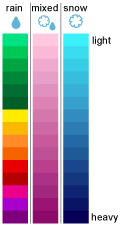
On failure, the response has a different status code and may include additional information about the error. You can use this additional information to troubleshoot this issue. For more information see Response status codes Radar color scheme legend:
Updated 2 months ago