

Manage tour planning billing
The Tour Planning product offers advanced features and has a unique billing structure compared to other HERE services. Its pricing is calculated based on the number of transactions, as detailed in the following sections of this document. For more information on pricing, refer to the Tour Planning section on the pricing page.
The billing for Tour Planning usage is based on the number of transactions, which are calculated according to the number of locations specified in the tour planning problem. Each location, including vehicle shift start and end locations, vehicle break locations (if specified), and job pick-up or delivery locations, counts as a billable transaction. Only well-formulated Vehicle Routing Problems produce billable transactions. If you built a problem incorrectly and it returns an error response, transactions are not billed.
For the asynchronous endpoint, transactions are accumulated even if you do not request the solution of the problem after it becomes available. The following examples illustrate how your problem might be billed based on the number of transactions.
Understand location-based calculation of transactions
To determine the accurate transaction count, it is essential to count all location objects involved in the vehicle routing problem. The following section provides a detailed breakdown of how locations are counted within the fleet and plan objects of the problem.
Fleet
To accurately account for fleet constraints, we must consider calculating four key sets of locations: vehicle shift start and end points, all shift locations (when multiple shifts are used), reload, and break locations. These calculations will be treated as transactions.
Plan
Regarding the plan aspect of the problem, we also calculate two types of job locations: single jobs and multi-job locations. When replanning a tour, the total number of job locations is also added to this calculation, with all resulting values considered as transactions.
Relations
The following example illustrates a vehicle intended to complete four jobs. The vehicle's shift start and end locations are calculated as two transactions.
Each job has one location, resulting in four additional transactions. Note that relationships was set for the vehicle to complete certain jobs in a specific order. However, this does not impact the total number of transactions, as it neither adds nor removes any locations from the problem. Ultimately, the example is optimized into a tour consisting of six locations, corresponding to six transactions.
Click to expand/collapse the sample JSON
{
  "fleet": {
    "types": [
      {
        "id": "Vehicle_1",
        "profile": "car_1",
        "costs": {
          "fixed": 9,
          "distance": 0.004,
          "time": 0.005
        },
        "shifts": [
          {
            "start": {
              "time": "2021-08-27T08:03:00Z",
              "location": {
                "lat": 52.530971,
                "lng": 13.384915
              }
            },
            "end": {
              "time": "2021-08-27T18:03:00Z",
              "location": {
                "lat": 52.530971,
                "lng": 13.384915
              }
            }
          }
        ],
        "capacity": [
          10
        ],
        "limits": {
          "maxDistance": 300000,
          "shiftTime": 43200
        },
        "amount": 1
      }
    ],
    "profiles": [
      {
        "type": "car",
        "name": "car_1"
      }
    ]
  },
  "plan": {
    "jobs": [
      {
        "id": "job_1",
        "tasks": {
          "deliveries": [
            {
              "places": [
                {
                  "times": [
                    [
                      "2021-08-27T09:03:00Z",
                      "2021-08-27T18:03:00Z"
                    ]
                  ],
                  "location": {
                    "lat": 52.59175589353722,
                    "lng": 13.350747750372257
                  },
                  "duration": 360
                }
              ],
              "demand": [
                1
              ]
            }
          ]
        }
      },
      {
        "id": "job_2",
        "tasks": {
          "deliveries": [
            {
              "places": [
                {
                  "times": [
                    [
                      "2021-08-27T11:03:00Z",
                      "2021-08-27T20:03:00Z"
                    ]
                  ],
                  "location": {
                    "lat": 52.43363386232821,
                    "lng": 13.403232562191313
                  },
                  "duration": 540
                }
              ],
              "demand": [
                1
              ]
            }
          ]
        }
      },
      {
        "id": "job_3",
        "tasks": {
          "deliveries": [
            {
              "places": [
                {
                  "times": [
                    [
                      "2021-08-27T10:03:00Z",
                      "2021-08-27T16:03:00Z"
                    ]
                  ],
                  "location": {
                    "lat": 52.473321658918245,
                    "lng": 13.28972099097991
                  },
                  "duration": 660
                }
              ],
              "demand": [
                1
              ]
            }
          ]
        }
      },
      {
        "id": "job_4",
        "tasks": {
          "deliveries": [
            {
              "places": [
                {
                  "times": [
                    [
                      "2021-08-27T09:03:00Z",
                      "2021-08-27T17:03:00Z"
                    ]
                  ],
                  "location": {
                    "lat": 52.54165532725351,
                    "lng": 13.365047170290309
                  },
                  "duration": 1140
                }
              ],
              "demand": [
                1
              ]
            }
          ]
        }
      }
    ],
    "relations": [
      {
        "type": "sequence",
        "jobs": [
          "job_1",
          "job_4"
        ],
        "vehicleId": "Vehicle_1_1"
      }
    ]
  }
}
Multiple shifts
When using multiple shifts, each shift start and end location, regardless of whether they are identical or not, is treated as a separate transaction. For example, consider a vehicle with four distinct shifts configured:
- Shift 1:
2021-10-23T09:00:00Z-2021-10-23T12:00:00Z - Shift 2:
2021-10-24T09:00:00Z-2021-10-24T12:00:00Z - Shift 3:
2021-10-25T09:00:00Z-2021-10-25T12:00:00Z - Shift 4:
2021-10-26T09:00:00Z-2021-10-26T12:00:00Z
The start and end locations for these shifts are identical, as drivers typically begin and conclude their shifts at the same depot. Despite this, the algorithm treats each location as a distinct transaction. As a result, we can expect to see eight transactions in total within the fleet section.
Click to expand/collapse the sample JSON
{
  "fleet": {
    "types": [
      {
        "id": "Vehicle_1",
        "profile": "car",
        "costs": {
          "fixed": 10,
          "distance": 0.002,
          "time": 0.003
        },
        "shifts": [
          {
            "start": {
              "time": "2021-10-23T09:00:00Z",
              "location": {
                "lat": 51.059188,
                "lng": 13.540317
              }
            },
            "end": {
              "time": "2021-10-23T12:00:00Z",
              "location": {
                "lat": 51.059188,
                "lng": 13.540317
              }
            }
          },
          {
            "start": {
              "time": "2021-10-24T09:00:00Z",
              "location": {
                "lat": 51.059188,
                "lng": 13.540317
              }
            },
            "end": {
              "time": "2021-10-24T12:00:00Z",
              "location": {
                "lat": 51.059188,
                "lng": 13.540317
              }
            }
          },
          {
            "start": {
              "time": "2021-10-25T09:00:00Z",
              "location": {
                "lat": 51.059188,
                "lng": 13.540317
              }
            },
            "end": {
              "time": "2021-10-25T12:00:00Z",
              "location": {
                "lat": 51.059188,
                "lng": 13.540317
              }
            }
          },
          {
            "start": {
              "time": "2021-10-26T09:00:00Z",
              "location": {
                "lat": 51.059188,
                "lng": 13.540317
              }
            },
            "end": {
              "time": "2021-10-26T12:00:00Z",
              "location": {
                "lat": 51.059188,
                "lng": 13.540317
              }
            }
          }
        ],
        "capacity": [
          10
        ],
        "amount": 1
      }
    ],
    "profiles": [
      {
        "type": "car",
        "name": "car"
      }
    ]
  },
  // Remaining problem components omitted for brevity
}
Breaks
When using breaks with a vehicle, a break is considered a transaction only when its location is specified. If no location is provided for the break, it occurs at one of the job locations, without an additional transaction.
The following example illustrates the previous scenario. In this problem, a vehicle has a fixed shift and a break, where the shift start and end locations match the transactions, and the break lacks a specific location. As a consequence, there are two transactions in the fleet constraints for this example.
Click to expand/collapse the sample JSON
{
  "fleet": {
    "types": [
      {
        "id": "92d3cd5cca04",
        "profile": "car_1",
        "costs": {
          "fixed": 10,
          "distance": 0.004,
          "time": 0.009
        },
        "shifts": [
          {
            "start": {
              "time": "2021-08-27T08:03:00Z",
              "location": {
                "lat": 52.530971,
                "lng": 13.384915
              }
            },
            "end": {
              "time": "2021-08-27T17:03:00Z",
              "location": {
                "lat": 52.530971,
                "lng": 13.384915
              }
            },
            "breaks": [
              {
                "duration": 1800,
                "times": [
                  [
                    "2021-08-27T12:03:00Z",
                    "2021-08-27T13:03:00Z"
                  ]
                ]
              }
            ]
          }
        ],
        "capacity": [
          2
        ],
        "limits": {
          "maxDistance": 300000
        },
        "amount": 1
      }
    ],
    "profiles": [
      {
        "type": "car",
        "name": "car_1"
      }
    ]
  }
  // Remaining problem components omitted for brevity
}
Multi-jobs
When using multi-jobs with multiple pickups and deliveries, we calculate each of those locations as separate transactions. For example, consider a multi-job with three pickups and one delivery that requires delivering all the pickups to one location, as illustrated in the following example. In this scenario, the calculation produces a total of four transactions.
Click to expand/collapse the sample JSON
{
  // Previous problem components omitted for brevity.
  "plan": {
    "jobs": [
      {
        "id": "job_1",
        "tasks": {
          "pickups": [
            {
              "places": [
                {
                  "location": {
                    "lat": 52.47706593757918,
                    "lng": 13.390815701172201
                  },
                  "duration": 660
                }
              ],
              "demand": [
                1
              ]
            },
            {
              "places": [
                {
                  "location": {
                    "lat": 52.473571009931106,
                    "lng": 13.389035169086807
                  },
                  "duration": 1140
                }
              ],
              "demand": [
                1
              ]
            },
            {
              "places": [
                {
                  "location": {
                    "lat": 52.53090538774364,
                    "lng": 13.384692097156309
                  },
                  "duration": 840
                }
              ],
              "demand": [
                1
              ]
            }
          ],
          "deliveries": [
            {
              "places": [
                {
                  "location": {
                    "lat": 52.58919138279804,
                    "lng": 13.462161100698735
                  },
                  "duration": 1020
                }
              ],
              "demand": [
                3
              ]
            }
          ]
        }
      }
    ]
  }
}
Alternative locations
When using alternative locations, all locations specified in the problem constraints are treated as transactions, regardless of whether the vehicle visits them all after solution generation. This is because alternative locations are set for a job with specific time windows for each location. After the solution is calculated, the vehicle will visit only one optimal location determined by the optimization algorithm.
When formulating the problem, all added locations in the constraints are treated as transactions. In the following example, there is a job with two locations tagged as "Home" and "Work", set for different time windows. Although the solution only includes one of these locations in the tour, the total number of transactions remains two.
Click to expand/collapse the sample JSON
{
  // Previous problem components omitted for brevity.
  "plan": {
    "jobs": [
      {
        "id": "Job_1",
        "tasks": {
          "pickups": [
            {
              "places": [
                {
                  "times": [
                    [
                      "2021-10-23T08:30:00Z",
                      "2021-10-23T09:00:00Z"
                    ]
                  ],
                  "location": {
                    "lat": 52.5154509,
                    "lng": 13.42167
                  },
                  "duration": 1150,
                  "tag": "Home"
                },
                {
                  "times": [
                    [
                      "2021-10-23T10:00:00Z",
                      "2021-10-23T19:00:00Z"
                    ]
                  ],
                  "location": {
                    "lat": 52.6834366,
                    "lng": 13.2781471
                  },
                  "duration": 1150,
                  "tag": "Work"
                }
              ],
              "demand": [
                1
              ]
            }
          ]
        }
      }
    ]
  }
}
Reloads
When using reloads, each location specified in the problem as a reload counts towards the total number of transactions.
The following example illustrates two possible reloads in two different locations. The resulting solution might include varying numbers of reloads: zero, one, or two. However, in all cases, the locations designated as reloads are counted as separate transactions.
Click to expand/collapse the sample JSON
{
  "fleet": {
    "types": [
      {
        "id": "92d3cd5cca04",
        "profile": "car_1",
        "costs": {
          "fixed": 10,
          "distance": 0.004,
          "time": 0.009
        },
        "shifts": [
          {
            "start": {
              "time": "2021-08-27T08:03:00Z",
              "location": {
                "lat": 52.530971,
                "lng": 13.384915
              }
            },
            "end": {
              "time": "2021-08-27T17:03:00Z",
              "location": {
                "lat": 52.530971,
                "lng": 13.384915
              }
            },
            "reloads": [
              {
                "location": {
                  "lat": 52.540881,
                  "lng": 13.379915
                },
                "duration": 180
              },
              {
                "location": {
                  "lat": 52.530971,
                  "lng": 13.384915
                },
                "duration": 180
              }
            ]
          }
        ],
        "capacity": [
          2
        ],
        "amount": 1
      }
    ],
    "profiles": [
      {
        "type": "car",
        "name": "car_1"
      }
    ]
  }
  // Remaining problem components omitted for brevity
}
Classify API usage and costs through the billingTag
By attaching a custom billingTag identifier to your requests, you can classify and track the HERE Tour Planning API usage and costs across specific projects, features, or clients.
The following snippet provides an example of how to add the billing tag to your HERE Tour Planning API requests:
curl --location 'https://tourplanning.hereapi.com/v3/problems?billingTag=YOUR_BILLING_TAG' \
--header 'Content-Type: application/json' \
--header 'Authorization: Bearer <TOKEN>' \
--data '<PROBLEM.json>'
In the previous request:
billingTagis the parameter that contains a string value representing the category to which you want to assign transactions made as part of the request.<TOKEN>is an OAuth 2.0 bearer token.<PROBLEM.json>represents the JSON body of the vehicle routing problem to solve.
Get the usage report
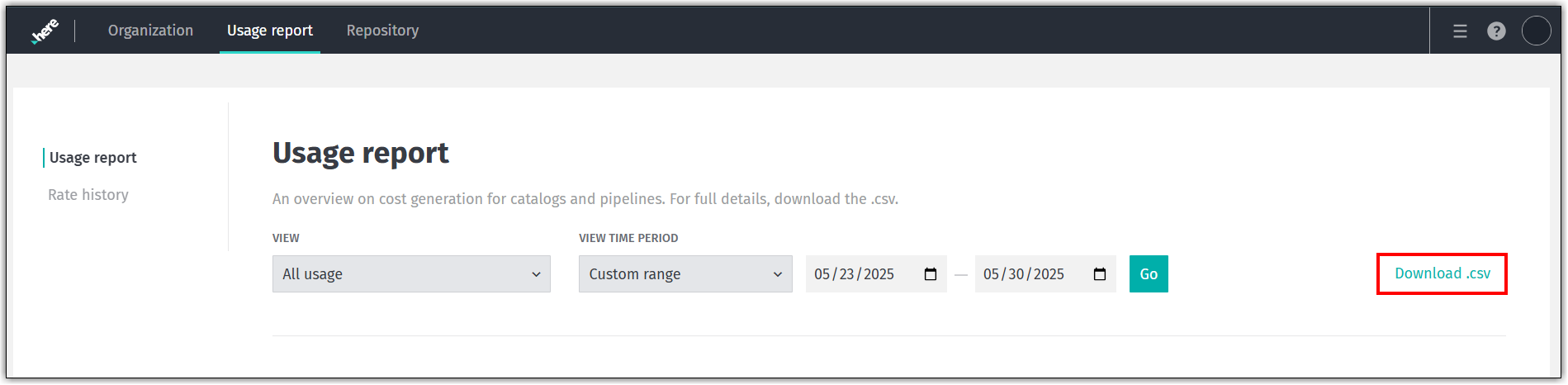
Follow these steps to download a usage report with costs broken down by billing tag from the HERE platform.
- Navigate to the Usage report landing page on the HERE platform.
- Specify the project and time range for the usage report.
- Click Download CSV.
Note
- The Usage details section does not contain billing tag details. You must download the CSV file for more information.
- Report generation might take some time, depending on the selected time range.
See the following figure for reference:
For information on how to retrieve API usage reports by billing tag, see the Cost Management Developer Guide.
The CSV file includes a BillingTag column that shows API usage for each billing tag used in requests during the specified period.
Next steps
For more information on how to build and send a HERE Tour Planning API request, see:
Updated 6 months ago