

Assign otherwise unreachable jobs by ignoring route violations
When a road closure or no-through zone blocks access to a job location, the HERE Tour Planning API treats that location as unreachable. As a result, the job is left unassigned and is not added to any tour.
Other routing constraints can lead to the same outcome. For example, a job can become unreachable when:
- A vehicle profile includes physical limits (such as axle weight restrictions) that prevent access to certain roads, bridges, or zones.
- The problem uses avoid areas or avoid segments in a way that removes every valid route to the location.
In real-life scenarios, such as last-mile delivery, such constraints often affect only the last few meters of a route. In those cases, a driver can park nearby and complete the final stretch on foot, making the job practically reachable even when the road network is not.
To account for this and prevents unnecessary unassignment when a driver can physically complete the delivery despite a routing restriction, use the ignoreRouteViolations feature.
When you configure this feature, the optimization algorithm treats locations that would otherwise trigger a REACHABLE_CONSTRAINT violation as reachable, and includes the corresponding jobs in the tour plan.
A REACHABLE_CONSTRAINT violation occurs when the optimization algorithm cannot find any route between two points without crossing a restricted or closed road segment.
Note
The
ignoreRouteViolationsfeature overrides routing restrictions without verifying that a location is physically accessible. If a job location is genuinely unreachable, even on foot, the driver cannot complete the stop even though the optimizer has assigned it. Use this feature only when your operational context confirms that drivers can bridge the last stretch of the route on foot.For more information, see Fleet.
Example: assign jobs blocked by axle weight restrictions
In this sample scenario, the truck fleet uses the weightPerAxleGroup option. This setting limits routing to roads and bridges whose posted axle-weight limits can accommodate the vehicle:
single: 10000: the truck applies 10,000 kg to a single axle group.tandem: 18000: the truck applies 18,000 kg to a tandem axle group.
In the problem JSON, these limits are defined in the corresponding truck profile under fleet.profiles, as shown in the following snippet:
{
  "name": "my_delivery_truck",
  "type": "truck",
  "options": {
    "weightPerAxleGroup": {
      "single": 10000,
      "tandem": 18000
    }
  }
}
When the optimization algorithm encounters a road or bridge with a weight restriction lower than these values, it treats the road as forbidden for this vehicle. If the only road to a job location leads or crosses a restricted road or bridge, the job becomes unreachable.
In the following Tour Planning problem, the truck fleet has to complete two jobs only, one located in Berlin suburbs, and the other one in the city center:
Click to expand/collapse the sample JSON
{
  "fleet": {
    "types": [
      {
        "profile": "my_delivery_truck",
        "amount": 1,
        "capacity": [
          100
        ],
        "costs": {
          "time": 0.005555555555555556,
          "distance": 0.0015,
          "fixed": 370
        },
        "id": "vehicle_1",
        "shifts": [
          {
            "start": {
              "location": {
                "lat": 52.58993,
                "lng": 13.42273
              },
              "time": "2025-09-26T07:58:00Z"
            }
          }
        ]
      }
    ],
    "profiles": [
      {
        "name": "my_delivery_truck",
        "type": "truck",
        "options": {
          "weightPerAxleGroup": {
            "single": 10000,
            "tandem": 18000
          }
        }
      }
    ]
  },
  "plan": {
    "jobs": [
      {
        "id": "delivery_1",
        "tasks": {
          "deliveries": [
            {
              "places": [
                {
                  "duration": 300,
                  "location": {
                    "lat": 52.595251760429065,
                    "lng": 13.456764166098564
                  }
                }
              ],
              "demand": [
                4
              ]
            }
          ]
        }
      },
      {
        "id": "delivery_2",
        "tasks": {
          "deliveries": [
            {
              "places": [
                {
                  "duration": 300,
                  "location": {
                    "lat": 52.51613904868212,
                    "lng": 13.376546984072776
                  }
                }
              ],
              "demand": [
                2
              ]
            }
          ]
        }
      }
    ]
  }
}
Interpret the initial solution
The following figure provides a visual summary of the resulting solution:
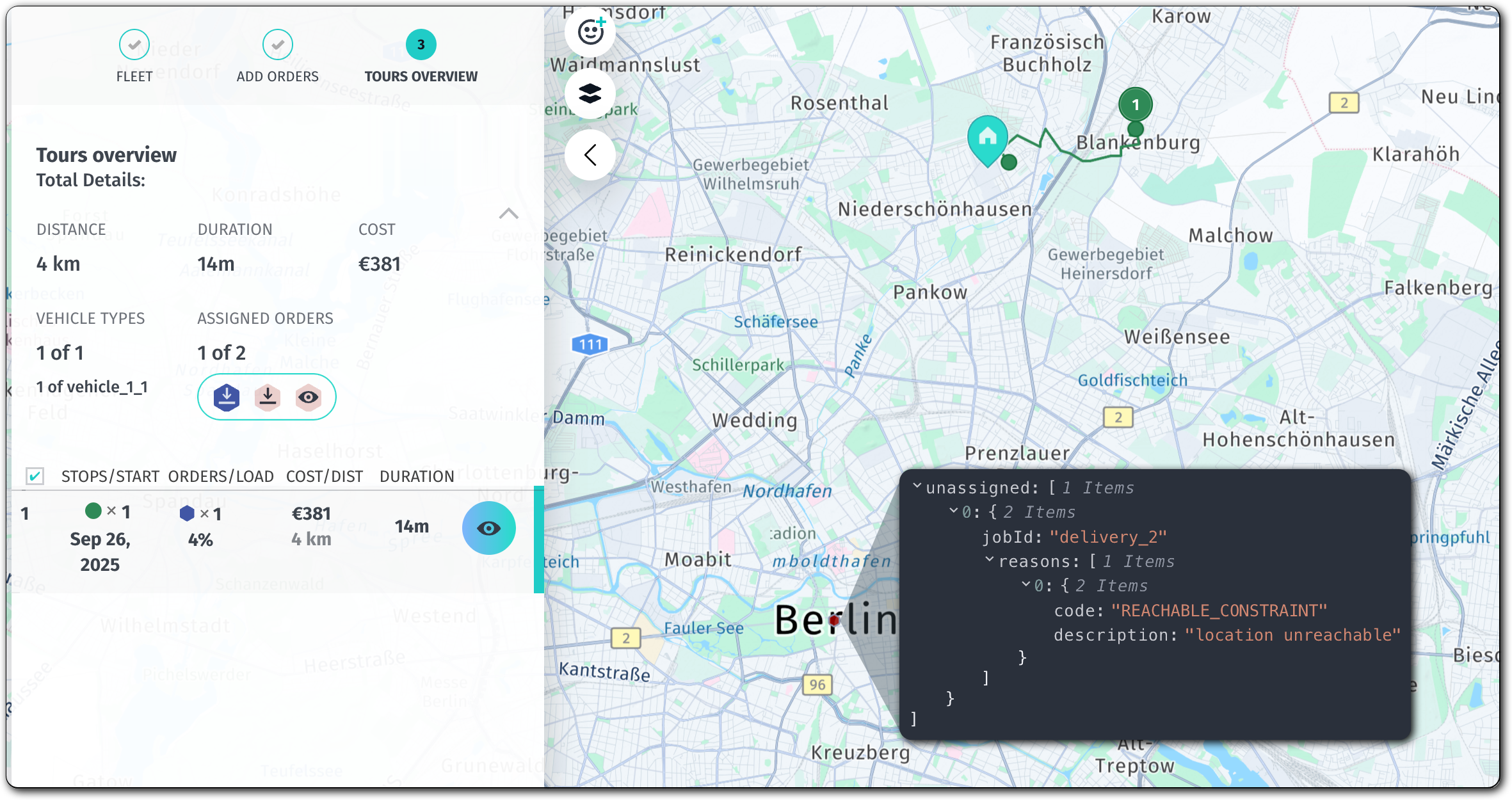
As the summary demonstrates, the optimization algorithm left delivery_2 unassigned with a location_unreachable status. The likely cause is that the truck cannot access the job location because the only available routes violate the posted axle weight limits.
See the following JSON file for the full solution file:
Click to expand/collapse the sample JSON
{
  "statistic": {
    "cost": 381.08094444444447,
    "distance": 4091,
    "duration": 890,
    "times": {
      "driving": 590,
      "serving": 300,
      "waiting": 0,
      "stopping": 0,
      "break": 0,
      "intraStop": 0
    },
    "intraStopDistance": 0
  },
  "tours": [
    {
      "vehicleId": "vehicle_1_1",
      "typeId": "vehicle_1",
      "stops": [
        {
          "time": {
            "arrival": "2025-09-26T07:58:00Z",
            "departure": "2025-09-26T07:58:00Z"
          },
          "load": [
            4
          ],
          "activities": [
            {
              "jobId": "departure",
              "type": "departure",
              "location": {
                "lat": 52.58993,
                "lng": 13.42273
              },
              "time": {
                "start": "2025-09-26T07:58:00Z",
                "end": "2025-09-26T07:58:00Z",
                "arrival": "2025-09-26T07:58:00Z"
              }
            }
          ],
          "location": {
            "lat": 52.58993,
            "lng": 13.42273
          },
          "distance": 0
        },
        {
          "time": {
            "arrival": "2025-09-26T08:07:50Z",
            "departure": "2025-09-26T08:12:50Z"
          },
          "load": [
            0
          ],
          "activities": [
            {
              "jobId": "delivery_1",
              "type": "delivery",
              "location": {
                "lat": 52.595251760429065,
                "lng": 13.456764166098564
              },
              "time": {
                "start": "2025-09-26T08:07:50Z",
                "end": "2025-09-26T08:12:50Z",
                "arrival": "2025-09-26T08:07:50Z"
              }
            }
          ],
          "location": {
            "lat": 52.595251760429065,
            "lng": 13.456764166098564
          },
          "distance": 4091
        }
      ],
      "statistic": {
        "cost": 381.08094444444447,
        "distance": 4091,
        "duration": 890,
        "times": {
          "driving": 590,
          "serving": 300,
          "waiting": 0,
          "stopping": 0,
          "break": 0,
          "intraStop": 0
        },
        "intraStopDistance": 0
      },
      "shiftIndex": 0
    }
  ],
  "unassigned": [
    {
      "jobId": "delivery_2",
      "reasons": [
        {
          "code": "REACHABLE_CONSTRAINT",
          "description": "location unreachable"
        }
      ]
    }
  ]
}
Ignore route violations
To override the weight limits for the road and make sure that the optimization algorithm assigns the delivery_2 job to the tour, you can use the ignoreRouteViolations option, with the value set to all. You set the option on the named profile object (fleet.profiles), as shown in the following snippet:
{
  "name": "my_delivery_truck",
  "type": "truck",
  "ignoreRouteViolations": [
    "all"
  ],
  "options": {
    "weightPerAxleGroup": {
      "single": 10000,
      "tandem": 18000
    }
  }
}
As a result, the optimization algorithm ignores all route violations for every vehicle type in fleet.types that references the my_delivery_truck profile, allowing jobs that would otherwise remain unassigned to be included in a tour.
Note
You cannot use the
"all"value in the"ignoreRouteViolations"array together with other values, for example,"traffic". Doing so results in an error.For more information about other supported
ignoreRouteViolationsvalues, see the API Reference.
The following sample contains the problem with the my_delivery_truck vehicle profile now containing the ignoreRouteViolations option set to all:
Click to expand/collapse the sample JSON
{
  "fleet": {
    "types": [
      {
        "profile": "my_delivery_truck",
        "amount": 1,
        "capacity": [
          100
        ],
        "costs": {
          "time": 0.005555555555555556,
          "distance": 0.0015,
          "fixed": 370
        },
        "id": "vehicle_1",
        "shifts": [
          {
            "start": {
              "location": {
                "lat":52.58993,
                "lng":13.42273
              },
              "time": "2025-09-26T07:58:00Z"
            }
          }
        ]
      }
    ],
    "profiles": [
      {
        "name": "my_delivery_truck",
        "type": "truck",
        "ignoreRouteViolations": [
          "all"
        ],
        "options": {
          "weightPerAxleGroup": {
            "single": 10000,
            "tandem": 18000
          }
        }
      }
    ]
  },
  "plan": {
    "jobs": [
      {
        "id": "delivery_1",
        "tasks": {
          "deliveries": [
            {
              "places": [
                {
                  "duration": 300,
                  "location": {
                    "lat": 52.595251760429065,
                    "lng": 13.456764166098564
                  }
                }
              ],
              "demand": [
                4
              ]
            }
          ]
        }
      },
      {
        "id": "delivery_2",
        "tasks": {
          "deliveries": [
            {
              "places": [
                {
                  "duration": 300,
                  "location": {
                    "lat": 52.51613904868212,
                    "lng": 13.376546984072776
                  }
                }
              ],
              "demand": [
                2
              ]
            }
          ]
        }
      }
    ]
  }
}
Interpret the updated solution
The new solution shows that the optimization algorithm assigned all jobs to the tour, including the delivery_2 job that was previously unassigned due to it being unreachable:
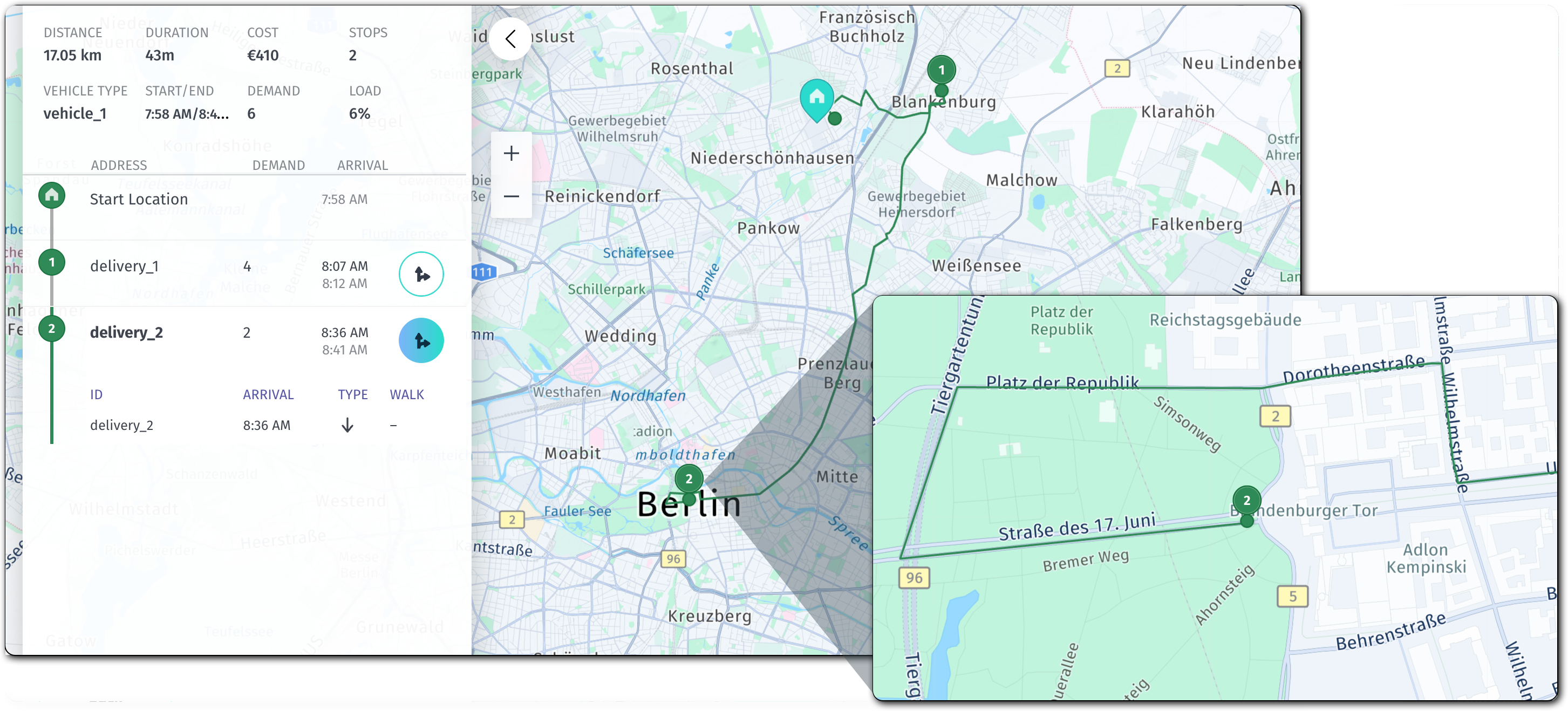
The updated solution demonstrates that the optimization algorithm suppressed all routing violations including weight, height, and other physical restrictions, with the responsibility now placed on the driver to verify physical access to the job location. This might include parking the vehicle at a nearby parking lot and completing the remaining segment of the route on foot.
In addition, all jobs for which the optimization algorithm ignored routing violations come with a corresponding warning in the notices array, as shown in the delivery_2 job example:
{
  "jobId": "delivery_2",
  "type": "delivery",
  "location": {
    "lat": 52.51613904868212,
    "lng": 13.376546984072776
  },
  "time": {
    "start": "2025-09-26T08:36:50Z",
    "end": "2025-09-26T08:41:50Z",
    "arrival": "2025-09-26T08:36:50Z"
  },
  "notices": [
    {
      "code": "unreachableLocation",
      "title": "Due to ignored route violations (all), this location can be unreachable",
      "action": "Remove ignoreRouteViolations to be sure that location is reachable"
    }
  ]
}
The full updated solution is available in the following section:
Click to expand/collapse the sample JSON
{
  "statistic": {
    "cost": 410.1831111111111,
    "distance": 17048,
    "duration": 2630,
    "times": {
      "driving": 2030,
      "serving": 600,
      "waiting": 0,
      "stopping": 0,
      "break": 0,
      "intraStop": 0
    },
    "intraStopDistance": 0
  },
  "tours": [
    {
      "vehicleId": "vehicle_1_1",
      "typeId": "vehicle_1",
      "stops": [
        {
          "time": {
            "arrival": "2025-09-26T07:58:00Z",
            "departure": "2025-09-26T07:58:00Z"
          },
          "load": [
            6
          ],
          "activities": [
            {
              "jobId": "departure",
              "type": "departure",
              "location": {
                "lat": 52.58993,
                "lng": 13.42273
              },
              "time": {
                "start": "2025-09-26T07:58:00Z",
                "end": "2025-09-26T07:58:00Z",
                "arrival": "2025-09-26T07:58:00Z"
              }
            }
          ],
          "location": {
            "lat": 52.58993,
            "lng": 13.42273
          },
          "distance": 0
        },
        {
          "time": {
            "arrival": "2025-09-26T08:07:50Z",
            "departure": "2025-09-26T08:12:50Z"
          },
          "load": [
            2
          ],
          "activities": [
            {
              "jobId": "delivery_1",
              "type": "delivery",
              "location": {
                "lat": 52.595251760429065,
                "lng": 13.456764166098564
              },
              "time": {
                "start": "2025-09-26T08:07:50Z",
                "end": "2025-09-26T08:12:50Z",
                "arrival": "2025-09-26T08:07:50Z"
              }
            }
          ],
          "location": {
            "lat": 52.595251760429065,
            "lng": 13.456764166098564
          },
          "distance": 4091
        },
        {
          "time": {
            "arrival": "2025-09-26T08:36:50Z",
            "departure": "2025-09-26T08:41:50Z"
          },
          "load": [
            0
          ],
          "activities": [
            {
              "jobId": "delivery_2",
              "type": "delivery",
              "location": {
                "lat": 52.51613904868212,
                "lng": 13.376546984072776
              },
              "time": {
                "start": "2025-09-26T08:36:50Z",
                "end": "2025-09-26T08:41:50Z",
                "arrival": "2025-09-26T08:36:50Z"
              },
              "notices": [
                {
                  "code": "unreachableLocation",
                  "title": "Due to ignored route violations (all), this location can be unreachable",
                  "action": "Remove ignoreRouteViolations to be sure that location is reachable"
                }
              ]
            }
          ],
          "location": {
            "lat": 52.51613904868212,
            "lng": 13.376546984072776
          },
          "distance": 17048
        }
      ],
      "statistic": {
        "cost": 410.1831111111111,
        "distance": 17048,
        "duration": 2630,
        "times": {
          "driving": 2030,
          "serving": 600,
          "waiting": 0,
          "stopping": 0,
          "break": 0,
          "intraStop": 0
        },
        "intraStopDistance": 0
      },
      "shiftIndex": 0
    }
  ]
}
Next steps
- To classify violations into named categories and track which stops carry which type of routing risk, see Map route violations to control job assignment.
- For more information on how to address unassigned jobs, see Troubleshoot unassigned jobs.
- For all available configuration options in the
fleetobject, see Fleet. - For an in-depth exploration of the HERE Tour Planning API methods, endpoints, and parameters, see the API Reference.
Updated 4 months ago