

Use preferred routes with avoid options
When you define a vehicle routing problem for a fleet operating across large territories with complex constraints, you might want some vehicles to avoid specific areas or roads. For example, as a truck operator, you might want to avoid roads that incur regulatory penalties (such as environmental zones) or introduce unnecessary risks for you fleet (for example, tight u-turns).
The HERE Tour Planning API provides the avoid option in a vehicle's routing profile to prioritize routes that stay clear of specified areas or roads.
By default, the optimization algorithm does not route a vehicle through any avoided entity. The avoid option works as follows:
- If a job is outside the avoided entity, the algorithm plans a route that goes around it, even if that route is longer.
- If a job is inside the avoided entity, the algorithm cannot reach it without violating the
avoidoption. The job is not assigned to the tour and appears in the list of unassigned jobs with theREACHABLE_CONSTRAINTviolation. - If a job is outside the avoided entity but the entity blocks every route to the job, the job is also unassigned with the
REACHABLE_CONSTRAINTviolation, even though the job itself is not inside the avoided entity.
Note
- To ignore all route violations, use the
ignoreRouteViolationsoption in the vehicle profile. For more information, see:- To ignore only avoid-related violations and keep other violations, such as height restrictions, blocking assignment, map the
avoidAreasAndSegmentsviolation type to a category withviolationMapping, and then ignore that category inignoreRouteViolations. For more information, see Map route violations to control job assignment.
Importance of the avoid-radius limit
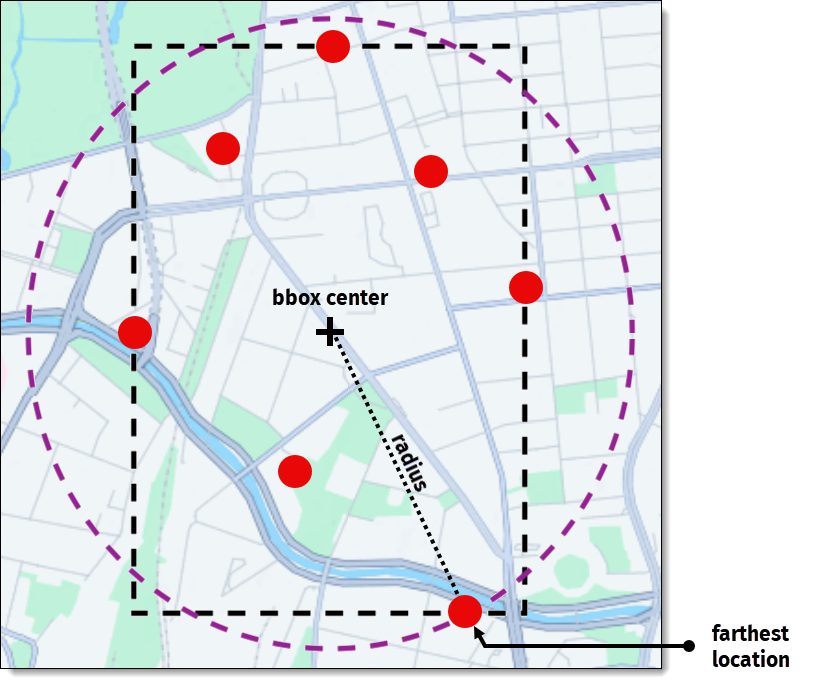
Use the avoid feature only if the radius of the minimum bounding circle of all locations defined in the problem is less than or equal to 490 km. The following steps explain how the API calculates the avoid radius:
- Generate a bounding box that encompasses all the job locations.
- Identify the center of the bounding box.
- From the center, locate the farthest point within the bounding box.
- Measure the distance from the center to the farthest point. This distance is the
avoidradius.
The following figure visualizes the avoid-radius calculation process:
If a job location falls outside of this radius, the service rejects the problem with the following error:
- Message: Locations' distribution radius is too big for profile option 'avoid'
- Error code: E613435
For more information and troubleshooting steps, see Understand API errors.
Choose between avoid and exclude
Use avoid when you can accept a violation to serve a job. Use exclude when the algorithm must never plan a route through the entity, so jobs reachable only through an excluded entity are never assigned. For the exclude syntax, see the routing profile.
The following table summarizes the differences between the avoid and exclude features:
avoid | exclude | |
|---|---|---|
| Intent | Operational preference. A different route is preferred, but not mandatory. | Hard restriction. The area or road must not be used. |
Override with ignoreRouteViolations | Yes | No |
| Example | A garbage truck avoids difficult turns, or a dispatcher steers vehicles away from congested areas. | A country you have no permit to enter, or a flooded road that is closed to traffic. |
Entities you can avoid
To specify an entity to avoid for your fleet, nest the avoid object within the fleet.profiles[] array of your problem. Depending on your business needs, you can avoid the following entity types:
| Entity type | Typical use |
|---|---|
features | School buses, garbage trucks, or trucks with trailers avoid uTurns and difficultTurns. Fleets avoid tunnel, ferry, or tollRoad to reduce costs. |
areas | Steer vehicles away from a flooded or heavily congested district. |
segments | Skip a specific narrow street or bridge that is problematic for your vehicles. |
truckRoadTypes | Keep heavy vehicles off roads with extra regulations, such as Bearing Class (BK) roads in Sweden. |
zoneIdentifiers | Avoid one known zone, such as a particular low-emission zone. |
zoneCategories | Prefer certain areas by vehicle type. For example, internal combustion engine (ICE) vehicles avoid environmental zones, while electric vehicles (EVs) use a profile without that restriction. |
See the following sections for a detailed description of each entity type and usage examples. For sample use cases focusing on analyzing full problem and solution files, see:
- Scenario #1: Reaching jobs across an avoid area
- Scenario #2: Avoiding zones belonging to specific categories
Avoid features
Use the features array to exclude road types or other routing features from route calculations, rather than specifying a particular area or road segment.
tollRoad- avoid toll roadsmotorway- avoid highways or motorwayscontrolledAccessHighway- avoid controlled-access highwaysferry- avoid ferriescarShuttleTrain- avoid car shuttle trainstunnel- avoid tunnelsdirtRoad- avoid dirt roadsdifficultTurns- avoid difficult turns, sharp turns, and U-turns on highways and motorways (for trucks only)seasonalClosure- avoid roads that are closed during certain seasons.uTurns- avoid u-turns on highways and motorways (unsupported for pedestrian, bicycle, and scooter modes)
Example: avoid features
To build a route avoiding tunnels and controlled-access highways, add the following to the vehicle constraints in the fleet part of the problem:
"profiles": [
  {
    "type": "truck",
    "name": "truck_1",
    "avoid": {
      "features": [
        "tunnel",
        "controlledAccessHighway"
      ]
    }
  }
]
Avoid areas
Use the areas array to steer routes away from defined geographic areas. Each entry can define a bounding box, a polygon as a list of coordinates, or an encoded polygon as a flexible polyline string.
boundingBox- a rectangle defined by two latitude and two longitude values:north- number (-90 to 90) - latitude in WGS 84 degrees of the northern boundary of the box.south- number (-90 to 90) - latitude in WGS 84 degrees of the southern boundary of the box.west- number (-180 to 180) - longitude in WGS 84 degrees of the western boundary of the box.east- number (-180 to 180) - longitude in WGS 84 degrees of the eastern boundary of the box.
polygon- a list of latitude and longitude coordinates in theouterproperty. The polygon closes automatically, so you do not need to repeat the first coordinate.encodedPolygon- a 2D flexible polyline string in theouterproperty. The polygon closes automatically, so you don't need to repeat the first point. Do not include elevation.
Example: avoid bounding box
To avoid an area specified as a bounding box, use the boundingBox type, as shown in the following snippet:
"profiles": [
  {
    "type": "truck",
    "name": "truck_1",
    "avoid": {
      "areas": [
        {
          "type": "boundingBox",
          "north": 52.523425044655696,
          "south": 52.432243159759814,
          "east": 13.435039860200588,
          "west": 12.990627124745892
        }
      ]
    }
  }
]
Example: avoid polygon
To avoid an area defined by coordinate pairs, use the polygon type, as shown in the following snippet:
"profiles": [
  {
    "type": "truck",
    "name": "truck_1",
    "avoid": {
      "areas": [
        {
          "type": "polygon",
          "outer": [
            { "lat": 50.10228, "lng": 8.69821 },
            { "lat": 50.10201, "lng": 8.69567 },
            { "lat": 50.10063, "lng": 8.69150 },
            { "lat": 50.09878, "lng": 8.68752 }
          ]
        }
      ]
    }
  }
]Example: avoid encoded polygon
To provide a polygon as an encoded flexible polyline string, use the encodedPolygon type as shown in the following snippet:
"profiles": [
  {
    "type": "truck",
    "name": "truck_1",
    "avoid": {
      "areas": [
        {
          "type": "encodedPolygon",
          "outer": "BFoz5xJ67i1B1B7PzIhaxL7Y"
        }
      ]
    }
  }
]
Avoid road segments
Use the segments array to avoid specific parts of the road network. Each entry identifies a topology segment and can target one or both directions. Each segment identifier entry has the following structure: {segmentId}(#{direction})?.
The individual parts of a segment include:
segmentId- the identifier of the referenced topology segment inside the catalog in the format ofdomain:system:type:id, for example:here:cm:segment:207551710. For the detailed explanation of how to get the segment identifiers, see Avoid segments in the HERE Routing API v8 Developer Guide.direction(optional) - Either*for bidirectional (default),+for positive direction, or-for negative direction.
Example: avoid road segments
To build a route avoiding two segments on the map, add the following to the vehicle constraints in the fleet part of the problem:
"profiles": [
  {
    "type": "truck",
    "name": "truck_1",
    "avoid": {
      "segments": [
        "here:cm:segment:207551710#+",
        "here:cm:segment:76771992#*"
      ]
    }
  }
]
ImportantLimit penalized segments to 250 per request. Penalized segments are segments with a maximum
baseSpeedrestriction throughmaxSpeedOnSegmentor theavoid[segments]option.
Avoid zone IDs
Use zoneIdentifiers array to avoid specific zones by ID. This is useful when you know the identifier of each zone to exclude.
The zoneIdentifiers array contains routing zone identifiers in the domain:system:type:id format. Routes avoid zones that match these identifiers. For example, here:cm:envzone:2 references the Berlin Umweltzone environmental zone.
TipTo find zone IDs, query the
ROUTING_ZONESlayer in HERE Map Attributes API v8. Use theZONE_IDattribute values inzoneIdentifiers. For more information, see Routing zones.If you don't have access to the catalogs, get IDs for zones along a route from a HERE Routing API v8 response. Include
routingZonesin the request'sreturnparameter, then resolve the zone references by using theroutingZonesandrefReplacementssections. For more information, see Routing zones in the response message.
Example: avoid zone identifiers
To build a route avoiding a specific zone on the map, add the following to the vehicle constraints in the fleet part of the problem:
"profiles": [
  {
    "type": "truck",
    "name": "truck_1",
    "avoid": {
      "zoneIdentifiers": [
        "here:cm:envzone:2"
      ]
    }
  }
]
Avoid truck road types
Use truckRoadTypes to avoid roads that have additional regulations for heavy vehicles. truckRoadTypes are specific road types with additional regulations for heavy vehicles to avoid. Examples include BK Bearing Class regulations in Sweden and ET categories in Mexico. For more information, see Truck Road Type.
Example: avoid truck road types
For example, to build a route avoiding three specific roads, add the following to the vehicle constraints in the fleet part of the problem:
"profiles": [
  {
    "type": "truck",
    "name": "truck_1",
    "avoid": {
      "truckRoadTypes": [
        "BK1",
        "BK2",
        "BK3"
      ]
    }
  }
]
Avoid zone categories
Use zoneCategories to avoid groups of zones by category instead of listing each zone ID. You can optionally exempt specific zones with exceptZoneIds.
Use the following options to avoid specific zone categories:
categories- an array of routing zone categories to avoid.exceptZoneIds- (optional) zone identifiers to exempt from category-based avoidance. If you have permission to access specific zones in an avoided category, list their IDs here to allow routes through them. Use thedomain:system:type:idformat. For more information, see Routing zones.
Example: avoid zone categories
To build a route avoiding three specific zone categories, add the following to the vehicle constraints in the fleet part of the problem:
"profiles": [
  {
    "type": "truck",
    "name": "truck_1",
    "avoid": {
      "zoneCategories": {
        "categories": [
          "vignette",
          "congestionPricing",
          "environmental"
        ]
      }
    }
  }
]
Example: avoid zone categories with exceptions
To build a route avoiding some specific zone category but excluding some zones from the avoid option, add the following to the vehicle constraints in the fleet part of the problem:
"profiles": [
  {
    "type": "truck",
    "name": "truck_1",
    "avoid": {
      "zoneCategories": {
        "categories": [
          "vignette"
        ],
        "exceptZoneIds": [
          "here:cm:envzone:2",
          "here:cm:envzone:261"
        ]
      }
    }
  }
]
Scenario #1: Reaching jobs across an avoid area
Consider a vehicle that serves four jobs. The boundingBox in the fleet configuration defines the area to avoid: north 52.523425044655696, south 52.432243159759814, east 13.435039860200588, and west 12.990627124745892, as shown in the following figure:
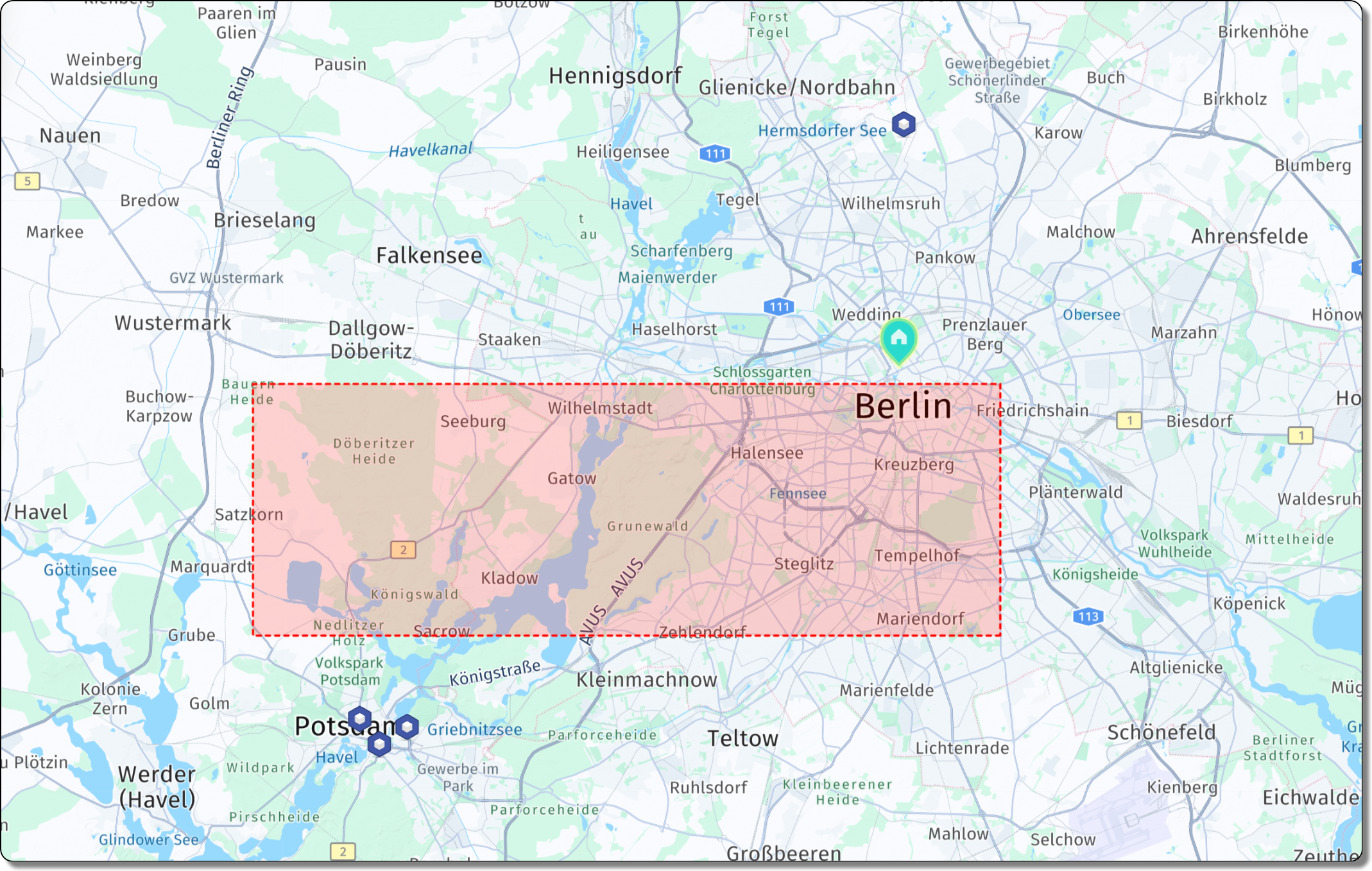
No job location in the plan section lies inside the boundingBox, but the route between the jobs crosses the area. The following request uses the avoid option to prefer an alternate route which does not involve crossing the areas specified by the bounding box coordinates.
The following section shows the full problem configuration:
Click to expand/collapse the sample JSON
{
  "fleet": {
    "types": [
      {
        "id": "delivery_truck",
        "profile": "truck_1",
        "costs": {
          "fixed": 9.0,
          "distance": 0.002,
          "time": 0.009
        },
        "shifts": [
          {
            "start": {
              "time": "2022-07-22T08:49:00Z",
              "location": {
                "lat": 52.530971,
                "lng": 13.384915
              }
            },
            "end": {
              "time": "2022-07-22T19:49:00Z",
              "location": {
                "lat": 52.530971,
                "lng": 13.384915
              }
            }
          }
        ],
        "capacity": [
          50
        ],
        "amount": 1
      }
    ],
    "profiles": [
      {
        "type": "truck",
        "name": "truck_1",
        "avoid": {
          "areas": [
            {
              "type": "boundingBox",
              "north": 52.523425044655696,
              "south": 52.432243159759814,
              "east": 13.435039860200588,
              "west": 12.990627124745892
            }
          ]
        }
      }
    ]
  },
  "plan": {
    "jobs": [
      {
        "id": "job_1",
        "tasks": {
          "deliveries": [
            {
              "places": [
                {
                  "location": {
                    "lat": 52.61233361982292,
                    "lng": 13.378211244312677
                  },
                  "duration": 135
                }
              ],
              "demand": [
                14
              ]
            }
          ]
        }
      },
      {
        "id": "job_2",
        "tasks": {
          "deliveries": [
            {
              "places": [
                {
                  "location": {
                    "lat": 52.396871659783336,
                    "lng": 13.05446681343765
                  },
                  "duration": 516
                }
              ],
              "demand": [
                7
              ]
            }
          ]
        }
      },
      {
        "id": "job_3",
        "tasks": {
          "deliveries": [
            {
              "places": [
                {
                  "location": {
                    "lat": 52.39394204075849,
                    "lng": 13.082571195347363
                  },
                  "duration": 571
                }
              ],
              "demand": [
                9
              ]
            }
          ]
        }
      },
      {
        "id": "job_4",
        "tasks": {
          "deliveries": [
            {
              "places": [
                {
                  "location": {
                    "lat": 52.387946983417116,
                    "lng": 13.066284687565254
                  },
                  "duration": 378
                }
              ],
              "demand": [
                6
              ]
            }
          ]
        }
      }
    ]
  }
}
Solution interpretation
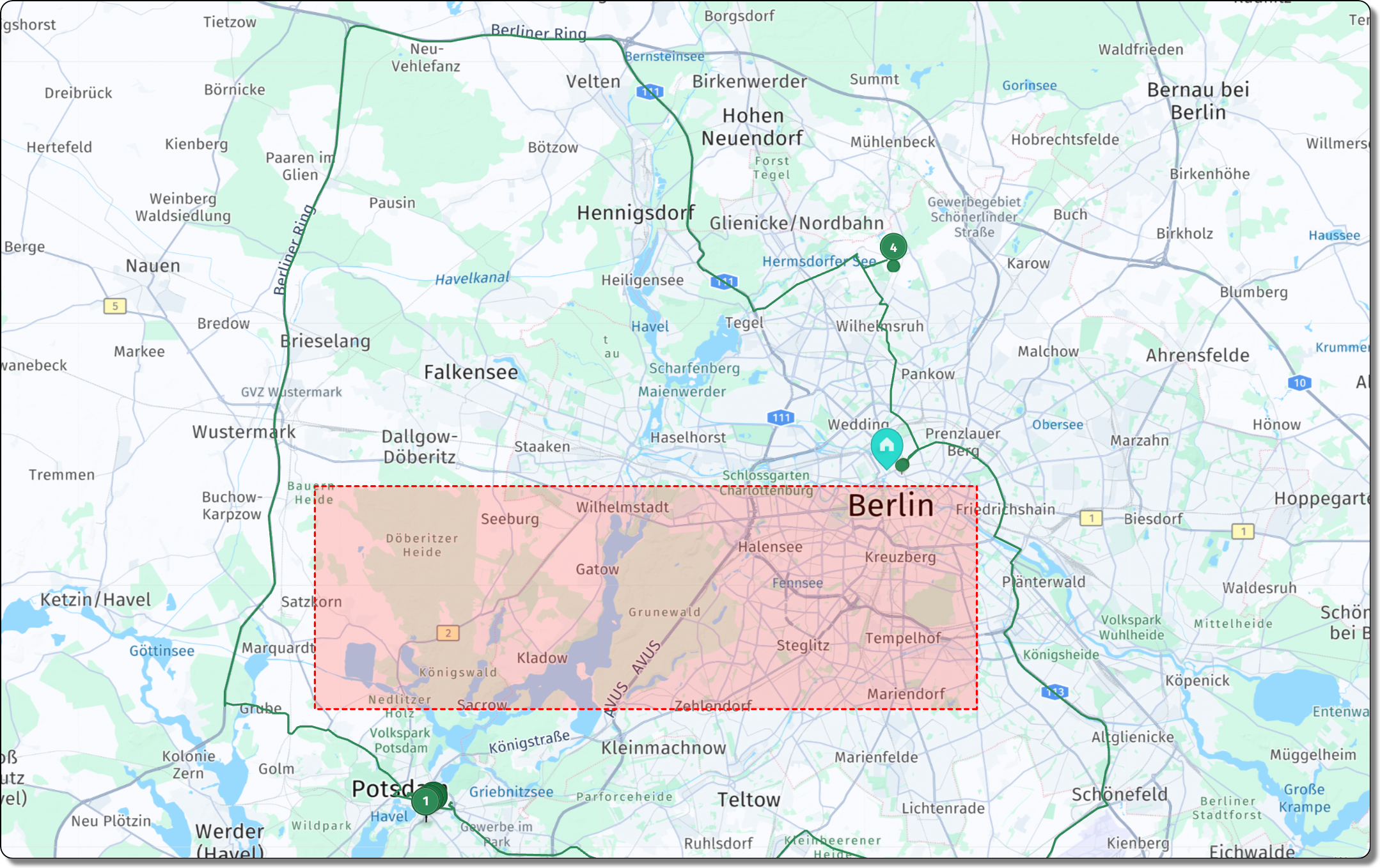
As expected, the optimization algorithm prioritizes routes around the specified bounding box when you set the avoid option, making the route less direct than it would be without the option. The following figure visualizes the tour and the resulting route around the bounding box:
The following section provides the full solution response:
Click to expand/collapse the sample JSON
  {
    "statistic": {
      "cost": 403.84000000000003,
      "distance": 139811,
      "duration": 12802,
      "times": {
        "break": 0,
        "driving": 11202,
        "serving": 1600,
        "stopping": 0,
        "waiting": 0
      },
      "costs": {
        "distance": 279.622,
        "fixed": 9,
        "time": 115.21799999999999
      },
      "intraStopDistance": 0
    },
    "tours": [
      {
        "shiftIndex": 0,
        "statistic": {
          "cost": 403.84000000000003,
          "distance": 139811,
          "duration": 12802,
          "times": {
            "break": 0,
            "driving": 11202,
            "serving": 1600,
            "stopping": 0,
            "waiting": 0
          },
          "costs": {
            "distance": 279.622,
            "fixed": 9,
            "time": 115.21799999999999
          },
          "intraStopDistance": 0
        },
        "stops": [
          {
            "activities": [
              {
                "jobId": "departure",
                "type": "departure",
                "location": {
                  "lat": 52.530971,
                  "lng": 13.384915
                },
                "time": {
                  "arrival": "2022-07-22T08:49:00Z",
                  "start": "2022-07-22T08:49:00Z",
                  "end": "2022-07-22T08:49:00Z"
                }
              }
            ],
            "load": [
              36
            ],
            "time": {
              "arrival": "2022-07-22T08:49:00Z",
              "departure": "2022-07-22T08:49:00Z"
            },
            "distance": 0,
            "location": {
              "lat": 52.530971,
              "lng": 13.384915
            }
          },
          {
            "activities": [
              {
                "jobId": "job_3",
                "type": "delivery",
                "location": {
                  "lat": 52.39394204075849,
                  "lng": 13.082571195347365
                },
                "time": {
                  "arrival": "2022-07-22T09:55:21Z",
                  "start": "2022-07-22T09:55:21Z",
                  "end": "2022-07-22T10:04:52Z"
                }
              }
            ],
            "load": [
              27
            ],
            "time": {
              "arrival": "2022-07-22T09:55:21Z",
              "departure": "2022-07-22T10:04:52Z"
            },
            "distance": 60578,
            "location": {
              "lat": 52.39394204075849,
              "lng": 13.082571195347365
            }
          },
          {
            "activities": [
              {
                "jobId": "job_4",
                "type": "delivery",
                "location": {
                  "lat": 52.38794698341712,
                  "lng": 13.066284687565254
                },
                "time": {
                  "arrival": "2022-07-22T10:10:49Z",
                  "start": "2022-07-22T10:10:49Z",
                  "end": "2022-07-22T10:17:07Z"
                }
              }
            ],
            "load": [
              21
            ],
            "time": {
              "arrival": "2022-07-22T10:10:49Z",
              "departure": "2022-07-22T10:17:07Z"
            },
            "distance": 63116,
            "location": {
              "lat": 52.38794698341712,
              "lng": 13.066284687565254
            }
          },
          {
            "activities": [
              {
                "jobId": "job_2",
                "type": "delivery",
                "location": {
                  "lat": 52.396871659783336,
                  "lng": 13.05446681343765
                },
                "time": {
                  "arrival": "2022-07-22T10:22:19Z",
                  "start": "2022-07-22T10:22:19Z",
                  "end": "2022-07-22T10:30:55Z"
                }
              }
            ],
            "load": [
              14
            ],
            "time": {
              "arrival": "2022-07-22T10:22:19Z",
              "departure": "2022-07-22T10:30:55Z"
            },
            "distance": 64981,
            "location": {
              "lat": 52.396871659783336,
              "lng": 13.05446681343765
            }
          },
          {
            "activities": [
              {
                "jobId": "job_1",
                "type": "delivery",
                "location": {
                  "lat": 52.61233361982292,
                  "lng": 13.378211244312675
                },
                "time": {
                  "arrival": "2022-07-22T11:54:42Z",
                  "start": "2022-07-22T11:54:42Z",
                  "end": "2022-07-22T11:56:57Z"
                }
              }
            ],
            "load": [
              0
            ],
            "time": {
              "arrival": "2022-07-22T11:54:42Z",
              "departure": "2022-07-22T11:56:57Z"
            },
            "distance": 127201,
            "location": {
              "lat": 52.61233361982292,
              "lng": 13.378211244312675
            }
          },
          {
            "activities": [
              {
                "jobId": "arrival",
                "type": "arrival",
                "location": {
                  "lat": 52.530971,
                  "lng": 13.384915
                },
                "time": {
                  "arrival": "2022-07-22T12:22:22Z",
                  "start": "2022-07-22T12:22:22Z",
                  "end": "2022-07-22T12:22:22Z"
                }
              }
            ],
            "load": [
              0
            ],
            "time": {
              "arrival": "2022-07-22T12:22:22Z",
              "departure": "2022-07-22T12:22:22Z"
            },
            "distance": 139811,
            "location": {
              "lat": 52.530971,
              "lng": 13.384915
            }
          }
        ],
        "typeId": "delivery_truck",
        "vehicleId": "delivery_truck_1"
      }
    ]
  }
Scenario #2: Avoiding zones belonging to specific categories
This scenario shows how to configure a vehicle’s routing profile to avoid environmental zones. The optimization algorithm prioritizes routes that stay clear of these zones, but jobs inside them aren’t automatically excluded. However such jobs might remain unassigned if the optimization algorithm cannot find a route to them without entering an avoided zone.
The following snippet shows the corresponding avoid configuration:
"profiles": [
  {
    "name": "car",
    "type": "car",
    "avoid": {
      "zoneCategories": {
        "categories": [
          "environmental"
        ]
      }
    }
  }
]
In addition, as the following figure demonstrates, the problem contains 10 jobs, three of which are located within the environmental zone (Berlin Umweltzone) boundaries:
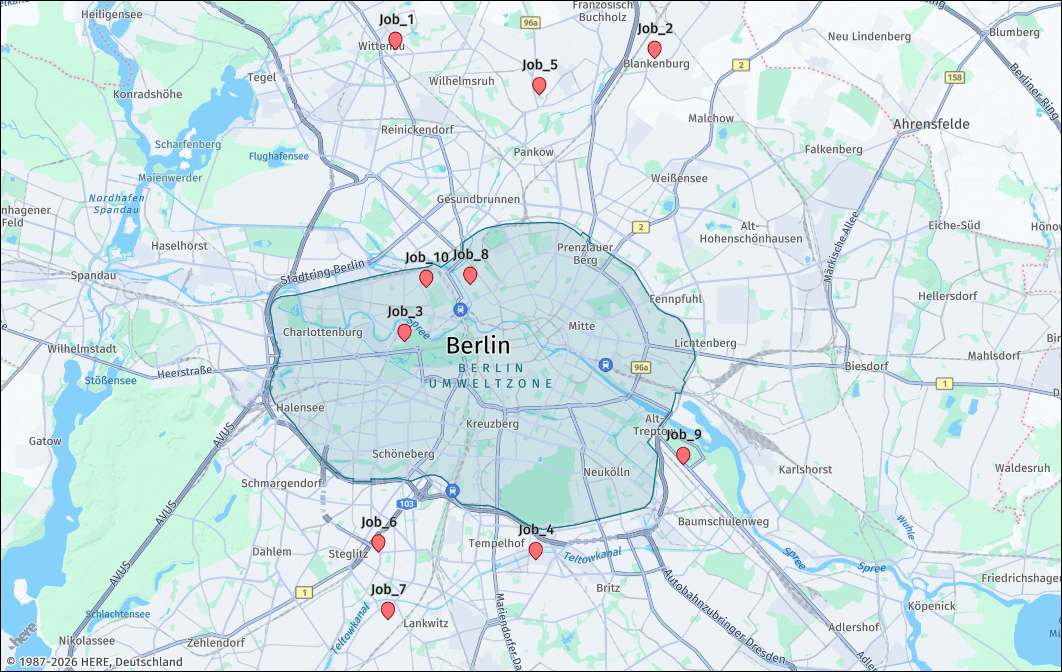
Such placement of Job_3, Job_8, and Job_10 puts them in danger of being unassigned by the optimization algorithm with the REACHABLE_CONSTRAINT violation. The following section provides the full problem configuration:
Click to expand/collapse the sample JSON
{
  "fleet": {
    "types": [
      {
        "profile": "car",
        "amount": 1,
        "capacity": [
          50
        ],
        "costs": {
          "time": 0.002,
          "distance": 0.001,
          "fixed": 10
        },
        "id": "vehicle_1",
        "shifts": [
          {
            "start": {
              "location": {
                "lat": 52.64821,
                "lng": 13.38841
              },
              "time": "2024-06-24T08:00:00+02:00"
            },
            "end": {
              "location": {
                "lat": 52.64821,
                "lng": 13.38841
              },
              "time": "2024-06-24T20:00:00+02:00"
            }
          }
        ]
      }
    ],
    "profiles": [
      {
        "name": "car",
        "type": "car",
        "avoid": {
          "zoneCategories": {
            "categories": [
              "environmental"
            ]
          }
        }
      }
    ]
  },
  "plan": {
    "jobs": [
      {
        "id": "Job_1",
        "tasks": {
          "deliveries": [
            {
              "places": [
                {
                  "duration": 300,
                  "location": {
                    "lat": 52.59701,
                    "lng": 13.33954
                  }
                }
              ],
              "demand": [
                1
              ]
            }
          ]
        }
      },
      {
        "id": "Job_2",
        "tasks": {
          "deliveries": [
            {
              "places": [
                {
                  "duration": 300,
                  "location": {
                    "lat": 52.59452,
                    "lng": 13.45727
                  }
                }
              ],
              "demand": [
                1
              ]
            }
          ]
        }
      },
      {
        "id": "Job_3",
        "tasks": {
          "deliveries": [
            {
              "places": [
                {
                  "duration": 300,
                  "location": {
                    "lat": 52.51635175288175,
                    "lng": 13.343661020679571
                  }
                }
              ],
              "demand": [
                1
              ]
            }
          ]
        }
      },
      {
        "id": "Job_4",
        "tasks": {
          "deliveries": [
            {
              "places": [
                {
                  "duration": 300,
                  "location": {
                    "lat": 52.456,
                    "lng": 13.403260583257188
                  }
                }
              ],
              "demand": [
                1
              ]
            }
          ]
        }
      },
      {
        "id": "Job_5",
        "tasks": {
          "deliveries": [
            {
              "places": [
                {
                  "duration": 300,
                  "location": {
                    "lat": 52.58451,
                    "lng": 13.40489
                  }
                }
              ],
              "demand": [
                1
              ]
            }
          ]
        }
      },
      {
        "id": "Job_6",
        "tasks": {
          "deliveries": [
            {
              "places": [
                {
                  "duration": 300,
                  "location": {
                    "lat": 52.45810373923444,
                    "lng": 13.331808942475499
                  }
                }
              ],
              "demand": [
                1
              ]
            }
          ]
        }
      },
      {
        "id": "Job_7",
        "tasks": {
          "deliveries": [
            {
              "places": [
                {
                  "duration": 300,
                  "location": {
                    "lat": 52.439442845393685,
                    "lng": 13.336118100685782
                  }
                }
              ],
              "demand": [
                1
              ]
            }
          ]
        }
      },
      {
        "id": "Job_8",
        "tasks": {
          "deliveries": [
            {
              "places": [
                {
                  "duration": 300,
                  "location": {
                    "lat": 52.53213114000045,
                    "lng": 13.373517153879769
                  }
                }
              ],
              "demand": [
                1
              ]
            }
          ]
        }
      },
      {
        "id": "Job_9",
        "tasks": {
          "deliveries": [
            {
              "places": [
                {
                  "duration": 300,
                  "location": {
                    "lat": 52.4823,
                    "lng": 13.4703
                  }
                }
              ],
              "demand": [
                1
              ]
            }
          ]
        }
      },
      {
        "id": "Job_10",
        "tasks": {
          "deliveries": [
            {
              "places": [
                {
                  "duration": 300,
                  "location": {
                    "lat": 52.5313,
                    "lng": 13.35356
                  }
                }
              ],
              "demand": [
                1
              ]
            }
          ]
        }
      }
    ]
  }
}
Solution interpretation
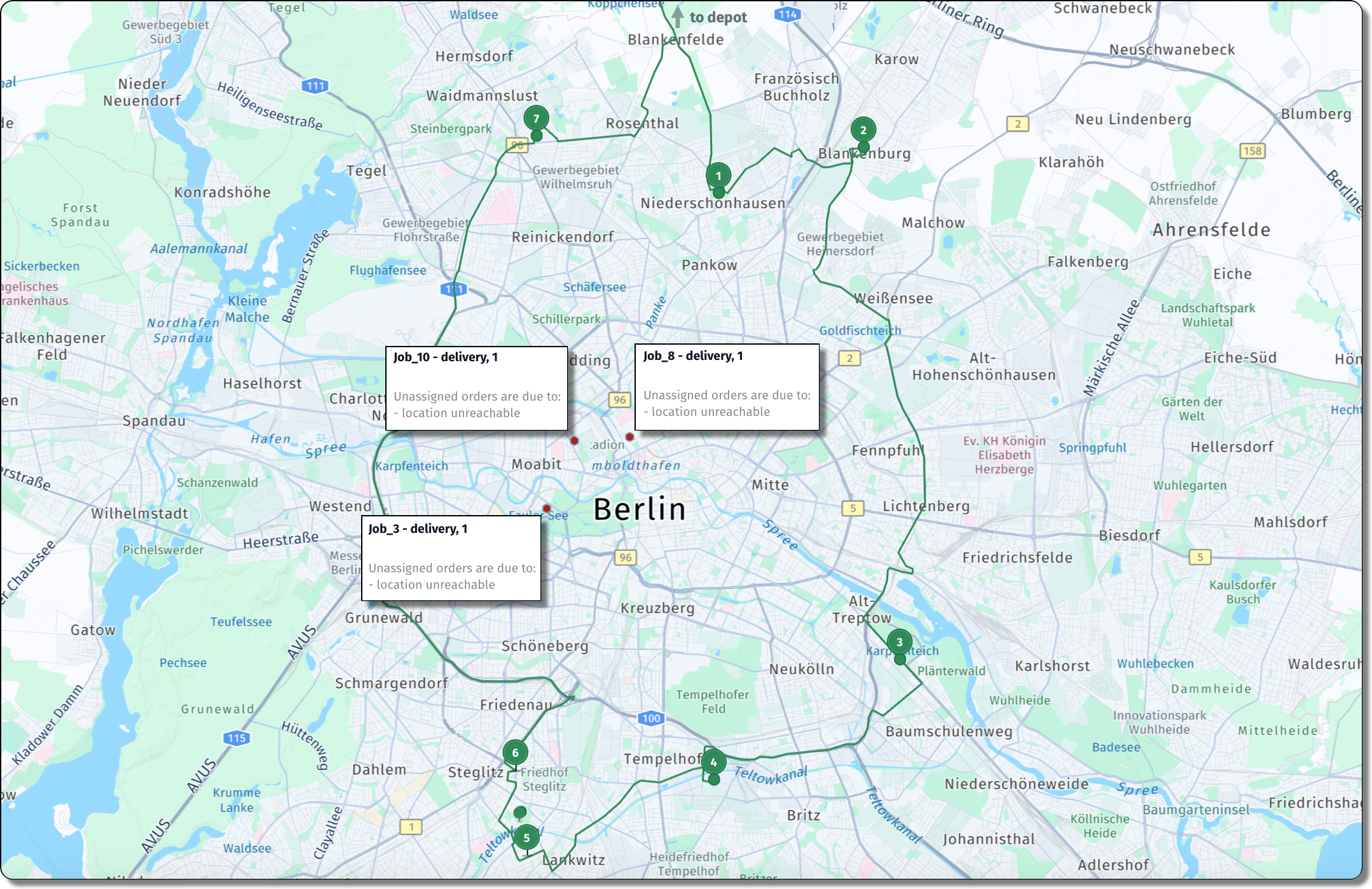
As expected, the three jobs inside the environmental zone remain unassigned with the REACHABLE_CONSTRAINT violation due to the optimization algorithm's inability to find a route to Job_3, Job_8, and Job_10 without routing the vehicle through the zone that vehicle must avoid. In contrast, the optimization algorithm assigned all jobs outside the environmental zone to the tour. See the following tour map for details:
The following section shows the full solution response:
Click to expand/collapse the sample JSON
{
  "statistic": {
    "cost": 109.205,
    "distance": 79959,
    "duration": 9623,
    "times": {
      "break": 0,
      "driving": 7523,
      "serving": 2100,
      "stopping": 0,
      "waiting": 0
    },
    "costs": {
      "distance": 79.959,
      "fixed": 10,
      "time": 19.246
    },
    "intraStopDistance": 0
  },
  "tours": [
    {
      "shiftIndex": 0,
      "statistic": {
        "cost": 109.205,
        "distance": 79959,
        "duration": 9623,
        "times": {
          "break": 0,
          "driving": 7523,
          "serving": 2100,
          "stopping": 0,
          "waiting": 0
        },
        "costs": {
          "distance": 79.959,
          "fixed": 10,
          "time": 19.246
        },
        "intraStopDistance": 0
      },
      "stops": [
        {
          "activities": [
            {
              "jobId": "departure",
              "type": "departure",
              "location": {
                "lat": 52.64821,
                "lng": 13.38841
              },
              "time": {
                "arrival": "2024-06-24T06:00:00Z",
                "start": "2024-06-24T06:00:00Z",
                "end": "2024-06-24T06:00:00Z"
              }
            }
          ],
          "load": [
            7
          ],
          "time": {
            "arrival": "2024-06-24T06:00:00Z",
            "departure": "2024-06-24T06:00:00Z"
          },
          "distance": 0,
          "location": {
            "lat": 52.64821,
            "lng": 13.38841
          }
        },
        {
          "activities": [
            {
              "jobId": "Job_5",
              "type": "delivery",
              "location": {
                "lat": 52.58451,
                "lng": 13.40489
              },
              "time": {
                "arrival": "2024-06-24T06:14:36Z",
                "start": "2024-06-24T06:14:36Z",
                "end": "2024-06-24T06:19:36Z"
              }
            }
          ],
          "load": [
            6
          ],
          "time": {
            "arrival": "2024-06-24T06:14:36Z",
            "departure": "2024-06-24T06:19:36Z"
          },
          "distance": 9179,
          "location": {
            "lat": 52.58451,
            "lng": 13.40489
          }
        },
        {
          "activities": [
            {
              "jobId": "Job_2",
              "type": "delivery",
              "location": {
                "lat": 52.59452,
                "lng": 13.45727
              },
              "time": {
                "arrival": "2024-06-24T06:29:55Z",
                "start": "2024-06-24T06:29:55Z",
                "end": "2024-06-24T06:34:55Z"
              }
            }
          ],
          "load": [
            5
          ],
          "time": {
            "arrival": "2024-06-24T06:29:55Z",
            "departure": "2024-06-24T06:34:55Z"
          },
          "distance": 14237,
          "location": {
            "lat": 52.59452,
            "lng": 13.45727
          }
        },
        {
          "activities": [
            {
              "jobId": "Job_9",
              "type": "delivery",
              "location": {
                "lat": 52.4823,
                "lng": 13.4703
              },
              "time": {
                "arrival": "2024-06-24T07:04:04Z",
                "start": "2024-06-24T07:04:04Z",
                "end": "2024-06-24T07:09:04Z"
              }
            }
          ],
          "load": [
            4
          ],
          "time": {
            "arrival": "2024-06-24T07:04:04Z",
            "departure": "2024-06-24T07:09:04Z"
          },
          "distance": 30306,
          "location": {
            "lat": 52.4823,
            "lng": 13.4703
          }
        },
        {
          "activities": [
            {
              "jobId": "Job_4",
              "type": "delivery",
              "location": {
                "lat": 52.456,
                "lng": 13.403260583257188
              },
              "time": {
                "arrival": "2024-06-24T07:20:48Z",
                "start": "2024-06-24T07:20:48Z",
                "end": "2024-06-24T07:25:48Z"
              }
            }
          ],
          "load": [
            3
          ],
          "time": {
            "arrival": "2024-06-24T07:20:48Z",
            "departure": "2024-06-24T07:25:48Z"
          },
          "distance": 38613,
          "location": {
            "lat": 52.456,
            "lng": 13.403260583257188
          }
        },
        {
          "activities": [
            {
              "jobId": "Job_7",
              "type": "delivery",
              "location": {
                "lat": 52.439442845393685,
                "lng": 13.336118100685782
              },
              "time": {
                "arrival": "2024-06-24T07:38:04Z",
                "start": "2024-06-24T07:38:04Z",
                "end": "2024-06-24T07:43:04Z"
              }
            }
          ],
          "load": [
            2
          ],
          "time": {
            "arrival": "2024-06-24T07:38:04Z",
            "departure": "2024-06-24T07:43:04Z"
          },
          "distance": 45000,
          "location": {
            "lat": 52.439442845393685,
            "lng": 13.336118100685782
          }
        },
        {
          "activities": [
            {
              "jobId": "Job_6",
              "type": "delivery",
              "location": {
                "lat": 52.45810373923444,
                "lng": 13.3318089424755
              },
              "time": {
                "arrival": "2024-06-24T07:49:46Z",
                "start": "2024-06-24T07:49:46Z",
                "end": "2024-06-24T07:54:46Z"
              }
            }
          ],
          "load": [
            1
          ],
          "time": {
            "arrival": "2024-06-24T07:49:46Z",
            "departure": "2024-06-24T07:54:46Z"
          },
          "distance": 47986,
          "location": {
            "lat": 52.45810373923444,
            "lng": 13.3318089424755
          }
        },
        {
          "activities": [
            {
              "jobId": "Job_1",
              "type": "delivery",
              "location": {
                "lat": 52.59701,
                "lng": 13.33954
              },
              "time": {
                "arrival": "2024-06-24T08:19:28Z",
                "start": "2024-06-24T08:19:28Z",
                "end": "2024-06-24T08:24:28Z"
              }
            }
          ],
          "load": [
            0
          ],
          "time": {
            "arrival": "2024-06-24T08:19:28Z",
            "departure": "2024-06-24T08:24:28Z"
          },
          "distance": 70104,
          "location": {
            "lat": 52.59701,
            "lng": 13.33954
          }
        },
        {
          "activities": [
            {
              "jobId": "arrival",
              "type": "arrival",
              "location": {
                "lat": 52.64821,
                "lng": 13.38841
              },
              "time": {
                "arrival": "2024-06-24T08:40:23Z",
                "start": "2024-06-24T08:40:23Z",
                "end": "2024-06-24T08:40:23Z"
              }
            }
          ],
          "load": [
            0
          ],
          "time": {
            "arrival": "2024-06-24T08:40:23Z",
            "departure": "2024-06-24T08:40:23Z"
          },
          "distance": 79959,
          "location": {
            "lat": 52.64821,
            "lng": 13.38841
          }
        }
      ],
      "typeId": "vehicle_1",
      "vehicleId": "vehicle_1_1"
    }
  ],
  "unassigned": [
    {
      "jobId": "Job_3",
      "reasons": [
        {
          "code": "REACHABLE_CONSTRAINT",
          "description": "location unreachable"
        }
      ]
    },
    {
      "jobId": "Job_8",
      "reasons": [
        {
          "code": "REACHABLE_CONSTRAINT",
          "description": "location unreachable"
        }
      ]
    },
    {
      "jobId": "Job_10",
      "reasons": [
        {
          "code": "REACHABLE_CONSTRAINT",
          "description": "location unreachable"
        }
      ]
    }
  ]
}
Next steps
- For more information about request structure and available options, see API Reference.
- Submit a Vehicle Routing Problem to solve it synchronously
- Submit a Vehicle Routing Problem to solve it asynchronously
- To understand how to interpret the API response, see Solution.
Updated 25 days ago