

Set maximum number of stops
The HERE Tour Planning API allows you to set a maximum number of stops for each vehicle in a tour. This functionality ensures that the optimization algorithm efficiently allocates resources and, at the same time, adheres to any operational constraints.
By limiting the number of stops in a tour, you can create more efficient routes that prioritize working well within the maximum stop limit, rather than simply filling each vehicle to capacity. Without a maximum stop constraint, you might risk allocating too many stops to a single vehicle. By limiting the number of stops, you can be more careful with resource allocation, making it less likely that vehicles or drivers are overwhelmed.
Implementing a limit on the number of stops a vehicle can make during a tour can significantly contribute to cost reduction, for example, in mega truck operations (trucks more powerful than standard commercial trucks). Minimizing the number of stops has the potential to decrease fuel consumption, especially considering the extra fuel needed for acceleration after each stop. Additionally, it can help mitigate vehicle wear and tear, which is often exacerbated by frequent stops.
Understand the maximum stops configuration
In the HERE Tour Planning API, you can use the maxCount object, within the fleet.types.limits.stops problem configuration to define the maximum number of stops for vehicles in a specific fleet.
In the context of the maximum stops functionality, a 'stop' in a tour denotes a location where one or more pickup or delivery activities occur. For the optimization algorithm to consider a group of activities as a single stop, each activity specified within it must be configured for the same location. Otherwise, the algorithm might treat such activities as separate stops within the parameters of the maximum stops functionality.
The following snippet provides a sample configuration for a maximum number of 35 stops within the limits object:
// JSON shortened for brevity, showcasing the limits object.
"limits": {
    "stops": {
    "maxCount": {
        "value": 35
    }
  }
}
Use case: Managing contractual obligation for subcontractor-operated services
In the scenario of a parcel pickup service operated by subcontractors, a rule is established to optimize operations and control costs: each pickup_vehicle is allowed a maximum of 35 stops for parcel pickups. This limit is dictated by the contract terms, which specify that each vehicle operated by a subcontractor will be paid only for 35 stops. Therefore, this constraint applies to all vehicles, regardless of their individual capacities. Even if a vehicle is capable of handling more stops under normal circumstances, it must adhere to this contractual obligation. This adjustment ensures compliance with contractual terms while maintaining operational efficiency.
Problem
To meet the previously stated objectives, the corresponding fleet configuration contains the following settings:
{
  "fleet": {
    "types": [
      {
        "id": "pickup_vehicle",
        "profile": "car",
        "costs": {
          "fixed": 20,
          "distance": 0,
          "time": 0.005
        },
        "shifts": [
          {
            "start": {
              "time": "2023-05-28T08:00:00Z",
              "location": {
                "lat": 52.50983164055919,
                "lng": 13.323804381229678
              }
            },
            "end": {
              "time": "2023-05-28T16:00:00Z",
              "location": {
                "lat": 52.50983164055919,
                "lng": 13.323804381229678
              }
            }
          }
        ],
        "capacity": [
          100
        ],
        "amount": 10,
        "limits": {
          "stops": {
            "maxCount": {
              "value": 35
            }
          }
        }
      }
    ],
    "profiles": [
      {
        "type": "car",
        "name": "car"
      }
    ]
  }
}
The key fleet setting include:
- The fleet with the
pickup_vehicleID consists of10vehicles. - The
capacityof thepickup_vehicleis300. - The
maxCountobject specifies the maximum count of stops for the tour, with a value of35in this case, which is less than the vehicle capacity.
To illustrate the allocation of jobs by the optimization algorithm to vehicles, consider the tour plan for the fleet comprising 100 stops. Each stop denotes a parcel pickup location where the vehicle driver must make a delivery, as outlined in the snippet below:
{
  "id": "Job_1",
  "tasks": {
    "pickups": [
      {
        "places": [
          {
            "location": {
              "lat": 52.51202735249645,
              "lng": 13.419303723712279
            },
            "duration": 600
          }
        ],
        "demand": [
          1
        ]
      }
    ]
  }
}
Solution
The following figure provides the solution visualization to the previously mentioned problem:
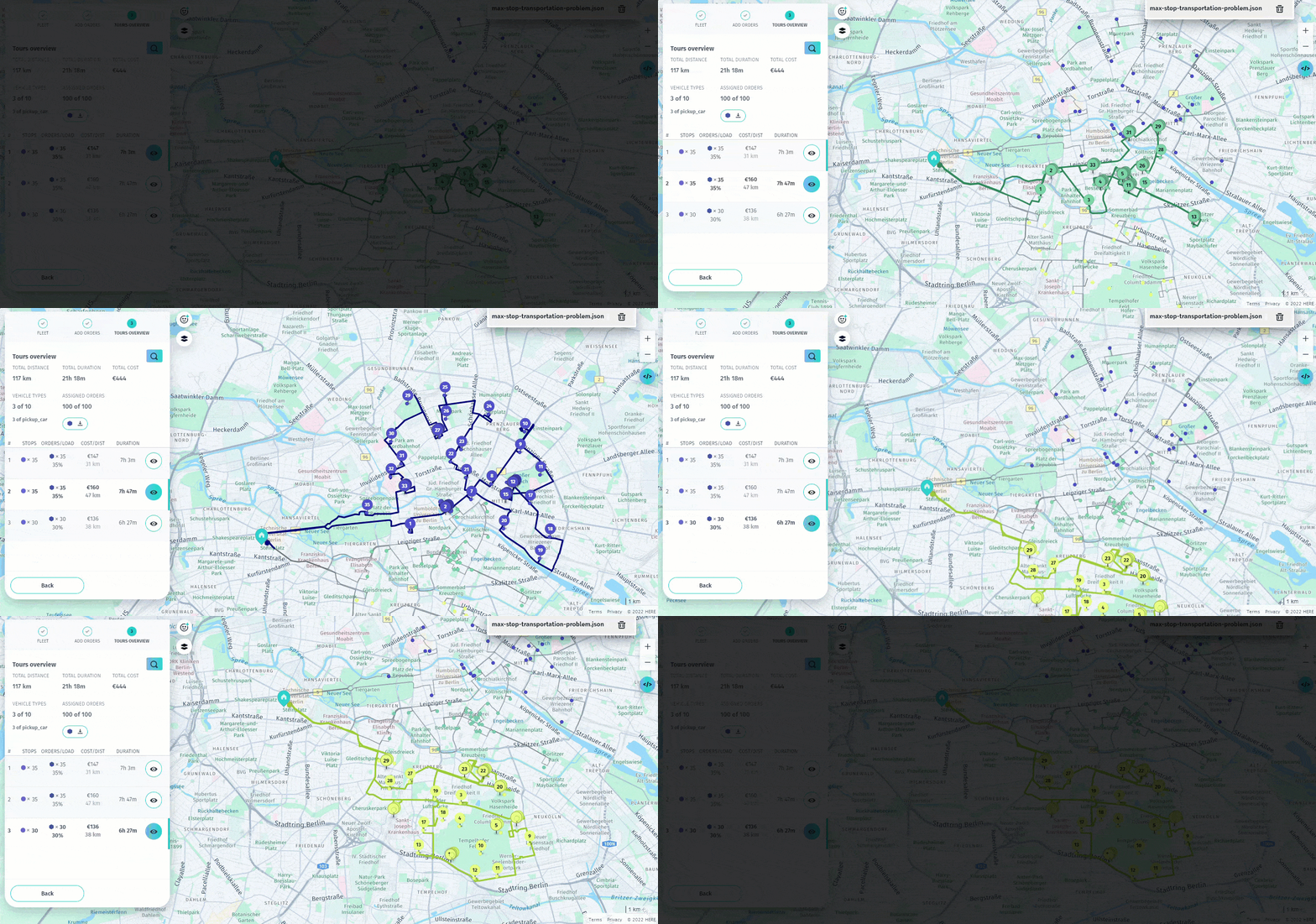
The tour overview confirms that all tours were completed without any unassigned jobs, within the 35-job limit specified in the problem. The algorithm allocated two vehicles with the maximum number of stops, while distributing the remaining jobs almost equally between two other vehicles. This approach maintains operational efficiency by ensuring that no single vehicle is overloaded while others are underutilized.
Next steps
- For more information about formulating problems in the HERE Tour Planning API, see Problem.
- For an in-depth exploration of the HERE Tour Planning API methods, endpoints, and parameters, see the API Reference.
- To explore other limit types, see Set route limits.
Updated 6 months ago