

Problem
The Problem entity represents a Vehicle Routing Problem. It consists of two main parts: plan and fleet.
Plan
A plan contains a list of jobs for the vehicles to serve, and optionally a list of relations between these jobs and vehicles as well as
the optional clustering object with settings for grouping similar jobs.
Job
Essentially, this entity represents a job to be served by any vehicle taking into account specific properties:
-
location (required): location represented via latitude and longitude or custom ID (only with custom matrix):
"location": {"lat": 52.5622847, "lng": 13.4023099}
or
"location": {"id": "uniqueLocationId"} -
duration (required): duration in seconds (service time): a time spent at a given location:
"duration": 120 -
houseKeyId (optional): ID of a household, used for multi-delivery and multi-pickup scenarios at the same location:
"houseKeyId": "household_1A" -
demand (required): demand is represented via multidimensional units of measure, e.g. volume, mass, size, etc:
"demand": [1] -
times (optional): a list of time windows specifying when the vehicle is allowed to visit the given location.
The date is represented in RFC3339 format:"times": [["2020-07-04T06:00:05.000Z","2020-07-04T12:05:05.000Z"]]
Note
The
timesproperty can be used in the Fleet part of the Problem for specifying Start and End times of the shifts, Breaks, and Departure time. It can also be used in the Plan part for specifying the Tasks times, with any time offset, but the times in the solution results will always be returned in UTC.
-
skills (optional): a list of skills which should be defined on the vehicle type serving the job.
"skills": ["fridge"] -
tag (optional): a user-defined tag associated with a given place. It is propagated back within the solution.
Use it to distinguish between different job places."tag": "pickup_1" -
territoryIds (optional): represents the territory identifiers to which the job place belongs.
This is used along with theterritoriesproperty of the vehicle type to limit/incentivize vehicles to serve jobs with specific territories.
This property is not allowed for complex jobs with more than one task."territoryIds": ["territory1"] -
groupId (optional): Represents the group id of a job. Jobs belonging to the same group will be served by the same vehicle and the locations of the jobs will be visited consecutively. That means that jobs belonging to the same group must be held together on the tour and must be completed before jobs of a different group or jobs, not belonging to any group, can be served. A group of jobs cannot be served by more than one vehicle. Jobs which do not belong to any group, reloads, and breaks with a location cannot interrupt a group, but they can be served between individual groups. Breaks without locations can interrupt a group. Also see Job Groups and Pudos.
"groupId": "first_group" -
priority (optional): priority of job with 1 for highest priority jobs, 2-4 for high to medium priority and 5 for normal jobs (default is 5):
"priority": 1BETA Please note that using more than 2 priority levels for all jobs is still beta.
-
customerId (optional): specifies a unique identifier for a customer. Jobs having the same customerId will be
grouped in one or several clusters if possible, see clustering. -
costFactor (optional): a multiplier applied to a vehicle type's
costs.perJob.rateto represent the relative "size" or "complexity" of a job. If not specified, the default value is1. For more information, see Calculate custom costs per job."costFactor": 4 -
order(optional, deprecated: use position instead): specifies a job task ordering within a route. Job tasks with lower values of 'order' should be scheduled
earlier in the route than job tasks with higher values oforder. Job tasks withorderproperty will be scheduled earlier in the route than any
job task withoutorderproperty. Note thatorderproperty does not affect the priority of job to be assigned, for that seepriorityproperty."order": 1 -
position (optional): specifies a job task position within a route. Job tasks can be assigned as first, last, any or in specific order. Job tasks with
positionproperty will be scheduled earlier in the route than any
job task withoutpositionproperty (except job task with position = 'last' - it will be assigned as a last one). Note thatpositionproperty does not affect the priority of job to be assigned, for that seepriorityproperty.
{
    "position": {
        "type":"ordered",
        "value": 1
    }
}-
maxTimeOnVehicle (optional): Constrains the maximum time the job can be on the vehicle.
For jobs with pickups and deliveries, this is the duration from the departure from the first pickup activity to the arrival at the last
delivery activity. For jobs with only one delivery, the duration is counted from either the departure activity
location or the previous reload activity. For jobs with only pickups, the duration is counted until the arrival
activity or the next reload. If the shift does not have an end, the duration is counted until the end of the last activity
in the tour. -
category (optional): The job category is specified to prevent mixing certain job categories. This can be used along with vehicles'
mixingRestrictionsto prevent mixing conflicting job categories within the vehicle.
Note
Avoid referencing any confidential or personal information as part of the
tag.
Depending on how the tasks property is specified, a job can be one of three types:
- pickup: a job for picking something along the route and bringing it to the route's end location. It is used when only
the pickups task with one job task is specified. An example of a pickup job:
{
  "id": "pickup1",
  "tasks": {
    "pickups": [
      {
        "places": [
          {
            "location": {
              "lat": 52.5622847,
              "lng": 13.4023099
            },
            "duration": 180,
            "territoryIds": ["territory1"]
          }
        ],
        "demand": [1]
      }
    ]
  }
}- delivery: a job for delivering something loaded at the beginning of the route. It is used when only the delivery's
place with one job place is specified. An example of a delivery job:
{
        "id": "delivery1",
        "tasks": {
          "deliveries": [
            {
              "places": [
                {
                  "location": {
                    "lat": 52.5252832,
                    "lng": 13.41884
                  },
                  "duration": 180,
                  "groupId": "one"
                }
              ],
              "demand": [1]
            }
          ]
        }
}- pickup and delivery job: a job for picking and delivering along the route. It is used when both pickup and delivery
places are specified. The job can have multiple pickups and deliveries. All or none of them have to be served. Also, the sum
of demands for pickup and delivery places should be equal. A basic scenario for it could be multiple pickups at different
places followed by a single delivery. An example of a job with multiple job places:
{
        "id": "myMultiJob",
        "tasks": {
          "pickups": [
            {
              "places": [
                {
                  "location": {
                    "lat": 52.5622847,
                    "lng": 13.4023099
                  },
                  "duration": 180,
                  "tag": "p1"
                }
              ],
              "demand": [1]
            },
            {
              "places": [
                {
                  "location": {
                    "lat": 52.5330881,
                    "lng": 13.3973059
                  },
                  "duration": 180,
                  "tag": "p2"
                }
              ],
              "demand": [1]
            }
          ],
          "deliveries": [
            {
              "places": [
                {
                  "location": {
                    "lat": 52.5252832,
                    "lng": 13.41884
                  },
                  "duration": 180,
                  "tag": "d1"
                }
              ],
              "demand": [2]
            }
          ]
        }
      }
If the places property for a task contains more than one place entry, then the provided places are considered as alternative places for that task and the optimization algorithm will try to pick the one that best serves the optimization objective function. Note that each place has its own location, duration and times.
The following example demonstrates a job with a task having alternative places:
{
        "id": "delivery1",
        "tasks": {
          "deliveries": [
            {
              "places": [
                {
                  "location": {
                    "lat": 52.5252832,
                    "lng": 13.41884
                  },
                  "duration": 180,
                  "times": [["2019-01-01T00:00:00Z","2019-01-01T12:00:00Z"]],
                  "tag": "place1"
                },
                {
                  "location": {
                    "lat": 53.5252832,
                    "lng": 14.41884
                  },
                  "duration": 240,
                  "times": [["2019-01-01T13:00:00Z","2019-01-01T18:00:00Z"]],
                  "tag": "place2"
                }
              ],
              "demand": [1]
            }
          ]
        }
      }
Example scenarios demonstrating territories can be found in alternative locations tutorials.
An example job with priority and category (applicable to all job types):
{
        "id": "delivery1",
        "priority": 1,
        "category": "food",
        "tasks": {
          "deliveries": [
            {
              "places": [
                {
                  "location": {
                    "lat": 52.5252832,
                    "lng": 13.41884
                  },
                  "duration": 180
                }
              ],
              "demand": [1]
            }
          ]
        }
      }
Maximum number of tasks in a request
There are upper limits on the overall number of tasks one problem can contain.
The total number of tasks is calculated as the sum of all pickups and deliveries of all jobs combined.
Currently, tour planning supports up to 250 tasks for the synchronous problems endpoint and
up to 6000 tasks for the asynchronous problems endpoint.
Refer to the release notes for the precise numbers.
Relation
Using the optional relations parameter, we can define various relations between jobs and vehicles.
There are three types of relations specified by type:
- sequence: The order of the jobs that are specified in this relation may not be changed and must be served by this
particular vehicle. No additional job may be inserted between those jobs that are specified in this relation. - flexible: The jobs that are specified in this relation must be served by this particular vehicle. The order among
the jobs defined in this relation may not be changed. Jobs that are not specified in this or another relation can be
inserted anywhere in this vehicle's tour even between the jobs defined in this relation. - tour: The jobs that are specified in this relation must be served by this particular vehicle. The order of the jobs
specified in this relation may be changed.
With the jobs property, each relation specifies a list of activities performed by a specific vehicle. There are four possible job types:
- jobId: regular job id (Important: Avoid referencing any confidential or personal information as part of the
jobId.) - departure: departure activity
- arrival: arrival activity
- break: vehicle break activity
The vehicleId property is used to attach jobs to the specific vehicle with the given id. Check the next section for details about
the vehicle id.
The property shiftIndex is used to specify the vehicle shifts when the job(s) should be scheduled.
The value of this property is an index in a shifts array defined on a vehicle type (see later in this documentation).
For example, given the following shifts of the vehicle type:
  {
    "shifts": [
      {
        "start": {
          "time": "2022-05-06T09:00:00Z",
          "location": {"lat": 52.46642, "lng": 13.28124}
        },
        "end": {
          "time": "2022-05-06T18:00:00Z",
          "location": {"lat": 52.46642, "lng": 13.28124}
        }
      },
      {
        "start": {
          "time": "2022-05-07T08:00:00Z",
          "location": {"lat": 52.46642, "lng": 13.28124}
        }
      }
    ]
  }
If we want the job(s) in the relation to be served in the second shift of the vehicle specified in this array, we will need to define the shiftIndex = 1 in the relation. Note that since one can define at most 7 shifts per vehicle, the value of the shiftIndex property must be between 0 and 6.
By using relations for our vehicles and jobs, we can influence the behavior of the algorithm for the re-planning process
and its result.
{
  "relations": [
    {
      "type": "sequence",
      "jobs": ["departure", "job1", "job2"],
      "vehicleId": "myVehicleType_1",
      "shiftIndex": 1
    }
  ]
}
Please note that jobs added into a sequence or a flexible relation are not checked for any constraint violations, for example,
time windows, skill requirements, capacity violations, pickup/delivery assignment, routing availability, and so on. This might lead to infeasible or undesired solutions. Similar to sequence and flexible relations, jobs added into a tour relation are generally
not checked for constraint violations, however, there might be some cases where not all jobs in a tour relation get assigned.
Also, a relation cannot be used with a job with multiple pickups
or deliveries.
Job Groups & Pudos
Groups can be used in a standalone manner, see groupId on the JobPlace above, or they can be used together with pudos and/or placement.
A pudo typically is a location where packages can be picked up and/or dropped off. Each job group can have up to 2 pudos. The property assignAt can be used to specify whether a pudo stop shall be visited as the first or last stop of a group.
placement defines how the jobs within a group are arranged in the tour. In strict mode, all group elements must be scheduled consecutively, without other jobs in between. In flexible mode, they can be placed anywhere in the tour and may be separated by other jobs.
{
  "groups": [
    {
      "id": "group-1",
      "placement": "strict",
      "pudos": [
        {
          "id": "pudo1",
          "assignAt": "first",
          "places": [
            {
              "times": [
                [
                  "2021-10-23T08:30:00Z",
                  "2021-10-23T12:00:00Z"
                ]
              ],
              "location": {
                "lat": 52.5354509,
                "lng": 13.4516700
              },
              "duration": 300,
              "tag": "first-pudo-group-1"
            }
          ]
        }
      ]
    }
  ]
}
Clustering
Using the optional clustering property, we can enable the grouping of similar jobs into one or several job clusters,
in order to ensure that they are assigned to the same stop if feasible and thus are served together.
Jobs are considered similar if they fulfil all the below conditions:
- they have only a single job task with a single job place
- they have the same type of task, either
pickupORdelivery - they have identical locations
- they have identical time windows
- they have identical skills
- they have the same amount of demand dimensions
- they have the same territories
- they have the same job task position, job tasks without position are considered having the same position
Jobs having the following properties are not considered for clustering:
- jobs with more than a single task
- jobs with more than one job place (alternative locations)
- jobs, which have both pickup & delivery tasks
- jobs with priority property
- jobs, which are referenced in a relation
Or put in simpler terms, all jobs which contain more than 1 location, use priority or are used in relations,
are not considered as candidates for clustering.
If a cluster violates some constraints, it is split into multiple smaller clusters. In that case, the customerId
property of a job can be used to group jobs for the same customer into the same cluster(s) if possible.
The optional clustering object provides the following properties:
- serviceTimeStrategy (required): Is used to control, how the duration or service time of the job clusters shall
be determined.- maxDurationStrategy: The total duration of the job cluster shall be equal to the duration of the job with
the longest duration, or more precisely the duration defined in the job task's place object. - fixedDurationStrategy: The total duration of the job cluster shall be equal to the
durationvalue defined
in the strategy object. - boundedSumStrategy: The total duration of a job cluster shall be equal to the sum of the durations of the jobs bounded by a given
maximum.
- maxDurationStrategy: The total duration of the job cluster shall be equal to the duration of the job with
{
  "clustering": {
      "serviceTimeStrategy": {
        "type": "fixedDurationStrategy",
        "duration": 300
      }
  }
}
Soft Time Windows (ALPHA)
Soft Time Windows allow to relax time window constraints per time window. This can be beneficial in situations where other KPIs are more important and slight violations of time windows are acceptable at the benefit of, for example, serving more jobs in total.
{
        "id": "delivery1",
        "tasks": {
          "deliveries": [
            {
              "places": [
                {
                  "location": {
                    "lat": 52.5252832,
                    "lng": 13.41884
                  },
                  "duration": 180,
                  "timeWindows": [{
                      "from": {
                          "time": "2021-10-23T08:00:00Z",
                          "preferred": "2021-10-23T10:00:00Z",
                          "penalty": {
                              "type": "quadratic"
                          }
                      },
                      "to": {
                          "time": "2021-10-23T12:00:00Z",
                          "preferred": "2021-10-23T10:00:00Z"
                      }
                  }]
                }
              ],
              "demand": [1]
            }
          ]
        }
      }
For more information, see Set soft time windows.
Customer based service duration
The houseKeyId property allows to control the service duration of multiple jobs served at the same customer location. In case multiple jobs with the same houseKeyId are served together, the maximum service duration of the individual jobs is applied as total service duration for this set of jobs.
{
        "id": "delivery1",
        "tasks": {
          "deliveries": [
            {
              "places": [
                {
                  "location": {
                    "lat": 52.5252832,
                    "lng": 13.41884
                  },
                  "duration": 180,
                  "houseKeyId": "houseKey01"
                }
              ],
              "demand": [1]
            },{
              "places": [
                {
                  "location": {
                    "lat": 52.5252832,
                    "lng": 13.41884
                  },
                  "duration": 120,
                  "houseKeyId": "houseKey01"
                }
              ],
              "demand": [1]
            }
          ]
        }
      }
Fleet
A fleet represents the collection of vehicles used for completing planned tours. Each vehicle is defined by its type and routing profile, which determine its legal classification as well as its physical and routing characteristics. Additionally, traffic modes can be defined for the fleet to optimize route planning based on real-time or historical traffic data.
The vehicle type defines the physical and operational characteristics of a vehicle. The vehicle type definition includes attributes such as running costs per vehicle, the number of vehicles available, shift time windows, load capacity, limits on distance and stops, and territories where the vehicle can operate.
Each vehicle type is linked to a routing profile that specifies how the vehicle should navigate. That link ensures that both physical capabilities and routing preferences are considered in tour optimization.
The following list provides an in-depth definition for each vehicle type parameter:
-
id: a unique identifier of a vehicle type. In the solution, it is used to generate specific vehicle ids using
the pattern${vehicleTypeId}_${sequenceIndex}."id": "myVehicleType"The
sequenceIndexis the index of the vehicle. For example, for the givenvehicleTypeId, if theamountis given as2, the possible vehicle ids are${vehicleTypeId}_1and ${vehicleTypeId}_2.Note
Avoid referencing any confidential or personal information as part of the vehicle's
Id. -
profile: specifies the name of the routing profile associated with the vehicle type. The value of that parameter must correspond to a profile name defined as part of the
fleet.profilesarray, for example:"profile": "light_delivery_truck" -
costs: defines different vehicle costs:
- fixed cost to start using the vehicle
- distance cost per meter
- time cost per second
- perJob cost per job served by the vehicle, made up of a
rateand optionaloverridesfor specific job IDs
{ "costs": { "distance": 0.0002, "time": 0.004806, "fixed": 22, "perJob": { "rate": 5, "overrides": [ { "jobId": "RushDelivery_Premium_001", "cost": 20 } ] } } }distance,timeandfixedare optional properties to measure the expenses associated with using a vehicle for a specific task or route. You cannot set bothtimeanddistancevalues to0. For more information, see Optimize tours for cost.perJobis an optional property that, combined with a job'scostFactor, lets you charge a cost per specific job. For more information, see Calculate custom costs per job. -
shifts: specifies an array of depot places where vehicles of this particular type should start and end:
  {
    "shifts": [{
      "start": {
        "time": "2020-07-04T09:00:00Z",
        "location": {"lat": 52.46642, "lng": 13.28124}
      },
      "end": {
        "time": "2020-07-04T18:00:00Z",
        "location": {"lat": 52.46642, "lng": 13.28124}
      },
      "breaks": [
        {
        "times": [["2020-07-04T12:00:05.000Z","2020-07-04T14:05:05.000Z"]],
        "location": {"lat": 52.46642, "lng": 13.28124},
        "duration": 3600,
        "policy": "allowAtTheEnd"
        }
      ],
      "recharges": {
        "maxDistance": 10000,
        "stations": [
          {
            "times": [["2020-07-04T13:00:05.000Z","2020-07-04T16:05:05.000Z"]],
            "location": {"lat": 52.46642, "lng": 13.28124},
            "duration": 3600
          }
        ]
      },
      "stopBaseDuration":{
        "type": "oncePerStop",
        "value": 10
      },
      "mixingRestrictions": {
        "level": "tour",
        "restrictions": [{
          "conflictingCategories": [
            "Flammable Liquids",
            "Flammable Gases"
          ]
        }]
      },
      "stopConfiguration": {
        "profile": "pedestrian",
        "limits": {
          "maxIntraStopDistance": 150
        }
      }
    }]
  }
Consider the following points while specifying shifts for your fleet:
-
Maximum allowed number of shifts per vehicle:
- The maximum number of shifts per vehicle type is 7 and the shifts are not allowed to overlap. At most five breaks can be specified per shift.
-
Place specification:
- Each place is specified by
timeandlocation. Start locationcan be omitted: this allows you to specify an unknown vehicle starting location, indicating that the tour departure stop location will be the same as the first stop in the tour.- The
end locationis optional: if it is omitted then vehicle's route ends at the last job location.
- Each place is specified by
-
Start/end time:
Start timemeans the earliest departure time, whileend timeis latest arrival time.Start timeOffsetdefines a maximum time offset for departure time optimization (limited by maximum shift duration). It has no effect on vehicle's end place (reserved for a future usage).
-
Breaks::
-
The optional parameter
breaksspecifies a list of vehicle breaks during the tour. Up to 5 breaks are supported per shift. No intersections between breaks'time windowsare allowed. -
Break has an optional location property, if it is omitted then the vehicle takes its break at the last served job's location.
-
If vehicle arrives to the depot before break's time window end, break is skipped by default. To change this behaviour and allow break to be at the end of the tour,
policyproperty should be added to the break withallowAtTheEndvalue.For more information, see Account for breaks.
-
-
Reloads:
-
The optional
reloadsproperty allows specifying a set ofVehicleReloads. Up to 5 reloads are supported per shift. -
A
VehicleReloadis a location, for example, a depot, where the vehicle can load or unload cargo. -
Use the required property
duration, to specify the time that is spent for loading or unloading the vehicle. -
The optional property
timesdefines a time window within which the vehicle must arrive at the reload location for loading or reloading. -
As a consequence of specifying reloads, the corresponding vehicles will perform multiple (one additional per reload) trips per tour, but only if the fleet cannot serve all jobs without preforming reloads.
-
The reload activity in the solution's tour object separates the activities of two individual trips of the same vehicle. In case the algorithm finds a solution without introducing reloads, for example, the fleet has sufficient capacity to serve all jobs within single trips, reload activities will not be added to tours.
For more information, see Enable multiple reload points.
-
-
Recharges:
- The optional
rechargesproperty allows you to define a list of available recharge stations for the vehicle within a given shift. You can specify up to 20 recharge stations per shift. - Before the vehicle reaches its
maxDistancelimit, one of the listed recharge stations will be automatically inserted into the tour. - The required
durationproperty defines how long the vehicle spends at the station for charging. - The optional
timesproperty allows you to set a time window during which the vehicle must arrive at the station for charging.
For more information, see Increase fleet effectiveness by scheduling EV recharges at designated stations
- The optional
-
StopBaseDuration:
-
You can add some constant time at each stop using the optional parameter
stopBaseDuration. -
When specified, a constant amount of time, specified in
value, is added directly after the vehicle arrival at each stop (only once per stop as pertype). This amount of time could be used to model, for example, vehicle parking time, vehicle preparation for loading/unloading or some facility entrance procedures. -
The stop duration is applied to all stops except departure and arrival from/to depot, also note that the job task duration is not affected by the stop duration, and it starts after the stop duration or when its time window opens whichever occurs latter.
For more information, see Improve dispatch with vehicle-dependent stop base durations.
-
-
Mixing restrictions:
-
To prevent mixing conflicting jobs within a single vehicle, you can use the optional property
mixingRestrictionswhere you can specify the sets of conflicting job categories, referenced by jobs'categoryproperty.For more information, see Define mixed load restrictions.
-
-
StopConfiguration:
- You can optionally add a
stopConfigurationto control how nearby jobs are grouped into a single stop. The requiredprofilefield specifies the routing profile (for example,pedestrian) used to estimate intra-stop travel duration and distance. The optionallimits.maxIntraStopDistancefield sets the maximum total travel distance (in meters) permitted within a stop.
Note
The
stopConfigfield is deprecated. UsestopConfigurationinstead. - You can optionally add a
-
Rest times:
-
The
restTimesparameter allows defining breaks and work limits based on driving time, working time, or both. This feature helps model legal or contractual requirements related to breaks and duty limits. -
Supported parameters
driving
Defines breaks based on accumulated driving time only.working
Defines breaks based on total working time (driving time + other work).dutyRule
Defines maximum allowed working and/or driving time before a mandatory off-duty period must occur.canStartEarly
An optionaldutyRulesetting. Set it totrueto allow the optimization algorithm to start a duty break before the vehicle reaches its maximum driving or working time. The default isfalse. For an example, see Understand duty rule configuration.
-
The
restTimesfeature cannot be combined with thebreaksfeature. -
Departure time optimization is disabled when
restTimesare used.
Note
This is an alpha feature under development
{
  "restTimes": {
    "driving": {
      "type": "fixedDuration",
      "interval": 14400,
      "breakDuration": 1800
    },
    "working": {
      "type": "fixedDuration",
      "interval": 28800,
      "breakDuration": 2700
    },
    "dutyRule": {
      "type": "fixedDuration",
      "maxWorkingTime": 32400,
      "maxDrivingTime": 32400,
      "minOffTime": 39600,
      "canStartEarly": true
    }
  }
}
For more information, see Incorporate rest times.
-
-
-
fuel: contains vehicle energy consumption parameters for calculating fuel
consumptionandco2emissionstatistics for a tour. For more information, see Monitor fuel consumption and CO₂ emissions -
capacity: the limit on the amount or volume of goods that a vehicle can carry. The capacity is represented through multidimensional units of measure, for example, volume, mass, size, and so on:
"capacity": [10] -
compartments: divides a vehicle's cargo space into separate sections, each with its own independent capacity. Use compartments when a single vehicle carries multiple types of goods that cannot share the same physical space, such as allergen-free and regular products, or different temperature requirements. Each compartment requires a unique
nameand its owncapacity:{ "compartments": [ { "name": "A", "capacity": [200] }, { "name": "B", "capacity": [150] } ] }Note
A vehicle type must set either
capacityorcompartments, but not both. If both are set, the API ignorescapacityand calculates the total vehicle capacity as the sum of all compartment capacities. Compartments is currently an ALPHA feature.Compartments work together with mixing restrictions to keep conflicting job categories separated within specific compartments rather than restricting the whole vehicle.
For more information, see Define vehicle compartments for mixed cargo.
-
skills: a list of vehicle skills which can be used to serve jobs. Skills allow for matching specific vehicle types to particular jobs. Only vehicles with skills that match the job skills can complete those jobs.
"skills": ["fridge"]For more information, see Assign jobs based on skills.
-
limits: specific constraints applied to a vehicle type
-
maxDistance: specifies the maximum distance limitation for our vehicle in meters
-
shiftTime: defines the shift time for the vehicle in seconds
-
stops: defines limits on the number of stops per shift
- maxCount: defines maximum amount of stops vehicle can serve in one shift
- minCount: defines minimum amount of stops vehicle should serve in one shift
Note
The ability to define a minimum number of stops is an alpha feature. Please be aware of potential issues, including:
- It might be challenging to find a solution when the minimum is very close to the maximum allowable stops based on other constraints
- The solution fulfilling the constraint may be significantly worse with respect to the objective, especially if all priority jobs have to remain unassigned
- Unnecessary stops may be created at times, solely to meet the specified limit
{
  "limits": {
    "maxDistance": 30000,
    "shiftTime": 28800,
    "stops": {
      "maxCount": {
        "value": 42
      },
      "minCount": {
        "value": 13
      }
    }
  }
}
For more information, see Set route limits.
-
-
territories: the vehicle type's territories with their priorities. If
strictis set tofalse, then the vehicle type can serve jobs outside its assigned territories, but with lower priority, otherwise, it cannot.Each territory has a required
idproperty and an optionalpriorityproperty with the default value of1. The allowed values forpriorityrange from1, as the highest priority, to5as the lowest priority.Jobs in a vehicle type's higher priority territories are preferably assigned to a vehicle with that type. Job territories are specified using the
territoryIdsproperty of the job place.{ "territories": { "strict": true, "items": [ { "id": "territory1", "priority": 1 } ] } }For more information, see Optimize tours by territories.
Routing Profile
A routing profile specifies the attributes and preferences for how a vehicle should navigate routes. It includes parameters such as the routing profile type (for example, car, truck, scooter), routes, areas, and countries to avoid or exclude, and physical characteristics unique to certain profile types that can influence routing.
For example, the profile can indicate whether the vehicle can carry hazardous materials or is restricted from accessing specific tunnel categories. The routing profile definition ensures that the vehicle's is optimized for efficiency and compliance with regulations.
Note
Creating too many profiles can slow down response times and increase service costs. Each profile requires extra computational resources for evaluation and processing.
To avoid redundancy:
- Combine profiles with similar values into a single profile with flexible parameters.
- Prevent creating profiles with only minor differences.
The following parameters are available as part of the routing profile definition for a vehicle:
-
name: a unique name of the routing profile. It is used on the vehicle type definition
"name": "light_delivery_truck" -
type: specifies the routing profile type, which influences how routes are calculated based on the vehicle's characteristics and constraints. The available values include:
taxicartruckscooterbicyclepedestrianbusprivateBus
For example:
"type": "car"Note
Some profile options are exclusive to certain profile types. For example, the
shippedHazardousGoodsoption is available only for truck profiles. -
departureTime: specifies a vehicle's departure time. If omitted, the earliest shift start time of all vehicle
types sharing the same vehicle profile is used. -
avoid: specify routes, areas, or features that should be avoided during route calculation. This helps tailor routing to meet specific needs or restrictions, enhancing efficiency and compliance with local regulations or preferences.
Depending on your needs, you can avoid the following entities:
featuresareassegmentszoneIdentifiertruckRoadTypeszoneCategories
For more information, see the API Reference.
Note
- Use this feature only if the radius of the minimum bounding circle of all locations defined in the problem is less than or equal to 490 km. The following figure shows how the API determines the radius for a group of locations:
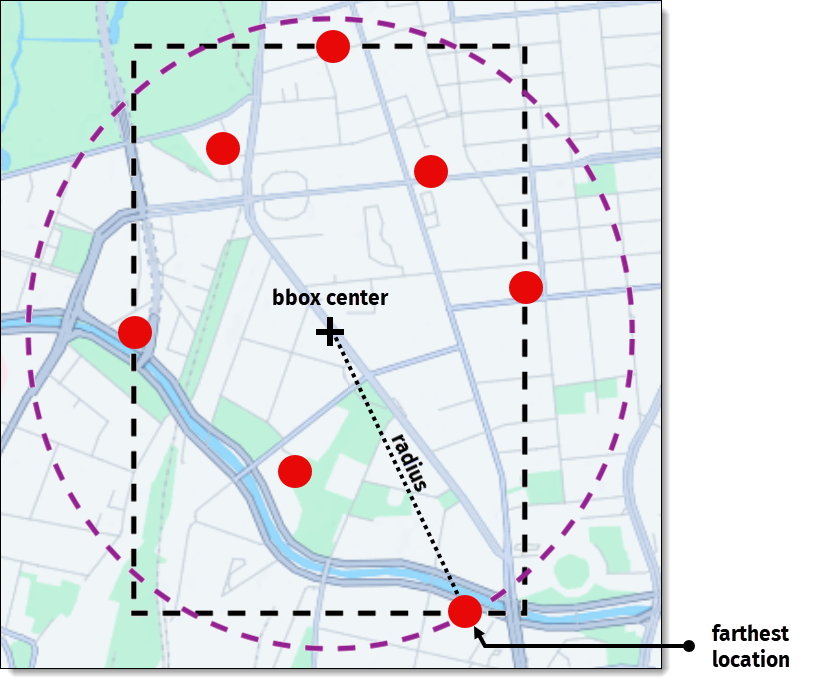
The following steps explain how the radius is calculated:
- Generate a bounding box that encompasses all the job locations.
- Identify the center of the bounding box.
- From the center, locate the farthest point within the bounding box.
- Measure the distance from the center to the farthest point. This distance is considered the radius.
- The use of the
avoidfeature can lead to jobs being unassigned, with the reasonREACHABLE_CONSTRAINT, if the calculated route did not manage to avoid the provided attributes.
The following example shows the
avoid.areasoption:{ "avoid": { "areas": [ { "type": "boundingBox", "north": 52.581602074654555, "south": 52.54549707905248, "east": 13.397741756250387, "west": 13.31585928556846 } ] } } -
exclude: specifies which
countriesorareasto exclude from tour planning. The country codes must be provided in ISO 3166-1 alpha-3 format, while areas are defined by a series of coordinates representing a bounding box, polygon, or an encoded polygon.Note
- To obtain meaningful results when excluding countries, ensure that the radius of the minimum bounding circle encompassing all locations is neither too small nor exceeds 490 km. For more information about how the circle is computed, see the
avoidoption. - If the radius exceeds 490 km, a validation error is returned. This balance is necessary for the effective processing of country exclusions.
The following example shows the
exclude.countriesoption:{ "exclude": { "countries": [ "AUT", "CHE" ] } }The following examples shows the
exclude.areasoption:{ "exclude": { "areas": [ { "type": "boundingBox", "north": 52.581602074654555, "south": 52.54549707905248, "east": 13.397741756250387, "west": 13.31585928556846 } ] } } - To obtain meaningful results when excluding countries, ensure that the radius of the minimum bounding circle encompassing all locations is neither too small nor exceeds 490 km. For more information about how the circle is computed, see the
-
traffic: specifies traffic parameters for the vehicle profile. When you set
modetodisabled, all traffic data, including long term closures, is ignored. If not specified, the trafficmodeis automatically set todefaultandfleet.trafficconfiguration is used.{ "traffic": { "mode":"disabled" } } -
ignoreRouteViolations: allows ignoring routing violations such as closed roads or no-through zones. Often, these restrictions apply only to the last meters of a route, and the driver can walk the remaining distance.
You can specify one of the following types:
- all — ignores all routing violations, such as closed roads, no-through zones, or other route restrictions.
- traffic — ignores only traffic-related violations, such as road closures or disruptions caused by traffic conditions.
Note
Use this feature with caution, as it may provide solutions even if some locations are unreachable.
{
  "ignoreRouteViolations": [
    "traffic"
  ]
}
For more information, see Assign otherwise unreachable jobs by ignoring route violations.
-
matrix: allows to specify custom routing matrix for a vehicle profile in synchronous requests. The matrix has to contain the
originsarray with all location IDs used in the problem and two flat arrays:travelTimesanddistances.
Both these arrays represent a 2D matrix where rows correspond tooriginsand columns todestinations.
The order of elements in both arrays is important because the data must be arranged in the same order as in theoriginsarray.For more information, see Implement custom time-distance matrices.
{ "matrix": { "origins": [ { "type": "id", "id": "location_1" }, { "type": "id", "id": "location_2" } ], "travelTimes":[0,1632,1650,0], "distances":[0,20977,24635,0] } } -
matrixId: ALPHA allows referencing a custom routing matrix ID for vehicle profiles in asynchronous requests. The matrix must be uploaded through the
/matricesendpoint before you can reference it by its ID.Note
To get access to this endpoint, contact your regional HERE representative. The format of such matrices is identical to matrices for the sync endpoint mentioned previously.
For more information, see Implement custom time-distance matrices.
{
  "matrixId": "2d3b04bc-055d-4d6a-8dff-49d3608be805"
}
Type-specific options
Certain profile types come with a set of exclusive options defined within the options parameter. These options are specific to the profile type and are provided alongside options that are common to all profile types.
For example, for the taxi profile type, you specify whether the vehicle is allowed to drive on the taxi-only roads and lanes by using the allowDriveThroughTaxiRoads option.
In another example, the truck profile type includes the shippedHazardousGoods option which sets a list of hazardous materials shipped by the trucks, such as explosives, gas, materials harmful to water, and so on.
These parameters help tailor the routing to the specific needs and constraints of different vehicle types and scenarios. For detailed information about the options available for each profile type, see the API Reference.
Traffic
The traffic setting configures what kind of traffic information should be considered for routing:
liveOrHistorical: for departure times in the future, either live or historical traffic data are applied depending
on how far in the future the departure time is. For departure times in the past, only historical traffic data
are applied. The departure time of a vehicle type can be configured via the vehicle profile's optional departureTime
property. In case this property is omitted when defining a vehicle profile, the earliest shift start time of all
vehicle types sharing that same vehicle profile is used as that profile's departure time. Choose this setting
if all locations are within a radius of 490 km and you want to use live traffic data whenever possible.historicalOnly: only free-flow speeds based on historical traffic data are applied. Choose this setting if you want
to avoid live traffic data usage.automatic: the same asliveOrHistorical, if all coordinates are within a radius of 490 km, otherwise the same as
historicalOnly. Choose this setting if you want the service to decide automatically what is the best option.
The default value is automatic.
Location
Each location object should contain two required parameters: latitude and longitude.
To be more precise when designating the location, we can specify two more optional parameters:
-
sideOfStreetHint: a hint to determine which side of the street to use for this location when routing.
This hint should be a point next to the street, where a vehicle should stop.{ "lat": 41.53761, "lng": -8.45025, "sideOfStreetHint": { "lat": 41.53761, "lng": -8.45025, "matchSideOfStreet":"always" } } -
nameHint: directs the route calculation to search for a location with a similar name.
This hint can be used for example to reach the location under an overpass.{ "lat": 52.39195, "lng": 13.08384, "nameHint": "Friedrich-List-Straße" }
Configuration
Configuration can be used to tweak the algorithm's default behaviour, see the Configuration documentation. In the following example, the solver will take a maximum of 2 seconds (maxTime) to solve the problem, and if within the 2 seconds there is a period of 1 second (stagnationTime) without a considerable solution improvement, then the algorithm will terminate.
Example
An example of a Problem:
{
  "plan": {
    "jobs": [
      {
        "id": "myJob",
        "tasks": {
          "deliveries": [
            {
              "places": [
                {
                  "location": {"lat": 52.46642, "lng": 13.28124},
                  "times": [["2020-07-04T10:00:00.000Z","2020-07-04T12:00:00.000Z"]],
                  "duration": 180
                }
              ],
              "demand": [1]
            }
          ]
        }
      }
    ]
  },
  "fleet": {
    "types": [
      {
        "id": "myVehicleType",
        "profile": "car",
        "costs": {
          "distance": 0.0002,
          "time": 0.005,
          "fixed": 22
        },
        "shifts": [{
          "start": {
            "time": "2020-07-04T09:00:00Z",
            "location": {"lat": 52.52568, "lng": 13.45345}
          },
          "end": {
            "time": "2020-07-04T18:00:00Z",
            "location": {"lat": 52.52568, "lng": 13.45345}
          }
        }],
        "limits": {
          "maxDistance": 300000,
          "shiftTime": 28800
        },
        "capacity": [10],
        "amount": 1
      }
    ],
    "profiles": [{
      "name": "car",
      "type": "car",
      "departureTime": "2020-07-04T09:15:00Z"
    }]
  },
  "configuration": {
    "termination": {
      "maxTime": 2,
      "stagnationTime": 1
    }
  }
}
Updated 3 days ago