

Limit the start time of activities through time windows
It often happens that solving the Last Mile Delivery problem needs to consider specific time windows when visiting customers is only possible during specific times. Such problems are known as VRPTWs - Vehicle Routing Problems with Time Windows, and it is a widespread problem for most delivery services. When solving this problem, the timing constraints must be considered additionally alongside all the other constraints that your specific problem includes.
Single Time Window Per Job
Let's explore the situation when your vehicle needs to execute 2 delivery jobs within different time windows:
job_1between 9:00 and 18:00job_2between 10:00 and 16:00
assuming that the vehicle shift time is 10 hours long from 8:00 till 18:00.
Here each of the jobs has a single time window and our goal is to minimize the total travel time of the vehicle and arrive at the locations within the specified time windows. In this case, the crucial condition is not only specifying the time windows of the jobs, but also the exact shifts’ start and end time. The shiftTime property defines the maximum allowed working time of a vehicle type. In case a break is defined for a vehicle, the duration of the break is added to the shiftTime. In our case, a vehicle type has a shift of 10 hours with no breaks, so the total shiftTime is defined as 10 hours.
The start.time and end.time properties on the VehicleShift define the lower and upper bounds of the time interval in which the vehicle's shift can lie. A vehicle cannot start working before the start.time, or finish working after the end.time. The start.time and end.time can be imagined as the opening and closing times of a depot where the vehicle starts and ends its tour and where in last mile delivery scenarios, deliveries are typically loaded into the vehicles.
At the same time, start.time and end.time can override the defined shiftTime. That means in case the time defined by the shiftTime property is longer than the time interval between the start.time and end.time, then the maximum working time of the vehicle will be reduced and will not exceed that time interval.
Problem
Click to expand/collapse the sample JSON
{
  "fleet": {
    "types": [
      {
        "id": "2695492ea0a5",
        "profile": "car_1",
        "costs": {
          "fixed": 5.0,
          "distance": 0.00,
          "time": 0.02
        },
        "shifts": [
          {
            "start": {
              "time": "2021-07-13T08:00:00Z",
              "location": {
                "lat": 52.530971,
                "lng": 13.384915
              }
            },
            "end": {
              "time": "2021-07-13T18:00:00Z",
              "location": {
                "lat": 52.540850339546864,
                "lng": 13.435575785242161
              }
            }
          }
        ],
        "capacity": [
          10
        ],
        "amount": 1
      }
    ],
    "profiles": [
      {
        "type": "car",
        "name": "car_1"
      }
    ]
  },
  "plan": {
    "jobs": [
      {
        "id": "job_1",
        "tasks": {
          "deliveries": [
            {
              "places": [
                {
                  "times": [
                    [
                      "2021-07-13T09:00:00Z",
                      "2021-07-13T18:00:00Z"
                    ]
                  ],
                  "location": {
                    "lat": 52.605284383450964,
                    "lng": 13.293433615477289
                  },
                  "duration": 1140
                }
              ],
              "demand": [
                2
              ]
            }
          ]
        }
      },
      {
        "id": "job_2",
        "tasks": {
          "deliveries": [
            {
              "places": [
                {
                  "times": [
                    [
                      "2021-07-13T10:00:00Z",
                      "2021-07-13T16:00:00Z"
                    ]
                  ],
                  "location": {
                    "lat": 52.48000596392929,
                    "lng": 13.458654687378955
                  },
                  "duration": 1020
                }
              ],
              "demand": [
                2
              ]
            }
          ]
        }
      }
    ]
  }
}
Solution
The solution for such problem will show the following:
Click to expand/collapse the sample JSON
{
    "statistic": {
        "cost": 144.94,
        "distance": 51941,
        "duration": 6997,
        "times": {
            "driving": 4837,
            "serving": 2160,
            "waiting": 0,
            "break": 0
        }
    },
    "tours": [
        {
            "vehicleId": "2695492ea0a5_1",
            "typeId": "2695492ea0a5",
            "stops": [
                {
                    "location": {
                        "lat": 52.530971,
                        "lng": 13.384915
                    },
                    "time": {
                        "arrival": "2021-07-13T08:00:00Z",
                        "departure": "2021-07-13T08:43:48Z"
                    },
                    "load": [
                        4
                    ],
                    "activities": [
                        {
                            "jobId": "departure",
                            "type": "departure"
                        }
                    ],
                    "distance": 0
                },
                {
                    "location": {
                        "lat": 52.60528438345096,
                        "lng": 13.293433615477287
                    },
                    "time": {
                        "arrival": "2021-07-13T09:06:09Z",
                        "departure": "2021-07-13T09:25:09Z"
                    },
                    "load": [
                        2
                    ],
                    "activities": [
                        {
                            "jobId": "job_1",
                            "type": "delivery"
                        }
                    ],
                    "distance": 13236
                },
                {
                    "location": {
                        "lat": 52.48000596392929,
                        "lng": 13.458654687378957
                    },
                    "time": {
                        "arrival": "2021-07-13T10:00:00Z",
                        "departure": "2021-07-13T10:17:00Z"
                    },
                    "load": [
                        0
                    ],
                    "activities": [
                        {
                            "jobId": "job_3",
                            "type": "delivery"
                        }
                    ],
                    "distance": 42833
                },
                {
                    "location": {
                        "lat": 52.540850339546864,
                        "lng": 13.43557578524216
                    },
                    "time": {
                        "arrival": "2021-07-13T10:40:25Z",
                        "departure": "2021-07-13T10:40:25Z"
                    },
                    "load": [
                        0
                    ],
                    "activities": [
                        {
                            "jobId": "arrival",
                            "type": "arrival"
                        }
                    ],
                    "distance": 52593
                }
            ],
            "statistic": {
                "cost": 144.94,
                "distance": 51941,
                "duration": 6997,
                "times": {
                    "driving": 4837,
                    "serving": 2160,
                    "waiting": 0,
                    "break": 0
                }
            }
        }
    ]
}
From this solution, we can see the regular tour statistics including the total cost, distance and duration, and the sequence of jobs execution considering the time windows that we set.
Time Windows and Activity Duration
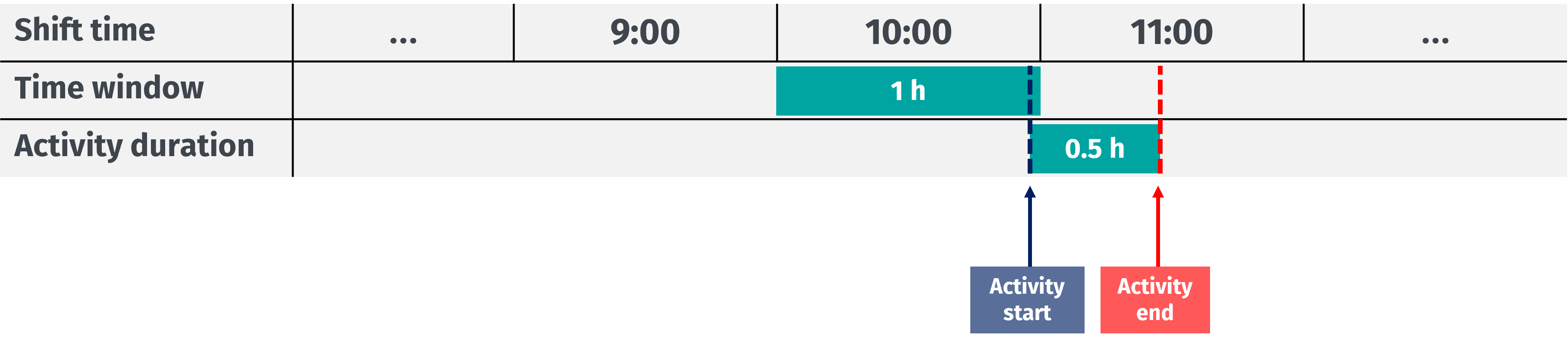
In the HERE Tour Planning API, time windows define the acceptable time range for a driver to arrive at a designated activity location, such as a pickup/delivery point, break area, or reload location. These time windows are independent of the duration of the activity. A typical scenario permits a driver to reach an activity location just before the time window expires, even if the specified duration extends beyond the assigned time window.
However, you can optimize time windows to account for activity durations. Consider the example of a driver shift from 8:00 to 18:00 and a pickup activity with a time window of 10:00-11:00 and a service time of 1800 seconds (0.5 hours), as reflected in the following sample job configuration:
{
  "id": "job_X",
  "tasks": {
    "pickups": [
      {
        "places": [
          {
            "times": [
              [
                "2021-10-23T10:00:00Z",
                "2021-10-23T11:00:00Z"
              ]
            ],
            "location": {
              "lat": 51.06099,
              "lng": 13.75245
            },
            "duration": 1800
          }
        ],
        "demand": [
          1
        ]
      }
    ]
  }
}
In this example, the time window (as specified by the times array) ensures that a driver can start the activity at any point within the designated time range. However, it mandates that the driver arrives at the activity location no later than 11 AM. The following figure illustrates a scenario where the driver arrives late but still within the time window, allowing the pickup activity to extend past 11 AM:
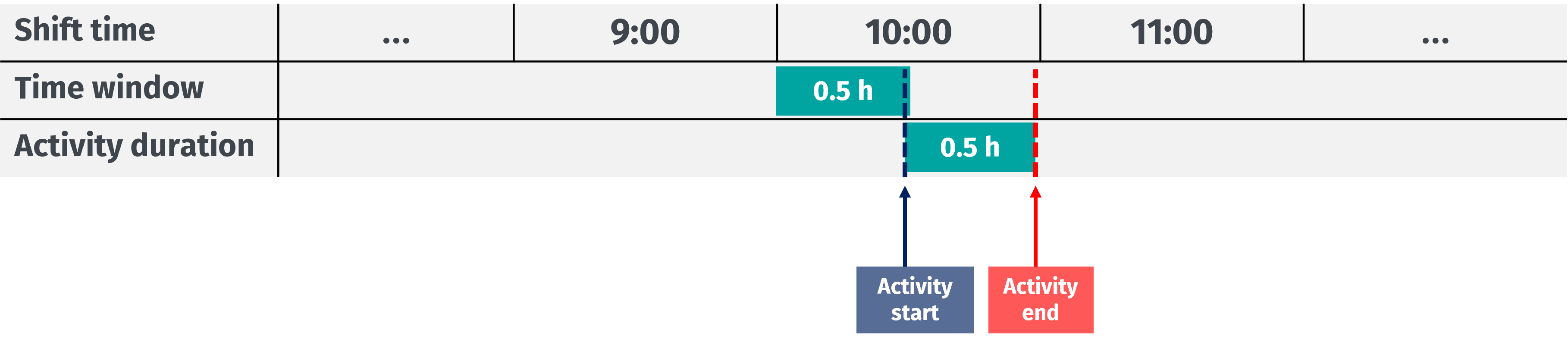
For example, to ensure that a driver arrives at the pickup location and completes the service before 11 AM, subtract the service time specified in the activity duration from the end of the time window. In this specific use case, the adjusted time window has the following configuration, where the end of the time window is now set to 10:30 AM:
{
  "times": [
    [
      "2021-10-23T10:00:00Z",
      "2021-10-23T10:30:00Z"
    ]
  ]
}
The resulting time window configuration takes the pickup activity duration into consideration, ensuring that the driver completes the activity and departs before 11 AM, as reflected in the following figure:
Multiple Time Windows Per Job
Sometimes due to the clients’ specific requirements, executing the jobs is possible within the multiple time windows within one day, which will add more options for the optimization and should be considered when planning the tour. In this case, we should assume that the time windows for a job may never overlap - so that the open and close times of a time window may not be within another time window of a job.
Let's consider the situation when your vehicle needs to execute 2 jobs within different time windows:
job_1between 9:00 and 11:00 or between 16:00 and 19:00job_2between 11:00 and 14:00 or between 17:00 and 19:00
assuming that the vehicle shift time is 10 hours long from 8:00 till 18:00. Here each of the jobs has two-time windows.
In this case, your vehicle shift time will match both time windows of job_1 but will only match partially with the first time window of job_2. Thus, the solution will consider those constraints to calculate the better route for the vehicle.
Problem
Click to expand/collapse the sample JSON
{
  "fleet": {
    "types": [
      {
        "id": "2695492ea0a5",
        "profile": "car_1",
        "costs": {
          "fixed": 5.0,
          "distance": 0.007,
          "time": 0.02
        },
        "shifts": [
          {
            "start": {
              "time": "2021-07-13T08:00:00Z",
              "location": {
                "lat": 52.530971,
                "lng": 13.384915
              }
            },
            "end": {
              "time": "2021-07-13T18:00:00Z",
              "location": {
                "lat": 52.540850339546864,
                "lng": 13.435575785242161
              }
            }
          }
        ],
        "capacity": [
          5
        ],
        "amount": 1
      }
    ],
    "profiles": [
      {
        "type": "car",
        "name": "car_1"
      }
    ]
  },
  "plan": {
    "jobs": [
      {
        "id": "job_1",
        "tasks": {
          "pickups": [
            {
              "places": [
                {
                  "times": [
                    [
                      "2021-07-13T09:00:00Z",
                      "2021-07-13T11:00:00Z"
                    ],
                    [
                      "2021-07-13T16:00:00Z",
                      "2021-07-13T19:00:00Z"
                    ]
                  ],
                  "location": {
                    "lat": 52.605284383450964,
                    "lng": 13.293433615477289
                  },
                  "duration": 1140
                }
              ],
              "demand": [
                2
              ]
            }
          ]
        }
      },
      {
        "id": "job_2",
        "tasks": {
          "pickups": [
            {
              "places": [
                {
                  "times": [
                    [
                      "2021-07-13T11:00:00Z",
                      "2021-07-13T14:00:00Z"
                    ],
                    [
                      "2021-07-13T17:00:00Z",
                      "2021-07-13T19:00:00Z"
                    ]
                  ],
                  "location": {
                    "lat": 52.54217501128922,
                    "lng": 13.31486008054587
                  },
                  "duration": 120
                }
              ],
              "demand": [
                2
              ]
            }
          ]
        }
      }
    ]
  }
}
Solution
The solution for such problem will look as follows:
Click to expand/collapse the sample JSON
{
    "statistic": {
        "cost": 334.486,
        "distance": 33638,
        "duration": 4701,
        "times": {
            "driving": 3441,
            "serving": 1260,
            "waiting": 0,
            "break": 0
        }
    },
    "tours": [
        {
            "vehicleId": "2695492ea0a5_1",
            "typeId": "2695492ea0a5",
            "stops": [
                {
                    "location": {
                        "lat": 52.530971,
                        "lng": 13.384915
                    },
                    "time": {
                        "arrival": "2021-07-13T08:00:00Z",
                        "departure": "2021-07-13T10:07:02Z"
                    },
                    "load": [
                        0
                    ],
                    "activities": [
                        {
                            "jobId": "departure",
                            "type": "departure"
                        }
                    ],
                    "distance": 0
                },
                {
                    "location": {
                        "lat": 52.60528438345096,
                        "lng": 13.293433615477287
                    },
                    "time": {
                        "arrival": "2021-07-13T10:29:23Z",
                        "departure": "2021-07-13T10:48:23Z"
                    },
                    "load": [
                        2
                    ],
                    "activities": [
                        {
                            "jobId": "job_1",
                            "type": "pickup"
                        }
                    ],
                    "distance": 13236
                },
                {
                    "location": {
                        "lat": 52.54217501128922,
                        "lng": 13.31486008054587
                    },
                    "time": {
                        "arrival": "2021-07-13T11:00:00Z",
                        "departure": "2021-07-13T11:02:00Z"
                    },
                    "load": [
                        4
                    ],
                    "activities": [
                        {
                            "jobId": "job_2",
                            "type": "pickup"
                        }
                    ],
                    "distance": 22829
                },
                {
                    "location": {
                        "lat": 52.540850339546864,
                        "lng": 13.43557578524216
                    },
                    "time": {
                        "arrival": "2021-07-13T11:25:23Z",
                        "departure": "2021-07-13T11:25:23Z"
                    },
                    "load": [
                        0
                    ],
                    "activities": [
                        {
                            "jobId": "arrival",
                            "type": "arrival"
                        }
                    ],
                    "distance": 33636
                }
            ],
            "statistic": {
                "cost": 334.486,
                "distance": 33638,
                "duration": 4701,
                "times": {
                    "driving": 3441,
                    "serving": 1260,
                    "waiting": 0,
                    "break": 0
                }
            }
        }
    ]
}
From this , we can see the regular tour statistics including the total cost, distance and duration, and the sequence of jobs execution considering both time windows that we set for each job.
Note
The
timesin the solution results will always be returned in UTC regardless of what time offset was used in the problem formulation.
Unassigned Jobs Due to Time Window Too Close to Shift End
In some cases, you may come across the situations when you will not be able to assign jobs to your vehicles due to the time window being too close to the vehicle shift end time. For example, if a job time window is from 16:00 to 18:00 and your vehicle shift end time is 19:00. In such a situation the job will not be assigned, and you will be notified with the respective message.
Let's consider the situation when your vehicle needs to execute 2 jobs within different time windows:
job_1between 9:00 and 19:00job_2between 17:45 and 18:30
assuming that the vehicle shift time is 10 hours long from 8:00 till 18:00.
Problem
Click to expand/collapse the sample JSON
{
  "fleet": {
    "types": [
      {
        "id": "2695492ea0a5",
        "profile": "car_1",
        "costs": {
          "fixed": 5.0,
          "distance": 0.007,
          "time": 0.02
        },
        "shifts": [
          {
            "start": {
              "time": "2021-07-13T08:00:00Z",
              "location": {
                "lat": 52.530971,
                "lng": 13.384915
              }
            },
            "end": {
              "time": "2021-07-13T18:00:00Z",
              "location": {
                "lat": 52.540850339546864,
                "lng": 13.435575785242161
              }
            }
          }
        ],
        "capacity": [
          5
        ],
        "amount": 1
      }
    ],
    "profiles": [
      {
        "type": "car",
        "name": "car_1"
      }
    ]
  },
  "plan": {
    "jobs": [
      {
        "id": "job_1",
        "tasks": {
          "pickups": [
            {
              "places": [
                {
                  "times": [
                    [
                      "2021-07-13T09:00:00Z",
                      "2021-07-13T19:00:00Z"
                    ]
                  ],
                  "location": {
                    "lat": 52.605284383450964,
                    "lng": 13.293433615477289
                  },
                  "duration": 1140
                }
              ],
              "demand": [
                2
              ]
            }
          ]
        }
      },
      {
        "id": "job_2",
        "tasks": {
          "pickups": [
            {
              "places": [
                {
                  "times": [
                    [
                      "2021-07-13T17:50:00Z",
                      "2021-07-13T18:30:00Z"
                    ]
                  ],
                  "location": {
                    "lat": 52.54217501128922,
                    "lng": 13.31486008054587
                  },
                  "duration": 120
                }
              ],
              "demand": [
                2
              ]
            }
          ]
        }
      }
    ]
  }
}
Solution
The solution for such problem will look as follows:
Click to expand/collapse the sample JSON
{
    "statistic": {
        "cost": 300.415,
        "distance": 30005,
        "duration": 4269,
        "times": {
            "driving": 3129,
            "serving": 1140,
            "waiting": 0,
            "break": 0
        }
    },
    "tours": [
        {
            "vehicleId": "2695492ea0a5_1",
            "typeId": "2695492ea0a5",
            "stops": [
                {
                    "location": {
                        "lat": 52.530971,
                        "lng": 13.384915
                    },
                    "time": {
                        "arrival": "2021-07-13T08:00:00Z",
                        "departure": "2021-07-13T08:37:39Z"
                    },
                    "load": [
                        0
                    ],
                    "activities": [
                        {
                            "jobId": "departure",
                            "type": "departure"
                        }
                    ],
                    "distance": 0
                },
                {
                    "location": {
                        "lat": 52.60528438345096,
                        "lng": 13.293433615477287
                    },
                    "time": {
                        "arrival": "2021-07-13T09:00:00Z",
                        "departure": "2021-07-13T09:19:00Z"
                    },
                    "load": [
                        2
                    ],
                    "activities": [
                        {
                            "jobId": "job_1",
                            "type": "pickup"
                        }
                    ],
                    "distance": 13236
                },
                {
                    "location": {
                        "lat": 52.540850339546864,
                        "lng": 13.43557578524216
                    },
                    "time": {
                        "arrival": "2021-07-13T09:48:48Z",
                        "departure": "2021-07-13T09:48:48Z"
                    },
                    "load": [
                        0
                    ],
                    "activities": [
                        {
                            "jobId": "arrival",
                            "type": "arrival"
                        }
                    ],
                    "distance": 30008
                }
            ],
            "statistic": {
                "cost": 300.415,
                "distance": 30005,
                "duration": 4269,
                "times": {
                    "driving": 3129,
                    "serving": 1140,
                    "waiting": 0,
                    "break": 0
                }
            }
        }
    ],
    "unassigned": [
        {
            "jobId": "job_2",
            "reasons": [
                {
                    "code": "TIME_WINDOW_CONSTRAINT",
                    "description": "cannot be visited within time window"
                }
            ]
        }
    ]
}
From this solution, we can see the regular tour statistics including the total cost, distance and duration, and the sequence of jobs execution considering the time windows. Note that one job here could not be executed due to its time window to close to the vehicle shift end time and the respective message is returned.
Next steps
For more information, see:
Updated 6 months ago