

Learn key concepts
The following list explains the most common terms and concepts used in the HERE Tour Planning API.
activity
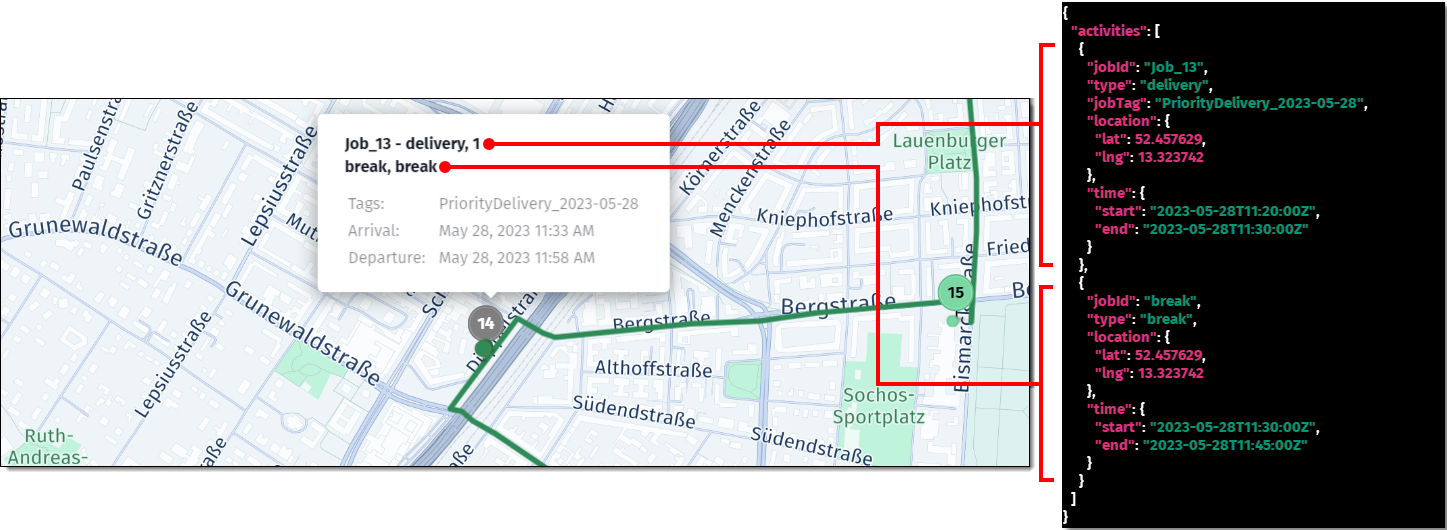
An activity is a planned event at a specific location and time within a stop on a tour. The available activity types include departure, arrival, break, pickup, delivery, and so on. In addition to its type, each activity also has properties such as jobId, jobTag, location, and time, which define its characteristics and context in detail, facilitating tracking and management.
The following figure shows a single stop with delivery and break activity types as well as their corresponding properties in the solution JSON:
For more information, see:
activity start/end time
In the tour planning solution, activity start and end refers to the specific times when a vehicle begins or completes an activity within a tour. The start time is when the activity is initiated, and the end time is when it concludes.
alternative locations
Alternative job locations provide the flexibility in terms where jobs can be completed. This feature considers both the time windows and various possible locations for jobs, which helps in assigning tasks more effectively and planning more efficient routes.
For example, you can configure a delivery job for a customer, with alternative "Home" and "Work" locations, each with a different time window, based on the customer's availability.
For more information, see Use alternative locations.
break
A break refers to a time period that is allocated for the vehicle's driver to rest. You can optimize the break period within the tour in multiple ways, depending on your business needs. For example, you can allocate the rest time window to coincide with the vehicle's charging stops, allowing the driver to recharge the battery while taking a rest.
For more information, see:
capacity
Vehicle capacity refers to the maximum number of people or goods a vehicle can accommodate at any given time during the tour, defined for a vehicle type.
You must consider capacity in relation to the demand of the jobs the vehicle is assigned to serve. For example, if a job requires the delivery of 5 units and another job requires 4 units, a vehicle with a capacity of at least 9 units is needed to fulfill both jobs without exceeding its capacity. The capacity is defined as a positive number and is essential in optimizing routes in a way that ensures vehicles are not overloaded while meeting the demands of all assigned jobs.
For more information, see:
clustering of jobs with nearby locations
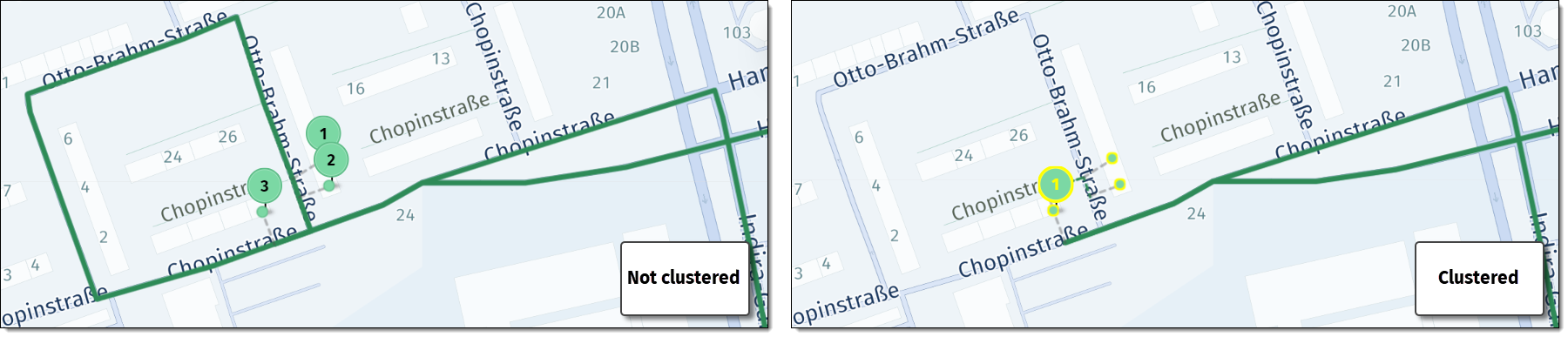
Clustering of nearby jobs involves grouping geographically close jobs into a single stop, which creates more efficient routes by reducing travel time and minimizing fuel consumption.
Clustering provides the ability to serve more jobs within a shift because of reduced driving time, the reduction of the total number of stops, and the decrease in both the total tour duration and distance, especially in scenarios involving one-way streets where you can minimize the number of detours.
The following figure shows a sample optimization through clustering, in which clustering reduces the total number of stops and decreases the overall tour distance:
For more information, see:
clustering of jobs with identical locations
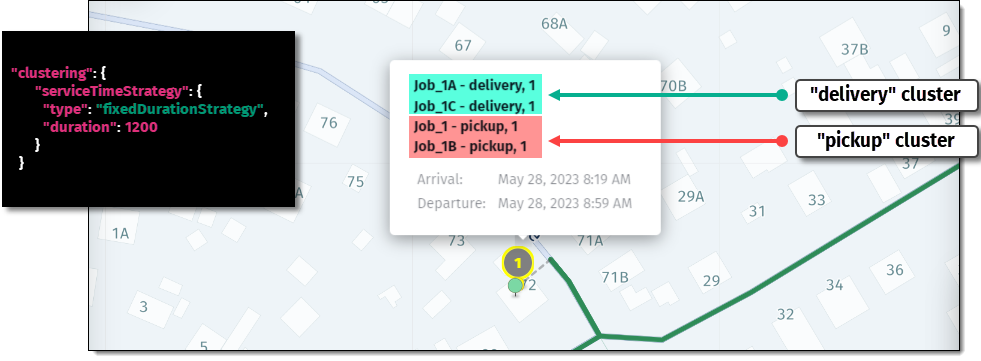
clustering of jobs with identical locationsThis type of clustering groups similar jobs placed at the same location. For the optimization algorithm to consider jobs eligible for this type of clustering, they must meet the following conditions in addition to being at identical locations:
- They have only a single
job taskwith a singlelocation. - They have the same type of task (either
pickupORdelivery) - They have identical
time windows - They have identical
skills - They have the same
territories - They have the same
job taskposition(job tasks withoutpositionare considered as having the same position) - They have the same number of
demanddimensions (different values are allowed, for example[2]and[3]). An example of unequaldemanddimensions includes[2]and[2,3].
You can control how the duration or service time of job is determined within the clustering feature by using any of the available strategies.
The following example shows a sample cluster, with two delivery and two pickup jobs as sub-clusters:
For more information, see Clustering.
costs
Tour costs are the expenses associated with vehicles during the computation of a solution. The HERE Tour Planning API distinguishes between the following types of tour-related costs:
fixed: Refers to the non-variable costs associated with deploying a vehicle for a specifictaskorjob, such as vehicle maintenance or driver wages.distance: Refers to the expenses incurred per unit of distance traveled by the vehicle.time: Refers to the costs associated with the time spent on the tour, including driving and serving time.
By manipulating the ratio between the distance and time costs, you can influence the resulting order of stops, the type of route selected for the tour, and so on.
For example, when prioritizing time over distance, the optimization algorithm might select roads which allow higher traveling speeds, such as motorways, potentially at the expense of a higher total traveling distance, which in turn may influence the order of stops.
For more information, see:
customer ID
In the context of clustering of jobs with identical locations, customerId is an optional property in the job entity that specifies a unique identifier for a customer. Jobs having the same customerId are grouped in one or several clusters if possible, to ensure they are assigned to the same stop if feasible and thus are served together.
For more information, see Problem.
delivery
A delivery is a job type that involves transporting specific goods from the following types of locations:
- The
pickuplocation inmulti-jobcases - The depot or a reload location, if these locations are defined
- A pre-loaded vehicle, if an optional start location is used
These goods are then transported to specific locations as part of a planned route.
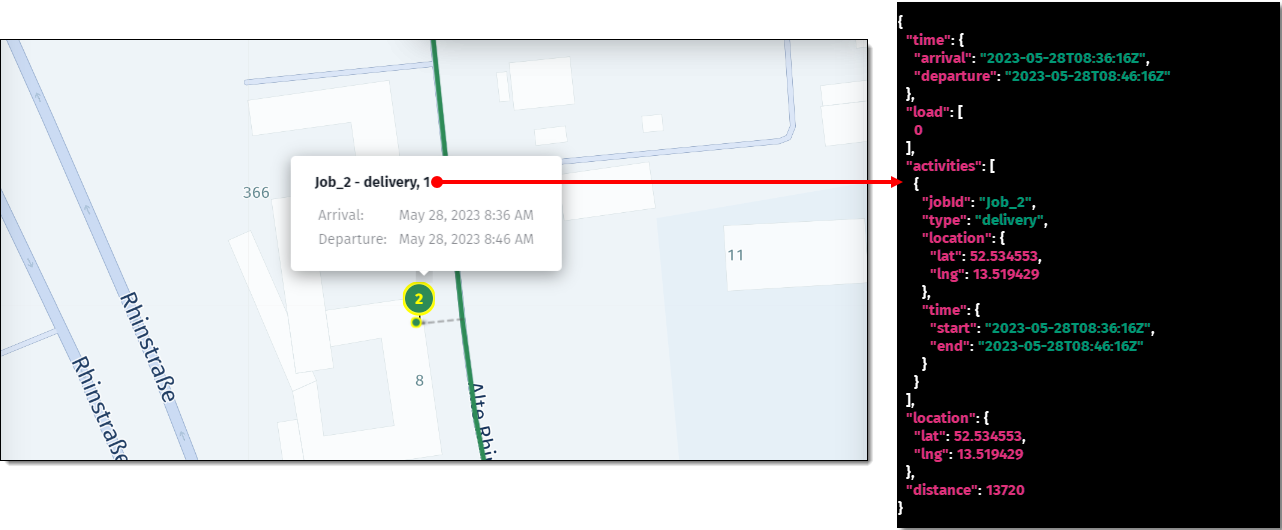
The following figure shows a sample delivery job with the associated properties from the corresponding Tour Planning solution:
demand
The demand refers to the exact number of people to be moved in a task, or the amount of space this task will occupy in a vehicle, measured in units of volume, weight, or quantity. It specifies how much of the vehicle's overall capacity will be subtracted to accommodate the task. For example: demand: [1].
For more information, see:
departure time
departure timeThe departureTime property specifies the actual time a vehicle leaves the depot and is relevant in the context of routing calculations for various vehicle profiles.
This property is particularly useful for planning tours in advance when road conditions or availability might change with relation to the present time. For example, when some streets might be open or closed on certain weekdays.
For more information, see:
duration
In tour planning, duration refers to two different types of time measurement:
-
stop duration: This is the total time a vehicle spends at a specific stop within the tour. This duration includes the time spent at the stop and the time required to perform specific activities at that stop (for example, loading, unloading, or picking up goods). The stopdurationis the sum of the individual activity durations plus the stop'sbase duration. -
total tour duration: This is the cumulative time for an entire tour and is measured in seconds. It accounts for all time-related elements of the tour, including:- Driving time between stops
- Time spent serving jobs (for example, pickups, deliveries)
- Waiting time (for example, when arriving before a time window starts)
- Stopping time (for example, for fueling or administrative tasks)
- Breaks required during the tour
For more information, see:
end location
The end location is the final point where a vehicle's shift concludes. The end location is part of the vehicle's shift details, specifying where the vehicle is expected to finish its route or shift. This location is counted as a transaction for billing purposes when calculating the number of transactions for the use of the HERE Tour Planning API.
For more information, see:
fleet
The term fleet refers to the full collection of vehicles that you use for serving tasks. The fleet configuration considers various constraints such as vehicle capacity, skills, territories, vehicle types, and other parameters. The HERE Tour Planning API optimizes routes for this collection of vehicles to improve fleet utilization and efficiently solve vehicle routing problems.
For more information, see:
job
In the context of the HERE Tour Planning API, a job refers to a list of activities performed by a specific vehicle. These activities can include various tasks such as pickups and deliveries.
A task, relates to specific actions within a job, like picking up or delivering items at designated locations.
Each job can include up to 3 pickup and 3 delivery tasks. In the HERE Tour Planning API, a synchronous request can include up to 250 job items, while an asynchronous request can include up to 3000 job items.
Note
Jobs may vary in
prioritylevel and require differentskills. Additionally, a specificmaxTimemay apply to vehicles, and categories prevent jobs from different categories from being mixed in a single vehicle.
The following snippet shows a sample job consisting of a single pickup task and a single delivery task:
{
    "id": "Job_Z",
    "priority": 1,
    "skills": ["heavy_duty"],
    "tasks": {
        "pickups": [
            {
                "places": [
                    {
                        "location": {
                            "lat": 52.458232,
                            "lng": 13.338698
                        },
                        "territoryIds": ["South"],
                        "duration": 600
                    }
                ],
                "demand": [1]
            }
        ],
        "deliveries": [
            {
                "places": [
                    {
                        "location": {
                            "lat": 52.457629,
                            "lng": 13.323742
                        },
                        "territoryIds": ["North"],
                        "duration": 600
                    }
                ],
                "demand": [1]
            }
        ]
    }
}
For more information, see Job.
job ID
This is a unique identifier assigned to each job within the fleet's tour plan. The ID enables tracking and retrieval of specific job-related information. In the solution context, each activity within a stop references a jobId that corresponds to the one assigned to it in the problem.
For more information, see:
job time window
This is the acceptable time range for a job to start. The API takes time windows and other constraints to ensure that jobs are scheduled within their specified time frames.
For more information, see Time Windows and Activity Duration.
mixing restrictions
You can defines categories of goods that should not be mixed and assign these categories to jobs. There are two levels of mixing restrictions: tour and subTour. The tour level restrictions apply to the entire trip, meaning a vehicle can only carry goods from a single restricted category throughout the tour. The subTour level restrictions are more flexible, allowing different categories of goods to be transported on the same tour but not simultaneously, accommodating more complex delivery or pickup scenarios.
For more information, see Define mixed load restrictions.
name hint
The nameHint is a string parameter used in defining a task location within the vehicle routing problem to look for a location that has a similar name to the one provided. This can be particularly useful for ensuring that the optimization algorithm considers the intended location when there may be multiple locations with similar or ambiguous names.
For more information, see the API Reference.
limits
Limits are restrictions that you set on various tour parameters.
Depending on your objectives, you can set the following limits on the shift level:
In addition, you can set the maximum speed limit on the vehicle profile level.
These limits are important for ensuring operational efficiency, driver safety, customer satisfaction, regulatory compliance, resource allocation, and cost control, helping the fleet to operate effectively and deliver high-quality service to customers.
The following example shows a sample limits objects that defines the maximum number of stops a vehicle can make during a tour:
{
    "limits": {
        "stops": {
            "maxCount": {
                "value": 35
            }
        }
    }
}
For more information, see Set route limits.
location
Location refers to specific geographical coordinates (latitude and longitude) for various types of activities defined in the problem and solution, for example, for pickup or delivery tasks.
For more information, see:
objectives
In Tour Planning, the term objectives refers to the objective function that is part of problem formulation. The goal of the function is to define the direction of the optimization, for example, to focus on reducing the tour distance, minimize the tour duration, and so on.
For more information, see:
pickup
This term refers to the action or process of collecting specific items or people from designated locations along a route to be transported to other delivery locations or to the depot location.
For more information, see Combine pickup and delivery in tour planning.
pickup and delivery
A job that consists of multiple pickups and deliveries (up to 3 for each job type) is referred to in the context of Tour Planning as a multi-job. A common example of a multi-job problem is a school bus routine, where the bus picks up several children at different addresses and drops them off at the school. A multi-job can only be considered as completed when all the tasks inside the job are done.
The following snippet shows a sample multi-job consisting of one delivery and one pickup task:
{
    "id": "Job_13",
    "tasks": {
        "pickups": [
            {
                "places": [
                    {
                        "location": {
                            "lat": 52.457629,
                            "lng": 13.323742
                        },
                        "duration": 600
                    }
                ],
                "demand": [1]
            }
        ],
        "deliveries": [
            {
                "places": [
                    {
                        "location": {
                            "lat": 52.457629,
                            "lng": 13.323742
                        },
                        "duration": 600
                    }
                ],
                "demand": [1]
            }
        ]
    }
}
For more information, see VRP With Multi-Jobs.
place
A place denotes a location where one or more pickup or delivery activities occur. A place is defined by its location, which includes the latitude and longitude, and optionally, the side of the street. In addition to location, the place also contains the duration, location, job time window, and group information for the activity. The following snippet shows a sample job with its corresponding place definition:
{
    "id": "pickup1",
    "tasks": {
        "pickups": [
            {
                "places": [
                    {
                        "location": {
                            "lat": 52.5622847,
                            "lng": 13.4023099
                        },
                        "duration": 180,
                        "territoryIds": ["territory1"]
                    }
                ],
                "demand": [1]
            }
        ]
    }
}
For more information, see Problem.
plan
A tour plan is an object in a vehicle routing problem that defines the list of jobs to be completed. In addition to listing the jobs, the plan may also include the relationships between these jobs and the assigned vehicles. Optionally, it can contain a clustering object with configuration settings for grouping similar jobs together.
For more information, see Plan.
position
The job task position feature allows users to set the serving order of tasks within a tour, enhancing logistics efficiency. The available position types include:
first:Tasksexecuted immediately after departure.ordered: Tasks assigned a specific integer value, prioritized lower than first but higher than unordered tasks.any: Tasks can be placed anywhere between assignments withfirstandlastpositions.last: Tasks executed after all others.
In the case of multi-jobs, the API always serves the pickup tasks before the corresponding deliveries. However, through the position feature, you can manipulate the order of pickup and delivery tasks that are part of a single multi-job.
For more information, see Control job task position.
priority
Priority is the importance assigned to certain jobs that need to be completed, making them more urgent compared to others.
Priority enables the optimization of route planning by ensuring that more critical jobs are included in the tour planning ahead of less urgent ones, even when not all jobs can be completed due to constraints like vehicle capacity. This ensures that the most important jobs are prioritized for completion, improving efficiency and meeting urgent demands more effectively.
The available priority values include:
1: high priority2: default priority
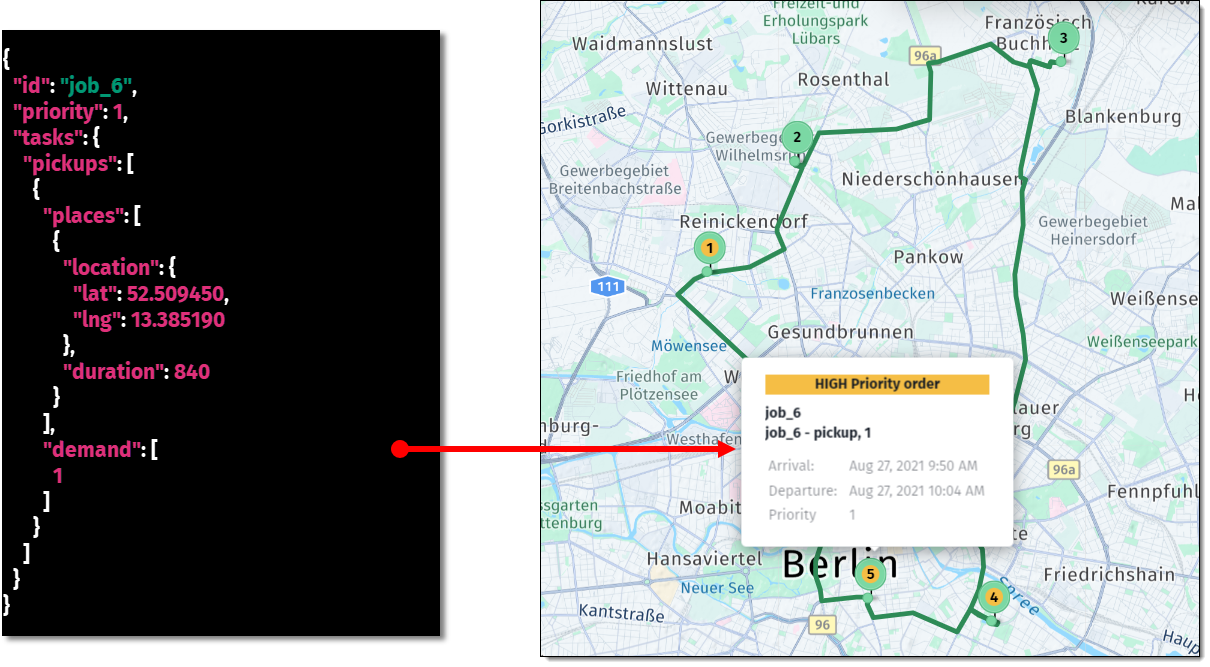
The following figure shows a sample high-priority job in a tour:
For more information, see Prioritize jobs.
problem
The Vehicle Routing Problem (VRP) involves two main parts: the plan and the fleet. It considers various factors such as job pickups and deliveries, time windows, vehicle skills and capacities, cost parameters, territories, fleet profiles, vehicle types, relations, demand, and traffic conditions to achieve an efficient and cost-effective solution.
For more information, see Problem.
profile
This is a set of characteristics that define the routing preferences for a type of vehicle. Each profile must have a name and can be set to various vehicle types such as car, truck, scooter, bicycle, pedestrian, bus, or privateBus. The profile determines the routing behavior taking into account vehicle-specific restrictions like height, weight, and turn limitations, especially for trucks.
For more information, see Routing Profile.
PUDO
PUDO stands for Pick-Up Drop-Off point. PUDOs are important in the context of job groups because they allow for specifying locations where packages can be picked up and/or dropped off for each job group. A job group can have up to 2 PUDOs, and the assignAt property determines whether a PUDO stop should be visited as the first or last stop of a group.
For more information, see Job groups with PUDOs.
relations
This term refers to the connections and dependencies between jobs and vehicles within a tour. In the context of Tour Planning, you can distinguish between the following types of relations:
Sequence:Jobsmust be executed in a specified order without interruptions.Flexible: Jobs must be executed in order, but other jobs can be inserted anywhere.Tour: Jobs must be executed by a specific vehicle, but the order is flexible.
HERE recommends that you use the relations feature only for tour replanning and for assigning certain jobs to a specific vehicle. Select other features like skills or territorry for more flexible planning.
For more information, see Using Relations For Tour Replanning.
reload
This feature allows vehicles to make multiple trips due to limited capacity. Reload enables vehicles to return to a depot or other designated locations to pick up and deliver additional goods after serving all jobs in the previous trip. When the total demand for jobs exceeds a vehicle's capacity, incorporating reloads into the problem constraints becomes essential. These reloads can occur at various locations, including depots and job sites, optimizing logistical efficiency and ensuring all tasks are effectively managed within the constraints of vehicle capacity.
For more information, see Enable multiple reload points.
route
A route is a cost-effective sequence for visiting all stops in the tour plan, taking into consideration such constraints like vehicle capacity, delivery time windows, and so on. For example, if a delivery company needs to send out a vehicle to deliver packages to ten different locations, the HERE Tour Planning API can optimize the order of these locations to ensure the most efficient route is taken, saving time and fuel.
For more information, see Introduction.
shift start/end time
Shift start and end times are mandatory constraints referring to the specific times that mark the beginning and end of a vehicle's shift (when a vehicle should start and end its deliveries or pickups).
shifts
A vehicle shift outlines the start and end times of a vehicle’s work, along with the possible locations for these events. It defines how the vehicle (and driver) operates, allowing for the specification of reloads, breaks, and any information related to driver changes within the shift.
The following snippet shows a sample shifts definition in a problem JSON:
{
    "shifts": [
        {
            "start": {
                "time": "2021-08-27T08:03:00Z",
                "location": {
                    "lat": 52.530971,
                    "lng": 13.384915
                }
            },
            "end": {
                "time": "2021-08-27T16:03:00Z",
                "location": {
                    "lat": 52.530971,
                    "lng": 13.384915
                }
            }
        }
    ]
}
For more information, see:
side of street
The optional sideOfStreetHint parameter provides a hint indicating the preferred side of the street for the location of a delivery or pickup task. This parameter ensures that vehicles stop on the most convenient or safest side of the road to perform the assignment.
skills
By using the skills functionality, you can assign jobs only to vehicles that can satisfy the specific requirements of those jobs. For example, you can assign a refrigerator vehicle for jobs involving transporting frozen items, or a vehicle with fresh air circulation for transporting animals.
For more information, see Assign jobs based on skills.
solution
The optimization algorithm returns a solution in response to a vehicle routing problem. A solution shows the optimized plan for vehicle tours, including the sequence of stops to visit, the distance covered, the duration of the tour, and other relevant statistics such as driving, serving, waiting, and stopping times. The solution also indicates any jobs that could not be assigned to a tour, along with reasons for their unassignment, such as reachability or order constraints.
For more information, see Solution.
statistic
You can find the tour statistic object in the solution JSON after submitting a problem. The statistic contains the following information:
cost: totalcostin abstract units rounded to three decimal places.distance: total distance driven in meters.duration: total duration in seconds.times: times spent for driving, serving jobs, waiting for time window start, stopping and break.
The information provided by tour statistic is useful for analyzing the efficiency and cost-effectiveness of a tour, allowing dispatchers and planners to make informed decisions regarding vehicle routing, scheduling, and overall operational efficiency.
The following snippet shows a sample statistic object from a solution JSON:
{
    "statistic": {
        "cost": 433.779,
        "distance": 154920,
        "duration": 12771,
        "times": {
            "driving": 11171,
            "serving": 1600,
            "waiting": 0,
            "stopping": 0,
            "break": 0
        }
    }
}
For more information, see Solution.
stop
A stop denotes a location where one or more pickup, delivery, break, or other activities occur, as specified in the solution.
The following snippet shows a sample stop properties from a solution JSON:
{
    "1": {
        "time": {
            "arrival": "2023-09-20T09:14:59Z",
            "departure": "2023-09-20T09:17:59Z"
        },
        "load": [4],
        "activities": [
            {
                "jobId": "Job_1",
                "type": "pickup",
                "location": {
                    "lat": 52.5063267065751,
                    "lng": 14.345924039737517
                },
                "time": {
                    "start": "2023-09-20T09:14:59Z",
                    "end": "2023-09-20T09:17:59Z"
                }
            }
        ],
        "location": {
            "lat": 52.5063267065751,
            "lng": 14.345924039737517
        },
        "distance": 68638
    }
}
For more information, see Solution.
tag
A jobTag is an optional free-text field submitted as part of the problem request. It provides additional information related to the job for easier identification or categorization, for example, "fragile", "morning-delivery", "perishable", and so on. You can use tags for organizing, identifying, and categorizing jobs within a system, simplifying their management.
For more information, see VRP With Multi-Jobs.
task
A task is a specific action or operation that forms part of a job. In Tour Planning, a job can consist of multiple tasks, such as pickups and deliveries.
Tour Planning supports up to 250 tasks for the synchronous problems endpoint, and up to 6000 tasks for the asynchronous problems endpoint.
The following snippet shows a sample job with single pickup and delivery tasks:
{
    "id": "Job_Z",
    "priority": 1,
    "skills": ["heavy_duty"],
    "tasks": {
        "pickups": [
            {
                "places": [
                    {
                        "location": {
                            "lat": 52.458232,
                            "lng": 13.338698
                        },
                        "territoryIds": ["South"],
                        "duration": 600
                    }
                ],
                "demand": [1]
            }
        ],
        "deliveries": [
            {
                "places": [
                    {
                        "location": {
                            "lat": 52.457629,
                            "lng": 13.323742
                        },
                        "territoryIds": ["North"],
                        "duration": 600
                    }
                ],
                "demand": [1]
            }
        ]
    }
}
For more information, see Plan.
territory
A territory is a specific district or area where you assign vehicles to operate.
You can use territories when you want to:
- Prioritize where a vehicle should operate (its primary territory).
- Allow flexibility by letting vehicles take
jobsfrom nearby territories, if they have the capacity and time.
For vehicles to operate strictly within their assigned territories and without taking jobs from outside, you can set the strict flag to true for the corresponding vehicle type.
The following snippet show a sample vehicle type configuration with a territory ID assigned:
{
  "id": "small_A",
  "profile": "car",
  "costs": {
    "fixed": 20,
    "distance": 0,
    "time": 0.005
  },
  "territories": {
    "strict": true,
    "items": [
      {
        "id": "North"
      }
    ]
  },
  "shifts": [...], // shifts config omitted for brevity
  "capacity": [
    100
  ],
  "amount": 1
}
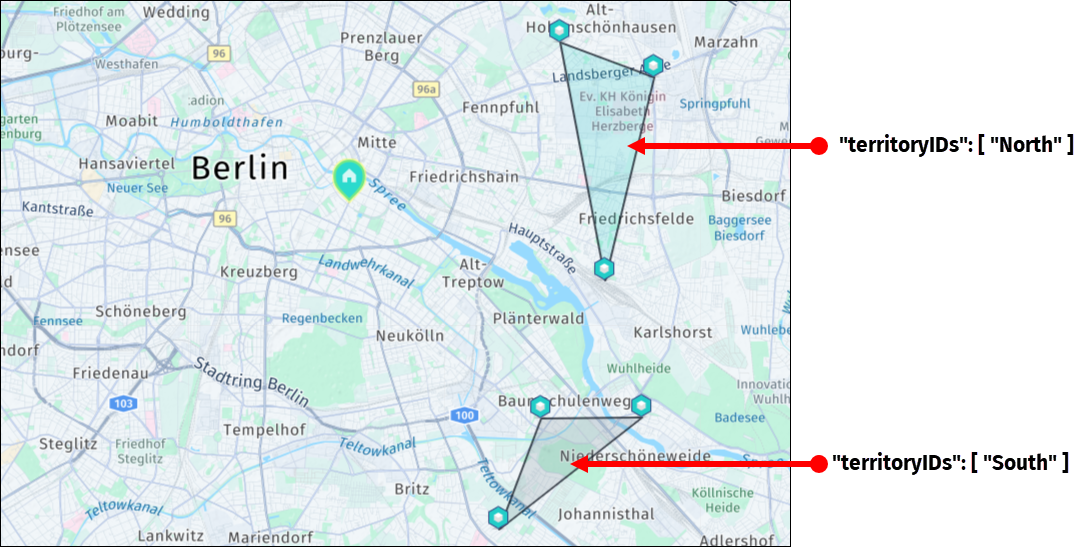
The following figure shows a map with sample jobs that have territory IDs assigned to them:
For more information, see Optimize tours by territories.
times
The times property within the solution shows the breakdown of time spent during the operation of each vehicle in the tour and provides details about the time allocation across such activities related to the tour as driving, serving, waiting, stopping, and break. The following snippet shows a sample times breakdown:
{
    "statistic": {
        "cost": 42.88,
        "distance": 25930,
        "duration": 4576,
        "times": {
            "driving": 2776,
            "serving": 1800,
            "waiting": 0,
            "stopping": 0,
            "break": 0
        }
    }
}
tour
A tour is the optimized route that a vehicle follows to complete its assigned jobs, including the start and end locations of the vehicle's shift, any specified break locations, and the pickup or delivery locations for the jobs.
For more information, see Introduction.
traffic
The traffic modes enable more accurate planning by allowing the optimization algorithm to base its solutions on distances and travel times that reflect expected traffic conditions, therefore improving route efficiency and reducing travel time.
In the HERE Tour Planning API, you can manage the impact of traffic on the resulting solution at both the fleet and vehicle profile levels. The following traffic modes are available on the fleet level:
liveOrHistorical: Uses live or historical traffic data based on departure time.historicalOnly: Ignores time-dependent factors except for long-term closures.automatic: Automatically selects between live and historical data based on location distribution.
The following snippet shows a sample fleet-level traffic configuration:
"fleet": {
    "traffic": "historicalOnly",
    "types": [ ... ],
    "profiles": [
      { ... }
    ]
  },
  [... ]
On a more granular, vehicle profile level, the API allows you to ignore traffic for specific vehicle types as cars, trucks, bicycles, and so on, through the fleet.profiles.traffic property, as shown in the following snippet:
"profiles": [
      {
        "name": "Vehicle_A",
        "type": "car",
        "traffic": {
            "mode": "disabled"
        }
      }
    ]
For more information, see Understand traffic modes.
trip
A trip is a segment where a vehicle completes activities before returning to a depot or starting another trip. For example, a delivery vehicle may begin at a depot, make several stops, then return or reload for more deliveries. A tour may consist of multiple trips, especially when reloads extend the vehicle’s service beyond its initial capacity.
For more information, see Define mixed load restrictions.
unassigned jobs
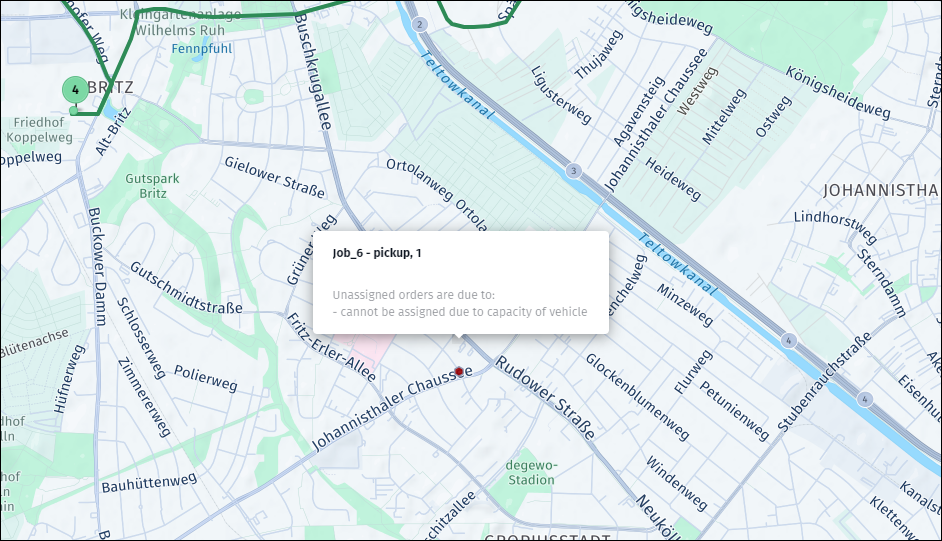
Unassigned jobs refer to jobs that the optimization algorithm did not allocate to any tour or vehicle because of violating a single or multiple tour constraints, for example, the number of jobs exceeded the vehicle's capacity. The objective minimizeUnassigned aims to minimize the number of these unassigned jobs.
For more information, see:
vehicle ID
The vehicleID property is a unique identifier assigned to a vehicle and is used to identify specific vehicles that the optimization algorithm assigned to the tour. For example, if the id of a vehicle type in the fleet is car_A, then the vehicleId for each vehicle of that type used in the tour would be car_A_1, car_A_2, car_A_3, and so on.
For more information, see List Of Tours.
vehicle type
The type property refers to a category of vehicles defined within the fleet to serve jobs. You specify vehicle types when submitting a problem request. Each distinct vehicle type can include such characteristics as capacity, cost, routing preferences, skills, and relevant operational constraints.
For more information, see:
Updated 6 months ago