

Understand traffic modes
Adjusting route planning to consider different traffic conditions enables more efficient navigation. The HERE Tour Planning API provides four traffic modes: liveOrHistorical, historicalOnly, automatic, and disabled. These modes enable customization of routing based on real-time, historical, or no traffic data, catering to diverse use cases and scenarios. This tutorial delves into the implications and scenarios of each mode, enabling you to adjust route planning according to your specific needs and preferences.
Define the traffic mode
To define the traffic mode in HERE Tour Planning API, you can use the fleet.traffic parameter. You can use this parameter to specify how the HERE Tour Planning API should consider traffic information.
You can specify one of the following traffic modes:
automaticliveOrHistoricalhistoricalOnly
For more information, see Traffic.
To prevent the optimization algorithm from considering traffic information in determining the routing solution, set the fleet.profiles.traffic to disabled.
Note
When you disable
fleet.profiles.traffic, the optimization algorithm disregards traffic conditions. This applies to calculating the optimal distance and duration between each stop location, as well as determining the sequence in which the stops should be visited. This ensures that the optimization is solely based on factors other than traffic conditions.
For more information, see Routing profile.
Available traffic modes
The following sections provide an overview of each traffic mode available in the HERE Tour Planning API.
liveOrHistorical
Considers either live or historical traffic data based on the departure time.
You can customize the departure time for a specific vehicle type through the optional departureTime property within the vehicle profile. If you omit this property during the definition of a vehicle profile, the departure time automatically defaults to the earliest shift start time among all vehicle types associated with that specific profile.
The optimization algorithm calculates the distance and duration between subsequent stops differently depending on whether you specify the departure time in the past or in the future:
-
For current departures: The API considers live traffic conditions at the specific moment when a departure occurs.
Note
Consider the following design principles and restrictions when setting current departure times for your routing problems:
- Live traffic data offers a snapshot of conditions at a given moment. However, when calculating optimal travel distances and durations over extended periods, for example, an entire day, the traffic conditions further from the request time might not be accurate.
- All routes except for the first one in the tour will be traversed later. By the time subsequent routes are traveled, the traffic conditions may have already changed.
- For accurate consideration of actual traffic conditions, set the departure time slightly in the future. This accounts for potential network and processing delays, clock mismatches, and other factors that may affect the real-time synchronization of traffic data. By setting the departure time slightly ahead, you can ensure that the traffic conditions reflected in the route calculation are as reliable as possible.
-
For future departures: When the departure time is in the future, the API determines whether to use live or historical traffic data based on the time gap between the current moment and the scheduled departure time. If the departure is scheduled further in the future, there's a greater likelihood that the API will rely on historical traffic data when computing a solution.
-
For past departures: When the departure time is set in the past, the optimization algorithm doesn't use the live traffic data for that particular point in time but rather reflects historical traffic trends aggregated over time intervals.
Use Cases
Use the liveOrHistorical traffic mode if all locations in your routing scenario are within the 490 kilometer radius. The choice of this setting indicates a preference to use live traffic data whenever possible, particularly for locations within the specified radius.
A request with the liveOrHistorical traffic mode fails if the combined geographical extent of all locations exceeds 490 km. This provides an opportunity to intervene and adjust the problem accordingly and then resubmit it. For example, you can handle jobs that are too distant by alternative means, such as assigning them from a different depot or at a later stage when sufficient fleet resources become available.
Note
Alternatively, if you prefer the HERE Tour Planning API to automatically balance between live and historical traffic data for each problem without manual intervention, use the
automatictraffic mode.
historicalOnly
In this traffic mode, the optimization algorithm doesn't consider time-dependent factors, except for long-term closures lasting more than a day. Therefore this mode can be handy when planning tours where the departure or arrival times aren't predetermined
Use Cases
This mode is suitable for routes with stable traffic patterns, such as between cities, where live data may not significantly impact routes. For example, this mode is useful in long-haul delivery scenarios which often involve transportation over extended distances, potentially crossing various regions and encountering diverse traffic conditions. In such scenarios, the stability and predictability offered by historical traffic data become valuable.
In addition, you might find this mode useful when you want to avoid using real-time traffic data. For example, you can disable traffic when planning routes significantly earlier, such as during nighttime preparations for morning departures, where real-time traffic data at the time of planning is largely irrelevant.
automatic
automaticAutomatically selects between live and historical data based on the spatial distribution of problem coordinates. If all locations fit within a circle with a 490 km radius, the API utilizes live traffic data, otherwise, it uses historical data only. This mode is the default if you don't explicitly specify a traffic mode in the problem JSON.
Use Cases
This mode is appropriate for tours spanning both urban and rural areas, allowing the service to decide the best option automatically.
For example, this traffic mode is suitable for retailers seeking to balance dynamic urban logistics and stable rural deliveries within complex supply chain networks.
disabled
disabledIn this mode, the route planning algorithm completely disregards any traffic-related information, providing route suggestions without factoring in real-time or historical traffic conditions, including information about long-term closures.
Hint
You disable traffic conditions by setting the
fleet.profiles.trafficparameter to"disabled". For more information, see the API Reference.
Use Cases
This traffic mode is suitable for areas with limited or unreliable traffic data, or when you want to avoid solutions where traffic conditions result in unassigned jobs, for example, due to the reachability constraint.
For example, in the last-mile delivery scenarios, especially in residential neighborhoods, disabling traffic incidents allows drivers the freedom to make on-the-spot decisions. They can even walk short distances if needed to reach the final delivery destination efficiently. For a practical demonstration of the problem, see Disabling traffic.
Sample problems
This section provides practical examples showcasing how the choice of traffic modes in the HERE Tour Planning API impacts route planning. From real-time adjustments to historical analysis, the following examples explore how the selected traffic mode influences navigation for specific use cases.
Note
Because of the ever-changing nature of traffic conditions, the following problems might not produce the same solutions consistently.
Disabling traffic
This example showcases how including or disabling a traffic mode in a routing problem can impact the resulting solution in a short-distance, last-mile delivery scenario.
Consider the following JSON snippet that contains a sample routing problem:
Click to expand/collapse the sample JSON
{
  "fleet": {
    "types": [
      {
        "id": "A",
        "profile": "Vehicle_A",
        "costs": {
          "fixed": 20,
          "distance": 0.001,
          "time": 0
        },
        "shifts": [
          {
            "start": {
              "time": "2023-07-18T02:28:40-07:00",
              "location": {
                "lat": 48.833409,
                "lng": 2.34858
              }
            }
          }
        ],
        "capacity": [
          3
        ],
        "amount": 5
      }
    ],
    "profiles": [
      {
        "name": "Vehicle_A",
        "type": "car"
      }
    ]
  },
  "plan": {
    "jobs": [
      {
        "id": "Job_1",
        "tasks": {
          "deliveries": [
            {
              "places": [
                {
                  "location": {
                    "lat": 48.826072,
                    "lng": 2.334607
                  },
                  "duration": 300
                }
              ],
              "demand": [
                1
              ]
            }
          ]
        }
      },
      {
        "id": "Job_2",
        "tasks": {
          "deliveries": [
            {
              "places": [
                {
                  "location": {
                    "lat": 48.826876,
                    "lng": 2.334753
                  },
                  "duration": 300
                }
              ],
              "demand": [
                1
              ]
            }
          ]
        }
      },
      {
        "id": "Job_3",
        "tasks": {
          "deliveries": [
            {
              "places": [
                {
                  "location": {
                    "lat": 48.830612,
                    "lng": 2.342853
                  },
                  "duration": 300
                }
              ],
              "demand": [
                1
              ]
            }
          ]
        }
      }
    ]
  }
}
The preceding problem specification consists of a fleet that includes a single delivery car with several short-distance delivery jobs around the center of a big city (in this case, Paris). Because no traffic setting was explicitly specified, the optimization algorithm selects the automatic traffic mode by default to produce the following solution:
Click to expand/collapse the sample JSON
{
  "statistic": {
    "cost": 21.187,
    "distance": 1187,
    "duration": 554,
    "times": {
      "driving": 254,
      "serving": 300,
      "waiting": 0,
      "stopping": 0,
      "break": 0
    }
  },
  "tours": [
    {
      "vehicleId": "A_2",
      "typeId": "A",
      "stops": [
        {
          "time": {
            "arrival": "2023-07-18T09:28:40Z",
            "departure": "2023-07-18T09:28:40Z"
          },
          "load": [
            1
          ],
          "activities": [
            {
              "jobId": "departure",
              "type": "departure",
              "location": {
                "lat": 48.833409,
                "lng": 2.34858
              },
              "time": {
                "start": "2023-07-18T09:28:40Z",
                "end": "2023-07-18T09:28:40Z"
              }
            }
          ],
          "location": {
            "lat": 48.833409,
            "lng": 2.34858
          },
          "distance": 0
        },
        {
          "time": {
            "arrival": "2023-07-18T09:32:54Z",
            "departure": "2023-07-18T09:37:54Z"
          },
          "load": [
            0
          ],
          "activities": [
            {
              "jobId": "Job_3",
              "type": "delivery",
              "location": {
                "lat": 48.830612,
                "lng": 2.342853
              },
              "time": {
                "start": "2023-07-18T09:32:54Z",
                "end": "2023-07-18T09:37:54Z"
              }
            }
          ],
          "location": {
            "lat": 48.830612,
            "lng": 2.342853
          },
          "distance": 1187
        }
      ],
      "statistic": {
        "cost": 21.187,
        "distance": 1187,
        "duration": 554,
        "times": {
          "driving": 254,
          "serving": 300,
          "waiting": 0,
          "stopping": 0,
          "break": 0
        }
      },
      "shiftIndex": 0
    }
  ],
  "unassigned": [
    {
      "jobId": "Job_1",
      "reasons": [
        {
          "code": "REACHABLE_CONSTRAINT",
          "description": "location unreachable",
          "details": [
            {
              "vehicleId": "A_2",
              "shiftIndex": 0
            }
          ]
        }
      ]
    },
    {
      "jobId": "Job_2",
      "reasons": [
        {
          "code": "REACHABLE_CONSTRAINT",
          "description": "location unreachable",
          "details": [
            {
              "vehicleId": "A_2",
              "shiftIndex": 0
            }
          ]
        }
      ]
    }
  ]
}
As the solution indicates, the optimization algorithm left two jobs unassigned with the location unreachable status. The following figure illustrates that solution:
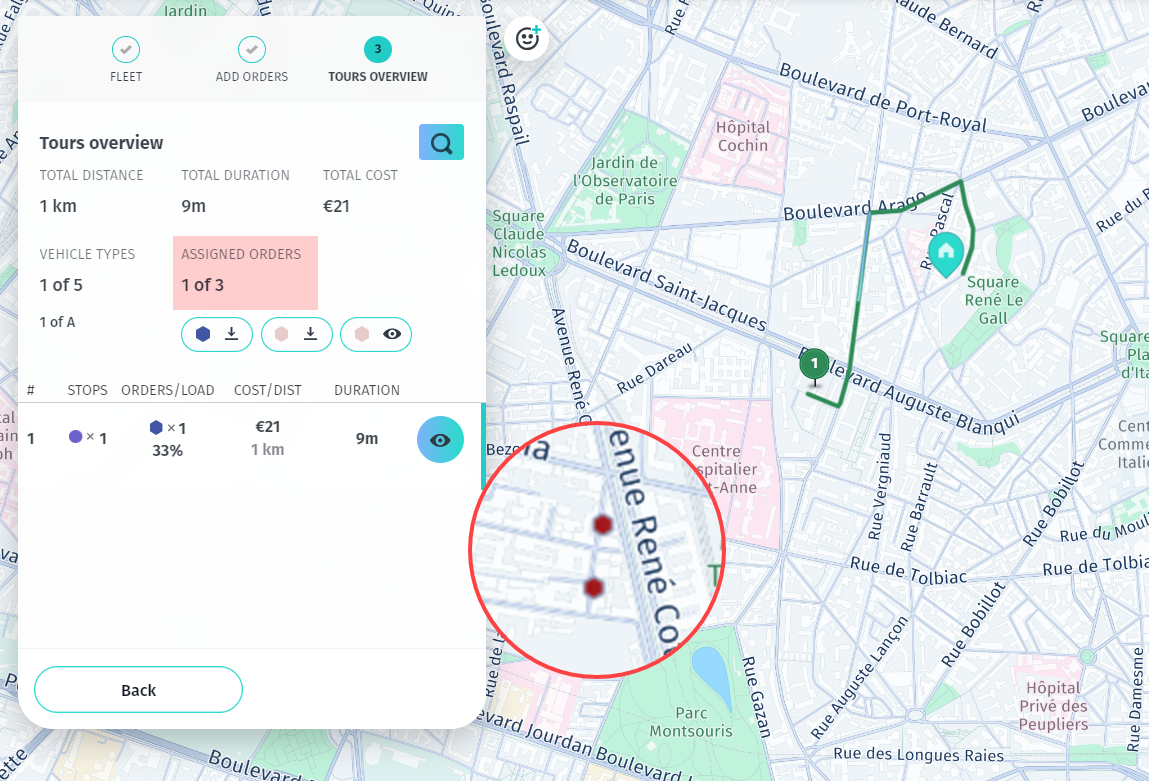
In this case, the location_unreachable state means that the optimization algorithm determined that, based on the current traffic conditions, Job1 and Job2 cannot be completed. For example, the conditions that could lead to the designation of a job location as unreachable might involve:
- Road closures
- Restrictions or prohibitions for specific vehicles (including during certain times)
- Roads in highly congested areas that are impractical to navigate
In last-mile delivery scenarios like this, disabling traffic might provide the driver with maximum flexibility to navigate and adapt to on-the-ground conditions. The driver might use local knowledge. They might choose alternative routes or make other decisions based on the immediate circumstances. Even if routes are congested or temporarily closed, this remains true.
To demonstrate that, the corresponding profile of the single-vehicle fleet from the previous example was modified by disabling traffic, as shown in the following snippet:
"profiles": [
      {
        "name": "Vehicle_A",
        "type": "car",
        "traffic": {
            "mode": "disabled"
        }
      }
    ]
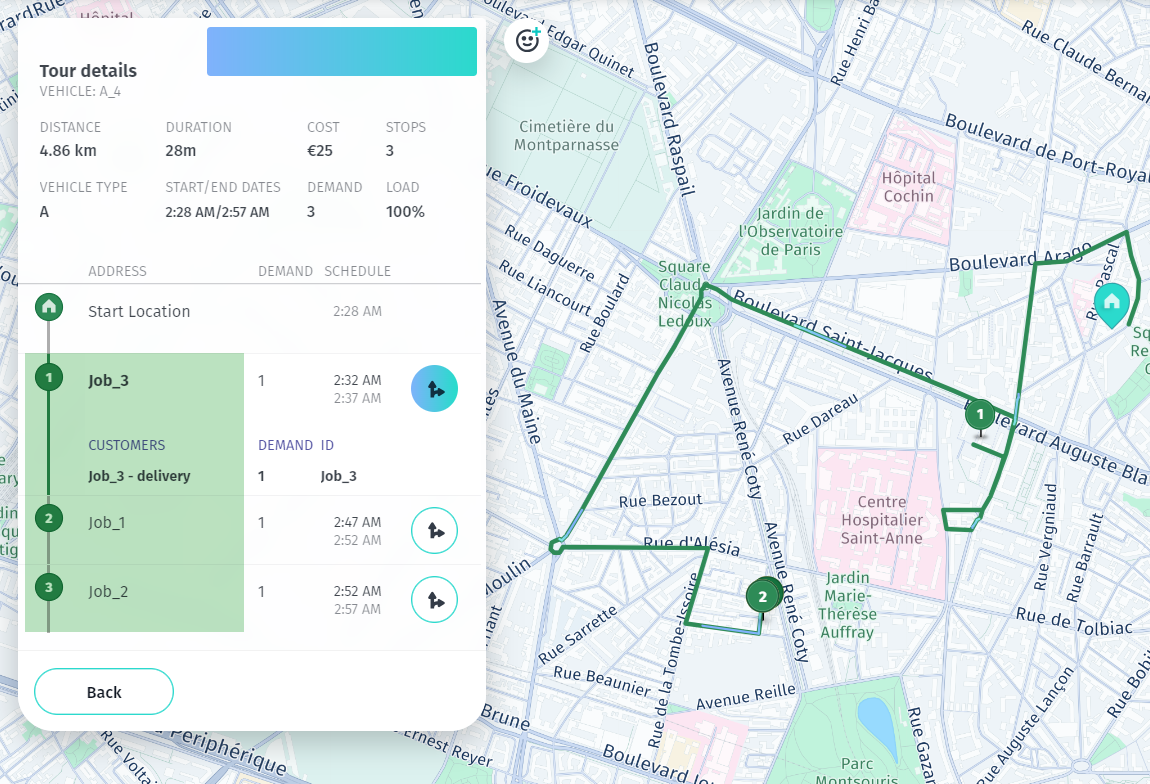
After disabling traffic, the resulting solution now leaves no jobs unassigned, as demonstrated in the following response JSON:
Click to expand/collapse the sample JSON
{
  "statistic": {
    "cost": 24.856,
    "distance": 4856,
    "duration": 1723,
    "times": {
      "driving": 823,
      "serving": 900,
      "waiting": 0,
      "stopping": 0,
      "break": 0
    }
  },
  "tours": [
    {
      "vehicleId": "A_4",
      "typeId": "A",
      "stops": [
        {
          "time": {
            "arrival": "2023-07-18T09:28:40Z",
            "departure": "2023-07-18T09:28:40Z"
          },
          "load": [
            3
          ],
          "activities": [
            {
              "jobId": "departure",
              "type": "departure",
              "location": {
                "lat": 48.833409,
                "lng": 2.34858
              },
              "time": {
                "start": "2023-07-18T09:28:40Z",
                "end": "2023-07-18T09:28:40Z"
              }
            }
          ],
          "location": {
            "lat": 48.833409,
            "lng": 2.34858
          },
          "distance": 0
        },
        {
          "time": {
            "arrival": "2023-07-18T09:32:19Z",
            "departure": "2023-07-18T09:37:19Z"
          },
          "load": [
            2
          ],
          "activities": [
            {
              "jobId": "Job_3",
              "type": "delivery",
              "location": {
                "lat": 48.830612,
                "lng": 2.342853
              },
              "time": {
                "start": "2023-07-18T09:32:19Z",
                "end": "2023-07-18T09:37:19Z"
              }
            }
          ],
          "location": {
            "lat": 48.830612,
            "lng": 2.342853
          },
          "distance": 1187
        },
        {
          "time": {
            "arrival": "2023-07-18T09:47:09Z",
            "departure": "2023-07-18T09:52:09Z"
          },
          "load": [
            1
          ],
          "activities": [
            {
              "jobId": "Job_1",
              "type": "delivery",
              "location": {
                "lat": 48.826072,
                "lng": 2.334607
              },
              "time": {
                "start": "2023-07-18T09:47:09Z",
                "end": "2023-07-18T09:52:09Z"
              }
            }
          ],
          "location": {
            "lat": 48.826072,
            "lng": 2.334607
          },
          "distance": 4767
        },
        {
          "time": {
            "arrival": "2023-07-18T09:52:23Z",
            "departure": "2023-07-18T09:57:23Z"
          },
          "load": [
            0
          ],
          "activities": [
            {
              "jobId": "Job_2",
              "type": "delivery",
              "location": {
                "lat": 48.826876,
                "lng": 2.334753
              },
              "time": {
                "start": "2023-07-18T09:52:23Z",
                "end": "2023-07-18T09:57:23Z"
              }
            }
          ],
          "location": {
            "lat": 48.826876,
            "lng": 2.334753
          },
          "distance": 4856
        }
      ],
      "statistic": {
        "cost": 24.856,
        "distance": 4856,
        "duration": 1723,
        "times": {
          "driving": 823,
          "serving": 900,
          "waiting": 0,
          "stopping": 0,
          "break": 0
        }
      },
      "shiftIndex": 0
    }
  ]
}
The following figure illustrates the updated solution, with all jobs assigned:
Conclusions
As demonstrated by the examples in this section, enabling or disabling traffic allows for a more hands-on and adaptive approach, especially if your business use cases often involve reaching locations that might be marked as unreachable under normal traffic considerations.
Considering historical traffic conditions
When considering long delivery routes, the historicalOnly traffic mode provides specific advantages related to the challenges associated with extended distances and time. For example, it provides stable and predictable time estimates, which reduces the risk of overpessimistic solutions that might arise from short-term traffic fluctuations.
Consider the following example which showcases a problem that consists of 10 jobs for a single-vehicle fleet:
Note
The following problem uses the default
automatictraffic mode setting.
Click to expand/collapse the sample JSON
{
  "fleet": {
    "types": [
      {
        "id": "Vehicle_1",
        "profile": "car",
        "costs": {
          "fixed": 10.0,
          "distance": 0.001,
          "time": 0.002
        },
        "shifts": [
          {
            "start": {
              "time": "2024-01-23T08:00:00Z",
              "location": {
                "lat": 51.059188,
                "lng": 13.540317
              }
            },
            "end": {
              "time": "2024-01-23T21:00:00Z",
              "location": {
                "lat": 51.059188,
                "lng": 13.540317
              }
            }
          }
        ],
        "capacity": [
          10
        ],
        "amount": 1
      }
    ],
    "profiles": [
      {
        "type": "car",
        "name": "car"
      }
    ]
  },
  "plan": {
    "jobs": [
      {
        "id": "Job_1",
        "tasks": {
          "pickups": [
            {
              "places": [
                {
                  "location": {
                    "lat": 51.05238,
                    "lng": 13.74114
                  },
                  "duration": 1500
                }
              ],
              "demand": [
                1
              ]
            }
          ]
        }
      },
      {
        "id": "Job_2",
        "tasks": {
          "pickups": [
            {
              "places": [
                {
                  "location": {
                    "lat": 51.06099,
                    "lng": 13.75245
                  },
                  "duration": 1500
                }
              ],
              "demand": [
                1
              ]
            }
          ]
        }
      },
      {
        "id": "Job_3",
        "tasks": {
          "pickups": [
            {
              "places": [
                {
                  "location": {
                    "lat": 51.08511,
                    "lng": 13.76875
                  },
                  "duration": 1500
                }
              ],
              "demand": [
                1
              ]
            }
          ]
        }
      },
      {
        "id": "Job_4",
        "tasks": {
          "pickups": [
            {
              "places": [
                {
                  "location": {
                    "lat": 51.1323847,
                    "lng": 13.7779515
                  },
                  "duration": 1500
                }
              ],
              "demand": [
                1
              ]
            }
          ]
        }
      },
      {
        "id": "Job_5",
        "tasks": {
          "pickups": [
            {
              "places": [
                {
                  "location": {
                    "lat": 51.11716,
                    "lng": 13.73054
                  },
                  "duration": 1500
                }
              ],
              "demand": [
                1
              ]
            }
          ]
        }
      },
      {
        "id": "Job_6",
        "tasks": {
          "deliveries": [
            {
              "places": [
                {
                  "location": {
                    "lat": 51.12308,
                    "lng": 13.76406
                  },
                  "duration": 1500
                }
              ],
              "demand": [
                1
              ]
            }
          ]
        }
      },
      {
        "id": "Job_7",
        "tasks": {
          "deliveries": [
            {
              "places": [
                {
                  "location": {
                    "lat": 51.08588,
                    "lng": 13.72637
                  },
                  "duration": 1500
                }
              ],
              "demand": [
                1
              ]
            }
          ]
        }
      },
      {
        "id": "Job_8",
        "tasks": {
          "deliveries": [
            {
              "places": [
                {
                  "location": {
                    "lat": 51.08588,
                    "lng": 13.72637
                  },
                  "duration": 1500
                }
              ],
              "demand": [
                1
              ]
            }
          ]
        }
      },
      {
        "id": "Job_9",
        "tasks": {
          "deliveries": [
            {
              "places": [
                {
                  "location": {
                    "lat": 51.08588,
                    "lng": 13.72637
                  },
                  "duration": 1500
                }
              ],
              "demand": [
                1
              ]
            }
          ]
        }
      },
      {
        "id": "Job_10",
        "tasks": {
          "deliveries": [
            {
              "places": [
                {
                  "location": {
                    "lat": 51.06866,
                    "lng": 13.77273
                  },
                  "duration": 1500
                }
              ],
              "demand": [
                1
              ]
            }
          ]
        }
      }
    ]
  }
}
Now, consider the same example, except with the traffic mode set to historicalOnly, as shown in the following snippet:
"fleet": {
    "traffic": "historicalOnly",
    "types": [ ... ],
    "profiles": [
      { ... }
    ]
  },
  //... (rest of the content)
The following solution comparison shows how the API response differs when you use either the automatic or historicalOnly traffic mode for the preceding sample problem:
| Traffic Mode | Cost | Distance (m) | Duration (s) | Driving Time (s) | Serving Time (s) |
|---|---|---|---|---|---|
| automatic | 113.779 | 63,071 | 20,354 | 5,354 | 15,000 |
| historicalOnly | 112.591 | 63,109 | 19,741 | 4,741 | 15,000 |
As the comparison shows, the key differences between the respective solutions lie in the cost, distance, and duration of the tour. The following breakdown summarizes these differences after converting the values from each solution to euros, kilometers, and hours:
| Cost | Distance (km) | Duration | |
|---|---|---|---|
historicalOnly | 112.591€ | 63.11 | 5 h 29 min |
automatic | 113.779€ | 63.07 | 5 h 39 min |
These different values stem from the locations being close enough together that live traffic is considered, accounting for some delays based on the actual traffic conditions. This results in a longer tour duration reflected in the automatic solution.
Conclusions
Incorporating live traffic data allows for more dynamic and accurate planning in many transport scenarios. Using historical traffic data provides a more static view of typical traffic patterns. It doesn't account for real-time fluctuations, which could lead to overly pessimistic routing solutions. This is especially crucial in long-distance scenarios, where routes may cover vast regions. This is where historical traffic data provides a stable and predictable baseline for consistent tour planning. It's less sensitive to short-term, day-to-day variations in traffic conditions.
Next steps
- For more information about formulating problems in the HERE Tour Planning API, see Problem.
- For an in-depth exploration of the HERE Tour Planning API methods, endpoints, and parameters, see the API Reference.
Updated 6 months ago