

電気自動車のルートを取得する
電気自動車 (EV) の利用と販売は世界中で増加し続けています。HERE は電気自動車向けの最適なルートを提供するのにどのように役立つのでしょうか。
-
HERE EV Routing では EV が A 地点から B 地点に移動するうえで最適なルートがわかるため、充電のために停止する回数が最小限に抑えられ、バッテリー充電時間が (車の消費モデルに基づいて) 最適化されます。また、移動を計画する際には、地形、道路形状、リアルタイム交通情報、交通パターンなど、さまざまな要素が考慮されます。
-
HEREは、利用可能な充電スタンドごとにさまざまな充電時間を分析し、走行時間と途中の充電時間を含めた、合計移動時間の最適化を試みます。
EVのルート検索は、HERE Routing API v8 - EV Routingに基づいています。EVのルート検索に基づくトランザクションの例:RoutingEngineを使用してRoutingOptionsおよびElectricVehicleOptionsを指定し、ensureReachabilityをtrueに設定してルートを計算します。
注EVのルート検索の価格については、「HERE基本プランの価格表」を参照してください。Navigateライセンスを使用している場合、または価格についてご質問がある場合は、お問い合わせください。
経由地を充電のための停止地として定義する
Waypointクラスを使用すると、エンジンによって追加される充電のための停止地に加えて、ユーザーが計画したChargingStopを指定できます。ユーザーが計画した充電のための停止地とは、ユーザー独自の設定に応じて事前に指定できる場所であり、旅の途中に車両の充電を予定する場所です。ChargingStopを定義するには、BatterySpecificationに次のフィールドを設定する必要があります。
totalCapacityInKilowattHoursinitialChargeInKilowattHourschargingCurve
これらのフィールドがすべて設定されていることを確認してください。いずれかが欠落していると、ルート計算は成功せず、INVALID_PARAMエラーが返されます。
次のパラメーターはChargingStopを定義します。
- powerInKilowatts:コネクターの定格電力 (キロワット (kW) 単位)
- currentInAmperes:コネクターの定格電流 (アンペア (A) 単位)
- voltageInVolts:コネクターの定格電圧 (ボルト (V) 単位)
- chargingSupplyType:電源装置のタイプ (ACまたはDCなど)
- minimumDuration:ユーザーがステーションで充電する予定の最小時間 (秒単位)
- maximumDuration:ユーザーがステーションで充電する予定の最大時間 (秒単位)
注
RoutingEngineは指定された充電するための停止地の正確性を検証しません。ユーザーが充電のための停止地を定義すると、指定された場所を充電のための停止地として扱い、指定された値を使用します。
次のコードを使用してChargingStopオブジェクトを作成できます。
let plannedChargingStopWaypoint = Waypoint(coordinates: chargingStopGeoCoordinates)

// The rated power of the connector, in kilowatts (kW).
let powerInKilowatts: Double = 350.0

// The rated current of the connector, in amperes (A).
let currentInAmperes: Double = 350.0

// The rated voltage of the connector, in volts (V).
let voltageInVolts: Double = 1000.0

// The minimum duration (in seconds) the user plans to charge at the station.
let minimumDuration = TimeInterval(3000)

// The maximum duration (in seconds) the user plans to charge at the station.
let maximumDuration = TimeInterval(4000)

// Add a user-defined charging stop.
//
// Note: To specify a ChargingStop, you must also set totalCapacityInKilowattHours,
// initialChargeInKilowattHours, and chargingCurve using BatterySpecifications in ElectricVehicleOptions.
// If any of these values are missing, the route calculation will fail with an invalid parameter error.
let plannedChargingStop = ChargingStop(
    powerInKilowatts: powerInKilowatts,
    currentInAmperes: currentInAmperes,
    voltageInVolts: voltageInVolts,
    supplyType: .dc,
    minDuration: minimumDuration,
    maxDuration: maximumDuration
)
計画された充電のための停止地を経由地として設定するには、次のコードを使用します。
plannedChargingStopWaypoint.chargingStop = plannedChargingStop指定された仕様が充電のための停止地が必要であることを示している場合、結果のルートにはその経由地がChargingStationメンバーを非nullとするRoutePlaceとして含まれる場合があります。ただし、ElectricVehicleOptions.ensureReachabilityがtrueに設定されていない場合、ルート計算は計画された充電のための停止地を考慮する場合があります。
ルート全体の充電をRoutingEngineに依存せずに計画する場合は、必要なすべての充電のための停止地をユーザーが計画した停止地として設定できます。ElectricVehicleOptions.ensureReachabilityをfalseに設定することで、ステーションが自動的に追加されなくなります。
ユーザーが計画した1つ以上の充電のための停止地を使用しても、そのユーザーがルート上の充電のための停止地をすべて追加する必要があるわけではありません。ユーザーが計画した停止地と、自動的に追加された停止地を組み合わせることができます。これを行うには、ElectricVehicleOptions.ensureReachabilityをtrueに設定します。これにより、選択された目的地に車両が到達できるように、充電のための停止地が自動的に追加されます。
いずれかの目的地または充電のための停止地に到達できない場合、RoutingEngineはSectionNoticeを使用してそれを示します。
注この機能は現在、
OfflineRoutingEngineではサポートされていません。
EVルートを計算する
EV ルートの取得は簡単です。乗用車やトラックのルートを取得するのと同様に、EV のルート検索の場合は電気自動車固有のルート オプションを追加するだけです。これにより、他の移動モードと同じように電気自動車のルートを取得できます。次のように、RoutingOptionsにElectricVehicleOptionsを指定して、それをcalculateRoute()メソッドに追加します。
routingEngine.calculateRoute(with: [Waypoint(coordinates: startGeoCoordinates!),
                                    Waypoint(coordinates: destinationGeoCoordinates!)],
                             options: getEVRoutingOptions()) { (routingError, routes) in

    if let error = routingError {
        self.showDialog(title: "Error while calculating a route:", message: "\(error)")
        return
    }

    // Use routes from list.
}
EV RoutingOptionsを定義する
デフォルトでは、エネルギーを使い果たさずに目的地に到達できるようにするために、RoutingOptionsには必須のEVパラメーターが含まれません。
これを確実に行うには、全体の移動時間の結果を最適化しながら、ルートに充電スタンドを追加できる必須パラメーターを設定する必要があります。
以下に、そのようなオプションを作成する方法の例を示します。
private func applyEMSPPreferences(evOptions: inout ElectricVehicleOptions) {
    // You can get a list of all E-Mobility Service Providers and their partner IDs by using the request described here:
    // https://docs.here.com/ev-products/docs/introduction-to-here-ev-products-concepts#structure-of-ev-charge-point-data.
    // The RoutingEngine will follow the priority order you specify when calculating routes, so try to specify at least most preferred providers.
    // Note that this may impact the route geometry.

    // Most preferred provider for route calculation: As an example, we use "Jaguar Charging" referenced by the partner ID taken from above link.
    let preferredProviders: [String] = ["3379b852-cca5-11ed-8856-42010aa40002"]

    // Example code for a least preferred provider.
    let leastPreferredProviders: [String] = ["12345678-abcd-0000-0000-000000000000"]

    // Alternative provider for route calculation to be used only when no better options are available.
    // Example code for an alternative provider.
    let alternativeProviders: [String] = ["12345678-0000-abcd-0000-000123456789"]

    evOptions.evMobilityServiceProviderPreferences = EVMobilityServiceProviderPreferences()
    evOptions.evMobilityServiceProviderPreferences.high = preferredProviders;
    evOptions.evMobilityServiceProviderPreferences.low = leastPreferredProviders;
    evOptions.evMobilityServiceProviderPreferences.medium = alternativeProviders;
}

private func getEVRoutingOptions() -> RoutingOptions {
    var routingOptions = RoutingOptions()

    // Configure a data-driven EV energy consumption model that combines empirically
    // derived vehicle parameters with speed and elevation characteristics.
    var empiricalConsumptionModel = EmpiricalConsumptionModel()
    // The below three options are the minimum you must specify or routing will result in an error.
    empiricalConsumptionModel.ascentConsumptionInWattHoursPerMeter = 9
    empiricalConsumptionModel.descentRecoveryInWattHoursPerMeter = 4.3
    empiricalConsumptionModel.freeFlowSpeedTable = [0: 0.239,
                                                        27: 0.239,
                                                        60: 0.196,
                                                        90: 0.238]

    var evOptions = ElectricVehicleOptions()

    // Set the empirical consumption model so the EV routing
    // can estimate energy usage based on speed and elevation.
    evOptions.empiricalConsumptionModel = empiricalConsumptionModel

    // Must be 0 for isoline calculation.
    routingOptions.routeOptions.alternatives = 0

    // Ensure that the vehicle does not run out of energy along the way
    // and charging stations are added as additional waypoints.
    evOptions.ensureReachability = true

    // The below options are required when setting the ensureReachability option to true
    // (AvoidanceOptions need to be empty).
    routingOptions.avoidanceOptions = AvoidanceOptions()
    routingOptions.routeOptions.speedCapInMetersPerSecond = nil
    routingOptions.routeOptions.optimizationMode = .fastest

    var batterySpecifications = BatterySpecifications()
    batterySpecifications.connectorTypes = [.tesla, .iec62196Type1Combo, .iec62196Type2Combo]
    batterySpecifications.totalCapacityInKilowattHours = 80.0
    batterySpecifications.initialChargeInKilowattHours = 10.0
    batterySpecifications.targetChargeInKilowattHours = 72.0
    batterySpecifications.chargingCurve = [0: 239.0,
                                                        64: 111.0,
                                                        72: 1.0]
    evOptions.batterySpecifications = batterySpecifications

    // Apply EV mobility service provider preferences (eMSP).
    applyEMSPPreferences(evOptions: &evOptions)

    routingOptions.evOptions = evOptions

    // Note: More EV options are available, the above shows only the minimum viable options.

    return routingOptions
}RoutingOptionsの一部として、上記でEmpiricalConsumptionModelによる消費モデル、BatterySpecificationsによるバッテリー仕様、および必要に応じてEV-Mobilityサービスプロバイダー設定を定義しました。
消費モデルを定義する
次のパラメーターは、電気自動車のより正確な結果を取得するための消費モデルを定義します。
- ascentConsumptionInWattHoursPerMeter: 標高が 1 メートル上昇するごとに消費されるエネルギーの割合。
- descentRecoveryInWattHoursPerMeter:標高が 1 メートル下がるごとに回収されるエネルギーの割合。
- freeFlowSpeedTable: 平坦な道路における特定の自由流速における消費率を指定する関数曲線。
- trafficSpeedTable:平坦な道路における交通状況下での特定の速度における消費率を指定する関数曲線。
- auxiliaryConsumptionInWattHoursPerSecond: 走行 1 秒あたりに車の補助システム (エアコン、ライトなど) によって消費されるエネルギーの割合。
消費速度テーブルでは、車が標高変化のない直線道路を所定の速度 (km/時) で走行するときのエネルギー消費率を定義します。これは区分的線形関数を表します。
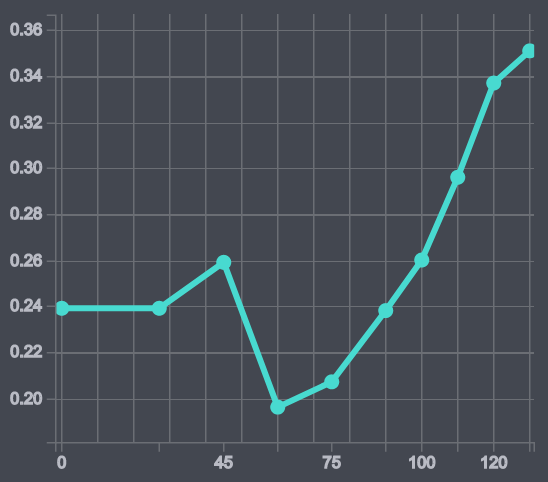
以下は自由流速リストの例です。左側には速度、右側には消費量が表示されています。
- 0:0.239
- 27:0.239
- 45:0.259
- 60:0.196
- 75:0.207
- 90:0.238
- 100:0.26
- 110:0.296
- 120:0.337
- 130:0.351
グラフでは次のようになります。
2つの異なる消費速度テーブル (自由流速テーブルと走行速度テーブル) を指定できます。
- 自由流速:一定速度で走行した場合のエネルギー消費量を表します。
- 走行速度:交通量の多い状況下で走行する場合、たとえば、車が特定の平均速度で走行速度を頻繁に変更すると予想される場合のエネルギー消費量を表します。
trafficSpeedTable が指定されていない場合、速度関連のエネルギー消費量の計算には freeFlowSpeedTable のみが使用されます。
EmpiricalConsumptionModel は電気自動車のエネルギー消費モデルを指定します。BatterySpecifications も追加します。これらのオプションを使用すると、追加の充電スタンドを追加のストップオーバーとしてルートに挿入できます。これは、挿入された充電スタンドの数に応じて、ルートがより多くのセクションに分割されることを意味します。
注このような必須の充電ステーションを含める場合は、
OptimizationMode.fastestを使用することも必須となります。ensureReachabilityを true に設定する必要もあります。ensureReachabilityがアクティブ化されると、必須の充電スタンドが最終的なパスに沿って配置されるようにルートが調整され、必須の充電スタンドがWayPointアイテムとしてrouteに追加されます。この機能のトランザクションは、このフィールドが true に設定されている場合にのみ「Routing EV」としてカウントされます。それ以外の場合、このような API コールは通常の自動車のルートとして課金されます。
すべてのオプションは、電気自動車のルートの計算にかかる時間に影響を与える可能性があります。最も重要なのは、totalCapacityInKilowattHours で設定したようにバッテリー容量が大きいと、充電のために停止する必要性が減るということです。また、移動を開始するときにバッテリーがフル充電されていることも同様に重要です (initialChargeInKilowattHours を参照)。比較的低い値であれば、ルートの先頭付近に充電スタンドがなければならないことを意味します。そうしないと、ルート計算が失敗する可能性もあります。
現在、エンジンには稼働中の充電スタンドのみが含まれます。当社のサービス停止中またはメンテナンス中の充電スタンドは考慮されません。ただし、充電スタンドの状況は常に変化するため、エンジンではスタンドが現在占有されているかや予約されているかが考慮されません。そのため、最悪の場合、スタンドに到着したのに別の車の充電に使用されているという事態も起こり得ます。
また、車を充電するための互換性のあるコネクターを備えていない充電スタンドが除外されるように、利用可能なバッテリー コネクターのタイプも指定していることに注意してください。
注通常、消費量とバッテリーの情報は車自体から取得することも、マニュアルを参照するか自動車メーカーに直接問い合わせることもできます。すべての情報が利用できるわけではなく、一部の情報はメーカーのみが独占的に知っている可能性があることに注意してください。いずれの場合も、ルート計算プロセスでは指定された仕様が考慮され、欠落している値は適切なデフォルト値で補完されます。
EV-Mobilityサービスプロバイダー設定を定義する
ルートを計算する際に、RoutingEngineはevMobilityServiceProviderPreferencesに対する優先順位を指定し、ユーザーの要件に基づいてルートを最適化できます。この機能を使用するには、アクティブなオンライン接続が必要です。
e-Mobility Service Provider (eMSP) とは、電気自動車の運転者にサービスを提供する企業または組織であり、EV充電インフラへのアクセスとその利用を可能にすることに重点を置いています。eMSPは、EVドライバーと充電ステーションネットワークの間をつなぐ仲介役として機能します。
eMSP設定では、ユーザーは優先するパートナー充電ステーションを選択できます。
最も優先したいeMSPを選択することで、ルート計算時にそのプロバイダーが優先されるようにできます。一方で、あまり好ましくないプロバイダーも、優先度を下げた形でルートに含めることが可能です。また、他によりよい選択肢がない場合にのみ考慮されるように、代替プロバイダーを指定しておくこともできます。さらに、特定のプロバイダーをルート計算プロセスから完全に除外することもできます。
evMobilityServiceProviderPreferencesを指定することで、結果として得られるルートのジオメトリーに影響を与える可能性があります。必須ではありませんが、ユーザーエクスペリエンスの向上に役立つ場合があります。たとえば、特定のプロバイダーを除外したいユーザーは、そのプロバイダーがルートに含まれないようにすることができます。
ルートに沿って充電ステーションを探す
特に電気自動車で長距離を移動する場合は、途中で充電できる場所を計画することが重要です。結局のところ、充電ステーションはガソリン スタンドよりもはるかに少ないのです。上記のオプションを使用すると、RoutingEngine では、途中で車がエネルギー切れにならないようにしながら、最速ルート、つまり目的地に到達するまでの総所要時間が最も短いルートを見つけようとします。
「ルートに沿って検索する」セクションで示したように、計算の結果は、途中で見つかった充電スタンドを追加するのではなく、電気自動車に最適化されたルートになります。
route が計算されたら、より有用な情報を収集できます。以下のコード スニペットは、Section ごとの推定エネルギー消費量を記録し、必要に応じて、バッテリーを充電するために実行する必要があるアクションを一覧表示します。
// Find inserted charging stations that are required for this route.
// Note that this example assumes only one start waypoint and one destination waypoint.
// By default, each route has one section.
let additionalSectionCount = route.sections.count - 1
if (additionalSectionCount > 0) {
    // Each additional waypoint splits the route into two sections.
    print("Number of required stops at charging stations: \(additionalSectionCount)")
} else {
    print("Based on the provided options, the destination can be reached without a stop at a charging station.")
}

var sectionIndex = 0
let sections = route.sections
for section in sections {
    print("Estimated net energy consumption in kWh for this section: \(String(describing: section.consumptionInKilowattHours))")
    for postAction in section.postActions {
        switch postAction.action {
            case .chargingSetup:
                print("At the end of this section you need to setup charging for \(postAction.duration) s.")
            break
            case .charging:
                print("At the end of this section you need to charge for \(postAction.duration) s.")
            break
            case .wait:
                print("At the end of this section you need to wait for \(postAction.duration) s.")
            break
            default: fatalError("Unknown post action type.")
        }
    }

    print("Section \(sectionIndex): Estimated battery charge in kWh when leaving the departure place: \(String(describing: section.departurePlace.chargeInKilowattHours))")
    print("Section \(sectionIndex): Estimated battery charge in kWh when leaving the arrival place: \(String(describing: section.arrivalPlace.chargeInKilowattHours))")

    // Only charging stations that are needed to reach the destination are listed below.
    let depStation = section.departurePlace.chargingStation
    if depStation != nil  && !chargingStationsIDs.contains(depStation?.id ?? "-1") {
        print("Section \(sectionIndex), name of charging station: \(String(describing: depStation?.name))")
        chargingStationsIDs.append(depStation?.id ?? "-1")
        addCircleMapMarker(geoCoordinates: section.departurePlace.mapMatchedCoordinates, imageName: "required_charging.png")
    }

    let arrStation = section.departurePlace.chargingStation
    if arrStation != nil && !chargingStationsIDs.contains(arrStation?.id ?? "-1") {
        print("Section \(sectionIndex), name of charging station: \(String(describing: arrStation?.name))")
        chargingStationsIDs.append(arrStation?.id ?? "-1")
        addCircleMapMarker(geoCoordinates: section.arrivalPlace.mapMatchedCoordinates, imageName: "required_charging.png")
    }

    sectionIndex += 1
}
postAction.duration はバッテリーの充電にかかる推定時間を示していることに注意してください。この時間は、全体のルート計算と到着予測時刻 (ETA) に含まれます。
次のヘルパーを使用して、スパンごとの消費量を記録し、バッテリーの到達可能性を確認することもできます。
private func logSpanConsumption(route: Route) {
    var sectionIndex = 0
    for section in route.sections {
        var spanIndex = 0
        for span in section.spans {
            if let kWh = span.consumptionInKilowattHours {
                print("EVSpan: Section \(sectionIndex) span \(spanIndex) consumption: \(String(format: "%.3f", kWh)) kWh")
            } else {
                print("EVSpan: Section \(sectionIndex) span \(spanIndex) consumption: n/a")
            }
            spanIndex += 1
        }
        sectionIndex += 1
    }
}private func logSectionArrivalCharge(route: Route) {
var sectionIndex = 0
var lastSectionArrivalChargeKWh: Double?
for routeSection in route.sections {
let remainingChargeAtArrivalKWh = routeSection.arrivalPlace.chargeInKilowattHours
if let charge = remainingChargeAtArrivalKWh {
print("EVArrival: Section \(sectionIndex): remaining charge upon arrival = \(String(format: "%.2f", charge)) kWh")
lastSectionArrivalChargeKWh = charge
} else {
print("EVArrival: Section \(sectionIndex): remaining charge upon arrival not available")
}
sectionIndex += 1
}
if let finalCharge = lastSectionArrivalChargeKWh {
print("EVArrival: Final destination arrival charge = \(String(format: "%.2f", finalCharge)) kWh")
if finalCharge < 0.0 {
print("EVArrival: Destination not reachable with the current battery configuration.")
}
} else {
print("EVArrival: No arrival charge data available for any section in this route.")
}
}ユーザーが計画した充電地点が計算されたルートに含まれているかどうかを確認するには、経由地を保存してルート上の充電スタンドと比較します。
private var lastPlannedChargingStopWaypoint: Waypoint?

private func verifyAndLogPlannedStopOutcome(route: Route) {
    if lastPlannedChargingStopWaypoint == nil {
        print("EVChargingStop: No user-planned charging stop to verify.")
        return
    }

    let coordinateMatchRadiusMeters = 200.0
    var isStopIncludedInRoute = false
    var matchedChargingStationName: String?

    let plannedStopCoordinates = lastPlannedChargingStopWaypoint!.coordinates

    for routeSection in route.sections {
        if let departureStation = routeSection.departurePlace.chargingStation {
            let departureStationCoordinates = routeSection.departurePlace.mapMatchedCoordinates
            if departureStationCoordinates.distance(to: plannedStopCoordinates) <= coordinateMatchRadiusMeters {
                isStopIncludedInRoute = true
                matchedChargingStationName = departureStation.name
                break
            }
        }

        if let arrivalStation = routeSection.arrivalPlace.chargingStation {
            let arrivalStationCoordinates = routeSection.arrivalPlace.mapMatchedCoordinates
            if arrivalStationCoordinates.distance(to: plannedStopCoordinates) <= coordinateMatchRadiusMeters {
                isStopIncludedInRoute = true
                matchedChargingStationName = arrivalStation.name
                break
            }
        }
    }

    if isStopIncludedInRoute {
        let suffix = matchedChargingStationName != nil ? " (≈ \(matchedChargingStationName!))." : "."
        print("EVChargingStop: User-defined charging stop was included in the calculated route\(suffix)")
    } else {
        print("EVChargingStop: User-defined charging stop was adjusted or replaced during route optimization.")
    }
}
以下は、最終的なルートがどのようになるかを示したスクリーンショットです。
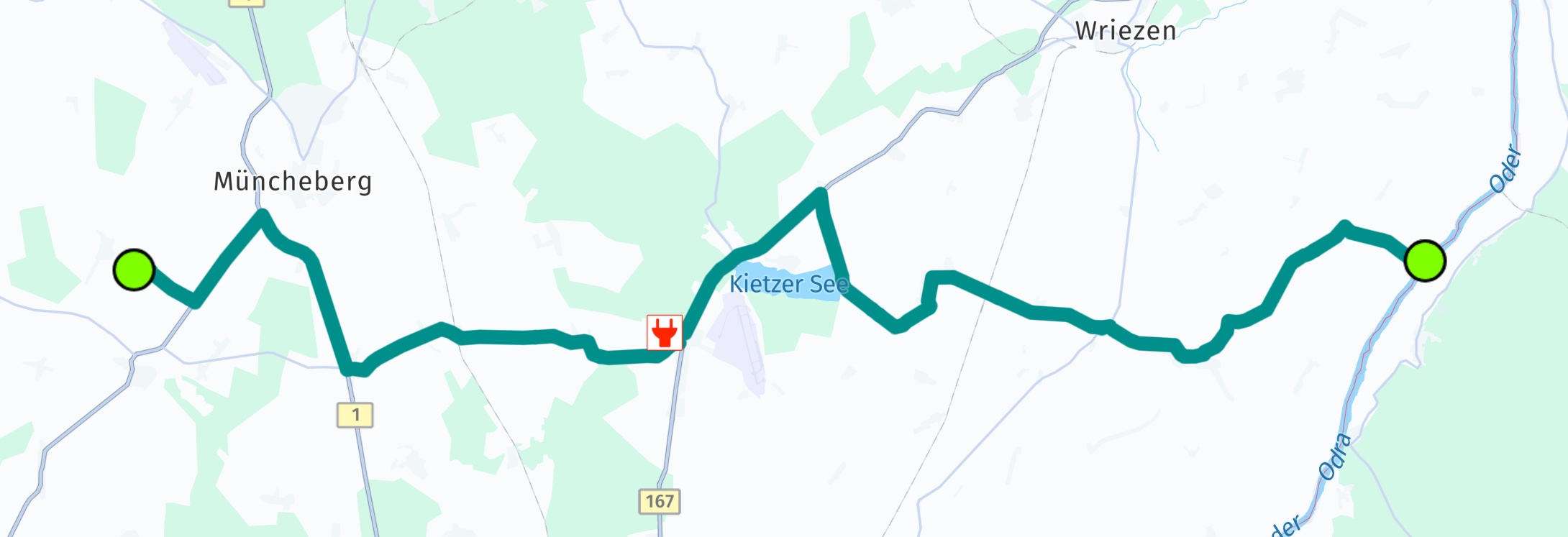
ここでは、このルートでは赤いマーカーで示されている充電スタンドで2回停車する必要があることがわかります。追加の経由地を挿入する場合、各充電スタンドによってルートが分割されるため、ルートには 3 つのセクションが含まれます。
最初のセクションには、充電のための停止を説明するポスト アクションが含まれています。到着までの予想充電などの情報が含まれています。
特に指定がない限り、エネルギー消費量は Wh 単位であると想定されます。
EV 充電プールを検索する
Route に追随する予定がなければ、オンラインの EVChargingStation を使用して、EVChargingPool の一部である SearchEngine コネクターを検索することもできます。電気自動車用の充電プールとは、1 つ以上の充電スタンドが存在するエリアのことです。
PlaceCategory.businessAndServicesEVChargingStation を使用してプールを検索します。または、「充電ステーション」のようなフリー テキスト クエリを使用することもできます。Placeの結果のDetailsで、スタンドを含む見つかったプールのリストを確認できます (存在する場合)。
このエンジンがお使いのHERE SDKのライセンスでサポートされている場合は、OfflineSearchEngineを使用してスタンドを検索することもできます。
HERE SDKでは、EVChargingPoolDetailsやEVChargingStationのその他のフィールドなどの、追加の充電スタンドのパラメーターを使って、結果を入力することもできます。オンラインで使用する場合、これらの詳細な結果を取得するには、searchEngine.setCustomOption("discover.show", "ev")を呼び出して機能を有効にする必要があります。また、追加のライセンスも必要です。OfflineSearchEngineで使用する場合 (お使いのライセンスで利用可能であれば)、ライセンスは不要です。オンラインアクセス権を取得するには、当社までお問い合わせください。資格情報が有効になっていない場合、ライセンスが不足していることを示すSearchError.forbiddenエラーが表示されます。
到達可能なエリアを表示する
Isoline Routing を使用すると、バッテリー消費などのパラメーターに基づいて到達エリアを視覚化できます。これについてはこちらで詳しく説明しています。
EV サンプル アプリを試す
EVRouting の例は GitHub で確認できます。
2 か月前の更新