

ルート検索を開始する
ルート検索を開始する
HERE SDKでは、A地点からB地点までの最適なルートを計算するRoutingEngineが用意されており、複数の経由地設定やローカライズ可能な右左折ごとの運転指示などの機能が含まれています。
希望のルートタイプ (最速または最短) とさまざまなルートオプション (速度プロファイル、ルート制限、ビネットオプションなど) を設定して優先設定を指定することで、最もエネルギーを節約できる最適なルートを見つけることができます。HEREは、高度なルート検索技術と専用のEVルートプランニングサポートにより、地球をよりクリーンで安全なものにするお手伝いをします。
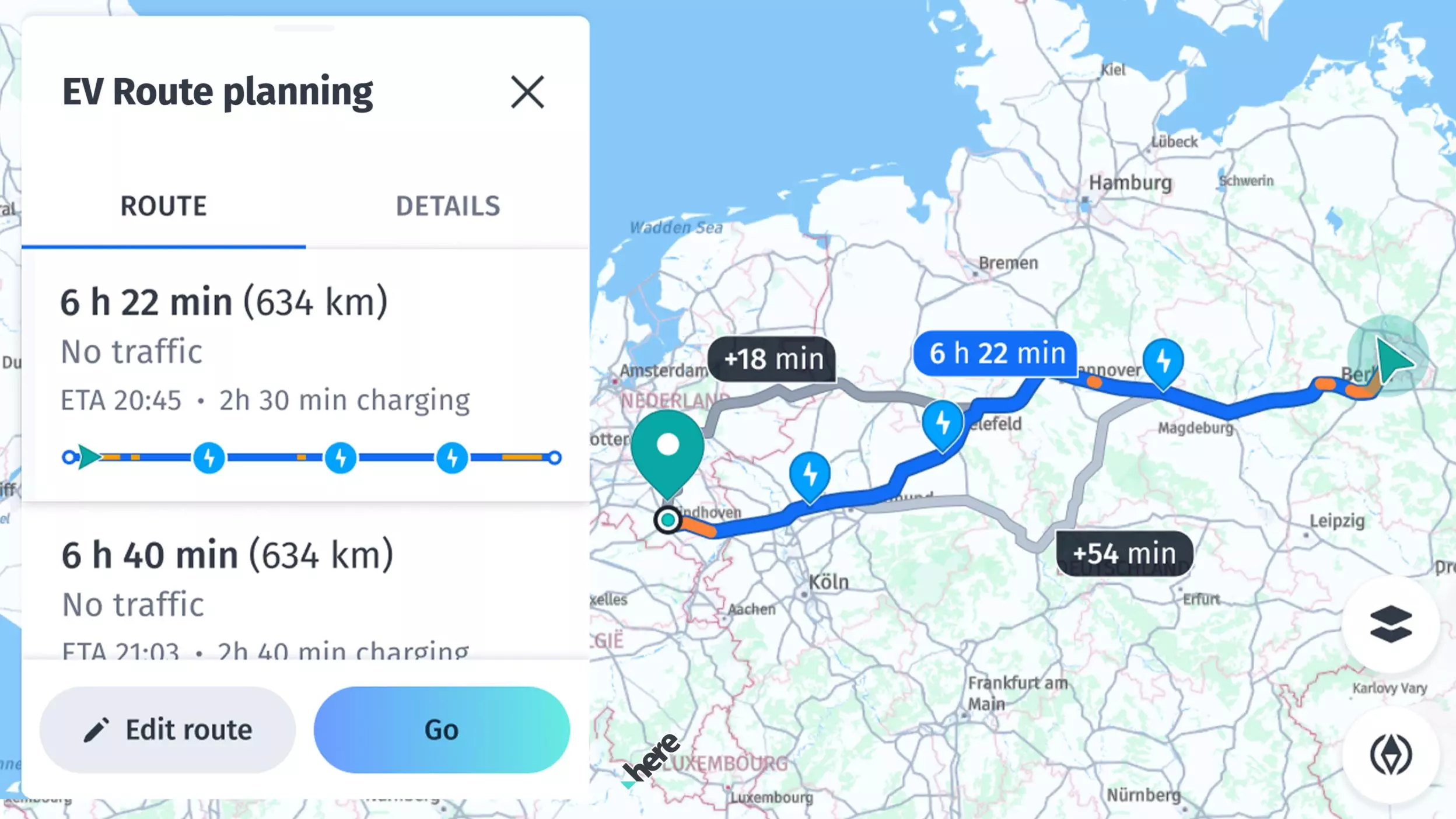
機能の概要:
- ルートを計算する:さまざまな移動モードで複数の経由地を使用してルートを計算します。
- Isoline Routing:時間、距離、または燃料消費量に基づいて、特定のポイントからの到達範囲を表す等値線ポリゴンを計算します。
- ルートに沿って検索する:ルート全体に沿って場所を検索します (この機能については「検索」セクションで説明します)。
- ルートインポート/ルートの照合:他のAPIからルートをインポートできます。
- オフラインルーティング (HERE SDK for Android Navigateのみ):インターネット接続が利用できない場合は、専用のオフラインのルート検索エンジンに切り替えて、すでにキャッシュに保存されているマップデータまたは事前に読み込まれたオフラインマップデータでルートを計算できます。
ルート検索はHERE Routing API v8に基づいています。ルート検索に基づくトランザクションの例:RoutingEngineでRoutingOptionsを使用してルートを計算します。RoutingOptions.transportSpecification.transportModeで移動モードをCAR、TRUCK、PEDESTRIAN、BICYCLE、BUS、TAXIまたはSCOOTERに設定できます。TrafficOptimizationMode.TIME_DEPENDENTは使用しないでください。時間を意識したルート検索では現在の交通量を含むよりよい結果を提供できるため、TIME_DEPENDENTがデフォルトで設定されています。
時間を意識したルート検索の例:RoutingEngineでTrafficOptimizationMode.TIME_DEPENDENTを使用してルートを計算します。デフォルトでは、これは有効になっています。RouteOptions.arrivalTimeおよびRouteOptions.arrivalTimeがnullのままである場合、HERE SDKは現在のデバイス時刻を使用します。
通行料金を考慮したルート検索の例:RoutingEngineでRouteOptions.enableTollsをtrueに設定してルートを計算します。
ルート検索にはHERE Public Transit APIも使用されます。HERE Public Transit APIの使用例:TransitRoutingEngineを使用してルートを計算します。
注これらの機能の価格については、「HERE基本プランの価格表」を参照してください。Navigateライセンスを使用している場合、または価格についてご質問がある場合は、お問い合わせください。
RoutingEngineを初期化する
次の方法でルートエンジンを作成して移動を開始します。
try {
    routingEngine = new RoutingEngine();
} catch (InstantiationErrorException e) {
    throw new RuntimeException("Initialization of RoutingEngine failed: " + e.error.name());
}
try {
routingEngine = RoutingEngine()
} catch (e: InstantiationErrorException) {
throw RuntimeException("Initialization of RoutingEngine failed: " + e.error.name)
}新しいRoutingEngineインスタンスを作成すると、前述のように処理する必要のあるエラーがスローされる場合があります。たとえば、HERE SDKの初期化が事前に失敗した場合にこのようなエラーが発生する可能性があります。
RoutingEngineインスタンスが不要になった場合は、保留中のリクエストをキャンセルしてシャットダウンし、適切なリソースクリーンアップを行うdispose()メソッドを呼び出すことが推奨されます。
注
ApplicationのonCreate()メソッド中にこのエンジンを初期化することはできません。それ以外の時点であれば問題ありません。たとえば、このエンジンを初期化するのに適した場所がActivityのonCreate()メソッドに含まれている可能性があります。
ルートを計算する
次のステップとして、出発地と目的地 (どちらもGeoCoordinatesインスタンスを保持するWaypointタイプ) の2つの経由地に基づいてルートを計算できます。以下ではRoutingOptionsを使用して、車両に合わせて最適化されたルートを計算します。デフォルトでは、次のようにRoutingOptionsはTransportMode.CARを使用します。
Waypoint startWaypoint = new Waypoint(startGeoCoordinates);
Waypoint destinationWaypoint = new Waypoint(destinationGeoCoordinates);

List<Waypoint> waypoints =
        new ArrayList<>(Arrays.asList(startWaypoint, destinationWaypoint));

routingEngine.calculateRoute(
        waypoints,
        new RoutingOptions(),
        new CalculateRouteCallback() {
            @Override
            public void onRouteCalculated(@Nullable RoutingError routingError, @Nullable List<Route> routes) {
                if (routingError == null) {
                    Route route = routes.get(0);
                    showRouteDetails(route);
                    showRouteOnMap(route);
                    logRouteViolations(route);
                } else {
                    showDialog("Error while calculating a route:", routingError.toString());
                }
            }
        });
val startWaypoint = Waypoint(startGeoCoordinates)
val destinationWaypoint = Waypoint(destinationGeoCoordinates)
val waypoints = arrayListOf(startWaypoint, destinationWaypoint)
private fun calculateRoute(waypoints: List<Waypoint>) {
routingEngine?.calculateRoute(
waypoints,
RoutingOptions(),
object : CalculateRouteCallback {
override fun onRouteCalculated(routingError: RoutingError?, routes: List<Route>?) {
if (routingError == null) {
val route: Route = routes!![0]
showRouteDetails(route)
showRouteOnMap(route)
logRouteViolations(route)
} else {
showDialog("Error while calculating a route:", routingError.toString())
}
}
})
}calculateRoute()は複数回呼び出すことができます。たとえば、さまざまなルート検索オプションを使用して複数のルートを並行して計算するために呼び出すことができます。
注
Waypointを設定するときにsideOfStreetHintを設定することで、歩行者またはドライバーが停車地に到着するときに道路のどちら側になるか調整できます。歩行者またはドライバーが移動している場合、
startWaypoint.headingInDegrees = location.bearingInDegrees;を設定することで、方位値によって最初の進行方向が決定されます。これにより、次の目的地がドライバーの後方にある場合に不要なUターンを回避できます。歩行者は、これにより道路を横断する必要がなくなるので、よりよいルートを確保することができます。
各ルート計算は非同期で実行されます。完了するとRouteリストか、エラーがあったときにエラーを示すRoutingErrorを取得します。すべてうまくいけば RoutingError は NULL になります。エラーが発生した場合、ルート リストは NULL になります。たとえば、指定された移動モードでルートが実行可能でない場合、エンジンでルートを計算できません。
注エラーがなければ、ルートリストには結果が1つだけ含まれます。ルートオプションを使用して代替ルートの数を指定すると、追加のルートバリエーションをリクエストできます。デフォルトでは、代替ルートなしでルートが計算されます。
上記のコード スニペットのshowRouteDetails()メソッドを使用して、運転指示を含むルートの詳細を表示します。完全なソースコードは付属のサンプルアプリで確認できます。運転指示については以下でも詳しく説明します。showRouteOnMap()メソッドには、マップ上でルートをレンダリングする方法の例が含まれています。この点については、後述のセクションで簡単に説明します。
ETAおよび交通情報を取得する
目的地までの移動にかかる推定時間 (ETA) やルートの全長 (メートル単位) など、ルートに関する追加情報は以下のようにRouteオブジェクトから取得できます。
// estimatedTravelTimeInSeconds includes traffic delay.
long estimatedTravelTimeInSeconds = route.getDuration().getSeconds();
// Get predictive traffic delay data.
long estimatedTrafficDelayInSeconds = route.getTrafficDelay().getSeconds();
int lengthInMeters = route.getLengthInMeters();
// estimatedTravelTimeInSeconds includes traffic delay.
val estimatedTravelTimeInSeconds: Long = route.duration.seconds
// Get predictive traffic delay data.
val estimatedTrafficDelayInSeconds: Long = route.trafficDelay.seconds
val lengthInMeters: Int = route.lengthInMeters交通情報に関する詳細については、「リアルタイムおよび予測交通データソースの違い」のセクションを参照してください。
到着予定時刻 (ETA) は、デバイスの地理座標によって異なるタイムゾーンで表示できます。たとえば、ルートを計算するとき、デバイスの現在のタイムゾーンが目的地のタイムゾーンと異なる場合があります。ベルリンからロンドンまでのルートを計算するシナリオを考えてみましょう。各都市は異なるタイムゾーンに従っています。これに対処するため、ETAを複数のタイムゾーンで表示できます。デバイスの現在のタイムゾーン (ベルリン)、目的地のタイムゾーン (ロンドン)、またグローバルリファレンスとしてUTC (協定世界時) を設定します。
同じETAが異なるタイムゾーン間でどのように変化するかの例は次のとおりです。
| デバイスの現在のタイムゾーン (ベルリン) に基づくETA | デバイスの目的地のタイムゾーン (ロンドン) に基づくETA | UTCでのETA |
|---|---|---|
| 8:30 AM | 7:30 AM | 6:30 AM |
デバイスのタイムゾーンでETAを計算するには、次の方法を使用します。この方法では、Routeオブジェクトから推定移動時間を取得し、現在の日付と時刻を初期化して、移動時間を追加し、結果の形式を設定します。
/**
 * Returns the ETA (as a string in ‘HH:mm’ format) in the current device’s timezone, derived from the estimatedTravelTimeInSeconds, which is sourced from the Route object.
 *
 * @param route Original route object from RoutingEngine.
 * @return A string representing the ETA in "HH:mm" format.
 */
public String getETAinDeviceTimeZone(Route route) {
    long estimatedTravelTimeInSeconds = route.getDuration().toSeconds();

    // Get an instance of the Calendar class initialized with the current date and time
    Calendar calendar = Calendar.getInstance();

    // Set the calendar's time to the current date and time
    calendar.setTime(new Date());

    // Add the estimated travel time (in seconds) to the current time
    calendar.add(Calendar.SECOND, (int) estimatedTravelTimeInSeconds);

    return getFormattedDate(calendar.getTime());
}
/**
* Returns the ETA (as a string in ‘HH:mm’ format) in the current device’s timezone, derived from the estimatedTravelTimeInSeconds, which is sourced from the Route object.
*
* @param route Original route object from RoutingEngine.
* @return A string representing the ETA in "HH:mm" format.
*/
fun getETAinDeviceTimeZone(route: Route): String {
val estimatedTravelTimeInSeconds = route.duration.toSeconds()
// Get an instance of the Calendar class initialized with the current date and time
val calendar = Calendar.getInstance()
// Set the calendar's time to the current date and time
calendar.time = Date()
// Add the estimated travel time (in seconds) to the current time
calendar.add(Calendar.SECOND, estimatedTravelTimeInSeconds.toInt())
return getFormattedDate(calendar.time)
}目的地のタイムゾーンのETAを計算するには、次の方法を使用します。この方法では、到着地の現地時間と、目的地の現地時間と協定世界時 (UTC) の差を取得します。
/**
 * Calculates the estimated time of arrival (ETA) in the destination timezone for a given route.
 * It is possible that the destination can be in a different timezone compared to the source.
 * Therefore, we are also calculating the ETA in the destination timezone. For example, the source can be in Berlin and the destination can be in Dubai.
 *
 * @param route Original route object from RoutingEngine.
 * @return A string representing the estimated time of arrival in the destination timezone, formatted as "hh:mm".
 */
public String getETAinDestinationTimeZone(Route route) {
    LocationTime arrivalLocationTime = getArrivalLocationTime(route);
    Date destinationDate = arrivalLocationTime.localTime;

    // The timeOffset represents the difference between the local time at destination and Coordinated Universal Time (UTC) in minutes.
    int timeOffset = (int) arrivalLocationTime.utcOffset.toMinutes();

    return getFormattedDate(destinationDate, timeOffset);
}
/**
* Calculates the estimated time of arrival (ETA) in the destination timezone for a given route.
* It is possible that the destination can be in a different timezone compared to the source.
* Therefore, we are also calculating the ETA in the destination timezone. For example, the source can be in Berlin and the destination can be in Dubai.
*
* @param route Original route object from RoutingEngine.
* @return A string representing the estimated time of arrival in the destination timezone, formatted as "hh:mm".
*/
fun getETAinDestinationTimeZone(route: Route): String {
val arrivalLocationTime = getArrivalLocationTime(route)
val destinationDate = arrivalLocationTime!!.localTime
// The timeOffset represents the difference between the local time at destination and Coordinated Universal Time (UTC) in minutes.
val timeOffset = arrivalLocationTime.utcOffset.toMinutes().toInt()
return getFormattedDate(destinationDate, timeOffset)
}特定のルートでのETAを協定世界時 (UTC) で計算するには、次の方法を使用します。この方法では、世界時間として規定される一時標準時でETAが表されます。
/**
 * Calculates the estimated time of arrival (ETA) in Coordinated Universal Time (UTC) for a given route.
 * UTC (Coordinated Universal Time) is the primary time standard by which the world regulates clocks and time.
 *
 * @param route Original route object from RoutingEngine.
 * @return A string representing the estimated time of arrival in UTC, formatted as "HH:mm".
 */
public String getEstimatedTimeOfArrivalInUTC(Route route) {
    Date utcDate = getArrivalLocationTime(route).utcTime;

    // The UTC offset represents the difference in hours and minutes between a specific time zone and Coordinated Universal Time (UTC).
    // It indicates whether the local time is ahead (+) or behind (-) UTC.
    // By using an offset of 0, we ensure that the time being represented is in Coordinated Universal Time (UTC).
    int utcTimeOffset = 0;
    return getFormattedDate(utcDate, utcTimeOffset);
}
/**
* Calculates the estimated time of arrival (ETA) in Coordinated Universal Time (UTC) for a given route.
* UTC (Coordinated Universal Time) is the primary time standard by which the world regulates clocks and time.
*
* @param route Original route object from RoutingEngine.
* @return A string representing the estimated time of arrival in UTC, formatted as "HH:mm".
*/
fun getEstimatedTimeOfArrivalInUTC(route: Route): String {
val utcDate = getArrivalLocationTime(route)!!.utcTime
// The UTC offset represents the difference in hours and minutes between a specific time zone and Coordinated Universal Time (UTC).
// It indicates whether the local time is ahead (+) or behind (-) UTC.
// By using an offset of 0, we ensure that the time being represented is in Coordinated Universal Time (UTC).
val utcTimeOffset = 0
return getFormattedDate(utcDate, utcTimeOffset)
}getArrivalLocationTime(Route route) メソッドは、ルートの最終セクションから特定のルートの到着時刻を取得します。ルート内の各セクションの所要時間を順番に累算します。たとえば、5分かかるセクションが2つある場合、最初のセクションの所要時間は5分、2つ目のセクションの合計所要時間は 10分 (各セクションで5分) です。
// Returns the arrival time at the final location of the route.
private LocationTime getArrivalLocationTime(Route route) {
    int lastSectionIndex = route.getSections().size() - 1;

    // The lastSection contains cumulative duration values that increase sequentially.
    // For instance, if there are two sections, each with a duration of 5 minutes, the first section will reflect a total duration of 5 minutes,
    // while the second section will show a total duration of 10 minutes.
    // This is because the total time includes the initial 5 minutes for the first section, followed by an additional 5 minutes to complete the second section, resulting in a cumulative travel time.
    Section lastSection = route.getSections().get(lastSectionIndex);
    return lastSection.getArrivalLocationTime();
}
// Returns the arrival time at the final location of the route.
private fun getArrivalLocationTime(route: Route): LocationTime? {
val lastSectionIndex = route.sections.size - 1
// The lastSection contains cumulative duration values that increase sequentially.
// For instance, if there are two sections, each with a duration of 5 minutes, the first section will reflect a total duration of 5 minutes,
// while the second section will show a total duration of 10 minutes.
// This is because the total time includes the initial 5 minutes for the first section, followed by an additional 5 minutes to complete the second section, resulting in a cumulative travel time.
val lastSection = route.sections[lastSectionIndex]
return lastSection.arrivalLocationTime
}上記のETAを特定のタイムゾーンでフォーマットする方法は次のとおりです。
/**
 * Formats the given date to a string representation based on the specified timezone offset.
 *
 * @param date   The Date object to be formatted.
 * @param offset The UTC offset in minutes for the desired timezone.
 * @return A string representing the formatted time in the specified timezone.
 */
private String getFormattedDate(Date date, int offset) {
    // Create a DateFormat instance that formats the time in a short format (e.g., "HH:mm a").
    java.text.DateFormat dateFormat = SimpleDateFormat.getTimeInstance(java.text.DateFormat.SHORT);

    // Retrieve the TimeZone object corresponding to the given UTC offset.
    TimeZone timeZone = getTimeZone(offset);

    // Set the DateFormat's timezone to the retrieved TimeZone.
    dateFormat.setTimeZone(timeZone);

    // Format the date using the configured DateFormat and return the result as a string.
    return dateFormat.format(date);
}

/**
 * Formats the given date to a string representation using the device's default timezone.
 *
 * @param date The Date object to be formatted.
 * @return     A string representing the formatted time in the default timezone.
 */
private String getFormattedDate(Date date) {
    // Create a DateFormat instance that formats the time in a short format (e.g., "HH:mm a").
    java.text.DateFormat dateFormat = SimpleDateFormat.getTimeInstance(java.text.DateFormat.SHORT);

    // Format the date using the configured DateFormat and return the result as a string.
    return dateFormat.format(date);
}

/**
 * Retrieves a TimeZone object based on the given UTC offset in minutes.
 *
 * @param utcOffsetInMinutes The UTC offset in minutes (can be positive or negative).
 * @return A TimeZone object representing the specified offset from GMT.
 */
private TimeZone getTimeZone(int utcOffsetInMinutes) {
    // Calculate the offset in hours.
    int hours = utcOffsetInMinutes / 60;

    // Calculate the remaining offset in minutes after converting to hours.
    int minutes = utcOffsetInMinutes % 60;

    // Create a string representing the time zone in GMT format (e.g., "GMT+05:30").
    String timeZoneId = String.format("GMT%+03d:%02d", hours, minutes);

    // Retrieve and return the TimeZone object corresponding to the constructed GMT time zone ID.
    return TimeZone.getTimeZone(timeZoneId);
}
/**
* Formats the given date to a string representation based on the specified timezone offset.
*
* @param date The Date object to be formatted.
* @param offset The UTC offset in minutes for the desired timezone.
* @return A string representing the formatted time in the specified timezone.
*/
private fun getFormattedDate(date: Date, offset: Int): String {
// Create a DateFormat instance that formats the time in a short format (e.g., "HH:mm a").
val dateFormat = SimpleDateFormat.getTimeInstance(DateFormat.SHORT)
// Retrieve the TimeZone object corresponding to the given UTC offset.
val timeZone = getTimeZone(offset)
// Set the DateFormat's timezone to the retrieved TimeZone.
dateFormat.timeZone = timeZone
// Format the date using the configured DateFormat and return the result as a string.
return dateFormat.format(date)
}
/**
* Formats the given date to a string representation using the device's default timezone.
*
* @param date The Date object to be formatted.
* @return A string representing the formatted time in the default timezone.
*/
private fun getFormattedDate(date: Date): String {
// Create a DateFormat instance that formats the time in a short format (e.g., "HH:mm a").
val dateFormat = SimpleDateFormat.getTimeInstance(DateFormat.SHORT)
// Format the date using the configured DateFormat and return the result as a string.
return dateFormat.format(date)
}
/**
* Retrieves a TimeZone object based on the given UTC offset in minutes.
*
* @param utcOffsetInMinutes The UTC offset in minutes (can be positive or negative).
* @return A TimeZone object representing the specified offset from GMT.
*/
private fun getTimeZone(utcOffsetInMinutes: Int): TimeZone {
// Calculate the offset in hours.
val hours = utcOffsetInMinutes / 60
// Calculate the remaining offset in minutes after converting to hours.
val minutes = utcOffsetInMinutes % 60
// Format the time zone as a GMT offset string, such as "GMT+05:30" or "GMT-04:00".
val timeZoneId = "GMT%+03d:%02d".format(hours, minutes)
// Retrieve and return the TimeZone object corresponding to the constructed GMT time zone ID.
return TimeZone.getTimeZone(timeZoneId)
}既存のルートの交通情報を更新するには、「交通情報の更新」を参照してください。これにより、交通データと到着予測時刻 (ETA) を更新できます。
交通が最適化されたルート計算
HERE SDKは交通データを自動的に統合し、最も速く正確なルートを計算します。
デフォルトでは、ルートは現在の交通状況と予測交通状況の両方を考慮して最適化されます。RoutingEngineは予測型位置情報サービスを使用してルート走行中の交通状況を先読みし、計算されるルートが遭遇する可能性の高い交通状況を考慮します。
- 最速ルートの計算時には、現在の交通状況が自動的に考慮されます。
RoutingEngineは、履歴パターンとリアルタイムデータに基づいて将来の交通状況を予測します。- 到着予測時刻 (ETA) には、交通渋滞による遅延が含まれます。
- ルートの各
Spanには、渋滞係数を含む詳細な交通速度情報が含まれます。 - 必要に応じて、
TrafficEngineを使用してルートに沿った交通データをクエリします。
交通の最適化は自動的に行われるため、明示的に有効にする必要はありませんが、無効にすることもできます。
交通の最適化を無効にする
RoutingEngineは_予測型位置情報サービス_を使用して今後の交通状況を予測します。つまり、生成されるルートはリアルタイムの交通データに応じて動的に変化し、ルート形状が変化していきます。
通常は交通の最適化が求められますが、たとえば、バスの運転手は事前に定義されたバスルートに従わなければならないため、より適切なルートを選択することはできません。
これを管理するため、HERE SDKにはTrafficOptimizationModeと呼ばれる機能があります。交通状況を気にせずに決められたルートを走行する場合は、TrafficOptimizationMode.DISABLEDを選択して交通の最適化を完全に無効にします。
routeOptions.trafficOptimizationMode = TrafficOptimizationMode.DISABLED;routeOptions.trafficOptimizationMode = TrafficOptimizationMode.DISABLEDTrafficOptimizationModeを無効にするとRouteからの交通情報もすべて無効になり、到着予測時刻には遅延の可能性が考慮されません。
ルートからインシデントの概要を取得する
ルート沿いの基本的な交通事案情報を取得するには、section.getTrafficIncidents()を呼び出して、SectionごとにRouteインスタンスから交通状況の概要を直接取得できます。結果として得られるTrafficIncidentOnRouteオブジェクトには、TrafficEngineから取得可能なデータの一部が含まれており、全体像を把握できます。
Routeオブジェクトに含まれるインシデントカテゴリーは次のとおりです。
ACCIDENT:交通事故。CONGESTION:交通渋滞。CONSTRUCTION:建設工事。DISABLED_VEHICLE:道路で転倒または故障した車。LANE_RESTRICTION:レーンごとの規制。MASS_TRANSIT:鉄道や地下鉄などの公共交通機関に関するインシデント。PLANNED_EVENT:スポーツイベントやフェスティバルなどの活動に関連するインシデント。ROAD_CLOSURE:道路の閉鎖。ROAD_HAZARD:倒木や信号故障などの道路上の危険な障害物。WEATHER:悪天候。OTHER:他のどのカテゴリーにも当てはまらない既知のインシデント。UNKNOWN:特定のタイプに分類されないインシデント。
HERE SDKはこれらのインシデントタイプに対応するアイコンアセットを提供していませんが、TRAFFIC_INCIDENTSマップフィーチャーレイヤーを有効にすることで、地図上にすべてのインシデントをアイコンで表示できます。同様に、TRAFFIC_FLOWレイヤーを有効にして、道路の一般的な交通流を表示することもできます。詳細については、「交通情報の使用を開始する」セクションを参照してください。
今後の制限速度などを確認する
Route オブジェクトは、Route に沿った詳細情報を公開して、今後の制限速度、道路の属性と道路名、踏切、動的な交通情報などを把握します。
次の属性を見てみましょう:Span.sectionPolylineOffset、Span.dynamicSpeedInfo、Span.streetAttributes、Span.carAttributes、Span.truckAttributes、Span.scooterAttributes、Span.walkAttributes、Span.durationInSeconds、Span.streetNames、Span.routeNumbers、Span.speedLimitInMetersPerSecond、Span.consumptionInKilowattHours、Span.functionalRoadClass、Span.duration、Span.baseDuration。属性の完全なリストについては、「APIリファレンス」を参照してください。
各属性はスパンごとに指定され、スパン全体の長さに対して有効です。場合によっては、2つの交差点間の道路ネットワークの一部を示すセグメントIDが見つかることもあります。Spanはルート関連の概念で、同じ属性を持つルートの一部です。同じセグメント上に複数のスパンが存在する場合があり、通常、各セグメントには開始オフセットと終了オフセットがあります。
Spanはルートセグメントの最小部分を定義し、そのカーブはGeoCoordinatesのリストとして公開されます。
踏切情報を取得する
RouteRailwayCrossingのリストはRouteオブジェクトから取得できます。このオブジェクトには、踏切のGeoCoordinates、RouteOffset、ルートを横断する鉄道路線または路面電車路線のRouteRailwayCrossingTypeの情報が含まれます。
RouteOffsetとはセクションインデックスによって定義されるルート上の位置であり、そのセクションの始点からルート上の指定された位置までの距離 (メートル単位) のことです。
RouteOffset の詳細については、「APIリファレンス」を参照してください。
RouteRailwayCrossing の使用例を以下に示します。
for (RouteRailwayCrossing routeRailwayCrossing : route.getRailwayCrossings()) {
    // Coordinates of the route offset
    GeoCoordinates routeOffsetCoordinates = routeRailwayCrossing.coordinates;
    // Index of the corresponding route section. The start of the section indicates the start of the offset.
    int routeOffsetSectionIndex = routeRailwayCrossing.routeOffset.sectionIndex;
    // Offset from the start of the specified section to the specified location along the route.
    double routeOffsetInMeters = routeRailwayCrossing.routeOffset.offsetInMeters;

    Log.d(TAG, "A railway crossing of type " + routeRailwayCrossing.type.name() +
        "is situated " +
        routeOffsetInMeters + " m away from start of section: " +
        routeOffsetSectionIndex);
}
for (routeRailwayCrossing in route.railwayCrossings) {
// Coordinates of the route offset
val routeOffsetCoordinates: GeoCoordinates = routeRailwayCrossing.coordinates
// Index of the corresponding route section. The start of the section indicates the start of the offset.
val routeOffsetSectionIndex: Int = routeRailwayCrossing.routeOffset.sectionIndex
// Offset from the start of the specified section to the specified location along the route.
val routeOffsetInMeters: Double = routeRailwayCrossing.routeOffset.offsetInMeters
Log.d(TAG, "A railway crossing of type " + routeRailwayCrossing.type.name +
"is situated " +
routeOffsetInMeters + " m away from start of section: " +
routeOffsetSectionIndex)
}ルート違反を検出する
ルートには、ルートの計算後に発生する可能性のある問題を説明するNoticeCode値のリストが含まれている場合があります。たとえば、ルートでトンネルを回避しなければならず、唯一のルート候補でトンネルを通過する必要がある場合、Routeには、リクエストされたトンネル回避の違反があったことを示す通知が含まれます。
- 計算済みの
Routeに違反の可能性がないか必ず確認することをお勧めします。 NoticeCodeはNoticeオブジェクトの一部です。使用可能なNoticeオブジェクトのリストにはRouteのSectionに従ってアクセスできます。- 違反が発生していない場合、リストは空になります。
- 違反の可能性を排除する場合は、違反を1つでも含むルートをスキップすることをお勧めします。
ただし、リクエストされたルートオプションおよび実際のNoticeCode値のリストに応じて、実装はケースバイケースで判断します。ルートオプションの詳細については、次のセクションを参照してください。重要:説明をわかりやすくするため、このガイドのコードスニペットでは通知の列挙型 (enum) 値を評価しません。
次の方法でルート通知を検出できます。
// A route may contain several warnings, for example, when a certain route option could not be fulfilled.
// An implementation may decide to reject a route if one or more violations are detected.
private void logRouteViolations(Route route) {
    for (Section section : route.getSections()) {
        for (Span span : section.getSpans()) {
            List<GeoCoordinates> spanGeometryVertices = span.getGeometry().vertices;
            // This route violation spreads across the whole span geometry.
            GeoCoordinates violationStartPoint = spanGeometryVertices.get(0);
            GeoCoordinates violationEndPoint = spanGeometryVertices.get(spanGeometryVertices.size() - 1);
            for (int index : span.getNoticeIndexes()) {
                SectionNotice spanSectionNotice = section.getSectionNotices().get(index);
                // The violation code such as "VIOLATED_VEHICLE_RESTRICTION".
                String violationCode = spanSectionNotice.code.toString();
                Log.d(TAG, "The violation " + violationCode + " starts at " + toString(violationStartPoint) + " and ends at " + toString(violationEndPoint) + " .");
            }
        }
    }
}
// A route may contain several warnings, for example, when a certain route option could not be fulfilled.
// An implementation may decide to reject a route if one or more violations are detected.
private fun logRouteViolations(route: Route) {
for (section in route.sections) {
for (span in section.spans) {
val spanGeometryVertices: List<GeoCoordinates> = span.geometry.vertices
// This route violation spreads across the whole span geometry.
val violationStartPoint: GeoCoordinates = spanGeometryVertices[0]
val violationEndPoint: GeoCoordinates =
spanGeometryVertices[spanGeometryVertices.size - 1]
for (index in span.noticeIndexes) {
val spanSectionNotice: SectionNotice = section.sectionNotices[index]
// The violation code such as "VIOLATED_VEHICLE_RESTRICTION".
val violationCode: String = spanSectionNotice.code.toString()
Log.d(TAG, "The violation " + violationCode + " starts at "
+ toString(violationStartPoint) + " and ends at " + toString(violationEndPoint) + " .")
}
}
}
}
注すべてのルートにはルートに沿って高度値が含まれています。たとえば、計画された自転車旅行の標高プロファイルを作成する目的で高度値を使用します。
Routingサンプルアプリを試す
GitHubでは、「Routing」サンプルアプリ (Java版およびKotlin版) を見つけることができます。ここには、上記のすべてのコードスニペットに加えて、さらに多くの内容が含まれています。
また、GitHubでは「PublicTransit」サンプルアプリ (Java版およびKotlin版) を見つけることができます。TransitRoutingEngineを使用して、A地点からB地点までの公共交通機関のルートを計算する方法を示します。A地点とB地点の間には複数の経由地があります。
GitHubにあるReroutingサンプルアプリも参照してください。これにはHERE SDK (Navigate) が必要ですが、UIビルディングブロックとIconProviderのコードは、たとえば、ルートプレビューパネルの一部として道路標識アイコンを表示できます。
2 か月前の更新