

レーンアシスタンスを取得する
HERE SDKでは、ドライバーがルートからそれずに走行できるよう推奨レーンが提供されます。Route が設定されていない場合、レーン アシスタンスは提供されません。
注この API を使用して、画面上に提供された情報を視覚化し、レーンを強調することができます。TTS エンジンで使用できる、ローカライズされたテキスト スニペットは提供されません。
2 つの個別のリスナーを設定すると、合流地点 (交差点やロータリーを含む) に到達する前に次のイベントを取得できます。
ManeuverViewLaneAssistance:合流地点が複雑であるかどうかに関係なく、次のルート運転操作が合流地点で行われる場合に推奨するLaneのリストを提供します。JunctionViewLaneAssistance:運転操作が合流地点で行われるかどうかに関係なく、合流地点が複雑な場合にのみ推奨するLaneのリストを提供します。このイベントは、複雑でない合流地点に関しては配信されません。CurrentSituationLaneView:ユーザーが現在走行している道路のレーンへの進入の可否、レーンの種類、方向に関するレーンベースの情報を提供します。このイベントは合流地点も含まれますが、合流地点のみに限定されません。
複雑な合流地点は次のように定義されます。
- 合流地点に 1 つ以上の分岐がある。
- 合流点にレーンが 2 以上あり、それらの方向が現在のルートに沿っていない。
どちらのイベントも同じ合流地点または異なる合流地点に対して配信できます。Lane インスタンスには、現在の道路で利用可能なレーン、それらの方向カテゴリー、推奨レーンかどうかなどの情報が含まれています。
どちらのイベントも、高速道路以外の合流地点の 300 m 手前、高速道路の合流地点の 1300 m 手前で起動されます。ただし現在のところ、次の複雑な合流地点までの距離は、JunctionViewLaneAssistance イベントの一部として公開されていません。ManeuverViewLaneAssistance では、この距離は次の運転操作までの距離の一部として利用でき、RouteProgress イベントを介して提供されます。
各レーンは、LaneDirection に格納されている複数の方向に進む可能性があります。
HARD_LEFT:約135度で鋭角に左方向に進むレーン。HARD_RIGHT:約135度で鋭角に右方向に進むレーン。MERGE_LANES:他のレーンと合流するレーン。MERGE_LEFT:左側のレーンと合流するレーン。MERGE_RIGHT:右側のレーンと合流するレーン。QUITE_LEFT:約90度で完全に左方向に進むレーン。QUITE_RIGHT:約90度で完全に右方向に進むレーン。SECOND_LEFT:2つ目の曲がり角を左折するレーン。SECOND_RIGHT:2つ目の曲がり角を右折するレーン。SLIGHT_LEFT:約45度でやや左方向に進むレーン。SLIGHT_RIGHT:約45度でやや右方向に進むレーン。STRAIGHT:直進するレーン。U_TURN_LEFT:約180度で左にUターンするレーン。U_TURN_RIGHT:約180度で右にUターンするレーン。
すべてのLaneDirectionは同時に選択できます。理論的には、レーンが複数のすべての方向に進めるレーンの場合、指定されたLaneに対し、すべての列挙型 (enum) が効になる可能性があります。ただし大抵のレーンは1方向または2方向に進むため、たとえば対象のレーンが2つの別々のレーンに分岐する場合は、QUITE_LEFTとQUITE_RIGHTが返されます。
指定されたレーンで利用できるすべてのLaneDirectionを取得するには、Lane.directionsを使用します。一方、Lane.directionsOnRouteはルート上のレーンの方向を返します。この方向に従うことにより、ドライバーはルートに沿って進むことができます。以下のコード例を参照してください。
// You can use this information to visualize all directions of a lane with a set of image overlays.
for (LaneDirection laneDirection: lane.directions) {
    boolean isLaneDirectionOnRoute = isLaneDirectionOnRoute(lane, laneDirection);
    Log.d(TAG, "LaneDirection for this lane: " + laneDirection.name());
    Log.d(TAG, "This LaneDirection is on the route: " + isLaneDirectionOnRoute);
}
// You can use this information to visualize all directions of a lane with a set of image overlays.
for (laneDirection in lane.directions) {
val isLaneDirectionOnRoute = isLaneDirectionOnRoute(lane, laneDirection)
Log.d(TAG, "LaneDirection for this lane: " + laneDirection.name)
Log.d(TAG, "This LaneDirection is on the route: $isLaneDirectionOnRoute")
}ドライバーに視覚的なフィードバックを提供するために、想定される 9 つの方向のそれぞれに 1 つの透かし画像アセットを作成することをお勧めします。各画像をオーバーレイとして使用し、複数の画像を 1 つのレーンのピクトグラムに混ぜ合わせて、道路上のレーンごとに想定される方向を示すことができます。
注視覚化には、HERE アイコン ライブラリからオープンソースとしてレーン アシスタンス用に提供されているアイコンを使用できます。
最も重要なのは、車がルートに沿って移動している間に、どのレーンを走行するかをドライバーに伝えられることです。この情報は Lane.recommendationState に格納されており、推奨レーンのピクトグラムを強調表示することをお勧めします。
Illustration: Example of a possible visualization for a road with three lanes where the two leftmost roads lead to the next maneuver.
レーン アシスタンス情報には逆方向のレーンは含まれていません。その代わりに、現在運転している方向のレーンのみが示されます。レーンのリストには、常に道路の左端のレーン (インデックス 0) から右端のレーン (最後のインデックス) の順で表示されます。
これにより、レーン アシスタンスは左ハンドル運転の国と右ハンドル運転の国の両方で同じように機能します。
注
roadAttributes.isRightDrivingSideを確認すると、左ハンドル運転の国かどうかがわかります。運転指示やその他の通知は、対象の国に自動的に対応します。レーン アシスタンスでは、レーンのリストが常に左のインデックス 0 から右に向かって順番に表示されるため、コードは国に関係なく同じように機能します。
イベントを受信したらすぐに ManeuverViewLaneAssistance イベントを表示することをお勧めします。イベントは EventTextListener と同期されます。
JunctionViewLaneAssistance イベントによって提供されたレーン情報は、注意が必要な複雑な合流地点が控えていることを示す別の UI エリアに表示することをお勧めします。
ManeuverViewLaneAssistance によって合流地点での運転操作のための推奨レーンを取得する
ManeuverViewLaneAssistance イベントは、運転操作が行われる合流地点での推奨レーンを提供します。VisualNavigator で MapView がレンダリングされるときに、地図上でこの運転操作は運転操作矢印で可視化されます。合流地点の位置は、RouteProgress イベントの一部として提供される次の Maneuver から取得できます。
ManeuverViewLaneAssistanceListener を Navigator または VisualNavigator に添付できます。結果の ManeuverViewLaneAssistance オブジェクトには、現在の道路で走行可能なレーンに関する情報、その方向などの情報が含まれます。
以下のコード スニペットは、走行すべきレーンの情報を取得する方法を示しています。
// Notifies which lane(s) lead to the next (next) maneuvers.
visualNavigator.setManeuverViewLaneAssistanceListener(new ManeuverViewLaneAssistanceListener() {
@Override
public void onLaneAssistanceUpdated(@NonNull ManeuverViewLaneAssistance maneuverViewLaneAssistance) {
// This lane list is guaranteed to be non-empty.
List<Lane> lanes = maneuverViewLaneAssistance.lanesForNextManeuver;
logLaneRecommendations(lanes);
List<Lane> nextLanes = maneuverViewLaneAssistance.lanesForNextNextManeuver;
if (!nextLanes.isEmpty()) {
Log.d(TAG, "Attention, the next next maneuver is very close.");
Log.d(TAG, "Please take the following lane(s) after the next maneuver: ");
logLaneRecommendations(nextLanes);
}
}
});
...
private void logLaneRecommendations(List<Lane> lanes) {
// The lane at index 0 is the leftmost lane adjacent to the middle of the road.
// The lane at the last index is the rightmost lane.
int laneNumber = 0;
for (Lane lane : lanes) {
// This state is only possible if maneuverViewLaneAssistance.lanesForNextNextManeuver is not empty.
// For example, when two lanes go left, this lanes leads only to the next maneuver,
// but not to the maneuver after the next maneuver, while the highly recommended lane also leads
// to this next next maneuver.
if (lane.recommendationState == LaneRecommendationState.RECOMMENDED) {
Log.d(TAG,"Lane " + laneNumber + " leads to next maneuver, but not to the next next maneuver.");
}
// If laneAssistance.lanesForNextNextManeuver is not empty, this lane leads also to the
// maneuver after the next maneuver.
if (lane.recommendationState == LaneRecommendationState.HIGHLY_RECOMMENDED) {
Log.d(TAG,"Lane " + laneNumber + " leads to next maneuver and eventually to the next next maneuver.");
}
if (lane.recommendationState == LaneRecommendationState.NOT_RECOMMENDED) {
Log.d(TAG,"Do not take lane " + laneNumber + " to follow the route.");
}
logLaneDetails(laneNumber, lane);
laneNumber++;
}
}
private void logLaneDetails(int laneNumber, Lane lane) {
// All directions can be true or false at the same time.
// The possible lane directions are valid independent of a route.
// If a lane leads to multiple directions and is recommended, then all directions lead to
// the next maneuver.
// You can use this information like in a bitmask to visualize the possible directions
// with a set of image overlays.
LaneDirectionCategory laneDirectionCategory = lane.directionCategory;
Log.d(TAG,"Directions for lane " + laneNumber);
Log.d(TAG,"laneDirectionCategory.straight: " + laneDirectionCategory.straight);
Log.d(TAG,"laneDirectionCategory.slightlyLeft: " + laneDirectionCategory.slightlyLeft);
Log.d(TAG,"laneDirectionCategory.quiteLeft: " + laneDirectionCategory.quiteLeft);
Log.d(TAG,"laneDirectionCategory.hardLeft: " + laneDirectionCategory.hardLeft);
Log.d(TAG,"laneDirectionCategory.uTurnLeft: " + laneDirectionCategory.uTurnLeft);
Log.d(TAG,"laneDirectionCategory.slightlyRight: " + laneDirectionCategory.slightlyRight);
Log.d(TAG,"laneDirectionCategory.quiteRight: " + laneDirectionCategory.quiteRight);
Log.d(TAG,"laneDirectionCategory.hardRight: " + laneDirectionCategory.hardRight);
Log.d(TAG,"laneDirectionCategory.uTurnRight: " + laneDirectionCategory.uTurnRight);
// More information on each lane is available in these bitmasks (boolean):
// LaneType provides lane properties such as if parking is allowed.
LaneType laneType = lane.type;
// LaneAccess provides which vehicle type(s) are allowed to access this lane.
LaneAccess laneAccess = lane.access;
}// Notifies which lane(s) lead to the next (next) maneuvers.
visualNavigator.maneuverViewLaneAssistanceListener =
ManeuverViewLaneAssistanceListener { maneuverViewLaneAssistance: ManeuverViewLaneAssistance ->
// This lane list is guaranteed to be non-empty.
val lanes = maneuverViewLaneAssistance.lanesForNextManeuver
logLaneRecommendations(lanes)
val nextLanes = maneuverViewLaneAssistance.lanesForNextNextManeuver
if (nextLanes.isNotEmpty()) {
Log.d(TAG, "Attention, the next next maneuver is very close.")
Log.d(TAG, "Please take the following lane(s) after the next maneuver: ")
logLaneRecommendations(nextLanes)
}
}
...
private fun logLaneRecommendations(lanes: List<Lane>) {
// The lane at index 0 is the leftmost lane adjacent to the middle of the road.
// The lane at the last index is the rightmost lane.
for ((laneNumber, lane) in lanes.withIndex()) {
// This state is only possible if maneuverViewLaneAssistance.lanesForNextNextManeuver is not empty.
// For example, when two lanes go left, this lanes leads only to the next maneuver,
// but not to the maneuver after the next maneuver, while the highly recommended lane also leads
// to this next next maneuver.
if (lane.recommendationState == LaneRecommendationState.RECOMMENDED) {
Log.d(
TAG,
"Lane $laneNumber leads to next maneuver, but not to the next next maneuver."
)
}
// If laneAssistance.lanesForNextNextManeuver is not empty, this lane leads also to the
// maneuver after the next maneuver.
if (lane.recommendationState == LaneRecommendationState.HIGHLY_RECOMMENDED) {
Log.d(
TAG,
"Lane $laneNumber leads to next maneuver and eventually to the next next maneuver."
)
}
if (lane.recommendationState == LaneRecommendationState.NOT_RECOMMENDED) {
Log.d(
TAG,
"Do not take lane $laneNumber to follow the route."
)
}
logLaneDetails(laneNumber, lane)
}
}
private fun logLaneDetails(laneNumber: Int, lane: Lane) {
Log.d(TAG, "Directions for lane $laneNumber")
// The possible lane directions are valid independent of a route.
// If a lane leads to multiple directions and is recommended, then all directions lead to
// the next maneuver.
// You can use this information to visualize all directions of a lane with a set of image overlays.
for (laneDirection in lane.directions) {
    val isLaneDirectionOnRoute = isLaneDirectionOnRoute(lane, laneDirection)
    Log.d(TAG, "LaneDirection for this lane: " + laneDirection.name)
    Log.d(TAG, "This LaneDirection is on the route: $isLaneDirectionOnRoute")
}
// More information on each lane is available in these bitmasks (boolean):
// LaneType provides lane properties such as if parking is allowed or is acceleration allowed or is express lane and many more.
val laneType = lane.type
// LaneAccess provides which vehicle type(s) are allowed to access this lane.
val laneAccess = lane.access
logLaneAccess(laneNumber, laneAccess)
// LaneMarkings indicate the visual style of dividers between lanes as visible on a road.
val laneMarkings = lane.laneMarkings
logLaneMarkings(laneMarkings)
}maneuverViewLaneAssistance.lanesForNextNextManeuver は通常空のリストですが、2 つの運転操作が非常に近い場合があります。そのような場合、このリストには、現在の運転操作が行われたすぐ後に走行するレーンに関する情報が保持されます。
次の運転操作が行われるまで、走行するレーンに関する情報は有効です。次の運転操作が行われるか、新しい ManeuverViewLaneAssistance に含まれる情報によって置き換えられると、非表示になります。
// See above code snippet for the RouteProgressListener.
if previousManeuverIndex != nextManeuverIndex {
    // A new maneuver: Remove stale lane assistance info.
}
// See above code snippet for the RouteProgressListener.
if previousManeuverIndex != nextManeuverIndex {
// A new maneuver: Remove stale lane assistance info.
}上記の RouteProgressListener のコードを参照すると、nextManeuverIndex を取得する方法を確認できます。これにより、新しい運転操作を行うべきタイミングがわかります。
ManeuverViewLaneAssistance によって複雑な合流地点のレーンに関する推奨アドバイスを得る
ManeuverViewLaneAssistance (上を参照) に加えて、HERE SDK では JunctionViewLaneAssistance イベントが提供されます。このイベントは、合流地点で運転操作が特に必要なくても複雑な合流地点について通知します。これらの通知は、ManeuverViewLaneAssistanceと並行して動作しますが、複雑な合流地点 (上を参照) に到達する前にのみ起動します。
ManeuverViewLaneAssistance と比較して、JunctionViewLaneAssistance イベントは複雑な合流地点を安全に通過するためのレーンをより多く推奨できますが、それらのレーンのすべてが合流地点を通過した後の次の運転操作につながっているわけではありません。
ManeuverViewLaneAssistance とは異なり、リストが空かどうかをチェックすると、いつ合流地点を通過したかを確認できます。
// notifies which lane(s) allow to follow the route.
visualNavigator.setJunctionViewLaneAssistanceListener(new JunctionViewLaneAssistanceListener() {
    @Override
    public void onLaneAssistanceUpdated(@NonNull JunctionViewLaneAssistance junctionViewLaneAssistance) {
        List<Lane> lanes = junctionViewLaneAssistance.lanesForNextJunction;
        if (lanes.isEmpty()) {
            Log.d(TAG, "You have passed the complex junction.");
        } else {
            Log.d(TAG, "Attention, a complex junction is ahead.");
            logLaneRecommendations(lanes);
        }
    }
});
// Notifies which lane(s) allow to follow the route.
visualNavigator.junctionViewLaneAssistanceListener =
JunctionViewLaneAssistanceListener { junctionViewLaneAssistance: JunctionViewLaneAssistance ->
val lanes = junctionViewLaneAssistance.lanesForNextJunction
if (lanes.isEmpty()) {
Log.d(TAG, "You have passed the complex junction.")
} else {
Log.d(TAG, "Attention, a complex junction is ahead.")
logLaneRecommendations(lanes)
}
}複雑な合流地点を通過したら、アプリの UI を更新してレーン情報を削除することをお勧めします。JunctionViewLaneAssistance イベントは、複雑な合流地点でどのレーンを進むべきかの追加のヒントと見なすことができます。ManeuverViewLaneAssistance イベントでは、特にそのような合流地点で運転操作が必要ない場合、この情報が提供されません。
追随するルートを設定していないと、レーン アシスタンスに関連するイベントを受け取ることはありません。
現在のレーンのレーン アシスタンスを利用する
CurrentSituationLaneAssistanceViewListenerはユーザーが現在走行している道路のレーン情報を提供します。これは、ターン・バイ・ターンナビとトラッキングモードでサポートされています。ターン・バイ・ターンナビでは、このイベントはルートを維持するのに役立つ車線を通知します。
一方ManeuverViewLaneAssistanceListenerは合流地点で新しい運転操作イベントが発生する場合にのみイベントを送信します。CurrentSituationLaneAssistanceViewListenerはそれぞれの位置情報の更新を評価して、次に現れるレーンなどレーンデータに変更があると、イベントを配信します。そのため、このイベントではガイダンスには関係がない場合でも、より頻繁にレーン情報を提供します。その名称にもかかわらず、これはユーザーが現在走行しているレーンを通知するものではありません。
すべての道路にレーン情報があるとは限りません。レーンデータは路面に道路標示が描かれている道路のほとんどで使用できます。
CurrentSituationLaneAssistanceViewクラス内に、現在地の道路のCurrentSituationLaneView情報のリストを確認できます。
CurrentSituationLaneViewクラスは、現在地の単一レーンに関する現在の状況を示すレーンアシスタンスビュー情報を提供します。CurrentSituationLaneViewクラスとその属性の詳細については、「HERE SDK APIリファレンス」を参照してください。
実装例は、「Navigation」サンプルアプリ (Java版およびKotlin版) に含まれています。GitHubで見つけることができます。
// Provides lane information for the road a user is currently driving on.
// It's supported for turn-by-turn navigation and in tracking mode.
// It does not notify on which lane the user is currently driving on.
visualNavigator.setCurrentSituationLaneAssistanceViewListener(new CurrentSituationLaneAssistanceViewListener() {
    @Override
    public void onCurrentSituationLaneAssistanceViewUpdate(@NonNull CurrentSituationLaneAssistanceView currentSituationLaneAssistanceView) {
        // A list of lanes on the current road.
        List<CurrentSituationLaneView>  lanesList = currentSituationLaneAssistanceView.lanes;

        if (lanesList.isEmpty()) {
            Log.d("CurrentSituationLaneAssistanceView: ", "No data on lanes available.")
        } else {
            // The lanes are sorted from left to right:
            // The lane at index 0 is the leftmost lane adjacent to the middle of the road.
            // The lane at the last index is the rightmost lane.
            // This is valid for right-hand and left-hand driving countries.
            for (int i = 0; i < lanesList.size(); i++) {
                logCurrentSituationLaneViewDetails(i, lanesList.get(i));
            }
        }
    }
});
// Provides lane information for the road a user is currently driving on.
// It's supported for turn-by-turn navigation and in tracking mode.
// It does not notify on which lane the user is currently driving on.
visualNavigator.currentSituationLaneAssistanceViewListener =
CurrentSituationLaneAssistanceViewListener { currentSituationLaneAssistanceView: CurrentSituationLaneAssistanceView ->
// A list of lanes on the current road.
val lanesList = currentSituationLaneAssistanceView.lanes
if (lanesList.isEmpty()) {
Log.d("CurrentSituationLaneAssistanceView: ", "No data on lanes available.")
} else {
// The lanes are sorted from left to right:
// The lane at index 0 is the leftmost lane adjacent to the middle of the road.
// The lane at the last index is the rightmost lane.
// This is valid for right-hand and left-hand driving countries.
for (i in 0..<lanesList.size()) {
logCurrentSituationLaneViewDetails(i, lanesList.get(i))
}
}
}ManeuverViewLaneAssistanceおよびJunctionViewLaneAssistanceと同様にユーザーが運転している現在のレーンは強調表示されません。これは、GPS信号の精度が現在のレーンを正確に特定するのに十分でない可能性があるためです。
ただし ManeuverViewLaneAssistance および JunctionViewLaneAssistance では追随するルートが必要であり、これからあるイベントを手前で通知します。通知のデフォルトの距離は 1.5 km です。反対に、CurrentSituationLaneAssistanceView はユーザーの現在の位置に基づいて、現在のレーンに関する情報を提供します。この情報は位置情報の更新ごとに更新され、レーン情報が変わると通知が送信されます。
3 つの警告はいずれも連携しておらず、必要に応じて同時に使用できます。
すべての道路にレーン情報があるとは限りません。ただし HERE は世界各地で新しい地図の更新があるたびにこの情報を更新しています。
レーン区分線を取得する
HERE SDKは道路上のレーン区分線をLaneMarkingsクラスを通じて表現しており、このクラスからlaneMarkings.laneDividerMarkerとlaneMarkings.centerDividerMarkerの両方にアクセスできます。
LaneMarkingsは道路上に見られるレーン間の区分線の外観を示します。
ManeuverViewLaneAssistanceおよびJunctionViewLaneAssistanceは、それぞれLaneMarkingsを含むLaneオブジェクトを提供します。一方で、CurrentSituationLaneAssistanceViewはLaneMarkingsを含むCurrentSituationLaneViewを提供します。
以下は、Laneオブジェクトからデータにアクセスする方法の例です。
LaneMarkings laneMarkings = lane.laneMarkings;
logLaneMarkings(laneMarkings);

...

private void logLaneMarkings(LaneMarkings laneMarkings){
    if (laneMarkings.centerDividerMarker != null) {
        Log.d(TAG,"Center divider marker for lane " + laneMarkings.centerDividerMarker.value);
    } else if (laneMarkings.laneDividerMarker != null) {
        Log.d(TAG, "Lane divider marker for lane " + laneMarkings.laneDividerMarker.value);
    }
}
val laneMarkings = lane.laneMarkings
logLaneMarkings(laneMarkings)
...
private fun logLaneMarkings(laneMarkings: LaneMarkings) {
if (laneMarkings.centerDividerMarker != null) {
Log.d(TAG, "Center divider marker for lane " + laneMarkings.centerDividerMarker!!.value)
} else if (laneMarkings.laneDividerMarker != null) {
Log.d(TAG, "Lane divider marker for lane " + laneMarkings.laneDividerMarker!!.value)
}
}laneMarkings.laneDividerMarkerは指定のレーン沿いにある走行方向の車線区分線を示します。右側通行の国では左端のレーンがレーン1となり、左側通行の国では右端の車線がレーン1となります。次のように、左右は走行方向に基づいて決まります。
laneMarkings.centerDividerMarkerは相互通行道路の中央分離帯に使われる車線分離の種類を表します。相互通行道路は、交通が両方向に流れることを可能にした道路のことで、通常、それぞれの方向別に対応したレーンが設けられています。
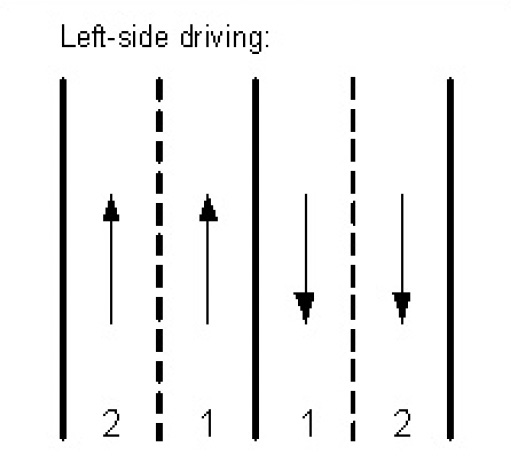 左側通行の国:区分線が走行方向の左側にあるレーン1に、車線区分線マーカーが指定されます。 左側通行の国:区分線が走行方向の左側にあるレーン1に、車線区分線マーカーが指定されます。 | 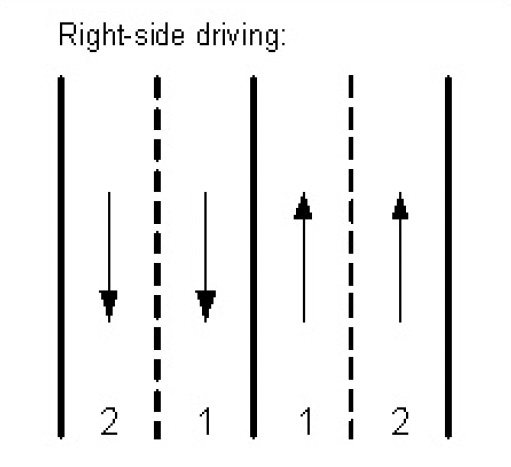 右側通行の国:区分線が走行方向の右側にあるレーン1に、車線区分線マーカーが指定されます。 右側通行の国:区分線が走行方向の右側にあるレーン1に、車線区分線マーカーが指定されます。 |
|---|
laneMarkings.centerDividerMarkerは相互通行道路の中央分離帯に使われる車線分離の種類を表します。相互通行道路は、交通が両方向に流れることを可能にした道路のことで、通常、それぞれの方向別に対応したレーンが設けられています。
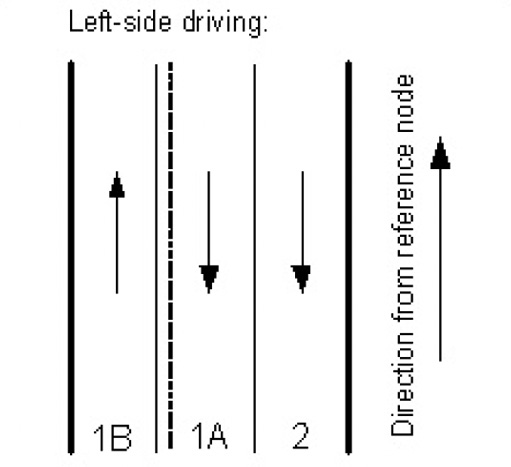 左側通行の国:中央分離帯マーカー (レーン内側に実線、外側に破線) はレーン1Bに指定されます。 左側通行の国:中央分離帯マーカー (レーン内側に実線、外側に破線) はレーン1Bに指定されます。 | 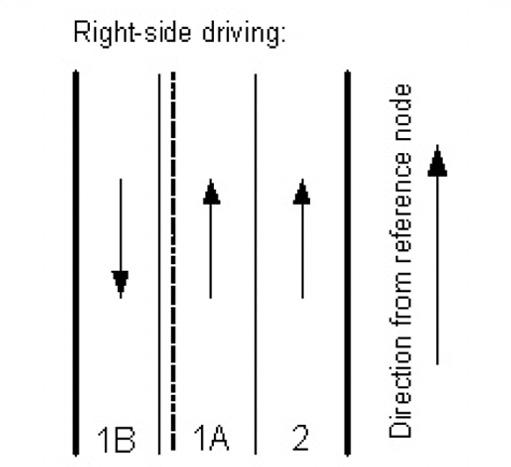 右側通行の国:中央分離帯マーカー (レーン内側に実線、外側に破線) はレーン1Aに指定されます。 右側通行の国:中央分離帯マーカー (レーン内側に実線、外側に破線) はレーン1Aに指定されます。 |
|---|
2 か月前の更新