

屋内地図コンポーネントを使用する
HERE Indoor Mapでは、地図に民間施設を読み込み、表示して操作する機能を提供しています。HERE Indoor Map の詳細については、「HERE Indoor Map ガイド」を参照してください。
注施設の所有者で、HERE SDK で HERE Indoor Map を活用することに興味がある場合は、
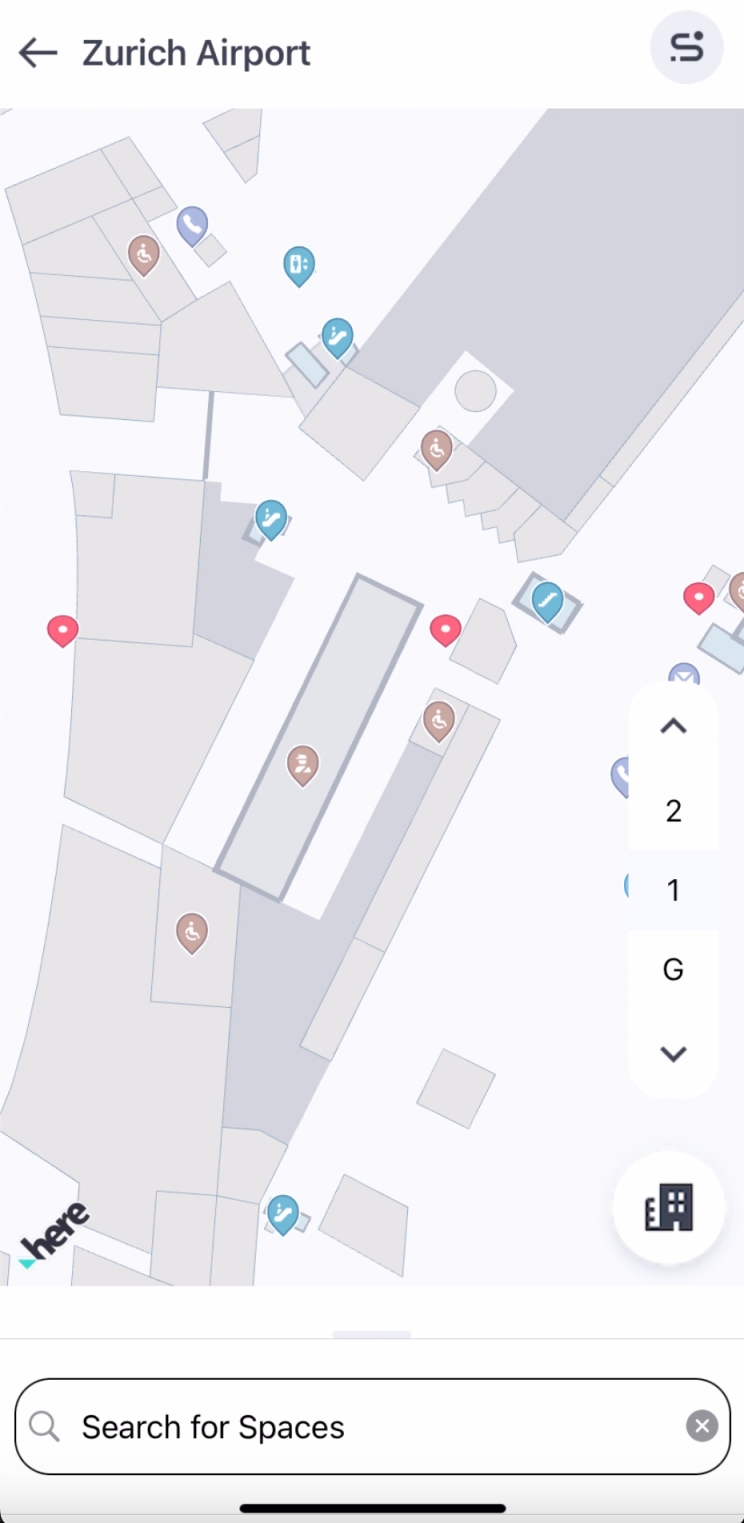
An airport venue with a customized floor switcher.
現在、HERE SDK では民間施設のみをサポートしているため、施設データはアプリにのみ表示されます。デフォルトでは、地図に施設は表示されません。各施設には、HERE SDK 資格情報に関連付けられた一意の施設 ID が割り当てられます。
VenueEngine を初期化する
HERE Indoor Map API の使用を開始する前に、VenueEngine インスタンスを作成して起動する必要があります。これは地図の初期化後に実行できますが、VenueEngine を作成する最適なタイミングは地図にシーンが読み込まれた後です。
private void loadMapScene() {
    // Load a scene from the HERE SDK to render the map with a map scheme.
    mapView.getMapScene().loadScene(MapScheme.NORMAL_DAY, mapError -> {
        if (mapError == null) {
            // Hide extruded buildings layer, so it will not overlaps with venues.
            List<String> mapFeatures = new ArrayList<>();
            mapFeatures.add(MapFeatures.EXTRUDED_BUILDINGS);
            mapView.getMapScene().disableFeatures(mapFeatures);

            // Create a venue engine object. Once an initialization is done, the callback
            // will be called.
            try {
                venueEngine = new VenueEngine(this ::onVenueEngineInitCompleted);
            } catch (InstantiationErrorException e) {
                Log.e(TAG, "SDK Engine instantiation failed");
                e.printStackTrace();
            }
        } else {
            Log.d(TAG, "Loading map failed: mapError: " + mapError.name());
        }
    });
}VenueEngineが初期化されると、コールバックが呼び出されます。この時点から、VenueService と VenueMap の両方にアクセスできるようになります。VenueService は施設の読み込みに使用され、VenueMap は地図上の施設を制御します。コールバック内で、必要なリスナーをすべて追加してから、VenueEngine を起動する必要があります。ユーザーがデフォルトのコレクション HRN を使用しない場合は、VenueEngine の起動後にプラットフォーム マップ カタログ HRN を設定できます。
注HRN の設定は必須ではありません。ユーザーが HRN を設定しない場合、デフォルトのコレクション HRN が自動的に選択されます。ユーザーが他のコレクションを使用したい場合は、それぞれの HRN を設定できます。HRN 値が欠落しているか無効であることを示すエラー ログが生成されます。プロジェクトの有効な HRN 文字列を受け取る方法の詳細については、「HERE Indoor Map ガイド」を参照してください。
private void onVenueEngineInitCompleted() {
    // Get VenueService and VenueMap objects.
    VenueService service = venueEngine.getVenueService();
    VenueMap venueMap = venueEngine.getVenueMap();

    // Add needed listeners.
    service.add(serviceListener);
    service.add(venueListener);
    venueMap.add(venueSelectionListener);

    //Lets user download topologies for current session.
    service.loadTopologies();

    // Start VenueEngine. Once authentication is done, the authentication callback
    // will be triggered. Afterwards, VenueEngine will start VenueService. Once VenueService
    // is initialized, VenueServiceListener.onInitializationCompleted method will be called.
    venueEngine.start((authenticationError, authenticationData) -> {
        if (authenticationError != null) {
            Log.e(TAG, "Failed to authenticate, reason: " + authenticationError.value);
        }
    });

    if(HRN != "") {
        // Set platform catalog HRN
        service.setHrn(HRN);
    }
}
VenueEngine が起動されると、現在の資格情報を使用して認証が行われ、次に VenueService が起動されます。VenueService が初期化されると、VenueServiceListener.onInitializationCompleted() メソッドが呼び出されます。
// Listener for the VenueService event.
private final VenueServiceListener serviceListener = new VenueServiceListener() {
    @Override
    public void onInitializationCompleted(@NonNull VenueServiceInitStatus result) {
        if (result == VenueServiceInitStatus.ONLINE_SUCCESS) {
            Log.d(TAG, "VenueService initialization is successful.");
        } else {
            Log.e(TAG, "Failed to initialize venue service.");
        }
    }

    @Override
    public void onVenueServiceStopped() {}
};
トークンを使用して VenueEngine を起動する
有効な HERE Indoor Platform プロジェクト トークンを使用して VenueEngine を起動できます。HERE プラットフォームのプロジェクト管理とプロジェクト ワークフローの詳細については、HERE プラットフォームのプロジェクト管理に関するページを参照してください。
private void onVenueEngineInitCompleted() {
    // Get VenueService and VenueMap objects.
    VenueService service = venueEngine.getVenueService();
    VenueMap venueMap = venueEngine.getVenueMap();

    // Add needed listeners.
    service.add(serviceListener);
    service.add(venueListener);
    venueMap.add(venueSelectionListener);

    // Start VenueEngine by replacing TOKEN_GOES_HERE with token you have in String data type.
    // Afterwards, VenueEngine will start VenueService. Once VenueService
    // is initialized, VenueServiceListener.onInitializationCompleted method will be called.
    venueEngine.start("TOKEN_GOES_HERE");
}
Indoor Mapサンプルアプリを試す
施設でのマップタップイベントの使用法を示す完全な例は、GitHubにある「IndoorMap」サンプルアプリで入手できます。
2 か月前の更新