

その他の交通機能
HERE SDKの高度な交通機能を使用して、リアルタイム交通情報データでマップアプリケーションを強化します。ライブの交通流とインシデントを地図に表示して、ユーザーに情報を提供し、効率的にナビゲートできるようにします。また、特定の交通事案を選択して強調表示し、詳細ビューを表示できます。
HERE SDK (Navigate) の場合、ラジオ基地局からの交通情報を組み込むこともできます。
リアルタイムの交通流とインシデントを地図に表示する
マップレイヤーの状態TRAFFIC_INCIDENTSを有効にすることで、交通事案を地図上で簡単に視覚化できます。HERE SDK は、現在の交通状況を確認するための別のレイヤーもサポートしています。地図上でレイヤーを表示または非表示にする方法については、以下の例を参照してください。
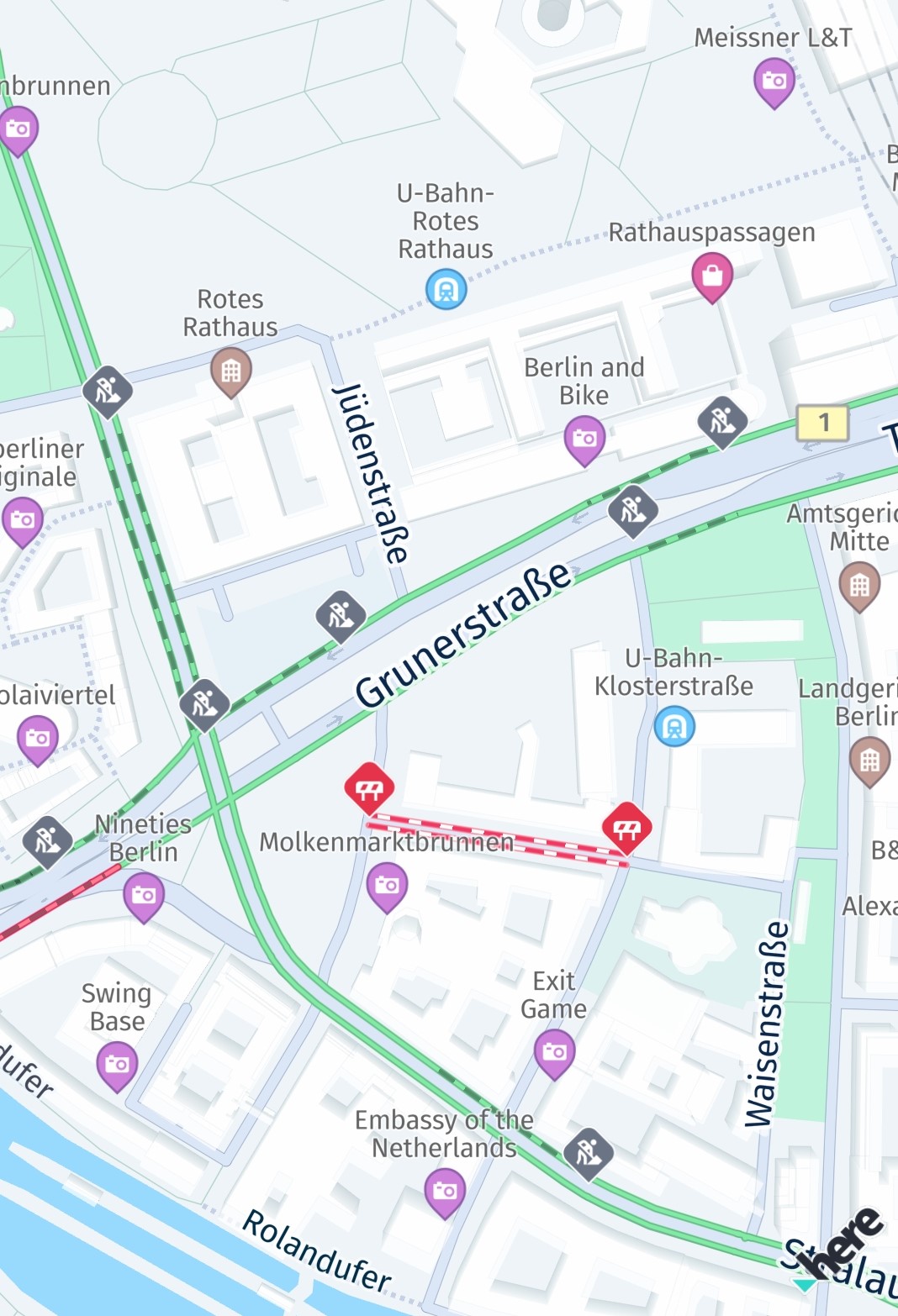
Screenshot: Traffic incidents visualized on the map.
レイヤーを設定すると、地図の表示エリアが自動的に更新されます。そのため、地図をあらゆる方向に自由にパンして、最新の交通事案を確認できます。
多くの状況で、ドライバーは市内または市外の現在の交通渋滞に基づいて最速ルートを見つけることに関心を持っています。HERE SDK を使用すると、現在のすべての交通渋滞を保持するレイヤーを表示できます。交通渋滞は混雑の度合いを示すさまざまな色のラインで視覚化され、常にリアルタイムで更新されます。この機能にはオンライン接続が必要で、通常よりも若干多くのデータを消費します。ただし、交通ラインはマップ タイルの一部として表示されるため、パフォーマンスが高くなります。
一緒に、または単独で、わずか数行のコードでこのような交通情報を地図上に視覚化できます。
private void enableTrafficVisualization() {
    // Try to refresh the TRAFFIC_FLOW vector tiles 5 minutes.
    // If MapFeatures.TRAFFIC_FLOW is disabled, no requests are made.
    try {
        MapContentSettings.setTrafficRefreshPeriod(Duration.ofMinutes(5));
    } catch (MapContentSettings.TrafficRefreshPeriodException e) {
        throw new RuntimeException("TrafficRefreshPeriodException: " + e.error.name());
    }

    Map<String, String> mapFeatures = new HashMap<>();
    // Once these traffic layers are added to the map, they will be automatically updated while panning the map.
    mapFeatures.put(MapFeatures.TRAFFIC_FLOW, MapFeatureModes.TRAFFIC_FLOW_WITH_FREE_FLOW);
    // MapFeatures.TRAFFIC_INCIDENTS renders traffic icons and lines to indicate the location of incidents.
    mapFeatures.put(MapFeatures.TRAFFIC_INCIDENTS, MapFeatureModes.DEFAULT);
    mapView.getMapScene().enableFeatures(mapFeatures);
}
private fun enableTrafficVisualization() {
// Try to refresh the TRAFFIC_FLOW vector tiles 5 minutes.
// If MapFeatures.TRAFFIC_FLOW is disabled, no requests are made.
//
// Note: This code initiates periodic calls to the HERE Traffic backend. Depending on your contract,
// each call may be charged separately. It is the application's responsibility to decide how
// often this code should be executed.
try {
MapContentSettings.setTrafficRefreshPeriod(Duration.ofMinutes(5))
} catch (e: TrafficRefreshPeriodException) {
throw RuntimeException("TrafficRefreshPeriodException: " + e.error.name)
}
val mapFeatures: MutableMap<String, String> = HashMap()
// Once these traffic layers are added to the map, they will be automatically updated while panning the map.
mapFeatures[MapFeatures.TRAFFIC_FLOW] = MapFeatureModes.TRAFFIC_FLOW_WITH_FREE_FLOW
// MapFeatures.TRAFFIC_INCIDENTS renders traffic icons and lines to indicate the location of incidents.
mapFeatures[MapFeatures.TRAFFIC_INCIDENTS] = MapFeatureModes.DEFAULT
mapView.mapScene.enableFeatures(mapFeatures)
}必要に応じて、MapFeatures.TRAFFIC_FLOWとMapFeatures.TRAFFIC_INCIDENTSについて、バックエンドから最新のトラフィックデータを取得するためにリクエストを実行する頻度を指定することもできます。マップビューが静的な状態に保たれるシナリオでは、この設定をMapContentSettings.setTrafficRefreshPeriod(Duration.ofMinutes(5))で行うのが最も有効です。
交通状況の更新期間の設定に関係なく、ビューポートが変更された場合、HERE SDKは更新されたビューポートを正しくレンダリングするために新しい交通状況データを取得する必要があります。
注これらの機能が有効になっている場合、ターン・バイ・ターンナビ中はビューポートの変更が1秒間に複数回発生する可能性があり、トラフィックベクタータイルのリクエストが大量に発生する可能性があります。代替策として、TrafficOnRouteを使用して、ルート沿いの交通情報の表示のみを更新することを検討してください。
トラフィックレイヤーを無効にするには、以下を呼び出します。
private void disableTrafficVisualization() {
    List<String> mapFeatures = new ArrayList<>();
    mapFeatures.add(MapFeatures.TRAFFIC_FLOW);
    mapFeatures.add(MapFeatures.TRAFFIC_INCIDENTS);
    mapView.getMapScene().disableFeatures(mapFeatures);
}
private fun disableTrafficVisualization() {
val mapFeatures: MutableList<String> = ArrayList()
mapFeatures.add(MapFeatures.TRAFFIC_FLOW)
mapFeatures.add(MapFeatures.TRAFFIC_INCIDENTS)
mapView.mapScene.disableFeatures(mapFeatures)
}交通流ラインは次のように色分けされています。
- 緑:交通量が通常
- 黄:交通量が多い
- 赤:交通量が非常に多い
- 黒:交通が遮断されている
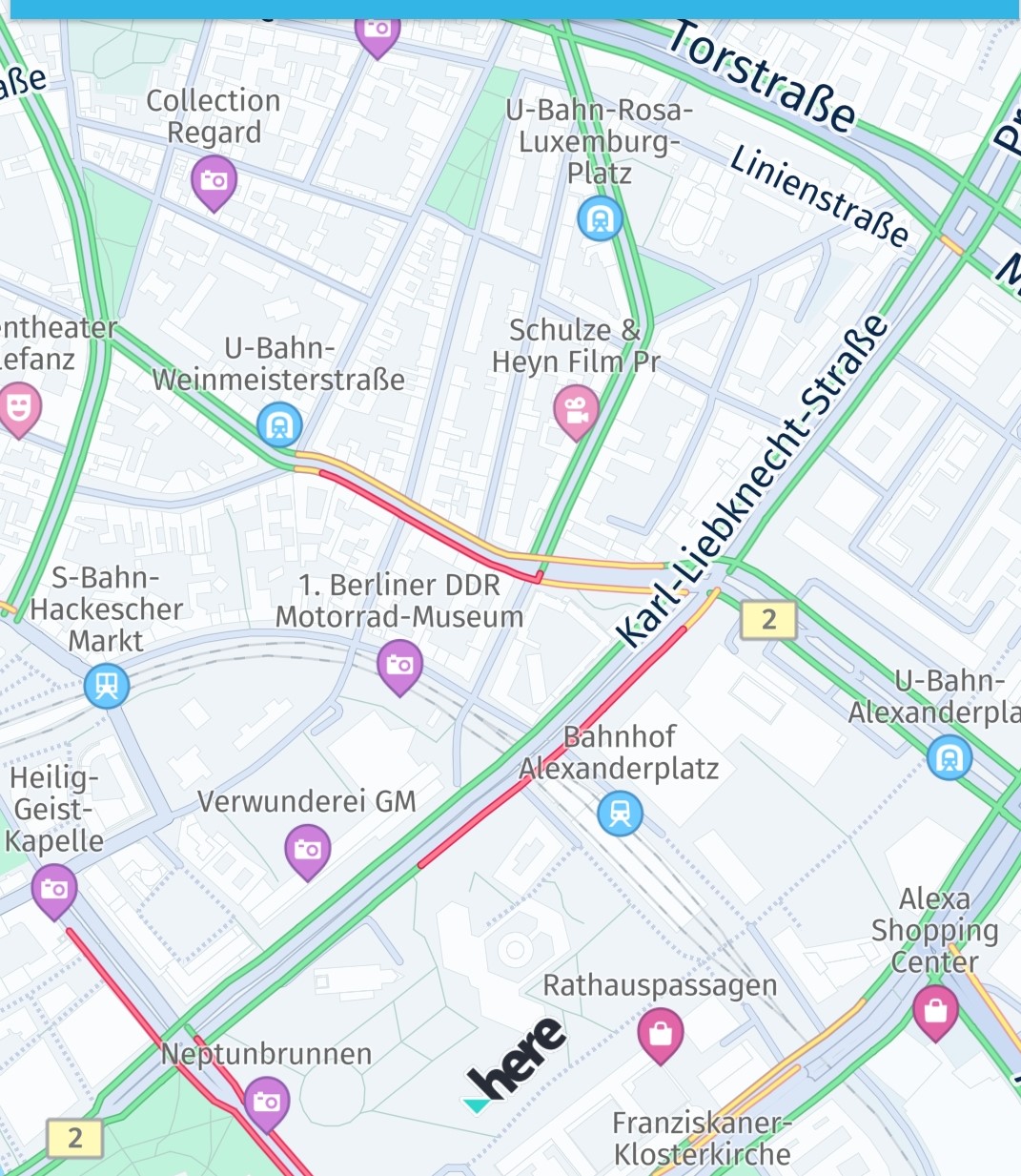
Screenshot: Traffic flow visualized on the map together with incidents.
交通障害を選択する
TRAFFIC_INCIDENTS が MapView に表示されている場合、タップ ハンドラーを設定し、交通事案を選択して詳細情報を取得できます。
private void setTapGestureHandler() {
    mapView.getGestures().setTapListener(touchPoint -> {
        GeoCoordinates touchGeoCoords = mapView.viewToGeoCoordinates(touchPoint);
        // Can be null when the map was tilted and the sky was tapped.
        if (touchGeoCoords != null) {
            // Pick incidents that are shown in TRAFFIC_INCIDENTS.
            pickTrafficIncident(touchPoint);
        }
    });
}

// Traffic incidents can only be picked, when TRAFFIC_INCIDENTS is visible.
private void pickTrafficIncident(Point2D touchPointInPixels) {
    Point2D originInPixels = new Point2D(touchPointInPixels.x, touchPointInPixels.y);
    Size2D sizeInPixels = new Size2D(1, 1);
    Rectangle2D rectangle = new Rectangle2D(originInPixels, sizeInPixels);

    // Creates a list of map content type from which the results will be picked.
    // The content type values can be MAP_CONTENT, MAP_ITEMS and CUSTOM_LAYER_DATA.
    ArrayList<MapScene.MapPickFilter.ContentType> contentTypesToPickFrom = new ArrayList<>();

    // MAP_CONTENT is used when picking embedded Carto POIs, traffic incidents, vehicle restriction etc.
    // MAP_ITEMS is used when picking map items such as MapMarker, MapPolyline, MapPolygon etc.
    // Currently we need traffic incidents so adding the MAP_CONTENT filter.
    contentTypesToPickFrom.add(MapScene.MapPickFilter.ContentType.MAP_CONTENT);
    MapScene.MapPickFilter filter = new MapScene.MapPickFilter(contentTypesToPickFrom);

    // If you do not want to specify any filter you can pass filter as NULL and all of the pickable contents will be picked.
    mapView.pick(filter, rectangle, new MapViewBase.MapPickCallback() {
        @Override
        public void onPickMap(@Nullable MapPickResult mapPickResult) {
            if (mapPickResult == null) {
                // An error occurred while performing the pick operation.
                return;
            }

            List<PickMapContentResult.TrafficIncidentResult> trafficIncidents =
                    mapPickResult.getMapContent().getTrafficIncidents();
            if (trafficIncidents.isEmpty()) {
                Log.d(TAG, "No traffic incident found at picked location");
            } else {
                Log.d(TAG, "Picked at least one incident.");
                PickMapContentResult.TrafficIncidentResult firstIncident = trafficIncidents.get(0);
                showDialog("Traffic incident picked:", "Type: " +
                        firstIncident.getType().name());

                // Find more details by looking up the ID via TrafficEngine.
                findIncidentByID(firstIncident.getOriginalId());
            }

            // Optionally, look for more map content like embedded POIs.
        }
    });
}
private fun setTapGestureHandler() {
mapView.gestures.tapListener =
TapListener { touchPoint: Point2D ->
val touchGeoCoords = mapView.viewToGeoCoordinates(touchPoint)
// Can be null when the map was tilted and the sky was tapped.
if (touchGeoCoords != null) {
// Pick incidents that are shown in TRAFFIC_INCIDENTS.
pickTrafficIncident(touchPoint)
}
}
}
// Traffic incidents can only be picked, when TRAFFIC_INCIDENTS is visible.
private fun pickTrafficIncident(touchPointInPixels: Point2D) {
val originInPixels = Point2D(touchPointInPixels.x, touchPointInPixels.y)
val sizeInPixels = Size2D(1.0, 1.0)
val rectangle = Rectangle2D(originInPixels, sizeInPixels)
// Creates a list of map content type from which the results will be picked.
// The content type values can be MAP_CONTENT, MAP_ITEMS and CUSTOM_LAYER_DATA.
val contentTypesToPickFrom = ArrayList<MapPickFilter.ContentType>()
// MAP_CONTENT is used when picking embedded Carto POIs, traffic incidents, vehicle restriction etc.
// MAP_ITEMS is used when picking map items such as MapMarker, MapPolyline, MapPolygon etc.
// Currently we need traffic incidents so adding the MAP_CONTENT filter.
contentTypesToPickFrom.add(MapPickFilter.ContentType.MAP_CONTENT)
val filter = MapPickFilter(contentTypesToPickFrom)
// If you do not want to specify any filter you can pass filter as NULL and all of the pickable contents will be picked.
mapView.pick(filter, rectangle, MapPickCallback { mapPickResult ->
if (mapPickResult == null) {
// An error occurred while performing the pick operation.
return@MapPickCallback
}
val trafficIncidents =
mapPickResult.mapContent!!.trafficIncidents
if (trafficIncidents.isEmpty()) {
Log.d(TAG, "No traffic incident found at picked location")
} else {
Log.d(TAG, "Picked at least one incident.")
val firstIncident = trafficIncidents[0]
showDialog(
"Traffic incident picked:", "Type: " +
firstIncident.type.name
)
// Find more details by looking up the ID via TrafficEngine.
findIncidentByID(firstIncident.originalId)
}
// Optionally, look for more map content like embedded POIs.
})
}タップ ハンドラーを使用すると、ビュー座標内のタッチされた位置を取得し、それを mapView.pickMapContent() に渡すことができます。ここではポイントサイズの長方形を使用しているだけですが、選択エリアを拡大して、より多くのコンテンツを一度に含めることもできます。
コールバックは、TrafficIncidentResult を含めることができる PickMapContentResult を提供しますが、デフォルトの POI マーカーなど、地図上に常に表示される他の埋め込みタイプも含めることができます。TrafficIncidentResultタイプはすでにインシデントに関するほとんどの情報を提供していますが、利用可能な情報をすべて取得するには、TrafficEngine (以下も参照) を使用して、選択したインシデントをIDで検索します。
private void findIncidentByID(String originalId) {
    TrafficIncidentLookupOptions trafficIncidentsQueryOptions = new TrafficIncidentLookupOptions();
    // Optionally, specify a language:
    // the language of the country where the incident occurs is used.
    // trafficIncidentsQueryOptions.languageCode = LanguageCode.EN_US;
    trafficEngine.lookupIncident(originalId, trafficIncidentsQueryOptions, new TrafficIncidentLookupCallback() {
        @Override
        public void onTrafficIncidentFetched(@Nullable TrafficQueryError trafficQueryError, @Nullable TrafficIncident trafficIncident) {
            if (trafficQueryError == null) {
                Log.d(TAG, "Fetched TrafficIncident from lookup request." +
                        " Description: " + trafficIncident.getDescription().text);
            } else {
                showDialog("TrafficLookupError:", trafficQueryError.toString());
            }
        }
    });
}
private fun findIncidentByID(originalId: String) {
val trafficIncidentsQueryOptions = TrafficIncidentLookupOptions()
// Optionally, specify a language:
// the language of the country where the incident occurs is used.
// trafficIncidentsQueryOptions.languageCode = LanguageCode.EN_US;
trafficEngine.lookupIncident(originalId, trafficIncidentsQueryOptions,
TrafficIncidentLookupCallback { trafficQueryError, trafficIncident ->
if (trafficQueryError == null) {
Log.d(
TAG, "Fetched TrafficIncident from lookup request." +
" Description: " + trafficIncident!!.description.text
)
} else {
showDialog("TrafficLookupError:", trafficQueryError.toString())
}
})
}使用例は、Java版とKotlin版の両方で提供されている「Traffic」サンプルアプリの一部としてGitHubで入手できます。
ラジオ基地局から交通放送を受信する (Navigateでのみ使用可能)
TrafficDataProviderインターフェースを使用すると、HERE SDKで交通ブロードキャストを提供するラジオ基地局信号を統合できます。
TrafficBroadcastはRDS-TMC形式の交通データを想定しており、インターネット接続なしで使用できます。このような場合、OfflineRoutingEngineレイヤーがRDS_TRAFFICを使用して有効化されていれば、LayerConfigurationはラジオチャネル経由で受信した交通データを利用できます。LayerConfigurationの使用方法の詳細については、こちらを参照してください。
trafficBroadcast.activate()メソッドを呼び出して、交通データイベントを受信する必要があります。
TrafficBroadcast は、位置情報ソースから提供される新しい位置に絶え間なく反応し、LocationListener として機能します。activate()の呼び出しに関係なく、位置を更新する必要があります。
注このインターフェースを採用するには特別なハードウェアが必要です。詳細については、HERE 担当者にお問い合わせください。これはベータ機能としてリリースされていることに注意してください。
2 か月前の更新