
Create a toll cost application
Note
The 3.1 version of this API has been deprecated. For continued support and feature development, upgrade to the latest 3.2 version.
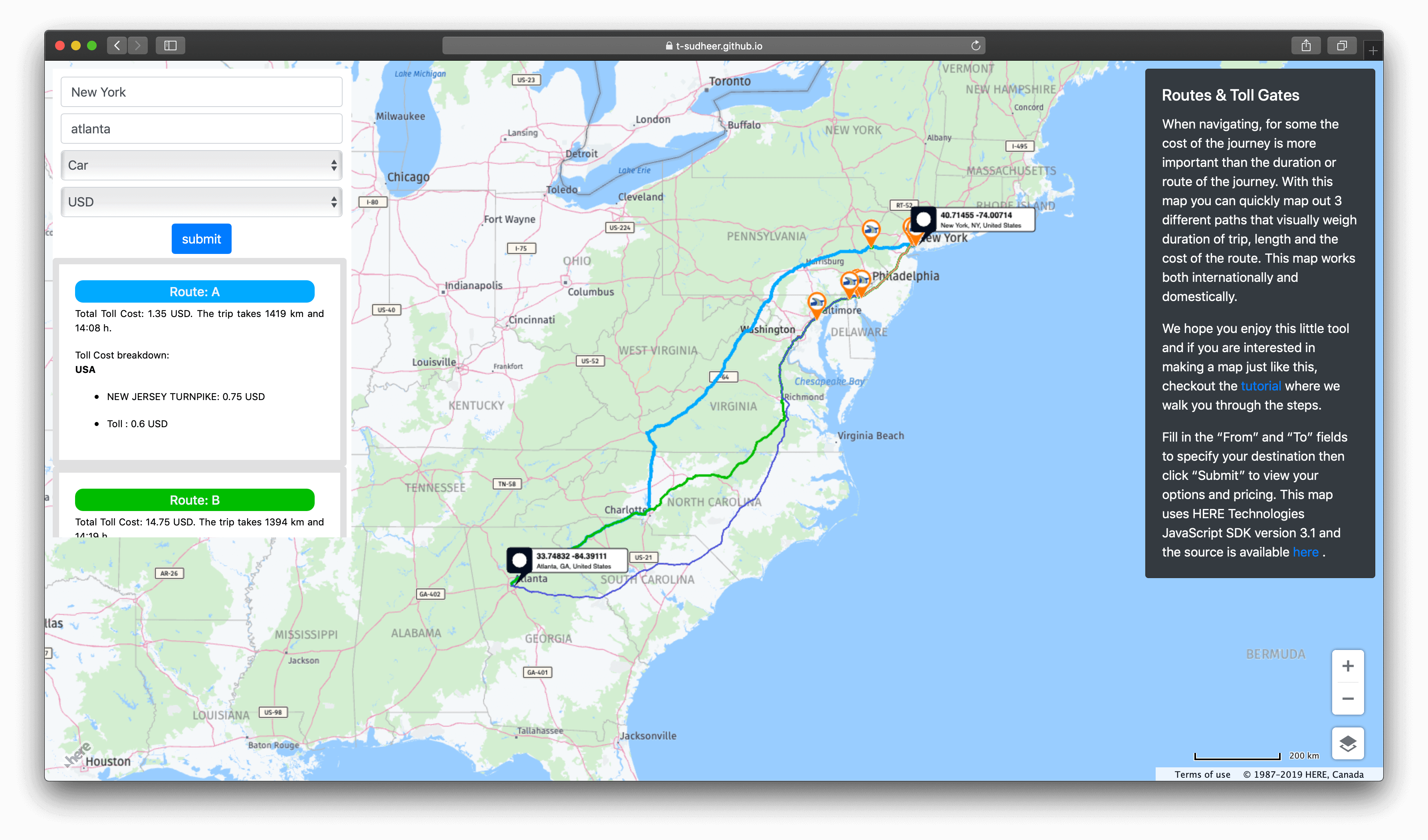
This tutorial demonstrates how to create a web application that calculates a route and the total toll cost. This includes how to:
- Create a base map using HERE JavaScript SDK v3.1
- Add user interface elements for routing
- Calculate the toll cost of 3 different routes and display them on the map
To explore the completed tutorial, see Routes and Toll Gates.
Before you begin
- Obtain an API Key: If you do not have one already, sign up for a HERE platform account and generate an API key. For more information, see Get started.
Create a base map using HERE JavaScript SDK v3.1
- Create an empty HTML file.
- In the
<head>element of the HTML file, copy the following code. Be sure to include references to the libraries:
<html>
  <head>
  <meta name="viewport" content="initial-scale=1.0, width=device-width" />
  <script src="https://js.api.here.com/v3/3.1/mapsjs-core.js"
  type="text/javascript" charset="utf-8"></script>
  <script src="https://js.api.here.com/v3/3.1/mapsjs-service.js"
  type="text/javascript" charset="utf-8"></script>
<!--The following libs will make the map interactive -->
  <script type="text/javascript" charset="UTF-8" src="https://js.api.here.com/v3/3.1/mapsjs-mapevents.js"></script>
    <script type="text/javascript" charset="UTF-8" src="https://js.api.here.com/v3/3.1/mapsjs-ui.js"></script>
    <script type="text/javascript" charset="UTF-8" src="https://js.api.here.com/v3/3.1/mapsjs-clustering.js"></script>
    <script type="text/javascript" charset="UTF-8" src="https://js.api.here.com/v3/3.1/mapsjs-data.js"></script>
    <link rel="stylesheet" type="text/css" href="https://js.api.here.com/v3/3.1/mapsjs-ui.css" />
  </head>
  <body>
  <!-- Here is div in which the map will render -->
  <div style="width: 100vh; height: 100vw" id="mapContainer"></div>
  <script>
    // Initialize the platform object:
    var platform = new H.service.Platform({
    'apikey': '{YOUR_APIKEY}' // Your apikey
    });

    // Obtain the default map types from the platform object
    var maptypes = platform.createDefaultLayers();

    // Instantiate (and display) a map object:
    var map = new H.Map(
    document.getElementById('mapContainer'),
    maptypes.vector.normal.map,
    {
      zoom: 8,
      center: { lat:40.730610,lng:-73.935242 }
    });
  </script>
  </body>
</html>Note
Add your apikey to the code.
For more information on creating interactive maps, see Getting started.
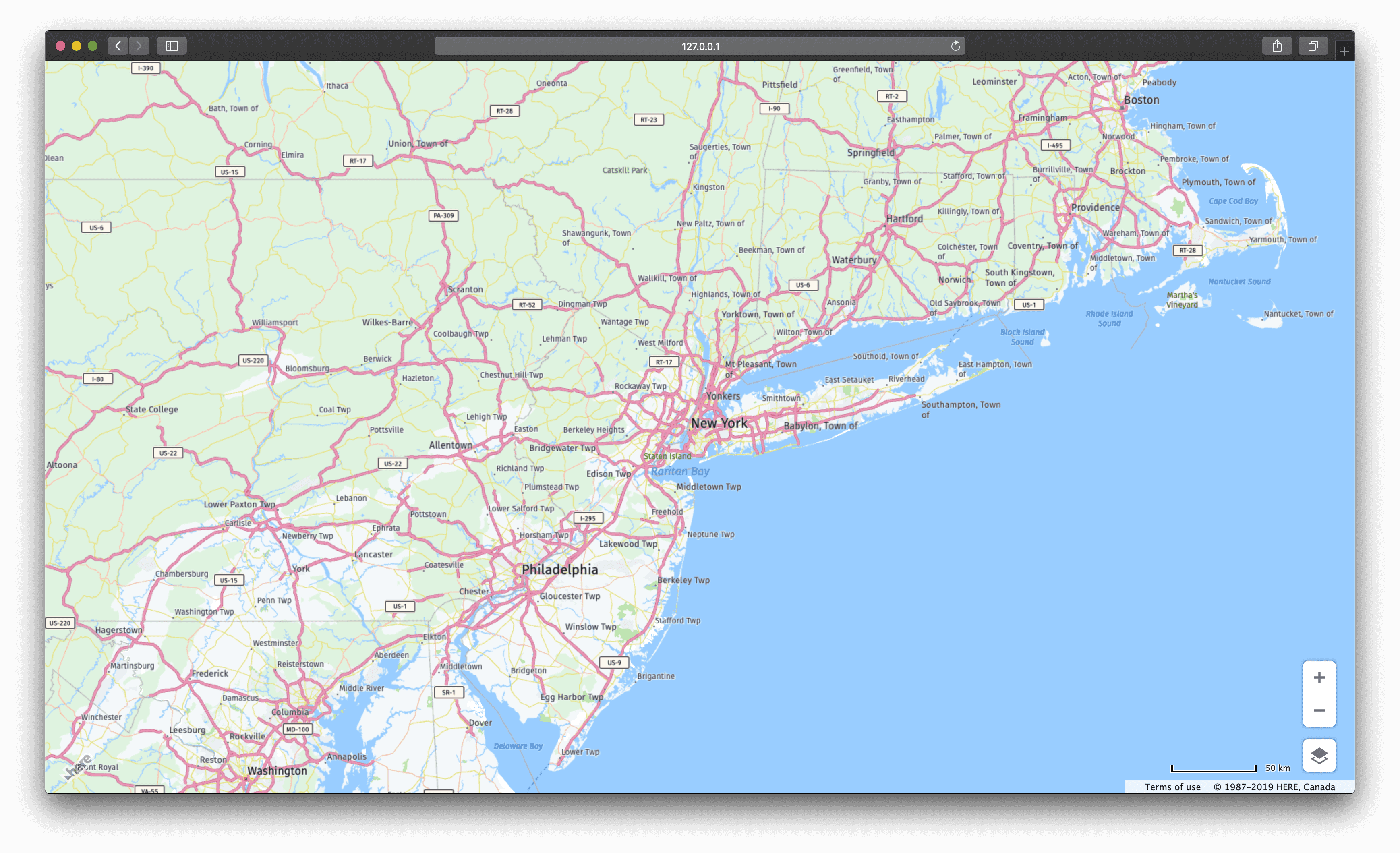
Your HTML file should render centered on New York city, as shown in the following screen capture:
Add in the UI elements for routing
-
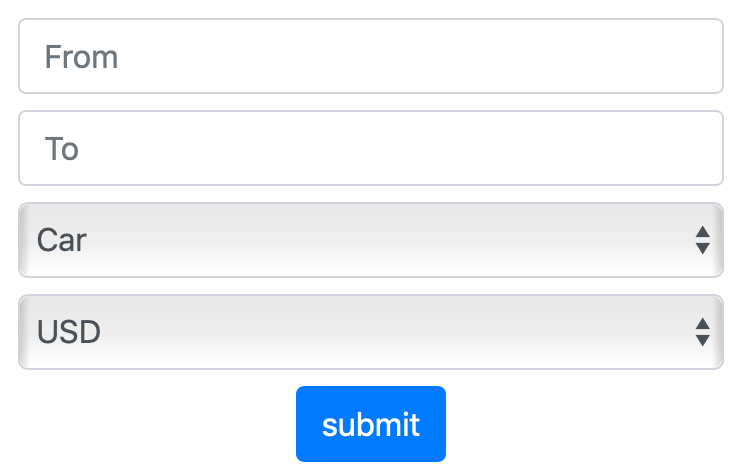
Using the Bootstrap library or equivalent, add:
- 2 input fields
- 2 drop down menus
- 1 submit button
This is named,
ctrl-panel.Your UI elements should appear similar to the following screen capture:
-
Add the following code to the
<body>tag of your html file.<div class="ctrl-panel"> <div class="form-horizontal"> <div class="form-group row"> <div class="col-sm-12"> <input required type='text' id='start' class='form-control ' value='' placeholder="From"/> </div> </div> <div class="form-group row"> <div class="col-sm-12"> <input type='text' id='dest' class='form-control' size='40' value='' required placeholder="To"/> </div> </div> </div> <div class="form-horizontal"> <div class="form-group row"> <div class="col-sm-12"> <select id="vehicles" class="form-control"> <option value="2" selected="true">Car</option> <option value="3">Truck</option> <option value="9">Delivery Truck</option> </select> </div> </div> </div> <div class="form-horizontal"> <div class="form-group row"> <div class="col-sm-12"> <select id="currency" class="form-control"> <option value="USD" selected="true">USD</option> <option value="INR">INR</option> <option value="EUR">EUR</option> <option value="CNY">CNY</option> </select> </div> </div> </div> <div class="form-horizontal"> <div class="form-group" style="text-align: center"> <div class="col-sm-9"> <input type="submit" id="routeButton2" class="btn btn-primary" value="submit" /> </div> </div> </div> </div> -
Add the following CSS to a new CSS file, named "main.css" to align the ctrl-panel to the top left corner of the map.
Note
Remember to link your new CSS file. See the final code for information.
.ctrl-panel {
   background-color: #ffffff;
   border-right: solid #ffffff 1px;
   border-bottom: solid #ffffff 1px;
   left: 30px;
   width: 374px;
   max-height: calc(100% - 100px);
   display: block;
   font-size: 12px;
   left: 10px;
   padding: 10px;
   position: absolute;
   text-align: justify;
   top: 10px;
   z-index: 10;
   -webkit-transition: left 0.5s, -webkit-transform 2s;
   transition: left 0.5s, transform 2s;
  clear: both;
		}
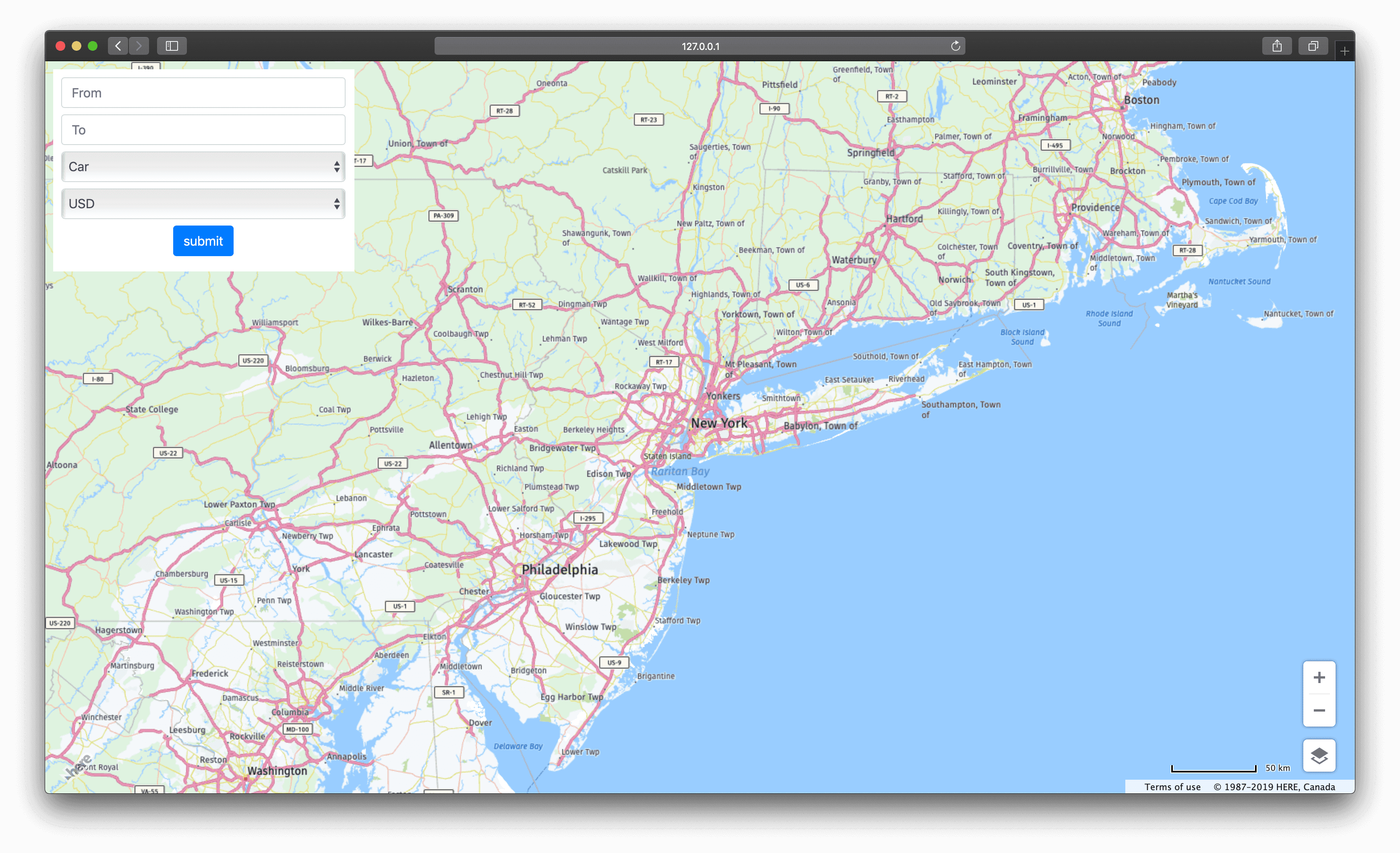
The map should now render as follows:
Calculate the toll cost of 3x different routes
The control-panel calculates routes from Point A to Point B plus the toll cost for each route, using the HERE Fleet Telematics REST API.
The following code calculates the toll cost from a source to a destination. The API requires:
- Source information
- Destination information
- Vehicle details
- Callback function
-
Add the following code to your JavaScript file:
var calculateRoute = function (start, destination) { feedbackTxt.innerHTML = '' // generate routing request var transportMode = "car"; if (vehicles.value == "3" || vehicles.value == "9") { transportMode = "truck" } if (vehicles.value == "9" && serverURL.value.search("fleet") != -1 ) { transportMode = "delivery" } var hasTrailer = null, shippedHazardousGoods = null, limitedWeight = null, trailerWeight =null, height = null, width = null, length = null, heightAbove1stAxle = null; if (parseInt(trailerType.value) > 0) { hasTrailer = "&trailersCount=1"; } if (parseInt(hazardousType.value) == 1) { shippedHazardousGoods = "&shippedHazardousGoods=explosive"; } else if (parseInt(hazardousType.value) == 2) { shippedHazardousGoods = "&shippedHazardousGoods=other"; } if (parseInt(vehWeight.value) > 0) { if (parseInt(vehWeight.value) > parseInt(totalWeight.value)) { alert("Total Weight cannot be smaller than Vehicle Weight"); return; } limitedWeight = "&limitedWeight=" + (totalWeight.value / 1000) + "t"; } if (parseInt(vehHeight.value) > 0 || parseInt(trailerHeight.value) > 0) { height = "&height=" + ((parseInt(vehHeight.value) > parseInt(trailerHeight.value) ? parseInt(vehHeight.value) : parseInt(trailerHeight.value)) / 100) + "m"; } if (parseInt(totalWidth.value) > 0) { width = "&width=" + (totalWidth.value / 100); } if (parseInt(totalLength.value) > 0) { length = "&length=" + (totalLength.value / 100); } if(document.getElementById("heightAbove1stAxle").value != 0) { heightAbove1stAxle = (document.getElementById("heightAbove1stAxle").value / 100) + "m"; } var vspec = `&tollVehicleType=${vehicles.value}&trailerType=0&vehicleNumberAxles=2&trailerNumberAxles=0&hybrid=0 &emissionType=5&fuelType=petrol&trailerHeight=${trailerHeight.value}&vehicleWeight=${vehWeight.value} &disabledEquipped=${disabledEquipped.value}&minimalPollution=minPollution.value&hov=${hov.value} &passengersCount=${nrPassengers.value}&tiresCount=${nrOfTotalTires.value}&commercial=${commercial.value} &heightAbove1stAxle=${heightAbove1stAxle}`; if (width != null && width.length > 0) vspec += width; if (length != null && length.length > 0) vspec += length; if (shippedHazardousGoods != null && shippedHazardousGoods.length > 0) vspec += shippedHazardousGoods; var routerParamsValue = ''; var finalParamsValue = ''; if (routerParamsValue !== '') { var paramsArray = []; var components = routerParamsValue.split('&'); for (var i = 0; i < components.length; i++) { var key = components[i].split('='); if (key[0].substr(0, 'waypoint'.length) === 'waypoint') { continue;// ignore waypoints because we already specified. } if (key[0] === 'mode') { continue;// Ignore mode since cor build this inside } paramsArray.push(components[i]); } finalParamsValue = paramsArray.join('&'); } var routeAlternativesRequested = false; if(document.getElementById("routeAlternatives").value != null && document.getElementById("routeAlternatives").value != "0") { routeAlternativesRequested = true; } var isDTFilteringEnabled = document.getElementById("chkEnableDTFiltering").checked; var rollupPrm = serverURL.value.search("fleet") != -1 ? "rollups" : "rollup" // Preparing the tollcost API end with all required params var urlRoutingReq = `https://fleet.ls.hereapi.com/2/calculateroute.json?apiKey={YOUR_API_KEY}&waypoint0=${start.lat},${start.lng}&detail=1&waypoint1=${destination.lat},${destination.lng} &routelegattributes=li&routeattributes=gr&maneuverattributes=none&linkattributes=${'none,rt,fl'}&legattributes=${'none,li,sm'}¤cy=${document.getElementById('currency').value}&departure= ${isDTFilteringEnabled ? document.getElementById("startRouteDate").value + "T" + document.getElementById("startRouteTime").value : ''} ${vspec}&mode=fastest;${transportMode};traffic:disabled${((shippedHazardousGoods != null && shippedHazardousGoods.length > 0) ? shippedHazardousGoods : "")} &${rollupPrm}=none,country;tollsys${(routeAlternativesRequested ? "&alternatives=" + document.getElementById("routeAlternatives").value : '')}&jsoncallback=parseRoutingResponse` $('#mydiv').fadeIn('slow'); script = document.createElement("script"); script.src = urlRoutingReq; document.body.appendChild(script); }When the user adds information and clicks the submit button, the function calls the HERE toll-cost API.
Note
See Request a simple route for more information about routing.
The callback function is named,
parseRoutingResponse, and is defined as follows. -
Add this to your JavaScript file:
function parseRoutingResponse(resp) { feedbackTxt.innerHTML = '' if (resp.errors != undefined && resp.errors.length != 0) { if (resp.errors[resp.errors.length-1] == "NoRouteFound") { alert('Please consider to change your start or destination as the one you entered is not reachable with the given vehicle profile'); feedbackTxt.innerHTML = 'The Router service is unable to compute the route: try to change your start / destination point'; } else { alert(JSON.stringify(resp)); $('#mydiv').fadeIn('slow'); feedbackTxt.innerHTML = JSON.stringify(resp); } return; } if (resp.response == undefined) { if (resp.subtype == "NoRouteFound") { alert('Please consider to change your start or destination as the one you entered is not reachable with the given vehicle profile'); feedbackTxt.innerHTML = 'The Router service is unable to compute the route: try to change your start / destination point'; } else { alert(resp.subtype + " " + resp.details); feedbackTxt.innerHTML = resp.error; } return; } routeLinkHashMap = new Object(); // create link objects for (var r = 0; r < resp.response.route.length; r++) { for (var m = 0; m < resp.response.route[r].leg[0].link.length; m++) { var strip = new H.geo.LineString(), shape = resp.response.route[r].leg[0].link[m].shape, i, l = shape.length; for (i = 0; i < l; i += 2) { strip.pushLatLngAlt(shape[i], shape[i + 1], 0); } routeColors[r] = routeColor[r]; var link = new H.map.Polyline(strip, { style: { lineWidth: (routeStroke - (r + 1)), // alternatives get smaller line with strokeColor: routeColor[r], } }); link.setArrows({color: "#F00F", width: 2, length: 3, frequency: 4}); link.$linkId = resp.response.route[r].leg[0].link[m].linkId; routeLinkHashMap[(resp.response.route[r].leg[0].link[m].linkId.lastIndexOf("+", 0) === 0 ? resp.response.route[r].leg[0].link[m].linkId.substring(1) : resp.response.route[r].leg[0].link[m].linkId)] = link; group.addObject(link); link.addEventListener('tap',function(e){ var link = new H.map.Polyline(strip, { style: { lineWidth: (routeStroke - (r + 1)), // alternatives get smaller line with strokeColor: 'rgba(240, 255, 0, 1)', lineCap: 'butt' } }); map.addObject(link); }) } } map.addObject(group); (async function(){ await sleep(2000); map.setZoom(map.getViewModel().getLookAtData().zoom-1); console.log('sleep') })(); map.getViewModel().setLookAtData({bounds: group.getBoundingBox()},true); for(var i = 0; i < resp.response.route.length; i++) { highlightRoute(resp.response.route[i].tollCost.routeTollItems, i); showTceCost(resp.response.route[i].tollCost.costsByCountryAndTollSystem, resp.response.route[i].cost,resp.response.route[i].summary, resp.warnings,routeIDs[i],routeColors[i]); } $('#mydiv').fadeOut('slow') } -
Add the following functions to your JavaScript code:
- highlightRoute
- showTceCost
After a successful toll-cost API response, plot the
routes(highlightRoute)and display the toll costinformation(showTceCost).Define the
highlightRouteas follows:function highlightRoute(routeTollItems, routeAlternative) { if (routeTollItems != null) { for (var i = 0; i < routeTollItems.length; i++) { var tollType = routeTollItems[i].tollType; var color = ppType_S_Color[routeAlternative]; if(tollType == 'A') { color = ppType_A_Color[routeAlternative]; } else if(tollType == 'a') { color = ppType_a_Color[routeAlternative]; } else if(tollType == 'S'){ color = ppType_S_Color[routeAlternative]; } else if(tollType == 'p'){ color = ppType_p_Color[routeAlternative]; } else if(tollType == 'F'){ color = ppType_F_Color[routeAlternative]; } else if(tollType == 'K'){ color = ppType_K_Color[routeAlternative]; } else if(tollType == 'U'){ color = ppType_U_Color[routeAlternative]; } for (var j = 0; j < routeTollItems[i].linkIds.length; j++) { // set color and stroke of links var tollstroke = (tollCostStroke - (routeAlternative + 1)); // route alternatives have a different stroke var link = routeLinkHashMap[routeTollItems[i].linkIds[j]]; if(link.getStyle().strokeColor == routeColor[routeAlternative]) { // only change link color to toll color if not already modified link.setStyle({strokeColor: color, lineWidth: tollstroke}); } } //toll structures if(routeTollItems[i].tollStructures != null) { for (var j = 0; j < routeTollItems[i].tollStructures.length; j++) { console.log({'routeTollItems':routeTollItems[i]}) createTollMarker(routeTollItems[i].tollStructures[j],routeTollItems[i]); } } } } } var createIconMarker = function (line1, line2) { var svgMarker = svgMarkerImage_Line; svgMarker = svgMarker.replace(/__line1__/g, line1); svgMarker = svgMarker.replace(/__line2__/g, (line2 != undefined ? line2 : "")); svgMarker = svgMarker.replace(/__width__/g, (line2 != undefined ? line2.length * 4 + 20 : (line1.length * 4 + 80))); svgMarker = svgMarker.replace(/__widthAll__/g, (line2 != undefined ? line2.length * 4 + 80 : (line1.length * 4 + 150))); return new H.map.Icon(svgMarker, { anchor: new H.math.Point(24, 57) }); }; -
Also, define
showTceCostas follows:
	function showTceCost(costByCountryAndTollSystem, costs, summary,warnings,routeName,routeColors) {

				var html_code = ''

			if(warnings)
			{
				for(var j = 0; j < warnings.length; j++)
				{
					// check only category 10 -> boat ferry and train ferry, both can be on one route.
					if(warnings[j].category == 10 && warnings[j].context.includes("boat"))
					{
						feedbackTxt.innerHTML += "<br/></br><span style=\"color:#ff0000\">Route contains boat ferry links which might add cost</span>";
					}
					else if(warnings[j].category == 10 && warnings[j].context.includes("train"))
					{
						feedbackTxt.innerHTML += "<br/></br><span style=\"color:#ff0000\">Route contains train ferry links which might add cost</span>";
					}
				}
			}

			if (!costs) {
				//feedbackTxt.innerHTML += "<br/><br/>None.";
			} else {
				html_code += '<div class="card" style="width: 23rem;border: 8px solid rgba(0,0,0,.125);"><div class="card-body">';
				html_code += '<div style="height: 28px; padding: 5px; border-radius: 10px; margin-bottom: 5px; text-align: center; color: aliceblue; width: 300px;background-color:'+routeColors+'"><h6>Route: '+routeName+'</h6></div>';
				html_code += "<p>Total Toll Cost: " + costs.totalCost + " " + costs.currency + '. '+summary.text +"</p>";

			}

			if(costByCountryAndTollSystem != null) {

				var feedback = "";
				feedback += "";

				var prevCoutry = ''

					if(costByCountryAndTollSystem.length > 0){
						feedback += "<h8>Toll Cost breakdown:</h8>";
				}

				for (var j = 0; j < costByCountryAndTollSystem.length; j++) {

					if(prevCoutry != costByCountryAndTollSystem[j].country){

						feedback += "<p style=\"font-weight: bold;\">" + costByCountryAndTollSystem[j].country + "</p>"
						prevCoutry = costByCountryAndTollSystem[j].country
					}

					feedback += "<ul><li>";
					if(costByCountryAndTollSystem[j].name != null && costByCountryAndTollSystem[j].name.trim().length > 0) {
						feedback += "" + costByCountryAndTollSystem[j].name + ": ";
					} else if(costByCountryAndTollSystem[j].tollSystemId != null && costByCountryAndTollSystem[j].tollSystemId.trim().length > 0) {
						feedback += "Toll System ID " + costByCountryAndTollSystem[j].tollSystemId + ": "
					} else {
						feedback += "Toll : ";
					}
					feedback += costByCountryAndTollSystem[j].amountInTargetCurrency + " " + costs.currency;
					feedback += "</li></ul>";

				}

				html_code += feedback;

			}
			feedbackTxt.innerHTML += html_code+'</div>';
			return; // done

		}
Final code
Your code should now consist as follows:
<!doctype html>
<html lang="en">
<head>
    <!-- Required meta tags -->
    <meta charset="utf-8">
    <meta name="viewport" content="width=device-width, initial-scale=1, shrink-to-fit=no">
    <title>Route with Toll Cost</title>
    <!-- Bootstrap CSS -->
    <link rel="stylesheet" href="https://stackpath.bootstrapcdn.com/bootstrap/4.3.1/css/bootstrap.min.css">
    <!-- HERE Javascript libs-->
    <script type="text/javascript" charset="UTF-8" src="https://js.api.here.com/v3/3.1/mapsjs-core.js"></script>
    <script type="text/javascript" charset="UTF-8" src="https://js.api.here.com/v3/3.1/mapsjs-service.js"></script>
    <script type="text/javascript" charset="UTF-8" src="https://js.api.here.com/v3/3.1/mapsjs-mapevents.js"></script>
    <script type="text/javascript" charset="UTF-8" src="https://js.api.here.com/v3/3.1/mapsjs-ui.js"></script>
    <script type="text/javascript" charset="UTF-8" src="https://js.api.here.com/v3/3.1/mapsjs-clustering.js"></script>
    <script type="text/javascript" charset="UTF-8" src="https://js.api.here.com/v3/3.1/mapsjs-data.js"></script>
    <link rel="stylesheet" type="text/css" href="https://js.api.here.com/v3/3.1/mapsjs-ui.css" />
    <!-- Custom Style sheet to try-->
    <link rel="stylesheet" type="text/css" href="main.css" />
    <link rel="shortcut icon" type="image/x-icon" href="favicon.ico" />
    <script src="include.js"></script>
</head>
<body>

<div class="form-horizontal">
		<div class="form-horizontal">
                <div class="form-group row">
                    <div class="col-sm-12">
                        <input required  type='text' id='start' class='form-control ' value='' placeholder="From"
                            onkeydown="if (event.keyCode == 13)startRouteCalculation();">
                    </div>
                </div>
                <div class="form-group row">
                    <div class="col-sm-12">
                        <input type='text' id='dest' class='form-control' size='40' value='' required placeholder="To"
                            onkeydown="if (event.keyCode == 13)startRouteCalculation();" />
                    </div>
                </div>
                <div class="form-group" style="display: none;">
                    <div class="checkbox">
                        <label><input type="checkbox" id="chkEnableDTFiltering" name="chkEnableDTFiltering"
                                onclick="handleDateTimeFilteringClicked()">Enable datetime filtering</label>
                    </div>
                </div>
            </div>
            <div class="form-horizontal">
                    <div class="form-group row">
                        <div class="col-sm-12">
                                <select id="vehicles" class="form-control"
                            onkeydown="if (event.keyCode == 13)startRouteCalculation();" required onchange="
                        (true)">
                            <option value="2" selected="true">Car</option>
                            <option value="3">Truck</option>
                            <option value="9">Delivery Truck</option>

                        </select>
                        </div>
                        <div class="col-smsdsds-6">
                                <input type='hidden' id='nrOfTotalTires' class="form-control" required  value='4'
                                onkeydown="if (event.keyCode == 13)startRouteCalculation();"
                                onchange="setUserdefinedVehicleSpec(true)" />
                        </div>
                    </div>
                </div>

            <div class="form-horizontal">
                <div class="form-group row">
                    <div class="col-sm-12">

                            <select id="currency" class="form-control"
                            onkeydown="if (event.keyCode == 13)startRouteCalculation();" required onchange="
                        (true)">
                        <option value="USD" selected="true">USD</option>
                        <option value="INR">INR</option>
                        <option value="EUR">EUR</option>
                        <option value="CNY">CNY</option>
                    </select>
                    </div>
                </div>
            </div>
</div>
<!-- Here is div in which the map will render -->
    <div id="mapContainer" class=""></div>
<!-- Bootstrap required files -->
    <script src="https://ajax.aspnetcdn.com/ajax/jQuery/jquery-3.3.1.min.js"></script>
    <script src="https://cdnjs.cloudflare.com/ajax/libs/popper.js/1.14.7/umd/popper.min.js"></script>
    <script src="https://stackpath.bootstrapcdn.com/bootstrap/4.3.1/js/bootstrap.min.js"></script>
<!-- HERE Javascript -->
    <script src="mainHome.js" type="text/javascript"></script>
</body>
</html>
You should now have a working toll-cost map.
The complete source code is available at github.
Conclusion
By completing this tutorial, you should have a functional toll-cost map built with HERE Maps API JavaScript 3.1. With this map, you can compare and contrast different routes based on the time it takes to drive, plus the overall toll cost of the trip.
To expand upon this tutorial, consider adding a calculation to compute the total fuel cost.
Next steps
For more information, see the Routing API.