
Vector maps
Note
The 3.1 version of this API has been deprecated. For continued support and feature development, upgrade to the latest 3.2 version.\
Base map style customization is done with HERE Style Editor.
Vector maps in the Maps API for JavaScript are a type of map representation that uses vector data to render map elements. Unlike traditional raster maps, which are composed of static images, vector maps store map features, such as roads, buildings, and points of interest, as geometric shapes and attributes.
Vector maps are highly customizable and offer several benefits:
Client-Side Rendering: Vector maps allow for dynamic rendering of map elements directly within the user's web browser. This means that the rendering of map features occurs on the client side, reducing the need for frequent server requests for map tile updates.
Map Styling: One of the significant advantages of vector maps is the ability to apply custom styles to map elements. Developers can define their own visual styles for roads, buildings, landmarks, and other features, giving them complete control over the map's appearance to align it with their desired design or branding.
Dynamic Map Updates: Vector maps make it easier to update map content dynamically. You can add or modify map elements, change their styling, and reflect real-time changes, such as traffic updates or weather conditions, without having to regenerate and serve new map tiles. The Maps API for JavaScript uses extensive HERE map data for vector tiles. This rich dataset includes a wide range of geographic information, such as roads, highways, public transportation networks, buildings, points of interest, and more. The usage of HERE map data ensures that vector maps are not only highly customizable and interactive but also accurate and up-to-date.
Create vector maps on the fly with default map styles
To quickly set the map style for a map, you can use the method createDefaultLayers() defined on the Platform class. The createDefaultLayers() method is a convenience function that generates a set of default layers with readily available map styles for common map rendering tasks. By using this method, you can quickly create maps that are suited for a variety of use cases, for example:
defaultLayers.vector.normal.map- This layer contains the base map data and is used to display the map's background, such as roads, streets, terrain, buildings, and other geographic features. It serves as the foundation for the map visualization.defaultLayers.vector.normal.traffic- This layer displays real-time traffic information on the map. It shows traffic flow, incidents, and congestion information, providing users with up-to-date traffic conditions.defaultLayers.vector.normal.truck- This layer displays information relevant to truck routing and navigation, such as areas with restricted access, weight limits, and so on.
By using the createDefaultLayers() method, you can create instances of these layers on the fly, without the need to manually configure each one. The following example demonstrates how to create a basic vector map with all features and labels:
// Obtain the default map types from the platform object:
const defaultLayers = platform.createDefaultLayers();

// Instantiate (and display) a map:
var map = new H.Map(
   document.getElementById("mapContainer"),
   // Display the map by using the default vector layer with the normal map style
   defaultLayers.vector.normal.map, {
       zoom: 10,
       center: { lat: 52.5, lng: 13.4 }
   });
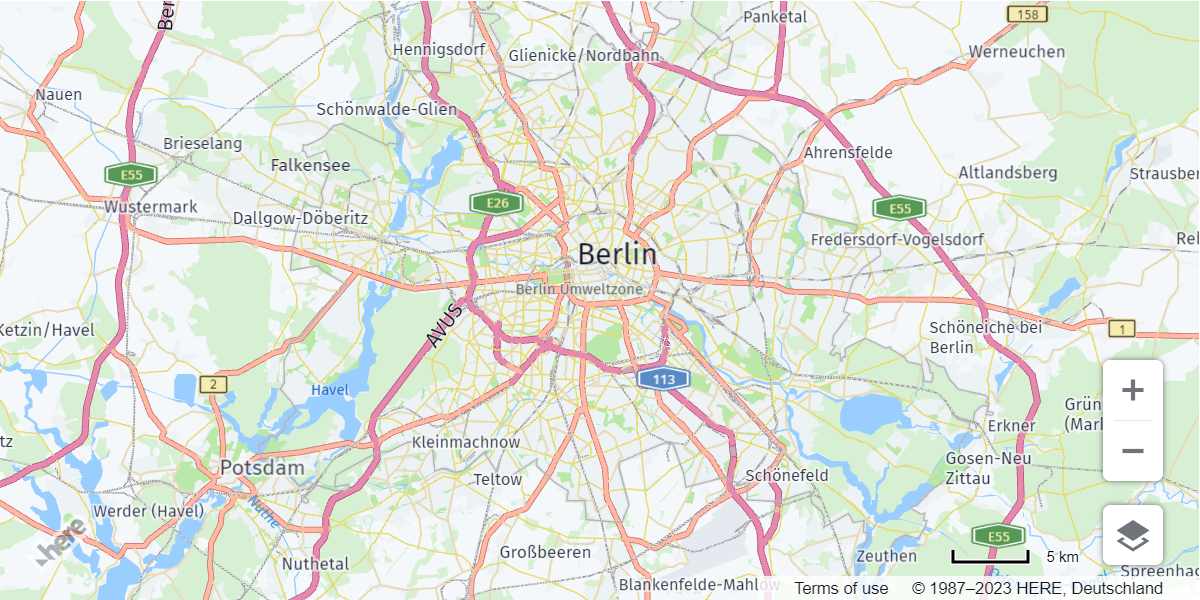
In the preceding example, the defaultLayers.vector.normal.map is used as the base map layer. You can substitute that layer with other default layers like defaultLayers.vector.normal.traffic for a map with traffic information or defaultLayers.vector.normal.truck for a map displaying truck restriction information.
The following figure demonstrates a vector map generated by using the default.Layers.vector.normal.map layer:
Customize vector map styles
While the default layers are excellent for quickly deploying functional maps, the style customization is better when the goal is to create maps that are visually unique, aligned with your brand, and tailored to specialized use cases.
The Maps API for JavaScript enables you to create maps with high customization and interactivity by providing you with complete control over the visual aspects of your maps so that you can tailor their appearance to your specific needs.
In the Maps API for JavaScript, each map style is a set of rules and definitions that dictate how a map is visually presented and interacted with in your application. The use of YAML-based syntax to define these style rules, strikes a balance between human readability and machine interpretability, providing a clear and accessible way to define map styles.
For an overview of the YAML syntax that the Maps API for JavaScript uses for controlling the style of vector maps, see Scene structure overview.
Note
HERE is moving towards the new HARP rendering engine within the Maps API for JavaScript. The engine is connected to a UI-based, easy-to-use style editor, enabling consistent experience between web and native SDKs.
Next steps:
To learn more about customizing the visual appearance of vector map features to create unique and engaging mapping experiences, see Practical examples for styling your map.
Updated last month