
Adjust the current route after a deviation
In this tutorial you will learn how to use rerouting[mode]=returnToRoute and routeHandle to adjust a route after the driver deviates from it.
The original route
The route that serves as the starting point for this tutorial is a simple car route. Note that it contains a via waypoint, which we'll come back to later. The following request computes that route and returns the corresponding routeHandle in the process:
curl -gX GET 'https://router.hereapi.com/v8/routes?'\
'origin=52.533670,13.404711&'\
'destination=52.60126,13.690847&'\
'via=52.53896,13.398679&'\
'return=polyline,routeHandle&'\
'transportMode=car&'\
'apiKey=YOUR_API_KEY'
The route follows this path:
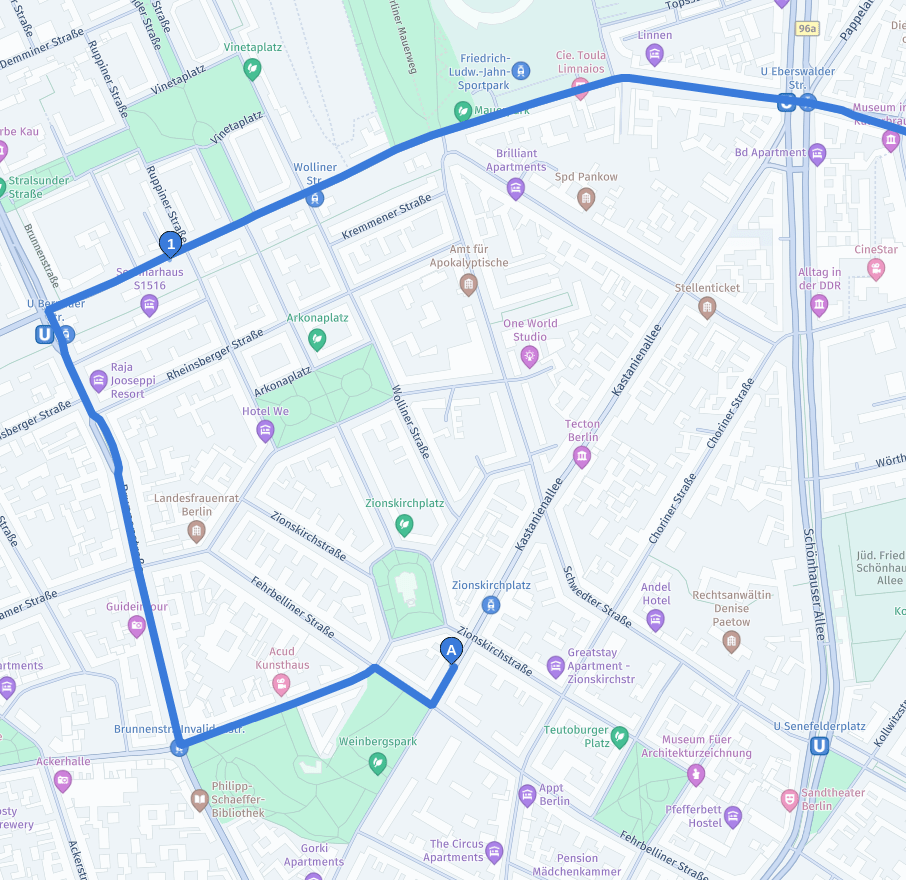
You are going to use the routeHandle to adjust the route, so make sure to extract it:
{
  "routes": [
    {
      ...,
      "routeHandle": "{ROUTE_HANDLE}"
    }
  ]
}
Route deviation due to an incorrect turn
In this example, the driver deviates from the route by turning left where the route is expecting a right turn.
You need to inform the service of the driver's new location by specifying origin, additionally using course=100 and minCourseDistance = 50 to ensure it doesn't suggest turning too early. Note that if you do this without also adjusting rerouting[mode] the service will respond with an error:
curl -gX GET 'https://router.hereapi.com/v8/routes/{ROUTE_HANDLE}?'\
'origin=52.532772,13.405133;course=100;minCourseDistance=50&'\
'return=polyline&'\
'transportMode=car&'\
'apiKey=YOUR_API_KEY'
The following is the error message from the service.
{
  "notices": [
    {
      "title": "Route calculation failed: Couldn't match origin.",
      "code": "couldNotMatchOrigin",
      "severity": "critical"
    }
  ],
  "routes": []
}
You must specify rerouting[mode]=returnToRoute since the new origin isn't located on the previously calculated route.
curl -gX GET 'https://router.hereapi.com/v8/routes/{ROUTE_HANDLE}?'\
'origin=52.532772,13.405133;course=100;minCourseDistance=50&'\
'return=polyline&'\
'rerouting[mode]=returnToRoute&'\
'transportMode=car&'\
'apiKey=YOUR_API_KEY'
The adjusted route, shown in purple below, will instruct the driver to turn back and rejoin the original route:
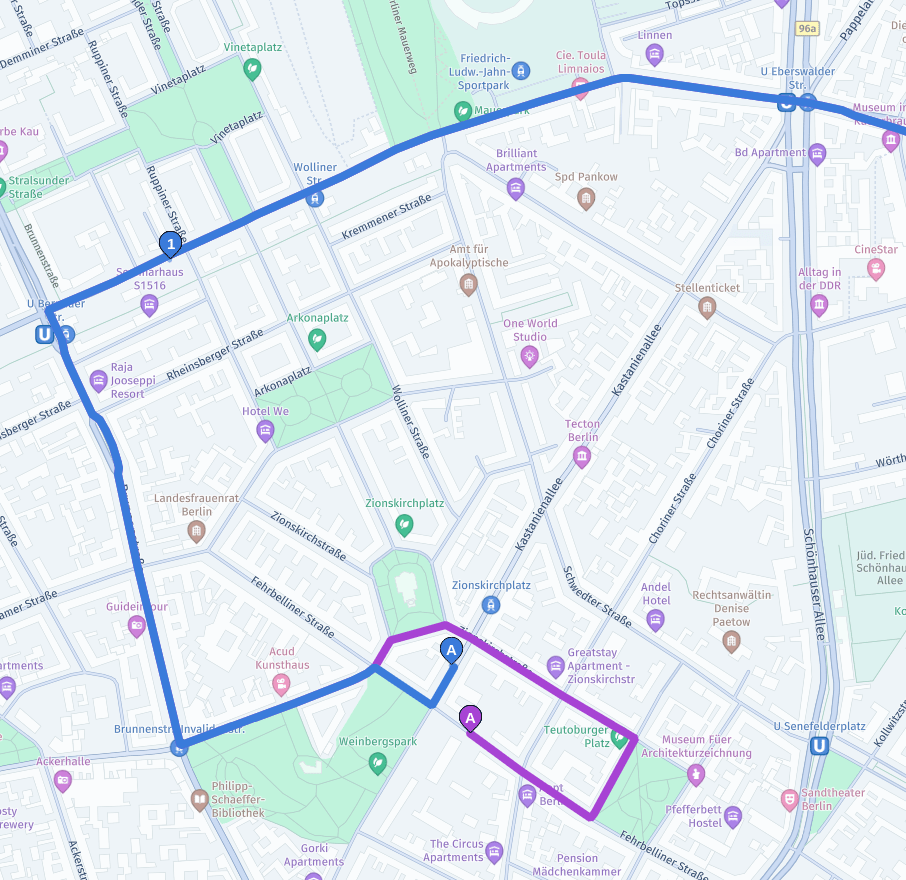
The response contains an info notice, confirming that the service did in fact adjust the route to the new origin, as shown in the following response snippet:
{
  "notices": [
    {
      "title": "Current route position was not on the original route. New route was calculated from the current position to the destination. Old route may have been reused.",
      "code": "returnToRoute",
      "severity": "info"
    }
  ],
  ...
}If the driver already visited the via waypoint before taking an unexpected turn, an adjusted route shouldn't visit the waypoint location when adjusting the route.
For the best user experience, you should keep track of which via waypoints the user already visited. There are various ways to achieve this, depending on your user experience flow:
- You could automatically mark waypoints as "visited" once a user gets close enough.
- You could additionally require that the user stops for some time in the vicinity.
- You could require that the user performs some explicit interactions in the user interface to mark a waypoint as "visited".
Independently of how you choose to track the user's progress along the route, you should inform the service of the route's section the user was traversing before the deviation using rerouting[lastTraveledSectionIndex].
In this example, you would use the rerouting[lastTraveledSectionIndex]=1 parameter. This tells the routing service that it doesn't need to visit the via waypoint when adjusting the route:
curl -gX GET 'https://router.hereapi.com/v8/routes/{ROUTE_HANDLE}?'\
'origin=52.532772,13.405133;course=100;minCourseDistance=50&'\
'return=polyline&'\
'rerouting[mode]=returnToRoute&'\
'rerouting[lastTraveledSectionIndex]=1&'\
'transportMode=car&'\
'apiKey=YOUR_API_KEY'
The adjusted route doesn't tell the user to turn back anymore, but rather to continue toward the route's destination:
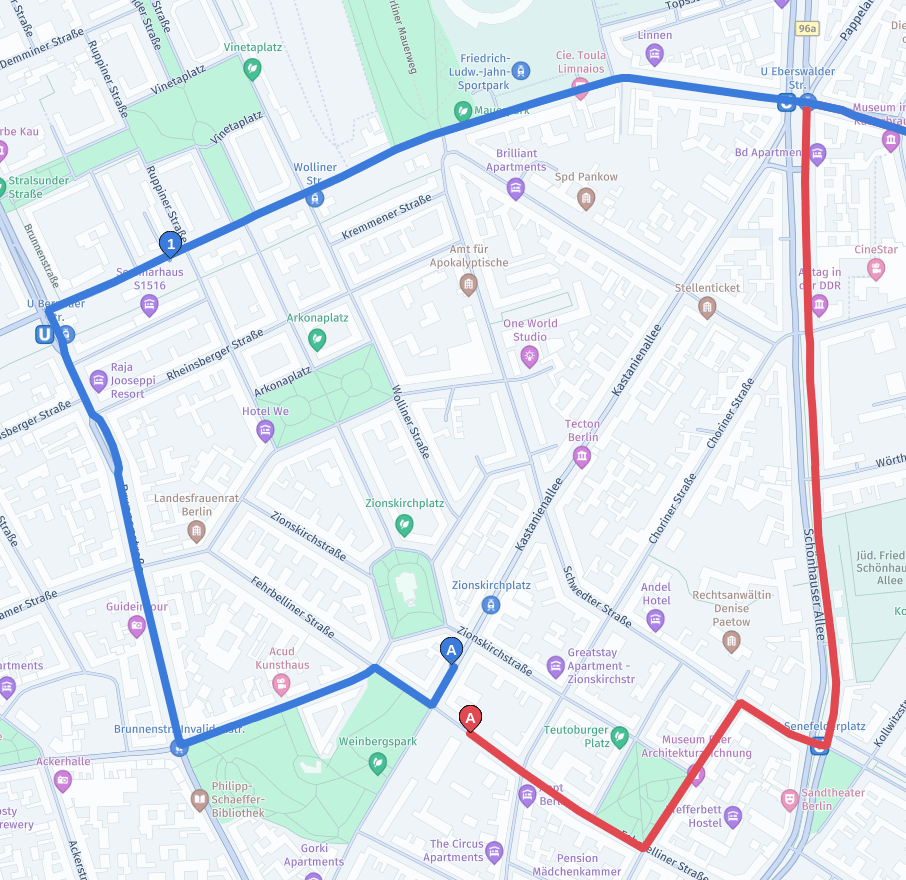
Control where the service will connect back to the original route
If the driver already travelled some distance along the section, or if you want to prevent the service from trying to return the driver to the route early on, you can use rerouting[traveledDistanceOnLastSection] to inform the routing service about the route segment to be considered as the starting point for recalculation.
Consider the following use cases:
- If you keep track of the distance travelled on the section and pass it to the service it will prevent the service from trying harder to connect back to the part of the route the user already traversed.
- If you aren't satisfied with how quickly the service reconnects back to the previous route you can artificially increase
rerouting[traveledDistanceOnLastSection], so that the service will consider only specific parts of the route, as in the following example:
Example: Relaxing traveledDistanceOnLastSection as driver keeps deviating from the route
traveledDistanceOnLastSection as driver keeps deviating from the routeIn this example, we present a solution to a common scenario: the driver doesn't like the suggested route, and continues driving along their preferred route, despite repeated route updates guiding the driver to return to the suggested route.
You can implement business logic to detect this scenario and provide the driver with a route that better matches their preference. In this example we use the following algorithm:
- On the first deviation, set the
rerouting[traveledDistanceOnLastSection]parameter based on the driver's last position on the route. - As the driver repeatedly deviates from the adjusted route, keep increasing
rerouting[traveledDistanceOnLastSection]andminCourseDistanceto prefer following the current street rather than reconnecting to the old route.
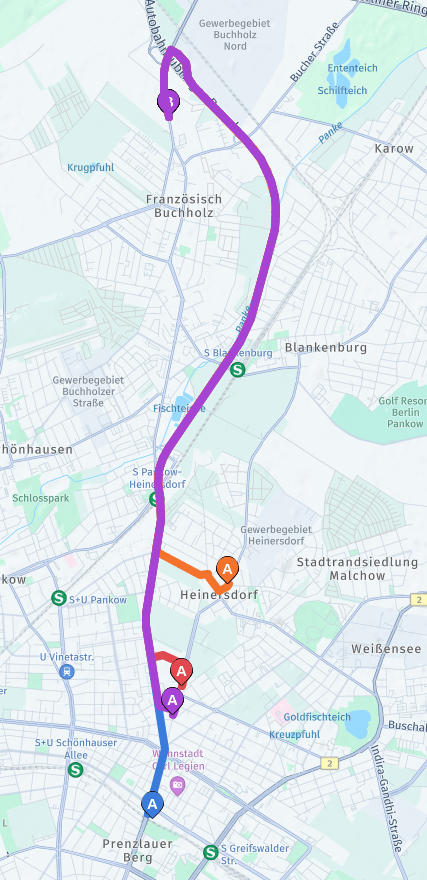
The following diagrams compare using returnToRoute with and without this extra logic:
| No extra logic | Relaxing traveledDistanceOnLastSection |
|---|---|
 | 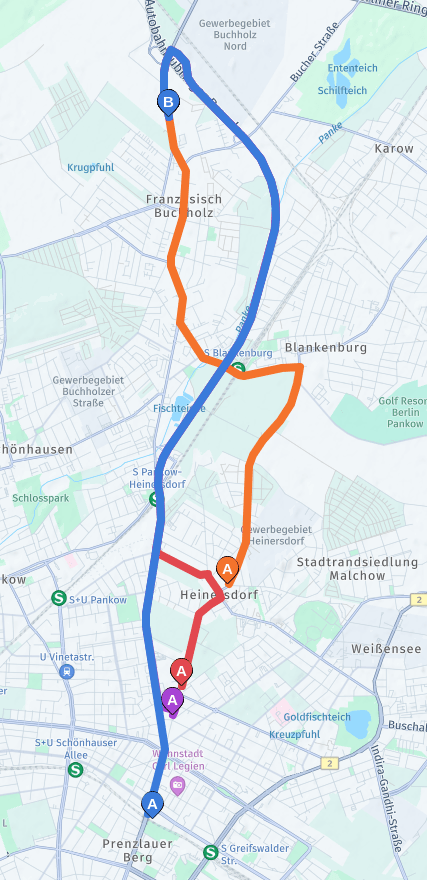 |
The original route was computed by using the following request:
curl -gX GET 'https://router.hereapi.com/v8/routes?'\
'origin=52.54421,13.42845&'\
'destination=52.617429,13.431091&'\
'return=polyline,routeHandle&'\
'transportMode=car&'\
'apiKey=YOUR_API_KEY'
The following requests were used to compute the 3 deviations in the diagram on the right:
- Purple: First deviation,
origin=52.555016,13.431892;course=10;minCourseDistance=50andrerouting[traveledDistanceOnLastSection]=0. - Red: Second deviation,
origin=52.558096,13.433329;course=10;minCourseDistance=500andrerouting[traveledDistanceOnLastSection]=2000. - Orange: Third deviation,
origin=52.568772,13.441322;course=60;minCourseDistance=2000andrerouting[traveledDistanceOnLastSection]=10000. Note that in this example this is identical to computing a completely new route.
Updated last month