
How to add via waypoints to a route
Additional intermediate waypoints can be inserted into the route by specifying one or more via waypoint parameters. The route will then visit those locations in the order they were specified in.
For example, the following request specifies an intermediate location via=52.52426,13.43000, to be visited before driving towards the destination.
curl -gX GET 'https://router.hereapi.com/v8/routes?'\
'transportMode=car&'\
'return=polyline,summary&'\
'origin=52.51375,13.42462&'\
'destination=52.52332,13.42800&'\
'via=52.52426,13.43000&'\
'apiKey=YOUR_API_KEY'
The resulting route visits this via ("1" in the image), turns around, and heads towards the destination:
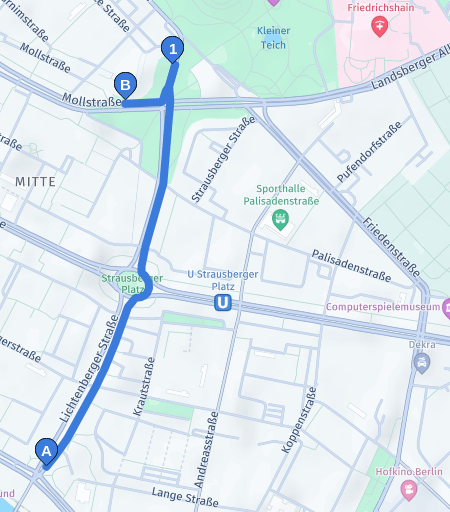
The response contains 2 sections: origin to via, and via to destination.
"sections": [
  {
    "departure": {
      ...
    },
    "arrival": {
      "time": "2024-09-05T09:47:46+02:00",
      "place": {
        "type": "place",
        "location": {
          "lat": 52.5242323,
          "lng": 13.4301462
        },
        "originalLocation": {
          "lat": 52.52426,
          "lng": 13.43
        },
        "waypoint": 0
      }
    },
    ...
  },
  {
    "departure": {
      "time": "2024-09-05T09:47:46+02:00",
      "place": {
        "type": "place",
        "location": {
          "lat": 52.5242323,
          "lng": 13.4301462
        },
        "originalLocation": {
          "lat": 52.52426,
          "lng": 13.43
        },
        "waypoint": 0
      }
    },
    "arrival": {
      ...
    },
    ...
  }
]
Note that the arrival of the first section, and the departure of the second section have a property called waypoint. This property informs you of the fact that this is the intermediate waypoint with the index 0.
The following request adds another via parameter (via=52.517871,13.434175), before the one from the previous example:
curl -gX GET 'https://router.hereapi.com/v8/routes?'\
'origin=52.51375,13.42462&'\
'transportMode=car&'\
'destination=52.52332,13.42800&'\
'via=52.517871,13.434175&'\
'via=52.52426,13.43000&'\
'return=polyline,summary&'\
'apiKey=YOUR_API_KEY'
The resulting route visits both intermediate waypoints in the same order that they appear in the request:
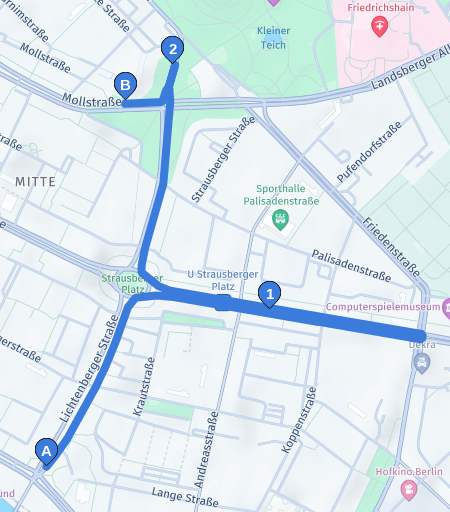
The result contains 3 sections, and the waypoint indices are populated accordingly.
"sections": [
  {
    "departure": {
      ...
    },
    "arrival": {
      "place": {
        ...,
        "waypoint": 0
      }
    },
    ...
  },
  {
    "departure": {
      "place": {
        ...,
        "waypoint": 0
      }
    },
    "arrival": {
      "place": {
        ...,
        "waypoint": 1
      }
    },
    ...
  },
  {
    "departure": {
      "place": {
        ...,
        "waypoint": 1
      }
    },
    "arrival": {
      ...
    },
    ...
  }
]
Additional tutorials
For adding waypoints that don't split the route into sections check the following tutorial:
Updated last month