
Update the current route
In this tutorial you will learn how to update a route's information periodically while the user is traversing it. This includes up-to-date traffic information, as well as a reevaluation of any time-dependent data.
This tutorial builds on the How to use route handles tutorial.
Original route
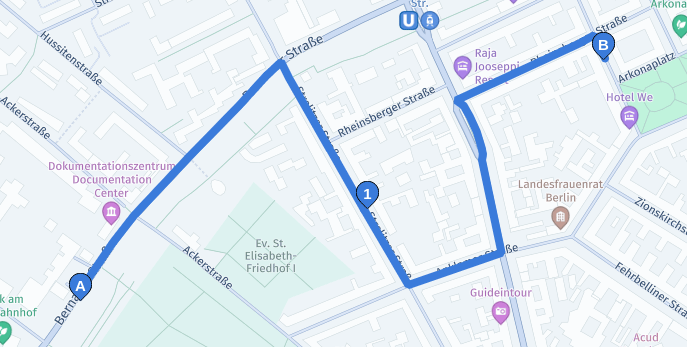
This example computes an initial route with one via waypoint, and requests a routeHandle in the response:
curl -gX GET 'https://router.hereapi.com/v8/routes?'\
'origin=52.534328,13.388957&'\
'destination=52.537471,13.400169&'\
'via=52.535527,13.395096&'\
'return=summary,polyline,routeHandle&'\
'transportMode=car&'\
'apiKey=YOUR_API_KEY'
This is how the route looks:
Update the route
As the user continues along the route it will become necessary to get new information along the route.
This request updates the route to start at the new position origin=52.536236,13.391172;radius=20
curl -gX GET 'https://router.hereapi.com/v8/routes/{ROUTE_HANDLE}?'\
'origin=52.536236,13.391172;radius=20&'\
'return=polyline,summary,routeHandle&'\
'transportMode=car&'\
'apiKey=YOUR_API_KEY'
The router matches the new origin to the nearest location on the previously calculated route, and cuts off route before the updated position. All information on the truncated route is updated accordingly:
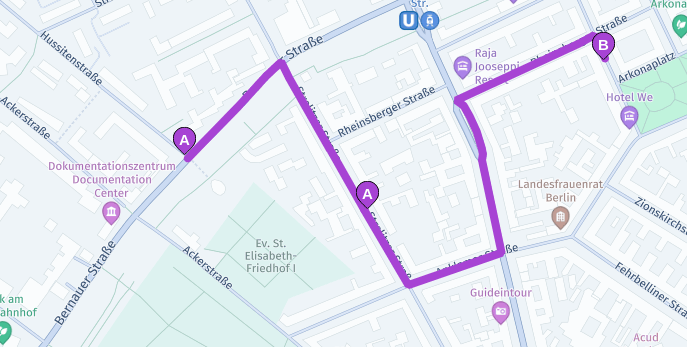
The response also contains a new routeHandle for this (shorter) route which can be used in subsequent requests.
A radius of 20 m is used as an example of how to handle a position based on inaccurate GPS data. Without the expanded radius, the service may not be able to match the position to the route, in which case it returns this critical notice:
{
  "notices": [
    {
      "title": "Route calculation failed: Couldn't match origin.",
      "code": "couldNotMatchOrigin",
      "severity": "critical"
    }
  ],
  "routes": []
}
See this tutorial if you want to handle situations in which the user deviated from the route.
Passing a via waypoint
The user's position will eventually pass the via waypoint on the route:
curl -gX GET 'https://router.hereapi.com/v8/routes/{ROUTE_HANDLE}?'\
'origin=52.535145,13.395526;radius=20&'\
'return=polyline,summary,routeHandle&'\
'transportMode=car&'\
'apiKey=YOUR_API_KEY'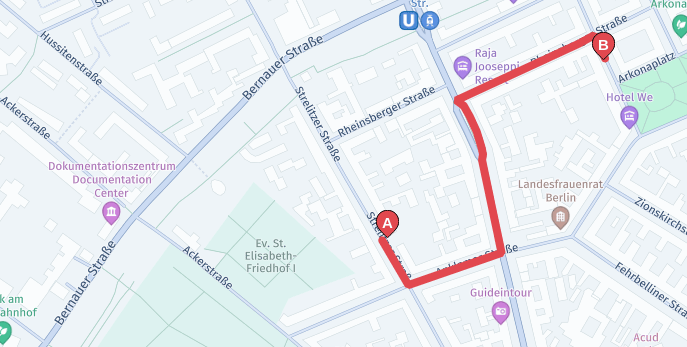
The resulting route will only contain a single section now.
Updated last month