
How to set waypoints based on search results
In this tutorial you will learn how to populate origin, destination, or via waypoints based on search results.
The user workflow this supports is typically a variation of:
- The user has the map open, for example around
52.51218,13.28539 - They search for a term, for example
Storkwinkel 17, - They select the search result and compute a route to it.
In this scenario it's important that you extract the necessary information from the search response and pass it on to the routing API.
In this tutorial you will use Geocoding and Search API v7 to search for and query points of interest (POIs). If you are using a different search provider, it should be possible to extract similar information.
Autosuggest / search based on user input
Use the Autosuggest service to search for POIs using text as it's typed by a user.
The following request searches for a single result, using the text Storkwinkel 17:
curl -gX GET 'https://autosuggest.search.hereapi.com/v1/autosuggest?'\
'at=52.51218%2C13.28539&'\
'lang=en-US&'\
'limit=1&'\
'q=Storkwinkel%2017&'\
'apiKey=YOUR_API_KEY'
The response contains information about the most likely item:
{
  "items": [
    {
      "title": "Storkwinkel 17, 10711 Berlin, Germany",
      "id": "here:af:streetsection:T4212cY0RD0PkIFjpNF70B:CgcIBCCR0s5QEAEaAjE3",
      ...
    }
  ]
}
Once the user selects this search result, use the Lookup service to query additional information:
curl -gX GET 'https://lookup.search.hereapi.com/v1/lookup?'\
'id=here%3Aaf%3Astreetsection%3AT4212cY0RD0PkIFjpNF70B%3ACgcIBCCR0s5QEAEaAjE3&'\
'showMapReferences=segments&'\
'apiKey=YOUR_API_KEY'
The response contains additional information for the search results that you will use in the rest of the tutorial:
{
  "title": "Storkwinkel 17, 10711 Berlin, Germany",
  "id": "here:af:streetsection:T4212cY0RD0PkIFjpNF70B:CgcIBCCR0s5QEAEaAjE3",
  "language": "de",
  "resultType": "houseNumber",
  "houseNumberType": "PA",
  "address": {
    "label": "Storkwinkel 17, 10711 Berlin, Germany",
    "countryCode": "DEU",
    "countryName": "Germany",
    "stateCode": "BE",
    "state": "Berlin",
    "countyCode": "B",
    "county": "Berlin",
    "city": "Berlin",
    "district": "Halensee",
    "street": "Storkwinkel",
    "postalCode": "10711",
    "houseNumber": "17"
  },
  "position": {
    "lat": 52.49443,
    "lng": 13.28874
  },
  "access": [
    {
      "lat": 52.49483,
      "lng": 13.28881
    }
  ],
  ...,
  "mapReferences": {
    "segments": [
      {
        "ref": "here:cm:segment:484382389#0.267944",
        "side": "left"
      }
    ]
  }
}
Extract basic information
When constructing a routing waypoint to route to a POI, the most important pieces of information are:
- The
positioncoordinates. These coordinates indicate the location of the POI itself, and are typically used as the location for rendering an icon representing the POI. - The first element of the
access[]coordinates array. Theaccesscoordinates indicate one or more locations which can be used to access the POI from the street network, and are usually different from theposition.
It's important to use the access coordinates (if available), not the position coordinates, for the waypoint's Place.
Using the position coordinates may result in the router sending you to an inconvenient location, such as a main road or highway, when in fact you should be routed to a parking area or a convenient street.
Note that not every POI has access coordinates. When no access coordinates are provided, use the position coordinates instead.
Our example search result has both position and access coordinates.
In the following image these two coordinates are visualized with B (access coordinates) and ↓ (position coordinates). Note that these position coordinates would match to a nearby highway, while the access coordinates are located on the correct street.
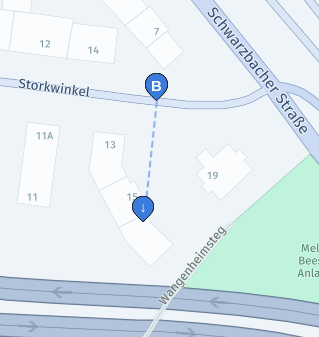
Use the coordinates in access[0] as the main Place of the destination parameter, and the position as the value of the sideOfStreetHint place option:
destination=52.49483,13.28881;sideOfStreetHint=52.49443,13.28874
Using the position coordinates as a sideOfStreetHint allows the Routing API to route to the appropriate side of street in certain cases.
For an explanation of this attribute, see the tutorial on how to select/enforce a side-of-street.
Also, note that some search providers respond with an explicit sideOfStreet location, in which case that should be used instead of position for sideOfStreetHint.
Provide additional matching hints
Sometimes the access coordinates can't be matched unambiguously. They may be located at an intersection, or at a location where multiple roads are crossing each other at different elevations.
To improve matching accuracy, you should provide additional information to the Routing API (if available in search results).
Use SegmentId option hints
SegmentId option hintsIf the search results provide a reference to the correct segment, you can pass this to the Routing API using the segmentIdHint place option. In this example the segment reference can be found in mapReferences.segments[0].ref: here:cm:segment:484382389#0.267944. The part before the # character is the SegmentId, resulting in destination parameter like this:
destination=52.49483,13.28881;sideOfStreetHint=52.49443,13.28874;segmentIdHint=here:cm:segment:484382389
Use street name hints
If a SegmentId isn't available, you can instead provide a nameHint. This will force the Routing API to match to the street with the most similar name. In this example the street name can be found in address.street, resulting in a destination parameter like this:
destination=52.49483,13.28881;sideOfStreetHint=52.49443,13.28874;nameHint=Storkwinkel
Updated 9 days ago