
Calculate a route with user-introduced charging stops
You can create routes reachable for electric vehicles (EVs) by calling the /routes endpoint and adding the ev[makeReachable]=true parameter. Routes created with this parameter come with automatically added charging stops.
You can change the number, location, or duration of the charging stops to create a route that's tailored to specific requirements, such as stopping at certain locations or using infrastructure that's not publicly available.
Note
You can also introduce charging stops to routes created with
ev[makeReachable]set tofalse.
Alter EV-reachable routes
The following cases show how to alter EV-reachable routes with automatically added charge stops obtained by calling the API with ev[makeReachable] set to true.
Charge at a different station
This API call gets an EV-reachable route from Berlin to Dresden for a mid-sized EV with an initial charge of around 50%:
curl -gX GET 'https://router.hereapi.com/v8/routes?'\
'origin=52.53072,13.38491&'\
'destination=51.056188,13.723614&'\
'return=polyline,summary,actions,instructions&'\
'transportMode=car&'\
'consumptionModel=physical&'\
'ev[auxiliaryPowerConsumption]=2000&'\
'ev[recuperationEfficiency]=0.8&'\
'ev[driveEfficiency]=0.9&'\
'vehicle[currentWeight]=2500&'\
'vehicle[frontalArea]=2.36&'\
'vehicle[rollingResistanceCoefficient]=0.0066&'\
'vehicle[airDragCoefficient]=0.23&'\
'ev[initialCharge]=39&'\
'ev[maxCharge]=77&'\
'ev[maxChargeAfterChargingStation]=77&'\
'ev[minChargeAtChargingStation]=7&'\
'ev[minChargeAtDestination]=7&'\
'ev[chargingCurve]=0,96,8,193,16,200,32,190,48,96,64,48,80,5&'\
'ev[chargingSetupDuration]=300&'\
'ev[connectorTypes]=Tesla,iec62196Type2Combo,Chademo,iec62196Type1Combo,gbtDc&'\
'ev[makeReachable]=true&'\
'apiKey=YOUR_API_KEY'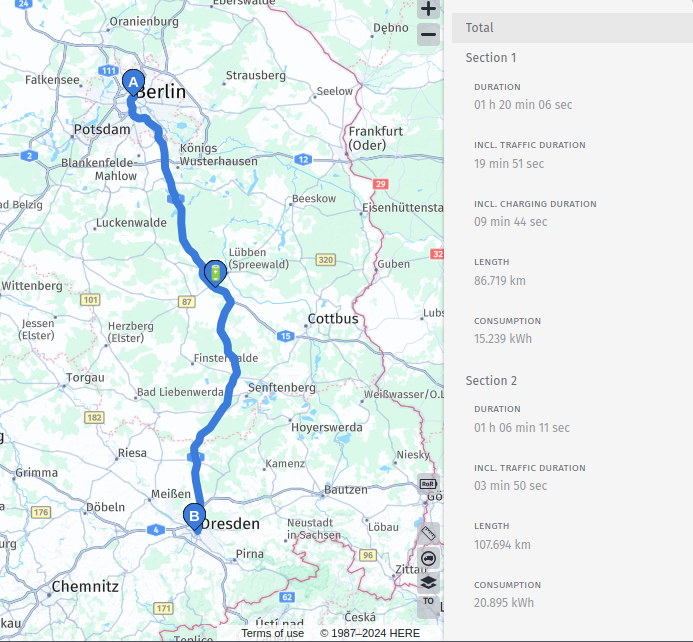
The API returns a route that requires 10 minutes of charging in a single stop to reach the destination. If the value of the arrival.charge property at the section with the auto-added charging stop is higher than the value set through the ev[minChargeAtChargingStation] parameter, you can potentially travel further along the route without charging. Using this information, you can change the route to facilitate stopping at a specific restaurant that has a charging station in its vicinity.
Information about publicly available charging stations can be fetched from the /browse endpoint of HERE Geocoding and Search. To learn more, see the HERE Geocoding and Search Developer Guide.
A response from HERE Geocoding and Search contains a list of connectors for the charging stations in the vicinity of the selected location as shown in the following example:
"evStation": {
  "connectors": [
    {
      "supplierName": "EWE Go",
      "connectorType": {
        "name": "IEC 62196-3 type 2 combo (Mennekes)",
        "id": "34"
      },
      "fixedCable": true,
      "maxPowerLevel": 300.0,
      "chargingPoint": {
        "numberOfConnectors": 2,
        "voltsRange": "750-750V DC",
        "ampsRange": "400A",
        "numberOfAvailable": 1,
        "numberOfInUse": 1,
        "lastUpdateTimestamp": "2024-12-17T13:02:11.000Z"
      }
    }
  ],
  "totalNumberOfConnectors": 2,
  "access": "public"
}
From such a response, you can get the details of the connector compatible with the vehicle and add them to the routing request as a charging waypoint using the via parameter.
via=51.849692,13.907567!charging=(power=300;current=400;voltage=750;minDuration=1200;maxDuration=2700;supplyType=dc)This configuration assumes that the stop lasts for at least 20 minutes, and not more than 45 minutes. This includes 300 seconds (five minutes) dedicated to setup (such as connecting to the charger, activating it, authenticating).
The route created with such configuration includes only the user-introduced charging stop, with a fifteen-minute charging time and a five-minute setup. This is sufficient to arrive at the destination with some energy left in the vehicle's battery.
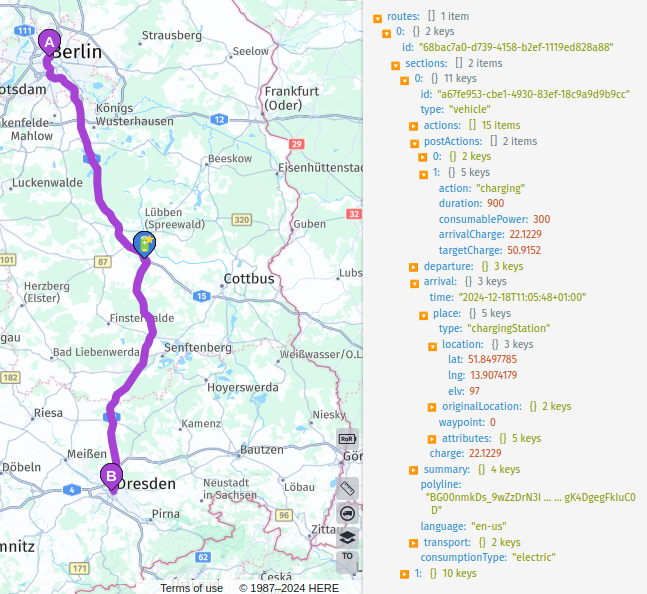
Using ev[makeReachable]=true and setting the minDuration to a very low value can result in the API suggesting to charge on the user-introduced stop only for a short time. Instead, the API can suggest charging at a station with a higher power output if one is available in the vicinity.
Change charging time for the auto-added stops
To change the charging time on an automatically added stop, add the location to the request using the via parameter and set the preferred charging time using the minDuration and maxDuration parameters.
To fetch the details of the connectors available at the auto-added charging station, query the /lookup endpoint of the HERE Geocoding and Search API using the place ID of the station. The place ID of the auto-added charging station is returned in the route response in the arrival.place.id property of the relevant section.
To learn more about getting information using place IDs, see Lookup.
Such station is treated as a via waypoint in the route and considered to be a user-introduced charging stop.
Add charging stops to make route EV-reachable
You can make a route created with ev[makeReachable] set to false EV-reachable by manually adding charging stops.
This API call gets a route from Berlin to Schwalbach for a mid-sized EV:
curl -gX GET 'https://router.hereapi.com/v8/routes?'\
'origin=52.53072,13.38491&'\
'destination=50.16193,8.53361&'\
'return=polyline,summary,actions,instructions&'\
'spans=notices&'\
'transportMode=car&'\
'consumptionModel=physical&'\
'ev[auxiliaryPowerConsumption]=2000&'\
'ev[recuperationEfficiency]=0.8&'\
'ev[driveEfficiency]=0.9&'\
'vehicle[currentWeight]=2500&'\
'vehicle[frontalArea]=2.36&'\
'vehicle[rollingResistanceCoefficient]=0.0066&'\
'vehicle[airDragCoefficient]=0.23&'\
'ev[initialCharge]=39&'\
'ev[maxCharge]=77&'\
'ev[maxChargeAfterChargingStation]=77&'\
'ev[minChargeAtChargingStation]=7&'\
'ev[minChargeAtDestination]=7&'\
'ev[chargingCurve]=0,96,8,193,16,200,32,190,48,96,64,48,80,5&'\
'ev[chargingSetupDuration]=300&'\
'ev[makeReachable]=false&'\
'ev[connectorTypes]=Tesla,iec62196Type2Combo,Chademo,iec62196Type1Combo,gbtDc&'\
'apiKey=YOUR_API_KEY'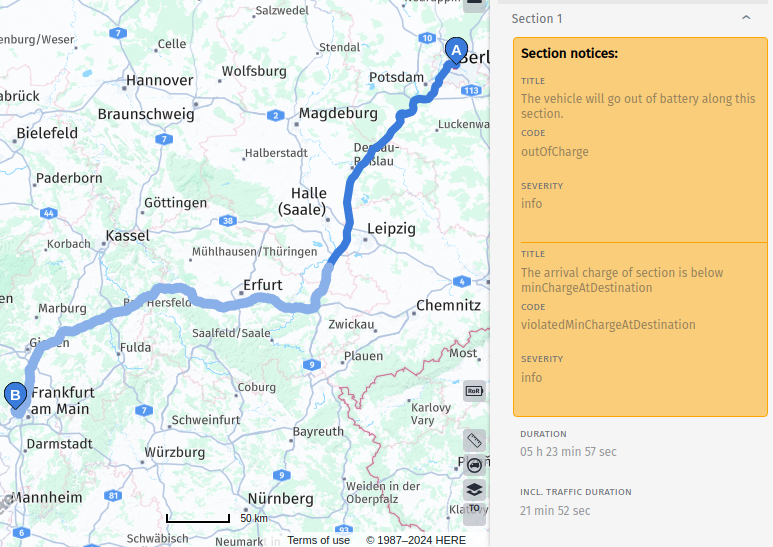
This route isn't reachable when starting with an initial charge of around 50%. Add the spans=notices parameter to the request to get a notice at the exact location on the route where the EV runs of out battery. The index of the notices are associated with a corresponding offset, which indexes the points in the decoded polyline as shown in the following excerpt from the API response:
{
  "routes": [
    {
      "...": {},
      "polyline": "...",
      "sections": [
        {
          "spans": [
            {
              "offset": 0
            },
            {
              "offset": 3124,
              "notices": [
                0
              ]
            }
          ],
          "notices": [
            {
              "title": "The vehicle will go out of battery along this section.",
              "code": "outOfCharge",
              "severity": "info"
            },
            {
              "title": "The arrival charge of section is below minChargeAtDestination",
              "code": "violatedMinChargeAtDestination",
              "severity": "info"
            }
          ],
          "...": {}
        }
      ]
    }
  ]
}
You can pick a location on the route before the EV runs out of charge and search for a charging station in its vicinity using the /browse endpoint of the HERE Geocoding and Search API.
The following is an excerpt of the response for the location 51.55536215,12.19285736:
"evStation": {
  "connectors": [
    {
      "supplierName": "Aral Pulse",
      "connectorType": {
        "name": "JEVS G 105 (CHAdeMO)",
        "id": "29"
      },
      "fixedCable": true,
      "maxPowerLevel": 100.0,
      "chargingPoint": {
        "numberOfConnectors": 3,
        "voltsRange": "500-500V DC",
        "ampsRange": "200A",
        "numberOfAvailable": 3,
        "lastUpdateTimestamp": "2024-12-17T14:54:14.000Z"
      }
    },
    {
      "supplierName": "Aral Pulse",
      "connectorType": {
        "name": "IEC 62196-3 type 2 combo (Mennekes)",
        "id": "34"
      },
      "fixedCable": true,
      "maxPowerLevel": 300.0,
      "chargingPoint": {
        "numberOfConnectors": 6,
        "voltsRange": "1000-1000V DC",
        "ampsRange": "300A",
        "numberOfAvailable": 6,
        "lastUpdateTimestamp": "2024-12-17T14:54:14.000Z"
      }
    }
  ],
  "totalNumberOfConnectors": 9,
  "access": "public"
}
You can use the details of the Mennekes connector available at the station to add the charging station:
via=51.555355,12.192857!charging=(power=300;current=300;voltage=1000;supplyType=dc;minDuration=1200;maxDuration=1800)&The route returned by the API with this via waypoint allows for the EV to reach further, but the destination is still not reachable.
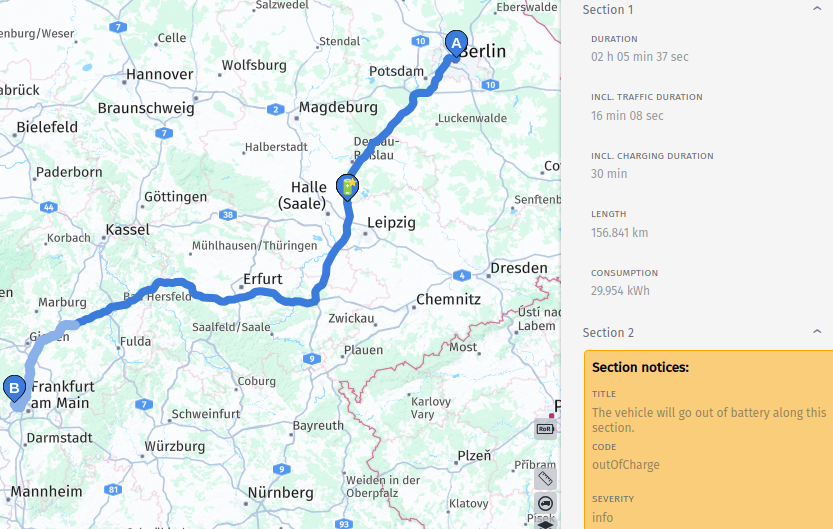
This is because the waypoint option maxDuration=1800 limits the EV to stay on the charging station up to 30 minutes. Setting maxDuration=3000 in this case makes the route reach the destination without another charging stop, but it will violate minChargeAtDestination instead.
Another parameter that may limit the amount of charge is ev[maxChargeAfterChargingStation], which may not be enough for the remaining part of the route.
To ensure that the vehicle reaches the destination, you can add more charging stops using additional via waypoints close to where the EV would run out of charge.
Combine auto-added and user-introduced charging stops
Using one or more user-introduced charging stops doesn't mean that all charging stops on the route must be added by the user. You can combine user-introduced stops with the ones added automatically.
To do so, use ev[makeReachable]=true after adding user-introduced stops. This automatically adds more charging stops to ensure the EV can reach the selected destination.
If any of the user-introduced stops aren't reachable for the EV, using ev[makeReachable]=true causes the API to automatically add charging stops between the existing one to ensure that the entire route is reachable for the vehicle.
Updated 9 days ago