
How to use high occupancy lanes
The allow[hov] parameter specifies whether high-occupancy vehicle (HOV) lanes can be used in the calculation.
An HOV lane or carpool lane is reserved for carpool usage.
Carpool lanes require a minimum number of passengers in order for the car to use them.
The parameter value type is boolean, by default false.
Notes
- This parameter can't be used with
vehicle[hovOccupancy].- This parameter can be used with
vehicle[occupancy]. Ifvehicle[occupancy]is set, then only HOV lanes allowing this number of occupants will be allowed.- In case of violation,
violatedCarpoolnotice will be returned.
The allow[hot] parameter specifies whether high-occupancy toll (HOT) lanes can be used in the calculation.
HOT lanes are HOV lanes where vehicles that do not qualify as high-occupancy are allowed to pass by paying a toll.
The parameter value type is boolean, by default false.
Notes
- This parameter can't be used with
vehicle[hovOccupancy].- This parameter can be used with
allow[hov]andvehicle[occupancy].- In case of violation,
violatedCarpoolnotice will be returned.- No toll information is returned for HOT lanes since it is dynamic information.
In case of violation, the response specifies a notice with the code violatedCarpool:
"notices": [
  {
    "title": "Violated carpool.",
    "code": "violatedCarpool",
    "severity": "critical"
  }
]
To learn more about notices, see this topic.
The following command can be used to request a route allowing HOV lanes.
curl -gX GET 'https://router.hereapi.com/v8/routes?'\
'origin=33.9136720,-118.0991479&'\
'destination=33.9138302,-118.1189846&'\
'transportMode=car&'\
'vehicle[occupancy]=2&'\
'allow[hov]=true&'\
'apiKey=YOUR_API_KEY'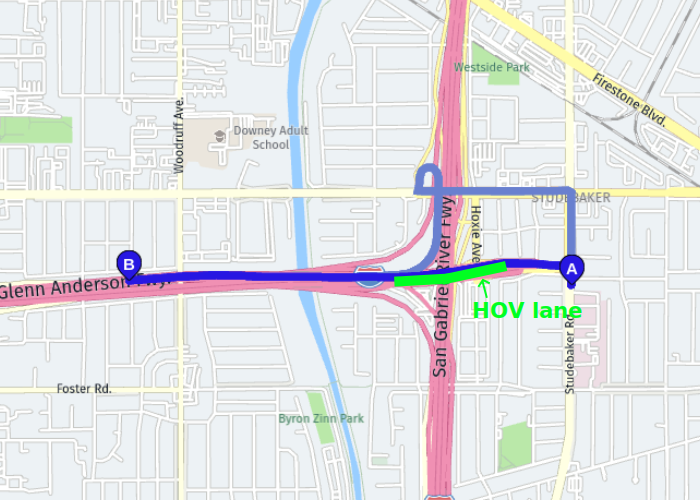
The dark blue line in the image shows the route that uses the HOV lane. The pale blue line shows the default route, for comparison.
The following command can be used to request a route allowing HOT lanes.
curl -gX GET 'https://router.hereapi.com/v8/routes?'\
'origin=35.376483,-80.847333&'\
'destination=35.4095822,-80.8559814&'\
'transportMode=car&'\
'allow[hot]=true&'\
'apiKey=YOUR_API_KEY'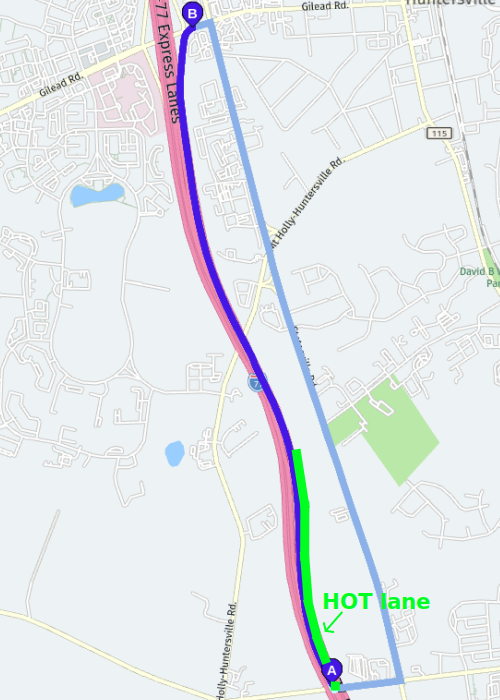
The dark blue line in the image shows the route that uses the HOT lane. The pale blue line shows the default route, for comparison.
Updated 28 days ago