
What is a span
A span is a portion of a route section that has a shared set of attributes with common values. When you request spans, the response contains the values of requested attributes along the calculated route. With such information, you can analyze the route information at a granular level, or use the data to create detailed visualizations of routes.
To get spans, the request must include the following parameters:
- The
return=polylineparameter, as the start and end points of spans are derived from polylines. - The
spans=ATTRIBUTE_LISTparameter, which defines the list of attributes with common values that constitute a span.
The starting point of a span is defined by the offset attribute, which is an index into the list of coordinates derived from the polyline of the route section.
One span ends where a subsequent span begins.
If a given span is the last one of a route section, it ends where the route section ends.
A new span is introduced when any of the requested attributes changes, with three notable exceptions: duration, length, and consumption.
These three attributes don't induce new spans and serve as metadata for other attributes.
Note
If you need more detailed data than that provided by the Routing API, you can request references to the HERE Map Content topology segments using
spans=segmentRef. These segment references can then be used to retrieve additional information from various services and data layers, for example:
Amount of spans in a section
The amount of spans in a section can vary depending on the number of attributes specified in the request for a route. Spans are more granular if the requested attributes change often, and less granular if they change rarely. The more attributes you request for, the more likely it is that one of them changes, which produces a new span.
Two extreme examples are countryCode and dynamicSpeedInfo.
The countryCode attribute produces new spans when the route section crosses country borders, which occurs rarely.
The dynamicSpeedInfo attribute produces new spans whenever the expected driving speed changes, which tends to occur frequently.
Example
To illustrate the influence the requested attributes have on the number of spans in the calculated route, consider the following example:
Single attribute
In this request, spans are added based on a single attribute - street names.
curl -gX GET 'https://router.hereapi.com/v8/routes?'\
'origin=52.544816,13.367221&'\
'destination=52.544862,13.365931&'\
'return=polyline&'\
'spans=names&'\
'transportMode=pedestrian&'\
'apiKey=YOUR_API_KEY'
The response contains two spans. One starts at offset 0, the other at offset 3:
"polyline": "BGozinkDq77vZApLwCnfA7aQjL",
"spans": [
  {
    "offset": 0,
    "names": [
      {
        "value": "Gerichtstraße",
        "language": "de"
      }
    ]
  },
  {
    "offset": 3,
    "names": [
      {
        "value": "Gerichtstraße",
        "language": "de"
      },
      {
        "value": "Max-Josef-Metzger-Platz",
        "language": "de"
      }
    ]
  }
]
The polyline decodes to:
Offset 0: (52.544820, 13.367221)
Offset 1: (52.544820, 13.367040)
Offset 2: (52.544860, 13.366540)
Offset 3: (52.544860, 13.366110)
Offset 4: (52.544868, 13.365932)
Two attributes
When you add another attribute to the request, the number of spans increases from two to three, while the polyline stays the same.
curl -gX GET 'https://router.hereapi.com/v8/routes?'\
'origin=52.544816,13.367221&'\
'destination=52.544862,13.365931&'\
'return=polyline&'\
'spans=names,carAttributes&'\
'transportMode=pedestrian&'\
'apiKey=YOUR_API_KEY'
The response now contains three spans instead of two:
"polyline": "BGozinkDq77vZApLwCnfA7aQjL",
"spans": [
  {
    "offset": 0,
    "carAttributes": [
      "open"
    ],
    "names": [
      {
        "value": "Gerichtstraße",
        "language": "de"
      }
    ]
  },
  {
    "offset": 1,
    "names": [
      {
        "value": "Gerichtstraße",
        "language": "de"
      }
    ]
  },
  {
    "offset": 3,
    "carAttributes": [
      "open",
      "noThrough"
    ],
    "names": [
      {
        "value": "Gerichtstraße",
        "language": "de"
      },
      {
        "value": "Max-Josef-Metzger-Platz",
        "language": "de"
      }
    ]
  }
]
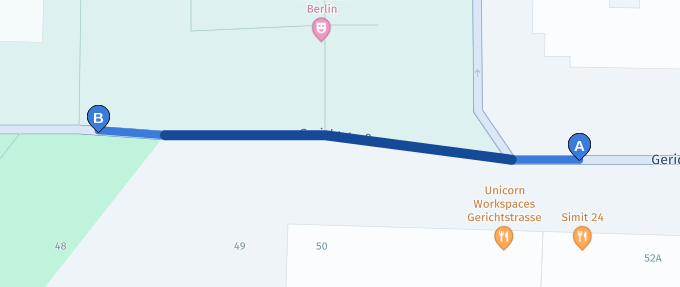
Note that the first span from the previous request is split in two as the carAttributes property changes in the middle of it (at offset 1). The dark blue part of the route (offset 1 to offset 3) is closed to cars:
Available span attributes
The span attributes in a section vary depending on the type of section: PedestrianSection, VehicleSection, or TransitSection.
To get the list of the available span attributes, consult the HERE Routing API v8 API reference. Follow these steps:
- Get the full API reference from the
/openapiendpoint:
curl -gX GET "https://router.hereapi.com/v8/openapi"- Look for the span schema definition for the desired section type:
PedestrianSpan,VehicleSpan, orTransitSpan. - All span attributes are listed with descriptions and links to their respective schemas.
Note
Alternatively, you can use the API reference hosted on the HERE documentation portal. To see it, go to HERE Routing API v8 API Reference.
Related content
Updated 9 days ago