
How to set waypoints based on UI interactions
In routing applications, the user may be clicking on a zoomed-out map view to select a waypoint. The expectation on such user interfaces is that only roads those are visible at that zoom level should be considered for matching. These examples demonstrate how to achieve that using the snapRadius waypoint option.
Route without snap radius
This request shows how when snapRadius isn't provided, the destination (waypoint B) is matched based on the input coordinates to the nearest local road, which isn't visible on this zoom level. This may lead to undesirable results.
curl -gX GET 'https://router.hereapi.com/v8/routes?'\
'origin=52.520112,13.187735&'\
'destination=52.607765,13.56539&'\
'return=polyline,summary&'\
'transportMode=car&'\
'departureTime=any&'\
'apiKey=YOUR_API_KEY'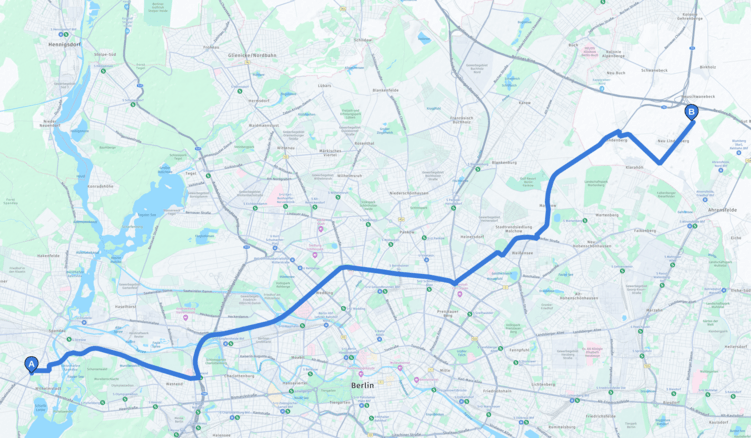
Route with snap radius
This request shows how adding snapRadius changes the matching algorithm. When this option is specified, the waypoint matcher chooses the nearest, most significant road within the specified radius (in meters).
With snapRadius=1000, the destination (waypoint B) is matched to "Federal Motorway 10", which is visible on this zoom level. Adjust the radius in your request depending on the current zoom level.
curl -gX GET 'https://router.hereapi.com/v8/routes?'\
'origin=52.520112,13.187735&'\
'destination=52.607765,13.56539;snapRadius=1000&'\
'return=polyline,summary&'\
'transportMode=car&'\
'departureTime=any&'\
'apiKey=YOUR_API_KEY'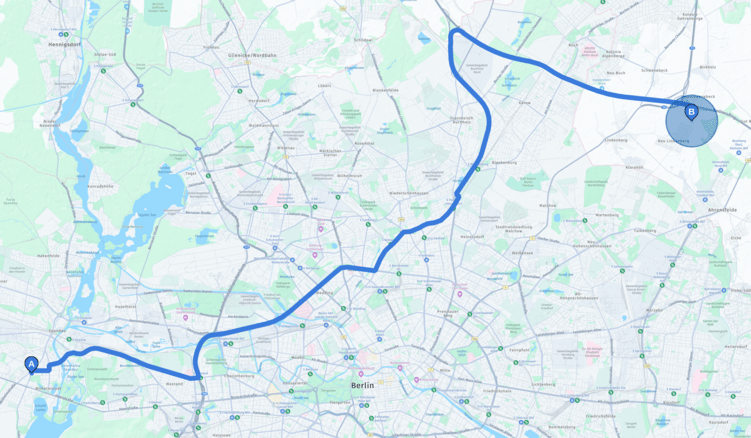
Updated last month