

File formats for Traffic Analytics
CSV format
Traffic Analytics results are delivered as one text file per query in CSV format, and uses the ANSI character set. However, since there aren't any free text fields in the file, the character set choice isn't important. The first line of the file is always a header line, specifying the fields included and their order, as shown in the following image:
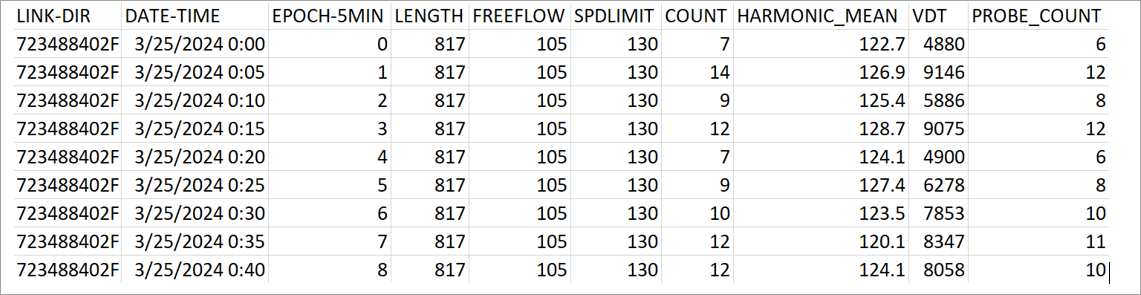
Query result files can be quite large, ranging up to many gigabytes, so only request the data you need.
Also, you should verify that the tools you use can process the volume of data you expect. For example, a single day’s worth of data for the entire United States is far too much data to load in Microsoft Excel.
Metadata format
Each query result returns with a plain text metadata file that contains a description of the generated query.
The following is a sample returned metadata file:
           requestId= 123456
           Vehicle Type= ALL
           beginDate= 20240312
           endDate= 20240312
           daysOfWeek= [SUNDAY, MONDAY, TUESDAY, WEDNESDAY, THURSDAY, FRIDAY, SATURDAY]
           TimeIntervals= [0000-2359]
           inputType= ADMIN_ID
           inputSource= 23488354,L1
           outputType= LINK
           outputFilePath= s3://traffic-analytics-si/2023Q4/queryOutput/1046/20240315-24511/output/
           functionalClass= 123
           percentiles= [5, 10, 15, 20, 25, 30, 35, 40, 45, 50, 55, 60, 65, 70, 75, 80, 85, 90, 95]
           epochType= 15
           reportFields= [LOCATION_REF, DATE, EPOCH, LENGTH, FREEFLOW, SPDLIMIT, COUNT, MEAN, HARMONIC_MEAN, VDT, PROBE_COUNT, STDDEV, MIN, MAX, CONFIDENCE, PERCENTILES]
           outputSize= 69.0 MB
           queryTime= Fri, 2024/03/15 08:02:56 UTC
           recordCount= 3181936
           total LINK Count=108139
           totalOutputFiles=1
           mapVersion=231G0
Technical support can use Requestid for troubleshooting.
Requesttype has the following options:
- Probe Data + Per Probe = PROBE
- Probe Data + Per Vehicle = AGGREGATED_PROBE
- Probe Data + Per Probe + Path Data = PROBE_PATH
- Probe Data + Per Vehicle + Path Data = AGGREGATED_PROBE_PATH
- Path Data = PATH
As shown in the path data, probe and path serve different purposes, and you shouldn't use them together.
Updated 6 months ago