

How to copy a Grafana Dashbaord from one Region to another
Grafana lets you easily export and import dashboards.
Exporting a dashboard from your source Region
From the Home page of the Region where your dashboard is located, open the dashboard you want to copy and click the Share Dashboard icon at the top right corner.  In the Share pop-up window, select Export tab. Click the 'View JSON' button, then click on 'Copy to Clipboard'.
Importing a dashboard to your target Region
To import a dashboard, click the + icon in the side menu, and then click Import. 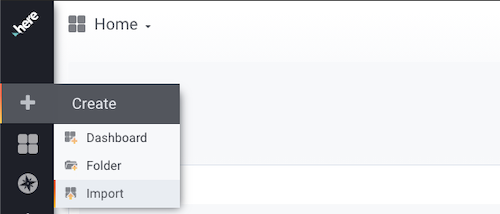 Paste the copied JSON from the first step and click 'Load'. In step 2, click 'Import'.
The new copied dashboard will appear in the appropriate list of available dashboards.
Grafana documentation
For more details, see the official Grafana export and import documentation.
Updated 7 months ago
Did this page help you?