

ジオコーディングと住所の検索を解決する
ジオコーディングと住所の検索を解決する
通常、ロケーションベースのアプリでは、住所の地理座標への変換、またはその逆が求められます。HERE Geocoding & Search API を使用すると、開発者は HERE サービスの検索およびジオコーディング機能を存分に活用でき、その無類の柔軟性を生かして卓越したロケーション対応アプリを生み出すことができます。
この API は、リバース ジオコーディング (一連の地理座標に対応する住所の取得) と、ランドマーク ジオコーディング (空港や、国として重要であると分類されたランドマークの検索) もサポートしています。
これらすべての機能は、Map API のサービス モジュール (mapsjs-service.js) からアクセスでき、マップ アプリ内に容易に統合できます。
ジオコーディング結果をマップに表示する
以下の例は、200 S Mathilda Ave, Sunnyvale, CA という住所をジオコーディングし、返されたマップの場所にマーカーを配置する方法を示しています。
コードでは、ジオコーディングリクエストを送信し、結果を処理するコールバック関数を提供しています。このリクエストは、HERE Geocoding and Searchのサポート対象パラメーター名と一致するメンバーを持つオブジェクトリテラルを使用しています。指定されたオブジェクトリテラルの内容は、Maps APIによってURLパラメーターに変換されています。パラメーター オブジェクトには、HERE Geocoding & Search API で認識される任意のパラメーターを含めることができます。
リクエストは非同期に処理されるため、コールバックが必要になります。成功時に呼び出されるコールバック関数はマーカーをマップに配置し、エラー時のコールバックはアラート表示のみを行います。
// Instantiate a map and platform object:
const platform = new H.service.Platform({
  'apikey': '{YOUR_API_KEY}'
});

// Get an instance of the geocoding service:
const service = platform.getSearchService();

// Call the geocode method with the geocoding parameters,
// the callback and an error callback function (called if a
// communication error occurs):
service.geocode({
  q: '200 S Mathilda Ave, Sunnyvale, CA'
}, (result) => {
  // Add a marker for each location found
  result.items.forEach((item) => {
    map.addObject(new H.map.Marker(item.position));
  });
}, alert);
ジオコーディング リクエストに成功すると、以下の画像のように、検索されたそれぞれの場所にマーカーを表示できます。
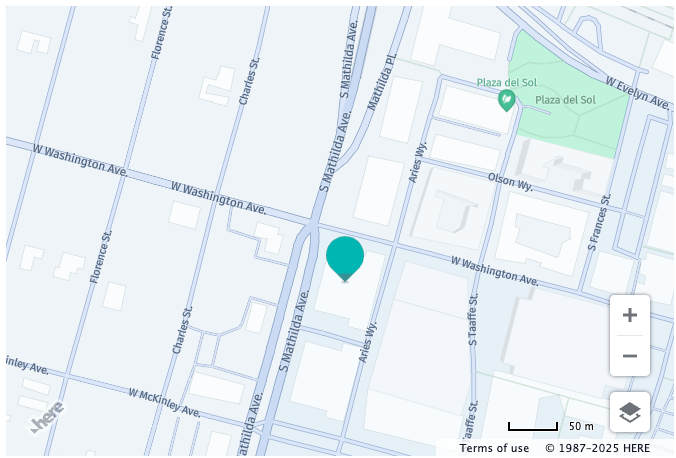
リバース ジオコーディング マップの位置
以下の例は、ドイツのベルリンにある指定された位置 (北緯 52.5309°、東経 13.3847°) の住所を取得する方法を示しています。結果は、取得した住所の場所を示す情報吹き出しでマップに表示されます。
// Instantiate a map and platform object:
const platform = new H.service.Platform({
  'apikey': '{YOUR_API_KEY}'
});

// Get an instance of the search service:
const service = platform.getSearchService();

// Call the reverse geocode method with the geocoding parameters,
// the callback and an error callback function (called if a
// communication error occurs):
service.reverseGeocode({
  at: '52.5309,13.3847,150'
}, (result) => {
  result.items.forEach((item) => {
    // Assumption: ui is instantiated
    // Create an InfoBubble at the returned location with
    // the address as its contents:
    ui.addBubble(new H.ui.InfoBubble(item.position, {
      content: item.address.label
    }));
  });
}, alert);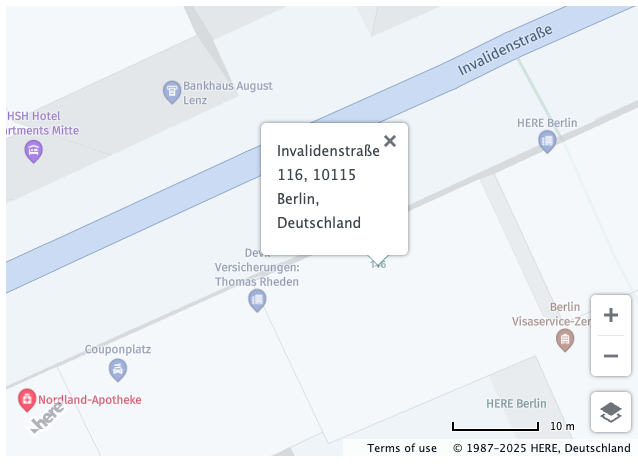
Autosuggest
autosuggest エンドポイントには、自由記述形式の不完全で綴りが誤っている住所または場所の名前を送信できます。これにより、ユーザーの検索操作性が向上します。
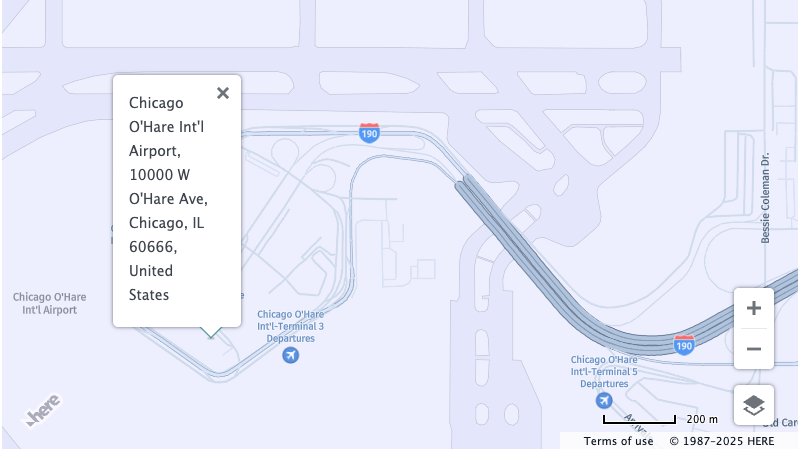
以下の例は、Chicago O'Hare International Airport (ORD、シカゴ オヘア国際空港) の検索方法を示しています。
// Instantiate a map and platform object:
const platform = new H.service.Platform({
  'apikey': '{YOUR_API_KEY}'
});
// Get an instance of the search service:
const service = platform.getSearchService();

// Call the "autosuggest" method with the search parameters,
// the callback and an error callback function (called if a
// communication error occurs):
service.autosuggest({
  // Search query
  q: 'Chicago ORD',
  // Center of the search context
  at: '38.71014896078624,-98.60787954719035'
}, (result) => {
  let {position, title} = result.items[0];
  // Assumption: ui is instantiated
  // Create an InfoBubble at the returned location
  ui.addBubble(new H.ui.InfoBubble(position, {
    content: title
  }));
}, alert);
リクエストが成功すると、コールバック関数は情報吹き出しをマップに表示します。
6 か月前の更新