

ドラッグ可能な方向を有効にする
ユーザーが経由地を追加したりマーカーをドラッグしたりしてデフォルトのルーティングを操作できるようにすると、ナビゲーションの効率と精度が向上します。
たとえば、マップで方向をドラッグできれば、倉庫業界の物流管理者にとって貴重なツールになります。特定の配送トラックのニーズに基づいてルートをカスタマイズすることで、効率的かつタイムリーに配送を行うことができます。
さらに、マップでマーカーをドラッグすることで、ユーザーはルートをカスタマイズして、通過する特定の通りやエリアを含めることができます。このレベルのパーソナライゼーションにより、ユーザーは自分の好みやニーズに合わせたルートを作成できます。
このチュートリアルでは、HERE Maps API for Javascriptを使用してマップに出発地と目的地のマーカーをプロットし、それらのマーカー間の最速ルートを計算して表示する方法を説明します。次に、ユーザーが経由地マーカーを追加または削除する、または既存のマーカーの位置を変更した場合に、デフォルトのルートを動的に再計算する方法を示します。
注
次のセクションでは、「HERE Maps API for Javascriptの使用を開始する」で説明したベースマップを基盤として、コードを追加する方法を説明します。
マップに出発地と目的地をプロットする
マップで、出発地と目的地の場所を表すマーカーを追加します。
-
カスタムSVGスタイルを各マーカーに適用する
getMarkerIcon()関数を作成します。/** * Returns an instance of H.map.Icon to style the markers * @param {number|string} id An identifier that will be displayed as marker label * * @return {H.map.Icon} */ function getMarkerIcon(id) { const svgCircle = `<svg width="30" height="30" version="1.1" xmlns="http://www.w3.org/2000/svg"> <g id="marker"> <circle cx="15" cy="15" r="10" fill="#E80808" stroke="#D31010" stroke-width="2" /> <text x="50%" y="50%" text-anchor="middle" fill="#FFFFFF" font-family="Arial, sans-serif" font-size="12px" dy=".3em">${id}</text> </g></svg>`; return new H.map.Icon(svgCircle, { anchor: { x: 10, y: 10 } }); };このスタイルでは、マーカーIDに対応するテキストを中央に配置した円のマーカーが作成されます。
-
オブジェクトマーカーをマップに追加し、カスタムSVGスタイルを適用する
addMarker()関数を作成します。/** * Create an instance of H.map.Marker and add it to the map * * @param {object} position An object with 'lat' and 'lng' properties defining the position of the marker * @param {string|number} id An identifier that will be displayed as marker label * @return {H.map.Marker} The instance of the marker that was created */ function addMarker(position, id) { const marker = new H.map.Marker(position, { data: { id }, icon: getMarkerIcon(id), }); map.addObject(marker); return marker; }; -
次の例に示すように、出発地マーカーと目的地マーカーの座標を定義します。
const origin = { lat: 52.643233, lng: 13.30395 }; // Starting point const destination = { lat: 52.37688, lng: 13.56038 }; // Destination point -
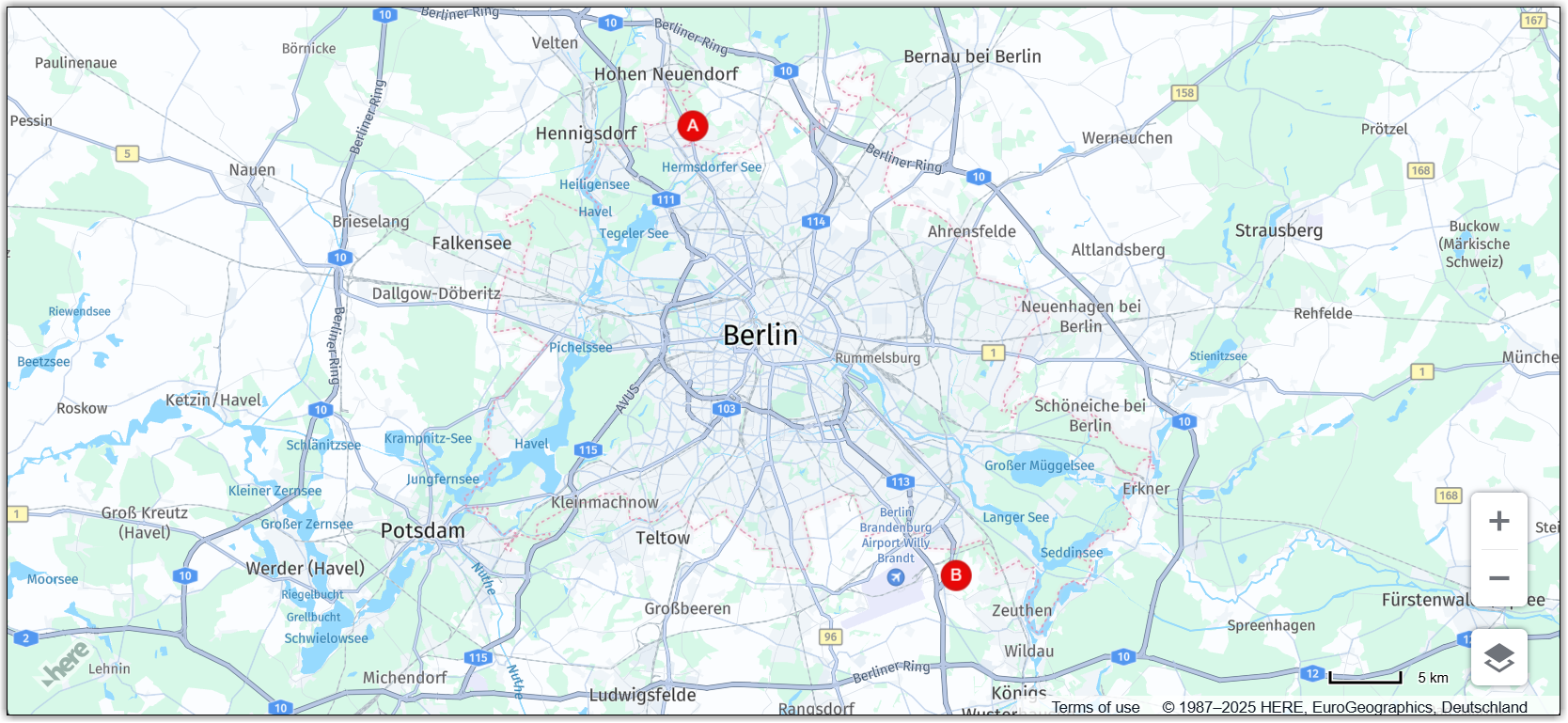
addMarker()関数を呼び出して、マップの指定した場所に出発地と目的地のマーカーを異なる ID でプロットします。const originMarker = addMarker(origin, 'A'); const destinationMarker = addMarker(destination, 'B');
結果:次の図に示すように、マップには出発地と目的地の座標の静的マーカーが表示されます。
マーカーについての詳細は、「マーカーを追加する」を参照してください。
出発地と目的地の間の最速ルートを計算する
HERE Routing API v8を使用して、出発地と目的地の間の最速ルートを決定します。
-
ルーティングパラメーターを指定します。
const routingParams = { 'origin': `${origin.lat},${origin.lng}`, 'destination': `${destination.lat},${destination.lng}`, 'transportMode': 'car', 'return': 'polyline' };説明
originは、ルートの出発地の緯度と経度を表す文字列です。destinationは、ルートの目的地の緯度と経度を表す文字列です。transportModeは、ルートに使用する輸送モードを指定する文字列です。この例では、carに設定されています。これは、ルートが車の移動に最適化されることを意味します。returnは、API からの応答の形式を示す文字列です。この例では、polylineに設定されています。これは、応答がポリラインとしてルートを表す文字列であることを意味します。
-
H.service.RoutingServiceオブジェクトを初期化します。const router = platform.getRoutingService(); -
マップで計算されたルートを表すポリラインを保持するために、空の変数を初期化します。
let routePolyline; -
routeResponseHandler()関数を定義して、それをH.service.RoutingService8オブジェクトのcalculateRouteメソッドのコールバック関数として使用します。/** * Handler for the H.service.RoutingService#calculateRoute call * * @param {object} response The response object returned by calculateRoute method */ function routeResponseHandler(response) { const sections = response.routes[0].sections; const lineStrings = []; sections.forEach((section) => { // convert Flexible Polyline encoded string to geometry lineStrings.push(H.geo.LineString.fromFlexiblePolyline(section.polyline)); }); const multiLineString = new H.geo.MultiLineString(lineStrings); const bounds = multiLineString.getBoundingBox(); // Create the polyline for the route if (routePolyline) { // If the routePolyline we just set the new geometry routePolyline.setGeometry(multiLineString); } else { // routePolyline is not yet defined, instantiate a new H.map.Polyline routePolyline = new H.map.Polyline(multiLineString, { style: { lineWidth: 5 } }); } // Add the polyline to the map map.addObject(routePolyline); } -
定義されたパラメーターを使用してルーティング サービスを呼び出す
updateRoute関数を定義します。function updateRoute() { router.calculateRoute(routingParams, routeResponseHandler, console.error); }calculateRouteメソッドは、routingParamsで指定されたパラメーターに基づいて、2 つ以上のポイント間の最速ルートを決定します。ルートが計算されると、応答オブジェクトをパラメーターとしてrouteResponseHandler()関数が呼び出されます。 -
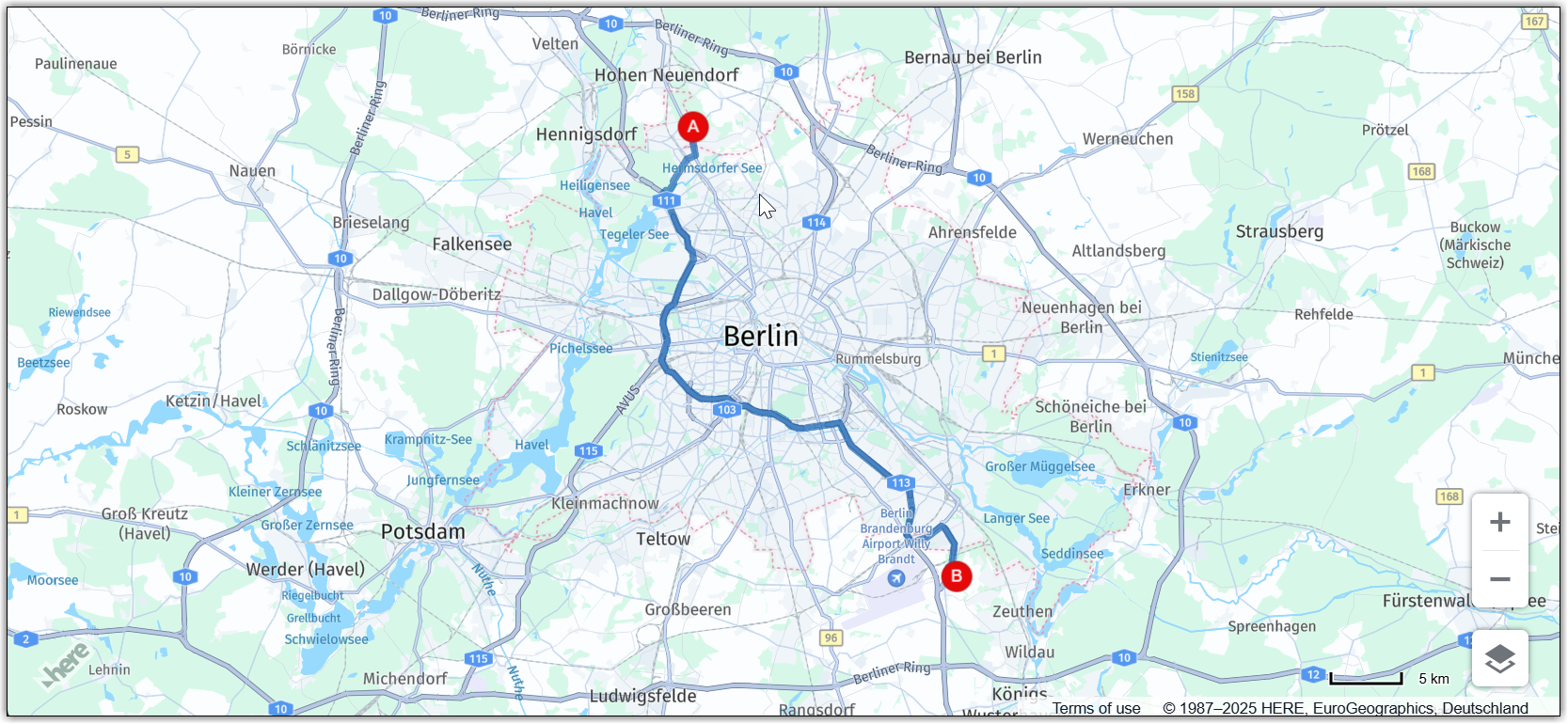
updateRoute関数を呼び出して、出発地と目的地の間のルートを表示します。updateRoute();
結果:マップには、次の図に示すように、出発地から目的地までの車での最速ルートが表示されます。
ルーティングの詳細については、「HERE Routing API v8」を参照してください。
マーカーをドラッグ可能にする
対応するマーカーを新しい位置にドラッグすることで、最初の出発地と目的地を編集できるようにします。マーカー位置の変更に応じてルートを動的に再計算するようにマップを設定できます。
-
addMarker関数内で、マーカー オブジェクトのドラッグを有効にします。-
スムーズなドラッグを有効にするには、
marker変数で、H.map.Markerオブジェクトのvolatile設定オプションを true に設定します。 -
marker.draggableプロパティをtrueに設定します。
更新された関数の定義を参照してください。
function addMarker(position, id) { const marker = new H.map.Marker(position, { data: { id }, icon: getMarkerIcon(id), // Enable smooth dragging volatility: true }); // Enable draggable markers marker.draggable = true; map.addObject(marker); return marker; }; -
-
dragstartイベントのマップ イベント リスナーを追加します。/** * Listen to the dragstart and store the relevant position information of the marker */ map.addEventListener('dragstart', function(ev) { const target = ev.target; const pointer = ev.currentPointer; if (target instanceof H.map.Marker) { // Disable the default draggability of the underlying map behavior.disable(H.mapevents.Behavior.Feature.PANNING); const targetPosition = map.geoToScreen(target.getGeometry()); // Calculate the offset between mouse and target's position // when starting to drag a marker object target['offset'] = new H.math.Point( pointer.viewportX - targetPosition.x, pointer.viewportY - targetPosition.y); } }, false);このイベントは、ユーザーがマップでマーカーのドラッグを開始したときにトリガーされます。このイベント リスナーの関数は、イベントのターゲットがマーカー オブジェクトかどうかをチェックします。true の場合、関数は基になるマップのデフォルトのドラッグ機能を無効にし、マーカー オブジェクトのドラッグを開始するときにマウスとターゲット位置の間のオフセットを計算します。このオフセットは、マップでマーカーをドラッグするときに、マーカーの新しい位置を計算するために使用されます。
-
dragイベントのマップ イベント リスナーを追加します。/** * Listen to the drag event and move the position of the marker as necessary */ map.addEventListener('drag', function(ev) { const target = ev.target; const pointer = ev.currentPointer; if (target instanceof H.map.Marker) { target.setGeometry( map.screenToGeo(pointer.viewportX - target['offset'].x, pointer.viewportY - target['offset'].y) ); } }, false);このイベント リスナーの関数は、ポインターの現在の位置に基づいてマーカーがドラッグされているときに、マップのマーカーの位置を更新します。
-
dragendイベントのマップ イベント リスナーを追加します。/** * Listen to the dragend and update the route */ map.addEventListener('dragend', function(ev) { const target = ev.target; if (target instanceof H.map.Marker) { // re-enable the default draggability of the underlying map // when dragging has completed behavior.enable(H.mapevents.Behavior.Feature.PANNING); const coords = target.getGeometry(); const markerId = target.getData().id; // Update the routing params `origin` and `destination` properties // in case we dragging either the origin or the destination marker if (markerId === 'A') { routingParams.origin = `${coords.lat},${coords.lng}`; } else if (markerId === 'B') { routingParams.destination = `${coords.lat},${coords.lng}`; } updateRoute(); } }, false);dragendイベントは、updateRoute関数をトリガーして、更新されたマーカー座標に基づいて新しいルートを動的に再計算して表示するように定義されています。
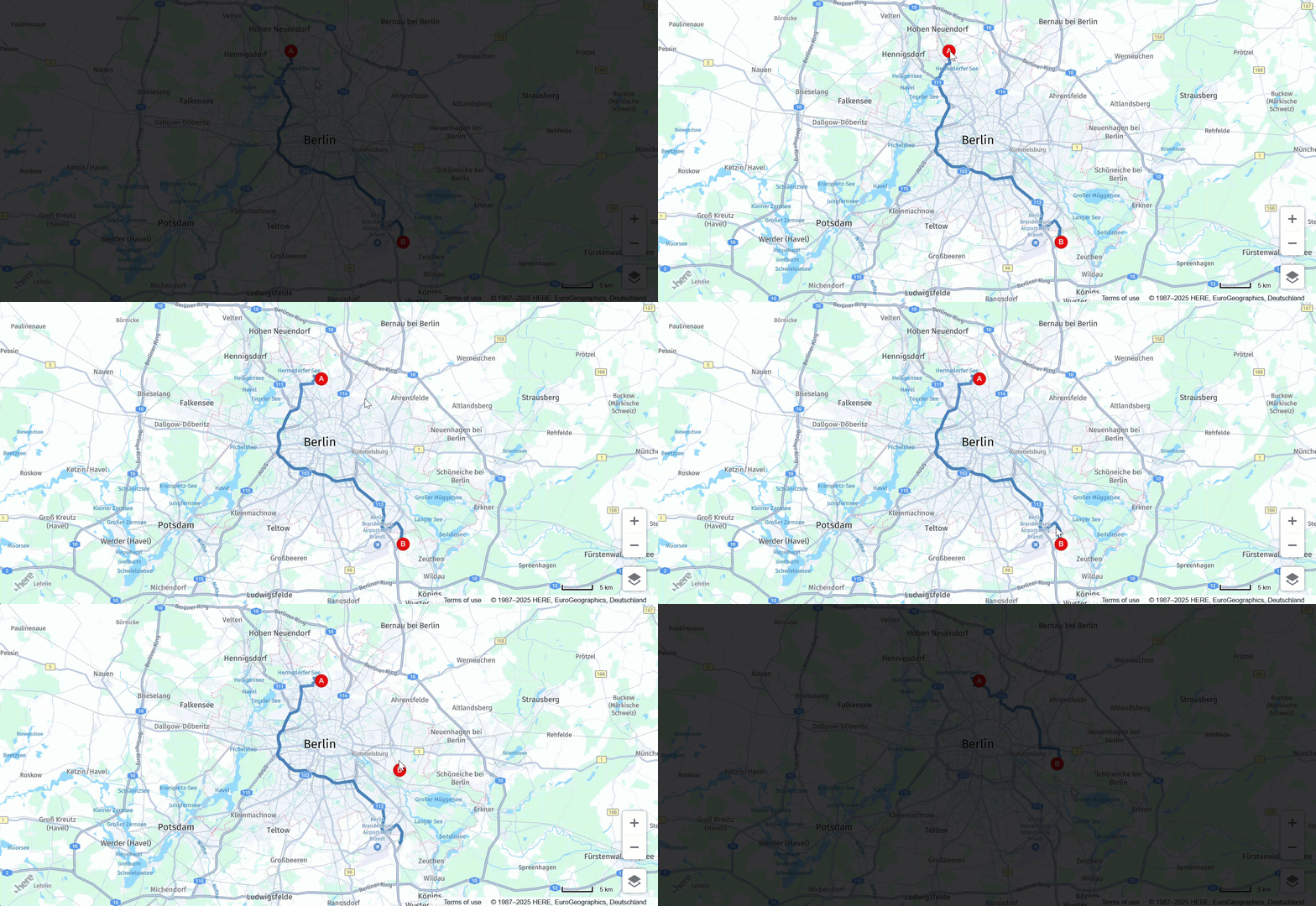
結果:次の図に示すように、出発地と目的地のマーカーを新しい場所に移動できるようになり、マップは最速のルートを動的に再計算します。
経由地を追加または削除する
ユーザーがドラッグ可能な経由地マーカーを追加または削除できるようにすることで、マップの双方向性をさらに高めることができます。この機能により、ルート計画の柔軟性と効率が向上します。
-
ルート経由地に対応するマーカーの空の配列を初期化します。
// This array holds instances of H.map.Marker representing the route waypoints const waypoints = [] -
次の例に示すように、ルーティング ロジックで、
routingParams変数を更新して新しいviaパラメーターを含めます。const routingParams = { 'origin': `${origin.lat},${origin.lng}`, 'destination': `${destination.lat},${destination.lng}`, // defines multiple waypoints 'via': new H.service.Url.MultiValueQueryParameter(waypoints), 'transportMode': 'car', 'return': 'polyline' };MultiValueQueryParameterは、出発地と目的地の間の複数の経由地の座標を保持する文字列パラメーターを作成します。次に、この文字列が HERE Routing API クエリに追加されます。 -
次の例に示すように、経由地を含めるように
updateRoute()関数を調整します。function updateRoute() { // Add waypoints the route must pass through routingParams.via = new H.service.Url.MultiValueQueryParameter( waypoints.map(wp => `${wp.getGeometry().lat},${wp.getGeometry().lng}`)); router.calculateRoute(routingParams, routeResponseHandler, console.error); }viaパラメーターは、ルートが出発地と目的地の間で通過する必要がある追加の経由地を追加します。 -
tapイベントのマップ イベント リスナーを追加します。/** * Listen to the tap event to add a new waypoint */ map.addEventListener('tap', function(ev) { const target = ev.target; const pointer = ev.currentPointer; const coords = map.screenToGeo(pointer.viewportX, pointer.viewportY); if (!(target instanceof H.map.Marker)) { const marker = addMarker(coords, waypoints.length + 1); waypoints.push(marker); updateRoute(); } });このイベント ハンドラを使用すると、ユーザーは目的の場所でマップをクリックすることで、新しい経由地をマーカーとして追加できます。これにより、経由地に応じてルートが更新されます。
-
dbltapイベントのマップ イベント リスナーを追加します。/** * Listen to the dbltap event to remove a waypoint */ map.addEventListener('dbltap', function(ev) { const target = ev.target; if (target instanceof H.map.Marker) { // Prevent the origin or destination markers from being removed if (['origin', 'destination'].indexOf(target.getData().id) !== -1) { return; } const markerIdx = waypoints.indexOf(target); if (markerIdx !== -1) { // Remove the marker from the array of way points waypoints.splice(markerIdx, 1) // Iterate over the remaining waypoints and update their data waypoints.forEach((marker, idx) => { const id = idx + 1; // Update marker's id marker.setData({ id }); // Update marker's icon to show its new id marker.setIcon(getMarkerIcon(id)) }); } // Remove the marker from the map map.removeObject(target); updateRoute(); } });このイベント リスナーの関数は、ユーザーがマーカーをダブルタップしたときに経由地の削除を処理します。
ユーザーがマーカーをダブルタップすると、関数はまずそのマーカーが出発地マーカーか目的地マーカーかを確認します。いずれかである場合、この関数はマーカーの削除を許可しません。それ以外の場合、関数は
waypoints配列からマーカーを削除します。waypoints配列からマーカーを削除した後、関数は、waypoints配列内の残りのマーカーのデータとアイコンを更新して、新しい順序を反映します。最後に、この関数はマップからマーカーを削除し、updateRoute()関数を呼び出して、新しい経由地のセットに基づいてルートを更新します。詳細については、「ルートに経由地を追加する」を参照してください。
-
マーカーをダブルタップしたときにマップのズームを無効にするマップ動作を追加します。
behavior.disable(H.mapevents.Behavior.Feature.DBL_TAP_ZOOM);
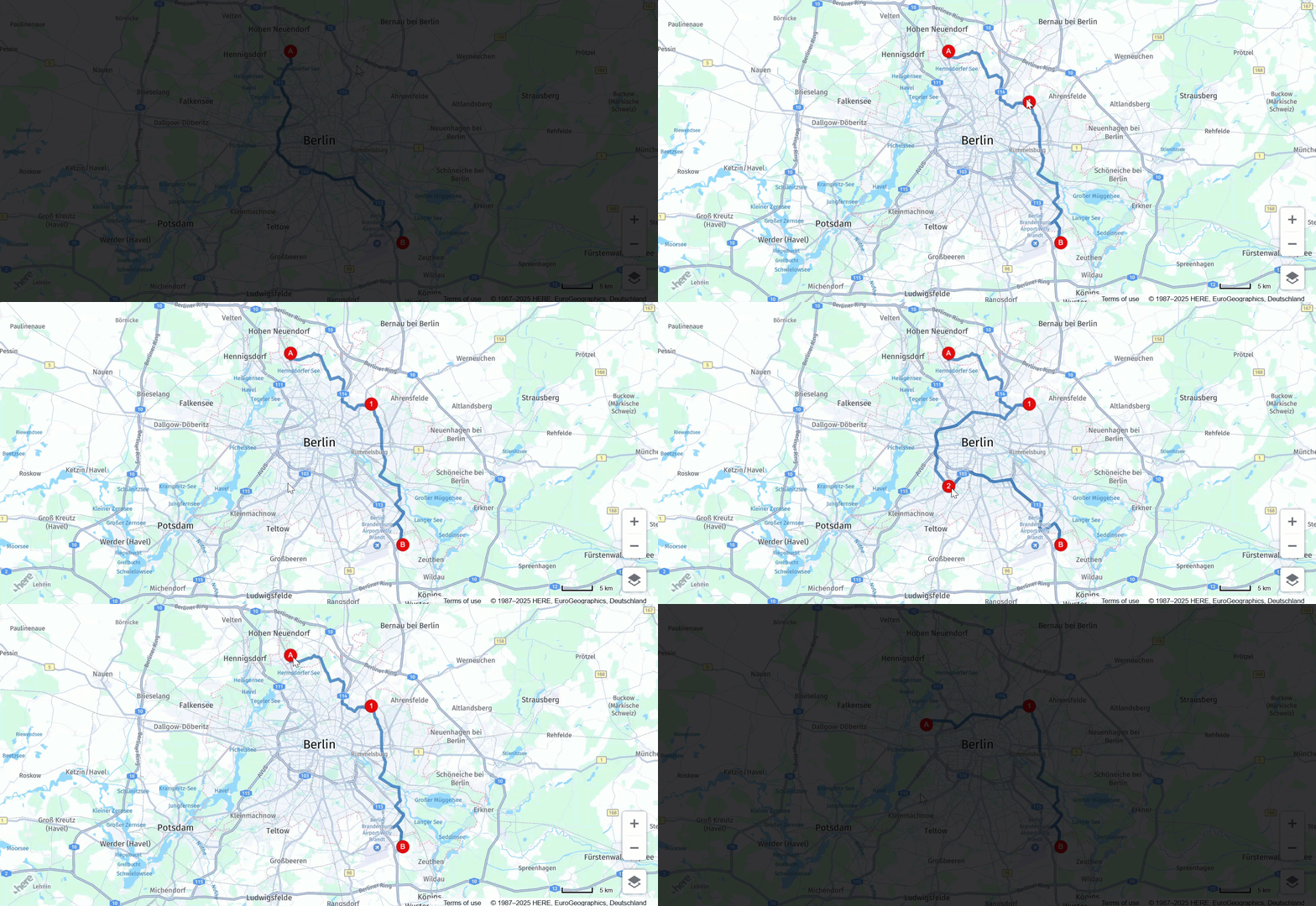
結果:次の例に示すように、各イベントの後にマップが最も速いルートを動的に再計算しながら、経由地マーカーを追加、削除、新しい場所にドラッグできるようになりました。
ソース コード
次のセクションでは、このチュートリアルで使用した完全なソースコードを示します。
注
次のコードを試す前に、
apikeyパラメーターの値を独自のAPIキーに置き換えてください。
//BOILERPLATE CODE TO INITIALIZE THE MAP
const platform = new H.service.Platform({
'apikey': 'Your API Key'
});
// Obtain the default map types from the platform object:
const defaultLayers = platform.createDefaultLayers();
// Instantiate (and display) a map:
const map = new H.Map(
document.getElementById("map"),
defaultLayers.vector.normal.map, {
zoom: 6,
center: {
lat: 53.480759,
lng: -2.242631
}
});
// MapEvents enables the event system
// Behavior implements default interactions for pan/zoom (also on mobile touch environments)
const behavior = new H.mapevents.Behavior(new H.mapevents.MapEvents(map));
// Disable zoom on double-tap to allow removing waypoints on double-tap
behavior.disable(H.mapevents.Behavior.Feature.DBL_TAP_ZOOM);
window.addEventListener('resize', () => map.getViewPort().resize());
// Create the default UI:
const ui = H.ui.UI.createDefault(map, defaultLayers);
// ROUTING LOGIC STARTS HERE
// This variable holds the instance of the route polyline
let routePolyline;
/**
* Handler for the H.service.RoutingService#calculateRoute call
*
* @param {object} response The response object returned by calculateRoute method
*/
function routeResponseHandler(response) {
const sections = response.routes[0].sections;
const lineStrings = [];
sections.forEach((section) => {
// convert Flexible Polyline encoded string to geometry
lineStrings.push(H.geo.LineString.fromFlexiblePolyline(section.polyline));
});
const multiLineString = new H.geo.MultiLineString(lineStrings);
const bounds = multiLineString.getBoundingBox();
// Create the polyline for the route
if (routePolyline) {
// If the routePolyline we just set has the new geometry
routePolyline.setGeometry(multiLineString);
} else {
// If routePolyline is not yet defined, instantiate a new H.map.Polyline
routePolyline = new H.map.Polyline(multiLineString, {
style: {
lineWidth: 5
}
});
}
// Add the polyline to the map
map.addObject(routePolyline);
}
/**
* Returns an instance of H.map.Icon to style the markers
* @param {number|string} id An identifier that will be displayed as marker label
*
* @return {H.map.Icon}
*/
function getMarkerIcon(id) {
const svgCircle = `<svg width="30" height="30" version="1.1" xmlns="http://www.w3.org/2000/svg">
<g id="marker">
<circle cx="15" cy="15" r="10" fill="#E80808" stroke="#D31010" stroke-width="2" />
<text x="50%" y="50%" text-anchor="middle" fill="#FFFFFF" font-family="Arial, sans-serif" font-size="12px" dy=".3em">${id}</text>
</g></svg>`;
return new H.map.Icon(svgCircle, {
anchor: {
x: 10,
y: 10
}
});
}
/**
* Create an instance of H.map.Marker and add it to the map
*
* @param {object} position An object with 'lat' and 'lng' properties defining the position of the marker
* @param {string|number} id An identifier that will be displayed as marker label
* @return {H.map.Marker} The instance of the marker that was created
*/
function addMarker(position, id) {
const marker = new H.map.Marker(position, {
data: {
id
},
icon: getMarkerIcon(id),
// Enable smooth dragging
volatility: true
});
// Enable draggable markers
marker.draggable = true;
map.addObject(marker);
return marker;
}
/**
* This method calls the routing service to retrieve the route line geometry
*/
function updateRoute() {
routingParams.via = new H.service.Url.MultiValueQueryParameter(
waypoints.map(wp => `${wp.getGeometry().lat},${wp.getGeometry().lng}`));
// Call the routing service with the defined parameters
router.calculateRoute(routingParams, routeResponseHandler, console.error);
}
// ADD MARKERS FOR ORIGIN/DESTINATION
const origin = {
lat: 52.643233,
lng: 13.30395
}; // Starting point
const destination = {
lat: 52.37688,
lng: 13.56038
}; // Destination point
const originMarker = addMarker(origin, 'A');
const destinationMarker = addMarker(destination, 'B');
// CALCULATE THE ROUTE BETWEEN THE TWO WAYPOINTS
// This array holds instances of H.map.Marker representing the route waypoints
const waypoints = []
// Define the routing service parameters
const routingParams = {
'origin': `${origin.lat},${origin.lng}`,
'destination': `${destination.lat},${destination.lng}`,
// defines multiple waypoints
'via': new H.service.Url.MultiValueQueryParameter(waypoints),
'transportMode': 'car',
'return': 'polyline'
};
// Get an instance of the H.service.RoutingService service
const router = platform.getRoutingService();
// Call the routing service with the defined parameters and display the route
updateRoute();
/**
* Listen to the dragstart and store relevant position information of the marker
*/
map.addEventListener('dragstart', function(ev) {
const target = ev.target;
const pointer = ev.currentPointer;
if (target instanceof H.map.Marker) {
// Disable the default draggability of the underlying map
behavior.disable(H.mapevents.Behavior.Feature.PANNING);
const targetPosition = map.geoToScreen(target.getGeometry());
// Calculate the offset between mouse and target's position
// when starting to drag a marker object
target['offset'] = new H.math.Point(
pointer.viewportX - targetPosition.x, pointer.viewportY - targetPosition.y);
}
}, false);
/**
* Listen to the dragend and update the route
*/
map.addEventListener('dragend', function(ev) {
const target = ev.target;
if (target instanceof H.map.Marker) {
// re-enable the default draggability of the underlying map
// when dragging has completed
behavior.enable(H.mapevents.Behavior.Feature.PANNING);
const coords = target.getGeometry();
const markerId = target.getData().id;
// Update the routing params `origin` and `destination` properties
// in case we dragging either the origin or the destination marker
if (markerId === 'A') {
routingParams.origin = `${coords.lat},${coords.lng}`;
} else if (markerId === 'B') {
routingParams.destination = `${coords.lat},${coords.lng}`;
}
updateRoute();
}
}, false);
/**
 * Listen to the drag event and move the position of the marker as necessary
 */
map.addEventListener('drag', function(ev) {
    const target = ev.target;
    const pointer = ev.currentPointer;
    if (target instanceof H.map.Marker) {
        target.setGeometry(
            map.screenToGeo(pointer.viewportX - target['offset'].x, pointer.viewportY - target['offset'].y)
        );
    }
}, false);
/**
 * Listen to the tap event to add a new waypoint
 */
map.addEventListener('tap', function(ev) {
    const target = ev.target;
    const pointer = ev.currentPointer;
    const coords = map.screenToGeo(pointer.viewportX, pointer.viewportY);

    if (!(target instanceof H.map.Marker)) {
        const marker = addMarker(coords, waypoints.length + 1);
        waypoints.push(marker);
        updateRoute();
    }
});
/**
* Listen to the dbltap event to remove a waypoint
*/
map.addEventListener('dbltap', function(ev) {
const target = ev.target;
if (target instanceof H.map.Marker) {
// Prevent origin or destination markers from being removed
if (['origin', 'destination'].indexOf(target.getData().id) !== -1) {
return;
}
const markerIdx = waypoints.indexOf(target);
if (markerIdx !== -1) {
// Remove the marker from the array of way points
waypoints.splice(markerIdx, 1)
// Iterate over the remaining waypoints and update their data
waypoints.forEach((marker, idx) => {
const id = idx + 1;
// Update marker's id
marker.setData({
id
});
// Update marker's icon to show its new id
marker.setIcon(getMarkerIcon(id))
});
}
// Remove the marker from the map
map.removeObject(target);
updateRoute();
}
});次のステップ
HERE Maps API for Javascriptの設計とフィーチャーの詳細については、「APIリファレンス」を参照してください。
5 か月前の更新