

Waypoints Sequenceサービスを使用して複数の経由地があるルートを視覚化する
地図上に視覚的に魅力的で機能的な経由地を表示することで、ユーザーは複数の立ち寄り地 (都市や名所など) を最適な順序で訪問し、移動時間や距離を効率的に短縮できます。このようなシナリオでは、マッピングアプリケーションの使いやすさが大幅に向上します。
カスタマイズされた経由地を表示する
次のコード例は、HERE Maps API for JavascriptのWaypointsSequenceServiceを使用して、複数の目的地間の経由地の順序を計算する方法を示しています。この例には、カスタムマーカーアイコンとポリラインのスタイリングも含まれています。
注
次のサンプルは、「HERE Maps API for Javascriptの使用を開始する」で説明したベースマップを基盤として、コードを追加する方法を説明します。
// Instantiate the WaypointSequence service
const waypointsSequenceService = platform.getWaypointsSequenceService();
// Define the starting point, multiple destinations, and ending point
// Calculate the waypoint sequence
waypointsSequenceService.findSequence({
  start: 'WiesbadenCentralStation;50.0715,8.2434',
  destination1: 'FrankfurtCentralStation;50.1073,8.6647',
  destination2: 'DarmstadtCentralStation;49.8728,8.6326',
  destination3: 'FrankfurtAirport;50.0505,8.5698',
  destination4: 'HanauCentralStation;50.1218,8.9298',
  end: 'MainzCentralStation;50.0021,8.259',
  // Departure time
  departure: '2025-02-09T09:30:00+01:00',
  // Mode of transportation: fastest route by car with traffic enabled
  mode: 'fastest;car;traffic:enabled'
}, (response) => {
  // Create an SVG circle with the specified ID and center coordinates (15, 15)
  function getMarkerIcon(id) {
    const svgCircle = `<svg width="30" height="30" version="1.1" xmlns="http://www.w3.org/2000/svg">
  <g id="marker">
    <circle cx="15" cy="15" r="10" fill="#d80065ff" stroke="#d8007eff" stroke-width="4" />
    <text x="50%" y="50%" text-anchor="middle"
     fill="#FFFFFF" font-family="Arial, sans-serif" font-size="12px" dy=".3em">${id}</text>
  </g></svg>`;
    // Return a new H.map.Icon object with the SVG string and center coordinates
    return new H.map.Icon(svgCircle, {
      anchor: {
        x: 15,
        y: 15
      }
    });
  }
  // Create polylines between waypoints
  function createPolylines(results, style) {
    // Initialize an empty array to store line strings
    const lineStrings = [];
    // Extract the waypoints and interconnections from the results
    const {waypoints, interconnections} = results;
    // Create a new H.geo.LineString object with the coordinates of two consecutive waypoints
    for (let i = 0; i < waypoints.length - 1; i++) {
      const lineString = (new H.geo.LineString([
        waypoints[i].lat, waypoints[i].lng, 0,
        waypoints[i + 1].lat, waypoints[i + 1].lng, 0
      ]));
      // Add the line string to the array of line strings
      lineStrings.push(new H.map.Polyline(lineString, {style, data: interconnections[i]}));
    }
    // Return the array of line strings
    return lineStrings;
  }
  // Create an object group and populate it with markers
  const group = new H.map.Group();
  response.results[0].waypoints.forEach((y, i) => {
    const icon = getMarkerIcon(i + 1);
    const marker = new H.map.Marker({lat: y.lat, lng: y.lng}, {icon, data: y});
    group.addObject(marker);
  });
  // Create polylines and add them to the object group
  const routePolylines = createPolylines(response.results[0], {
    lineWidth: 10,
    strokeColor: 'rgba(100, 100, 250, 0.8)'
  });
  group.addObjects(routePolylines);
  // Add the group to the map and set the view to show the bounding box of the group
  map.addObject(group);
  map.getViewModel().setLookAtData({bounds: group.getBoundingBox()});
   // Display waypoint data in a table in the browser console
   group.addEventListener('tap', ({target}) => {
    console.table(target.getData())
  });
}, console.error);
**結果:**次の図は、カスタム経由地とそれらを結ぶポリラインが表示された地図の例を示しています。
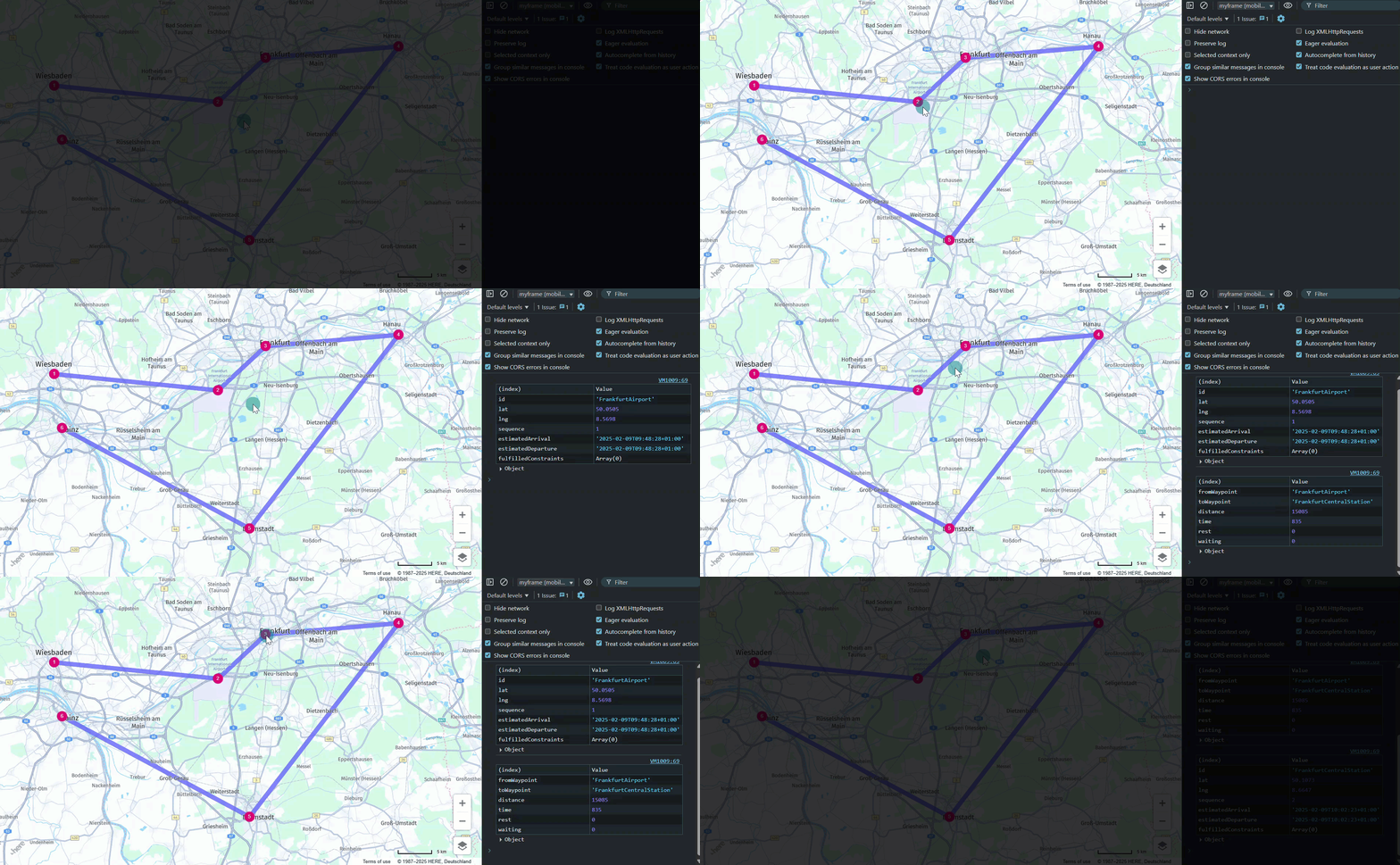
さらに、各経由地とポリラインはクリックイベントに応答し、データテーブルをコンソールに記録します。次の例は、この動作を示しています。
経由地:
| (インデックス) | 値 |
|---|---|
| id | DarmstadtCentralStation |
| lat | 49.8728 |
| lng | 8.6326 |
| sequence | 4 |
| estimatedArrival | 2025-02-09T11:01:20+01:00 |
| estimatedDeparture | 2025-02-09T11:01:20+01:00 |
| fulfilledConstraints | Array (0) |
ポリライン:
| (インデックス) | 値 |
|---|---|
| fromWaypoint | HanauCentralStation |
| toWaypoint | DarmstadtCentralStation |
| distance | 49217 |
| time | 2017 |
| rest | 0 |
| waiting | 0 |
次のステップ
経由地の詳細については、「HERE Waypoints Sequence API V8 - 開発者ガイド」を参照してください。
5 か月前の更新
このページは役に立ちましたか?