
HERE Style Editor styling for Japan
The base map styles offer optional support for styling the Japan map region with region-specific details.
After enabling the Japan specific styling, Style Editor panels can be toggled to offer their content towards each of the specific styling regions. The map view will always show the composite style, containing each region's specific styling details.
Note
The detailed map data for Japan may incur additional data access costs in deployed applications. If you wish to enable this option, please ensure that your HERE data access quotas have sufficient capacities.
Note:Enabling the detailed styling for Japan may introduce a negative performance impact for the map views. Please ensure that your deployed applications are able to display their maps with sufficient performance.
Enabling Japan specific styling
Japan specific styling is enabled as part of setting up a new map style. The sliding toggle at the bottom of the new map style dashboard turns the Japan specific style details on and off.

Enable Japan specific styling
Toggling the target region for styling
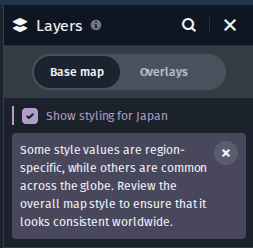
The checkbox at the top of the layers panel switches the editor panel views between the target regions for styling: global and Japan. Using this checkbox affects the editor panels only: the map view shows always the composite style, adapted to each region's styling details.
Enable Japan specific styling
Updated last month