

Optimize Positioning
Below, we present additional options for obtaining precise and reliable location data for a variety of applications.
Enable background updates
In case you want to continue receiving location updates while the application is running in the background, you need to enable such capability by adding the following key to the app's Info.plist file:
<key>UIBackgroundModes</key>
	<array>
		<string>location</string>
        <string>processing</string>
	</array>
The "processing" mode is needed for iOS versions 13.0 and above. When added, also the following is needed:
<key>BGTaskSchedulerPermittedIdentifiers</key>
    <array>
        <string>$(PRODUCT_BUNDLE_IDENTIFIER)</string>
    </array>
Check Apple's iOS documentation for more details.
Additionally the user needs to be requested for authorization. The code snippet we shared in the section Add permissions can also take care of that.
Once the authorization is cleared, you are all set. You can enable or disable location updates in the background with the LocationEngine.setBackgroundLocationAllowed() method. You can also set the visibility of the application's background location indicator with the method LocationEngine.setBackgroundLocationIndicatorVisible().
Finally, you can ensure that the location updates won't pause when the device is stationary by passing false to the LocationEngine.setPauseLocationUpdatesAutomatically() method.
Note
setBackgroundLocationAllowed()andsetBackgroundLocationIndicatorVisible()will returnLocationEngineStatus.notAllowedif the application does not have background location capabilities enabled. Otherwise,LocationEngineStatus.okwill be returned.
Note that the accompanying Positioning example app does not enable background updates, by default.
Add sub-meter precision
HD GNSS features are currently not supported by the HERE SDK for iOS (Navigate). The HD GNSS (High Definition Global Navigation Satellite System) feature is currently only available for Android devices as part of the HERE SDK for Android (Navigate) and the HERE SDK for Flutter (Navigate)
Handle location accuracy
The horizontalAccuracyInMeters field, which is present in the Location object, also known as the "radius of uncertainty", provides an estimate of the area within which the true geographic coordinates are likely to lie with a 68% probability. This is used to draw a halo indicator around the current location. The illustration below depicts the inner green circle as the location.coordinates and the surrounding circle as the accuracy circle with a radius of horizontalAccuracyInMeters. The true geographical coordinates may lie inside (68%) or outside (32%) the accuracy circle.
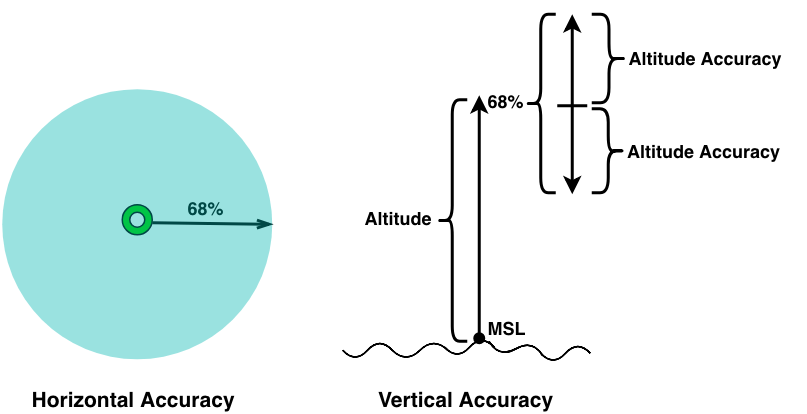
Likewise, in the case of altitude, if the verticalAccuracyInMeters value is 10 meters, this indicates that the actual altitude is expected to fall within a range of altitude - 10m to altitude + 10m with a probability of 68%. Other accuracy values, like bearingAccuracyInDegrees and speedAccuracyInMetersPerSecond will follow the same rule: a smaller uncertainty results in a better accuracy.
Note
The
coordinates.altitudevalue is given in relation to the mean sea level (MSL).
Achieving probabilities other than 68% (CEP68)
What if the given probability of 68% (CEP68) is not enough - is it possible to achieve an accuracy of 99%? Yes, it is: Since the given circular error probability (CEP) follows a chi-squared distribution with two degrees-of-freedom, it is easy to calculate the desired probability based on the following formulas:
| Probability | Radius of Uncertainty |
|---|---|
| 50% | CEP50 = 0.78 x CEP68 |
| 60% | CEP60 = 0.90 x CEP68 |
| 70% | CEP70 = 1.03 x CEP68 |
| 80% | CEP80 = 1.19 x CEP68 |
| 90% | CEP90 = 1.42 x CEP68 |
| 95% | CEP95 = 1.62 x CEP68 |
| 99% | CEP99 = 2.01 x CEP68 |
The table above can be used to visualize various probability levels for a halo indicator on the map. For example, if the horizontal accuracy is 20 meters, you can (roughly) double the radius to achieve a probability of 99%. The accuracy value is always given as CEP68, that means:
CEP99 = 2.01 x CEP68 = 2.01 x 20m = 40.2m
Now you can draw a radius of 40.2 meters around the found location - and with a probability of 99%, the real location will lie within that circle. On the other hand, the probability for a radius of 0 meters is 0%.
Updated 14 days ago