

Stay aware with warners
The Navigator and the VisualNavigator offer an extended warner system that allows you to receive notifications for certain events during tracking or during turn-by-turn navigation. An example of how to implement the warners can be seen in the "NavigationWarners" example app. You can find the example app on GitHub. Warners help you to drive safely or to receive information that may be useful to know in advance.
Warners notify about events ahead along the current path of travel.
The most common warning events are:
TruckRestrictionWarning: Notifies on upcoming truck obstacles that violate the set truck specifications (such as height or weight), or when trucks are not allowed to pass.SafetyCameraWarning: Notifies on upcoming safety spots (radar speed cameras).SchoolZoneWarning: A warning which notifies about a school zone presence on a road ahead where the speed limit is lower than the default speed limit on that road.BorderCrossingWarning: Notifies when country borders or states within a country are approached. Notifies also on the general speed limits that apply in the country or state.RailwayCrossingWarning: Notifies on upcoming railway crossings.EnvironmentalZoneWarning: Notifies when emission zones are approached.DangerZoneWarning: Notifies when a danger zone is approached that requires the attention of a driver.LowSpeedZoneWarning: Notifies when a low speed zone is approached that requires the attention of a driver.TollStop: Notifies on upcoming toll stops and which lane to take to reach a toll booth.RealisticViewWarning: Provides SVG content to show an upcoming junction with signposts.RoadSignWarning: Notifies on upcoming traffic signs, such as stop signs.TrafficMergeWarning: Notifies on upcoming warning for merging traffic to the current road.
Configure notification distances
By default, the notification distances for emitting warnings for each WarningType are configured as follows:
warningNotificationDistances.slowSpeedDistanceInMeters: For roads in urban areas where a slow driving speed is expected, the event is sent 500 meters ahead, by default.warningNotificationDistances.regularSpeedDistanceInMeters: For roads in rural areas where a regular driving speed is expected, the event is sent 750 meters ahead, by default.warningNotificationDistances.fastSpeedDistanceInMeters: For roads such as highways where a higher driving speed is expected, the event is sent 1000 meters in advance by default.
Note
The
TimingProfiledefines the speed ranges categorized as fast, regular, and slow.
Distances for emitting warnings can be configured using WarnerEngine. This is achieved by calling warnerEngine.setWarningNotificationDistances(..), which accepts a specified WarningType and an instance of WarningNotificationDistances. The example below shows how the notification distances for RoadSignWarning can be set:
// Get notification distances for road sign alerts from the warner engine.
WarningNotificationDistances warningNotificationDistances = warnerEngine.getWarningNotificationDistances(WarningType.ROAD_SIGN);
// The distance in meters for emitting warnings when the speed limit or current speed is fast. Defaults to 1500.
warningNotificationDistances.fastSpeedDistanceInMeters = 1600;
// The distance in meters for emitting warnings when the speed limit or current speed is regular. Defaults to 750.
warningNotificationDistances.regularSpeedDistanceInMeters = 800;
// The distance in meters for emitting warnings when the speed limit or current speed is slow. Defaults to 500.
warningNotificationDistances.slowSpeedDistanceInMeters = 600;

// Set the warning distance for road signs.
warnerEngine.setWarningNotificationDistances(WarningType.ROAD_SIGN, warningNotificationDistances);
// Get notification distances for road sign alerts from the warner engine.
val warningNotificationDistances = warnerEngine.getWarningNotificationDistances(WarningType.ROAD_SIGN)
// The distance in meters for emitting warnings when the speed limit or current speed is fast. Defaults to 1500.
warningNotificationDistances.fastSpeedDistanceInMeters = 1600
// The distance in meters for emitting warnings when the speed limit or current speed is regular. Defaults to 750.
warningNotificationDistances.regularSpeedDistanceInMeters = 800
// The distance in meters for emitting warnings when the speed limit or current speed is slow. Defaults to 500.
warningNotificationDistances.slowSpeedDistanceInMeters = 600
// Set the warning distances for road signs.
warnerEngine.setWarningNotificationDistances(
WarningType.ROAD_SIGN,
warningNotificationDistances
)Note
The
WarningNotificationDistancesapply only to warners that alert about specific locations or areas along the route. It does not impact speed limit updates or overspeed notifications, which are documented in Get speed limit updates and Get overspeed warnings.
For most warners, the notification threshold is configurable, here you can find more information: notification frequency.
Note
- All warners are supported independently of an active route. This means you will receive events for each warning type while following a route, as well as during free driving in tracking mode.
- Warners will continue to deliver events even after you leave the route or reach your destination.
In addition, all warners are not specific for a route or the set RouteOptions - unless explicitly mentioned. For example, you may receive TruckRestrictionWarning events while following a pedestrian route - if you wish so. In general, warner events are generated based on the map-matched location fed into the navigator. For example, pedestrian routes are most often map-matched to the same side of the road as for other transport modes ignoring sideways due to the precision of the GPS signal.
Note
Sometimes an application may want to warn on certain danger spots. For example, to display the distance to an obstacle that is ahead of a vehicle. For such cases consider to use the convenient method
navigator.calculateRemainingDistanceInMeters(GeoCoordinates coordinates)which provides the distance between the current location of the user on the route and the givencoordinates- if they are on the route ahead. If thecoordinatesare already behind or not on the route at all,nullis returned. Note that this method requires that the app knows thecoordinatesof the spot ahead in question.
Find more information on each warner in the sections below.
Get road sign warnings
Along a road you can find many shields. While driving you can receive detailed notifications on these shields via the unified WarningListener on WarnerEngine.
The resulting RoadSignWarning event contains information on the shield, including information such as RoadSignType and RoadSignCategory.
The HERE SDK provides various RoadSignType values that can be retrieved from RoadSignWarning events. In general, the visual appearance of the road signs can differ across countries. However, some signs are standardized and look almost the same in all countries, such as STOP_SIGN. The list of available RoadSignType values can be found here.
Note that the actual road sign icons are not provided by the HERE SDK - this event delivers only information on the type of the sign, but no visuals of the sign itself. Also, the exact location of the traffic sign is not provided - however, since the ahead-distance information is provided, an application can notify when the sign is reached: for example, the RouteProgress event delivers constantly information about the travelled distance of a vehicle.
With RoadSignWarningOptions you can set a filter on which shields you want to get notified.

Note that not all road signs are included. RoadSignType lists all supported types. For example, road signs showing speed limits are excluded, as speed limit updates are documented in Navigation.
The below code snippet shows a usage example using WarnerEngine.addWarningListener():
// Configure road sign warning options through WarnerEngine.
WarningOptions warningOptions = warnerEngine.getWarningOptions();
RoadSignWarningOptions roadSignWarningOptions = new RoadSignWarningOptions();
// Set a filter to get only road signs relevant for TRUCKS and HEAVY_TRUCKS.
roadSignWarningOptions.vehicleTypesFilter = Arrays.asList(RoadSignVehicleType.TRUCKS, RoadSignVehicleType.HEAVY_TRUCKS);
warningOptions.roadSignWarningOptions = roadSignWarningOptions;
warnerEngine.setWarningOptions(warningOptions);

// Receive road sign warnings through the unified WarningListener
// Ensure WarningType.ROAD_SIGN is included in warnerEngine.setEnabledWarnings()
// When a road sign warning is triggered:
warnerEngine.addWarningListener(new WarningListener() {
    @Override
    public void onWarnings(@NonNull List<WarningUpdate> warnings, @NonNull WarningsRegistry warningsRegistry) {
        for (WarningUpdate warningUpdate : warnings) {
            if (warningUpdate.warning.warningType == WarningType.ROAD_SIGN) {
                RoadSignWarning roadSignWarning = warningsRegistry.getRoadSignWarning(warningUpdate.warning);
                if (roadSignWarning != null) {
                    RoadSignType roadSignType = roadSignWarning.type;
                    if (warningUpdate.warningStatus == WarningStatus.AHEAD) {
                        // The start indicates the RoadSign spot.
                        Log.d(TAG, "A RoadSignWarning of road sign type: " + roadSignType.name()
                        + " ahead in (m): " + warningUpdate.distanceTillStartInMeters);
                    } else if (warningUpdate.warningStatus == WarningStatus.PASSED) {
                        Log.d(TAG, "A RoadSignWarning of road sign type: " + roadSignType.name() + " just passed.");
                    }

                    if (roadSignWarning.signValue != null) {
                        // Optional text as it is printed on the local road sign.
                        Log.d(TAG, "Road sign text: " + roadSignWarning.signValue.text);
                    }
                    // For more road sign attributes, please check the API Reference.
                }
            }
        }
    }
});
// Configure road sign warning options through WarnerEngine.
val warningOptions = warnerEngine.warningOptions
val roadSignWarningOptions = RoadSignWarningOptions()
// Set a filter to get only road signs relevant for TRUCKS and HEAVY_TRUCKS.
roadSignWarningOptions.vehicleTypesFilter = listOf(RoadSignVehicleType.TRUCKS, RoadSignVehicleType.HEAVY_TRUCKS)
warningOptions.roadSignWarningOptions = roadSignWarningOptions
warnerEngine.warningOptions = warningOptions
// Receive road sign warnings through the unified WarningListener
// Ensure WarningType.ROAD_SIGN is included in warnerEngine.setEnabledWarnings()
// When a road sign warning is triggered:
warnerEngine.addWarningListener { warnings: List<WarningUpdate>, warningsRegistry: WarningsRegistry ->
for (warningUpdate in warnings) {
if (warningUpdate.warning.warningType == WarningType.ROAD_SIGN) {
val roadSignWarning = warningsRegistry.getRoadSignWarning(warningUpdate.warning)
if (roadSignWarning != null) {
val roadSignType: RoadSignType = roadSignWarning.type
if (warningUpdate.warningStatus == WarningStatus.AHEAD) {
// The start indicates the RoadSign spot.
Log.d(TAG, "A RoadSignWarning of road sign type: ${roadSignType.name}" +
" ahead in (m): ${warningUpdate.distanceTillStartInMeters}"
)
} else if (warningUpdate.warningStatus == WarningStatus.PASSED) {
Log.d(TAG, "A RoadSignWarning of road sign type: ${roadSignType.name} just passed.")
}
if (roadSignWarning.signValue != null) {
// Optional text as it is printed on the local road sign.
Log.d(TAG, "Road sign text: " + roadSignWarning.signValue!!.text)
}
// For more road sign attributes, please check the API Reference.
}
}
}
}RoadSignWarning events are issued exactly two times:
- When
WarningStatusisAHEADanddistanceTillStartInMetersis > 0. - When
WarningStatusisPASSEDanddistanceTillStartInMetersis 0.
Note
For positional warners that notify on a singular object along a road, such as a safety camera, a road sign or a realistic view, there is always only one active warning happening at a time: this means that after each
AHEADevent always aPASSEDevent will follow to avoid cases where twoAHEADwarnings for a single object are active at the same time.
Get toll collection point warnings
Another warner type is TollStop, which provides events on upcoming toll booths via the unified WarningListener.
This includes also information on payment details for vignettes such as window sticker or road taxes.
Like all warners, the event will be issued in tracking mode and during turn-by-turn navigation.
Inside the TollBoothLane class you can find information which lanes at a toll stop are suitable per vehicle type, as well as other information such as the accepted payment methods.
// Receive toll stop warnings through the unified WarningListener
// Ensure WarningType.TOLL_STOP is included in warnerEngine.setEnabledWarnings()
// When a toll stop warning is triggered:
warnerEngine.addWarningListener(new WarningListener() {
    @Override
    public void onWarnings(@NonNull List<WarningUpdate> warnings, @NonNull WarningsRegistry warningsRegistry) {
        for (WarningUpdate warningUpdate : warnings) {
            if (warningUpdate.warning.warningType == WarningType.TOLL_STOP) {
                TollStop tollStop = warningsRegistry.getTollStopWarning(warningUpdate.warning);
                if (tollStop != null) {
                    List<TollBoothLane> lanes = tollStop.lanes;
                    // The lane at index 0 is the leftmost lane adjacent to the middle of the road.
                    // The lane at the last index is the rightmost lane.
                    int laneNumber = 0;
                    for (TollBoothLane tollBoothLane : lanes) {
                        // Log which vehicles types are allowed on this lane that leads to the toll booth.
                        logLaneAccess(laneNumber, tollBoothLane.access);
                        TollBooth tollBooth = tollBoothLane.booth;
                        List<TollCollectionMethod> tollCollectionMethods = tollBooth.tollCollectionMethods;
                        List<PaymentMethod> paymentMethods = tollBooth.paymentMethods;
                        // The supported collection methods like ticket or automatic / electronic.
                        for (TollCollectionMethod collectionMethod : tollCollectionMethods) {
                            Log.d(TAG,"This toll stop supports collection via: " + collectionMethod.name());
                        }
                        // The supported payment methods like cash or credit card.
                        for (PaymentMethod paymentMethod : paymentMethods) {
                            Log.d(TAG,"This toll stop supports payment via: " + paymentMethod.name());
                        }
                        laneNumber++;
                    }
                }
            }
        }
    }
});

private void logLaneAccess(int laneNumber, LaneAccess laneAccess) {
    Log.d(TAG,"Lane access for lane " + laneNumber);
    Log.d(TAG,"Automobiles are allowed on this lane: " + laneAccess.automobiles);
    Log.d(TAG,"Buses are allowed on this lane: " + laneAccess.buses);
    Log.d(TAG,"Taxis are allowed on this lane: " + laneAccess.taxis);
    Log.d(TAG,"Carpools are allowed on this lane: " + laneAccess.carpools);
    Log.d(TAG,"Pedestrians are allowed on this lane: " + laneAccess.pedestrians);
    Log.d(TAG,"Trucks are allowed on this lane: " + laneAccess.trucks);
    Log.d(TAG,"ThroughTraffic is allowed on this lane: " + laneAccess.throughTraffic);
    Log.d(TAG,"DeliveryVehicles are allowed on this lane: " + laneAccess.deliveryVehicles);
    Log.d(TAG,"EmergencyVehicles are allowed on this lane: " + laneAccess.emergencyVehicles);
    Log.d(TAG,"Motorcycles are allowed on this lane: " + laneAccess.motorcycles);
}
// Receive toll stop warnings through the unified WarningListener
// Ensure WarningType.TOLL_STOP is included in warnerEngine.setEnabledWarnings()
// When a toll stop warning is triggered:
warnerEngine.addWarningListener { warnings: List<WarningUpdate>, warningsRegistry: WarningsRegistry ->
for (warningUpdate in warnings) {
if (warningUpdate.warning.warningType == WarningType.TOLL_STOP) {
val tollStop = warningsRegistry.getTollStopWarning(warningUpdate.warning)
if (tollStop != null) {
val lanes = tollStop.lanes
// The lane at index 0 is the leftmost lane adjacent to the middle of the road.
// The lane at the last index is the rightmost lane.
var laneNumber = 0
for (tollBoothLane in lanes) {
// Log which vehicles types are allowed on this lane that leads to the toll booth.
logLaneAccess(laneNumber, tollBoothLane.access)
val tollBooth = tollBoothLane.booth
val tollCollectionMethods = tollBooth.tollCollectionMethods
val paymentMethods = tollBooth.paymentMethods
// The supported collection methods like ticket or automatic / electronic.
for (collectionMethod in tollCollectionMethods) {
Log.d(
TAG,
"This toll stop supports collection via: " + collectionMethod.name
)
}
// The supported payment methods like cash or credit card.
for (paymentMethod in paymentMethods) {
Log.d(TAG, "This toll stop supports payment via: " + paymentMethod.name)
}
laneNumber++
}
}
}
}
}
private fun logLaneAccess(laneNumber: Int, laneAccess: LaneAccess) {
Log.d(TAG, "Lane access for lane $laneNumber")
Log.d(TAG, "Automobiles are allowed on this lane: " + laneAccess.automobiles)
Log.d(TAG, "Buses are allowed on this lane: " + laneAccess.buses)
Log.d(TAG, "Taxis are allowed on this lane: " + laneAccess.taxis)
Log.d(TAG, "Carpools are allowed on this lane: " + laneAccess.carpools)
Log.d(TAG, "Pedestrians are allowed on this lane: " + laneAccess.pedestrians)
Log.d(TAG, "Trucks are allowed on this lane: " + laneAccess.trucks)
Log.d(TAG, "ThroughTraffic is allowed on this lane: " + laneAccess.throughTraffic)
Log.d(TAG, "DeliveryVehicles are allowed on this lane: " + laneAccess.deliveryVehicles)
Log.d(TAG, "EmergencyVehicles are allowed on this lane: " + laneAccess.emergencyVehicles)
Log.d(TAG, "Motorcycles are allowed on this lane: " + laneAccess.motorcycles)
}Note that more information, like the exact price to pay and the location of a toll booth is available as part of a Route object. Such information may be useful to extract from a route before starting the trip. For example, tappable MapMarker items can be used to indicate the toll stations along a route. During guidance, such detailed information could potentially distract a driver. Therefore, it is recommended to provide such information in advance.
Get safety camera warnings
Safety cameras, commonly referred to as speed cameras or traffic cameras, are tools used to monitor and enforce traffic laws to increase road safety. They are typically installed at intersections, along busy roads, or in areas known for frequent traffic violations or accidents.
To configure text notifications for safety camera warnings, use the WarnerEngine.getWarningOptions() to access SafetyCameraWarningOptions. These notifications provide helpful information about upcoming safety cameras, such as: "A safety camera is ahead in 500 meters." This text can be processed by Text-to-Speech (TTS) engines, and it can be localized through the ManeuverNotificationOptions. In addition to enabling SafetyCameraWarningOptions, you must also set up an EventTextListener to receive and handle the text notifications. More information about EventTextListener can be found here.
WarningOptions warningOptions = warnerEngine.getWarningOptions();
SafetyCameraWarningOptions safetyCameraWarningOptions = new SafetyCameraWarningOptions();
// Enable text notifications for safety camera warnings, that can be used with TTS engines.
safetyCameraWarningOptions.enableTextNotification = true;
warningOptions.safetyCameraWarningOptions = safetyCameraWarningOptions;
warnerEngine.setWarningOptions(warningOptions);
val warningOptions = warnerEngine.warningOptions
val safetyCameraWarningOptions: SafetyCameraWarningOptions = SafetyCameraWarningOptions()
// Enable text notifications for safety camera warnings, that can be used with TTS engines.
safetyCameraWarningOptions.enableTextNotification = true
warningOptions.safetyCameraWarningOptions = safetyCameraWarningOptions
warnerEngine.warningOptions = warningOptions-
You can register a
WarningListeneron theWarnerEngineto get notified onSafetyCameraWarningevents that inform on cameras that detect the speed of a driver. -
For most countries, this includes only permanently installed cameras. The HERE SDK does not inform whether the cameras are currently active - or not.
Note
Getting notifications on safety cameras - also know as "speed cameras" - is not available for all countries, due to the local laws and regulations. Note that for some countries, like in France or Germany, precise location information for speed cameras is disallowed by law. Such countries are excluded and will not receive events. Users in France should consider consuming
DaneZoneWarningevents instead. For most countries, however, precise location information is available and allowed.
While driving you can receive notifications on safety cameras by using the unified WarningListener as shown below:
// Receive safety camera warnings through the unified WarningListener
// Ensure WarningType.SAFETY_CAMERA is included in warnerEngine.setEnabledWarnings()
// When a safety camera warning is triggered:
warnerEngine.addWarningListener(new WarningListener() {
    @Override
    public void onWarnings(@NonNull List<WarningUpdate> warnings, @NonNull WarningsRegistry warningsRegistry) {
        for (WarningUpdate warningUpdate : warnings) {
            if (warningUpdate.warning.warningType == WarningType.SAFETY_CAMERA) {
                SafetyCameraWarning safetyCameraWarning = warningsRegistry.getSafetyCameraWarning(warningUpdate.warning);
                if (safetyCameraWarning != null) {
                  // Safety camera warning geocoordinates can only be fetched in non-tracking mode.
                  Route currentRoute = Objects.requireNonNull(visualNavigator.getRoute());
                  GeoCoordinates safetyCameraGeoCoordinates = getGeocordinatesForRemainingDistance(currentRouteProgress,
                      warningUpdate.distanceTillStartInMeters,
                          currentRoute
                  );

                  if (warningUpdate.warningStatus == WarningStatus.AHEAD) {
                      Log.d(TAG, "Safety camera warning " + safetyCameraWarning.type.name() + " ahead in: "
                              + warningUpdate.distanceTillStartInMeters + " with speed limit ="
                              + safetyCameraWarning.speedLimitInMetersPerSecond + " m/s"
                              + " at geo-coordinates: " + toString(safetyCameraGeoCoordinates));
                  } else if (warningUpdate.warningStatus == WarningStatus.PASSED) {
                      Log.d(TAG, "Safety camera warning " + safetyCameraWarning.type.name() + " passed: "
                              + warningUpdate.distanceTillStartInMeters + " with speed limit ="
                              + safetyCameraWarning.speedLimitInMetersPerSecond + " m/s");
                  } else if (warningUpdate.warningStatus == WarningStatus.REACHED) {
                      Log.d(TAG, "Safety camera warning " + safetyCameraWarning.type.name() + " reached at: "
                              + warningUpdate.distanceTillStartInMeters + " with speed limit ="
                              + safetyCameraWarning.speedLimitInMetersPerSecond + " m/s");
                  }
                }
            }
        }
    }
});
// Receive safety camera warnings through the unified WarningListener
// Ensure WarningType.SAFETY_CAMERA is included in warnerEngine.setEnabledWarnings()
// When a safety camera warning is triggered:
warnerEngine.addWarningListener { warnings: List<WarningUpdate>, warningsRegistry: WarningsRegistry ->
for (warningUpdate in warnings) {
if (warningUpdate.warning.warningType == WarningType.SAFETY_CAMERA) {
val safetyCameraWarning = warningsRegistry.getSafetyCameraWarning(warningUpdate.warning)
if (safetyCameraWarning != null) {
// Safety camera warning geocoordinates can only be fetched in non-tracking mode.
val currentRoute = Objects.requireNonNull<Route>(visualNavigator.route)
val safetyCameraGeoCoordinates: GeoCoordinates =
getGeocoordinatesForRemainingDistance(
currentRouteProgress,
warningUpdate.distanceTillStartInMeters,
currentRoute
)
if (warningUpdate.warningStatus == WarningStatus.AHEAD) {
Log.d(
TAG,
"Safety camera warning ${safetyCameraWarning.type.name} ahead in: " +
"${warningUpdate.distanceTillStartInMeters} m " +
"with speed limit = ${safetyCameraWarning.speedLimitInMetersPerSecond} m/s " +
"at geo-coordinates: ${toString(safetyCameraGeoCoordinates)}"
)
} else if (warningUpdate.warningStatus == WarningStatus.PASSED) {
Log.d(
TAG,
"Safety camera warning ${safetyCameraWarning.type.name} passed: " +
"${warningUpdate.distanceTillStartInMeters} with speed limit = " +
"${safetyCameraWarning.speedLimitInMetersPerSecond} m/s"
)
} else if (warningUpdate.warningStatus == WarningStatus.REACHED) {
Log.d(
TAG,
"Safety camera warning ${safetyCameraWarning.type.name} reached at: " +
"${warningUpdate.distanceTillStartInMeters} with speed limit = " +
"${safetyCameraWarning.speedLimitInMetersPerSecond} m/s"
)
}
}
}
}
}The HERE SDK provides geopolyline.coordinatesAtOffsetInMeters(), which returns the exact coordinates of an object on the polyline such as a safety camera. The method takes an offset distance in meters and a GeoPolylineDirection, traverses the polyline geometry, and computes the latitude and longitude at that offset. This enables the application to identify the location of upcoming objects based on their distance ahead along the route as shown below:
// Returns the GeoCoordinates for an object that is located at the end of the remaining distance.
private GeoCoordinates getGeocordinatesForRemainingDistance(RouteProgress routeProgress,
                                                            double remainingObjectDistnaceInMetres,
                                                            Route currentRoute) {
    double currentCCPOffsetInMetrs = getOffsetOfCCPOnRouteInMeters(routeProgress, currentRoute);

    // Calculate the offset along the route for the given object.
    double remainingDistanceOffsetInMetres = currentCCPOffsetInMetrs + remainingObjectDistnaceInMetres;
    return getGeoCoordinatesFromOffsetInMeters(currentRoute.getGeometry(), remainingDistanceOffsetInMetres);
}

private Double getOffsetOfCCPOnRouteInMeters(RouteProgress routeProgress, Route currentRoute) {
    double totalLength = currentRoute.getLengthInMeters();
    // [SectionProgress] is guaranteed to be non-empty.
    double remainingDistance = routeProgress.sectionProgress.get(routeProgress.sectionProgress.size() - 1).remainingDistanceInMeters;
    return totalLength - remainingDistance;
}

// Convert an offset in meters along a GeoPolyline to GeoCoordinates using the HERE SDK's coordinatesAtOffsetInMeters.
public GeoCoordinates getGeoCoordinatesFromOffsetInMeters(GeoPolyline geoPolyline, double offsetInMeters) {
    return geoPolyline.coordinatesAtOffsetInMeters(offsetInMeters, GeoPolylineDirection.FROM_BEGINNING);
}
// Returns the GeoCoordinates for an object that is located at the end of the remaining distance.
private fun getGeocoordinatesForRemainingDistance(
routeProgress: RouteProgress,
remainingObjectDistnaceInMetres: Double,
currentRoute: Route
): GeoCoordinates {
val currentCCPOffsetInMetrs = getOffsetOfCCPOnRouteInMeters(routeProgress, currentRoute)
// Calculate the offset along the route for the given object.
val remainingDistanceOffsetInMetres =
currentCCPOffsetInMetrs + remainingObjectDistnaceInMetres
return getGeoCoordinatesFromOffsetInMeters(
currentRoute.geometry,
remainingDistanceOffsetInMetres
)
}
private fun getOffsetOfCCPOnRouteInMeters(
routeProgress: RouteProgress,
currentRoute: Route
): Double {
val totalLength = currentRoute.lengthInMeters.toDouble()
// [SectionProgress] is guaranteed to be non-empty.
val remainingDistance =
routeProgress.sectionProgress[routeProgress.sectionProgress.size - 1].remainingDistanceInMeters.toDouble()
return totalLength - remainingDistance
}
// Convert an offset in meters along a GeoPolyline to GeoCoordinates using the HERE SDK's coordinatesAtOffsetInMeters.
fun getGeoCoordinatesFromOffsetInMeters(
geoPolyline: GeoPolyline,
offsetInMeters: Double
): GeoCoordinates {
return geoPolyline.coordinatesAtOffsetInMeters(
offsetInMeters,
GeoPolylineDirection.FROM_BEGINNING
)
}As of now, the below listed countries are supported.
Coverage for safety cameras
- Vietnam
- United States of America
- United Kingdom of Great Britain and Northern Ireland
- United Arab Emirates
- Ukraine
- Turkey
- Thailand
- Taiwan
- Sweden
- Spain
- South Africa
- Slovenia
- Slovakia
- Singapore
- Serbia
- Saudi Arabia
- Russian Federation
- Romania
- Qatar
- Portugal
- Poland
- Oman
- Norway
- New Zealand
- Netherlands
- Mexico
- Malta
- Malaysia
- Macao
- Luxembourg
- Lithuania
- Latvia
- Kuwait
- Korea, Republic of
- Kazakhstan
- Indonesia
- Italy
- Israel
- Isle of Man
- Iceland
- Hungary
- Hong Kong
- Greece
- Finland
- Estonia
- Denmark
- Czechia
- Cyprus
- Croatia
- Chile
- Canada
- Cambodia
- Bulgaria
- Brazil
- Bosnia and Herzegovina
- Belgium
- Belarus
- Bahrain
- Azerbaijan
- Austria
- Australia
- Argentina
- Andorra
Get school zone warnings
Similar to other warners, school zone events can be received via the unified WarningListener:
// Receive school zone warnings through the unified WarningListener
// Ensure WarningType.SCHOOL_ZONE is included in warnerEngine.setEnabledWarnings()
// When a school zone warning is triggered:
warnerEngine.addWarningListener(new WarningListener() {
    @Override
    public void onWarnings(@NonNull List<WarningUpdate> warnings, @NonNull WarningsRegistry warningsRegistry) {
        for (WarningUpdate warningUpdate : warnings) {
            if (warningUpdate.warning.warningType == WarningType.SCHOOL_ZONE) {
                List<SchoolZoneWarning> schoolZoneWarnings = warningsRegistry.getSchoolZoneWarnings(warningUpdate.warning);
                if (schoolZoneWarnings != null && !schoolZoneWarnings.isEmpty()) {
                    for (SchoolZoneWarning schoolZoneWarning : schoolZoneWarnings) {
                        if (warningUpdate.warningStatus == WarningStatus.AHEAD) {
                            Log.d(TAG, "A school zone ahead in: " + warningUpdate.distanceTillStartInMeters + " meters.");
                            // Note that this is usually the same as the current effective speed limit, unless
                            // already a lower speed limit applies, for example, because of a heavy truck load.
                            Log.d(TAG, "Speed limit restriction for this school zone: " + schoolZoneWarning.speedLimitInMetersPerSecond + " m/s.");
                            if (schoolZoneWarning.timeRule != null && !schoolZoneWarning.timeRule.appliesTo(new Date())) {
                                // For example, during night sometimes a school zone warning does not apply.
                                // If schoolZoneWarning.timeRule is null, the warning applies at anytime.
                                Log.d(TAG, "Note that this school zone warning currently does not apply.");
                            }
                        } else if (warningUpdate.warningStatus == WarningStatus.REACHED) {
                            Log.d(TAG, "A school zone has been reached.");
                        } else if (warningUpdate.warningStatus == WarningStatus.PASSED) {
                            Log.d(TAG, "A school zone has been passed.");
                        }
                    }
                }
            }
        }
    }
});
// Receive school zone warnings through the unified WarningListener
// Ensure WarningType.SCHOOL_ZONE is included in warnerEngine.setEnabledWarnings()
// When a school zone warning is triggered:
warnerEngine.addWarningListener { warnings: List<WarningUpdate>, warningsRegistry: WarningsRegistry ->
for (warningUpdate in warnings) {
if (warningUpdate.warning.warningType == WarningType.SCHOOL_ZONE) {
val schoolZoneWarnings = warningsRegistry.getSchoolZoneWarnings(warningUpdate.warning)
if (schoolZoneWarnings != null && !schoolZoneWarnings.isEmpty()) {
for (schoolZoneWarning in schoolZoneWarnings) {
if (warningUpdate.warningStatus == WarningStatus.AHEAD) {
Log.d(TAG, "A school zone ahead in: " + warningUpdate.distanceTillStartInMeters + " meters.")
// Note that this is usually the same as the current effective speed limit, unless
// already a lower speed limit applies, for example, because of a heavy truck load.
Log.d(TAG, "Speed limit restriction for this school zone: " + schoolZoneWarning.speedLimitInMetersPerSecond + " m/s.")
if (schoolZoneWarning.timeRule != null && !schoolZoneWarning.timeRule!!.appliesTo(Date())) {
// For example, during night sometimes a school zone warning does not apply.
// If schoolZoneWarning.timeRule is null, the warning applies at anytime.
Log.d(TAG, "Note that this school zone warning currently does not apply.")
}
} else if (warningUpdate.warningStatus == WarningStatus.REACHED) {
Log.d(TAG, "A school zone has been reached.")
} else if (warningUpdate.warningStatus == WarningStatus.PASSED) {
Log.d(TAG, "A school zone has been passed.")
}
}
}
}
}
}Note that this warner notifies only about a school zone presence on a road ahead when the speed limit is lower than the default speed limit on that road - otherwise no alert is raised, even when there is a school ahead.
The notification threshold applies to all regions and can be set via WarnerEngine.getWarningOptions() and SchoolZoneWarningOptions:
WarningOptions warningOptions = warnerEngine.getWarningOptions();
SchoolZoneWarningOptions schoolZoneWarningOptions = new SchoolZoneWarningOptions();
schoolZoneWarningOptions.filterOutInactiveTimeDependentWarnings = true;
schoolZoneWarningOptions.warningDistanceInMeters = 150;
warningOptions.schoolZoneWarningOptions = schoolZoneWarningOptions;
warnerEngine.setWarningOptions(warningOptions);
val warningOptions = warnerEngine.warningOptions
val schoolZoneWarningOptions = SchoolZoneWarningOptions()
schoolZoneWarningOptions.filterOutInactiveTimeDependentWarnings = true
schoolZoneWarningOptions.warningDistanceInMeters = 150
warningOptions.schoolZoneWarningOptions = schoolZoneWarningOptions
warnerEngine.warningOptions = warningOptionsThe default distance threshold can be found in the API Reference.
Get border crossing warnings
Similar to other warners, also a dedicated BorderCrossingWarning notification can be received, which notifies whenever a border is crossed of a country. Optionally, the event notifies also when a state border of a country is crossed.
// Receive border crossing warnings through the unified WarningListener
// Ensure WarningType.BORDER_CROSSING is included in warnerEngine.setEnabledWarnings()
// When a border crossing warning is triggered:
warnerEngine.addWarningListener(new WarningListener() {
    @Override
    public void onWarnings(@NonNull List<WarningUpdate> warnings, @NonNull WarningsRegistry warningsRegistry) {
        for (WarningUpdate warningUpdate : warnings) {
            if (warningUpdate.warning.warningType == WarningType.BORDER_CROSSING) {
                BorderCrossingWarning borderCrossingWarning = warningsRegistry.getBorderCrossingWarning(warningUpdate.warning);
                if (borderCrossingWarning != null) {
                    // Since the border crossing warning is given relative to a single location,
                    // the WarningStatus.REACHED will never be given for this warning.
                    if (warningUpdate.warningStatus == WarningStatus.AHEAD) {
                        Log.d(TAG, "BorderCrossing: A border is ahead in: " + warningUpdate.distanceTillStartInMeters + " meters.");
                        Log.d(TAG, "BorderCrossing: Type (such as country or state): " + borderCrossingWarning.type.name());
                        Log.d(TAG, "BorderCrossing: Country code: " + borderCrossingWarning.countryCode.name());

                        // The state code after the border crossing. It represents the state / province code.
                        // It is a 1 to 3 upper-case characters string that follows the ISO 3166-2 standard,
                        // but without the preceding country code (e.g. for Texas, the state code will be TX).
                        // It will be null for countries without states or countries in which the states have very
                        // similar regulations (e.g. for Germany there will be no state borders).
                        if (borderCrossingWarning.stateCode != null) {
                            Log.d(TAG, "BorderCrossing: State code: " + borderCrossingWarning.stateCode);
                        }

                        // The general speed limits that apply in the country / state after border crossing.
                        GeneralVehicleSpeedLimits generalVehicleSpeedLimits = borderCrossingWarning.speedLimits;
                        Log.d(TAG, "BorderCrossing: Speed limit in cities (m/s): " + generalVehicleSpeedLimits.maxSpeedUrbanInMetersPerSecond);
                        Log.d(TAG, "BorderCrossing: Speed limit outside cities (m/s): " + generalVehicleSpeedLimits.maxSpeedRuralInMetersPerSecond);
                        Log.d(TAG, "BorderCrossing: Speed limit on highways (m/s): " + generalVehicleSpeedLimits.maxSpeedHighwaysInMetersPerSecond);
                    } else if (warningUpdate.warningStatus == WarningStatus.PASSED) {
                        Log.d(TAG, "BorderCrossing: A border has been passed.");
                    }
                }
            }
        }
    }
});
// Receive border crossing warnings through the unified WarningListener
// Ensure WarningType.BORDER_CROSSING is included in warnerEngine.setEnabledWarnings()
// When a border crossing warning is triggered:
warnerEngine.addWarningListener { warnings: List<WarningUpdate>, warningsRegistry: WarningsRegistry ->
for (warningUpdate in warnings) {
if (warningUpdate.warning.warningType == WarningType.BORDER_CROSSING) {
val borderCrossingWarning = warningsRegistry.getBorderCrossingWarning(warningUpdate.warning)
if (borderCrossingWarning != null) {
// Since the border crossing warning is given relative to a single location,
// the WarningStatus.REACHED will never be given for this warning.
if (warningUpdate.warningStatus == WarningStatus.AHEAD) {
Log.d(
TAG,
"BorderCrossing: A border is ahead in: " + warningUpdate.distanceTillStartInMeters + " meters."
)
Log.d(TAG, "BorderCrossing: Type (such as country or state): " + borderCrossingWarning.type.name)
Log.d(TAG, "BorderCrossing: Country code: " + borderCrossingWarning.countryCode.name)
// The state code after the border crossing. It represents the state / province code.
// It is a 1 to 3 upper-case characters string that follows the ISO 3166-2 standard,
// but without the preceding country code (e.g. for Texas, the state code will be TX).
// It will be null for countries without states or countries in which the states have very
// similar regulations (e.g. for Germany there will be no state borders).
if (borderCrossingWarning.stateCode != null) {
Log.d(TAG, "BorderCrossing: State code: " + borderCrossingWarning.stateCode)
}
// The general speed limits that apply in the country / state after border crossing.
val generalVehicleSpeedLimits = borderCrossingWarning.speedLimits
Log.d(
TAG,
"BorderCrossing: Speed limit in cities (m/s): " + generalVehicleSpeedLimits.maxSpeedUrbanInMetersPerSecond
)
Log.d(
TAG,
"BorderCrossing: Speed limit outside cities (m/s): " + generalVehicleSpeedLimits.maxSpeedRuralInMetersPerSecond
)
Log.d(
TAG,
"BorderCrossing: Speed limit on highways (m/s): " + generalVehicleSpeedLimits.maxSpeedHighwaysInMetersPerSecond
)
} else if (warningUpdate.warningStatus == WarningStatus.PASSED) {
Log.d(TAG, "BorderCrossing: A border has been passed.")
}
}
}
}
}With BorderCrossingWarningOptions you can specify a filter for border notifications using WarnerEngine.getWarningOptions():
WarningOptions warningOptions = warnerEngine.getWarningOptions();
BorderCrossingWarningOptions borderCrossingWarningOptions = new BorderCrossingWarningOptions();
// If set to true, all the state border crossing notifications will not be given.
// If the value is false, all border crossing notifications will be given for both
// country borders and state borders. Defaults to false.
borderCrossingWarningOptions.filterOutStateBorderWarnings = true;
warningOptions.borderCrossingWarningOptions = borderCrossingWarningOptions;
warnerEngine.setWarningOptions(warningOptions);
val warningOptions = warnerEngine.warningOptions
val borderCrossingWarningOptions = BorderCrossingWarningOptions()
// If set to true, all the state border crossing notifications will not be given.
// If the value is false, all border crossing notifications will be given for both
// country borders and state borders. Defaults to false.
borderCrossingWarningOptions.filterOutStateBorderWarnings = true
warningOptions.borderCrossingWarningOptions = borderCrossingWarningOptions
warnerEngine.warningOptions = warningOptionsGet danger zone warnings
Similar to other warners, also a dedicated DangerZoneWarning notification can be received, which notifies whenever a danger zone is approached.
A danger zone refers to areas where there is an increased risk of traffic incidents. These zones are designated to alert drivers to potential hazards and encourage safer driving behaviors.
Legally, certain devices can alert you to being in a danger zone, typically indicating the presence of a speed camera. In line with applicable law and industry standard, these alerts are usually provided along a road within a range of 4 km on a motorway, 2 km outside built-up areas, and 300 m in built-up areas.
The HERE SDK warns when approaching the danger zone, as well as when leaving such a zone. A danger zone may or may not have one or more speed cameras in it. The exact location of such speed cameras is not provided.
Note that danger zones are only available in selected countries, such as France.
// Receive danger zone warnings through the unified WarningListener
// Ensure WarningType.DANGER_ZONE is included in warnerEngine.setEnabledWarnings()
// When a danger zone warning is triggered:
warnerEngine.addWarningListener(new WarningListener() {
    @Override
    public void onWarnings(@NonNull List<WarningUpdate> warnings, @NonNull WarningsRegistry warningsRegistry) {
        for (WarningUpdate warningUpdate : warnings) {
            if (warningUpdate.warning.warningType == WarningType.DANGER_ZONE) {
                DangerZoneWarning dangerZoneWarning = warningsRegistry.getDangerZoneWarning(warningUpdate.warning);
                if (dangerZoneWarning != null) {
                    if (warningUpdate.warningStatus == WarningStatus.AHEAD) {
                        Log.d(TAG, "A danger zone ahead in: " + dangerZoneWarning.distanceInMeters + " meters.");
                        // isZoneStart indicates if we enter the danger zone from the start.
                        // It is false, when the danger zone is entered from a side street.
                        // Based on the route path, the HERE SDK anticipates from where the danger zone will be entered.
                        // In tracking mode, the most probable path will be used to anticipate from where
                        // the danger zone is entered.
                        Log.d(TAG, "isZoneStart: " + dangerZoneWarning.isZoneStart);
                    } else if (warningUpdate.warningStatus == WarningStatus.REACHED) {
                        Log.d(TAG, "A danger zone has been reached. isZoneStart: " + dangerZoneWarning.isZoneStart);
                    } else if (warningUpdate.warningStatus == WarningStatus.PASSED) {
                        Log.d(TAG, "A danger zone has been passed.");
                    }
                }
            }
        }
    }
});
// Receive danger zone warnings through the unified WarningListener
// Ensure WarningType.DANGER_ZONE is included in warnerEngine.setEnabledWarnings()
// When a danger zone warning is triggered:
warnerEngine.addWarningListener { warnings: List<WarningUpdate>, warningsRegistry: WarningsRegistry ->
for (warningUpdate in warnings) {
if (warningUpdate.warning.warningType == WarningType.DANGER_ZONE) {
val dangerZoneWarning = warningsRegistry.getDangerZoneWarning(warningUpdate.warning)
if (dangerZoneWarning != null) {
if (warningUpdate.warningStatus == WarningStatus.AHEAD) {
Log.d(TAG, "A danger zone ahead in: ${dangerZoneWarning.distanceInMeters} meters.")
// isZoneStart indicates if we enter the danger zone from the start.
// It is false, when the danger zone is entered from a side street.
// Based on the route path, the HERE SDK anticipates from where the danger zone will be entered.
// In tracking mode, the most probable path will be used to anticipate from where
// the danger zone is entered.
Log.d(TAG, "isZoneStart: ${dangerZoneWarning.isZoneStart}")
} else if (warningUpdate.warningStatus == WarningStatus.REACHED) {
Log.d(
TAG,
"A danger zone has been reached. isZoneStart: ${dangerZoneWarning.isZoneStart}"
)
} else if (warningUpdate.warningStatus == WarningStatus.PASSED) {
Log.d(TAG, "A danger zone has been passed.")
}
}
}
}
}Get low speed zone warnings
Similar to other warners, also a dedicated LowSpeedZoneWarning notification can be received, which notifies whenever a low speed zone is approached.
A "low speed zone" is an area where the speed limit is intentionally set lower than the surrounding areas to enhance safety and accommodate specific conditions. These zones are often implemented in places where higher speeds would pose a greater risk to pedestrians, cyclists, and other road users. Such zones can be also visualized on the map view by showing the MapFeatures.LOW_SPEED_ZONES.
The HERE SDK warns when approaching the low speed zone, as well as when reaching or leaving such a zone.
// Receive low speed zone warnings through the unified WarningListener
// Ensure WarningType.LOW_SPEED_ZONE is included in warnerEngine.setEnabledWarnings()
// When a low speed zone warning is triggered:
warnerEngine.addWarningListener(new WarningListener() {
    @Override
    public void onWarnings(@NonNull List<WarningUpdate> warnings, @NonNull WarningsRegistry warningsRegistry) {
        for (WarningUpdate warningUpdate : warnings) {
            if (warningUpdate.warning.warningType == WarningType.LOW_SPEED_ZONE) {
                LowSpeedZoneWarning lowSpeedZoneWarning = warningsRegistry.getLowSpeedZoneWarning(warningUpdate.warning);
                if (lowSpeedZoneWarning != null) {
                    if (warningUpdate.warningStatus == WarningStatus.AHEAD) {
                        Log.d(TAG, "Low speed zone ahead in meters: " + warningUpdate.distanceTillStartInMeters);
                        Log.d(TAG, "Speed limit in low speed zone (m/s): " + lowSpeedZoneWarning.speedLimitInMetersPerSecond);
                    } else if (warningUpdate.warningStatus == WarningStatus.REACHED) {
                        Log.d(TAG, "A low speed zone has been reached.");
                        Log.d(TAG, "Speed limit in low speed zone (m/s): " + lowSpeedZoneWarning.speedLimitInMetersPerSecond);
                    } else if (warningUpdate.warningStatus == WarningStatus.PASSED) {
                        Log.d(TAG, "A low speed zone has been passed.");
                    }
                }
            }
        }
    }
});
// Receive low speed zone warnings through the unified WarningListener
// Ensure WarningType.LOW_SPEED_ZONE is included in warnerEngine.setEnabledWarnings()
// When a low speed zone warning is triggered:
warnerEngine.addWarningListener { warnings: List<WarningUpdate>, warningsRegistry: WarningsRegistry ->
for (warningUpdate in warnings) {
if (warningUpdate.warning.warningType == WarningType.LOW_SPEED_ZONE) {
val lowSpeedZoneWarning = warningsRegistry.getLowSpeedZoneWarning(warningUpdate.warning)
if (lowSpeedZoneWarning != null) {
if (warningUpdate.warningStatus == WarningStatus.AHEAD) {
Log.d(
TAG,
"Low speed zone ahead in meters: ${warningUpdate.distanceTillStartInMeters}"
)
Log.d(
TAG,
"Speed limit in low speed zone (m/s): ${lowSpeedZoneWarning.speedLimitInMetersPerSecond}"
)
} else if (warningUpdate.warningStatus == WarningStatus.REACHED) {
Log.d(TAG, "A low speed zone has been reached.")
Log.d(
TAG,
"Speed limit in low speed zone (m/s): ${lowSpeedZoneWarning.speedLimitInMetersPerSecond}"
)
} else if (warningUpdate.warningStatus == WarningStatus.PASSED) {
Log.d(TAG, "A low speed zone has been passed.")
}
}
}
}
}Get traffic merge warnings for merging roads ahead
Similar to other warners, also a dedicated TrafficMergeWarning notification can be received, which notifies you when upcoming roads merge with the current road.
The TrafficMergeWarning event describes the RoadType that is merging with the current road such as highway, slip road or a limited access road.
The HERE SDK warns when approaching or leaving a merging road. Since the event is given relative to a single position on the Route, the REACHING distance type is never given for this warning.
// Receive traffic merge warnings through the unified WarningListener
// Ensure WarningType.TRAFFIC_MERGE is included in warnerEngine.setEnabledWarnings()
// When a traffic merge warning is triggered:
warnerEngine.addWarningListener(new WarningListener() {
    @Override
    public void onWarnings(@NonNull List<WarningUpdate> warnings, @NonNull WarningsRegistry warningsRegistry) {
        for (WarningUpdate warningUpdate : warnings) {
            if (warningUpdate.warning.warningType == WarningType.TRAFFIC_MERGE) {
                TrafficMergeWarning trafficMergeWarning = warningsRegistry.getTrafficMergeWarning(warningUpdate.warning);
                if (trafficMergeWarning != null) {
                    if (warningUpdate.warningStatus == WarningStatus.AHEAD) {
                        Log.d(TAG, "There is a merging " + trafficMergeWarning.roadType.name() + " ahead in: "
                            + warningUpdate.distanceTillStartInMeters + " meters, merging from the "
                                + trafficMergeWarning.side.name() + " side, with lanes = "
                                + trafficMergeWarning.laneCount);
                    } else if (warningUpdate.warningStatus == WarningStatus.PASSED) {
                        Log.d(TAG, "A merging " + trafficMergeWarning.roadType.name() + " passed: "
                            + warningUpdate.distanceTillStartInMeters + " meters, merging from the "
                                + trafficMergeWarning.side.name() + " side, with lanes = "
                                + trafficMergeWarning.laneCount);
                    } else if (warningUpdate.warningStatus == WarningStatus.REACHED) {
                        // Since the traffic merge warning is given relative to a single position on the route,
                        // WarningStatus.REACHED will never be given for this warning.
                    }
                }
            }
        }
    }
});
// Receive traffic merge warnings through the unified WarningListener
// Ensure WarningType.TRAFFIC_MERGE is included in warnerEngine.setEnabledWarnings()
// When a traffic merge warning is triggered:
warnerEngine.addWarningListener { warnings: List<WarningUpdate>, warningsRegistry: WarningsRegistry ->
for (warningUpdate in warnings) {
if (warningUpdate.warning.warningType == WarningType.TRAFFIC_MERGE) {
val trafficMergeWarning = warningsRegistry.getTrafficMergeWarning(warningUpdate.warning)
if (trafficMergeWarning != null) {
if (warningUpdate.warningStatus == WarningStatus.AHEAD) {
Log.d(
TAG,
"There is a merging ${trafficMergeWarning.roadType.name} ahead in: " +
"${warningUpdate.distanceTillStartInMeters} meters, merging from the " +
"${trafficMergeWarning.side.name} side, with lanes = ${trafficMergeWarning.laneCount}"
)
} else if (warningUpdate.warningStatus == WarningStatus.PASSED) {
Log.d(
TAG,
"A merging ${trafficMergeWarning.roadType.name} passed: " +
"${warningUpdate.distanceTillStartInMeters} meters, merging from the " +
"${trafficMergeWarning.side.name} side, with lanes = ${trafficMergeWarning.laneCount}"
)
} else if (warningUpdate.warningStatus == WarningStatus.REACHED) {
// Since the traffic merge warning is given relative to a single position on the route,
// WarningStatus.REACHED will never be given for this warning.
}
}
}
}
}A text notification useful for TTS voice guidance, such as "Merging road ahead", can be optionally emitted alongside this warner notification via the EventTextListener. This can be enabled or disabled through the TrafficMergeWarningOptions.
Get realistic view warnings
With the WarnerEngine you can receive SVG string data for signpost shields and complex junction views in 3D. The RealisticViewWarning event contains SVG data for both, signposts and junction views. Note that the warning is only delivered for complex junctions (see above).
// Configure realistic view warning options through WarnerEngine.
WarningOptions warningOptions = warnerEngine.getWarningOptions();
RealisticViewWarningOptions realisticViewWarningOptions = new RealisticViewWarningOptions();
realisticViewWarningOptions.aspectRatio = AspectRatio.ASPECT_RATIO_3_X_4;
realisticViewWarningOptions.darkTheme = false;
warningOptions.realisticViewWarningOptions = realisticViewWarningOptions;
warnerEngine.setWarningOptions(warningOptions);

// Receive realistic view warnings through the unified WarningListener
// Ensure WarningType.REALISTIC_VIEW is included in warnerEngine.setEnabledWarnings()
// When a realistic view warning is triggered:
warnerEngine.addWarningListener(new WarningListener() {
    @Override
    public void onWarnings(@NonNull List<WarningUpdate> warnings, @NonNull WarningsRegistry warningsRegistry) {
        for (WarningUpdate warningUpdate : warnings) {
            if (warningUpdate.warning.warningType == WarningType.REALISTIC_VIEW) {
                RealisticViewWarning realisticViewWarning = warningsRegistry.getRealisticViewWarning(warningUpdate.warning);
                if (realisticViewWarning != null) {
                    double distance = warningUpdate.distanceTillStartInMeters;

                    // Note that WarningStatus.REACHED is not used for Signposts and junction views
                    // as a junction is identified through a location instead of an area.
                    if (warningUpdate.warningStatus == WarningStatus.AHEAD) {
                        Log.d(TAG, "A RealisticView ahead in: " + distance + " meters.");
                    } else if (warningUpdate.warningStatus == WarningStatus.PASSED) {
                        Log.d(TAG, "A RealisticView just passed.");
                    }

                    RealisticViewVectorImage realisticView = realisticViewWarning.realisticViewVectorImage;
                    if (realisticView == null) {
                        Log.d(TAG, "A RealisticView just passed. No SVG data delivered.");
                        continue;
                    }

                    String signpostSvgImageContent = realisticView.signpostSvgImageContent;
                    String junctionViewSvgImageContent = realisticView.junctionViewSvgImageContent;
                    // The resolution-independent SVG data can now be used in an application to visualize the image.
                    // Use a SVG library of your choice to create an SVG image out of the SVG string.
                    // Both SVGs contain the same dimension and the signpostSvgImageContent should be shown on top of
                    // the junctionViewSvgImageContent.
                    // The images can be quite detailed, therefore it is recommended to show them on a secondary display
                    // in full size.
                    Log.d("signpostSvgImage", signpostSvgImageContent);
                    Log.d("junctionViewSvgImage", junctionViewSvgImageContent);
                }
            }
        }
    }
});
// Configure realistic view warning options through WarnerEngine.
val warningOptions = warnerEngine.warningOptions
val realisticViewWarningOptions = RealisticViewWarningOptions()
realisticViewWarningOptions.aspectRatio = AspectRatio.ASPECT_RATIO_3_X_4
realisticViewWarningOptions.darkTheme = false
warningOptions.realisticViewWarningOptions = realisticViewWarningOptions
warnerEngine.warningOptions = warningOptions
// Receive realistic view warnings through the unified WarningListener
// Ensure WarningType.REALISTIC_VIEW is included in warnerEngine.setEnabledWarnings()
// When a realistic view warning is triggered:
warnerEngine.addWarningListener { warnings: List<WarningUpdate>, warningsRegistry: WarningsRegistry ->
for (warningUpdate in warnings) {
if (warningUpdate.warning.warningType == WarningType.REALISTIC_VIEW) {
val realisticViewWarning = warningsRegistry.getRealisticViewWarning(warningUpdate.warning)
if (realisticViewWarning != null) {
val distance = warningUpdate.distanceTillStartInMeters
// Note that WarningStatus.REACHED is not used for Signposts and junction views
// as a junction is identified through a location instead of an area.
if (warningUpdate.warningStatus == WarningStatus.AHEAD) {
Log.d(
TAG,
"A RealisticView ahead in: $distance meters."
)
} else if (warningUpdate.warningStatus == WarningStatus.PASSED) {
Log.d(TAG, "A RealisticView just passed.")
}
val realisticView = realisticViewWarning.realisticViewVectorImage
if (realisticView == null) {
Log.d(TAG, "A RealisticView just passed. No SVG data delivered.")
continue
}
val signpostSvgImageContent = realisticView.signpostSvgImageContent
val junctionViewSvgImageContent = realisticView.junctionViewSvgImageContent
// The resolution-independent SVG data can now be used in an application to visualize the image.
// Use a SVG library of your choice to create an SVG image out of the SVG string.
// Both SVGs contain the same dimension and the signpostSvgImageContent should be shown on top of
// the junctionViewSvgImageContent.
// The images can be quite detailed, therefore it is recommended to show them on a secondary display
// in full size.
Log.d("signpostSvgImage", signpostSvgImageContent)
Log.d("junctionViewSvgImage", junctionViewSvgImageContent)
}The realisticView.signpostSvgImageContent is meant to be overlayed on top of the realisticView.junctionViewSvgImageContent. Both images can be requested in the same aspect ratio. This way, both images will have the same dimensions and can be rendered at the same top-left position.
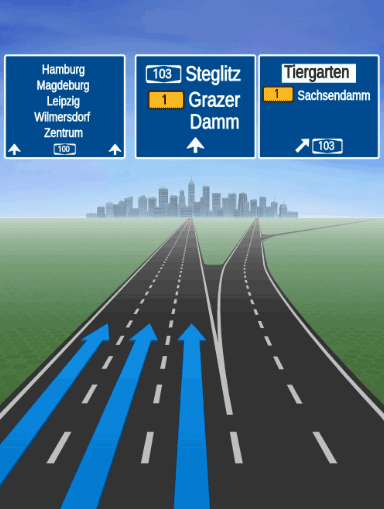
Note that the HERE SDK only delivers the SVG as string, so you need to use a third-party library to render the SVG string content, such as AndroidSVG. In order to use the correct fonts, the HERE SDK provides a free-to-use font package, see below.
Note
The data for junction views is optimized to occupy only around 2 MB, while the signpost data occupies only a few KB. However, it is recommended to use the available feature-configurations to preload the image data in advance, see our Optimization Guide for more details.
While you can use the 16:9 resolution in landscape format, you can use it also in portrait mode to not cover the full screen: however, since the SVG assets are quite detailed it is recommended to shown them fullscreen on a secondary display.
Note
For positional warners that notify on a singular object along a road, such as a safety camera, a road sign or a realistic view, there is always only one active warning happening at a time: this means that after each
AHEADevent always aPASSEDevent will follow to avoid cases where twoAHEADwarnings for a single object are active at the same time.
Take a look at the "NavigationWarners" example app on GitHub for a usage example.
Note
The
RealisticViewVectorImagefeature is released as a beta release, so there could be a few bugs and unexpected behaviors. Related APIs may change for new releases without a deprecation process.
Integrate a SVG renderer and HERE fonts
In order to render the signposts SVGs (see above), we recommend to use the AndroidSVG plugin. In addition, you need the required TTF fonts that are defined in the SVG content as font families. These fonts can be found in the HERE SDK distribution package.
- Integrate
AndroidSVGaccording to the instructions of the plugin vendor. Make sure to be okay with the license of the vendor. Modify the app'sbuild.gradlefile:
dependencies {
    implementation fileTree(dir: 'libs', include: ['*.aar', '*.jar'], exclude : ['*mock*.jar'])
    implementation 'androidx.appcompat:appcompat:1.3.1'
    implementation 'androidx.constraintlayout:constraintlayout:2.1.1'

    // Needed for realistic views rendering that are provided as SVG strings.
    implementation 'com.caverock:androidsvg-aar:1.4'
}-
Add the
import com.caverock.androidsvg.SVG;statement to your code and check if the integration of the plugin was successful. -
Extract the
SignpostFonts.ziparchive as found in the HERE SDK distribution package (the one that also contains the binaries for the HERE SDK). Copy the content to your project'sassetfolder:YourApp/app/src/main/assets. If not already existing, create the folder. -
Create a font resolver class to load the needed fonts with Android's
AssetManager. It is registered by the plugin in the next step. When the plugin needs to use a font, it will look it up via our resolver:
import android.content.res.AssetManager;
import android.graphics.Typeface;
import android.util.Log;

import com.caverock.androidsvg.SVGExternalFileResolver;

// Needed by AndroidSVG plugin to render the provided fonts.
// Note: It has to be registered for use with the plugin.
public class FontResolver extends SVGExternalFileResolver {

    final private AssetManager assetManager;

    public FontResolver(AssetManager assetManager) {
        super();
        this.assetManager = assetManager;
    }

    @Override
    public Typeface resolveFont(String fontFamily, int fontWeight, String fontStyle) {
        try {
            return Typeface.createFromAsset(assetManager, getFontPath(fontFamily));
        } catch (RuntimeException exception) {
            Log.e("FontResolver", exception.getMessage());
        }

        return null;
    }

    private String getFontPath(String fontFamily) {
        switch (fontFamily) {
            case "FiraGO-Map":
                return "FiraGO_Map/FiraGO-Map.ttf";
            case "SignText-Bold":
                return "SignText/SignText-Bold.ttf";
            case "SignTextNarrow-Bold":
                return "SignTextNarrow/SignTextNarrow-Bold.ttf";
            case "SourceHanSansSC-Normal":
                return "SourceHanSansSC/TTF/SourceHanSansSC-Normal.ttf";

            default:
                Log.e("FontResolver", "Font not found: " + fontFamily);
                return "";
        }
    }
}- Render the SVG content:
private void showRealisticViews(String signpostSvgImageContent, String junctionViewSvgImageContent) {
    ImageView signpostSvgImage = createImageView(signpostSvgImageContent);
    ImageView junctionViewSvgImage = createImageView(junctionViewSvgImageContent);

    if (signpostSvgImage == null || junctionViewSvgImage == null) {
        throw new RuntimeException("Unexpectedly, the SVG string could not be parsed.");
    }

    // Draw the signpost image on top of the junction view image.
    FrameLayout frameLayout = new FrameLayout(MainActivity.this);
    frameLayout.addView(junctionViewSvgImage);
    frameLayout.addView(signpostSvgImage);

    // Attention: In a production-app, be careful to not distract a driver.
    // It is recommended to show this on a secondary display that resets
    // automatically after some time or when the junction was passed.

    // ... now show the view.
}

private boolean registerFontResolver = true;

// Create a rendered bitmap from a raw SVG string.
// Requires com.caverock.androidsvg.SVG plugin.
@Nullable
private ImageView createImageView(String svgString) {
    // Register our font resolver with AndroidSVG.
    if (registerFontResolver) {
        registerFontResolver = false;
        SVG.registerExternalFileResolver(new FontResolver(getAssets()));
    }

    SVG svg;
    try {
        svg = SVG.getFromString(svgString);
    } catch (SVGParseException e) {
        e.printStackTrace();
        return null;
    }
    PictureDrawable pictureDrawable = new PictureDrawable(svg.renderToPicture());
    ImageView imageView = new ImageView(MainActivity.this);
    imageView.setImageDrawable(pictureDrawable);
    return imageView;
}Note
The rasterization of the SVG content has to happen on the app-side. Depending on the GPU of the mobile device, rendering a full-screen image can take a while. Consider to move this to a worker thread to not block the UI thread.
As of now, the following TTF fonts are provided by the HERE SDK. They are free-to-use in your own commercial and non-commercial projects. Be sure to check the license file included in the SignpostFonts.zip archive for each font:
- SourceHanSansSC-Normal.ttf: This font is mainly used in Macao, Taiwan, Hong Kong.
- FiraGO-Map.ttf: This font is mainly used in Israel.
- SignText-Bold.ttf: This font is mainly used in Vietnam.
- SignTextNarrow-Bold.ttf: This font is used in all countries, except for the above countries.
Note
If a font family that is specified in the SVG content is not found, then usually the SVG plugin of your choice will render a default font which may not look as expected.
Get environmental zone warnings
Environmental Zones, also known as Low Emission Zones (LEZ) or Clean Air Zones (CAZ), are designated areas within cities or regions where certain restrictions or regulations are implemented to improve air quality and reduce pollution. These zones aim to discourage or limit the entry of vehicles that emit high levels of pollutants, such as nitrogen dioxide (NO2) and particulate matter (PM).
The specific rules and regulations of environmental zones can vary between different cities and countries. Typically, vehicles that do not meet certain emission standards are either prohibited from entering the zone or required to pay a fee.
Environmental zone designations and their corresponding rules are typically determined by local or regional authorities in collaboration with transportation and environmental agencies.
The HERE SDK notifies on upcoming environmental zones through the unified WarnerEngine:
// Receive environmental zone warnings through the unified WarningListener
// Ensure WarningType.ENVIRONMENTAL_ZONE is included in warnerEngine.setEnabledWarnings()
// When an environmental zone warning is triggered:
warnerEngine.addWarningListener(new WarningListener() {
    @Override
    public void onWarnings(@NonNull List<WarningUpdate> warnings, @NonNull WarningsRegistry warningsRegistry) {
        for (WarningUpdate warningUpdate : warnings) {
            if (warningUpdate.warning.warningType == WarningType.ENVIRONMENTAL_ZONE) {
                EnvironmentalZoneWarning environmentalZoneWarning = warningsRegistry.getEnvironmentalZoneWarning(warningUpdate.warning);
                if (environmentalZoneWarning != null) {
                    if (warningUpdate.warningStatus == WarningStatus.AHEAD) {
                        Log.d(TAG, "An EnvironmentalZone ahead in: " + environmentalZoneWarning.distanceInMeters + " meters.");
                    } else if (warningUpdate.warningStatus == WarningStatus.REACHED) {
                        Log.d(TAG, "An EnvironmentalZone has been reached.");
                    } else if (warningUpdate.warningStatus == WarningStatus.PASSED) {
                        Log.d(TAG, "An EnvironmentalZone just passed.");
                    }

                    // The official name of the environmental zone (example: "Zone basse émission Bruxelles").
                    String name = environmentalZoneWarning.name;
                    // The description of the environmental zone for the default language.
                    String description = environmentalZoneWarning.description.getDefaultValue();
                    // The environmental zone ID - uniquely identifies the zone in the HERE map data.
                    String zoneID = environmentalZoneWarning.zoneId;
                    // The website of the environmental zone, if available - null otherwise.
                    String websiteUrl = environmentalZoneWarning.websiteUrl;
                    Log.d(TAG, "environmentalZoneWarning: description: " + description);
                    Log.d(TAG, "environmentalZoneWarning: name: " + name);
                    Log.d(TAG, "environmentalZoneWarning: zoneID: " + zoneID);
                    Log.d(TAG, "environmentalZoneWarning: websiteUrl: " + websiteUrl);
                }
            }
        }
    }
});
Use the unified WarnerEngine
Starting with version 4.26.0.0, the HERE SDK introduces the WarnerEngine as a unified API for receiving and configuring all navigation warnings. Instead of registering individual listeners for each warning type directly on the VisualNavigator, you can now use a single WarningListener on the WarnerEngine to handle all warnings in one place.
The WarnerEngine is accessible via visualNavigator.getWarnerEngine() and provides the following key benefits:
- Centralized configuration: All warning options (safety camera, road sign, school zone, border crossing, realistic view, truck restrictions, and more) are configured through a single
WarningOptionsobject. - Single listener: A unified
WarningListenerreceives all warning events, making it easier to manage and dispatch warnings. - Warning registry: The
WarningsRegistrylets you look up detailed typed warning metadata from the genericWarningobject. - Flexible warning management: You can dynamically add, remove, or replace enabled warning types at runtime.
Get the WarnerEngine
The WarnerEngine is obtained from the VisualNavigator. It is internally connected to the navigator and processes warnings based on the current navigation context:
WarnerEngine warnerEngine = visualNavigator.getWarnerEngine();val warnerEngine = visualNavigator.warnerEngineConfigure warning options
All warning-specific options are configured through a single WarningOptions object. This replaces the individual set...Options() calls on the VisualNavigator:
// Get the current warning options from the WarnerEngine.
WarningOptions warningOptions = warnerEngine.getWarningOptions();

// Configure safety camera warning options.
SafetyCameraWarningOptions safetyCameraWarningOptions = new SafetyCameraWarningOptions();
safetyCameraWarningOptions.enableTextNotification = true;
warningOptions.safetyCameraWarningOptions = safetyCameraWarningOptions;

// Configure road sign warning options.
RoadSignWarningOptions roadSignWarningOptions = new RoadSignWarningOptions();
roadSignWarningOptions.vehicleTypesFilter = Arrays.asList(RoadSignVehicleType.TRUCKS, RoadSignVehicleType.HEAVY_TRUCKS);
warningOptions.roadSignWarningOptions = roadSignWarningOptions;

// Configure school zone warning options.
SchoolZoneWarningOptions schoolZoneWarningOptions = new SchoolZoneWarningOptions();
schoolZoneWarningOptions.filterOutInactiveTimeDependentWarnings = true;
schoolZoneWarningOptions.warningDistanceInMeters = 150;
warningOptions.schoolZoneWarningOptions = schoolZoneWarningOptions;

// Configure border crossing warning options.
BorderCrossingWarningOptions borderCrossingWarningOptions = new BorderCrossingWarningOptions();
borderCrossingWarningOptions.filterOutStateBorderWarnings = true;
warningOptions.borderCrossingWarningOptions = borderCrossingWarningOptions;

// Configure realistic view warning options.
RealisticViewWarningOptions realisticViewWarningOptions = new RealisticViewWarningOptions();
realisticViewWarningOptions.aspectRatio = AspectRatio.ASPECT_RATIO_3_X_4;
realisticViewWarningOptions.darkTheme = false;
warningOptions.realisticViewWarningOptions = realisticViewWarningOptions;

// Apply all warning options at once.
warnerEngine.setWarningOptions(warningOptions);
// Get the current warning options from the WarnerEngine.
val warningOptions: WarningOptions = warnerEngine.warningOptions
// Configure safety camera warning options.
val safetyCameraWarningOptions = SafetyCameraWarningOptions()
safetyCameraWarningOptions.enableTextNotification = true
warningOptions.safetyCameraWarningOptions = safetyCameraWarningOptions
// Configure road sign warning options.
val roadSignWarningOptions = RoadSignWarningOptions()
roadSignWarningOptions.vehicleTypesFilter = listOf(RoadSignVehicleType.TRUCKS, RoadSignVehicleType.HEAVY_TRUCKS)
warningOptions.roadSignWarningOptions = roadSignWarningOptions
// Configure school zone warning options.
val schoolZoneWarningOptions = SchoolZoneWarningOptions()
schoolZoneWarningOptions.filterOutInactiveTimeDependentWarnings = true
schoolZoneWarningOptions.warningDistanceInMeters = 150
warningOptions.schoolZoneWarningOptions = schoolZoneWarningOptions
// Configure border crossing warning options.
val borderCrossingWarningOptions = BorderCrossingWarningOptions()
borderCrossingWarningOptions.filterOutStateBorderWarnings = true
warningOptions.borderCrossingWarningOptions = borderCrossingWarningOptions
// Configure realistic view warning options.
val realisticViewWarningOptions = RealisticViewWarningOptions()
realisticViewWarningOptions.aspectRatio = AspectRatio.ASPECT_RATIO_3_X_4
realisticViewWarningOptions.darkTheme = false
warningOptions.realisticViewWarningOptions = realisticViewWarningOptions
// Apply all warning options at once.
warnerEngine.warningOptions = warningOptionsConfigure notification distances
You can configure notification distances through the WarnerEngine in the same way as on the VisualNavigator:
WarningNotificationDistances roadSignDistances = warnerEngine.getWarningNotificationDistances(WarningType.ROAD_SIGN);
roadSignDistances.fastSpeedDistanceInMeters = 1600;
roadSignDistances.regularSpeedDistanceInMeters = 800;
roadSignDistances.slowSpeedDistanceInMeters = 600;
warnerEngine.setWarningNotificationDistances(WarningType.ROAD_SIGN, roadSignDistances);
val roadSignDistances = warnerEngine.getWarningNotificationDistances(WarningType.ROAD_SIGN)
roadSignDistances.fastSpeedDistanceInMeters = 1600
roadSignDistances.regularSpeedDistanceInMeters = 800
roadSignDistances.slowSpeedDistanceInMeters = 600
warnerEngine.setWarningNotificationDistances(WarningType.ROAD_SIGN, roadSignDistances)Enable specific warning types to receive events
setEnabledWarnings() is required to receive any warnings at all. Without this call, no warnings will be delivered to the WarningListener, regardless of its registration. Pass the list of WarningType values you want to receive. Any type not included will be silently suppressed:
List<WarningType> enabledWarnings = Arrays.asList(
        WarningType.SAFETY_CAMERA,
        WarningType.TRUCK_RESTRICTION,
        WarningType.ROAD_SIGN,
        WarningType.SCHOOL_ZONE,
        WarningType.REALISTIC_VIEW,
        WarningType.BORDER_CROSSING,
        WarningType.DANGER_ZONE,
        WarningType.RAILWAY_CROSSING,
        WarningType.LOW_SPEED_ZONE,
        WarningType.TRAFFIC_MERGE,
        WarningType.TOLL_STOP,
        WarningType.LANE_DECREASE
);
warnerEngine.setEnabledWarnings(enabledWarnings);
val enabledWarnings = listOf(
WarningType.SAFETY_CAMERA,
WarningType.TRUCK_RESTRICTION,
WarningType.ROAD_SIGN,
WarningType.SCHOOL_ZONE,
WarningType.REALISTIC_VIEW,
WarningType.BORDER_CROSSING,
WarningType.DANGER_ZONE,
WarningType.RAILWAY_CROSSING,
WarningType.LOW_SPEED_ZONE,
WarningType.TRAFFIC_MERGE,
WarningType.TOLL_STOP,
WarningType.LANE_DECREASE
)
warnerEngine.setEnabledWarnings(enabledWarnings)Register a WarningListener
Register a single WarningListener to receive all warning events. Each WarningUpdate contains a warning (with warningType and id), a warningStatus, and optional distances. Use the WarningsRegistry to look up detailed typed warning metadata:
WarningStatus values:
AHEAD: The warning is ahead of the vehicle.APPROACHING: The warning is ahead with the updated distance till theREACHEDnotification.INSIDE: The vehicle is inside the warned area.PASSED: The warning location has been passed.REACHED: The warning location has just been reached.
warnerEngine.addWarningListener(new WarningListener() {
    @Override
    public void onWarnings(@NonNull List<WarningUpdate> warnings, @NonNull WarningsRegistry warningsRegistry) {
        for (WarningUpdate warningUpdate : warnings) {
            switch (warningUpdate.warning.warningType) {
                case SAFETY_CAMERA:
                    SafetyCameraWarning safetyCameraWarning = warningsRegistry.getSafetyCameraWarning(warningUpdate.warning);
                    if (safetyCameraWarning != null) {
                        Log.d(TAG, "SafetyCameraWarning " + safetyCameraWarning.type.name()
                                + " warning status: " + warningUpdate.warningStatus.name());
                    }
                    break;
                case TRUCK_RESTRICTION:
                    TruckRestrictionWarning truckRestriction = warningsRegistry.getTruckRestrictionWarning(warningUpdate.warning);
                    if (truckRestriction != null) {
                        Log.d(TAG, "TruckRestrictionWarning warning status: " + warningUpdate.warningStatus.name());
                    }
                    break;
                case ROAD_SIGN:
                    RoadSignWarning roadSign = warningsRegistry.getRoadSignWarning(warningUpdate.warning);
                    if (roadSign != null) {
                        Log.d(TAG, "RoadSignWarning " + roadSign.type.name()
                                + " warning status: " + warningUpdate.warningStatus.name());
                    }
                    break;
                // Handle other warning types: SCHOOL_ZONE, BORDER_CROSSING, DANGER_ZONE,
                // LOW_SPEED_ZONE, REALISTIC_VIEW, TOLL_STOP, TRAFFIC_MERGE, etc.
                default:
                    Log.d(TAG, "Warning type: " + warningUpdate.warning.warningType.name()
                            + ", warning status: " + warningUpdate.warningStatus.name());
                    break;
            }
        }
    }
});
warnerEngine.addWarningListener(WarningListener { warnings, warningsRegistry ->
for (warningUpdate in warnings) {
when (warningUpdate.warning.warningType) {
WarningType.SAFETY_CAMERA -> {
val safetyCameraWarning = warningsRegistry.getSafetyCameraWarning(warningUpdate.warning)
if (safetyCameraWarning != null) {
Log.d(TAG, "SafetyCameraWarning ${safetyCameraWarning.type.name}" +
" warning status: ${warningUpdate.warningStatus.name}")
}
}
WarningType.TRUCK_RESTRICTION -> {
val truckRestriction = warningsRegistry.getTruckRestrictionWarning(warningUpdate.warning)
if (truckRestriction != null) {
Log.d(TAG, "TruckRestrictionWarning warning status: ${warningUpdate.warningStatus.name}")
}
}
WarningType.ROAD_SIGN -> {
val roadSign = warningsRegistry.getRoadSignWarning(warningUpdate.warning)
if (roadSign != null) {
Log.d(TAG, "RoadSignWarning ${roadSign.type.name}" +
" warning status: ${warningUpdate.warningStatus.name}")
}
}
// Handle other warning types: SCHOOL_ZONE, BORDER_CROSSING, DANGER_ZONE,
// LOW_SPEED_ZONE, REALISTIC_VIEW, TOLL_STOP, TRAFFIC_MERGE, etc.
else -> Log.d(TAG, "Warning type: ${warningUpdate.warning.warningType.name}" +
", warning status: ${warningUpdate.warningStatus.name}")
}
}
})Finalize warnings
When guidance is stopped, you can call finalizeGivenWarnings() to mark all active warnings as PASSED and notify all registered listeners before clearing the internal state:
warnerEngine.finalizeGivenWarnings();warnerEngine.finalizeGivenWarnings()Note
- The
WarnerEnginenow covers warning events. Speed limit updates and overspeed notifications are documented in Get speed limit updates and Get overspeed warnings.- A complete example of the
WarnerEngineusage can be found in theWarnerEngineExampleclass of the "NavigationWarners" example app.
Add a custom warner
Implement a CustomWarningProvider to deliver custom warning types not covered by the built-in warning system. Custom warnings depend on SegmentDataLoader: The WarnerEngine invokes your provider for the traversed segments, and your provider can only inspect the segment data that was requested when the provider was registered.
Create a custom warning provider for speed bumps
In this example, the provider reads SegmentSpanData.getSpecialSpeedSituations(). According to the API Reference, this data is loaded only when SegmentDataLoaderOptions.loadSpecialSpeedSituations is enabled.
You must call setEnabledWarnings(...) to receive any warnings. Without this call, the WarnerEngine will not deliver any warnings to your WarningListener. Include WarningType.CUSTOM in the list so the engine knows it should invoke registered custom providers like the speed-bump provider.
Register custom providers with addCustomWarningProvider(...) before calling setEnabledWarnings(...). See the dedicated registerCustomProvider() method called from setupWarnerEngine(visualNavigator), as shown in the registration snippet below.
Inside the WarningListener you receive generic Warning objects. For WarningType.CUSTOM entries, call warningsRegistry.getCustomWarning(warning) to obtain the CustomWarning (and its payload). Always verify customWarning.customWarningType matches your provider ID (here SpeedBumpWarningProvider.SPEED_BUMP_WARNING_ID) before decoding the payload with the helper accessors.
public class SpeedBumpWarningProvider implements CustomWarningProvider {
    public static final int SPEED_BUMP_WARNING_ID = 1000;
    private static final String PAYLOAD_SEGMENT_REFERENCE = "segmentReference";

    @Override
    public int getCustomWarningType() {
        return SPEED_BUMP_WARNING_ID;
    }

    // Called by the WarnerEngine for EVERY segment the vehicle passes through.
    // The WarnerEngine uses startOffsetInMeters to compute distance and determine AHEAD/PASSED.
    @Override
    public List<CustomWarning> getWarnings(SegmentData currentSegment, SegmentData previousSegment) {
        List<CustomWarning> result = new ArrayList<>();
        List<SegmentSpanData> spans = currentSegment.getSpans();
        if (spans == null) return result;

        for (SegmentSpanData span : spans) {
            List<SegmentSpecialSpeedSituation> specialSituations = span.getSpecialSpeedSituations();
            if (specialSituations == null) continue;

            for (SegmentSpecialSpeedSituation situation : specialSituations) {
                if (situation.specialSpeedType == SpecialSpeedType.SPEED_BUMPS_PRESENT) {
                    // The position of the speed bump comes directly from SegmentData.
                    int spanStartOffsetMeters = span.getStartOffsetInMeters();

                    Metadata payload = new Metadata();
                    payload.setString(PAYLOAD_SEGMENT_REFERENCE, currentSegment.getSegmentReference().toString());

                    CustomWarning customWarning = new CustomWarning();
                    customWarning.customWarningType = SPEED_BUMP_WARNING_ID;
                    // startOffsetInMeters tells the WarnerEngine where in the segment the bump is.
                    customWarning.startOffsetInMeters = spanStartOffsetMeters;
                    customWarning.endOffsetInMeters = null;
                    customWarning.payload = payload;
                    result.add(customWarning);
                }
            }
        }
        return result;
    }

    // Helper for decoding payload in warning handler
    public String getSegmentReference(CustomWarning customWarning) {
        if (customWarning.payload != null) {
            return customWarning.payload.getString(PAYLOAD_SEGMENT_REFERENCE);
        }
        return null;
    }
}
class SpeedBumpWarningProvider : CustomWarningProvider {
companion object {
const val SPEED_BUMP_WARNING_ID: Int = 1000
private const val PAYLOAD_SEGMENT_REFERENCE = "segmentReference"
}
override fun getCustomWarningType(): Int = SPEED_BUMP_WARNING_ID
// Called by the WarnerEngine for EVERY segment the vehicle passes through.
// The WarnerEngine uses startOffsetInMeters to compute distance and determine AHEAD/PASSED.
override fun getWarnings(currentSegment: SegmentData, previousSegment: SegmentData?): List<CustomWarning> {
val result: MutableList<CustomWarning> = ArrayList()
val spans = currentSegment.spans
for (span in spans) {
val specialSituations = span.specialSpeedSituations ?: continue
for (situation in specialSituations) {
if (situation.specialSpeedType == SpecialSpeedType.SPEED_BUMPS_PRESENT) {
// The position of the speed bump comes directly from SegmentData.
val spanStartOffsetMeters = span.startOffsetInMeters
val payload = Metadata()
payload.setString(PAYLOAD_SEGMENT_REFERENCE, currentSegment.segmentReference.toString())
val customWarning = CustomWarning()
customWarning.customWarningType = SPEED_BUMP_WARNING_ID
// startOffsetInMeters tells the WarnerEngine where in the segment the bump is.
customWarning.startOffsetInMeters = spanStartOffsetMeters.toDouble()
customWarning.endOffsetInMeters = null
customWarning.payload = payload
result.add(customWarning)
}
}
}
return result
}
// Helper for decoding payload in warning handler
fun getSegmentReference(customWarning: CustomWarning): String? {
return customWarning.payload?.getString(PAYLOAD_SEGMENT_REFERENCE)
}
}To deliver your custom warnings, register the provider with the WarnerEngine, enable WarningType.CUSTOM in the enabled warnings list, and handle the custom warnings in your WarningListener.
// Register the provider in a dedicated method, called from setupWarnerEngine() before configureEnabledWarnings().
private void registerCustomProvider() {
    SegmentDataLoaderOptions speedBumpOptions = new SegmentDataLoaderOptions();
    // Ensure segment loader includes special speed situations (required for speed bumps).
    speedBumpOptions.loadSpecialSpeedSituations = true;
    warnerEngine.addCustomWarningProvider(speedBumpWarningProvider, speedBumpOptions);
}

// Make sure CUSTOM warnings are enabled so the engine will poll custom providers.
List<WarningType> enabledWarnings = Arrays.asList(
    WarningType.SAFETY_CAMERA,
    // ... other built-in types ...
    WarningType.CUSTOM
);
warnerEngine.setEnabledWarnings(enabledWarnings);

// In your WarningListener, decode the custom warning using WarningsRegistry.getCustomWarning().
warnerEngine.addWarningListener(new WarningListener() {
    @Override
    public void onWarnings(@NonNull List<WarningUpdate> warnings, @NonNull WarningsRegistry warningsRegistry) {
        for (WarningUpdate warningUpdate : warnings) {
            Warning warning = warningUpdate.warning;
            if (warning.warningType == WarningType.CUSTOM) {
                CustomWarning customWarning = warningsRegistry.getCustomWarning(warning);
                if (customWarning != null && customWarning.customWarningType == SpeedBumpWarningProvider.SPEED_BUMP_WARNING_ID) {
                    String segRef = speedBumpWarningProvider.getSegmentReference(customWarning);
                    // The WarnerEngine provides warningStatus (AHEAD/PASSED) based on startOffsetInMeters.
                    Log.d(TAG, "Speed bump " + (warningUpdate.warningStatus == WarningStatus.AHEAD ? "ahead" : "passed")
                            + ". segmentRef=" + segRef);
                }
            }
        }
    }
});
// Register the provider in a dedicated method, called from setupWarnerEngine() before configureEnabledWarnings().
private fun registerCustomProvider() {
val speedBumpOptions = SegmentDataLoaderOptions()
// Ensure segment loader includes special speed situations (required for speed bumps).
speedBumpOptions.loadSpecialSpeedSituations = true
warnerEngine.addCustomWarningProvider(speedBumpWarningProvider, speedBumpOptions)
}
// Enable CUSTOM warnings so the engine will poll custom providers.
val enabledWarnings = listOf(
WarningType.SAFETY_CAMERA,
// ... other built-in types ...
WarningType.CUSTOM
)
warnerEngine.setEnabledWarnings(enabledWarnings)
// Add a WarningListener and decode custom warnings.
warnerEngine.addWarningListener(WarningListener { warnings, warningsRegistry ->
for (warningUpdate in warnings) {
val warning = warningUpdate.warning
if (warning.warningType == WarningType.CUSTOM) {
val cw = warningsRegistry.getCustomWarning(warning)
if (cw != null && cw.customWarningType == SpeedBumpWarningProvider.SPEED_BUMP_WARNING_ID) {
val segRef = speedBumpWarningProvider.getSegmentReference(cw)
// The WarnerEngine provides warningStatus (AHEAD/PASSED) based on startOffsetInMeters.
Log.d(TAG, "Speed bump " + (if (warningUpdate.warningStatus == WarningStatus.AHEAD) "ahead" else "passed")
+ ". segmentRef=" + segRef)
}
}
}
})When WarningType.CUSTOM warnings arrive in your WarningListener, call warningsRegistry.getCustomWarning(warning) to retrieve the detailed CustomWarning object, verify its customWarningType matches your provider's ID, and extract the segment reference from the payload. The WarnerEngine determines warningStatus (AHEAD/PASSED) automatically based on the startOffsetInMeters you reported from SegmentData.
Note
- An example of the custom warner usage can be found in the
SpeedBumpWarningProviderclass of the NavigationWarners example app.
Updated 25 days ago