

Navigate trucks
The HERE SDK supports truck routing and guidance with a variety of features. For example, during navigation you can use the WarnerEngine to get notified on truck restrictions ahead, such as narrow tunnels. Other examples of possible restrictions can be bridges that are not high enough to be passed by a bigger truck or roads where the weight of the truck is beyond the permissible weight of the road.
See the following code snippet:
// Setup WarnerEngine to receive truck restriction warnings. Called whenever there is a change.
private var truckRestrictionWarnerDelegate: TruckRestrictionWarnerDelegate?

warnerEngine.setEnabledWarnings([.truckRestriction])
truckRestrictionWarnerDelegate = TruckRestrictionWarnerDelegate(self)
warnerEngine.addWarningDelegate(truckRestrictionWarnerDelegate!)

private class TruckRestrictionWarnerDelegate: WarningDelegate {
    private let truckGuidanceExample: TruckGuidanceExample
    init(_ truckGuidanceExample: TruckGuidanceExample) {
        self.truckGuidanceExample = truckGuidanceExample
    }

    func onWarnings(warnings: [WarningUpdate], warningsRegistry: WarningsRegistry) {
        for warningUpdate in warnings {
            if warningUpdate.warning.warningType == .truckRestriction {
                truckGuidanceExample.handleTruckRestrictionWarning(warningUpdate, warningsRegistry: warningsRegistry)
            }
        }
    }
}

private func handleTruckRestrictionWarning(_ warningUpdate: WarningUpdate, warningsRegistry: WarningsRegistry) {
    guard let truckRestrictionWarning = warningsRegistry.getTruckRestrictionWarning(warning: warningUpdate.warning) else {
        print("TruckRestrictionWarning: No detailed data available.")
        return
    }
        if warningUpdate.warningStatus == .ahead || warningUpdate.warningStatus == .approaching {
            print("TruckRestrictionWarning ahead in \(warningUpdate.distanceTillStartInMeters) meters.")
            if let timeRule = truckRestrictionWarning.timeRule {
              if !timeRule.appliesTo(dateTime: Date()) {
                // For example, during a specific time period of a day, some truck restriction warnings do not apply.
                // If truckRestrictionWarning.timeRule is nil, the warning applies at anytime.
                print("Note that this truck restriction warning currently does not apply.")
              }
            }
        } else if warningUpdate.warningStatus == .reached {
            print("A restriction has been reached.")
        } else if warningUpdate.warningStatus == .passed {
            // If not preceded by a "reached"-notification, this restriction was valid only for the passed location.
            print("A restriction was just passed.")
        }

        // One of the following restrictions applies, if more restrictions apply at the same time,
        // they are part of another TruckRestrictionWarning element contained in the list.
        if truckRestrictionWarning.weightRestriction != nil {
            let type = truckRestrictionWarning.weightRestriction!.type
            let value = truckRestrictionWarning.weightRestriction!.valueInKilograms
            print("TruckRestriction for weight (kg): \(type): \(value)")
        } else if truckRestrictionWarning.dimensionRestriction != nil {
            // Can be either a length, width or height restriction of the truck. For example, a height
            // restriction can apply for a tunnel. Other possible restrictions are delivered in
            // separate TruckRestrictionWarning objects contained in the list, if any.
            let type = truckRestrictionWarning.dimensionRestriction!.type
            let value = truckRestrictionWarning.dimensionRestriction!.valueInCentimeters
            print("TruckRestriction for dimension: \(type): \(value)")
        } else {
            print("TruckRestriction: General restriction - no trucks allowed.")
        }
    }
}
The WarningStatus.reached notifies when a truck restriction has been reached. The event is followed by passed, when the restriction has been passed. If the restriction has no length, then reached is skipped and only a passed event is sent. Note that the ahead and approaching events are always sent first.
Note that a restriction for each distance type is exactly given only one time. If you want to continuously notify a driver with updated distance information, you can do so, by tracking the RouteProgress which includes a frequent distance update to the destination.
If all restrictions are nil, then a general truck restriction applies.
When comparing the restriction warnings with the MapFeatures.vehicleRestrictions layer on the map, note that some restrictions may be valid only for one direction of a road.
Note
When guidance is stopped by setting a nil route or a new route, then any restriction that was announced with an
aheadnotification, will instantly result in apassedevent to clear pending restriction warnings. While following a route - any restriction that lies not on the route is filtered out, but as soon as a driver deviates far enough (more than 15 meters) from a route, then supported restrictions ahead on the current road will lead again to restriction warnings.
The notification thresholds for truck restrictions differ slightly from other warners, find the thresholds listed here.
The TruckRestrictionWarning event is based on the map data of the road network ahead. It delivers restrictions regardless of the currently set TransportMode.
Note
When calculating a route, you can specify
RoutingOptionswithTransportMode.truckincluding aVehicleSpecification. This may have an influence on the resultingRoute. However, it does not influence theTruckRestrictionWarningevent: most restrictions found in the map data ahead are forwarded. Therefore, it may make sense for an application to filter out restriction warnings that are not relevant for the current vehicle. Note that this event is also delivering events in tracking mode when there is no route to follow.
More details on truck routing are given in the routing section. For example, there you can find how to calculate a route specifically for trucks. In general, if a route contains the Truck transportation type, it is optimized for trucks.
In addition, you can specify several avoidance options, for example, to exclude certain city areas. All this can be specified before the route gets calculated and passed into the Navigator or VisualNavigator.
Worth to mention are also the following features:
- You can specify vehicle restrictions such as truck dimensions or if a truck is carrying hazardous goods via
RoutingOptionswithTransportMode.truckthat can contain aVehicleSpecificationandHazardousMateriallist. With this information you can shape the truck route. To get notified on upcoming truck restrictions, listen to theTruckRestrictionWarningevent as shown above. - You can listen for certain
RoadAttributesas explained above. - When transport mode is set to
truck,SpeedLimitevents will indicate the commercial vehicle regulated (CVR) speed limits that may be lower than for cars. Consider to specify also theVehicleSpecificationinside theTransportSpecificationused byRoutingOptionswhen calculating the route. For tracking mode, setnavigator.trackingTransportSpecificationwith a truckTransportSpecificationthat includes aVehicleSpecification. By default, for tracking,caris assumed: Make sure to specify other vehicle properties like weight according to your truck. - Worth to mention,
grossWeightInKilogramsandweightInKilogramswill affect CVR speed limits, as well as route restrictions and the estimated arrival time. Without setting properVehicleSpecification, routes and notifications may be inappropriate. - You can exclude emission zones to not pollute the air in sensible inner city areas via
AvoidanceOptions. With this you can also avoid certainRoadFeatureslike tunnels. Those can be set viaRoutingOptionsand are then excluded from route calculation. - You can enable a map layer scheme that shows safety camera icons on the map:
MapScene.Layers.safetyCameras. Note: This layer is also suitable for cars. - You can enable a map layer scheme that is optimized to show truck-specific information on the map:
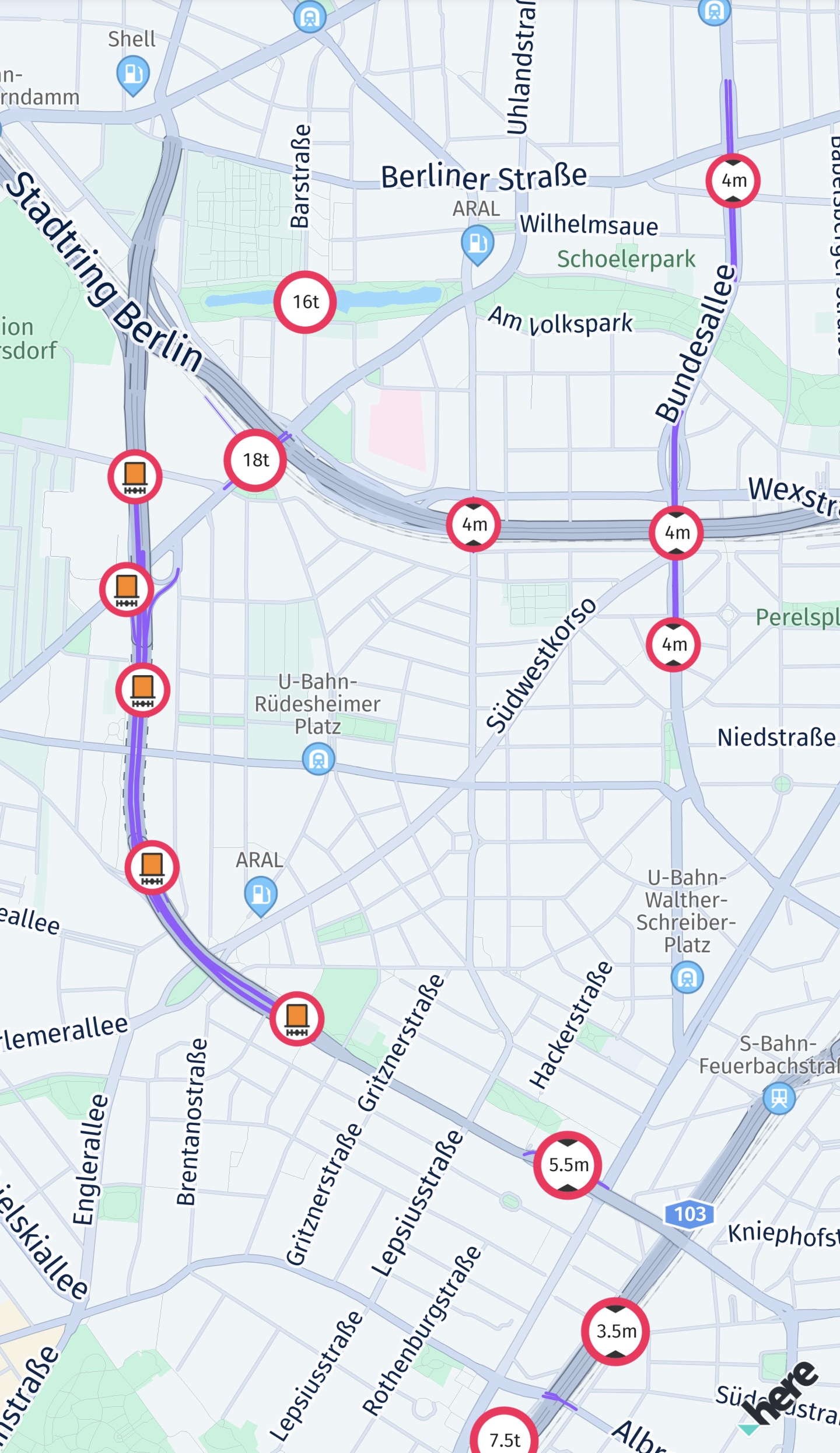
MapScene.Layers.vehicleRestrictions. It offers severalMapFeatureModes, for example, to highlight active and inactive restrictions as purple lines on an affected road - a gray line or a gray icon means that the restriction is inactive. If a road is crossing such a purple line - and the road itself is not indicated as purple - then this restriction does not apply on the current road. Note that an icon does not necessarily indicate an exact location: For example, in case of a restricted road an icon may be placed centered on the restricted road - or, if the restriction is longer, the icon may be repeated several times for the same restriction along one or several roads. The icon itself is localized per country and represents the type of restriction. For most restrictions, the location and the type of the restriction is also indicated through theTruckRestrictionWarningevent (as shown above). - Use
TruckAmenitieswhich contains information on showers or rest rooms in theDetailsof aPlace. Search along a route corridor and check if a place contains truck amenities. For online use, obtainingTruckAmenitiesrequires enabling the closed-alpha feature by callingsearchEngine.setCustomOption()with"show"asnameand"truck"asvalue. Additionally, an extra license is required. For use with theOfflineSearchEngine(if available for your license), no license is required. Please contact us to receive online access. If your credentials are not enabled, aSearchError.forbiddenerror will indicate the missing license.
Updated 13 days ago