
Get lane assistance
The HERE SDK provides lane recommendations to help a driver to stay on the route. When no Route is set, no lane assistance is provided.
NoteThis API can be used to visualize the provided information on the screen, for example, to highlight the lanes to take. It does not provide localized text snippets that can be used for TTS engines.
Two independent listeners can be set to obtain the following events before reaching a junction (including intersections and roundabouts):
ManeuverViewLaneAssistance: Provides a list ofLanerecommendations if the next route maneuver takes place at a junction - regardless if the junction is considered complex or not.JunctionViewLaneAssistance: Provides a list ofLanerecommendations only for complex junctions - regardless if a maneuver takes place at the junction or not. This event is not delivered for non-complex junctions.CurrentSituationLaneView: Provides lane-based information on the access, type and direction of the lanes of the current road a user is driving on. This event is not limited to junctions, but includes junctions as well.
A complex junction is defined as follows:
- The junction has at least a bifurcation.
- The junction has at least two lanes whose directions do not follow the current route.
Both events can be delivered for the same junction or for different ones. A Lane instance contains information such as the available lanes on the current road, their direction category and whether the lane is recommended or not.
Both events are fired 300 meters ahead of a junction for non-highways and 1300 meters ahead of a junction on highways. However, for now the distance to the next complex junction is not exposed as part of the JunctionViewLaneAssistance event. For ManeuverViewLaneAssistance, the distance is available as part of the distance to the next maneuver which is available via the RouteProgress event.
Each lane can lead to multiple directions stored in LaneDirection:
HARD_LEFT: A lane direction that goes hard left around 135 degrees.HARD_RIGHT: A lane direction that goes hard right around 135 degrees.MERGE_LANES: A lane direction that merges with the lane an other lane.MERGE_LEFT: A lane direction that merges with the lane one the left.MERGE_RIGHT: A lane direction that merges with the lane one the right.QUITE_LEFT: A lane direction that goes quite left around 90 degrees.QUITE_RIGHT: A lane direction that goes quite right around 90 degrees.SECOND_LEFT: A lane direction that leads to the second turn to the left.SECOND_RIGHT: A lane direction that leads to the second turn to the right.SLIGHT_LEFT: A lane direction that goes slightly left around 45 degrees.SLIGHT_RIGHT: A lane direction that goes slightly right around 45 degrees.STRAIGHT: A lane direction that goes straight up.U_TURN_LEFT: A lane direction that makes a left u-turn 180 degrees.U_TURN_RIGHT: A lane direction that makes a right u-turn 180 degrees.
Note that all LaneDirection are possible at the same time. Theoretically, all enums can be valid for a given Lane, when the lane leads to all multiple directions. Most lanes, however, lead to one or two directions, for example, QUITE_LEFT and QUITE_RIGHT is returned when the lane splits up into two separate lanes.
To get all available LaneDirection possible for a given lane, use Lane.directions. While, Lane.directionsOnRoute returns the lane directions that are on the route. Following those directions keeps the driver on the route. See code example below:
// You can use this information to visualize all directions of a lane with a set of image overlays.
for (LaneDirection laneDirection: lane.directions) {
    boolean isLaneDirectionOnRoute = isLaneDirectionOnRoute(lane, laneDirection);
    Log.d(TAG, "LaneDirection for this lane: " + laneDirection.name());
    Log.d(TAG, "This LaneDirection is on the route: " + isLaneDirectionOnRoute);
}
// You can use this information to visualize all directions of a lane with a set of image overlays.
for (laneDirection in lane.directions) {
    val isLaneDirectionOnRoute = isLaneDirectionOnRoute(lane, laneDirection)
    Log.d(TAG, "LaneDirection for this lane: " + laneDirection.name)
    Log.d(TAG, "This LaneDirection is on the route: $isLaneDirectionOnRoute")
}
To give visual feedback for the driver, it is recommended to create one transparent image asset for each of the nine possible directions. Each image can then be used as an overlay and several images can be blended into one lane pictogram that indicates the possible directions per lane on a road.
NoteFor visualization, you can use the open source icons provided for lane assistance from the HERE Icon Library.
Most importantly, while the vehicle is traveling along the route, you can tell the driver which lane to take: this information is stored in the Lane.recommendationState and it is recommended to highlight the pictogram of the recommended lane.
Note that the lane assistance information does not contain the lanes of the contraflow, instead it only describes the lanes of the current driving direction. The list of lanes is always ordered from the leftmost lane (index 0) to the rightmost lane (last index) of the road.
This way, lane assistance works the same for both, left-hand and right-hand driving countries.
NoteCheck
roadAttributes.isRightDrivingSideto know if you are in a left-hand driving country. Maneuver instructions and other notifications automatically adapt to the country. For lane assistance, the code will work the same, regardless of the country, as the list of lanes is always ordered from left - starting with index 0 - to right.
It is recommended to show ManeuverViewLaneAssistance events immediately when the event is received. The event is synchronized with the EventTextListener.
Lane information provided by JunctionViewLaneAssistance events is recommended to be shown in a separate UI area indicating that there is an upcoming complex junction that needs attention.
Get lane recommendations for maneuvers at a junction with ManeuverViewLaneAssistance
The ManeuverViewLaneAssistance event provides the recommended lanes at a junction where a maneuver takes place. On the map this maneuver is visualized by a maneuver arrow when the VisualNavigator is rendering the MapView. The location of the junction can be retrieved from the next Maneuver that is available as part of the RouteProgress event.
You can attach a ManeuverViewLaneAssistanceListener to the Navigator or VisualNavigator. The resulting ManeuverViewLaneAssistance object contains information about the available lanes on the current road and information such as their directions.
The following code snippet shows how to retrieve the information which lanes to take:
// Notifies which lane(s) lead to the next (next) maneuvers.
visualNavigator.setManeuverViewLaneAssistanceListener(new ManeuverViewLaneAssistanceListener() {
    @Override
    public void onLaneAssistanceUpdated(@NonNull ManeuverViewLaneAssistance maneuverViewLaneAssistance) {
        // This lane list is guaranteed to be non-empty.
        List<Lane> lanes = maneuverViewLaneAssistance.lanesForNextManeuver;
        logLaneRecommendations(lanes);

        List<Lane> nextLanes = maneuverViewLaneAssistance.lanesForNextNextManeuver;
        if (!nextLanes.isEmpty()) {
            Log.d(TAG, "Attention, the next next maneuver is very close.");
            Log.d(TAG, "Please take the following lane(s) after the next maneuver: ");
            logLaneRecommendations(nextLanes);
        }
    }
});

...

private void logLaneRecommendations(List<Lane> lanes) {
    // The lane at index 0 is the leftmost lane adjacent to the middle of the road.
    // The lane at the last index is the rightmost lane.
    int laneNumber = 0;
    for (Lane lane : lanes) {
        // This state is only possible if maneuverViewLaneAssistance.lanesForNextNextManeuver is not empty.
        // For example, when two lanes go left, this lanes leads only to the next maneuver,
        // but not to the maneuver after the next maneuver, while the highly recommended lane also leads
        // to this next next maneuver.
        if (lane.recommendationState == LaneRecommendationState.RECOMMENDED) {
            Log.d(TAG,"Lane " + laneNumber + " leads to next maneuver, but not to the next next maneuver.");
        }

        // If laneAssistance.lanesForNextNextManeuver is not empty, this lane leads also to the
        // maneuver after the next maneuver.
        if (lane.recommendationState == LaneRecommendationState.HIGHLY_RECOMMENDED) {
            Log.d(TAG,"Lane " + laneNumber + " leads to next maneuver and eventually to the next next maneuver.");
        }

        if (lane.recommendationState == LaneRecommendationState.NOT_RECOMMENDED) {
            Log.d(TAG,"Do not take lane " + laneNumber + " to follow the route.");
        }

        logLaneDetails(laneNumber, lane);

        laneNumber++;
    }
}

private void logLaneDetails(int laneNumber, Lane lane) {
    // All directions can be true or false at the same time.
    // The possible lane directions are valid independent of a route.
    // If a lane leads to multiple directions and is recommended, then all directions lead to
    // the next maneuver.
    // You can use this information like in a bitmask to visualize the possible directions
    // with a set of image overlays.
    LaneDirectionCategory laneDirectionCategory = lane.directionCategory;
    Log.d(TAG,"Directions for lane " + laneNumber);
    Log.d(TAG,"laneDirectionCategory.straight: " + laneDirectionCategory.straight);
    Log.d(TAG,"laneDirectionCategory.slightlyLeft: " + laneDirectionCategory.slightlyLeft);
    Log.d(TAG,"laneDirectionCategory.quiteLeft: " + laneDirectionCategory.quiteLeft);
    Log.d(TAG,"laneDirectionCategory.hardLeft: " + laneDirectionCategory.hardLeft);
    Log.d(TAG,"laneDirectionCategory.uTurnLeft: " + laneDirectionCategory.uTurnLeft);
    Log.d(TAG,"laneDirectionCategory.slightlyRight: " + laneDirectionCategory.slightlyRight);
    Log.d(TAG,"laneDirectionCategory.quiteRight: " + laneDirectionCategory.quiteRight);
    Log.d(TAG,"laneDirectionCategory.hardRight: " + laneDirectionCategory.hardRight);
    Log.d(TAG,"laneDirectionCategory.uTurnRight: " + laneDirectionCategory.uTurnRight);

    // More information on each lane is available in these bitmasks (boolean):
    // LaneType provides lane properties such as if parking is allowed.
    LaneType laneType = lane.type;
    // LaneAccess provides which vehicle type(s) are allowed to access this lane.
    LaneAccess laneAccess = lane.access;
}
// Notifies which lane(s) lead to the next (next) maneuvers.
visualNavigator.maneuverViewLaneAssistanceListener =
    ManeuverViewLaneAssistanceListener { maneuverViewLaneAssistance: ManeuverViewLaneAssistance ->
        // This lane list is guaranteed to be non-empty.
        val lanes = maneuverViewLaneAssistance.lanesForNextManeuver
        logLaneRecommendations(lanes)

        val nextLanes = maneuverViewLaneAssistance.lanesForNextNextManeuver
        if (nextLanes.isNotEmpty()) {
            Log.d(TAG, "Attention, the next next maneuver is very close.")
            Log.d(TAG, "Please take the following lane(s) after the next maneuver: ")
            logLaneRecommendations(nextLanes)
        }
    }

...

private fun logLaneRecommendations(lanes: List<Lane>) {
    // The lane at index 0 is the leftmost lane adjacent to the middle of the road.
    // The lane at the last index is the rightmost lane.
    for ((laneNumber, lane) in lanes.withIndex()) {
        // This state is only possible if maneuverViewLaneAssistance.lanesForNextNextManeuver is not empty.
        // For example, when two lanes go left, this lanes leads only to the next maneuver,
        // but not to the maneuver after the next maneuver, while the highly recommended lane also leads
        // to this next next maneuver.
        if (lane.recommendationState == LaneRecommendationState.RECOMMENDED) {
            Log.d(
                TAG,
                "Lane $laneNumber leads to next maneuver, but not to the next next maneuver."
            )
        }

        // If laneAssistance.lanesForNextNextManeuver is not empty, this lane leads also to the
        // maneuver after the next maneuver.
        if (lane.recommendationState == LaneRecommendationState.HIGHLY_RECOMMENDED) {
            Log.d(
                TAG,
                "Lane $laneNumber leads to next maneuver and eventually to the next next maneuver."
            )
        }

        if (lane.recommendationState == LaneRecommendationState.NOT_RECOMMENDED) {
            Log.d(
                TAG,
                "Do not take lane $laneNumber to follow the route."
            )
        }

        logLaneDetails(laneNumber, lane)

    }
}

private fun logLaneDetails(laneNumber: Int, lane: Lane) {
    Log.d(TAG, "Directions for lane $laneNumber")
    // The possible lane directions are valid independent of a route.
    // If a lane leads to multiple directions and is recommended, then all directions lead to
    // the next maneuver.
    // You can use this information to visualize all directions of a lane with a set of image overlays.
    for (laneDirection in lane.directions) {
        val isLaneDirectionOnRoute = isLaneDirectionOnRoute(lane, laneDirection)
        Log.d(TAG, "LaneDirection for this lane: " + laneDirection.name)
        Log.d(TAG, "This LaneDirection is on the route: $isLaneDirectionOnRoute")
    }

    // More information on each lane is available in these bitmasks (boolean):
    // LaneType provides lane properties such as if parking is allowed or is acceleration allowed or is express lane and many more.
    val laneType = lane.type

    // LaneAccess provides which vehicle type(s) are allowed to access this lane.
    val laneAccess = lane.access
    logLaneAccess(laneNumber, laneAccess)

    // LaneMarkings indicate the visual style of dividers between lanes as visible on a road.
    val laneMarkings = lane.laneMarkings
    logLaneMarkings(laneMarkings)
}
The maneuverViewLaneAssistance.lanesForNextNextManeuver is normally an empty list, but there may be cases when two maneuvers are very close. In such cases, this list holds the information for the lanes to take immediately after the current maneuver is reached.
Until the next maneuver is reached, the information about the lanes to take is valid. It should be hidden once the next maneuver is reached or replaced by the information contained in any new ManeuverViewLaneAssistance event:
// See above code snippet for the RouteProgressListener.
if previousManeuverIndex != nextManeuverIndex {
    // A new maneuver: Remove stale lane assistance info.
}
// See above code snippet for the RouteProgressListener.
if previousManeuverIndex != nextManeuverIndex {
    // A new maneuver: Remove stale lane assistance info.
}
View the code for the RouteProgressListener above and you can find how to get the nextManeuverIndex, which will tell you when a new maneuver has to be taken.
Get lane recommendations for complex junctions with JunctionViewLaneAssistance
In addition to ManeuverViewLaneAssistance (see above), the HERE SDK provides JunctionViewLaneAssistance events that notify on the available lanes at complex junctions - even if there is no actual maneuver happening at that junction. These notifications work in parallel to ManeuverViewLaneAssistance, but will only fire before reaching a complex junction (see above).
In comparison to ManeuverViewLaneAssistance, the JunctionViewLaneAssistance event can recommend more lanes to safely pass a complex junction - but not every of those lanes may lead to the next maneuver after passing the junction.
Unlike ManeuverViewLaneAssistance, you can detect when the junction has been passed by checking the list if it is empty or not:
// notifies which lane(s) allow to follow the route.
visualNavigator.setJunctionViewLaneAssistanceListener(new JunctionViewLaneAssistanceListener() {
    @Override
    public void onLaneAssistanceUpdated(@NonNull JunctionViewLaneAssistance junctionViewLaneAssistance) {
        List<Lane> lanes = junctionViewLaneAssistance.lanesForNextJunction;
        if (lanes.isEmpty()) {
            Log.d(TAG, "You have passed the complex junction.");
        } else {
            Log.d(TAG, "Attention, a complex junction is ahead.");
            logLaneRecommendations(lanes);
        }
    }
});
// Notifies which lane(s) allow to follow the route.
visualNavigator.junctionViewLaneAssistanceListener =
    JunctionViewLaneAssistanceListener { junctionViewLaneAssistance: JunctionViewLaneAssistance ->
    val lanes = junctionViewLaneAssistance.lanesForNextJunction
    if (lanes.isEmpty()) {
        Log.d(TAG, "You have passed the complex junction.")
    } else {
        Log.d(TAG, "Attention, a complex junction is ahead.")
        logLaneRecommendations(lanes)
    }
}
When the complex junction has been passed, it is recommended to update the UI of your app to remove the lane information. JunctionViewLaneAssistance events can be considered as an additional hint which lanes to take at complex junctions - especially, when no maneuver takes places at such junctions, because this information is not provided with the ManeuverViewLaneAssistance event.
Keep in mind, that without a route to follow, you will not get any lane assistance related events.
Get lane assistance for the current lane
The CurrentSituationLaneAssistanceViewListener provides lane information for the road a user is currently driving on. It is supported for turn-by-turn navigation as well as also in tracking mode. For turn-by-turn navigation the event notfies which lanes help to stay on the route.
While the ManeuverViewLaneAssistanceListener sends an event only when there's a new maneuver event at a junction, the CurrentSituationLaneAssistanceViewListener evaluates each location update and delivers the event when there's a change in lane data, like a new upcoming lane. Therefore, this event provides more frequent lane information, even when it may not be relevant for guidance. Despite it's name, it does not notify on which lane the user is currently driving on.
Note that not every road may contain lane information. Lane data is mostly available for streets with painted turn directions on the street.
Inside the class CurrentSituationLaneAssistanceView you can find list of CurrentSituationLaneView information for the street at the current location.
CurrentSituationLaneView class provides the current situation lane assistance view information for the street at the current position of a single lane. For more information about CurrentSituationLaneView class and it's attributes, please look at the HERE SDK API Reference.
An implementation example can be found in the "Navigation" example app, provided in both Java and Kotlin. You can find on GitHub:
// Provides lane information for the road a user is currently driving on.
// It's supported for turn-by-turn navigation and in tracking mode.
// It does not notify on which lane the user is currently driving on.
visualNavigator.setCurrentSituationLaneAssistanceViewListener(new CurrentSituationLaneAssistanceViewListener() {
    @Override
    public void onCurrentSituationLaneAssistanceViewUpdate(@NonNull CurrentSituationLaneAssistanceView currentSituationLaneAssistanceView) {
        // A list of lanes on the current road.
        List<CurrentSituationLaneView>  lanesList = currentSituationLaneAssistanceView.lanes;

        if (lanesList.isEmpty()) {
            Log.d("CurrentSituationLaneAssistanceView: ", "No data on lanes available.")
        } else {
            // The lanes are sorted from left to right:
            // The lane at index 0 is the leftmost lane adjacent to the middle of the road.
            // The lane at the last index is the rightmost lane.
            // This is valid for right-hand and left-hand driving countries.
            for (int i = 0; i < lanesList.size(); i++) {
                logCurrentSituationLaneViewDetails(i, lanesList.get(i));
            }
        }
    }
});
// Provides lane information for the road a user is currently driving on.
// It's supported for turn-by-turn navigation and in tracking mode.
// It does not notify on which lane the user is currently driving on.
visualNavigator.currentSituationLaneAssistanceViewListener =
    CurrentSituationLaneAssistanceViewListener { currentSituationLaneAssistanceView: CurrentSituationLaneAssistanceView ->
        // A list of lanes on the current road.
        val lanesList = currentSituationLaneAssistanceView.lanes
        if (lanesList.isEmpty()) {
            Log.d("CurrentSituationLaneAssistanceView: ", "No data on lanes available.")
        } else {
            // The lanes are sorted from left to right:
            // The lane at index 0 is the leftmost lane adjacent to the middle of the road.
            // The lane at the last index is the rightmost lane.
            // This is valid for right-hand and left-hand driving countries.
            for (i in 0..<lanesList.size()) {
                logCurrentSituationLaneViewDetails(i, lanesList.get(i))
            }
        }
    }
Similar as for ManeuverViewLaneAssistance and JunctionViewLaneAssistance the current lane a user is driving on is not highlighted - as the GPS signal may not be accurate enough to precisely determine the current lane.
However, ManeuverViewLaneAssistance and JunctionViewLaneAssistance require a route to follow and inform on upcoming events ahead - the default distance is 1.5 km. In opposition, CurrentSituationLaneAssistanceView provides information on the current lanes - based on the current location of a user. This information is updated for each location update and a notification is sent when the lane information has changed.
All three warners are not connected in any way and can be used simultaneously, if desired.
Note that not all roads contain lane information. However, HERE is updating this information with each new map update around the world.
Get lane markings
The HERE SDK represents lane dividers on the road through the LaneMarkings class, which provides access to both laneMarkings.laneDividerMarker and laneMarkings.centerDividerMarker.
LaneMarkings indicate the visual style of the dividers between lanes as seen on the road.
ManeuverViewLaneAssistance and JunctionViewLaneAssistance provide a Lane object that contains LaneMarkings, while CurrentSituationLaneAssistanceView provides a CurrentSituationLaneView, which also contains LaneMarkings.
Below is an example of how to access the data from the Lane object:
LaneMarkings laneMarkings = lane.laneMarkings;
logLaneMarkings(laneMarkings);

...

private void logLaneMarkings(LaneMarkings laneMarkings){
    if (laneMarkings.centerDividerMarker != null) {
        Log.d(TAG,"Center divider marker for lane " + laneMarkings.centerDividerMarker.value);
    } else if (laneMarkings.laneDividerMarker != null) {
        Log.d(TAG, "Lane divider marker for lane " + laneMarkings.laneDividerMarker.value);
    }
}
val laneMarkings = lane.laneMarkings
logLaneMarkings(laneMarkings)

...

private fun logLaneMarkings(laneMarkings: LaneMarkings) {
    if (laneMarkings.centerDividerMarker != null) {
        Log.d(TAG, "Center divider marker for lane " + laneMarkings.centerDividerMarker!!.value)
    } else if (laneMarkings.laneDividerMarker != null) {
        Log.d(TAG, "Lane divider marker for lane " + laneMarkings.laneDividerMarker!!.value)
    }
}
laneMarkings.laneDividerMarker indicates the lane separator along the specified lane in the driving direction. In right-side driving countries, the leftmost lane is counted as lane one, while in left-side driving countries, the rightmost lane is counted as lane one. Left and right are determined based on the direction of travel:

|

|
laneMarkings.centerDividerMarker describes the type of lane separator for center dividers on bidirectional roads. A bidirectional road refers to a road that allows traffic to flow in both directions, typically with lanes designated for each direction:
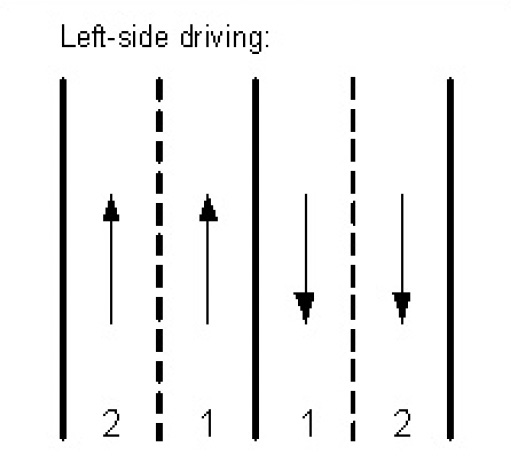 For left-side driving countries: Lane divider marker is specified for lane 1 where the divider is on the left side in the lane driving direction. For left-side driving countries: Lane divider marker is specified for lane 1 where the divider is on the left side in the lane driving direction. | 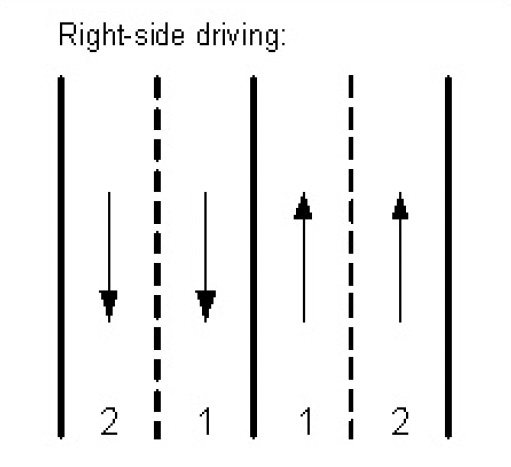 For right-side driving countries: Lane divider marker is specified for lane 1 where the divider is on the right side in the lane driving direction. For right-side driving countries: Lane divider marker is specified for lane 1 where the divider is on the right side in the lane driving direction. |
|---|
laneMarkings.centerDividerMarker describes the type of lane separator for center dividers on bidirectional roads. A bidirectional road refers to a road that allows traffic to flow in both directions, typically with lanes designated for each direction:
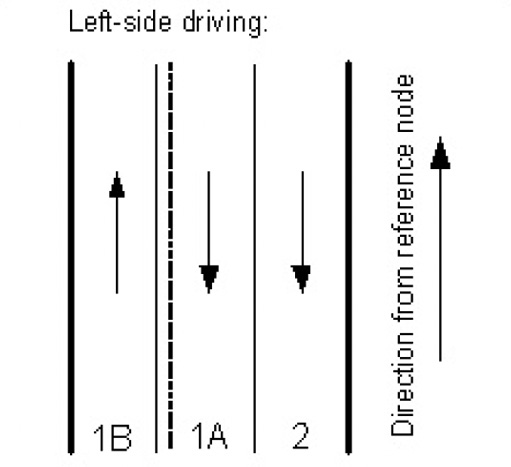 For left-side driving countries: Center divider marked (inner solid line, outer dashed line) specified for lane 1B. For left-side driving countries: Center divider marked (inner solid line, outer dashed line) specified for lane 1B. | 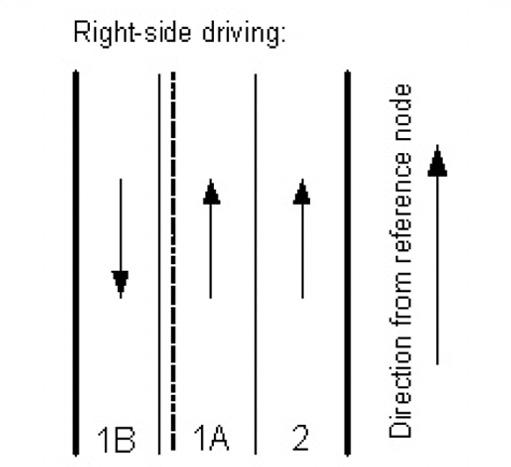 For right-side driving countries: Center divider marker (inner solid line, outer dashed line) specified for lane 1A. For right-side driving countries: Center divider marker (inner solid line, outer dashed line) specified for lane 1A. |
|---|
Updated yesterday